This page provides a general overview of VPC-native clusters in
Google Kubernetes Engine (GKE).
This page is for Cloud architects and Networking specialists who
design and architect the network for their organization. To learn more about
common roles and example tasks that we reference in Google Cloud content, see
[Common GKE user roles and tasks](https://docs.cloud.google.com/kubernetes-engine/enterprise/docs/concepts/roles-tasks).
## Overview
In GKE, clusters can be distinguished according to the way they
route traffic from one Pod to another Pod.
A cluster where Pod IP addresses are natively routable within the
VPC network without using custom static routes is called a
*VPC-native cluster* . In IPv4 and dual-stack clusters,
VPC-native networking uses [alias IP address
ranges](https://docs.cloud.google.com/vpc/docs/alias-ip). In single-stack IPv6 clusters,
VPC-native networking allocates node and Pod IP address subranges
directly from the subnetwork CIDR block without using alias IP address ranges.
In contrast, a cluster that uses [custom static routes in a VPC
network](https://docs.cloud.google.com/vpc/docs/routes) is called a *routes-based cluster*.
**Best practice** :
Plan and design your cluster configuration with your organization's Network architects, Network administrators, or any other Network engineers team responsible for defining, implementing, and maintaining your network architecture.
### Benefits of VPC-native clusters
VPC-native clusters have several benefits:
- [Pod](https://kubernetes.io/docs/concepts/workloads/pods)
IP addresses are natively routable within the cluster's VPC
network and other VPC networks connected to it by [VPC Network Peering](https://docs.cloud.google.com/vpc/docs/vpc-peering).
- Pod IP addresses are reserved in the VPC network *before* the
Pods are created in your cluster. This prevents conflict with other
resources in the VPC network and lets you better plan IP
address allocations.
- Pod IP address ranges don't depend on custom static routes. They don't
consume the [system-generated and custom static routes
quota](https://docs.cloud.google.com/vpc/docs/quota). Instead, automatically-generated [subnet
routes](https://docs.cloud.google.com/vpc/docs/routes#subnet-routes) handle routing for
VPC-native clusters.
- You can create [firewall rules](https://docs.cloud.google.com/vpc/docs/firewalls) that apply to just Pod
IP address ranges instead of any IP address on the cluster's nodes.
- Pod IP address ranges, and subnet secondary IP address ranges in general,
are accessible from on-premises networks connected with Cloud VPN
or Cloud Interconnect using
[Cloud Routers](https://docs.cloud.google.com/network-connectivity/docs/router).
- Some features, such as [network endpoint groups
(NEGs)](https://docs.cloud.google.com/load-balancing/docs/negs), only work with VPC-native
clusters.
## Default cluster network mode
VPC-native is the default network mode for all new clusters in
any available version and created through any surface, including
Google Cloud CLI, Google Cloud console, or GKE API. For more
information about available versions, see [Current versions](https://docs.cloud.google.com/kubernetes-engine/docs/release-notes#current_versions).
If you don't want to use the recommended VPC-native network mode,
see [Creating a routes-based cluster](https://docs.cloud.google.com/kubernetes-engine/docs/how-to/routes-based-cluster).
## IP address ranges for VPC-native clusters
When you create a VPC-native cluster, you specify a subnet in a
VPC network. The cluster uses the following [subnet IP address
ranges](https://docs.cloud.google.com/vpc/docs/subnets#manually_created_subnet_ip_ranges):
#### IPv4 address allocation
VPC-native clusters allocate IPv4 addresses for nodes, Pods, and
Services as follows.
- **Node IPv4 addresses**: The cluster utilizes the subnet's primary IPv4
address range to assign IP addresses to all nodes.
- **Pod IPv4 addresses** : The cluster utilizes one or more subnet secondary
IPv4 address ranges for all Pod IPv4 addresses. This page focuses on the use
of a single subnet secondary IPv4 address range. For
information about using multiple ranges, see [Adding
Pod IPv4 address ranges](https://docs.cloud.google.com/kubernetes-engine/docs/how-to/multi-pod-cidr).
- **Service IPv4 addresses**: Two options are available:
- **Service IPv4 addresses from `34.118.224.0/20`** : GKE
Autopilot clusters running version 1.27 and later
and GKE Standard clusters running version 1.29
and later use the `34.118.224.0/20` IPv4 address range for Services.
Google Cloud uses the `34.118.224.0/20` address range for private
purposes and doesn't publish any routes on the public internet for this
range. You can't use this range for external IPv4 addresses of your
resources.
- **Service IPv4 addresses from a subnet secondary IPv4 address range** :
For all Service (`ClusterIP`) addresses, the cluster utilizes a subnet
secondary IPv4 address range that is different from the range(s) used by
Pods.
#### IPv6 address allocation for dual-stack networking
- **Node and Pod IPv6 addresses** : in clusters enabled for dual-stack
networking, the node's IPv6 address and all Pod IPv6 addresses originate
from the node's designated `/96` IPv6 address range. The node IP address
itself is the first `/128` (single IPv6 address) within this range. For more
information, see [dual-stack networking](https://docs.cloud.google.com/kubernetes-engine/docs/concepts/alias-ips#dual_stack_network).
- **Service IPv6 addresses** : GKE clusters use the
`2600:2D00:0:4::0:0/64` IPv6 address range for Services. Google Cloud
uses the `2600:2D00:0:4::0:0/64` address range for private purposes and
doesn't publish any routes on the public internet for this range. You can't
use this range for external IPv6 addresses of your resources.
#### IPv6 address allocation for single-stack networking (Preview)
In single-stack IPv6 clusters, GKE doesn't use alias IP address
ranges. Instead, GKE directly allocates the addresses as follows:
- **Node and Pod IPv6 addresses** : GKE assigns each node a `/96` subrange directly from the cluster subnetwork's `/64` IPv6 CIDR block. Subsequently, GKE assigns Pods that run on a worker node IPv6 addresses from a `/112` subset of the node's `/96` subrange.
- **Service IPv6 addresses** : GKE clusters use the `2600:2D00:0:4::0:0/64` IPv6 address range for Services (`ClusterIP`). Google Cloud uses the `2600:2D00:0:4::0:0/64` address range for private purposes and doesn't publish any routes on the public internet for this range. You can't use this range for external IPv6 addresses of your resources.
For more information, see [Create and manage single-stack IPv6 clusters](https://docs.cloud.google.com/kubernetes-engine/docs/how-to/single-stack-ipv6).
The following table provides a summary of IP address ranges for nodes, Pods, and
Services:
| Range | Explanation | Example |
|---|---|---|
| Nodes | Node IP addresses are assigned from the [primary IP address range](https://docs.cloud.google.com/vpc/docs/subnets#manually_created_subnet_ip_ranges) of the subnet associated with your cluster. Both node IP addresses and the size of the subnet's secondary IP address range for Pods limit the number of nodes that a cluster can support. Refer to [node limiting ranges for more information.](https://docs.cloud.google.com/kubernetes-engine/docs/concepts/alias-ips#node_limiters) | If you plan to create a 900-node cluster, the primary IP address range of the cluster's subnet must be at least a `/22` (2^(32-22)^ = 2^10^ = 1,024 addresses). Of those 1,024 addresses, 1,020 are usable because [four IP addresses are reserved](https://docs.cloud.google.com/vpc/docs/subnets#unusable-ip-addresses-in-every-subnet) in every primary IP address range. Refer to [Subnet primary IP address range](https://docs.cloud.google.com/kubernetes-engine/docs/concepts/alias-ips#cluster_sizing_primary_range) and [Subnet secondary IP address range for Pods](https://docs.cloud.google.com/kubernetes-engine/docs/concepts/alias-ips#cluster_sizing_secondary_range_pods) for more information. |
| Pods | Pod IP addresses are taken from the cluster subnet's secondary IP address range for Pods. Unless you set a different [maximum number of Pods per node](https://docs.cloud.google.com/kubernetes-engine/docs/how-to/flexible-pod-cidr), GKE allocates a `/24` [alias IP range](https://docs.cloud.google.com/vpc/docs/alias-ip) (256 addresses) to each node for the Pods running on it. On each node, those 256 alias IP addresses are used to support up to 110 Pods. | For a 900-node cluster supporting up to 110 Pods per node, you need 900 × 256 = 230,400 IP addresses for Pods. (Each node is allocated an alias IP range whose netmask's size is /24.) This cluster requires a subnet whose secondary IP range for Pods has a subnet mask no larger than /14. This secondary IP range provides 2^(32-14)^ = 2^18^ = 262,144 IP addresses for Pods. Refer to [Subnet secondary IP address range for Pods](https://docs.cloud.google.com/kubernetes-engine/docs/concepts/alias-ips#cluster_sizing_secondary_range_pods) for more information. |
| Services | Service (cluster IP) addresses are taken from the cluster's subnet's secondary IP address range for Services. You must ensure this range is large enough to provide addresses for all the Kubernetes Services you host in your cluster. In GKE Autopilot clusters running version 1.27 and later, and GKE Standard clusters running version 1.29 and later, GKE assigns IP addresses for GKE Services from a GKE-managed range: `34.118.224.0/20` by default. This eliminates the need for you to specify your own IP address range for Services. For details, see [Subnet secondary IP address range for Services](https://docs.cloud.google.com/kubernetes-engine/docs/concepts/alias-ips#cluster_sizing_secondary_range_svcs). | For a cluster that runs up to 3000 Services, you need 3000 cluster IP addresses. You need a secondary range of size /20 or larger. A /20 range of IP addresses results in 2^(32-20)^ = 2^12^ = 4,096 IP addresses. Refer to [Subnet secondary IP address range for Services](https://docs.cloud.google.com/kubernetes-engine/docs/concepts/alias-ips#cluster_sizing_secondary_range_svcs) for more information. |
### Internal IPv4 addresses
The IPv4 addresses that you use for your VPC-native cluster's subnets
must come from a valid subnet range. The valid ranges include private IPv4
addresses, such as [RFC 1918](https://tools.ietf.org/html/rfc1918), and privately
used public IP addresses. See [Valid ranges](https://docs.cloud.google.com/vpc/docs/subnets#valid-ranges) and
[Restricted ranges](https://docs.cloud.google.com/vpc/docs/subnets#restricted-ranges) in the VPC
documentation for more information about valid subnet IPv4 ranges.
For important information about using private addresses that aren't RFC
1918 addresses, see [Using non-RFC 1918 private IPv4 address
ranges](https://docs.cloud.google.com/kubernetes-engine/docs/how-to/alias-ips#enable_reserved_ip_ranges).
For important information about using privately used public IPv4 address
ranges, see [Enable privately used public IP address
ranges](https://docs.cloud.google.com/kubernetes-engine/docs/how-to/alias-ips#enable_pupis).
### Subnet secondary IPv4 range assignment methods
You can assign Pod IP address ranges and Service (`ClusterIP`) address ranges to
a VPC-native cluster. These IP address ranges can be managed by
GKE or user-managed.
You must understand the following key terms to understand the secondary range
assignment methods.
**Assignment**: assigning IP address ranges refers to the process of allocating
a specific subnet range to a VPC-native cluster. This establishes
a pool of IP addresses that the components can use within the cluster, such as
Pods and Services.
**Management**: managing the IP address range refers to the ongoing (creation,
update, deletion, reading) CRUD operations at the cluster, node pool, or Pod
level, related to the assigned subnet ranges and resource allocation within your
VPC-native cluster.
#### GKE-managed secondary ranges (default)
For GKE Autopilot clusters running version 1.27 and
later and GKE Standard clusters running versions 1.29
and later, GKE assigns IP addresses for Services from a
GKE-managed range by default: `34.118.224.0/20`. This eliminates
the need for you to specify your own IP address range for Services. The
following considerations apply:
- You can optionally specify custom ranges for Services by using the `--services-ipv4-cidr` flag.
- If you specify only a range *size* using the `--services-ipv4-cidr` flag (for example, `/22`), GKE still uses the GKE-managed range to obtain the sub-range of addresses.
- If you specify only a size for the Pod IP address range, for example `--cluster-ipv4-cidr=/17`, GKE automatically selects an available secondary IP address range from your VPC network.
- GKE doesn't create a separate secondary IP address range for Services when the GKE-managed range is used.
#### User-managed
For full control over IP address allocation, you can manually manage your
VPC-native cluster's subnets.
You can [create the subnet's secondary IP address
ranges](https://docs.cloud.google.com/vpc/docs/create-modify-vpc-networks#edit-secondary), then create a
cluster that uses those ranges. During cluster creation, specify the subnet
range name for Pods and Services. If you manually create the secondary ranges,
you must manage them yourself.
> [!CAUTION]
> **Caution:** User-managed ranges lets you use smaller subnet secondary ranges than is possible when using ranges managed by GKE. Use caution when creating Pod address ranges smaller than a /21 as you could run out of Pod IP addresses as your cluster grows.
The smallest IP address range you can create without using [discontiguous
multi-Pod CIDR](https://docs.cloud.google.com/kubernetes-engine/docs/how-to/multi-pod-cidr) is /28, but that
range would only let you create 1 node with a maximum of 8 Pods. You should use
a range that is large enough for the maximum number of nodes that you need.
The minimum usable range also depends on the [maximum number of Pods per
Node](https://docs.cloud.google.com/kubernetes-engine/docs/how-to/flexible-pod-cidr#configuring_maximum_pods_per_node).
Refer to the table in
[Pod CIDR ranges in Standard clusters](https://docs.cloud.google.com/kubernetes-engine/docs/how-to/flexible-pod-cidr#cidr_ranges_for_clusters)
for the minimum usable CIDR range for different values of maximum Pods per node.
If you exhaust your IP address range for Pods, you must do one of the following:
- Create a new cluster with a larger Pod address range.
- Re-create your node pools after decreasing the [`--max-pods-per-node`](https://docs.cloud.google.com/kubernetes-engine/docs/how-to/flexible-pod-cidr#setting_the_maximum_number_of_pods_in_a_new_node_pool_for_an_existing_cluster) for the node pools.
- Expand the secondary Pod IP address range using [discontiguous multi-Pod
CIDR](https://docs.cloud.google.com/kubernetes-engine/docs/how-to/multi-pod-cidr).
#### Differences with routes-based clusters
The allocation scheme for Pod and Service (ClusterIP) addresses is different
than the scheme used by a routes-based cluster. Instead of specifying a single
CIDR for Pods and Services together, you must choose or create two secondary IP
address ranges in cluster's subnet: one for Pods and another for Services.
### Shared VPC considerations
When creating a VPC-native cluster in a
[Shared VPC](https://docs.cloud.google.com/vpc/docs/shared-vpc) environment, a project owner, editor,
or Identity and Access Management (IAM) principal with the Network Admin role in the
Shared VPC host project must create the cluster's subnet and secondary
IP address ranges manually. A service project administrator who creates a cluster must
at least have [subnet-level permissions](https://docs.cloud.google.com/vpc/docs/shared-vpc#svc_proj_admins)
to the subnet in the Shared VPC network's host project.
In a Shared VPC environment, secondary IP address ranges cannot be
managed by GKE. A Network Admin in the Shared VPC host
project must create the subnet and secondary IP address ranges before you can
create the cluster. For an example showing how to set up a
VPC-native cluster in a Shared VPC network, refer to
[Setting up clusters with
Shared VPC](https://docs.cloud.google.com/kubernetes-engine/docs/how-to/cluster-shared-vpc).
## IP address range planning
Use the information in the following sections to help you calculate sizes for
primary and secondary IP address ranges of the subnet used by your cluster.
### GKE IP address calculator
Use this calculator to help you plan IP address allocation for your
VPC-native Standard clusters, where each node pool has a
fixed maximum number of Pods per node. You can either input the number of nodes
and Pods to determine appropriate subnet prefix sizes, or input subnet sizes to
see the maximum nodes and Pods that are supported. This calculator allocates
sufficient IP address ranges to prevent exhaustion as your cluster scales.
### Subnet primary IPv4 address range
Consider the following when you plan the primary IPv4 address range of a
cluster's subnet:
- Every subnet must have a primary IP address range. This is the IP address range that GKE uses to allocate IP addresses for internal load balancers and nodes.
- You cannot shrink or change a subnet's primary IP address range after the subnet has been created.
- After you create a subnet, you can expand its primary IP address range, but you can't reduce it. If you expand a subnet that is used by a cluster with authorized networks, you must add the expanded IP address range to the [control plane authorized networks list](https://docs.cloud.google.com/kubernetes-engine/docs/how-to/authorized-networks#add). Before expanding a range, be sure to review the limitations and recommendations in [Expand a primary IPv4
range](https://docs.cloud.google.com/vpc/docs/create-modify-vpc-networks#expand-subnet).
- The first two and last two IP addresses of a primary IP address range are reserved by Google Cloud.
- Clusters with [Private Service Connect](https://docs.cloud.google.com/kubernetes-engine/docs/concepts/private-service-connect#clusters-private-service-connect) use the primary subnet range to provision the internal IP address assigned to the control plane endpoint. However, you can override this IP address provisioning with the [`private-endpoint-subnetwork`](https://docs.cloud.google.com/sdk/gcloud/reference/container/clusters/create#--private-endpoint-subnetwork) flag. To learn more, see [Create a cluster and select the control plane IP address range](https://docs.cloud.google.com/kubernetes-engine/docs/how-to/alias-ips#create_a_cluster_and_select_the_control_plane_ip_address_range).
The following table shows the maximum number of nodes you can create given the size
of the subnet's primary IPv4 address range and the cluster configuration:
- **Scenario 1:** maximum nodes in a cluster that uses the default subnet.
- **Scenario 2:** maximum nodes in a Private Service Connect cluster that doesn't use the `private-endpoint-subnetwork` flag.
| Subnet primary IP address range | Scenario 1 | Scenario 2 |
|---|---|---|
| /29 [Minimum size for a subnet's primary IP address range](https://docs.cloud.google.com/vpc/docs/subnets#ipv4-range-limitations) | 4 nodes | 3 nodes |
| /28 | 12 nodes | 11 nodes |
| /27 | 28 nodes | 27 nodes |
| /26 | 60 nodes | 59 nodes |
| /25 | 124 nodes | 123 nodes |
| /24 | 252 nodes | 251 nodes |
| /23 | 508 nodes | 507 nodes |
| /22 | 1,020 nodes | 1,019 nodes |
| /21 | 2,044 nodes | 2,043 nodes |
| /20 Default size of a subnet's primary IP address range in [auto mode networks](https://docs.cloud.google.com/vpc/docs/vpc#subnet-ranges) | 4,092 nodes | 4,091 nodes |
| /19 | 8,188 nodes | 8,187 nodes |
| /9 [Maximum size for a subnet's primary IP address range](https://docs.cloud.google.com/vpc/docs/create-modify-vpc-networks#subnet-rules) | 8,388,604 nodes | 8,388,603 nodes |
#### Expand the primary IP address range
If you run out of IP addresses in the primary IP address range, you can [expand
the primary IP address
range](https://docs.cloud.google.com/vpc/docs/create-modify-vpc-networks#expand-subnet) at any time, even
when Google Cloud resources, such as load balancers and network endpoint
groups, use the subnet.
Before you expand the primary IP address range, consider the following:
- There must be no overlapping IP address ranges in the subnet.
- GKE uses the primary IP address range to allocate IP addresses for internal load balancers and nodes.
- If the cluster uses [authorized
networks](https://docs.cloud.google.com/kubernetes-engine/docs/how-to/authorized-networks), you must add the expanded primary IP address range to the list of authorized networks.
#### Useful formulas
You can use the following formulas to:
- Calculate the maximum number of nodes, N, that a given netmask
can support in clusters that use the default subnet. Use S for
the size of the netmask, whose valid range is between `9` and `29`,
inclusive.
$$ N = 2\^{(32 - S)} - 4 $$
- Calculate the size of the netmask, S, required to support a
maximum of N nodes:
$$ S = 32 - \\lceil{log_2(N + 4)}\\rceil $$
\\( \\lceil{ }\\rceil \\) is the [ceiling (least integer)
function](https://en.wikipedia.org/wiki/Floor_and_ceiling_functions),
meaning round up to the next integer. The valid range for the size of the
netmask, S, is between `9` and `29`, inclusive.
In Private Service Connect clusters that don't use the
`private-endpoint-subnetwork` flag, you can use the preceding formulas, but
reduce the value of N by 1.
### Cluster sizing considerations for secondary IP address range for Pods
To calculate the maximum number of Pods that your cluster can support,
consider the size of the Pod subnet and the maximum number of Pods per node.
The maximum number of Pods depends on the subnet mask and the maximum number of
Pods per node. Additionally, remember that some IP addresses are reserved in the
primary range.
#### Key variables
- `Q`: the maximum number of Pods per node.
- `DS`: the selected CIDR block size for the Pod subnet (for example, `/17`).
- `M`: the netmask size for each node's Pod range.
- `HM`: the number of host bits for the node's Pod range netmask.
- `HD`: the number of host bits for the Pod subnet's CIDR block.
- `MN`: the maximum number of nodes that can be supported.
- `MP`: the maximum number of Pods that can be supported.
- `S`: the prefix length of the subnet's primary IP address range.
- `N`: the number of usable IP addresses in the subnet's primary IP address range.
#### Steps to calculate maximum Pods
1. **Determine the maximum Pods per node (`Q`):**
- For Autopilot clusters, the value of `Q` is fixed at 32.
- For Standard clusters, you can configure `Q`.
2. **Define the size of the CIDR block for the Pod subnet (`DS`):**
- Determine the selected CIDR block size for the Pod subnet (for example, `/17`).
3. **Calculate the netmask size (`M`):**
$$ M = 31 - \\lceil{log_2(Q)}\\rceil $$
Replace `Q` with the value of maximum
Pods per node. Use the ceiling function (\\( \\lceil \\rceil \\)) to round up to the nearest
integer.
4. **Calculate the host bits for the Pod range (`HM`):**
$$ HM = 32 - M $$
5. **Calculate the host bits for the selected CIDR block (`HD`):**
$$ HD = 32 - DS $$
6. **Calculate the maximum number of nodes (`MN`):**
$$ MN = 2\^{(HD - HM)} $$
The result of this calculation is the maximum number of
nodes that the selected Pod subnet can support.
7. **Calculate the maximum number of Pods (`MP`):**
$$ MP = MN \* Q $$
The result of this calculation is the maximum number of Pods that the
cluster can support.
8. **Calculate the number of usable IP addresses in the primary range (`N`):**
$$ N = 2\^{(32 - S)} - 4 $$
Where `S` is the prefix length of the primary CIDR range for the subnet.
> [!NOTE]
> **Note:** The first two and last two IP addresses of a primary IP address range are reserved by Google Cloud.
#### Important notes
- All IP addresses in the secondary range are usable for Pods.
- These calculations provide the *theoretical* maximums. Real-world performance can be affected by other factors.
#### Example
Suppose you are creating a GKE Autopilot cluster with the following:
- A Pod subnet CIDR block of `/17` (`DS` = 17).
- A maximum of 32 Pods per node (`Q` = 32).
Calculate the maximum number of Pods:
1. \\( M = 31 - \\lceil{log_2(32)}\\rceil = 26 \\)
2. \\( HM = 32 - 26 = 6 \\)
3. \\( HD = 32 - 17 = 15 \\)
4. \\( MN = 2\^{(15 - 6)} = 512 \\)
5. \\( MP = 512 \* 32 = 16384 \\)
This cluster can support a maximum of 512 nodes and 16,384 Pods.
You can add more IPv4 addresses for Pods by [adding Pod IPv4 address
ranges](https://docs.cloud.google.com/kubernetes-engine/docs/how-to/multi-pod-cidr) or by [adding
subnets to clusters](https://docs.cloud.google.com/kubernetes-engine/docs/how-to/multi-subnet-cluster).
### Subnet secondary IP address range for Services
Carefully plan your secondary IP address range for Services. Because this is
also a subnet secondary IP address range, this range cannot be changed once the
cluster is created.
If you use [multi-cluster
services](https://docs.cloud.google.com/kubernetes-engine/docs/concepts/multi-cluster-services), the
`ServiceImport` object uses IP addresses from the secondary IP address range for
Services.
In GKE Autopilot clusters running version 1.27 and later
and GKE Standard clusters running versions 1.29 and
later, GKE assigns IP addresses for Services from a
GKE-managed range by default: `34.118.224.0/20`. This reduces
the need for you to specify your own IP address range for Services. The
following considerations apply:
- You can optionally specify custom ranges for Services by using the `--services-ipv4-cidr` flag or the `--services-secondary-range-name` flag.
- If you specify only a range *size* using the `--services-ipv4-cidr` flag (for example, `/22`), GKE still uses the GKE-managed range to obtain the sub-range of addresses.
- GKE doesn't create a separate secondary IP address range for Services when the Google-managed range is used. The GKE-managed range doesn't use the secondary IP address range quota for your subnet.
The following table shows the maximum number of Services you can create in a
single cluster using the subnet, given the size of the subnet's secondary IP
address range for Services.
| Secondary IP range for Services | Maximum number of Services |
|---|---|
| /28 Smallest possible Service address range [when the secondary range assignment method is user-managed](https://docs.cloud.google.com/kubernetes-engine/docs/concepts/alias-ips#user-managed) | 16 Services |
| /27 Smallest possible Service address range [when the secondary range assignment method is managed by GKE](https://docs.cloud.google.com/kubernetes-engine/docs/concepts/alias-ips#managed_by_default) | 32 Services |
| /26 | 64 Services |
| /25 | 128 Services |
| /24 | 256 Services |
| /23 | 512 Services |
| /22 | 1,024 Services |
| /21 | 2,048 Services |
| /20 Default size for the subnet's secondary IP range for Services [when the secondary range assignment method is managed by GKE](https://docs.cloud.google.com/kubernetes-engine/docs/concepts/alias-ips#managed_by_default) | 4,096 Services |
| /19 | 8,192 Services |
| /18 | 16,384 Services |
| /17 | 32,768 Services |
| /16 Largest possible Service address range | 65,536 Services |
## Sharing IP address ranges across GKE clusters
You can share the primary range, secondary IP address range for Pods, and
secondary IP address range for Services between clusters in the same subnetwork.
This behavior is available for both Standard and Autopilot
clusters.
You might want to share IP address ranges if you have a centralized team that is
managing the infrastructure for clusters. You can reduce overhead by creating
three ranges, for Pods, Services and nodes, and reusing or sharing them,
especially in a Shared VPC model. It can also make it easier for network
administrators to manage IP addresses by not requiring them to create specific
subnets for each cluster.
### Sharing the customized subnet range for the control plane
By default, GKE uses the primary subnet range to provision the
internal endpoint of the control plane. However, in clusters with [Private Service Connect](https://docs.cloud.google.com/kubernetes-engine/docs/concepts/private-service-connect#clusters-private-service-connect),
you can configure GKE to provision the internal endpoint from a
different subnet that you created. You can share this subnet among other
clusters, or across projects if you are using Shared VPC.
### Sharing the primary IP address range for nodes
If you create more than one cluster in the subnet, the primary IP address range
for nodes is shared by default.
Sharing the primary IP address for nodes has the following limitations:
- If you share the primary IP address range for nodes with two or more VPC-native clusters, one cluster can use a large portion of the shared IP address range, leaving the other clusters without enough IP addresses to expand.
### Sharing the secondary IP address range for Pods
When you share the secondary range for Pods, each Pod still gets a unique IP
address.
Sharing the secondary IP address range for Pods has the following limitations:
- If you share the secondary IP address range for Pods with two or more
VPC-native clusters, one cluster can use a large portion of
the shared IP address range, leaving the other clusters without enough IP
addresses to expand.
- Among the different types of secondary ranges, both the
[GKE-managed](https://docs.cloud.google.com/kubernetes-engine/docs/concepts/alias-ips#managed_by_default)
and [additional Pod ranges](https://docs.cloud.google.com/kubernetes-engine/docs/how-to/multi-pod-cidr#add_more_pod_ipv4_ranges_for_specific_use_cases)
are not shareable across clusters.
- To share a secondary IP address range, pass it on the command line with
`--cluster-secondary-range`. You cannot use a shared secondary range when
creating clusters in the UI.
### Sharing the secondary IP address range for Services
Two or more clusters can simultaneously use the same subnet secondary IPv4
address range for Services when you use [user-managed](https://docs.cloud.google.com/kubernetes-engine/docs/concepts/alias-ips#user-managed) secondary
ranges.
To configure two or more clusters to share a common subnet secondary IPv4
address range for Services, use the same subnet secondary IPv4 address range
when you create each cluster. There is no separate configuration flag required
to share a common IPv4 address range for Services.
When sharing a common IPv4 address range for Services, each cluster uses the
entire subnet secondary IPv4 address range for Services internally. The IP
addresses for Services are programmed within each cluster's node, but they are
not assigned to the network interface of any node. Service IP addresses are not
routable within the cluster's VPC network. Service IP addresses
are only usable by client Pods within the same cluster as the Service.
When a Pod sends a packet to a Service IP address, the iptables or eBPF
configuration on the node performs destination Network Address Translation
(NAT), changing the destination IP address of the packet from the Service IP
address to a serving Pod IP address. The packet is routed based on the
destination Pod IP address.
Sharing the secondary IP address range for Services provides the following
benefits:
- Reduce the number of unique secondary IP address ranges for Services created on a subnet
- Use fewer IP addresses
Sharing the secondary IP address range for Services has the following
limitations:
- Sharing the secondary IP address range for Services is not supported with [VPC scope Cloud DNS for
GKE](https://docs.cloud.google.com/kubernetes-engine/docs/how-to/cloud-dns#vpc_scope_dns).
- You can't share ranges that match the following regular expression:
^gke-.*-services-[abcdef0-9]{8}
- To share a secondary IP address range for services, pass it on the command
line with `--cluster-secondary-range`. You cannot use a shared secondary
range for services when creating clusters in the UI.
### Node limiting ranges
The maximum number of Pods and Services for a given GKE
cluster is limited by the size of the cluster's secondary ranges. The maximum
number of nodes in the cluster is limited by the size of the cluster's subnet's
primary IP address range *and* the cluster's Pod address range.
The following error message indicates that either the subnet's primary IP
address range or the cluster's Pod IP address range (the subnet's secondary IP
address range for Pods) has been exhausted:
Instance [node name] creation failed: IP space of [cluster subnet] is
exhausted
You can add more IP addresses for nodes by [expanding the primary
subnet](https://docs.cloud.google.com/vpc/docs/create-modify-vpc-networks#expand-subnet), or add new IP
addresses for Pods using [discontiguous multi-Pod
CIDR](https://docs.cloud.google.com/kubernetes-engine/docs/how-to/multi-pod-cidr). For more information, see
[Not enough free IP address space for
Pods](https://docs.cloud.google.com/kubernetes-engine/docs/troubleshooting/vpc-clusters#not_enough_space).
## IPv4/IPv6 dual-stack networking
With IPv4/IPv6 dual-stack networking, you can define how GKE
allocates IP addresses (`ipFamilies`) to the following objects:
- For Pods and nodes, GKE allocates both IPv4 and IPv6 addresses.
- For Services, GKE allocates either single-stack (IPv4 only or IPv6 only), or dual-stack addresses.
In GKE version 1.24 or later, you can enable dual-stack
networking for new GKE clusters on standalone and
Shared VPC networks. You can also apply network policies with dual-stack
networking enabled. If you see validation errors when enabling dual-stack networking on
GKE clusters that have been upgraded from versions 1.24 to
versions 1.25 or 1.26, contact the Google Cloud [support team](https://cloud.google.com/support-hub/).
> [!NOTE]
> **Note:** You can [configure your
> cluster](https://docs.cloud.google.com/kubernetes-engine/docs/how-to/latest/network-isolation#enable-private-nodes-cluster) to have nodes with internal (private) or external (public) access by using the `enable-private-nodes` flag. The `enable-private-nodes` flag only affects the IPv4 address of the nodes in your cluster. Therefore, this flag *doesn't* affect the configuration of the IPv4/IPv6 dual-stack networking that you define in this section.
### Benefits
Dual-stack networking provides the following benefits:
- Enables end-to-end IPv6 communication.
- Enables better performance compared to network address translation (NAT) or IP tunneling. This is achieved because there is no IPv6 to IPv4 translation.
### Availability
Dual-stack networking with GKE has the following restrictions:
- Dual-stack networking is only available for [VPC-native
clusters](https://docs.cloud.google.com/kubernetes-engine/docs/how-to/alias-ips) clusters with [GKE Dataplane V2](https://docs.cloud.google.com/kubernetes-engine/docs/how-to/dataplane-v2) enabled.
- Dual-stack networking is only supported on subnets in custom mode VPCs. For more information, see [Google Cloud types of
VPC networks](https://docs.cloud.google.com/vpc/docs/vpc#subnet-ranges).
- Dual-stack clusters don't support single-stack IPv6 addresses for Pods or nodes; GKE assigns both IPv4 and IPv6 addresses to Pods and nodes. To deploy workloads in an IPv6-only networking environment, see [Create and manage single-stack IPv6
clusters](https://docs.cloud.google.com/kubernetes-engine/docs/how-to/single-stack-ipv6).
- Dual-stack clusters consume additional memory per node to support both IPv4 and IPv6 networking compared to IPv4-only clusters. Consider this characteristic when setting up large-scale clusters.
- Dual-stack clusters don't support Private Google Access over IPv6 addresses.
- GKE versions 1.26.0-gke.2200 and later supports IPv6 (AAAA records) with Cloud DNS for cluster-internal operations and external DNS queries.
- Dual-stack Services are supported for `ClusterIP`, `NodePort`, and `LoadBalancer` Services.
- Windows nodes don't support IPv6 networking.
Consider the preceding restrictions before creating a cluster with dual-stack
networking. For more information, learn [how to create a
VPC-native cluster with dual-stack
networking](https://docs.cloud.google.com/kubernetes-engine/docs/how-to/alias-ips#dual-stack).
### Public and Private IPv6 address assignment
The following table provides a summary of public and private IPv6 addresses with
dual-stack networking behavior and configurations:
| `ipv6-access-type` flag | IP address assignment | Subnet range |
|---|---|---|
| `EXTERNAL` | GKE assigns external IPv6 addresses that are routable to the internet. | From `2600:1900/28` |
| `INTERNAL` | GKE assigns internal IPv6 addresses that are not routable to the internet. Clusters with `INTERNAL` IPv6 access type cannot access the internet over IPv6 addresses. [Cloud NAT](https://docs.cloud.google.com/nat/docs/nat-product-interactions#NATwithGKE) does not support IPv6 addresses. | From `fd20::/20` (which is a subset of the overall ULA range: `fc00::/7`). |
To learn more, see [how to use a dual-stack network for a
VPC-native
cluster](https://docs.cloud.google.com/kubernetes-engine/docs/how-to/alias-ips#dual-stack).
### Architecture
A cluster with IPv4/IPv6 dual-stack networking has the following ranges
allocated:
- A /64 range to each subnet as a primary range.
- A /96 per-node range from the primary range to use as a primary node IP address range.
- A /112 per-node range from the primary node IP address range to use as a Pod
IP address range for that node. With dual-stack networking, Pods get their
IPv6 addresses from the *overall Pod IP address range* (similar to nodes),
and not from a secondary range for Pods reserved to IPv4 addresses.
The overall Pod IP address range comprises non-overlapping ranges
from the primary node IP range. Therefore, this Pod IP range is
discontiguous.
- A /112 range to use for Services. This range comes from a /64 range from the
Google private address range which has been reserved for
GKE's secondary Services IP address range.
The following diagram shows how Google Cloud and GKE
allocate IPv6 addresses:
IPv6 address allocation in GKE. [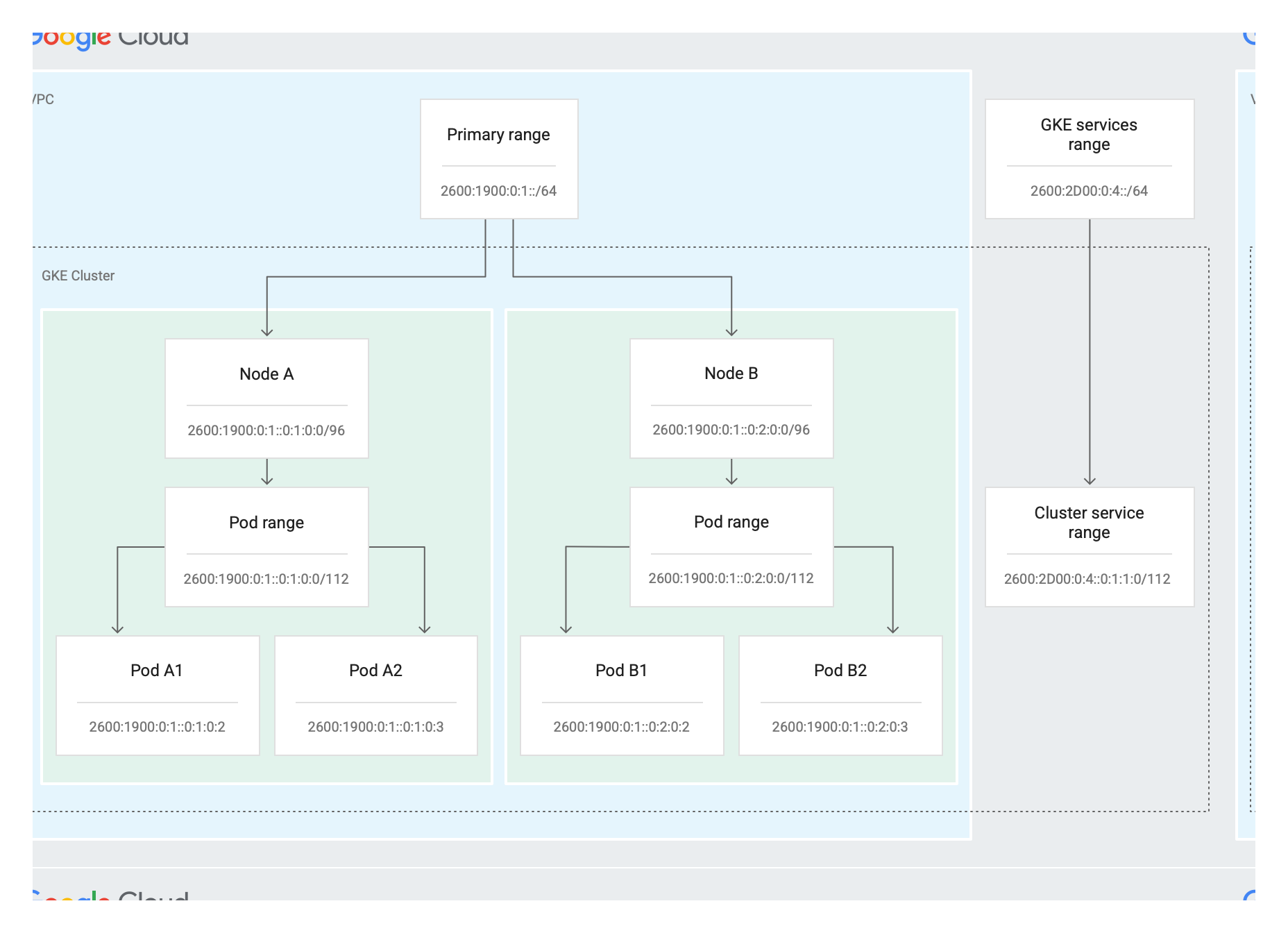](https://docs.cloud.google.com/static/kubernetes-engine/images/ipv6-addresses-allocation.svg)
In the diagram, the primary range of the VPC subnet is
`2600:1900:0:1::/64` and the reserved range for GKE Services is
`2600:2D00:0:4::0:0/64`. Each node in the cluster has a /96 range for the
primary node IP address range and a /112 range for the Pod IP address range. The
cluster also has a /112 secondary Services IP address range.
> [!NOTE]
> **Note:** GKE automatically selects the IPv6 IP address range for the Pod IP address range and the secondary Services IP address range.
### Services
You can create an IPv4/IPv6 dual-stack Service of type
[`ClusterIP`](https://docs.cloud.google.com/kubernetes-engine/docs/concepts/service#services_of_type_clusterip)
or
[`NodePort`](https://docs.cloud.google.com/kubernetes-engine/docs/concepts/service#service_of_type_nodeport).
New GKE clusters running version 1.29 or later support dual-stack
Services of type
[`LoadBalancer`](https://docs.cloud.google.com/kubernetes-engine/docs/concepts/service-load-balancer).
You can expose a Deployment with a Service of type `ClusterIP`, `NodePort`, or
`LoadBalancer`. For each of these Service types, you can define `ipFamilies` and
`ipFamilyPolicy` fields as either IPv4, IPv6, or a
[dual-stack](https://kubernetes.io/docs/concepts/services-networking/dual-stack/#services)
Service. For more information, see an
[example of how to set up a
Deployment](https://docs.cloud.google.com/kubernetes-engine/docs/deploy-app-cluster).
## What's next
- [Learn more about VPC Network Peering](https://docs.cloud.google.com/vpc/docs/vpc-peering).
- [Learn how to create a VPC-native
cluster](https://docs.cloud.google.com/kubernetes-engine/docs/how-to/alias-ips).
- [Learn how to create and manage single-stack IPv6
clusters](https://docs.cloud.google.com/kubernetes-engine/docs/how-to/single-stack-ipv6).
- [Learn about GKE IP address utilization
insights](https://docs.cloud.google.com/network-intelligence-center/docs/network-analyzer/insights/kubernetes-engine/gke-ip-utilization).