To install and operate Google Distributed Cloud software only for bare metal, your network must meet the requirements
in this document. These requirements cover external connectivity to Google,
Layer 2 and Layer 3 connectivity between cluster nodes and load balancers, IP
address ranges for Pods and Services, and the ports that cluster components
use. If your nodes run Red Hat Enterprise Linux (RHEL) with firewalld, this
document also shows how to open the required ports.
## External network requirements
Google Distributed Cloud requires an internet connection for operational purposes.
Google Distributed Cloud retrieves cluster components from
[Artifact Registry](https://docs.cloud.google.com/artifact-registry/docs.md.txt), and the cluster is registered
with [Connect Agent](https://docs.cloud.google.com/kubernetes-engine/fleet-management/docs/connect-agent.md.txt).
> [!NOTE]
> **Note:** Although Container Registry is shut down, Artifact Registry still uses the same `gcr.io` URLs that were used by Container Registry. For more information, see [`gcr.io` repositories](https://docs.cloud.google.com/artifact-registry/docs/transition/gcr-repositories.md.txt).
You can connect to Google by using the public internet through HTTPS, a virtual
private network (VPN), or a
[Dedicated Interconnect](https://docs.cloud.google.com/network-connectivity/docs/interconnect/concepts/dedicated-overview.md.txt) connection.
If the machines you are using for your admin workstation and cluster nodes use
a proxy server to access the internet, your proxy server must allow some
specific connections. For details, see the prerequisites section of
[Install behind a proxy](https://docs.cloud.google.com/kubernetes-engine/distributed-cloud/bare-metal/docs/installing/proxy.md.txt#prerequisites).
## Internal network requirements
Google Distributed Cloud can work with [Layer 2](https://wikipedia.org/wiki/OSI_model#Layer_2:_Data_Link_Layer)
or [Layer 3](https://wikipedia.org/wiki/OSI_model#Layer_3:_Network_Layer)
connectivity between cluster nodes. The load balancer nodes can be the control
plane nodes or a dedicated set of nodes. For more information, see
[Choosing and configuring load balancers](https://docs.cloud.google.com/kubernetes-engine/distributed-cloud/bare-metal/docs/installing/load-balance.md.txt).
When you use [Bundled Layer 2 load balancing with
MetalLB](https://docs.cloud.google.com/kubernetes-engine/distributed-cloud/bare-metal/docs/installing/bundled-lb) (`spec.loadBalancer.mode: bundled`
and `spec.loadBalancer.type: layer2`), load balancer nodes require Layer 2
adjacency. The Layer 2 adjacency requirement applies whether you run the load
balancer on control plane nodes or in a dedicated set of load balancing nodes.
[Bundled load balancing with BGP](https://docs.cloud.google.com/kubernetes-engine/distributed-cloud/bare-metal/docs/how-to/lb-bundled-bgp.md.txt) supports
Layer 3 protocol, so strict Layer 2 adjacency isn't required.
The requirements for load balancer machines are as follows:
- For Bundled Layer 2 load balancing, all load balancers for a given cluster are in the same Layer 2 domain. Control plane nodes must also be in the same Layer 2 domain.
- For Bundled Layer 2 load balancing, all virtual IP addresses (VIPs) must be in the load balancer machine subnet and routable to the gateway of the subnet.
- Users are responsible for allowing ingress load balancer traffic.
## Pods and Services networking
The ranges of IP addresses available for Services and Pods are specified in the
cluster configuration file. The following sections discuss the minimum and
maximum constraints for the address ranges and some of the related factors that
you need to consider when planning your cluster installation.
The number of Pods and Services you can have in your clusters is controlled by
the following settings:
- [`clusterNetwork.pods.cidrBlocks`](https://docs.cloud.google.com/kubernetes-engine/distributed-cloud/bare-metal/docs/reference/cluster-config-ref.md.txt#clusternetwork-pods-cidrblocks)
specifies the number of Pods allowed in your cluster.
- [`clusterNetwork.services.cidrBlocks`](https://docs.cloud.google.com/kubernetes-engine/distributed-cloud/bare-metal/docs/reference/cluster-config-ref.md.txt#clusternetwork-services-cidrblocks)
specifies the number of Services allowed in your cluster.
- [`nodeConfig.podDensity.maxPodsPerNode`](https://docs.cloud.google.com/kubernetes-engine/distributed-cloud/bare-metal/docs/reference/cluster-config-ref.md.txt#nodeconfig-poddensity-maxpodspernode)
specifies the maximum number of Pods that can run on a single node.
```yaml
apiVersion: baremetal.cluster.gke.io/v1
kind: Cluster
metadata:
name: admin-basic
namespace: cluster-admin-basic
spec:
type: admin
profile: default
...
clusterNetwork:
pods:
cidrBlocks:
- 192.168.0.0/16
services:
cidrBlocks:
- 10.96.0.0/20
...
nodeConfig:
podDensity:
maxPodsPerNode: 250
```
### IP address ranges for Pods and Services
You specify a range of IP addresses as a [Classless Inter-Domain Routing (CIDR)
block](https://tools.ietf.org/html/rfc1918) to be used for Pods and another CIDR
block to be used for the `ClusterIP` addresses of Kubernetes
Services. Use IP addresses in the private address space, as described in [RFC
1918](https://datatracker.ietf.org/doc/html/rfc1918#section-3). The cluster
configuration file is prefilled with values that fall within the limits
described in the following table:
| Limit | Pods | Services |
|---|---|---|
| Minimum range | Mask value of `/18` (16,384 addresses) | Mask value of `/24` (256 addresses) |
| Prefilled range | Mask value of `/16` (65,536 addresses) | Mask value of `/20` (4,096 addresses) |
| Maximum range | Mask value of `/8` (16,777,216 addresses) | Mask value of `/12` (1,048,576 addresses) |
To avoid overlapping with IP addresses that are reachable on your network, you
might need to use CIDR ranges that are different from the prefilled values. In
particular, the Service and Pod ranges must not overlap with the following:
- IP addresses of nodes in any cluster
- VIPs used by control-plane nodes and load balancers
- IP addresses of DNS servers or NTP servers
Preflight checks block cluster creation and upgrades if overlapping IP addresses
are identified.
> [!NOTE]
> **Note:** The Pod and Service CIDR blocks for the cluster are split into smaller IP address ranges for each cluster node. Google Distributed Cloud uses network address translation (NAT) to map these Pod IP address ranges to the Node IP address. If any of these Pod IP addresses corresponds to an external IP address, that external address is considered unreachable from within the cluster.
You can [increase the Service network
range](https://docs.cloud.google.com/kubernetes-engine/distributed-cloud/bare-metal/docs/how-to/update-clusters#increase_service_network_range)
([`clusterNetwork.services.cidrBlocks`](https://docs.cloud.google.com/kubernetes-engine/distributed-cloud/bare-metal/docs/reference/cluster-config-ref.md.txt#clusternetwork-services-cidrblocks))
after you create a cluster, but you can't reduce the number of allotted IP
addresses or change. You can only change the CIDR block suffix, reducing the
mask value to increase the number of IP addresses.
Both `clusterNetwork.pods.cidrBlocks` and `nodeConfig.podDensity.maxPodsPerNode`
(described in the following section) are immutable so **plan carefully for the
future growth of your cluster** to avoid running out of node capacity. For the
recommended maximums for Pods per cluster, Pods per node, and nodes per cluster
based on testing, see [Limits](https://docs.cloud.google.com/kubernetes-engine/distributed-cloud/bare-metal/docs/limits.md.txt#limits).
### Maximum pods per node
On bare metal, Google Distributed Cloud lets you configure a maximum of up to 250
pods per node. Kubernetes assigns a CIDR block to each node so that each pod can
have a unique IP address. The size of the pod CIDR block corresponds to the
maximum number of pods per node.
> [!NOTE]
> **Note:** The `maxPodsPerNode` setting only accounts for running pods, pods that use resources. For example, a Kubernetes [Job](https://kubernetes.io/docs/concepts/workloads/controllers/job/) creates one or more pods to accomplish a specific task. The pods typically run until they complete the task (or fail) and stop. These stopped pods aren't usually cleaned up automatically, so they show up on the node when you run `kubectl get
> pods`. However, because the stopped pods don't consume any resources, including IP addresses, they don't contribute to the maximum pods per node total.
The following table lists the size of the CIDR block that Kubernetes assigns to
each node based on the configured maximum pods per node:
| Maximum pods per node | CIDR block per node | Number of IP addresses |
|---|---|---|
| 32 | `/26` | 64 |
| 33-64 | `/25` | 128 |
| 65-128 | `/24` | 256 |
| 129-250 | `/23` | 512 |
Running 250 pods per node requires Kubernetes to reserve a `/23` CIDR block for
each node. Assuming that your cluster uses the default value of `/16` for the
`clusterNetwork.pods.cidrBlocks` field, your cluster has a limit of
(2^(23-16)^)=128 nodes.
If you intend to grow the cluster beyond this limit, we highly recommend that
you set `clusterNetwork.pods.cidrBlocks` to a significantly larger pod CIDR
block than the prefilled value.
For more information about how the number of Pods and Services and other factors
affect cluster scalability, see
[Scale up Google Distributed Cloud clusters](https://docs.cloud.google.com/kubernetes-engine/distributed-cloud/bare-metal/docs/how-to/scale.md.txt).
## Single user cluster deployment with high availability
The following diagram illustrates a number of key networking concepts for
Google Distributed Cloud in one possible network configuration.
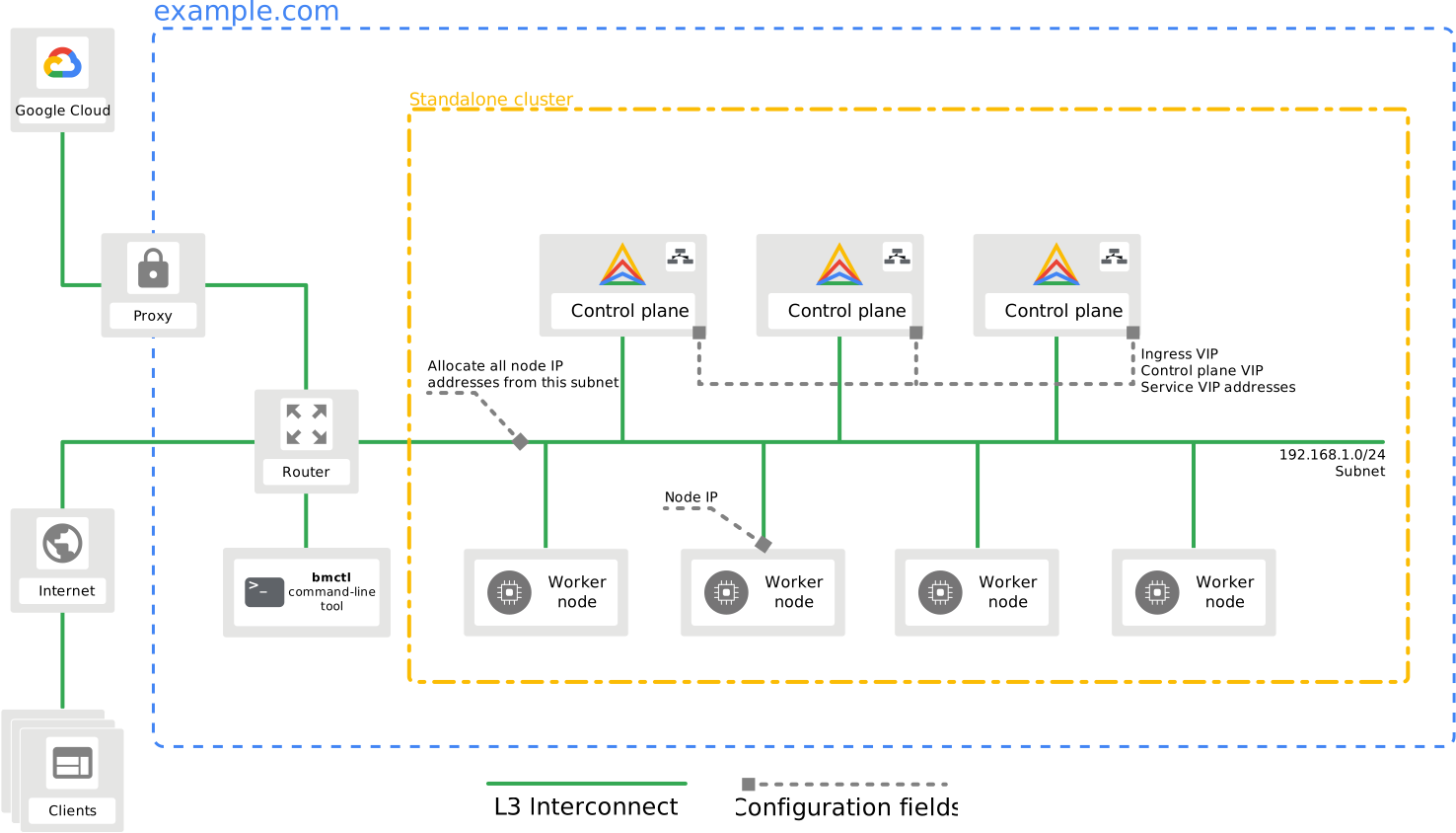
Consider the following information to meet the network requirements:
- The control plane nodes run the load balancers, and they all have Layer 2 connectivity, while other connections, including worker nodes, only require Layer 3 connectivity.
- Configuration files define IP addresses for worker node pools. Configuration files also define VIPs for the following purposes:
- Services
- Ingress
- Control plane access through the Kubernetes API
- You require a connection to Google Cloud.
## Port usage
This section identifies the port requirements for Google Distributed Cloud clusters.
The following tables show how UDP and TCP ports are used by Kubernetes
components on cluster and load balancer nodes.
### Control plane nodes
### Version 1.33 and later
| Protocol | Direction | Port range | Purpose | Used by |
|---|---|---|---|---|
| TCP | Inbound | 22 | Provisioning and updating of admin cluster nodes | Admin workstation |
| TCP | Inbound | 2379 - 2381 | etcd server client API, metrics and health | `kube-apiserver` and `etcd` |
| TCP | Inbound | 2382 - 2384 | etcd-events server client API, metrics and health | `kube-apiserver` and `etcd-events` |
| TCP | Both | 4240 | CNI health check | All |
| UDP | Inbound | 6081 | GENEVE Encapsulation | Self |
| TCP | Inbound | 6444 | Kubernetes API server | All |
| TCP | Inbound | 9100 | auth-proxy | `node-exporter` |
| TCP | Inbound | 9101 | Serve node metrics on localhost only (applies to version 1.28 and higher) | `node-exporter` |
| TCP | Inbound | 9192 (default, but can be [configured](https://docs.cloud.google.com/kubernetes-engine/distributed-cloud/bare-metal/docs/how-to/node-agent.md.txt#port-config)) | Node Agent port (applies only for clusters using Node Agent) (applies to version 1.33 and higher) | `node-agent-port` |
| TCP | Inbound | 9977 | Receive audit event from API server | `audit-proxy` |
| TCP | Inbound | 10250 | `kubelet` API | Self and control plane |
| TCP | Inbound | 10256 | Node health check | All |
| TCP | Inbound | 10257 | `kube-controller-manager` (port number change for version 1.28 and higher) | Self |
| TCP | Inbound | 10259 | `kube-scheduler` (port number change for version 1.28 and higher) | Self |
| TCP | Inbound | 11002 | GKE Identity Service core container binds to port through `hostPort` (applies to version 1.29 and higher) | Self |
| TCP | Inbound | 14443 | ANG Webhook Service | `kube-apiserver` and `ang-controller-manager` |
### Version 1.29-1.32
| Protocol | Direction | Port range | Purpose | Used by |
|---|---|---|---|---|
| TCP | Inbound | 22 | Provisioning and updating of admin cluster nodes | Admin workstation |
| TCP | Inbound | 2379 - 2381 | etcd server client API, metrics and health | `kube-apiserver` and `etcd` |
| TCP | Inbound | 2382 - 2384 | etcd-events server client API, metrics and health | `kube-apiserver` and `etcd-events` |
| TCP | Both | 4240 | CNI health check | All |
| UDP | Inbound | 6081 | GENEVE Encapsulation | Self |
| TCP | Inbound | 6444 | Kubernetes API server | All |
| TCP | Inbound | 9100 | auth-proxy | `node-exporter` |
| TCP | Inbound | 9101 | Serve node metrics on localhost only (applies to version 1.28 and higher) | `node-exporter` |
| TCP | Inbound | 9977 | Receive audit event from API server | `audit-proxy` |
| TCP | Inbound | 10250 | `kubelet` API | Self and control plane |
| TCP | Inbound | 10256 | Node health check | All |
| TCP | Inbound | 10257 | `kube-controller-manager` (port number change for version 1.28 and higher) | Self |
| TCP | Inbound | 10259 | `kube-scheduler` (port number change for version 1.28 and higher) | Self |
| TCP | Inbound | 11002 | GKE Identity Service core container binds to port through `hostPort` (applies to version 1.29 and higher) | Self |
| TCP | Inbound | 14443 | ANG Webhook Service | `kube-apiserver` and `ang-controller-manager` |
### Version 1.28
| Protocol | Direction | Port range | Purpose | Used by |
|---|---|---|---|---|
| TCP | Inbound | 22 | Provisioning and updating of admin cluster nodes | Admin workstation |
| TCP | Inbound | 2379 - 2381 | etcd server client API, metrics and health | `kube-apiserver` and `etcd` |
| TCP | Inbound | 2382 - 2384 | etcd-events server client API, metrics and health | `kube-apiserver` and `etcd-events` |
| TCP | Both | 4240 | CNI health check | All |
| UDP | Inbound | 6081 | GENEVE Encapsulation | Self |
| TCP | Inbound | 6444 | Kubernetes API server | All |
| TCP | Inbound | 8444 | GKE Identity Service core container binds to port through `hostPort` (applies to version 1.28 only) | All |
| TCP | Inbound | 9100 | auth-proxy | `node-exporter` |
| TCP | Inbound | 9101 | Serve node metrics on localhost only (applies to version 1.28 and higher) | `node-exporter` |
| TCP | Inbound | 9977 | Receive audit event from API server | `audit-proxy` |
| TCP | Inbound | 10250 | `kubelet` API | Self and control plane |
| TCP | Inbound | 10256 | Node health check | All |
| TCP | Inbound | 10257 | `kube-controller-manager` (port number change for version 1.28 and higher) | Self |
| TCP | Inbound | 10259 | `kube-scheduler` (port number change for version 1.28 and higher) | Self |
| TCP | Inbound | 14443 | ANG Webhook Service | `kube-apiserver` and `ang-controller-manager` |
### Version 1.16
| Protocol | Direction | Port range | Purpose | Used by |
|---|---|---|---|---|
| TCP | Inbound | 22 | Provisioning and updating of admin cluster nodes | Admin workstation |
| TCP | Inbound | 2379 - 2381 | etcd server client API, metrics and health | `kube-apiserver` and `etcd` |
| TCP | Inbound | 2382 - 2384 | etcd-events server client API, metrics and health (applies to version 1.16 and higher) | `kube-apiserver` and `etcd-events` |
| TCP | Both | 4240 | CNI health check | All |
| UDP | Inbound | 6081 | GENEVE Encapsulation | Self |
| TCP | Inbound | 6444 | Kubernetes API server | All |
| TCP | Inbound | 9100 | Serve metrics | `node-exporter` |
| TCP | Inbound | 9443 | Serve/proxy metrics for control plane components (This port requirement is for cluster version 1.16 and lower.) | `kube-control-plane-metrics-proxy` |
| TCP | Inbound | 9977 | Receive audit event from API server | `audit-proxy` |
| TCP | Inbound | 10250 | `kubelet` API | Self and control plane |
| TCP | Inbound | 10251 | `kube-scheduler` | Self |
| TCP | Inbound | 10252 | `kube-controller-manager` | Self |
| TCP | Inbound | 10256 | Node health check | All |
| TCP | Inbound | 14443 | ANG Webhook Service | `kube-apiserver` and `ang-controller-manager` |
### Version 1.15 and lower
| Protocol | Direction | Port range | Purpose | Used by |
|---|---|---|---|---|
| TCP | Inbound | 22 | Provisioning and updating of admin cluster nodes | Admin workstation |
| TCP | Inbound | 2379 - 2381 | etcd server client API, metrics and health | `kube-apiserver` and `etcd` |
| TCP | Both | 4240 | CNI health check | All |
| UDP | Inbound | 6081 | GENEVE Encapsulation | Self |
| TCP | Inbound | 6444 | Kubernetes API server | All |
| TCP | Inbound | 9100 | Serve metrics | `node-exporter` |
| TCP | Inbound | 9443 | Serve/proxy metrics for control plane components (This port requirement is for cluster version 1.16 and lower.) | `kube-control-plane-metrics-proxy` |
| TCP | Inbound | 9977 | Receive audit event from API server | `audit-proxy` |
| TCP | Inbound | 10250 | `kubelet` API | Self and control plane |
| TCP | Inbound | 10251 | `kube-scheduler` | Self |
| TCP | Inbound | 10252 | `kube-controller-manager` | Self |
| TCP | Inbound | 10256 | Node health check | All |
| TCP | Inbound | 14443 | ANG Webhook Service | `kube-apiserver` and `ang-controller-manager` |
### Worker nodes
### Version 1.33 and later
| Protocol | Direction | Port range | Purpose | Used by |
|---|---|---|---|---|
| TCP | Inbound | 22 | Provisioning and updating of user cluster nodes | Admin cluster nodes |
| TCP | Both | 4240 | CNI health check | All |
| UDP | Inbound | 6081 | GENEVE Encapsulation | Self |
| TCP | Inbound | 9100 | auth-proxy | `node-exporter` |
| TCP | Inbound | 9101 | Serve node metrics on localhost only (applies to version 1.28 and higher) | `node-exporter` |
| TCP | Inbound | 9192 (default, but can be [configured](https://docs.cloud.google.com/kubernetes-engine/distributed-cloud/bare-metal/docs/how-to/node-agent.md.txt#port-config)) | Node Agent port (applies only for clusters using Node Agent) (applies to version 1.33 and higher) | `node-agent-port` |
| TCP | Inbound | 10250 | `kubelet` API | Self and control plane |
| TCP | Inbound | 10256 | Node health check | All |
| TCP | Inbound | 30000 - 32767 | `NodePort` services | Self |
### Version 1.29-1.32
| Protocol | Direction | Port range | Purpose | Used by |
|---|---|---|---|---|
| TCP | Inbound | 22 | Provisioning and updating of user cluster nodes | Admin cluster nodes |
| TCP | Both | 4240 | CNI health check | All |
| UDP | Inbound | 6081 | GENEVE Encapsulation | Self |
| TCP | Inbound | 9100 | auth-proxy | `node-exporter` |
| TCP | Inbound | 9101 | Serve node metrics on localhost only (applies to version 1.28 and higher) | `node-exporter` |
| TCP | Inbound | 10250 | `kubelet` API | Self and control plane |
| TCP | Inbound | 10256 | Node health check | All |
| TCP | Inbound | 30000 - 32767 | `NodePort` services | Self |
### Version 1.28
| Protocol | Direction | Port range | Purpose | Used by |
|---|---|---|---|---|
| TCP | Inbound | 22 | Provisioning and updating of user cluster nodes | Admin cluster nodes |
| TCP | Both | 4240 | CNI health check | All |
| UDP | Inbound | 6081 | GENEVE Encapsulation | Self |
| TCP | Inbound | 9100 | auth-proxy | `node-exporter` |
| TCP | Inbound | 9101 | Serve node metrics on localhost only (applies to version 1.28 and higher) | `node-exporter` |
| TCP | Inbound | 10250 | `kubelet` API | Self and control plane |
| TCP | Inbound | 10256 | Node health check | All |
| TCP | Inbound | 30000 - 32767 | `NodePort` services | Self |
### Version 1.16
| Protocol | Direction | Port range | Purpose | Used by |
|---|---|---|---|---|
| TCP | Inbound | 22 | Provisioning and updating of user cluster nodes | Admin cluster nodes |
| TCP | Both | 4240 | CNI health check | All |
| UDP | Inbound | 6081 | GENEVE Encapsulation | Self |
| TCP | Inbound | 9100 | Serve metrics | `node-exporter` |
| TCP | Inbound | 10250 | `kubelet` API | Self and control plane |
| TCP | Inbound | 10256 | Node health check | All |
| TCP | Inbound | 30000 - 32767 | `NodePort` services | Self |
### Version 1.15 and lower
| Protocol | Direction | Port range | Purpose | Used by |
|---|---|---|---|---|
| TCP | Inbound | 22 | Provisioning and updating of user cluster nodes | Admin cluster nodes |
| TCP | Both | 4240 | CNI health check | All |
| UDP | Inbound | 6081 | GENEVE Encapsulation | Self |
| TCP | Inbound | 9100 | Serve metrics | `node-exporter` |
| TCP | Inbound | 10250 | `kubelet` API | Self and control plane |
| TCP | Inbound | 10256 | Node health check | All |
| TCP | Inbound | 30000 - 32767 | `NodePort` services | Self |
### Load balancer nodes
### Version 1.33 and later
| Protocol | Direction | Port range | Purpose | Used by |
|---|---|---|---|---|
| TCP | Inbound | 22 | Provisioning and updating of user cluster nodes | Admin cluster nodes |
| TCP | Inbound | 443 | Cluster management This port can be configured in the cluster configuration file with the `controlPlaneLBPort` field. | All |
| TCP | Both | 4240 | CNI health check | All |
| UDP | Inbound | 6081 | GENEVE Encapsulation | Self |
| TCP and UDP | Inbound | 7946 | MetalLB health check | Load balancer nodes |
| TCP | Inbound | 9192 (default, but can be [configured](https://docs.cloud.google.com/kubernetes-engine/distributed-cloud/bare-metal/docs/how-to/node-agent.md.txt#port-config)) | Node Agent port (applies only for clusters using Node Agent) (applies to version 1.33 and higher) | `node-agent-port` |
| TCP | Inbound | 10256 | Node health check | All |
| TCP | Inbound | 11000 | Listening port for HAProxy metrics (immutable) (applies to version 1.29 and higher) | All |
| TCP | Inbound | 11001 | Listening port for GKE Identity Service (immutable) (applies to version 1.29 and higher) | All |
### Version 1.29-1.32
| Protocol | Direction | Port range | Purpose | Used by |
|---|---|---|---|---|
| TCP | Inbound | 22 | Provisioning and updating of user cluster nodes | Admin cluster nodes |
| TCP | Inbound | 443 | Cluster management This port can be configured in the cluster configuration file with the `controlPlaneLBPort` field. | All |
| TCP | Both | 4240 | CNI health check | All |
| UDP | Inbound | 6081 | GENEVE Encapsulation | Self |
| TCP and UDP | Inbound | 7946 | MetalLB health check | Load balancer nodes |
| TCP | Inbound | 10256 | Node health check | All |
| TCP | Inbound | 11000 | Listening port for HAProxy metrics (immutable) (applies to version 1.29 and higher) | All |
| TCP | Inbound | 11001 | Listening port for GKE Identity Service (immutable) (applies to version 1.29 and higher) | All |
### Version 1.28
| Protocol | Direction | Port range | Purpose | Used by |
|---|---|---|---|---|
| TCP | Inbound | 22 | Provisioning and updating of user cluster nodes | Admin cluster nodes |
| TCP | Inbound | 443 | Cluster management This port can be configured in the cluster configuration file with the `controlPlaneLBPort` field. | All |
| TCP | Both | 4240 | CNI health check | All |
| UDP | Inbound | 6081 | GENEVE Encapsulation | Self |
| TCP and UDP | Inbound | 7946 | MetalLB health check | Load balancer nodes |
| TCP | Inbound | 8443 | Listening port for GKE Identity Service (immutable) (applies to version 1.28 only) | All |
| TCP | Inbound | 10256 | Node health check | All |
### Version 1.16
| Protocol | Direction | Port range | Purpose | Used by |
|---|---|---|---|---|
| TCP | Inbound | 22 | Provisioning and updating of user cluster nodes | Admin cluster nodes |
| TCP | Inbound | 443 | Cluster management This port can be configured in the cluster configuration file with the `controlPlaneLBPort` field. | All |
| TCP | Both | 4240 | CNI health check | All |
| UDP | Inbound | 6081 | GENEVE Encapsulation | Self |
| TCP | Inbound | 7946 | MetalLB health check | load balancer nodes |
| TCP | Inbound | 10256 | Node health check | All |
### Version 1.15 and lower
| Protocol | Direction | Port range | Purpose | Used by |
|---|---|---|---|---|
| TCP | Inbound | 22 | Provisioning and updating of user cluster nodes | Admin cluster nodes |
| TCP | Inbound | 443 | Cluster management This port can be configured in the cluster configuration file with the `controlPlaneLBPort` field. | All |
| TCP | Both | 4240 | CNI health check | All |
| UDP | Inbound | 6081 | GENEVE Encapsulation | Self |
| TCP | Inbound | 7946 | MetalLB health check | load balancer nodes |
| TCP | Inbound | 10256 | Node health check | All |
### Multi-cluster port requirements
In a multi-cluster configuration, added clusters must include the following
ports to communicate with the admin cluster.
| Protocol | Direction | Port range | Purpose | Used by |
|---|---|---|---|---|
| TCP | Inbound | 22 | Provisioning and updating of cluster nodes | All nodes |
| TCP | Inbound | 443 | Kubernetes API server for added cluster This port can be configured in the cluster config, using the `controlPlaneLBPort` field. | Control plane and load balancer nodes |
## Configure firewalld ports
You are not required to disable firewalld to run Google Distributed Cloud on Red
Hat Enterprise Linux (RHEL). To use firewalld, you must open the UDP and TCP
ports used by control plane, worker, and load balancer nodes as described in
[Port usage](https://docs.cloud.google.com/kubernetes-engine/distributed-cloud/bare-metal/docs/concepts/network-reqs.md.txt#port_usage) on this page. The following example configurations
show how you can open ports with `firewall-cmd`, the firewalld command-line
utility. You should run the commands as the root user.
### Control plane node example configuration
The following block of commands shows an example of how you can open the needed
ports on servers running control plane nodes:
```bash
firewall-cmd --permanent --zone=public --add-port=22/tcp
firewall-cmd --permanent --zone=public --add-port=4240/tcp
firewall-cmd --permanent --zone=public --add-port=6444/tcp
firewall-cmd --permanent --zone=public --add-port=6081/udp
firewall-cmd --permanent --zone=public --add-port=10256/tcp
firewall-cmd --permanent --zone=public --add-port=10257/tcp
firewall-cmd --permanent --zone=public --add-port=10259/tcp
firewall-cmd --permanent --zone=public --add-port=2379-2380/tcp
firewall-cmd --permanent --zone=public --add-port=443/tcp
firewall-cmd --permanent --zone=public --add-port=30000-32767/tcp
firewall-cmd --permanent --new-zone=k8s-pods
firewall-cmd --permanent --zone=k8s-pods --add-source PODS_CIDR
firewall-cmd --permanent --zone=k8s-pods --set-target=ACCEPT
firewall-cmd --reload
```
For the specific port requirements for the cluster version you intend to use,
see the preceding [Port usage](https://docs.cloud.google.com/kubernetes-engine/distributed-cloud/bare-metal/docs/concepts/network-reqs.md.txt#port_usage) section. Update the sample commands
accordingly.
Replace `PODS_CIDR` with the CIDR blocks reserved for your
pods configured in the `clusterNetwork.pods.cidrBlocks` field. The default CIDR
block for pods is `192.168.0.0/16`.
### Worker node example configuration
The following block of commands shows an example of how you can open the needed
ports on servers running worker nodes:
```bash
firewall-cmd --permanent --zone=public --add-port=22/tcp
firewall-cmd --permanent --zone=public --add-port=4240/tcp
firewall-cmd --permanent --zone=public --add-port=6444/tcp
firewall-cmd --permanent --zone=public --add-port=6081/udp
firewall-cmd --permanent --zone=public --add-port=10250/tcp
firewall-cmd --permanent --zone=public --add-port=10256/tcp
firewall-cmd --permanent --zone=public --add-port=443/tcp
firewall-cmd --permanent --zone=public --add-port=30000-32767/tcp
firewall-cmd --permanent --new-zone=k8s-pods
firewall-cmd --permanent --zone=k8s-pods --add-source PODS_CIDR
firewall-cmd --permanent --zone=k8s-pods --set-target=ACCEPT
firewall-cmd --reload
```
For the specific port requirements for the cluster version you intend to use,
see the preceding [Port usage](https://docs.cloud.google.com/kubernetes-engine/distributed-cloud/bare-metal/docs/concepts/network-reqs.md.txt#port_usage) section. Update the sample commands
accordingly.
Replace `PODS_CIDR` with the CIDR blocks reserved for your
pods configured in the `clusterNetwork.pods.cidrBlocks` field. The default CIDR
block for pods is `192.168.0.0/16`.
### Load balancer node example configuration
The following block of commands shows an example of how you can open the needed
ports on servers running load balancer nodes:
```bash
firewall-cmd --permanent --zone=public --add-port=22/tcp
firewall-cmd --permanent --zone=public --add-port=4240/tcp
firewall-cmd --permanent --zone=public --add-port=6444/tcp
firewall-cmd --permanent --zone=public --add-port=7946/tcp
firewall-cmd --permanent --zone=public --add-port=7946/udp
firewall-cmd --permanent --zone=public --add-port=6081/udp
firewall-cmd --permanent --zone=public --add-port=10250/tcp
firewall-cmd --permanent --zone=public --add-port=10256/tcp
firewall-cmd --permanent --zone=public --add-port=443/tcp
firewall-cmd --permanent --zone=public --add-port=30000-32767/tcp
firewall-cmd --permanent --new-zone=k8s-pods
firewall-cmd --permanent --zone=k8s-pods --add-source PODS_CIDR
firewall-cmd --permanent --zone=k8s-pods --set-target=ACCEPT
firewall-cmd --reload
```
For the specific port requirements for the cluster version you intend to use,
see the preceding [Port usage](https://docs.cloud.google.com/kubernetes-engine/distributed-cloud/bare-metal/docs/concepts/network-reqs.md.txt#port_usage) section. Update the sample commands
accordingly.
Replace `PODS_CIDR` with the CIDR blocks reserved for your
pods configured in the `clusterNetwork.pods.cidrBlocks` field. The default CIDR
block for pods is `192.168.0.0/16`.
### Supplemental configuration for RHEL 9.2 and 9.4
Red Hat Enterprise Linux (RHEL) version 9.2 and 9.4 are supported as GA in
versions 1.29.400 and higher. With RHEL versions 9.2 and 9.4, you must perform
additional firewalld configuration on nodes for your services and pods to
function properly:
1. List the active interfaces for the node to find the main node interface:
```bash
firewall-cmd --list-interfaces
```
Based on the naming conventions for Linux machine interfaces, your main
interface name might look like one of the following: `eth0`, `eno1`, `ens1`,
or `enp2s0`.
2. List the zones for the node to find which zone the main interface uses:
```bash
firewall-cmd --list-all-zones
```
For example, if your main interface is `eno1`, the following section of the
response indicates that the main interface is in the `public` zone:
...
public (active)
target: default
icmp-block-inversion: no
interfaces: eno1
sources:
...
3. Run the following firewalld commands to set up custom zone and policy
details for RHEL 9.2 or 9.4:
```bash
firewall-cmd --permanent --new-zone=cilium
firewall-cmd --permanent --zone=cilium --add-interface=cilium_host
firewall-cmd --permanent --zone=cilium --set-target ACCEPT
firewall-cmd --permanent --zone=cilium --add-masquerade
firewall-cmd --permanent --zone=cilium --add-forward
firewall-cmd --permanent --new-policy cilium-host-port-forwarding
firewall-cmd --permanent --policy cilium-host-port-forwarding --add-ingress-zone IN_ZONE
firewall-cmd --permanent --policy cilium-host-port-forwarding --add-egress-zone cilium
firewall-cmd --permanent --policy cilium-host-port-forwarding --set-target ACCEPT
firewall-cmd --reload
```
Replace `IN_ZONE` with one of the following values, based
on what you found in the preceding steps:
- `public`: predefined zone for use in public areas where only selected incoming connections are accepted.
- `trusted`: predefined zone in a controlled environment where all network connections are accepted.
- The name of a custom zone that you have defined.
4. Follow the vendor documentation to configure your storage solution.
For example, if you're using Portworx to manage stateful workloads, the
[Portworx network requirements](https://docs.portworx.com/portworx-enterprise/platform/prerequisites#portworx-network-requirements)
lists ports that need to remain open.
For each of the ports listed in the vendor documentation, run the following
command:
```bash
firewall-cmd --permanent --zone=public --add-port=PORT_INFO
```
Replace `PORT_INFO` with the port number or range of port
numbers followed by the protocol. For example, `10250-10252/tcp`.
> [!NOTE]
> **Note:** A bug in some Linux kernels for Red Hat Enterprise Linux (RHEL) 9.2 might result in very slow image downloads. For more information, including workaround instructions, see [Slow downloads within containers on RHEL 9.2](https://docs.cloud.google.com/kubernetes-engine/distributed-cloud/bare-metal/docs/troubleshooting/known-issues.md.txt#rhel-92-downloads).
### Confirm your port configuration
To verify your port configuration, use the following steps on control plane,
worker, and load balancer nodes:
1. Run the following Network Mapper command to see what ports are open:
```bash
nmap localhost
```
2. Run the following commands to get your firewalld configuration settings:
```bash
firewall-cmd --info-zone=public
firewall-cmd --info-zone=k8s-pods
firewall-cmd --list-all-policies
```
3. If necessary, rerun the commands from the preceding sections to configure
your nodes properly. You may need to run the commands as the root user.
### Known issue for firewalld
When running Google Distributed Cloud with `firewalld` enabled on Red Hat
Enterprise Linux (RHEL), changes to `firewalld` can remove the Cilium `iptables`
chains on the host network. The `iptables` chains are added by the `anetd` Pod
when it's started. The loss of the Cilium `iptables` chains causes the Pod on
the Node to lose network connectivity outside of the Node.
Changes to `firewalld` that remove the `iptables` chains include, but aren't
limited to:
- Restarting `firewalld`, using `systemctl`
- Reloading `firewalld` with the command line client (`firewall-cmd --reload`)
To apply `firewalld` changes without removing `iptables` chains, restart `anetd`
on the Node:
1. Locate and delete the `anetd` Pod with the following commands to restart
`anetd`:
```bash
kubectl get pods -n kube-system kubectl delete pods -n kube-system ANETD_XYZ
```
Replace ANETD_XYZ with the name of the `anetd` Pod.