> [!WARNING]
>
> **Preview**
>
>
> This feature is
>
> subject to the "Pre-GA Offerings Terms" in the General Service Terms section of the
> [Service Specific
> Terms](https://docs.cloud.google.com/terms/service-terms#1).
>
> Pre-GA features are available "as is" and might have limited support.
>
> For more information, see the
> [launch stage descriptions](https://cloud.google.com/products/#product-launch-stages).
Knowledge Catalog enrichment tasks let you automate metadata
curation and build domain-specific context sets by analyzing your dataset
schemas, query logs, and enterprise documentation. You can use these generated
proposals to reduce manual documentation effort and ground downstream AI agents
in verified business context.
This document is for data stewards, data engineers, and platform administrators
who are familiar with core Knowledge Catalog concepts
and want to understand how enrichment tasks work. To configure and run an
enrichment task right away, see [Create enrichment
tasks](https://docs.cloud.google.com/knowledge-catalog/docs/create-enrichment-tasks).
## Why use enrichment tasks
Enrichment tasks address the challenge of keeping large-scale data catalogs
accurate and up-to-date.
| Aspect | Conventional approach | Knowledge Studio approach |
|---|---|---|
| **Process** | Hand-written descriptions. Stewards manually review thousands of tables and interview domain experts. | Agent-driven. An autonomous agent analyzes data and reads standard operating procedures. |
| **Speed and scale** | Slow and difficult to maintain as schemas change over time. | Highly scalable. High-quality metadata proposals are generated continuously. |
| **Human effort** | High. Extensive manual data entry and ongoing maintenance. | Low. Data stewards only need to review and approve generated suggestions. |
## Enrichment task use cases
Enrichment tasks help organizations solve the following common metadata
challenges:
- **Acquisition integration**: A company acquires a new business unit with
thousands of undocumented data assets. Data engineers point an enrichment
task at the new dataset and provide the acquired company's data dictionaries
as a knowledge signal, which is reference material that grounds the agent in
company-specific context. The agent proposes business-aligned descriptions
for the entire dataset in hours rather than months.
- **Continuous documentation**: A platform engineering team builds a dynamic
lakehouse where schemas change daily. The team configures an enrichment task
to run on a daily schedule with auto-publishing enabled so that verified
metadata updates are applied automatically without manual review.
Auto-publishing ensures that the catalog always reflects the latest schema
changes.
- **Semantic governance**: A central data office wants to standardize
terminology across all departments. The team configures an enrichment task
to use an approved business glossary as reference material. The agent then
aligns table and column descriptions with those official definitions,
ensuring consistent terminology across the catalog without altering the
original data sources.
## Core concepts
When you configure an enrichment task, you work with the following core
components and optional resources:
Context set *(Required)*
: A bounded container of target data assets and metadata. Every enrichment
task targets one context set, and each context set can be enriched by only
one enrichment task. Enrichment tasks don't overwrite descriptions on your
underlying BigQuery resources or create business glossary terms;
instead, they store generated descriptions, concepts, and column-to-glossary
links as overlay entries inside the context set and link generated entries to
underlying tables using `reference` entry links
(`projects/dataplex-types/locations/global/entryLinkTypes/reference`).
The context set can contain pre-populated target resources (such as a
BigQuery dataset or Lakehouse), or you can create an
empty context set and optionally add target resources when you configure the
enrichment task.
For example, a marketing context set that logically bounds
your campaign tables, ROAS metrics, and terminology glossaries into a
single AI context boundary.
Enrichment task
: The configuration that defines what the agent must do. A task contains
your required context set and schedule, along with any optional target data
assets, knowledge signals, evaluation sets, or self-learning sources that
you configure when you create or edit the task.
For example, a task configured to instruct the agent to
read your GitHub repositories and enrich your `finance` dataset
every Sunday at midnight.
Enrichment job
: The backend orchestration process within Knowledge Studio that executes
an enrichment task.
Enrichment run
: A single, point-in-time execution instance of a task. The Knowledge
Studio console includes a **Jobs** tab that lists historical runs
for a task, and you can open a specific run to review the metadata
proposals it generated.
For example, the specific execution instance that
occurred on October 24th and resulted in 15 proposed column changes.
Knowledge signals *(Optional)*
: External reference materials that ground the agent in your company's
reality. When you provide Cloud Storage buckets, folders, or files containing
data dictionaries, Knowledge Catalog glossaries, or
internal documentation URLs during task creation or when editing a task's
scope, you ensure that the agent uses your specific business logic rather than
making generic guesses.
Evaluation sets *(Optional)*
: Test questions and corresponding SQL (provided in `.jsonl`
format when you create or edit an enrichment task) used to grade the agent's
accuracy. When the agent proposes new metadata, it runs these test questions
against the proposals to ensure accuracy doesn't drop before publishing.
For example, providing a test
question like "What is our MRR?" paired with the exact SQL query needed to
calculate Monthly Recurring Revenue. If the agent proposes confusing metadata
that causes this test query to fail, the proposal is flagged.
Self-learning sources *(Optional)*
: Live conversational logs from your Gemini Enterprise apps or
BigQuery agent analytics that you can attach when you create
or edit an enrichment task. The agent reads these chat logs to identify what
users are asking, discovers missing knowledge gaps, and automatically
proposes new metadata to fill those gaps.
For example, if chat logs reveal that users frequently ask
"What does status code 42 mean?" and the agent fails to answer, self-learning
triggers a metadata proposal to document that missing status code.
## Supported data sources and integrations for enrichment tasks
Enrichment tasks integrate with both Google Cloud and third-party systems.
### Data sources for enrichment
The enrichment agent can directly enrich and add target data assets from the
following Google Cloud data sources to your context sets:
- BigQuery datasets and tables
- Lakehouse catalogs, namespaces, and tables
Through Lakehouse integration, Knowledge Studio indirectly supports
enriching metadata from third-party sources attached through Iceberg REST
Catalog integrations (such as Databricks Unity, Snowflake Horizon, AWS Glue Data
Catalog, and SAP Business Data Cloud).
### Knowledge signals (optional)
During an enrichment run, the agent can extract semantic rules, business
context, and domain knowledge from the following optional read-only sources that
you attach to the task:
- Google Cloud:
- Cloud Storage buckets, folders, or individual files containing supported file formats (such as PDFs, CSVs, Markdown, configuration, datasets, and unstructured text files)
- Knowledge Catalog business glossaries located in the same regional scope
- Google Workspace applications, including Google Drive files (such as Documents, Sheets, Slides, PDFs, files, and generic text documents)
- Third-party systems (Non-Google-Cloud):
- Microsoft SharePoint files under 5 MB (such as PDFs, Office files, and generic text documents, excluding legacy formats or images)
- GitHub repositories (any file containing readable text)
- Atlassian Confluence spaces and Jira projects
### Self-learning sources (optional)
To identify knowledge gaps from real interaction logs, the enrichment agent can
mine trajectories from the following optional sources:
- Gemini Enterprise applications
- BigQuery agent analytics tables. For more information, see [BigQuery agent analytics](https://docs.cloud.google.com/bigquery/docs/bigquery-agent-analytics.md.txt).
## How the enrichment agent works
When you trigger an enrichment task---either on-demand or on a recurring
schedule---an enrichment run is initiated. The enrichment agent executes
asynchronously in the background, analyzing your data assets, query traces, and
documentation to produce verified metadata proposals.
The following diagram illustrates the high-level workflow architecture of an
enrichment agent:
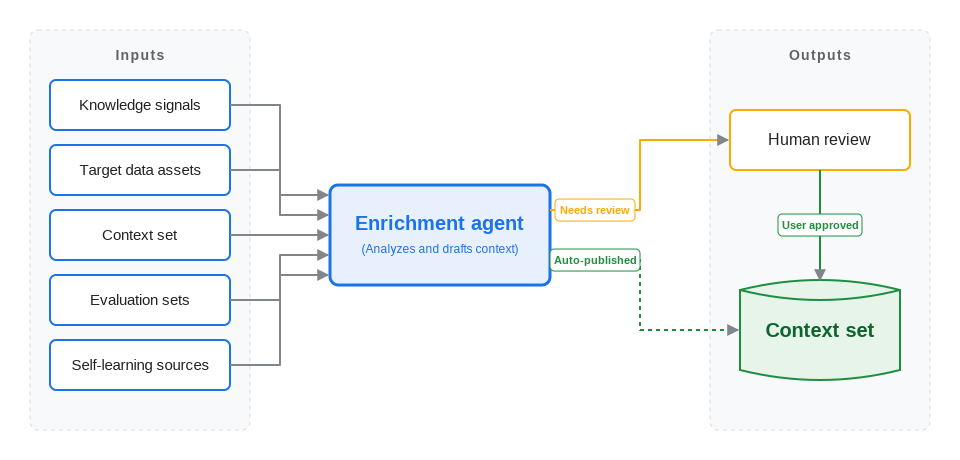 Enrichment agent workflow.
The agent curates your context set through four key phases:
1. **Analyzing signals and documentation**: The agent mines interaction logs to find where downstream AI agents struggled or required disambiguation. The agent scans enterprise documents in Cloud Storage or linked third-party apps, and it examines query history to discover high-frequency table joins and upstream dependencies.
2. **Drafting context proposals**: Guided by your curation goal, the agent drafts structured context for your target assets. These drafted proposals include business-oriented table overviews, formal metric formulas, verified join conditions, and golden parameter-based SQL query templates.
3. **Benchmarking and optimization**: Every proposal is checked for deterministic validity (for example, valid SQL syntax) and assigned a confidence score, which rolls up into an overall confidence score for the run. If you configured an evaluation set, the agent also iteratively tests its drafted metadata against your test questions to maximize downstream query accuracy and measures whether accuracy drops compared to the baseline.
4. **Applying review policies** : The agent stages all proposed changes as
change requests. When a run generates more than 250 metadata changes, the
agent splits the proposals into chained batch change requests (**Batch 1 of
N** , **Batch 2 of N**, and so on) that must be
approved in sequence. If you enabled auto-publishing, the agent evaluates
the entire run as a whole and automatically approves the staged change
requests---leaving an audit record---only when all of the following conditions
are met:
- The run's overall confidence score is at least 0.85 (85%) or meets your configured threshold.
- No proposal fails a validity check (for example, malformed SQL).
- When an evaluation set is configured, accuracy drops by no more than 5 percentage points (or your configured maximum quality drop).
If any of these conditions isn't met, all proposals in the run remain staged
as change requests for manual review. Deletion proposals are always staged
in a separate **Deletions** change request and held for manual review, even
when auto-publishing is enabled.
> [!NOTE]
> **Note:** If you enable **Auto-publish**, we strongly recommend that you configure an evaluation set. Without an evaluation guardrail, the agent might automatically publish metadata that causes regressions in downstream queries.
## Enterprise security and governance
Because Knowledge Studio enrichment tasks use artificial intelligence to analyze
your data schemas and internal documentation, the platform implements strict
security and governance boundaries to protect your proprietary information:
- **User-managed execution identity**: Enrichment tasks run under a
user-managed execution service account that you configure in your project.
The Dataplex Service Agent impersonates this execution service account using
short-lived credentials, ensuring that tasks can only read the data sources
and context sets to which you grant explicit access.
- **Human-in-the-loop governance**: Generated metadata proposals are staged as
change requests to maintain an audit record. Unless you enable
auto-publishing and the run meets all quality, validity, and evaluation
thresholds, data stewards must inspect diff comparisons and confidence
scores before approving updates to a context set. Deletion proposals always
require manual review.
- **Foundation model training**: Your data remains your own. Customer
execution traces, database schemas, and supplied knowledge signals (such as
documents or internal glossaries) are never used to train Google's
foundation models.
- **Data sanitization**: Before any proposed metadata is written into a
context set, the agent automatically redacts personally identifiable
information (PII) from system logs and generation traces.
- **Execution boundaries**: The enrichment agent operates within a secure,
Google-managed tenant. The agent reaches your private data sources using a
Private Service Connect interface and a customer-controlled egress proxy.
To configure Identity and Access Management (IAM) roles, service accounts, and external
authentication providers for enrichment tasks, see [Configure prerequisites for
enrichment tasks](https://docs.cloud.google.com/knowledge-catalog/docs/configure-enrichment-prerequisites).
## Recommended configurations
Knowledge Catalog provides several optional settings for
enrichment tasks. We recommend that you start with a basic configuration and
progressively enable advanced features as you scale your metadata operations.
| Configuration | Included components | Auto-publish | Recommended for |
|---|---|---|---|
| **Basic** | Context set | Disabled | Testing the tool. Lets you see how the agent infers metadata strictly from your dataset's schema. You must manually review all proposals. |
| **Grounded** | - Context set - Knowledge signals | Disabled | Production environments. Grounds the agent in your specific business logic, using your standard operating procedures and glossaries to improve accuracy. |
| **Automated** | - Context set - Knowledge signals - Evaluation sets | Enabled | Scaling metadata operations. The Evaluation set acts as a safety guardrail. If an auto-generated proposal causes a regression in downstream accuracy, publishing halts for manual review. |
| **Self-learning** | - Context set - Knowledge signals - Evaluation sets - Self-learning sources | Enabled | Advanced and autonomous catalogs. The agent continuously adapts by analyzing live user interactions and agent chat logs to identify and patch knowledge gaps. |
### Choose between a single task and multiple tasks
Every enrichment task has a one-to-one relationship with its target context set
and supports up to 500 total data resources across the context set's default
resources and any additional resources you add to the task.
- **Use a single enrichment task and context set** when up to 500 tables share a common business domain, data steward team, and refresh schedule. Grouping related tables into a single task lets the enrichment agent discover cross-table join keys, shared business concepts, and multi-table SQL query templates in one run. If a large run generates more than 250 metadata proposals, Knowledge Studio automatically splits the output into sequential batches (**Batch 1 of N** , **Batch 2 of N**) so reviewers can approve them in manageable stages.
- **Split into multiple context sets and enrichment tasks** when your data domains have distinct domain owners or workflow approvers, require different run schedules or knowledge signals, or span more than 500 target tables.
## Deployment lifecycle
The process of building and deploying an enrichment task follows a linear
lifecycle:
1. **Configure prerequisites** : Grant the required roles, configure the service accounts, and enable data profiling and AI data insights on frequently used tables. For more information, see [Configure prerequisites for enrichment
tasks](https://docs.cloud.google.com/knowledge-catalog/docs/configure-enrichment-prerequisites).
2. **Link external knowledge** : Authorize the task to read files from your Google Drive or external Git repositories for grounding. For more information, see [Configure external connectors for enrichment
tasks](https://docs.cloud.google.com/knowledge-catalog/docs/configure-enrichment-connectors).
3. **Create the task** : Define the context set, target resources, knowledge signals, and evaluation strategy. For more information, see [Create
enrichment tasks](https://docs.cloud.google.com/knowledge-catalog/docs/create-enrichment-tasks).
4. **Review the AI proposals** : Check the run diagnostics, review the proposed descriptions, and approve the metadata changes. For more information, see [Evaluate and approve enrichment
proposals](https://docs.cloud.google.com/knowledge-catalog/docs/manage-enrichment-runs).
## Limitations
During Preview, enrichment tasks operate within the following boundaries:
- **Compliance boundaries**: Enrichment tasks don't support VPC Service Controls
(VPC Service Controls), Customer-Managed Encryption Keys (CMEK), Data
Residency (DRZ) commitments, Access Transparency (AXT), or Assured
Workloads.
- **Console-first management** : You configure and manage tasks exclusively
through the Google Cloud console. Direct public REST APIs and `gcloud` CLI
commands aren't available in Preview.
- **Task scope and one-to-one context set mapping**: Each context set can be
enriched by only one enrichment task, and each enrichment task supports up
to 500 total target resources.
- **Quotas and limits** : Enrichment tasks and task runs are subject to
per-project regional resource and rate quotas. For more information, see the
Knowledge Studio enrichment tasks section in [Quotas and
limits](https://docs.cloud.google.com/knowledge-catalog/docs/quotas#enrichment-task-quotas).
## Pricing
During Preview, running Knowledge Studio enrichment tasks and staging unapproved
batch change requests are offered at no charge.
An empty context set entry group or an unapproved batch change request incurs no
metadata storage charge. Metadata storage charges begin only when you approve a
change request into your context set entry group (or when auto-publish applies
the changes), at which point standard Knowledge Catalog
metadata storage charges apply to the project hosting the entry group. Standard
usage charges, including BigQuery query processing and
Cloud Storage staging reads and writes, apply in your project when an
enrichment task uses optional customer-managed resources, such as
Cloud Storage buckets for knowledge signals or evaluation sets and
BigQuery agent analytics trace tables for self-learning.
## What's next
Concept
### [Knowledge Studio overview](https://docs.cloud.google.com/knowledge-catalog/docs/knowledge-studio.md.txt)
Learn about the core concepts and architecture of Knowledge Studio.
Concept
### [Context sets overview](https://docs.cloud.google.com/knowledge-catalog/docs/context-sets.md.txt)
Learn how metadata generated by enrichment tasks is stored in context sets to ground AI agents.
Task
### [Configure prerequisites for enrichment tasks](https://docs.cloud.google.com/knowledge-catalog/docs/configure-enrichment-prerequisites.md.txt)
Learn how to configure roles and service accounts to run enrichment tasks.
Task
### [Create enrichment tasks](https://docs.cloud.google.com/knowledge-catalog/docs/create-enrichment-tasks.md.txt)
Learn how to generate metadata by running automated enrichment tasks.
Task
### [Evaluate and approve enrichment proposals](https://docs.cloud.google.com/knowledge-catalog/docs/manage-enrichment-runs.md.txt)
Learn how to monitor jobs and manually review or approve metadata proposals.
Task
### [Manage enrichment tasks](https://docs.cloud.google.com/knowledge-catalog/docs/manage-enrichment-tasks.md.txt)
Learn how to edit, pause, and delete scheduled enrichment jobs.