This page provides an overview of Cloud External Key Manager (Cloud EKM).
## Terminology
- **External key manager (EKM)**
The key manager used outside of Google Cloud to manage your keys.
- **Cloud External Key Manager (Cloud EKM)**
A Google Cloud service for using your external keys that are
managed within a supported EKM.
- **Cloud EKM through the
internet**
A version of Cloud EKM where Google Cloud communicates
with your external key manager over the internet.
- **Cloud EKM through a
VPC**
A version of Cloud EKM where Google Cloud communicates
with your external key manager over a Virtual Private Cloud (VPC). For more
information, see [VPC network overview](https://docs.cloud.google.com/vpc/docs/vpc.md.txt).
- **EKM key management from Cloud KMS**
When using Cloud EKM through a VPC with an
external key management partner that supports the Cloud EKM
control plane, you can use the **Cloud KMS** EKM
management mode to simplify the process of maintaining external keys in
your external key management partner and in Cloud EKM. For more information, see
[Coordinated external keys](https://docs.cloud.google.com/kms/docs/ekm.md.txt#how-coordinated) and
[EKM key management from Cloud KMS](https://docs.cloud.google.com/kms/docs/ekm.md.txt#ekm-management-mode) on this page.
- **Crypto space**
A container for your resources within your external key management partner. Your crypto
space is identified by a unique crypto space path. The format of the
crypto space path varies by external key management partner---for example,
`v0/cryptospaces/YOUR_UNIQUE_PATH`.
- **Partner-managed EKM**
An arrangement where your EKM is managed for you by a trusted partner.
For more information, see [Partner-managed EKM](https://docs.cloud.google.com/kms/docs/ekm.md.txt#partner-managed)
on this page.
- **Key Access Justifications**
When you use Cloud EKM with Key Access Justifications, each request to
your external key management partner includes a field that identifies the reason for each
request. You can configure your external key management partner to allow or deny requests
based on the Key Access Justifications code provided. For more information about
Key Access Justifications, see
[Key Access Justifications overview](https://docs.cloud.google.com/assured-workloads/key-access-justifications/docs/overview.md.txt).
## Overview
With Cloud EKM, you can use keys that you manage within a
[supported external key management partner](https://docs.cloud.google.com/kms/docs/ekm.md.txt#supported_partners) to protect data within
Google Cloud. You can protect data at rest in [supported CMEK integration
services](https://docs.cloud.google.com/kms/docs/ekm#supported_services), or by calling the Cloud Key Management Service API directly.
Cloud EKM provides several benefits:
- **Key provenance:** You control the location and distribution of your
externally managed keys. Externally managed keys are never cached or stored
within Google Cloud. Instead, Cloud EKM communicates directly
with the external key management partner for each request.
- **Access control:** You manage access to your externally managed keys in
your external key manager. You can't use an externally managed key in
Google Cloud without first granting the Google Cloud project
access to the key in your external key manager. You can revoke this access
at any time.
- **Centralized key management:** You can manage your keys and access policies
from a single user interface, whether the data they protect resides in the
cloud or on your premises.
- **Migrate between Cloud EKM protection levels with zero downtime
([Preview](https://cloud.google.com/products#product-launch-stages)):** If you have Cloud EKM keys that you're
already using, you can migrate existing key versions between the `EXTERNAL`
and `EXTERNAL_VPC` protection levels. This lets you switch between
Cloud EKM over the internet and Cloud EKM over a VPC
for the same key material, without needing to re-encrypt your data. For more
information, see [Migrate external keys](https://docs.cloud.google.com/kms/docs/migrate-external-keys.md.txt).
In all cases, the key resides on the external system, and is never sent to
Google.
You can communicate with your external key manager [over the
internet](https://docs.cloud.google.com/kms/docs/set-up-ekm-internet) or [over a
Virtual Private Cloud (VPC)](https://docs.cloud.google.com/kms/docs/create-ekm-connection).
## How Cloud EKM works
Cloud EKM key versions consist of these parts:
- **External key material**: The external key material of a Cloud EKM key is cryptographic material created and stored in your EKM. This material does not leave your EKM and it is never shared with Google.
- **Key reference**: Each Cloud EKM key version contains either a key URI or a key path. This is a unique identifier for the external key material that Cloud EKM uses when requesting cryptographic operations using the key.
- **Internal key material**: When a symmetric Cloud EKM key is created, Cloud KMS creates additional key material in Cloud KMS, which never leaves Cloud KMS. This key material is used as an extra layer of encryption when communicating with your EKM. This internal key material does not apply to asymmetric signing keys.
To use your Cloud EKM keys, Cloud EKM sends requests for
cryptographic operations to your EKM. For example, to encrypt data with a
symmetric encryption key, Cloud EKM first encrypts the data using the
internal key material. The encrypted data is included in a request to the EKM.
The EKM wraps the encrypted data in another layer of encryption using the
external key material, and then returns the resulting ciphertext. Data encrypted
using a Cloud EKM key can't be decrypted without both the external key
material and the internal key material.
If your organization has enabled Key Access Justifications, your external key management partner records the provided access justification and completes the request only for [justification reason codes](https://docs.cloud.google.com/assured-workloads/key-access-justifications/docs/overview.md.txt#reasons) that are allowed by your Key Access Justifications policy on the external key management partner.
Creating and managing Cloud EKM keys requires corresponding changes in
both Cloud KMS and the EKM.
These corresponding changes are handled differently for *manually managed
external keys* and for *coordinated external keys* . All external keys accessed over the
internet are manually managed. External keys accessed over a VPC network can be
manually managed or coordinated, depending on the EKM management mode of the EKM
connection. The **Manual** EKM management mode is used for manually
managed keys. The **Cloud KMS** EKM management mode is used for coordinated external keys.
For more information about EKM management modes, see [Manually managed external
keys](https://docs.cloud.google.com/kms/docs/ekm#how-manually-managed) and [Coordinated external keys](https://docs.cloud.google.com/kms/docs/ekm.md.txt#how-coordinated)
on this page.
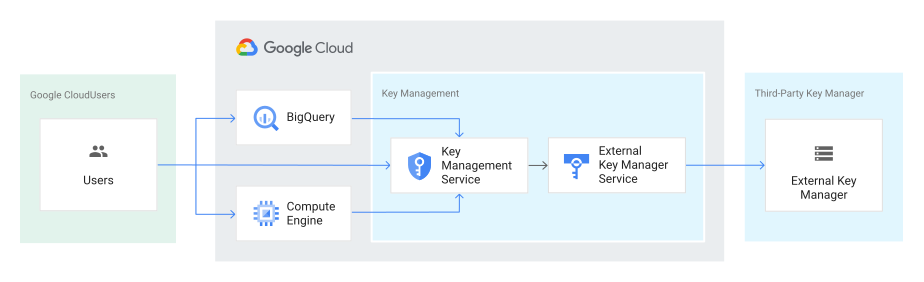
The following diagram shows how Cloud KMS fits into the key management
model. This diagram uses Compute Engine and BigQuery as two examples;
you can also see [the full list of services that support Cloud EKM
keys](https://docs.cloud.google.com/kms/docs/ekm#supported_services).
> [!CAUTION]
> **Caution:** Both the Cloud EKM key version and the external key are required for each encryption and decryption request. If you lose access to either key, your data cannot be recovered. It is not possible to re-create an identical Cloud EKM key version by using the same external key URI or key path.
You can learn about the [considerations](https://docs.cloud.google.com/kms/docs/ekm.md.txt#considerations) and
[restrictions](https://docs.cloud.google.com/kms/docs/ekm.md.txt#restrictions) when using Cloud EKM.
### Manually managed external keys
This section provides a broad overview of how Cloud EKM works with a
manually managed external key.
1. You create or use an existing key in a [supported external key management partner
system](https://docs.cloud.google.com/kms/docs/ekm#supported_partners). This key has a unique URI or key path.
2. You grant your Google Cloud project access to use the key, in the external key management partner system.
3. In your Google Cloud project, you create a Cloud EKM key version, using the URI or key path for the externally managed key.
4. Maintenance operations like key rotation must be manually managed between your EKM and Cloud EKM. For example, key version rotation or key version destruction operations need to be completed both directly in your EKM and in Cloud KMS.
Within Google Cloud, the key appears alongside your other
Cloud KMS and Cloud HSM keys, with protection level
`EXTERNAL` or `EXTERNAL_VPC`. The Cloud EKM key and the
external key management partner key work together to protect your data. The external key
material is never exposed to Google.
### Coordinated external keys
This section provides an overview of how Cloud EKM works with
coordinated external keys.
1. You [set up an EKM connection](https://docs.cloud.google.com/kms/docs/create-ekm-connection.md.txt),
setting the **EKM management mode** to **Cloud KMS** . During setup, you
must authorize your EKM to access your VPC network and authorize your
Google Cloud project service account to access your *crypto space* in
your EKM. Your EKM connection uses the hostname of your EKM and a *crypto
space path* that identifies your resources within your EKM.
2. You [create an external key](https://docs.cloud.google.com/kms/docs/create-key.md.txt) in
Cloud KMS. When you create a Cloud EKM key using an EKM
over VPC connection with the **Cloud KMS** EKM management mode enabled, the
following steps take place automatically:
1. Cloud EKM sends a key creation request to your EKM.
2. Your EKM creates the requested key material. This external key material remains in the EKM and is never sent to Google.
3. Your EKM returns a key path to Cloud EKM.
4. Cloud EKM creates your Cloud EKM key version using the key path provided by your EKM.
3. Maintenance operations on coordinated external keys can be initiated from
Cloud KMS. For example, coordinated external keys used for
symmetric encryption can be automatically rotated on a set schedule. The
creation of new key versions is coordinated in your EKM by
Cloud EKM. You can also trigger the creation or destruction of
key versions in your EKM from Cloud KMS using the
Google Cloud console, the gcloud CLI, the Cloud KMS
API, or Cloud KMS client libraries.
Within Google Cloud, the key appears alongside your other
Cloud KMS and Cloud HSM keys, with protection level
`EXTERNAL_VPC`. The Cloud EKM key and the external key management partner key work
together to protect your data. The external key material is never exposed to
Google.
#### EKM key management from Cloud KMS
Coordinated external keys are made possible by EKM connections that use EKM key management from Cloud KMS.
If your EKM supports the Cloud EKM
control plane, then you can enable EKM key management from Cloud KMS for your
EKM connections to create coordinated external keys. With EKM key management from Cloud KMS enabled,
Cloud EKM can request the following changes in your EKM:
- Create a key: When you create an externally managed key in
Cloud KMS using a compatible EKM connection,
Cloud EKM sends your key creation request to your EKM. When
successful, your EKM creates the new key and key material and returns the
key path for Cloud EKM to use to access the key.
- Rotate a key: When you rotate an externally-managed key in
Cloud KMS using a compatible EKM connection,
Cloud EKM sends your rotation request to your EKM. When successful,
your EKM creates new key material and returns the key path for
Cloud EKM to use to access the new key version.
- Destroy a key: When you destroy a key version for an externally-managed key
in Cloud KMS using a compatible EKM connection,
Cloud KMS schedules the key version for destruction in
Cloud KMS. If the key version is not restored before the *scheduled
for destruction* period ends, Cloud EKM destroys its part of the
key's cryptographic material and sends a destruction request to your EKM.
Data encrypted with this key version cannot be decrypted after the key
version is destroyed in Cloud KMS, even if the EKM has not yet
destroyed the key version. You can see whether the EKM has successfully
destroyed the key version by viewing the key's details in
Cloud KMS.
When keys in your EKM are managed from Cloud KMS, the key material
still resides in your EKM. Google can't make any key management requests to your
EKM without explicit permission.
Google can't change permissions or Key Access Justifications policies in your
external key management partner system.
If you revoke Google's permissions in your EKM, key management operations
attempted in Cloud KMS fail.
## Compatibility
### Supported key managers
You can store external keys in the following external key management partner systems:
- Supported today:
- [Fortanix](https://fortanix.com/solutions/use-case/ekm-for-gcp/)
- [Futurex](https://www.futurex.com/solutions/google-cloud-ekm-integration)
- [Thales](https://thalesdocs.com/dpod/services/key_management_services/cdsp/index.html)
### Services that support CMEK with Cloud EKM
The following services support integration with Cloud KMS for
external (Cloud EKM) keys:
- [Agent Assist](https://docs.cloud.google.com/agent-assist/docs/cmek)
- [Agent Retrieval](https://docs.cloud.google.com/gemini-enterprise-agent-platform/build/vector-search-2/cmek.md.txt)
- [AlloyDB for PostgreSQL](https://docs.cloud.google.com/alloydb/docs/cmek.md.txt)
- [Apigee API hub](https://docs.cloud.google.com/apigee/docs/apihub/provision.md.txt#step-encryption)
- [Application Integration](https://docs.cloud.google.com/application-integration/docs/cmek.md.txt)
- [Artifact Registry](https://docs.cloud.google.com/artifact-registry/docs/cmek.md.txt)
- Backup and DR Service: [Backup Vault Container](https://docs.cloud.google.com/backup-disaster-recovery/docs/concepts/cmek.md.txt#backup-vault-container) and [Backups at rest](https://docs.cloud.google.com/backup-disaster-recovery/docs/concepts/cmek.md.txt#backups-at-rest)
- [Backup for GKE](https://docs.cloud.google.com/kubernetes-engine/docs/add-on/backup-for-gke/concepts/about-cmek.md.txt)
- [BigQuery](https://docs.cloud.google.com/bigquery/docs/customer-managed-encryption.md.txt)
- [Bigtable](https://docs.cloud.google.com/bigtable/docs/cmek.md.txt)
- [Cloud Data Fusion](https://docs.cloud.google.com/data-fusion/docs/how-to/customer-managed-encryption-keys.md.txt)
- [Cloud Healthcare API](https://docs.cloud.google.com/healthcare-api/docs/cmek.md.txt)
- Cloud Logging: [Data in the Log Router](https://docs.cloud.google.com/logging/docs/routing/managed-encryption.md.txt) and [Data in Logging storage](https://docs.cloud.google.com/logging/docs/routing/managed-encryption-storage.md.txt)
- [Cloud Run](https://docs.cloud.google.com/run/docs/securing/using-cmek.md.txt)
- [Cloud Run functions](https://docs.cloud.google.com/functions/docs/securing/cmek.md.txt)
- Cloud SQL: [Data written to databases](https://docs.cloud.google.com/sql/docs/mysql/configure-cmek.md.txt) and [Standard and enhanced backups](https://docs.cloud.google.com/sql/docs/mysql/backup-recovery/backups.md.txt)
- [Cloud Storage](https://docs.cloud.google.com/storage/docs/encryption/using-customer-managed-keys.md.txt)
- [Cloud Tasks](https://docs.cloud.google.com/tasks/docs/use-cmek.md.txt)
- [Cloud Workstations](https://docs.cloud.google.com/workstations/docs/encrypt-workstation-resources)
- Compute Engine: [Persistent disks](https://docs.cloud.google.com/compute/docs/disks/customer-managed-encryption.md.txt#encrypt_a_new_persistent_disk_with_cmek), [Snapshots](https://docs.cloud.google.com/compute/docs/disks/customer-managed-encryption.md.txt#create_snapshot), [Custom images](https://docs.cloud.google.com/compute/docs/disks/customer-managed-encryption.md.txt#encrypt_an_imported_image), and [Machine images](https://docs.cloud.google.com/compute/docs/machine-images/create-machine-images.md.txt#create-image-from-instance)
- [Customer Experience Insights](https://docs.cloud.google.com/contact-center/insights/docs/cmek)
- [Data Studio](https://docs.cloud.google.com/data-studio/cmek.md.txt)
- Database Migration Service: [MySQL migrations - data written to databases](https://docs.cloud.google.com/sql/docs/mysql/configure-cmek.md.txt), [PostgreSQL migrations - Data written to databases](https://docs.cloud.google.com/sql/docs/postgres/configure-cmek.md.txt), [PostgreSQL to AlloyDB migrations - Data written to databases](https://docs.cloud.google.com/alloydb/docs/use-cmek.md.txt), [SQL Server migrations - Data written to databases](https://docs.cloud.google.com/sql/docs/sqlserver/configure-cmek.md.txt), and [Oracle to PostgreSQL data at rest](https://docs.cloud.google.com/database-migration/docs/oracle-to-postgresql/cmek-for-migration-jobs.md.txt)
- [Dataflow](https://docs.cloud.google.com/dataflow/docs/guides/customer-managed-encryption-keys.md.txt)
- [Dataform](https://docs.cloud.google.com/dataform/docs/cmek.md.txt)
- [Dataproc Metastore](https://docs.cloud.google.com/dataproc-metastore/docs/cmek.md.txt)
- [Datastream](https://docs.cloud.google.com/datastream/docs/use-cmek.md.txt)
- [Dialogflow CX](https://docs.cloud.google.com/dialogflow/cx/docs/concept/cmek.md.txt)
- [Document AI](https://docs.cloud.google.com/document-ai/docs/cmek.md.txt)
- [Eventarc Advanced](https://docs.cloud.google.com/eventarc/advanced/docs/use-cmek.md.txt) ([Preview](https://cloud.google.com/products/#product-launch-stages))
- [Eventarc Standard](https://docs.cloud.google.com/eventarc/docs/use-cmek.md.txt)
- [Filestore](https://docs.cloud.google.com/filestore/docs/cmek.md.txt)
- [Firestore](https://docs.cloud.google.com/firestore/docs/use-cmek)
- [Google Cloud Managed Lustre](https://docs.cloud.google.com/managed-lustre/docs/cmek.md.txt)
- [Google Cloud Managed Service for Apache Kafka](https://docs.cloud.google.com/managed-service-for-apache-kafka/docs/encryption.md.txt)
- [Google Cloud NetApp Volumes](https://docs.cloud.google.com/netapp/volumes/docs/configure-and-use/cmek/create-cmek-policy.md.txt)
- [Google Cloud Observability](https://docs.cloud.google.com/stackdriver/docs/observability/set-defaults-for-observability-buckets.md.txt) ([Preview](https://cloud.google.com/products/#product-launch-stages))
- [Google Distributed Cloud](https://docs.cloud.google.com/distributed-cloud/edge/latest/docs/security#storage)
- Google Kubernetes Engine: [Data on VM disks](https://docs.cloud.google.com/kubernetes-engine/docs/how-to/using-cmek.md.txt) and [Application-layer secrets](https://docs.cloud.google.com/kubernetes-engine/docs/how-to/encrypting-secrets.md.txt)
- [Integration Connectors](https://docs.cloud.google.com/integration-connectors/docs/encryption.md.txt)
- [Knowledge Catalog](https://docs.cloud.google.com/dataplex/docs/cmek)
- [Looker (Google Cloud core)](https://docs.cloud.google.com/looker/docs/looker-core-cmek.md.txt)
- [Managed Service for Apache Airflow](https://docs.cloud.google.com/composer/docs/cmek)
- Managed Service for Apache Spark: [Cluster data on VM disks](https://docs.cloud.google.com/dataproc/docs/concepts/configuring-clusters/customer-managed-encryption) and [Serverless data on VM disks](https://docs.cloud.google.com/dataproc-serverless/docs/guides/cmek-serverless)
- [Memorystore for Redis](https://docs.cloud.google.com/memorystore/docs/redis/cmek)
- [Memorystore for Redis Cluster](https://docs.cloud.google.com/memorystore/docs/cluster/use-cmek.md.txt)
- [Memorystore for Valkey](https://docs.cloud.google.com/memorystore/docs/valkey/use-cmek.md.txt)
- Migrate to Virtual Machines: [Data migrated from VMware, AWS, and Azure VM sources](https://docs.cloud.google.com/migrate/virtual-machines/docs/5.0/migrate/cmek.md.txt#migration-data), [Data migrated from disk and machine image sources](https://docs.cloud.google.com/migrate/virtual-machines/docs/5.0/migrate/cmek.md.txt#target-disk-machine-images), and [Data on target VM instances and VM disks](https://docs.cloud.google.com/migrate/virtual-machines/docs/5.0/migrate/cmek.md.txt#data-target-vm-vm-disks)
- [Parameter Manager](https://docs.cloud.google.com/secret-manager/parameter-manager/docs/cmek.md.txt)
- [Pub/Sub](https://docs.cloud.google.com/pubsub/docs/cmek)
- [Secret Manager](https://docs.cloud.google.com/secret-manager/docs/cmek.md.txt)
- [Secure Source Manager](https://docs.cloud.google.com/secure-source-manager/docs/cmek.md.txt)
- [Security Command Center](https://docs.cloud.google.com/security-command-center/docs/cmek.md.txt)
- [Spanner](https://docs.cloud.google.com/spanner/docs/cmek.md.txt)
- [Speech-to-Text](https://docs.cloud.google.com/speech-to-text/v2/docs/encryption)
- [Vertex AI](https://docs.cloud.google.com/vertex-ai/docs/general/cmek)
- [Vertex AI Workbench instances](https://docs.cloud.google.com/vertex-ai/docs/workbench/instances/cmek)
- [Workflows](https://docs.cloud.google.com/workflows/docs/use-cmek.md.txt)
- [Workload Manager](https://docs.cloud.google.com/workload-manager/docs/evaluate/custom-rules/enable-cmek.md.txt)
> [!IMPORTANT]
> **Important:** All other services are not compatible with Cloud External Key Manager for CMEK.
> [!NOTE]
> **Note:** If your Cloud EKM key is not listed in the Google Cloud console when setting up CMEK services, first [copy the resource
> name](https://docs.cloud.google.com/kms/docs/getting-resource-ids#getting_the_id_for_a_key_and_version). Then select **Don't see your key? Enter key resource name.** and enter the key resource name captured earlier.
## Considerations
- When you use a Cloud EKM key, Google has no control over the
availability of your externally managed key in the external key management partner system.
If you lose keys that you manage outside of Google Cloud, Google can't
recover your data.
- Review the guidelines about [external key management partners and regions](https://docs.cloud.google.com/kms/docs/ekm.md.txt#regions) when
choosing the locations for your Cloud EKM keys.
- Review the [Cloud EKM Service Level Agreement
(SLA)](https://cloud.google.com/ekm/sla).
- Communicating with an external service over the internet can lead to
problems with reliability, availability, and latency. For applications with
low tolerance for these types of risks, consider using Cloud HSM or
Cloud KMS to store your key material.
- If an external key is unavailable, Cloud KMS returns a
`FAILED_PRECONDITION` error and provides details in the
[`PreconditionFailure`](https://docs.cloud.google.com/kms/docs/reference/ekm_errors.md.txt#input_errors)
error detail.
[Enable data audit logging](https://docs.cloud.google.com/kms/docs/audit-logging.md.txt#enabling_audit_logging) to maintain a record of all
errors related to Cloud EKM. Error messages contain detailed
information to help pinpoint the source of the error. An example of a
common error is when an external key management partner does not respond to a request
within a reasonable timeframe.
- You need a support contract with the external key management partner.
Google Cloud support can only help with issues in
Google Cloud services and cannot directly assist with issues on
external systems. Sometimes, you must work with support on both sides to
troubleshoot interoperability issues.
- Cloud EKM can be used with
[Bare Metal Rack HSM](https://docs.cloud.google.com/kms/docs/bare-metal-rack-hsm.md.txt) to create a standalone HSM
solution integrated with Cloud KMS. To learn more, choose a
Cloud EKM partner that supports single-tenant HSMs and review the
[requirements for Bare Metal Rack HSMs](https://docs.cloud.google.com/kms/docs/bare-metal-rack-hsm.md.txt#requirements).
This is different from
[Single-tenant Cloud HSM](https://docs.cloud.google.com/kms/docs/single-tenant-hsm.md.txt), and you should
carefully consider which solution better meets your requirements.
- Enable audit logging in your external key manager to capture access to and
usage of your EKM keys.
> [!CAUTION]
> **Caution:** When you use Cloud EKM keys, there's a risk that the key can become unavailable. Depending on which services you're using, this can cause fatal errors or inaccessible data. For example, if you use an external CMEK key to encrypt Google Kubernetes Engine application-layer secrets, your nodes can become unavailable if they can't decrypt the secrets. Inability to access the external key can also cause permanent data loss. For example, if the CMEK key used to encrypt a Spanner database remains unavailable for more than 30 consecutive days, Spanner automatically deletes the database. When the current key version is not available, you cannot recover the data by rotating to a new key version. For better availability, consider using Cloud EKM over VPC or Cloud HSM keys.
## Restrictions
- When you create a Cloud EKM key using the API or the Google Cloud CLI, it must not have an initial key version. This does not apply to Cloud EKM keys created using the Google Cloud console.
- Automatic rotation is not supported for manually-managed external keys.
- Cloud EKM operations are subject to [specific
quotas](https://docs.cloud.google.com/kms/quotas#cloud_ekm_quotas) in addition to the quotas on Cloud KMS operations.
### Symmetric encryption keys
- Symmetric encryption keys are only supported for the following:
- Customer managed encryption keys (CMEK) in [supported integration
services](https://docs.cloud.google.com/kms/docs/ekm#supported_services).
- [Symmetric encryption and decryption using Cloud KMS
directly](https://docs.cloud.google.com/kms/docs/encrypt-decrypt).
- Data that is encrypted by Cloud EKM using an externally managed key cannot be decrypted without using Cloud EKM.
### Asymmetric signing keys
- Asymmetric signing keys are limited to a subset of Cloud KMS algorithms.
- Asymmetric signing keys are only supported for the following use cases:
- [Asymmetric signing using Cloud KMS
directly](https://docs.cloud.google.com/kms/docs/create-validate-signatures).
- [Custom signing key with
Access Approval](https://docs.cloud.google.com/assured-workloads/access-approval/docs/review-approve-access-requests-custom-keys).
- Once an asymmetric signing algorithm is set on a Cloud EKM key, it cannot be modified.
- Signing must be done on the `data` field.
## External key managers and regions
Cloud EKM needs to be able to reach your keys quickly to
avoid an error. When creating a Cloud EKM key, choose a
Google Cloud location that is geographically near the location of the
external key management partner key. See your external key management partner's documentation to determine
which locations they support.
- Cloud EKM over the internet: available in most Google Cloud locations where Cloud KMS is available, including regional and multi-regional locations.
- Cloud EKM over a VPC: available in most [regional
locations](https://docs.cloud.google.com/kms/docs/locations#regional) where Cloud KMS is available. Cloud EKM over a VPC isn't available in multi-regional locations.
Some locations including `global` and `nam-eur-asia1` aren't available for
Cloud EKM. To learn which locations support Cloud EKM, see
[Cloud KMS locations](https://docs.cloud.google.com/kms/docs/locations.md.txt).
### Multi-region use
When you use an externally managed key with a multi-region, the metadata of the
key is available in multiple data centers within the multi-region. This metadata
includes the information needed to communicate with the external key management partner. If your
application fails over from one data center to another within the multi-region,
the new data center initiates key requests. The new data center may have
different network characteristics from the previous data center, including
distance from the external key management partner and the likelihood of timeouts. We recommend
only using a multi-region with Cloud EKM if your chosen external key
manager provides low latency to all areas of that multi-region.
## Partner-managed EKM
Partner-managed EKM lets you use Cloud EKM through a trusted sovereign
partner that manages your EKM system for you. With partner-managed EKM, your
partner creates and manages the keys that you
use in Cloud EKM. The partner ensures that your EKM complies with
sovereignty requirements.
When you onboard with your sovereign partner, the partner provisions resources
in the Google Cloud and your EKM. These resources include a
Cloud KMS project to manage your Cloud EKM keys and an EKM
connection configured for EKM key management from Cloud KMS. Your partner creates resources
in Google Cloud locations according to your data residency requirements.
Each Cloud EKM key includes
Cloud KMS metadata, which lets Cloud EKM send requests to your
EKM to perform cryptographic operations using the external key material that
never leaves your EKM. Symmetric Cloud EKM keys also include
Cloud KMS internal key material that never leaves Google Cloud.
For more information about the internal and external sides of Cloud EKM
keys, see [How Cloud EKM works](https://docs.cloud.google.com/kms/docs/ekm.md.txt#how_it_works) on this page.
For more information about partner-managed EKM, see [Configure partner-managed
Cloud KMS](https://docs.cloud.google.com/sovereign-controls-by-partners/docs/configure-kms).
## Monitor Cloud EKM usage
> [!WARNING]
>
> **Preview**
>
>
> This feature is
>
> subject to the "Pre-GA Offerings Terms" in the General Service Terms section of the
> [Service Specific
> Terms](https://docs.cloud.google.com/terms/service-terms#1).
>
> Pre-GA features are available "as is" and might have limited support.
>
> For more information, see the
> [launch stage descriptions](https://cloud.google.com/products/#product-launch-stages).
You can use Cloud Monitoring to monitor your EKM connection. The following
metrics can help you understand your EKM usage:
- `cloudkms.googleapis.com/ekm/external/request_latencies`
- `cloudkms.googleapis.com/ekm/external/request_count`
For more information about these metrics, see
[cloudkms metrics](https://docs.cloud.google.com/monitoring/api/metrics_gcp_c.md.txt#gcp-cloudkms). You can create a
dashboard to track these metrics. To learn how to set up a dashboard to monitor
your EKM connection, see [Monitor EKM usage](https://docs.cloud.google.com/kms/docs/monitor-ekm-usage.md.txt).
## Getting support
If you experience an issue with Cloud EKM, contact [Support](https://docs.cloud.google.com/kms/docs/support).
## What's next
- Start [using the
API](https://docs.cloud.google.com/kms/docs/accessing-the-api).
- [Set up Cloud EKM over the
internet](https://docs.cloud.google.com/kms/docs/set-up-ekm-internet).
- [Create an EKM connection](https://docs.cloud.google.com/kms/docs/create-ekm-connection.md.txt) to use EKM over
VPC.
- Read through the [Cloud KMS API
Reference](https://docs.cloud.google.com/kms/docs/reference/rest).
- Learn about [Logging](https://docs.cloud.google.com/kms/docs/audit-logging.md.txt#enabling_audit_logging) in Cloud KMS. Logging is based
on operations, and applies to keys with both HSM and software protection
levels.
- See [Reference architectures for reliable deployment of Cloud EKM
services](https://docs.cloud.google.com/docs/security/reliable-ekm-architectures) for recommendations on configuring an External Key
Manager (EKM) service deployment integrated
with Cloud EKM.