背景處理

許多應用程式都需要在網頁要求環境以外執行背景處理作業。本教學課程會建立網頁應用程式,供使用者輸入要翻譯的文字,然後顯示先前的翻譯清單。翻譯作業會在背景程序中進行,避免封鎖使用者的要求。

下圖說明翻譯要求程序。
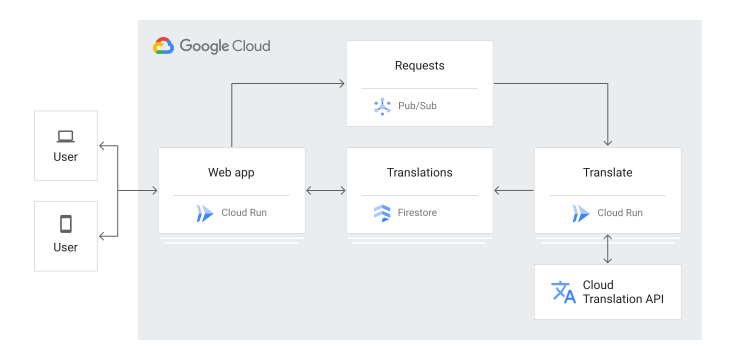
架構圖。

以下是教學課程應用程式的運作事件序列:

  1. 造訪網頁,查看儲存在 Firestore 的翻譯記錄清單。
  2. 輸入 HTML 表單以要求翻譯文字。
  3. 翻譯要求會發布至 Pub/Sub。
  4. 系統會觸發訂閱該 Pub/Sub 主題的 Cloud Run 服務。
  5. Cloud Run 服務會使用 Cloud Translation 翻譯文字。
  6. Cloud Run 服務會將結果儲存在 Firestore 中。

本教學課程適合有意瞭解如何使用 Google Cloud進行背景處理的使用者。不需具備 Pub/Sub、Firestore、Cloud Run 相關經驗。不過,如要瞭解所有程式碼,具備 Java 和 HTML 經驗會很有幫助。

目標

  • 瞭解及部署 Cloud Run 服務。
  • 試用應用程式。

費用

在本文件中,您將使用下列 Google Cloud計費元件:

如要根據預測用量估算費用,請使用 Pricing Calculator。

初次使用 Google Cloud 的使用者可能符合免費試用期資格。

完成本文所述工作後,您可以刪除建立的資源,避免繼續計費,詳情請參閱「清除所用資源」。

事前準備

  1. 登入 Google Cloud 帳戶。如果您是 Google Cloud新手,歡迎 建立帳戶,親自體驗產品的實際應用成效。新客戶還能獲得價值 $300 美元的免費抵免額,能用於執行、測試及部署工作負載。
  2. In the Google Cloud console, on the project selector page, select or create a Google Cloud project.

    Roles required to select or create a project

    • Select a project: Selecting a project doesn't require a specific IAM role—you can select any project that you've been granted a role on.
    • Create a project: To create a project, you need the Project Creator role (roles/resourcemanager.projectCreator), which contains the resourcemanager.projects.create permission. Learn how to grant roles.

    Go to project selector

  3. Verify that billing is enabled for your Google Cloud project.

  4. Enable the Firestore, Pub/Sub, and Cloud Translation APIs, if any are not already enabled.

    Roles required to enable APIs

    To enable APIs, you need the serviceusage.services.enable permission. If you created the project, then you likely already have this permission through the Owner role (roles/owner). Otherwise, you can get this permission through the Service Usage Admin role (roles/serviceusage.serviceUsageAdmin). Learn how to grant roles.

    Enable the APIs

  5. Install the Google Cloud CLI.

  6. If you're using an external identity provider (IdP), you must first sign in to the gcloud CLI with your federated identity.

  7. To initialize the gcloud CLI, run the following command:

    gcloud init
  8. In the Google Cloud console, on the project selector page, select or create a Google Cloud project.

    Roles required to select or create a project

    • Select a project: Selecting a project doesn't require a specific IAM role—you can select any project that you've been granted a role on.
    • Create a project: To create a project, you need the Project Creator role (roles/resourcemanager.projectCreator), which contains the resourcemanager.projects.create permission. Learn how to grant roles.

    Go to project selector

  9. Verify that billing is enabled for your Google Cloud project.

  10. Enable the Firestore, Pub/Sub, and Cloud Translation APIs, if any are not already enabled.

    Roles required to enable APIs

    To enable APIs, you need the serviceusage.services.enable permission. If you created the project, then you likely already have this permission through the Owner role (roles/owner). Otherwise, you can get this permission through the Service Usage Admin role (roles/serviceusage.serviceUsageAdmin). Learn how to grant roles.

    Enable the APIs

  11. Install the Google Cloud CLI.

  12. If you're using an external identity provider (IdP), you must first sign in to the gcloud CLI with your federated identity.

  13. To initialize the gcloud CLI, run the following command:

    gcloud init
  14. 更新 gcloud 元件:
    gcloud components update
  15. 準備開發環境。

    前往 Java 設定指南

準備應用程式

  1. 在終端機視窗中,將範例應用程式存放區複製到本機電腦:

    git clone https://github.com/GoogleCloudPlatform/getting-started-java.git

    您也可以 下載 zip 格式的範例檔案 ,然後將檔案解壓縮。

  2. 變更為包含背景處理範例程式碼的目錄:

    cd getting-started-java/background

瞭解應用程式

網頁應用程式主要有兩個元件:

  • 用來處理網頁要求的 Java HTTP 伺服器。伺服器有下列兩個端點:
    • /translate
      • GET (使用網路瀏覽器):顯示使用者提交的 10 個最新翻譯要求。
      • POST (搭配 Pub/Sub 訂閱項目):使用 Cloud Translation API 處理翻譯要求,並將結果儲存至 Firestore。
    • /create:提交新翻譯要求的表單。
  • 處理網頁表單提交的翻譯要求。有三個用戶端會協同運作:
    • Pub/Sub:使用者提交網路表單時,Pub/Sub 用戶端會發布含有要求詳細資料的訊息。在本教學課程中建立的訂閱項目會將這些訊息轉送至您建立的 Cloud Run 端點,以執行翻譯作業。
    • 翻譯:這個用戶端會執行翻譯作業,處理 Pub/Sub 要求。
    • Firestore:翻譯完成後,這個用戶端會將要求資料和翻譯內容儲存在 Firestore 中。這個用戶端也會讀取主要 /translate 端點的最新要求。

瞭解 Cloud Run 程式碼

  • Cloud Run 應用程式依附於 Firestore、Translation 和 Pub/Sub。

    <dependency>
      <groupId>com.google.cloud</groupId>
      <artifactId>google-cloud-firestore</artifactId>
      <version>3.13.2</version>
    </dependency>
    <dependency>
      <groupId>com.google.cloud</groupId>
      <artifactId>google-cloud-translate</artifactId>
      <version>2.20.0</version>
    </dependency>
    
    <dependency>
      <groupId>com.google.cloud</groupId>
      <artifactId>google-cloud-pubsub</artifactId>
      <version>1.123.17</version>
    </dependency>
  • 系統會初始化全域 Firestore、Translation 和 Pub/Sub 用戶端,以便在叫用之間重複使用。這樣一來,您就不必為每次叫用初始化新的用戶端,以免執行速度變慢。

    @WebListener("Creates Firestore and TranslateServlet service clients for reuse between requests.")
    public class BackgroundContextListener implements ServletContextListener {
      @Override
      public void contextDestroyed(javax.servlet.ServletContextEvent event) {}
    
      @Override
      public void contextInitialized(ServletContextEvent event) {
        String firestoreProjectId = System.getenv("FIRESTORE_CLOUD_PROJECT");
        Firestore firestore = (Firestore) event.getServletContext().getAttribute("firestore");
        if (firestore == null) {
          firestore =
              FirestoreOptions.getDefaultInstance().toBuilder()
                  .setProjectId(firestoreProjectId)
                  .build()
                  .getService();
          event.getServletContext().setAttribute("firestore", firestore);
        }
    
        Translate translate = (Translate) event.getServletContext().getAttribute("translate");
        if (translate == null) {
          translate = TranslateOptions.getDefaultInstance().getService();
          event.getServletContext().setAttribute("translate", translate);
        }
    
        String topicId = System.getenv("PUBSUB_TOPIC");
        TopicName topicName = TopicName.of(firestoreProjectId, topicId);
        Publisher publisher = (Publisher) event.getServletContext().getAttribute("publisher");
        if (publisher == null) {
          try {
            publisher = Publisher.newBuilder(topicName).build();
            event.getServletContext().setAttribute("publisher", publisher);
          } catch (IOException e) {
            e.printStackTrace();
          }
        }
      }
    }
  • 索引處理常式 (/) 可從 Firestore 取得所有現有的譯文,並使用清單填入 HTML 範本:

    @Override
    public void doGet(HttpServletRequest req, HttpServletResponse resp)
        throws ServletException, IOException {
      Firestore firestore = (Firestore) this.getServletContext().getAttribute("firestore");
      CollectionReference translations = firestore.collection("translations");
      QuerySnapshot snapshot;
      try {
        snapshot = translations.limit(10).get().get();
      } catch (InterruptedException | ExecutionException e) {
        throw new ServletException("Exception retrieving documents from Firestore.", e);
      }
      List<TranslateMessage> translateMessages = Lists.newArrayList();
      List<QueryDocumentSnapshot> documents = Lists.newArrayList(snapshot.getDocuments());
      documents.sort(Comparator.comparing(DocumentSnapshot::getCreateTime));
    
      for (DocumentSnapshot document : Lists.reverse(documents)) {
        String encoded = gson.toJson(document.getData());
        TranslateMessage message = gson.fromJson(encoded, TranslateMessage.class);
        message.setData(decode(message.getData()));
        translateMessages.add(message);
      }
      req.setAttribute("messages", translateMessages);
      req.setAttribute("page", "list");
      req.getRequestDispatcher("/base.jsp").forward(req, resp);
    }
  • 如要要求新的翻譯,請提交 HTML 表單。在 /create 註冊的翻譯要求處理常式會剖析提交表單、驗證要求,並向 Pub/Sub 發布訊息:

    @Override
    public void doPost(HttpServletRequest req, HttpServletResponse resp)
        throws ServletException, IOException {
      String text = req.getParameter("data");
      String sourceLang = req.getParameter("sourceLang");
      String targetLang = req.getParameter("targetLang");
    
      Enumeration<String> paramNames = req.getParameterNames();
      while (paramNames.hasMoreElements()) {
        String paramName = paramNames.nextElement();
        logger.warning("Param name: " + paramName + " = " + req.getParameter(paramName));
      }
    
      Publisher publisher = (Publisher) getServletContext().getAttribute("publisher");
    
      PubsubMessage pubsubMessage =
          PubsubMessage.newBuilder()
              .setData(ByteString.copyFromUtf8(text))
              .putAttributes("sourceLang", sourceLang)
              .putAttributes("targetLang", targetLang)
              .build();
    
      try {
        publisher.publish(pubsubMessage).get();
      } catch (InterruptedException | ExecutionException e) {
        throw new ServletException("Exception publishing message to topic.", e);
      }
    
      resp.sendRedirect("/");
    }
  • 您建立的 Pub/Sub 訂閱項目會將這些要求轉送至 Cloud Run 端點,該端點會剖析 Pub/Sub 訊息,取得要翻譯的文字和所需的譯文語言。Translation API 接著會將字串翻譯成您選取的語言。

    String body = req.getReader().lines().collect(Collectors.joining(System.lineSeparator()));
    
    PubSubMessage pubsubMessage = gson.fromJson(body, PubSubMessage.class);
    TranslateMessage message = pubsubMessage.getMessage();
    
    // Use Translate service client to translate the message.
    Translate translate = (Translate) this.getServletContext().getAttribute("translate");
    message.setData(decode(message.getData()));
    Translation translation =
        translate.translate(
            message.getData(),
            Translate.TranslateOption.sourceLanguage(message.getAttributes().getSourceLang()),
            Translate.TranslateOption.targetLanguage(message.getAttributes().getTargetLang()));
  • 應用程式會將翻譯資料儲存在 Firestore 中建立的新文件中。

    // Use Firestore service client to store the translation in Firestore.
    Firestore firestore = (Firestore) this.getServletContext().getAttribute("firestore");
    
    CollectionReference translations = firestore.collection("translations");
    
    ApiFuture<WriteResult> setFuture = translations.document().set(message, SetOptions.merge());
    
    setFuture.get();
    resp.getWriter().write(translation.getTranslatedText());

部署 Cloud Run 應用程式

  1. 選擇 Pub/Sub 主題名稱,並使用 uuidgen 或線上 UUID 產生器 (例如 uuidgenerator.net) 產生 Pub/Sub 驗證權杖。這個權杖可確保 Cloud Run 端點只接受您建立的 Pub/Sub 訂閱項目要求。

    export PUBSUB_TOPIC=background-translate
    export PUBSUB_VERIFICATION_TOKEN=your-verification-token
  2. 建立 Pub/Sub 主題:

     gcloud pubsub topics create $PUBSUB_TOPIC
    
    • 將 pom.xml 檔案中的 MY_PROJECT 替換為您的 Google Cloud 專案 ID。
  3. 使用 Jib Maven 外掛程式,建構程式碼映像檔並部署至 GCR (映像檔存放區)。

     mvn clean package jib:build
    
  4. 將應用程式部署至 Cloud Run:

    gcloud run deploy background --image gcr.io/MY_PROJECT/background \
          --platform managed --region us-central1 --memory 512M \
          --update-env-vars PUBSUB_TOPIC=$PUBSUB_TOPIC,PUBSUB_VERIFICATION_TOKEN=$PUBSUB_VERIFICATION_TOKEN

    其中 MY_PROJECT 是您建立的Google Cloud 專案名稱。這項指令會輸出端點,Pub/Sub 訂閱項目會將翻譯要求推送至該端點。請記下這個端點,因為您需要這個端點來建立 Pub/Sub 訂閱項目,並在瀏覽器中造訪這個端點,要求新的翻譯。

測試應用程式

部署 Cloud Run 服務後,請嘗試要求翻譯。

  1. 如要在瀏覽器中查看應用程式,請前往先前建立的 Cloud Run 端點。

    頁面會顯示空白的翻譯清單,以及要求新翻譯的表單。

  2. 按一下「+ 要求翻譯」,填寫要求表單,然後按一下「提交」。

  3. 提交後,系統會自動將你帶回 /translate 路徑,但新翻譯可能尚未顯示。如要重新整理頁面,請按一下「重新整理」圖示 。翻譯清單中會出現新的一列。如果沒有看到翻譯,請稍候幾秒再試一次。如果還是沒看到翻譯,請參閱下一節,瞭解如何對應用程式進行偵錯。

應用程式偵錯

如果無法連線至 Cloud Run 服務,或沒有看到新的翻譯內容,請檢查下列事項:

  • 確認 gcloud run deploy 指令已成功完成,且未輸出任何錯誤。如有錯誤 (例如 message=Build failed),請修正錯誤,然後再試一次。

  • 檢查記錄中的錯誤:

    1. 前往 Google Cloud 控制台的 Cloud Run 頁面。

      前往 Cloud Run 頁面

    2. 按一下服務名稱 background。

    3. 按一下「Logs」(記錄檔)。

清除所用資源

刪除專案

  1. 前往 Google Cloud 控制台的「Manage resources」(管理資源) 頁面。

    前往「Manage resources」(管理資源)

  2. 在專案清單中選取要刪除的專案,然後點選「Delete」(刪除)。
  3. 在對話方塊中輸入專案 ID,然後按一下 [Shut down] (關閉) 以刪除專案。

刪除 Cloud Run 服務。

  • 刪除在本教學課程中建立的 Cloud Run 服務:

    gcloud run services delete --region=$region background

後續步驟