This page describes the basic concepts of Identity-Aware Proxy
(IAP), a Google Cloud global service.
IAP lets you establish a central authorization
layer for applications accessed by HTTPS, so you can use an application-level
access control model instead of relying on network-level firewalls.
IAP policies scale across your organization. You can define
access policies centrally and apply them to all of your applications and
resources. When you assign a dedicated team to create and enforce policies, you
protect your project from incorrect policy definition or implementation in any
application.
## When to use IAP
Use IAP when you want to enforce access control policies for applications and resources. IAP works with [signed headers](https://docs.cloud.google.com/iap/docs/signed-headers-howto.md.txt) or the App Engine standard environment [Users API](https://docs.cloud.google.com/appengine/docs/standard/services/users.md.txt) to secure your app. With IAP, you can set up group-based application access: a resource can be accessible for employees and inaccessible for contractors, or only accessible to a specific department.
## How IAP works
When an application or resource is protected by IAP, it can
only be accessed through the proxy by
[principals](https://docs.cloud.google.com/iam/docs/overview.md.txt#concepts_related_identity), also known as users,
who have the correct
[Identity and Access Management (IAM) role](https://docs.cloud.google.com/iam/docs/understanding-roles).
When you grant a user access to an application or resource by
IAP, they're subject to the fine-grained access controls
implemented by the product in use without requiring a VPN. When a user tries
to access an IAP-secured resource, IAP
performs authentication and authorization checks.
App Engine 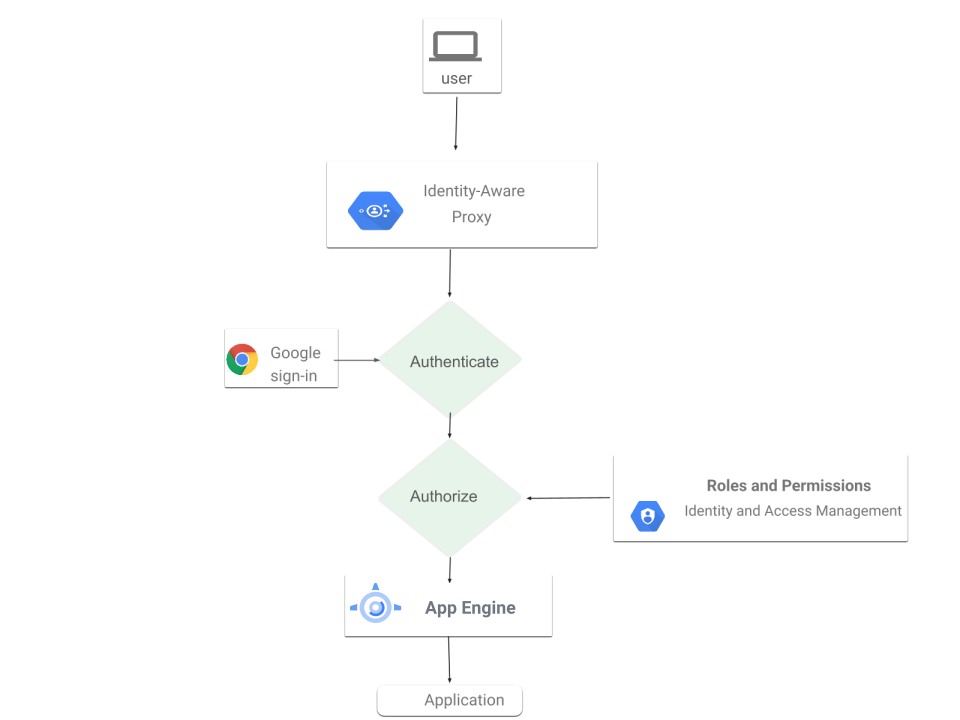 Cloud Run  Compute Engine 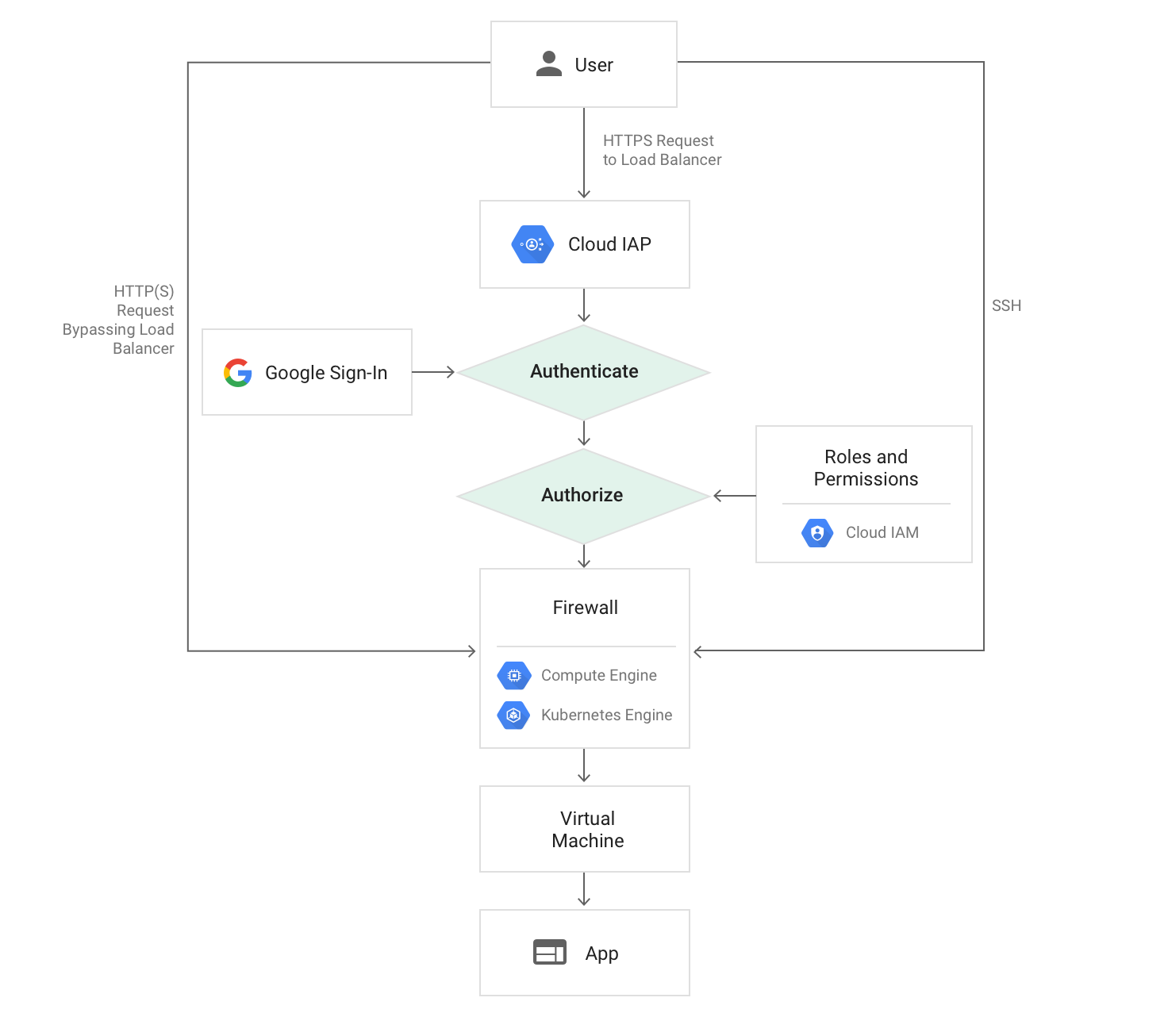 GKE  On-premises 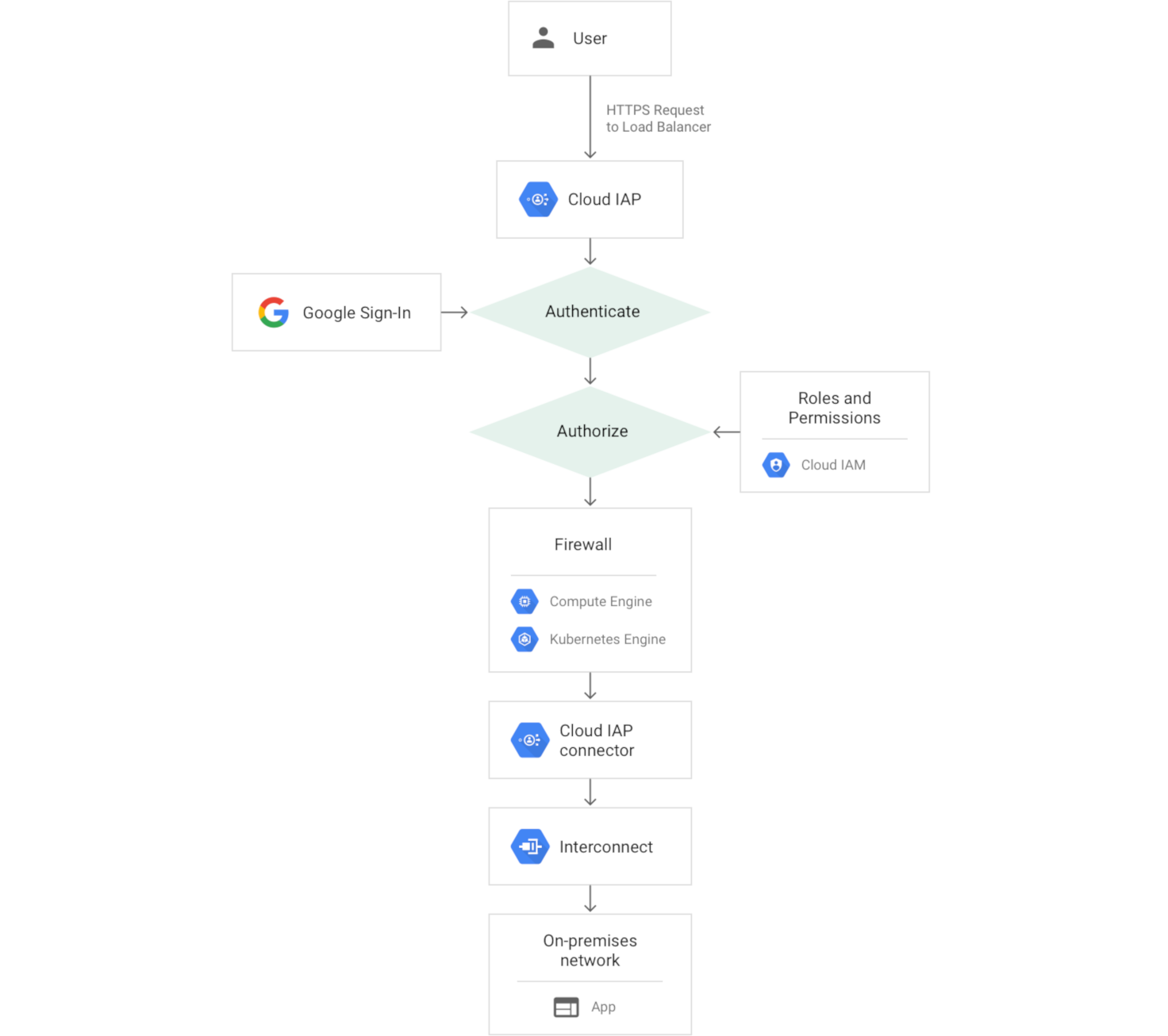
### Authentication
Requests to your Google Cloud resources come through Cloud Run, App Engine, and Cloud Load Balancing (external and internal HTTP(S) load balancing). The serving infrastructure code for these products checks if IAP is enabled for the app or backend service. If IAP is enabled, information about the protected resource is sent to the IAP authentication server. This includes information like the Google Cloud project number, the request URL, and any IAP credentials in the request headers or cookies.
IAP then checks whether the user is signed in. If the
user isn't signed in, their browser is redirected to one of the following
sign-in methods that IAP supports:
- **Google Account:** Your Google Cloud users with Google Accounts are
redirected through the Google Account sign-in flow to access Google Cloud.
- **Workforce Identity Federation:** Your Google Cloud users in an external identity
provider are redirected through their IdP sign-in to access Google Cloud.
- **Identity Platform:** Your customers who use email and passwords or social
sign-ins, such as Facebook, Apple, and Google (Gmail) to access your
application.
After authentication, the user's browser stores a token in a browser cookie for
future sign-ins.
If the request credentials are valid, the authentication server uses those
credentials to get the user's identity (email address and user ID). The
authentication server then uses the identity to check the user's
IAM role and check if the user is authorized to access the
resource.
If you're using Compute Engine or Google Kubernetes Engine,
users who can access the application-serving port of the Virtual Machine (VM)
can bypass IAP authentication. Compute Engine and
GKE firewall rules can't protect against access from code
running on the same VM as the IAP-secured application.
Firewall rules can protect against access from another VM, but only if properly
configured. Learn about [your responsibilities](https://docs.cloud.google.com/iap/docs/concepts-overview.md.txt#your-responsibilities) to
ensure security.
If you're using Cloud Run, you can [enable
IAP](https://docs.cloud.google.com/run/docs/securing/identity-aware-proxy-cloud-run) in the following ways:
- Directly on your Cloud Run services. This enables
IAP to protect all ingress paths to Cloud Run,
including the [auto-assigned URL](https://docs.cloud.google.com/run/docs/triggering/https-request.md.txt) and any
configured load balancer URL. This configuration is useful when you have
a single Cloud Run service to enable IAP for.
- Through a load balancer with a Cloud Run backend. This
configuration is useful when you have multiple Cloud Run
services in different regions with a single global load balancer. In this
configuration, the auto-assigned URL is unprotected by IAP and
might be directly accessible. Learn more about [your
responsibilities](https://docs.cloud.google.com/iap/docs/concepts-overview#your-responsibilities) to ensure security.
If a Cloud Run service runs with a load balancer, don't enable
IAP on both the load balancer and the Cloud Run
service.
Learn more about [Workforce Identity Federation](https://docs.cloud.google.com/iam/docs/workforce-identity-federation.md.txt).
Learn how to [configure IAP with Workforce Identity Federation](https://docs.cloud.google.com/iap/docs/use-workforce-identity-federation.md.txt).
Alternatively, if you want to sync your external identities to their own Google
Accounts, you can use [Google Cloud Directory Sync](https://support.google.com/a/answer/106368)
to synchronize with your IdP.
### Authorization
After authentication, IAP applies the relevant
IAM policy to check if the user is authorized to access the
requested resource. If the user has the **IAP-secured Web App User** role on the
Google Cloud console project where the resource exists, they're authorized to
access the application.
To manage the **IAP-secured Web App User** role list,
use the
[IAP panel on the Google Cloud console](https://console.cloud.google.com/security/iap/).
When you enable IAP for a resource, it automatically creates an OAuth 2.0 client ID and secret. If you delete the automatically generated OAuth 2.0 credentials, IAP won't function correctly. You can view and manage OAuth 2.0 credentials in the [Google Cloud console APIs \& services](https://console.cloud.google.com/apis/dashboard).
#### Context-aware access
As part of the [authorization](https://docs.cloud.google.com/iap/docs/concepts-overview.md.txt#iap-auth) step, you can use context-aware access to provide
secure access to the following types of resources:
##### Google Cloud console and APIs
- First layer of defense in protecting infrastructure access to Google Cloud.
- Advanced context-aware Google Cloud access to users.
##### Virtual Machines (VMs)
- Enables administrative SSH/RDP access to VMs in Google Cloud and in other clouds.
- Lets you implement robust context-aware controls to restrict access to only
designated administrators.
##### Web applications
- Provides authorization and authentication for web applications hosted in
Google Cloud and other clouds.
- Provides continuous authorization to prevent unauthorized access and data loss.
## Your responsibilities
IAP secures authentication and authorization of all requests
to Cloud Run, App Engine, Cloud Load Balancing (HTTPS),
and internal HTTP load balancing.
To ensure security, you must take the following precautions:
- If you're enabling IAP on a load balancer, verify whether the
backend resources can be accessed directly.
- If the backend resource is a VM, configure your firewall rules to protect
against traffic that doesn't come through the load balancer.
IAP doesn't protect against activity within a project,
such as another VM inside the project.
- If the backend resource is a Cloud Run service, you can
disable the run.app URL to ensure that all ingress comes in through the load
balancer. If you choose to leave the run.app URL enabled, you should use
[ingress controls](https://docs.cloud.google.com/run/docs/securing/ingress.md.txt) to block traffic from outside
your network.
- Update your app to use [signed headers](https://docs.cloud.google.com/iap/docs/signed-headers-howto.md.txt) or use the
App Engine standard environment [Users API](https://docs.cloud.google.com/appengine/docs/standard/services/users.md.txt).
## What's next
- Get started with IAP by completing one of the following
tasks:
- Enable IAP [directly on your
Cloud Run](https://docs.cloud.google.com/run/docs/securing/identity-aware-proxy-cloud-run)
services or on a [load balancer with a
Cloud Run backend](https://docs.cloud.google.com/iap/docs/enabling-cloud-run).
- Complete the App Engine quickstart to [Manage Access with Google
Accounts](https://docs.cloud.google.com/iap/docs/app-engine-quickstart).
- Enable [IAP for Compute Engine](https://docs.cloud.google.com/iap/docs/enabling-compute-howto.md.txt).
- Enable [IAP for GKE](https://docs.cloud.google.com/iap/docs/enabling-kubernetes-howto.md.txt).
- Enable [IAP for on-premises apps](https://docs.cloud.google.com/iap/docs/enabling-on-prem-howto.md.txt).
- Learn more:
- [Authenticating to Compute Engine](https://docs.cloud.google.com/compute/docs/authentication.md.txt)
- [App Engine user authentication options](https://docs.cloud.google.com/appengine/docs/standard/authenticating-users.md.txt)
- [Using OAuth 2.0 to access Google APIs](https://developers.google.com/identity/protocols/OAuth2)
- [Google Cloud auth guide](https://docs.cloud.google.com/docs/authentication.md.txt)
- [Setting up a load balancer](https://docs.cloud.google.com/iap/docs/load-balancer-howto.md.txt)
- [Setting up a load balancer with Cloud Run (fully managed)](https://docs.cloud.google.com/load-balancing/docs/https/setting-up-https-serverless.md.txt)
- [Restricting ingress for Cloud Run](https://docs.cloud.google.com/run/docs/securing/ingress.md.txt)