FHIR implementation guides and profiles ensure that resources in a FHIR store
conform to specific defined criteria. Some examples of implementation guides
include the [US Core Implementation Guide 4.0.0](https://www.hl7.org/fhir/us/core/)
and the [Carin Blue Button Implementation Guide](https://bluebutton.cms.gov/assets/ig/index.html).
This page explains how to define, configure, and use implementation guides and
profiles in R4 FHIR stores using the US Core Implementation Guide 4.0.0.
## Overview
[FHIR profiles](https://www.hl7.org/fhir/profiling.html) are
a set of additional rules defined on top of the base FHIR specification that
handle how different healthcare systems process resources. You can import and enable FHIR
profiles in a FHIR store to ensure that all resources in a
FHIR store meet specific criteria for resource structure and information captured.
### Structure definitions and implementation guides
You can import FHIR profiles for your FHIR store by inserting one or more
structure definitions grouped into one or more implementation
guides. Use a structure definition to do the following:
- Define the constraint for a field in a FHIR resource.
- Reference value sets that link code systems and FHIR resources.
You use an implementation guide with structure definitions to validate
resources so that they match the use case of your
third-party software.
For example, suppose that your third-party software needs to comply with [the Centers for
Medicare \& Medicaid Services (CMS) interoperability and Patient Access final
rule](https://www.cms.gov/Regulations-and-Guidance/Guidance/Interoperability/index)
in the US. Your third-party software would need to provide a Patient Access API that complies with the
[CARIN profiles](https://build.fhir.org/ig/HL7/carin-bb/).
You can import and enable the CARIN implementation guide in your FHIR store to
validate the resources against the CARIN profiles. Importing and enabling
implementation guides is described in the subsequent sections of this page.
After you have imported your implementation guide, you can enable it in your
FHIR store for FHIR resource validation. When a FHIR resource is updated or added to the
store, the Cloud Healthcare API verifies whether it matches a structure definition in the
implementation guide. If the FHIR resource does match, the FHIR resource is added to the store. If the
FHIR resource does not conform to the structure definitions in the implementation
guide, an error message is returned and the FHIR resource is rejected.
### Data validation enforcement
The Cloud Healthcare API enforces data validation when using the following methods:
- [`projects.locations.datasets.fhirStores.fhir.create`](https://docs.cloud.google.com/healthcare-api/docs/reference/rest/v1/projects.locations.datasets.fhirStores/create.md.txt)
- [`projects.locations.datasets.fhirStores.fhir.update`](https://docs.cloud.google.com/healthcare-api/docs/reference/rest/v1/projects.locations.datasets.fhirStores.fhir/update.md.txt)
- [`projects.locations.datasets.fhirStores.fhir.patch`](https://docs.cloud.google.com/healthcare-api/docs/reference/rest/v1/projects.locations.datasets.fhirStores/patch.md.txt)
- [`projects.locations.datasets.fhirStores.executeBundle`](https://docs.cloud.google.com/healthcare-api/docs/reference/rest/v1/projects.locations.datasets.fhirStores.fhir/executeBundle.md.txt)
> [!IMPORTANT]
> **Important:** Profile validation is not enforced for the [`projects.locations.datasets.fhirStores.import`](https://docs.cloud.google.com/healthcare-api/docs/reference/rest/v1/projects.locations.datasets.fhirStores/import.md.txt) method.
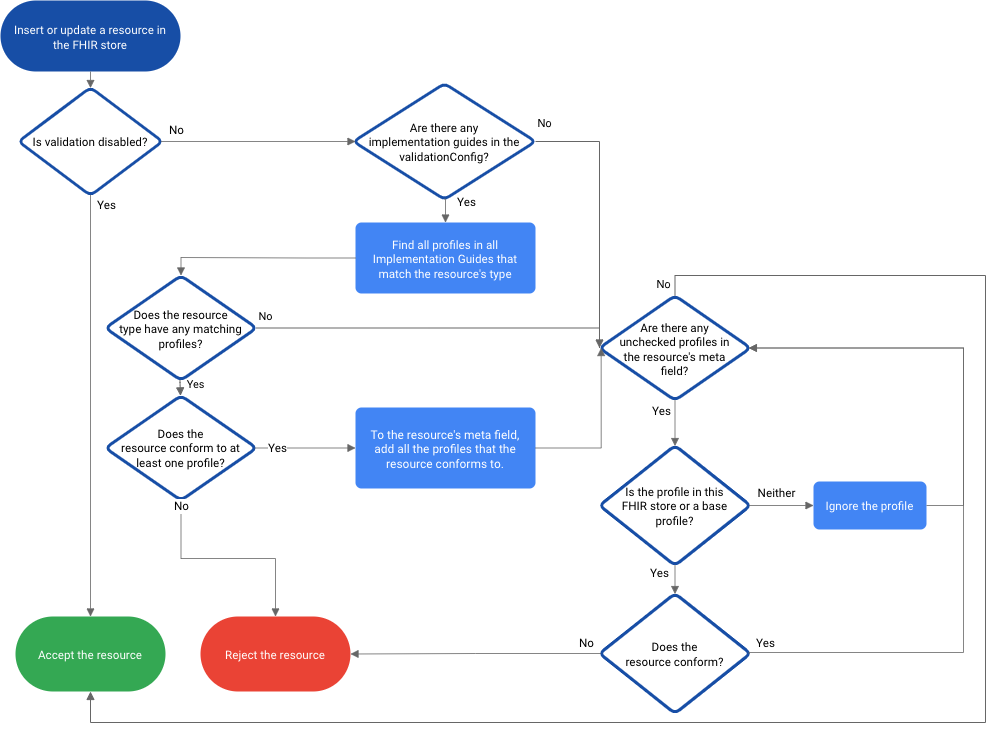
### Profile validation workflow
The following diagram shows the validation workflow for adding or updating
FHIR resources:
## Define your FHIR profiles
The following sections describe how to download structure definitions from your
third-party software and configure an implementation guide.
### Download your profile validation resources
To ensure your structure definitions match your authoritative source, you need
to download the profile validation resources, such as structure definitions,
implementation guides, or value sets, from an external source, such as
[FHIR.org's implementation guide registry](https://fhir.org/guides/registry/).
External sources provide a package which contains all the value sets, profiles,
extensions, a list of pages, and URLs for each implementation guide.
For example, if your system uses the
[US Core](https://www.hl7.org/fhir/us/core/)
patient profile, you can download the structure definitions and implementation
guide used by [US Core](https://www.hl7.org/fhir/us/core/downloads.html).
The Cloud Healthcare API allows validation for the following type of structure
definition rules:
- `slicing`, with support for the following discriminators:
- `value`
- `pattern`
- `profile`
- `min/max`
- `type`
- `fixed`
- `pattern`
- `minValue`
- `maxValue`
- `maxLength`
- `binding`, with the exception of the following rules:
- `ValueSet.compose.include.filter`
- `ValueSet.compose.exclude`
### Configure your implementation guide
After you have downloaded your structure definitions, implementation guide, and
value set, you must add the profiles that the implementation guide uses to
validate FHIR resources.
To configure the implementation guide, complete the following steps:
1. Open the implementation guide file you downloaded from your third-party
software provider.
2. Add the following section to include the structure definitions to be
validated by your implementation guide:
```bash
{
"resourceType": "ImplementationGuide",
...
"global": [
{
"type": "RESOURCE_TYPE",
"profile": "STRUCTURE_DEFINITION_URL"
}
]
...
}
```
Replace the following:
- RESOURCE_TYPE: defines the resource type to which the implementation guide is applicable.
- STRUCTURE_DEFINITION_URL: the URL to the profile's source structure definition, for example, the [US Core Patient Profile](https://hl7.org/fhir/us/core/STU4/StructureDefinition-us-core-patient.html).
3. Save the implementation guide file.
The following example shows the Patient and Organization profiles enabled
for the US Core implementation guide:
```json
"global":[
{
"type":"Patient",
"profile":"https://hl7.org/fhir/us/core/StructureDefinition/us-core-patient"
},
{
"type":"Organization",
"profile":"https://hl7.org/fhir/us/core/StructureDefinition/us-core-organization"
},
...
]
```
> [!NOTE]
> **Note:** Some implementation guide download packages contain more than one implementation guide file. Either delete the implementation guides you are not using or define the structure definitions in all implementation guides.
### Upload your implementation guide to Cloud Storage
> [!NOTE]
> **Note:** Before completing this section, you must have [created a storage bucket in
> Cloud Storage](https://docs.cloud.google.com/storage/docs/creating-buckets).
After you have edited your implementation guide, you must upload the following
files to Cloud Storage:
- The implementation guide
- Structure definitions
- Value sets
After uploading, you can use these files to validate resources in your FHIR
store.
To upload your implementation guide to Cloud Storage, complete the
following steps:
1. Delete all files from your implementation guide that are not used by FHIR
profiles in the Cloud Healthcare API.
For example, if you are implementing the US core
implementation guide, you can delete the following files:
- `.DS_Store`
- `ig-r4.json`
- `openapi/.index.json`
- `package.json`
2. To add the implementation guide, structure definitions, and value sets to
Cloud Storage, run the following commands:
```bash
gcloud storage cp \
PATH_TO_IMPLEMENTATION_GUIDE \
gs://BUCKET/IMPLEMENTATION_GUIDE_DIRECTORY \
--recursive
```
Replace the following:
- PATH_TO_IMPLEMENTATION_GUIDE: the path to the implementation guide on your local machine
- BUCKET/IMPLEMENTATION_GUIDE_DIRECTORY: the bucket and directory where you store the implementation guide in Cloud Storage
> [!NOTE]
> **Note:** You can also upload the files using the Google Cloud console by clicking **Upload files** in the Cloud Storage bucket.
### Import your implementation guide
To use the implementation guide to validate profiles in your FHIR store,
import it to your FHIR store as a FHIR resource.
> [!NOTE]
> **Note:** Ensure that all your implementation guide files have been uploaded to Cloud Storage before importing your implementation guide. If you do not delete the files that are not used by FHIR profiles, you will encounter a number of errors during the import.
The following samples show how to import your implementation guide to a FHIR
store:
### gcloud
To add your implementation guide as a resource to a FHIR store, run the
[`gcloud healthcare fhir-stores import gcs`](https://docs.cloud.google.com/sdk/gcloud/reference/healthcare/fhir-stores/import/gcs)
command:
```bash
gcloud healthcare fhir-stores import gcs FHIR_STORE_ID \
--dataset=DATASET_ID \
--gcs-uri='gs://BUCKET/IMPLEMENTATION_GUIDE_DIRECTORY/*' \
--content-structure=resource-pretty
```
Replace the following:
- FHIR_STORE_ID: the FHIR store ID
- DATASET_ID: the dataset ID
- BUCKET/IMPLEMENTATION_GUIDE_DIRECTORY: the location of the implementation guide in a Cloud Storage bucket
The output is the following:
```
Request issued for: [FHIR_STORE_ID]
Waiting for operation [OPERATION_ID] to complete...done.
name: projects/PROJECT_ID/locations/LOCATION/datasets/DATASET_ID/fhirStores/FHIR_STORE_ID
```
In this output:
- PROJECT_ID, LOCATION, DATASET_ID: the values that you provided in the method call
- OPERATION_ID: an identifier for the long-running operation provided by the Cloud Healthcare API
To view more details of the operation, run the
[`gcloud healthcare operations describe`](https://docs.cloud.google.com/sdk/gcloud/reference/healthcare/operations/describe)
command, providing the OPERATION_ID from the response:
```bash
gcloud healthcare operations describe OPERATION_ID \
--dataset=DATASET_ID
```
The output is the following. If the response contains `done: true`, then
the operation is finished. If it doesn't, then the operation is still running;
wait a few seconds and then run the `gcloud healthcare operations describe` command again.
```
done: true
metadata:
'@type': type.googleapis.com/google.cloud.healthcare.v1.OperationMetadata
apiMethodName: google.cloud.healthcare.v1.fhir.FhirService.ImportResources
createTime: 'CREATE_TIME'
endTime: 'END_TIME'
name: projects/PROJECT_ID/locations/LOCATION/datasets/DATASET_ID/fhirStores/FHIR_STORE_ID
response:
'@type': type.googleapis.com/google.cloud.healthcare.v1.fhir.rest.ImportResourcesResponse
fhirStore: projects/PROJECT_ID/locations/LOCATION/datasets/DATASET_ID/fhirStores/FHIR_STORE_ID
```
### API
### curl
```bash
curl -X POST \
-H "Authorization: Bearer $(gcloud auth application-default print-access-token)" \
-H "Content-Type: application/json; charset=utf-8" \
--data '{
"contentStructure": "RESOURCE_PRETTY",
"gcsSource": {
"uri": "gs://BUCKET/IMPLEMENTATION_GUIDE_DIRECTORY/*"
}
}' "https://healthcare.googleapis.com/v1/projects/PROJECT_ID/locations/LOCATION/datasets/DATASET_ID/fhirStores/FHIR_STORE_ID:import"
```
Replace the following:
- BUCKET/IMPLEMENTATION_GUIDE_DIRECTORY: the location of the implementation guide in a Cloud Storage bucket
- PROJECT_ID: the ID of your Google Cloud project
- LOCATION: the dataset location
- DATASET_ID: the dataset ID
- FHIR_STORE_ID: the FHIR store ID
The response is the following:
```
{
"name": "projects/PROJECT_ID/locations/LOCATION/datasets/DATASET_ID/operations/OPERATION_ID"
}
```
In this output:
- PROJECT_ID, LOCATION, DATASET_ID: the values that you provided in the method call
- OPERATION_ID: an identifier for the long-running operation provided by the Cloud Healthcare API
To track the status of the operation,
use the
[`operations.get`](https://docs.cloud.google.com/healthcare-api/docs/reference/rest/v1/projects.locations.datasets.operations/get.md.txt) method:
```bash
curl -X GET \
-H "Authorization: Bearer $(gcloud auth application-default print-access-token)" \
"https://healthcare.googleapis.com/v1/projects/PROJECT_ID/locations/LOCATION/datasets/DATASET_ID/operations/OPERATION_ID"
```
Replace the following:
- PROJECT_ID: the ID of your Google Cloud project
- LOCATION: the dataset location
- DATASET_ID: the dataset ID
- FHIR_STORE_ID: the FHIR store ID
- OPERATION_ID: the ID returned from the long-running operation
The output is the following. If the response contains `"done": true`, then
the operation is finished. If it doesn't, then the operation is still running;
wait a few seconds and then call the `operations.get` method again.
```
{
"name": "projects/PROJECT_ID/locations/LOCATION/datasets/DATASET_ID/operations/OPERATION_ID",
"metadata": {
"@type": "type.googleapis.com/google.cloud.healthcare.v1.OperationMetadata",
"apiMethodName": "google.cloud.healthcare.v1.fhir.FhirService.ImportResources",
"createTime": "CREATE_TIME",
"endTime": "END_TIME",
"logsUrl": "https://console.cloud.google.com/logs/query/CLOUD_LOGGING_URL",
"counter": {
"success": "SUCCESS_COUNT"
}
},
"done": true,
"response": {
"@type": "type.googleapis.com/google.cloud.healthcare.v1.fhir.rest.ImportResourcesResponse",
}
}
```
### PowerShell
```bash
$cred = gcloud auth application-default print-access-token
$headers = @{ Authorization = "Bearer $cred" }
Invoke-WebRequest `
-Method Post `
-Headers $headers `
-ContentType: "application/json; charset=utf-8" `
-Body '{
"contentStructure": "RESOURCE_PRETTY",
"gcsSource": {
"uri": "gs://BUCKET/IMPLEMENTATION_GUIDE_DIRECTORY/*"
}
}' `
-Uri "https://healthcare.googleapis.com/v1/projects/PROJECT_ID/locations/LOCATION/datasets/DATASET_ID/fhirStores/FHIR_STORE_ID:import" | Select-Object -Expand Content
```
Replace the following:
- BUCKET/IMPLEMENTATION_GUIDE_DIRECTORY: the location of the implementation guide in a Cloud Storage bucket
- PROJECT_ID: the ID of your Google Cloud project
- LOCATION: the dataset location
- DATASET_ID: the dataset ID
- FHIR_STORE_ID: the FHIR store ID
The response is the following:
```
{
"name": "projects/PROJECT_ID/locations/LOCATION/datasets/DATASET_ID/operations/OPERATION_ID"
}
```
In this output:
- PROJECT_ID, LOCATION, DATASET_ID: the values that you provided in the method call
- OPERATION_ID: an identifier for the long-running operation provided by the Cloud Healthcare API
To track the status of the operation,
use the
[`operations.get`](https://docs.cloud.google.com/healthcare-api/docs/reference/rest/v1/projects.locations.datasets.operations/get.md.txt) method:
```bash
$cred = gcloud auth application-default print-access-token
$headers = @{ Authorization = "Bearer $cred" }
Invoke-WebRequest `
-Method Get `
-Headers $headers `
-Uri "https://healthcare.googleapis.com/v1/projects/PROJECT_ID/locations/LOCATION/datasets/DATASET_ID/operations/OPERATION_ID" | Select-Object -Expand Content
```
Replace the following:
- PROJECT_ID: the ID of your Google Cloud project
- LOCATION: the dataset location
- DATASET_ID: the dataset ID
- FHIR_STORE_ID: the FHIR store ID
- OPERATION_ID: the ID returned from the long-running operation
The output is the following. If the response contains `"done": true`, then
the operation is finished. If it doesn't, then the operation is still running;
wait a few seconds and then call the `operations.get` method again.
```
{
"name": "projects/PROJECT_ID/locations/LOCATION/datasets/DATASET_ID/operations/OPERATION_ID",
"metadata": {
"@type": "type.googleapis.com/google.cloud.healthcare.v1.OperationMetadata",
"apiMethodName": "google.cloud.healthcare.v1.fhir.FhirService.ImportResources",
"createTime": "CREATE_TIME",
"endTime": "END_TIME",
"logsUrl": "https://console.cloud.google.com/logs/query/CLOUD_LOGGING_URL",
"counter": {
"success": "SUCCESS_COUNT"
}
},
"done": true,
"response": {
"@type": "type.googleapis.com/google.cloud.healthcare.v1.fhir.rest.ImportResourcesResponse",
}
}
```
### Upload and import dependencies of your implementation
Before you can enable your implementation guide, you must ensure that all the
guide's dependencies are uploaded and imported. Dependencies are defined
by the `dependsOn` parameter in your implementation guide as follows:
```json
"dependsOn":[
{
"id":"hl7_fhir_uv_bulkdata",
"uri":"http://hl7.org/fhir/uv/bulkdata/ImplementationGuide/hl7.fhir.uv.bulkdata",
"packageId":"hl7.fhir.uv.bulkdata",
"version":"1.0.1"
},
{
"id":"vsac",
"uri":"http://fhir.org/packages/us.nlm.vsac/ImplementationGuide/us.nlm.vsac",
"packageId":"us.nlm.vsac",
"version":"0.3.0"
}
]
```
To upload and import dependencies, follow the instructions in
[Upload your implementation guide to Cloud Storage](https://docs.cloud.google.com/healthcare-api/docs/how-tos/fhir-profiles.md.txt#upload_your_implementation_guide_to)
and [Import your implementation guide](https://docs.cloud.google.com/healthcare-api/docs/how-tos/fhir-profiles.md.txt#import_your_implementation_guide),
respectively.
### Enable your implementation guide
To use an implementation guide resource to validate profiles, you must enable
the implementation guide. If you enable more than one implementation guide,
Cloud Healthcare API attempts to validate profiles against all implementation
guides. A FHIR resource only needs to match one profile from any enabled
implementation guide.
The Cloud Healthcare API only validates implementation guides when you
enable them. If you modify an implementation guide and enable it again,
the Cloud Healthcare API validates the modified implementation guide.
If you remove an implementation guide after enabling it,
the implementation guide stops taking effect.
> [!NOTE]
> **Note:** Ensure that you have imported your implementation guide before enabling it. Although you can use implementation guides without importing your dependencies, we recommend that you import the dependencies before enabling the implementation guide.
The following samples show how to enable your implementation guide for profile
validation on an existing FHIR store:
### curl
To enable your implementation guide , make a `PATCH` request and specify the
following information:
- The name and location of the parent dataset
- The name of the FHIR store
- The `enabledImplementationGuides` field set to the path to your implementation guide resource
The following sample shows a `PATCH` request using `curl`.
```bash
curl -X PATCH \
-H "Authorization: Bearer $(gcloud auth application-default print-access-token)" \
-H "Content-Type: application/fhir+json; charset=utf-8" \
--data '{
"validationConfig": {
"enabledImplementationGuides": ["IMPLEMENTATION_GUIDE_URL"],
"disableProfileValidation": false
}
}' "https://healthcare.googleapis.com/v1/projects/PROJECT_ID/locations/LOCATION/datasets/DATASET_ID/fhirStores/FHIR_STORE_ID?updateMask=validationConfig"
```
Replace the following:
- IMPLEMENTATION_GUIDE_URL: the URL defined in the [`url` property](https://www.hl7.org/fhir/implementationguide-definitions.html#ImplementationGuide.url) of the ImplementationGuide resource, for example, `http://hl7.org/fhir/us/core/ImplementationGuide/hl7.fhir.us.core`
- PROJECT_ID: the ID of your Google Cloud project
- LOCATION: the dataset location
- DATASET_ID: the dataset ID
- FHIR_STORE_ID: the FHIR store ID
The response is the following:
```
{
"name": "projects/PROJECT_ID/locations/LOCATION/datasets/DATASET_ID/fhirStores/FHIR_STORE_ID",
"validationConfig": {
"enabledImplementationGuides": ["IMPLEMENTATION_GUIDE_URL"]
}
}
```
> [!IMPORTANT]
> **Important:** If your resources are failing the validation, you can disable validation by setting the `disableProfileValidation` field to `true`.
### PowerShell
To enable your implementation guide , make a `PATCH` request and specify the
following information:
- The name and location of the parent dataset
- The name of the FHIR store
- The `enabledImplementationGuides` field set to the path to your implementation guide resource
The following sample shows a `PATCH` request using Windows PowerShell.
```bash
$cred = gcloud auth application-default print-access-token
$headers = @{ Authorization = "Bearer $cred" }
Invoke-WebRequest `
-Method Patch `
-Headers $headers `
-ContentType: "application/json; charset=utf-8" `
-Body '{
"validationConfig": {
"enabledImplementationGuides": ["IMPLEMENTATION_GUIDE_URL"]
}
}' `
-Uri "https://healthcare.googleapis.com/v1/projects/PROJECT_ID/locations/LOCATION/datasets/DATASET_ID/fhirStores/FHIR_STORE_ID?updateMask=validationConfig" | Select-Object -Expand Content
```
Replace the following:
- IMPLEMENTATION_GUIDE_URL: the URL defined in the [`url` property](https://www.hl7.org/fhir/implementationguide-definitions.html#ImplementationGuide.url) of the ImplementationGuide resource, for example, `http://hl7.org/fhir/us/core/ImplementationGuide/hl7.fhir.us.core`
- PROJECT_ID: the ID of your Google Cloud project
- LOCATION: the dataset location
- DATASET_ID: the dataset ID
- FHIR_STORE_ID: the FHIR store ID
The response is the following:
```
{
"name": "projects/PROJECT_ID/locations/LOCATION/datasets/DATASET_ID/fhirStores/FHIR_STORE_ID",
"validationConfig": {
"enabledImplementationGuides": ["IMPLEMENTATION_GUIDE_URL"],
},
}
```
> [!IMPORTANT]
> **Important:** If your resources are failing the validation, you can disable validation by setting the `disableProfileValidation` field to `true`.
### Python
```python
def enable_implementation_guide(
project_id,
location,
dataset_id,
fhir_store_id,
implementation_guide_url,
):
"""
Patches an existing FHIR store to enable an ImplementationGuide resource
that exists in the FHIR store.
See https://github.com/GoogleCloudPlatform/python-docs-samples/tree/main/healthcare/api-client/v1/fhir
before running the sample."""
# Imports the Google API Discovery Service.
from googleapiclient import discovery
api_version = "v1"
service_name = "healthcare"
# Instantiates an authorized API client by discovering the Healthcare API
# and using GOOGLE_APPLICATION_CREDENTIALS environment variable.
client = discovery.build(service_name, api_version)
# TODO(developer): Uncomment these lines and replace with your values.
# project_id = 'my-project' # replace with your GCP project ID
# location = 'us-central1' # replace with the dataset's location
# dataset_id = 'my-dataset' # replace with your dataset ID
# fhir_store_id = 'my-fhir-store' # replace with the FHIR store's ID
# implementation_guide_url =
# 'http://hl7.org/fhir/us/core/ImplementationGuide/hl7.fhir.us.core' #
# replace with the 'url' property in the ImplementationGuide resource
fhir_store_parent = "projects/{}/locations/{}/datasets/{}".format(
project_id, location, dataset_id
)
fhir_store_name = f"{fhir_store_parent}/fhirStores/{fhir_store_id}"
validation_config = {
"validationConfig": {"enabledImplementationGuides": [implementation_guide_url]}
}
request = (
client.projects()
.locations()
.datasets()
.fhirStores()
.patch(
name=fhir_store_name, updateMask="validationConfig", body=validation_config
)
)
response = request.execute()
print(
"Enabled ImplementationGuide with URL {} on FHIR store {}".format(
implementation_guide_url, fhir_store_id
)
)
return response
```
## Use the Google Cloud console to enable implementation guides
When you use the Google Cloud console to
[create or edit a FHIR store](https://docs.cloud.google.com/healthcare-api/docs/how-tos/fhir.md.txt), you can do the
following:
- Select the default implementation guides that are provided by the Cloud Healthcare API
- Import a custom implementation guide from Cloud Storage into your FHIR store
To import a custom implementation guide, complete the following steps:
1. [Download your profile validation resources](https://docs.cloud.google.com/healthcare-api/docs/how-tos/fhir-profiles.md.txt#download-ig).
2. Optional: [Configure your implementation guide](https://docs.cloud.google.com/healthcare-api/docs/how-tos/fhir-profiles.md.txt#configure_your_implementation_guide).
This step is necessary to add the `global` array to your implementation guide
resource manually. If you choose to skip this step, you must add the `global` array
when you create the FHIR transaction bundle in the next step using a
different method, such as the
[Bundler for FHIR profile validation resources](https://github.com/GoogleCloudPlatform/bundler_for_fhir_profile_validation_resources)
tool with the `generate_global_array` flag.
3. Create a [FHIR transaction bundle](https://docs.cloud.google.com/healthcare-api/docs/how-tos/fhir-bundles.md.txt)
of your profile validation resources, which includes the implementation guide,
the structure definitions, and the value sets.
You can create the transaction bundle using the
[Bundler for FHIR profile validation resources](https://github.com/GoogleCloudPlatform/bundler_for_fhir_profile_validation_resources)
tool.
4. Upload the FHIR profile validation bundle to a Cloud Storage location.
```bash
gcloud storage cp \
PATH_TO_PROFILE_VALIDATION_BUNDLE \
gs://BUCKET/IMPLEMENTATION_GUIDE_DIRECTORY \
--recursive
```
Replace the following:
- PATH_TO_PROFILE_VALIDATION_BUNDLE: the path to the profile validation bundle on your local machine
- BUCKET/IMPLEMENTATION_GUIDE_DIRECTORY: the Cloud Storage location where the bundle must be stored
> [!NOTE]
> **Note:** You can also upload the files using the Google Cloud console by clicking **Upload files** in the Cloud Storage bucket.
5. Import your custom implementation guide from the Cloud Storage location when
you [create](https://docs.cloud.google.com/healthcare-api/docs/how-tos/fhir.md.txt#healthcare-create-fhir-store-console)
or
[edit](https://docs.cloud.google.com/healthcare-api/docs/how-tos/fhir.md.txt#healthcare-patch-fhir-store-console)
your FHIR store.
## Validate resources against specific profiles
The following samples show how to validate a FHIR resource for a specific
profile or for all profiles defined for a FHIR store. Validating the FHIR resource
lets you determine if your FHIR resource conforms to one more profiles.
To validate a FHIR resource, use the [`fhir.Resource-validate`](https://docs.cloud.google.com/healthcare-api/docs/reference/rest/v1/projects.locations.datasets.fhirStores.fhir/Resource-validate.md.txt)
method.
### curl
```bash
curl -X POST \
-H "Authorization: Bearer $(gcloud auth application-default print-access-token)" \
-H "Content-Type: application/json; charset=utf-8" \
--data @RESOURCE_FILE \
'https://healthcare.googleapis.com/v1/projects/PROJECT_ID/locations/LOCATION/datasets/DATASET_ID/fhirStores/FHIR_STORE_ID/fhir/RESOURCE_TYPE/$validate?profile=PROFILE_URL'
```
Replace the following:
- RESOURCE_FILE: the location to a file containing the resource
- PROJECT_ID: the ID of your Google Cloud project
- LOCATION: the dataset location
- DATASET_ID: the dataset ID
- FHIR_STORE_ID: the FHIR store ID
- PROFILE_URL: the canonical URL of the FHIR profile, for example `http://hl7.org/fhir/us/core/StructureDefinition/us-core-patient` for a Patient resource. There must be a StructureDefinition resource in FHIR_STORE_ID that has this URL. If you are validating the resource against the profiles you have already enabled in the store, do not provide this query parameter.
- RESOURCE_TYPE: the resource type
If a resource conforms to the profiles, a response similar to the following is
returned:
```
{
"issue": [
{
"code": "informational",
"details": {
"text": "success"
},
"diagnostics": "success",
"severity": "information"
}
],
"resourceType": "OperationOutcome"
}
```
If a resource does not conform to a profile, an error is returned with a
response similar to the following:
```
{
"issue": [
{
"code": "processing",
"diagnostics": "Profile http://hl7.org/fhir/StructureDefinition/AuditEvent, Element 'AuditEvent.agent.requestor': minimum required = 1, but only found 0",
"location": [
"AuditEvent.agent"
],
"severity": "error"
}
],
"resourceType": "OperationOutcome"
}
```
### PowerShell
```bash
$cred = gcloud auth application-default print-access-token
$headers = @{ Authorization = "Bearer $cred" }
Invoke-WebRequest `
-Method Post `
-Headers $headers `
-ContentType: "application/json; charset=utf-8" `
-Body '@RESOURCE_FILE' `
-Uri "https://healthcare.googleapis.com/v1/projects/PROJECT_ID/locations/LOCATION/datasets/DATASET_ID/fhirStores/FHIR_STORE_ID/fhir/RESOURCE_TYPE/$validate?profile=PROFILE_URL" | Select-Object -Expand Content
```
Replace the following:
- RESOURCE_FILE: the location to a file containing the resource
- PROJECT_ID: the ID of your Google Cloud project
- LOCATION: the dataset location
- DATASET_ID: the dataset ID
- FHIR_STORE_ID: the FHIR store ID
- PROFILE_URL: the canonical URL of the FHIR profile, for example `http://hl7.org/fhir/us/core/StructureDefinition/us-core-patient` for a Patient resource. There must be a StructureDefinition resource in FHIR_STORE_ID that has this URL. If you are validating the resource against the profiles you have already enabled in the store, do not provide this query parameter.
- RESOURCE_TYPE: the resource type
If a resource is validated for a profile, a response similar to the following is
returned:
```
{
"issue": [
{
"code": "informational",
"details": {
"text": "success"
},
"diagnostics": "success",
"severity": "information"
}
],
"resourceType": "OperationOutcome"
}
```
If a resource is not validated for a profile, an error is returned with a
response similar to the following:
```
{
"issue": [
{
"code": "processing",
"diagnostics": "Profile http://hl7.org/fhir/StructureDefinition/AuditEvent, Element 'AuditEvent.agent.requestor': minimum required = 1, but only found 0",
"location": [
"AuditEvent.agent"
],
"severity": "error"
}
],
"resourceType": "OperationOutcome"
}
```
### Python
```python
def validate_resource_profile_url(
project_id, location, dataset_id, fhir_store_id, resource_type, profile_url
):
"""Validates an input FHIR resource's conformance to a profile URL. The
profile StructureDefinition resource must exist in the FHIR store before
performing validation against the URL.
See https://github.com/GoogleCloudPlatform/python-docs-samples/tree/main/healthcare/api-client/v1/fhir
before running the sample."""
# Imports Python's built-in "os" module
import os
# Imports the google.auth.transport.requests transport
from google.auth.transport import requests
# Imports a module to allow authentication using a service account
from google.oauth2 import service_account
# Gets credentials from the environment.
credentials = service_account.Credentials.from_service_account_file(
os.environ["GOOGLE_APPLICATION_CREDENTIALS"]
)
scoped_credentials = credentials.with_scopes(
["https://www.googleapis.com/auth/cloud-platform"]
)
# Creates a requests Session object with the credentials.
session = requests.AuthorizedSession(scoped_credentials)
# URL to the Cloud Healthcare API endpoint and version
base_url = "https://healthcare.googleapis.com/v1"
# TODO(developer): Uncomment these lines and replace with your values.
# project_id = 'my-project' # replace with your GCP project ID
# location = 'us-central1' # replace with the parent dataset's location
# dataset_id = 'my-dataset' # replace with the parent dataset's ID
# fhir_store_id = 'my-fhir-store' # replace with the FHIR store ID
# resource_type = 'Patient' # replace with the FHIR resource type
# profile_url = 'http://hl7.org/fhir/us/core/StructureDefinition/us-core-patient' # replace with the profile URL
url = f"{base_url}/projects/{project_id}/locations/{location}"
resource_path = "{}/datasets/{}/fhirStores/{}/fhir/{}".format(
url, dataset_id, fhir_store_id, resource_type
)
resource_path += "/$validate"
params = {"profile": profile_url}
# The body shown works with a Patient resource and is not guaranteed
# to work with other types of FHIR resources. If necessary,
# supply a new body with data that corresponds to the resource you
# are validating and supply a new resource_type.
body = {
"name": [{"use": "official", "family": "Smith", "given": ["Darcy"]}],
"gender": "female",
"birthDate": "1970-01-01",
"resourceType": "Patient",
}
# Sets required application/fhir+json header on the request
headers = {"Content-Type": "application/fhir+json;charset=utf-8"}
response = session.post(resource_path, headers=headers, json=body, params=params)
response.raise_for_status()
resource = response.json()
print(json.dumps(resource))
return resource
```