This page describes how to configure consent policies and attributes.
Consent policies are used by the Consent Management API to represent consent granted
by an end-user or through an organizational guideline. Consent
policies are the building blocks of
[`consent`](https://docs.cloud.google.com/healthcare-api/docs/reference/rest/v1/projects.locations.datasets.consentStores.consents.md.txt)
resources. Each `consent` resource can contain up to 10 consent policies. A consent
policy consists of `RESOURCE` attributes that describe what the policy
applies to, and `REQUEST` attributes that define an authorization rule that
determines under what conditions the policy is valid. For more information on consent
policies, see
[Policy representation](https://docs.cloud.google.com/healthcare-api/docs/concepts/consent.md.txt#policy_representation).
The Consent Management API uses attributes to define the consent and privacy
taxonomy that a consent store can understand. Attributes are used to describe the
consents being stored and the data that is being managed. Access determination
requests also use attributes to describe the requests that are being made.
The [`attributeDefinition`](https://docs.cloud.google.com/healthcare-api/docs/reference/rest/v1/projects.locations.datasets.consentStores.attributeDefinitions.md.txt) resources
are the resources within a consent store that determine what
consent attributes the Consent Management API can process. A consent store can
contain up to 200 attribute definition resources. Each attribute
definition has one of the following attribute types:
- A `RESOURCE` attribute is an attribute whose value is determined by the properties of the data or action. For example, whether data is de-identified or identifiable. This type of attribute is used to describe what a consent policy applies to, to describe data registered with `user data mappings`, and to narrow the scope of some access determination requests to specific classes of resources.
- A `REQUEST` attribute is an attribute whose value is determined by requester's identity or purpose. For example, professions that are consented for use, such as researchers or care providers. This type of attribute is used to write the authorization rule of a consent policy, and to specify the proposed use in an access determination request.
An `attributeDefinition` resource represents a single attribute with up to 500
attribute values. Attribute values represent the possible values
that an attribute can have. For an example, see [Policy representation](https://docs.cloud.google.com/healthcare-api/docs/concepts/consent.md.txt#policy_representation).
Additional attribute values can be added to an
attribute definition over time, but cannot be removed. Referential integrity of
attribute definitions is enforced as related to `consent` resources. This means
that some fields of an attribute definition cannot be changed or deleted while
that attribute definition is being referenced by the latest revision of a
consent resource.
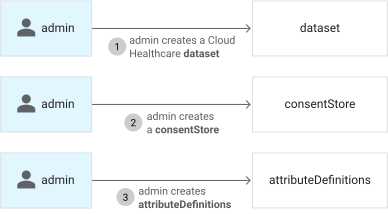
The following diagram shows the process for creating consent attributes in a
new consent store:
To create all the attribute definitions that your consent and privacy taxonomy
requires, repeat the process shown in
[Creating a `RESOURCE` attribute definition](https://docs.cloud.google.com/healthcare-api/docs/how-tos/consent-policies.md.txt#creating_a_resource_attribute_definition)
and
[Creating a `REQUEST` attribute definition](https://docs.cloud.google.com/healthcare-api/docs/how-tos/consent-policies.md.txt#creating_a_request_attribute_definition).
## Creating a `RESOURCE` attribute definition
To create a `RESOURCE` attribute definition, use the
[`projects.locations.datasets.consentStores.attributeDefinitions.create`](https://docs.cloud.google.com/healthcare-api/docs/reference/rest/v1/projects.locations.datasets.consentStores.attributeDefinitions/create.md.txt)
method. Make a `POST` request and specify the following information in the
request:
- The name of the parent consent store.
- A name for the attribute definition that's unique in the parent consent store. The name can be any lower or upper case letter, numbers, and underscores. It must not be a reserved keyword within the [Common Expression Language (CEL)](https://github.com/google/cel-spec/blob/master/doc/langdef.md).
- The category of the attribute, in this case `RESOURCE`
- The possible values that this attribute can represent
- An access token
### curl
The following sample shows a `POST` request using `curl` that creates a
`RESOURCE` attribute named `data_identifiable` with values `identifiable` and
`de-identified`:
```bash
curl -X POST \
-H "Authorization: Bearer $(gcloud auth application-default print-access-token)" \
-H "Content-Type: application/consent+json; charset=utf-8" \
--data "{
'description': 'whether the data is identifiable',
'category': 'RESOURCE',
'allowed_values': [
'identifiable',
'de-identified'
],
}" \
"https://healthcare.googleapis.com/v1/projects/PROJECT_ID/locations/LOCATION/datasets/DATASET_ID/consentStores/CONSENT_STORE_ID/attributeDefinitions?attribute_definition_id=data_identifiable"
```
If the request is successful, the server returns a response similar to the
following sample in JSON format:
```
{
"name": "projects/PROJECT_ID/locations/LOCATION/datasets/DATASET_ID/consentStores/CONSENT_STORE_ID/attributeDefinitions/data_identifiable",
"description": "whether the data is identifiable",
"category": "RESOURCE",
"allowedValues": [
"identifiable",
"de-identified"
]
}
```
### PowerShell
The following sample shows a `POST` request using Windows PowerShell that
creates a `RESOURCE` attribute named `data_identifiable` with values
`identifiable` and `de-identified`:
```bash
$cred = gcloud auth application-default print-access-token
$headers = @{ Authorization = "Bearer $cred" }
Invoke-WebRequest `
-Method Post `
-Headers $headers `
-ContentType: "application/consent+json; charset=utf-8" `
-Body "{
'description': 'whether the data is identifiable',
'category': 'RESOURCE',
'allowed_values': [
'identifiable',
'de-identified'
]
}" `
-Uri "https://healthcare.googleapis.com/v1/projects/PROJECT_ID/locations/LOCATION/datasets/DATASET_ID/consentStores/CONSENT_STORE_ID/attributeDefinitions?attribute_definition_id=data_identifiable" | Select-Object -Expand Content
```
If the request is successful, the server returns a response similar to the
following sample in JSON format:
```
{
"name": "projects/PROJECT_ID/locations/LOCATION/datasets/DATASET_ID/consentStores/CONSENT_STORE_ID/attributeDefinitions/data_identifiable",
"description": "whether the data is identifiable",
"category": "RESOURCE",
"allowedValues": [
"identifiable",
"de-identified"
]
}
```
### Python
```python
def create_resource_attribute_definition(
project_id: str,
location: str,
dataset_id: str,
consent_store_id: str,
resource_attribute_definition_id: str,
):
"""Creates a RESOURCE attribute definition. A RESOURCE attribute is an attribute whose value is
determined by the properties of the data or action.
See https://github.com/GoogleCloudPlatform/python-docs-samples/tree/main/healthcare/api-client/v1/consent
before running the sample."""
# Imports the Google API Discovery Service.
from googleapiclient import discovery
api_version = "v1"
service_name = "healthcare"
# Returns an authorized API client by discovering the Healthcare API
# and using GOOGLE_APPLICATION_CREDENTIALS environment variable.
client = discovery.build(service_name, api_version)
# TODO(developer): Uncomment these lines and replace with your values.
# project_id = 'my-project' # replace with your GCP project ID
# location = 'us-central1' # replace with the parent dataset's location
# dataset_id = 'my-dataset' # replace with the FHIR store's parent dataset ID
# consent_store_id = 'my-consent-store' # replace with the consent store's ID
# resource_attribute_definition_id = 'requester_identity' # replace with the attribute definition ID
consent_store_parent = (
"projects/{}/locations/{}/datasets/{}/consentStores/{}".format(
project_id, location, dataset_id, consent_store_id
)
)
body = {
"description": "whether the data is identifiable",
"category": "RESOURCE",
"allowed_values": ["identifiable", "de-identified"],
}
request = (
client.projects()
.locations()
.datasets()
.consentStores()
.attributeDefinitions()
.create(
parent=consent_store_parent,
body=body,
attributeDefinitionId=resource_attribute_definition_id,
)
)
response = request.execute()
print(f"Created RESOURCE attribute definition: {response}")
return response
```
## Creating a `REQUEST` attribute definition
To create a `REQUEST` attribute definition, use the
[`projects.locations.datasets.consentStores.attributeDefinitions.create`](https://docs.cloud.google.com/healthcare-api/docs/reference/rest/v1/projects.locations.datasets.consentStores.attributeDefinitions/create.md.txt)
method. Make a `POST` request and specify the following information in the
request:
- The name of the parent consent store.
- A name for the attribute definition that's unique in the parent consent store. The name can be any Unicode string of 1 to 256 characters consisting of numbers, letters, underscores, dashes, and periods but it can't start with a number.
- The category of the attribute, in this case `REQUEST`.
- The possible values that this attribute can represent.
- An optional set of default values that will be applied to consent policies. Setting a value for this field will configure your consent store to assume consent policies include this attribute and value if this attribute is not otherwise specified in that policy. This field should only be set if specifically required for your use-case.
- An access token.
### curl
The following sample shows a `POST` request using `curl` that creates a
`REQUEST` attribute named `requester_identity`:
```bash
curl -X POST \
-H "Authorization: Bearer $(gcloud auth application-default print-access-token)" \
-H "Content-Type: application/consent+json; charset=utf-8" \
--data "{
'description': 'what groups are consented for access',
'category': 'REQUEST',
'allowed_values': ['internal-researcher', 'external-researcher', 'clinical-admin'],
}" \
"https://healthcare.googleapis.com/v1/projects/PROJECT_ID/locations/LOCATION/datasets/DATASET_ID/consentStores/CONSENT_STORE_ID/attributeDefinitions?attribute_definition_id=requester_identity"
```
If the request is successful, the server returns a response similar to the
following sample in JSON format:
```
{
"name": "projects/PROJECT_ID/locations/LOCATION/datasets/DATASET_ID/consentStores/CONSENT_STORE_ID/attributeDefinitions/requester_identity",
"description": "what groups are consented for access",
"category": "REQUEST",
"allowedValues": [
"internal-researcher",
"external-researcher",
"clinical-admin"
]
}
```
### PowerShell
The following sample shows a `POST` request using Windows PowerShell that
creates a `REQUEST` attribute named `requester_identity`:
```bash
$cred = gcloud auth application-default print-access-token
$headers = @{ Authorization = "Bearer $cred" }
Invoke-WebRequest `
-Method Post `
-Headers $headers `
-ContentType: "application/consent+json; charset=utf-8" `
-Body "{
'description': 'what groups are consented for access',
'category': 'REQUEST',
'allowed_values': ['internal-researcher', 'external-researcher', 'clinical-admin']
}" `
-Uri "https://healthcare.googleapis.com/v1/projects/PROJECT_ID/locations/LOCATION/datasets/DATASET_ID/consentStores/CONSENT_STORE_ID/attributeDefinitions?attribute_definition_id=requester_identity" | Select-Object -Expand Content
```
If the request is successful, the server returns a response similar to the
following sample in JSON format:
```
{
"name": "projects/PROJECT_ID/locations/LOCATION/datasets/DATASET_ID/consentStores/CONSENT_STORE_ID/attributeDefinitions/requester_identity",
"description": "what groups are consented for access",
"category": "REQUEST",
"allowedValues": [
"internal-researcher",
"external-researcher",
"clinical-admin"
]
}
```
### Python
```python
def create_request_attribute_definition(
project_id: str,
location: str,
dataset_id: str,
consent_store_id: str,
request_attribute_definition_id: str,
):
"""Creates a REQUEST attribute definition. A REQUEST attribute is an attribute whose value is determined
by the requester's identity or purpose.
See https://github.com/GoogleCloudPlatform/python-docs-samples/tree/main/healthcare/api-client/v1/consent
before running the sample."""
# Imports the Google API Discovery Service.
from googleapiclient import discovery
api_version = "v1"
service_name = "healthcare"
# Returns an authorized API client by discovering the Healthcare API
# and using GOOGLE_APPLICATION_CREDENTIALS environment variable.
client = discovery.build(service_name, api_version)
# TODO(developer): Uncomment these lines and replace with your values.
# project_id = 'my-project' # replace with your GCP project ID
# location = 'us-central1' # replace with the parent dataset's location
# dataset_id = 'my-dataset' # replace with the FHIR store's parent dataset ID
# consent_store_id = 'my-consent-store' # replace with the consent store's ID
# request_attribute_definition_id = 'requester_identity' # replace with the request attribute definition ID
consent_store_parent = (
"projects/{}/locations/{}/datasets/{}/consentStores/{}".format(
project_id, location, dataset_id, consent_store_id
)
)
body = {
"description": "what groups are consented for access",
"category": "REQUEST",
"allowed_values": [
"internal-researcher",
"external-researcher",
"clinical-admin",
],
}
request = (
client.projects()
.locations()
.datasets()
.consentStores()
.attributeDefinitions()
.create(
parent=consent_store_parent,
body=body,
attributeDefinitionId=request_attribute_definition_id,
)
)
response = request.execute()
print(f"Created REQUEST attribute definition: {response}")
return response
```
## Edit an attribute definition
### REST
Before using any of the request data,
make the following replacements:
- PROJECT_ID: the ID of your Google Cloud project
- LOCATION: the dataset location
- DATASET_ID: the dataset ID
- CONSENT_STORE_ID: the consent store ID
- ATTRIBUTE_DEFINITION_ID: the attribute definition ID
- DESCRIPTION: a description of the attribute
Request JSON body:
```
{
"description": "DESCRIPTION"
}
```
To send your request, choose one of these options:
#### curl
> [!NOTE]
> **Note:** The following command assumes that you have logged in to the `gcloud` CLI with your user account by running [`gcloud init`](https://docs.cloud.google.com/sdk/gcloud/reference/init) or [`gcloud auth login`](https://docs.cloud.google.com/sdk/gcloud/reference/auth/login.md.txt) , or by using [Cloud Shell](https://docs.cloud.google.com/shell/docs.md.txt), which automatically logs you into the `gcloud` CLI . You can check the currently active account by running [`gcloud auth list`](https://docs.cloud.google.com/sdk/gcloud/reference/auth/list.md.txt).
Save the request body in a file named `request.json`.
Run the following command in the terminal to create or overwrite
this file in the current directory:
```
cat > request.json << 'EOF'
{
"description": "DESCRIPTION"
}
EOF
```
Then execute the following command to send your REST request:
```
curl -X PATCH \
-H "Authorization: Bearer $(gcloud auth print-access-token)" \
-H "Content-Type: application/json; charset=utf-8" \
-d @request.json \
"https://healthcare.googleapis.com/v1/projects/PROJECT_ID/locations/LOCATION/datasets/DATASET_ID/consentStores/CONSENT_STORE_ID/attributeDefinitions/ATTRIBUTE_DEFINITION_ID?updateMask=description"
```
#### PowerShell
> [!NOTE]
> **Note:** The following command assumes that you have logged in to the `gcloud` CLI with your user account by running [`gcloud init`](https://docs.cloud.google.com/sdk/gcloud/reference/init) or [`gcloud auth login`](https://docs.cloud.google.com/sdk/gcloud/reference/auth/login.md.txt) . You can check the currently active account by running [`gcloud auth list`](https://docs.cloud.google.com/sdk/gcloud/reference/auth/list.md.txt).
Save the request body in a file named `request.json`.
Run the following command in the terminal to create or overwrite
this file in the current directory:
```
@'
{
"description": "DESCRIPTION"
}
'@ | Out-File -FilePath request.json -Encoding utf8
```
Then execute the following command to send your REST request:
```
$cred = gcloud auth print-access-token
$headers = @{ "Authorization" = "Bearer $cred" }
Invoke-WebRequest `
-Method PATCH `
-Headers $headers `
-ContentType: "application/json; charset=utf-8" `
-InFile request.json `
-Uri "https://healthcare.googleapis.com/v1/projects/PROJECT_ID/locations/LOCATION/datasets/DATASET_ID/consentStores/CONSENT_STORE_ID/attributeDefinitions/ATTRIBUTE_DEFINITION_ID?updateMask=description" | Select-Object -Expand Content
```
#### APIs Explorer
Copy the request body and open the
[method reference page](https://docs.cloud.google.com/healthcare-api/docs/reference/rest/v1/projects.locations.datasets.consentStores.attributeDefinitions/patch.md.txt).
The APIs Explorer panel opens on the right side of the page.
You can interact with this tool to send requests.
Paste the request body in this tool, complete any other required fields, and click **Execute**.
You should receive a JSON response similar to the following:
#### Response
```
{
"name": "projects/PROJECT_ID/locations/LOCATION/datasets/DATASET_ID/consentStores/CONSENT_STORE_ID/attributeDefinitions/ATTRIBUTE_DEFINITION_ID",
"description": "DESCRIPTION",
"category": "{RESOURCE|REQUEST}",
"allowedValues": [
"ALLOWED_VALUE_1",
"ALLOWED_VALUE_n"
]
}
```
### Python
```python
def patch_attribute_definition(
project_id: str,
location: str,
dataset_id: str,
consent_store_id: str,
attribute_definition_id: str,
description: str,
):
"""Updates the attribute definition.
See https://github.com/GoogleCloudPlatform/python-docs-samples/tree/main/healthcare/api-client/v1/consent
before running the sample."""
# Imports the Google API Discovery Service.
from googleapiclient import discovery
api_version = "v1"
service_name = "healthcare"
# Returns an authorized API client by discovering the Healthcare API
# and using GOOGLE_APPLICATION_CREDENTIALS environment variable.
client = discovery.build(service_name, api_version)
# TODO(developer): Uncomment these lines and replace with your values.
# project_id = 'my-project' # replace with your GCP project ID
# location = 'us-central1' # replace with the parent dataset's location
# dataset_id = 'my-dataset' # replace with the consent store's parent dataset ID
# consent_store_id = 'my-consent-store' # replace with the consent store's ID
# attribute_definition_id = 'requester_identity' # replace with the attribute definition ID
# description = 'whether the data is identifiable' # replace with a description of the attribute
attribute_definition_parent = (
"projects/{}/locations/{}/datasets/{}/consentStores/{}".format(
project_id, location, dataset_id, consent_store_id
)
)
attribute_definition_name = "{}/attributeDefinitions/{}".format(
attribute_definition_parent, attribute_definition_id
)
# Updates
patch = {"description": description}
request = (
client.projects()
.locations()
.datasets()
.consentStores()
.attributeDefinitions()
.patch(name=attribute_definition_name, updateMask="description", body=patch)
)
response = request.execute()
print(
"Patched attribute definition {} with new description: {}".format(
attribute_definition_id, description
)
)
return response
```
## Get an attribute definition
### REST
Before using any of the request data,
make the following replacements:
- PROJECT_ID: the ID of your Google Cloud project
- LOCATION: the dataset location
- DATASET_ID: the dataset ID
- CONSENT_STORE_ID: the consent store ID
- ATTRIBUTE_DEFINITION_ID: the attribute definition ID
To send your request, choose one of these options:
#### curl
> [!NOTE]
> **Note:** The following command assumes that you have logged in to the `gcloud` CLI with your user account by running [`gcloud init`](https://docs.cloud.google.com/sdk/gcloud/reference/init) or [`gcloud auth login`](https://docs.cloud.google.com/sdk/gcloud/reference/auth/login.md.txt) , or by using [Cloud Shell](https://docs.cloud.google.com/shell/docs.md.txt), which automatically logs you into the `gcloud` CLI . You can check the currently active account by running [`gcloud auth list`](https://docs.cloud.google.com/sdk/gcloud/reference/auth/list.md.txt).
Execute the following command:
```
curl -X GET \
-H "Authorization: Bearer $(gcloud auth print-access-token)" \
"https://healthcare.googleapis.com/v1/projects/PROJECT_ID/locations/LOCATION/datasets/DATASET_ID/consentStores/CONSENT_STORE_ID/attributeDefinitions/ATTRIBUTE_DEFINITION_ID"
```
#### PowerShell
> [!NOTE]
> **Note:** The following command assumes that you have logged in to the `gcloud` CLI with your user account by running [`gcloud init`](https://docs.cloud.google.com/sdk/gcloud/reference/init) or [`gcloud auth login`](https://docs.cloud.google.com/sdk/gcloud/reference/auth/login.md.txt) . You can check the currently active account by running [`gcloud auth list`](https://docs.cloud.google.com/sdk/gcloud/reference/auth/list.md.txt).
Execute the following command:
```
$cred = gcloud auth print-access-token
$headers = @{ "Authorization" = "Bearer $cred" }
Invoke-WebRequest `
-Method GET `
-Headers $headers `
-Uri "https://healthcare.googleapis.com/v1/projects/PROJECT_ID/locations/LOCATION/datasets/DATASET_ID/consentStores/CONSENT_STORE_ID/attributeDefinitions/ATTRIBUTE_DEFINITION_ID" | Select-Object -Expand Content
```
#### APIs Explorer
Open the
[method reference page](https://docs.cloud.google.com/healthcare-api/docs/reference/rest/v1/projects.locations.datasets.consentStores.attributeDefinitions/get.md.txt).
The APIs Explorer panel opens on the right side of the page.
You can interact with this tool to send requests.
Complete any required fields and click **Execute**.
You should receive a JSON response similar to the following:
#### Response
```
{
"name": "projects/PROJECT_ID/locations/LOCATION/datasets/DATASET_ID/consentStores/CONSENT_STORE_ID/attributeDefinitions/ATTRIBUTE_DEFINITION_ID",
"description": "DESCRIPTION",
"category": "{RESOURCE|REQUEST}",
"allowedValues": [
"ALLOWED_VALUE_1",
"ALLOWED_VALUE_n"
]
}
```
### Python
```python
def get_attribute_definition(
project_id: str,
location: str,
dataset_id: str,
consent_store_id: str,
attribute_definition_id: str,
):
"""Gets the specified attribute definition.
See https://github.com/GoogleCloudPlatform/python-docs-samples/tree/main/healthcare/api-client/v1/consent
before running the sample."""
# Imports the Google API Discovery Service.
from googleapiclient import discovery
api_version = "v1"
service_name = "healthcare"
# Returns an authorized API client by discovering the Healthcare API
# and using GOOGLE_APPLICATION_CREDENTIALS environment variable.
client = discovery.build(service_name, api_version)
# TODO(developer): Uncomment these lines and replace with your values.
# project_id = 'my-project' # replace with your GCP project ID
# location = 'us-central1' # replace with the parent dataset's location
# dataset_id = 'my-dataset' # replace with the consent store's parent dataset ID
# consent_store_id = 'my-consent-store' # replace with the consent store's ID
# attribute_definition_id = 'data_identifiable' # replace with the attribute definition ID
consent_store_parent = (
"projects/{}/locations/{}/datasets/{}/consentStores/{}".format(
project_id, location, dataset_id, consent_store_id
)
)
attribute_definition_name = "{}/attributeDefinitions/{}".format(
consent_store_parent, attribute_definition_id
)
request = (
client.projects()
.locations()
.datasets()
.consentStores()
.attributeDefinitions()
.get(name=attribute_definition_name)
)
response = request.execute()
print(f"Got attribute definition: {attribute_definition_id}")
return response
```
## List attribute definitions
### REST
Before using any of the request data,
make the following replacements:
- PROJECT_ID: the ID of your Google Cloud project
- LOCATION: the dataset location
- DATASET_ID: the dataset ID
- CONSENT_STORE_ID: the consent store ID
To send your request, choose one of these options:
#### curl
> [!NOTE]
> **Note:** The following command assumes that you have logged in to the `gcloud` CLI with your user account by running [`gcloud init`](https://docs.cloud.google.com/sdk/gcloud/reference/init) or [`gcloud auth login`](https://docs.cloud.google.com/sdk/gcloud/reference/auth/login.md.txt) , or by using [Cloud Shell](https://docs.cloud.google.com/shell/docs.md.txt), which automatically logs you into the `gcloud` CLI . You can check the currently active account by running [`gcloud auth list`](https://docs.cloud.google.com/sdk/gcloud/reference/auth/list.md.txt).
Execute the following command:
```
curl -X GET \
-H "Authorization: Bearer $(gcloud auth print-access-token)" \
"https://healthcare.googleapis.com/v1/projects/PROJECT_ID/locations/LOCATION/datasets/DATASET_ID/consentStores/CONSENT_STORE_ID/attributeDefinitions"
```
#### PowerShell
> [!NOTE]
> **Note:** The following command assumes that you have logged in to the `gcloud` CLI with your user account by running [`gcloud init`](https://docs.cloud.google.com/sdk/gcloud/reference/init) or [`gcloud auth login`](https://docs.cloud.google.com/sdk/gcloud/reference/auth/login.md.txt) . You can check the currently active account by running [`gcloud auth list`](https://docs.cloud.google.com/sdk/gcloud/reference/auth/list.md.txt).
Execute the following command:
```
$cred = gcloud auth print-access-token
$headers = @{ "Authorization" = "Bearer $cred" }
Invoke-WebRequest `
-Method GET `
-Headers $headers `
-Uri "https://healthcare.googleapis.com/v1/projects/PROJECT_ID/locations/LOCATION/datasets/DATASET_ID/consentStores/CONSENT_STORE_ID/attributeDefinitions" | Select-Object -Expand Content
```
#### APIs Explorer
Open the
[method reference page](https://docs.cloud.google.com/healthcare-api/docs/reference/rest/v1/projects.locations.datasets.consentStores.attributeDefinitions/list.md.txt).
The APIs Explorer panel opens on the right side of the page.
You can interact with this tool to send requests.
Complete any required fields and click **Execute**.
You should receive a JSON response similar to the following:
#### Response
```
{
"attributeDefinitions": [
{
"name": "projects/PROJECT_ID/locations/LOCATION/datasets/DATASET_ID/consentStores/CONSENT_STORE_ID/attributeDefinitions/ATTRIBUTE_DEFINITION_ID",
"description": "DESCRIPTION",
"category": "{RESOURCE|REQUEST}",
"allowedValues": [
"ALLOWED_VALUE_1",
"ALLOWED_VALUE_n"
]
},
...
]
}
```
### Python
```python
def list_attribute_definitions(
project_id: str, location: str, dataset_id: str, consent_store_id: str
):
"""Lists the attribute definitions in the given consent store.
See https://github.com/GoogleCloudPlatform/python-docs-samples/tree/main/healthcare/api-client/v1/consent
before running the sample."""
# Imports the Google API Discovery Service.
from googleapiclient import discovery
api_version = "v1"
service_name = "healthcare"
# Returns an authorized API client by discovering the Healthcare API
# and using GOOGLE_APPLICATION_CREDENTIALS environment variable.
client = discovery.build(service_name, api_version)
# TODO(developer): Uncomment these lines and replace with your values.
# project_id = 'my-project' # replace with your GCP project ID
# location = 'us-central1' # replace with the parent dataset's location
# dataset_id = 'my-dataset' # replace with the consent store's parent dataset ID
# consent_store_id = 'my-consent-store' # replace with the consent store ID
attribute_definition_parent = (
"projects/{}/locations/{}/datasets/{}/consentStores/{}".format(
project_id, location, dataset_id, consent_store_id
)
)
attribute_definitions = (
client.projects()
.locations()
.datasets()
.consentStores()
.attributeDefinitions()
.list(parent=attribute_definition_parent)
.execute()
.get("attributeDefinitions", [])
)
for attribute_definition in attribute_definitions:
print(attribute_definition)
return attribute_definitions
```
## Delete an attribute definition
### REST
Before using any of the request data,
make the following replacements:
- PROJECT_ID: the ID of your Google Cloud project
- LOCATION: the dataset location
- DATASET_ID: the dataset ID
- CONSENT_STORE_ID: the consent store ID
- ATTRIBUTE_DEFINITION_ID: the attribute definition ID
To send your request, choose one of these options:
#### curl
> [!NOTE]
> **Note:** The following command assumes that you have logged in to the `gcloud` CLI with your user account by running [`gcloud init`](https://docs.cloud.google.com/sdk/gcloud/reference/init) or [`gcloud auth login`](https://docs.cloud.google.com/sdk/gcloud/reference/auth/login.md.txt) , or by using [Cloud Shell](https://docs.cloud.google.com/shell/docs.md.txt), which automatically logs you into the `gcloud` CLI . You can check the currently active account by running [`gcloud auth list`](https://docs.cloud.google.com/sdk/gcloud/reference/auth/list.md.txt).
Execute the following command:
```
curl -X DELETE \
-H "Authorization: Bearer $(gcloud auth print-access-token)" \
"https://healthcare.googleapis.com/v1/projects/PROJECT_ID/locations/LOCATION/datasets/DATASET_ID/consentStores/CONSENT_STORE_ID/attributeDefinitions/ATTRIBUTE_DEFINITION_ID"
```
#### PowerShell
> [!NOTE]
> **Note:** The following command assumes that you have logged in to the `gcloud` CLI with your user account by running [`gcloud init`](https://docs.cloud.google.com/sdk/gcloud/reference/init) or [`gcloud auth login`](https://docs.cloud.google.com/sdk/gcloud/reference/auth/login.md.txt) . You can check the currently active account by running [`gcloud auth list`](https://docs.cloud.google.com/sdk/gcloud/reference/auth/list.md.txt).
Execute the following command:
```
$cred = gcloud auth print-access-token
$headers = @{ "Authorization" = "Bearer $cred" }
Invoke-WebRequest `
-Method DELETE `
-Headers $headers `
-Uri "https://healthcare.googleapis.com/v1/projects/PROJECT_ID/locations/LOCATION/datasets/DATASET_ID/consentStores/CONSENT_STORE_ID/attributeDefinitions/ATTRIBUTE_DEFINITION_ID" | Select-Object -Expand Content
```
#### APIs Explorer
Open the
[method reference page](https://docs.cloud.google.com/healthcare-api/docs/reference/rest/v1/projects.locations.datasets.consentStores.attributeDefinitions/delete.md.txt).
The APIs Explorer panel opens on the right side of the page.
You can interact with this tool to send requests.
Complete any required fields and click **Execute**.
You should receive a JSON response similar to the following:
#### Response
```
{}
```
### Python
```python
def delete_attribute_definition(
project_id: str,
location: str,
dataset_id: str,
consent_store_id: str,
attribute_definition_id: str,
):
"""Deletes the specified attribute definition.
See https://github.com/GoogleCloudPlatform/python-docs-samples/tree/main/healthcare/api-client/v1/consent
before running the sample."""
# Imports the Google API Discovery Service.
from googleapiclient import discovery
api_version = "v1"
service_name = "healthcare"
# Returns an authorized API client by discovering the Healthcare API
# and using GOOGLE_APPLICATION_CREDENTIALS environment variable.
client = discovery.build(service_name, api_version)
# TODO(developer): Uncomment these lines and replace with your values.
# project_id = 'my-project' # replace with your GCP project ID
# location = 'us-central1' # replace with the parent dataset's location
# dataset_id = 'my-dataset' # replace with the consent store's parent dataset ID
# consent_store_id = 'my-consent-store' # replace with the consent store's ID
# attribute_definition_id = 'data_identifiable' # replace with the attribute definition ID
consent_store_parent = (
"projects/{}/locations/{}/datasets/{}/consentStores/{}".format(
project_id, location, dataset_id, consent_store_id
)
)
attribute_definition_name = "{}/attributeDefinitions/{}".format(
consent_store_parent, attribute_definition_id
)
request = (
client.projects()
.locations()
.datasets()
.consentStores()
.attributeDefinitions()
.delete(name=attribute_definition_name)
)
response = request.execute()
print(f"Deleted attribute definition: {attribute_definition_id}")
return response
```