This page explains how to use [Pub/Sub](https://docs.cloud.google.com/pubsub/docs.md.txt)
to get notifications when a clinical event occurs in a FHIR store.
You can use Pub/Sub notifications for multiple use cases, including
triggering downstream processing or analysis of new data. For example, a
machine learning model can receive
notifications when new data is available for training and generate
insights or predictions to improve patient care.
## Overview
You can receive Pub/Sub notifications when a FHIR resource is
created, updated, patched, or deleted in a FHIR store. The Cloud Healthcare API doesn't
send notifications when a FHIR resource is [imported from Cloud Storage](https://docs.cloud.google.com/healthcare-api/docs/how-tos/fhir-import-export.md.txt#importing_fhir_resources).
To receive notifications, you must create a Pub/Sub topic and
subscription, and then configure the FHIR store to send notifications to the
topic.
The following diagram shows how Pub/Sub notifications are created
and delivered when a FHIR resource is created in a FHIR store using the
[`fhir.create`](https://docs.cloud.google.com/healthcare-api/docs/reference/rest/v1/projects.locations.datasets.fhirStores.fhir/create.md.txt)
method. The steps are the same when a FHIR resource is updated, patched, or deleted.
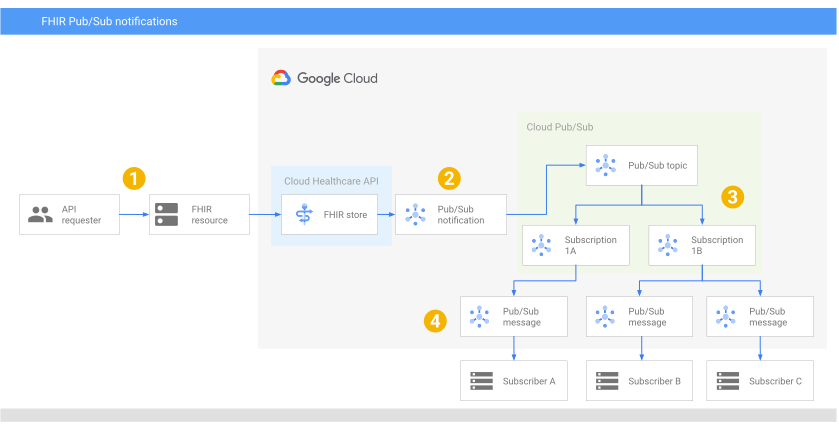

**Figure 1.** Using Pub/Sub notifications for changes in a FHIR store.
Figure 1 shows the following steps:
1. A caller makes a [`fhirStores.fhir.create`](https://docs.cloud.google.com/healthcare-api/docs/reference/rest/v1/projects.locations.datasets.fhirStores.fhir/create.md.txt) request to create a FHIR resource.
2. The FHIR store receives the request, creates a Pub/Sub message, and sends it to the Pub/Sub topic configured on the FHIR store.
3. Pub/Sub forwards the message to the subscriptions attached to the topic.
4. The subscribers receive a notification, in the form of a Pub/Sub message, from their subscription. Each subscription can have one or more subscribers for increased parallelism.
## Notification configuration
You can configure Pub/Sub notifications and their behavior in a
[`FhirNotificationConfig`](https://docs.cloud.google.com/healthcare-api/docs/reference/rest/v1/projects.locations.datasets.fhirStores.md.txt#FhirNotificationConfig)
object on a FHIR store. Each FHIR store can have multiple `FhirNotificationConfig`
configured.
The following table describes the fields in the `FhirNotificationConfig`
object.
> [!CAUTION]
> **Caution:** FHIR resource information might contain protected health information (PHI). Use caution when sending PHI in a Pub/Sub message.
| Field | Description | Example |
|---|---|---|
| [`pubsubTopic`](https://docs.cloud.google.com/healthcare-api/docs/reference/rest/v1/projects.locations.datasets.fhirStores.md.txt#FhirNotificationConfig.FIELDS.pubsub_topic) | The Pub/Sub topic to attach to the FHIR store. Notifications are sent to the specified topic. | `projects/my-project/topics/my-topic` |
| [`sendFullResource`](https://docs.cloud.google.com/healthcare-api/docs/reference/rest/v1/projects.locations.datasets.fhirStores.md.txt#FhirNotificationConfig.FIELDS.send_full_resource) | Whether to include the full contents of a created, updated, or patched FHIR resource in a notification. This field has no effect on notifications sent when FHIR resources are deleted. To include the full contents of a deleted resource, set `sendPreviousResourceOnDelete` to `true`. | `true` |
| [`sendPreviousResourceOnDelete`](https://docs.cloud.google.com/healthcare-api/docs/reference/rest/v1/projects.locations.datasets.fhirStores.md.txt#FhirNotificationConfig.FIELDS.send_full_resource) | Whether to include the full contents of a deleted FHIR resource in a notification. This field has no effect on notifications sent when FHIR resources are created, updated, or patched. | `true` |
## Notification format and content
Each Pub/Sub notification contains a [`message`](https://docs.cloud.google.com/pubsub/docs/reference/rest/v1/projects.subscriptions/pull.md.txt#ReceivedMessage.FIELDS.message)
object that holds
information about the clinical event. The `message` object looks
similar to the following:
```json
{
"message": {
"attributes": {
"action": "ACTION",
"lastUpdatedTime": "RFC_1123_FORMAT_DATETIME",
"payloadType": "PAYLOAD_TYPE",
"resourceType": "FHIR_RESOURCE_TYPE",
"storeName": "projects/PROJECT_ID/locations/LOCATION/datasets/DATASET_ID/fhirStores/FHIR_STORE_ID",
"versionId": "VERSION_ID"
},
"data": "BASE_64_ENCODED_DATA",
"messageId": "MESSAGE_ID",
"publishTime": "YYYY-MM-DDTHH:MM:SS+ZZ:ZZ"
}
}
```
For information on additional fields included in each Pub/Sub message,
see [`ReceivedMessage`](https://docs.cloud.google.com/pubsub/docs/reference/rest/v1/projects.subscriptions/pull.md.txt#ReceivedMessage)
and [`PubsubMessage`](https://docs.cloud.google.com/pubsub/docs/reference/rest/v1/PubsubMessage.md.txt).
The following table describes each field in the `attributes` object:
| Attribute | Description | Example |
|---|---|---|
| `action` | The action that occurred on a FHIR resource. Possible values include: - `CreateResource` - `PatchResource` - `UpdateResource` - `DeleteResource` | `CreateResource` |
| `resourceType` | The type of FHIR resource that was modified. Possible values include any supported [FHIR resource type](https://www.hl7.org/fhir/resourcelist.html) in the Cloud Healthcare API. | `Patient` |
| `payloadType` | The payload type of the message, one of `NameOnly` or `FullResource`. | `FullResource` |
| `storeName` | The full resource name of the FHIR store where the action occurred. | `projects/my-project/locations/us/datasets/my-dataset/fhirStores/my-fhir-store` |
| `lastUpdatedTime` | A timestamp of the most recent time the FHIR resource was modified. The timestamp uses the RFC 1123 format. | `Mon, 01 Jan 2020 00:00:00 UTC` |
| `versionId` | The ID of the most recent version of the FHIR resource that the action occurred on. For more information on version IDs, see [Listing FHIR resource versions](https://docs.cloud.google.com/healthcare-api/docs/how-tos/fhir-resources.md.txt#listing_fhir_resource_versions). | `MTY4MzA2MDQzOTI5NjIxMDAwMA` |
The following table describes the remaining fields in the `message` object:
| Field | Description | Example |
|---|---|---|
| `data` | A base 64-encoded string of either the FHIR resource name or the FHIR resource contents, depending on the values specified in `FhirNotificationConfig`. | |
| `messageId` | An identifier for the Pub/Sub message. | |
| `publishTime` | The time at which the Pub/Sub server published the message. | |
## Specify the information to include in notifications
Pub/Sub notifications, as detailed in
[Notification format and content](https://docs.cloud.google.com/healthcare-api/docs/fhir-pubsub.md.txt#notification_format_and_content), include
a standard set of fields. You can include either the full FHIR resource or just
its name in each notification. The resource name contains
the full path to the resource and the resource ID in this format:
```bash
projects/PROJECT_ID/locations/LOCATION/datasets/DATASET_ID/fhirStores/FHIR_STORE_ID/fhir/RESOURCE_TYPE/RESOURCE_ID
```
FHIR resource information is stored in the [`data`](https://docs.cloud.google.com/pubsub/docs/reference/rest/v1/PubsubMessage.md.txt#FIELDS.data)
field as a base 64-encoded string.
By including the full contents of a FHIR resource, you don't need to
to separately query Pub/Sub and the Cloud Healthcare API for resource
details.
### Get the FHIR resource name
To only include the name of a FHIR resource when you create, update, or
patch the resource, set `sendFullResource` to `false`.
To only include the name when you delete a FHIR resource, set
`sendPreviousResourceOnDelete` to `false`.
When you view the notification, the `message` object looks similar to the following:
```json
{
"message": {
"attributes": {
"action": "{CreateResource|PatchResource|UpdateResource|DeleteResource}",
"lastUpdatedTime": "RFC_1123_FORMAT_DATETIME",
"payloadType": "NameOnly",
"resourceType": "FHIR_RESOURCE_TYPE",
"storeName": "projects/PROJECT_ID/locations/LOCATION/datasets/DATASET_ID/fhirStores/FHIR_STORE_ID",
"versionId": "VERSION_ID"
},
"data": "BASE64_ENCODED_FHIR_RESOURCE_NAME",
"messageId": "MESSAGE_ID",
"publishTime": "YYYY-MM-DDTHH:MM:SS+ZZ:ZZ"
}
}
```
Note the following in the notification:
- The `payloadType` field is set to `NameOnly` to indicate the following about
the request:
- For create, update, and patch operations, `sendFullResource` is set to `false`.
- For delete operations, `sendPreviousResourceOnDelete` is set to `false`.
- Only the FHIR resource name is included in the `data` field. The name is
encoded as a base 64-encoded string.
### Get created, updated, or patched FHIR resource contents
To include the full contents of a FHIR resource when you create, update, or
patch the resource, set `sendFullResource` to `true`.
This behavior doesn't apply if you delete a FHIR resource. If you delete a
FHIR resource, and `sendFullResource` is set to `true` but `sendPreviousResourceOnDelete`
is set to `false`, the notification is the same as when you only retrieve the
[FHIR resource name](https://docs.cloud.google.com/healthcare-api/docs/fhir-pubsub.md.txt#get_the_fhir_resource_name). To include the FHIR resource
contents when a FHIR resource is deleted, see [Get deleted FHIR resource contents](https://docs.cloud.google.com/healthcare-api/docs/fhir-pubsub.md.txt#get_deleted_fhir_resource_contents).
When you view the notification, the `message` object looks similar to the following:
```json
{
"message": {
"attributes": {
"action": "{CreateResource|PatchResource|UpdateResource}",
"lastUpdatedTime": "RFC_1123_FORMAT_DATETIME",
"payloadType": "FullResource",
"resourceType": "FHIR_RESOURCE_TYPE",
"storeName": "projects/PROJECT_ID/locations/LOCATION/datasets/DATASET_ID/fhirStores/FHIR_STORE_ID",
"versionId": "VERSION_ID"
},
"data": "BASE64_ENCODED_FHIR_RESOURCE_CONTENTS",
"messageId": "MESSAGE_ID",
"publishTime": "YYYY-MM-DDTHH:MM:SS+ZZ:ZZ"
}
}
```
Note the following in the notification:
- `payloadType` is set to `FullResource` to indicate that `sendFullResource` is set to `true`. The full contents of the FHIR resource are included in the `data` field as a base 64-encoded string.
- The `data` field contains the FHIR resource contents as a base 64-encoded string.
### Get deleted FHIR resource contents
To include the full contents of a FHIR resource when you delete it,
set `sendPreviousResourceOnDelete` to `true`.
When you view the notification, the `message` object looks similar to the following:
```json
{
"message": {
"attributes": {
"action": "DeleteResource",
"lastUpdatedTime": "RFC_1123_FORMAT_DATETIME",
"payloadType": "FullResource",
"resourceType": "FHIR_RESOURCE_TYPE",
"storeName": "projects/PROJECT_ID/locations/LOCATION/datasets/DATASET_ID/fhirStores/FHIR_STORE_ID",
"versionId": "VERSION_ID"
},
"data": "BASE64_ENCODED_FHIR_RESOURCE_CONTENTS",
"messageId": "MESSAGE_ID",
"publishTime": "YYYY-MM-DDTHH:MM:SS+ZZ:ZZ"
}
}
```
Note the values in the following fields:
- `payloadType` is set to `FullResource` even if `sendFullResource` is
set to `false`.
The full contents of the FHIR resource are included in the `data` field
as a base 64-encoded string.
- The `data` field contains the contents of the FHIR resource as a base 64-encoded string
before the resource was deleted.
## Configure and view FHIR notifications
The following examples show how to view the generated Pub/Sub
notification when a FHIR resource is created in a FHIR store.
### Before you begin
Before configuring and using Pub/Sub notifications, complete the
following sections:
#### Review Pub/Sub quotas
Familiarize yourself with [Pub/Sub quotas and limits](https://docs.cloud.google.com/pubsub/quotas.md.txt).
For information about how to view quotas, requesting higher quota values, and
what happens if you run out of quota, see the
[Cloud Quotas documentation](https://docs.cloud.google.com/docs/quotas/overview.md.txt).
#### Enable the Pub/Sub API
In the Google Cloud console, enable the Pub/Sub API:
[Enable the API](https://console.cloud.google.com/apis/enableflow?apiid=pubsub)
#### Configure Pub/Sub permissions
To allow messages to be published from the Cloud Healthcare API
to Pub/Sub, you must add the `pubsub.publisher` role to
your project's **Cloud Healthcare Service Agent** [service account](https://docs.cloud.google.com/iam/docs/service-accounts).
See [DICOM, FHIR, and HL7v2 store Pub/Sub permissions](https://docs.cloud.google.com/healthcare-api/docs/how-tos/permissions-healthcare-api-gcp-products#dicom_fhir_and_hl7v2_store_cloud_pubsub_permissions)
for steps to add the required role.
#### Create a Pub/Sub topic
To create a topic, see [Create a topic](https://docs.cloud.google.com/pubsub/docs/create-topic.md.txt#create_a_topic).
Individual data stores can have
their own Pub/Sub topic, or multiple data stores can share the
same topic.
Use the following format when specifying the Pub/Sub topic:
```bash
projects/PROJECT_ID/topics/TOPIC_NAME
```
`PROJECT_ID` is your Google Cloud project ID and
`TOPIC_NAME` is the name of the Pub/Sub topic.
#### Create a Pub/Sub subscription
To receive messages published to a topic, you need to create a
Pub/Sub [subscription](https://docs.cloud.google.com/pubsub/docs/subscriber.md.txt). Every
Pub/Sub topic needs at least one Pub/Sub
subscription. The subscription connects the topic to a subscriber application that receives
and processes messages published to the topic.
To create a subscription and attach it to a Pub/Sub topic, see
[Create subscriptions](https://docs.cloud.google.com/pubsub/docs/create-subscription.md.txt#create_subscriptions).
### Create or edit a FHIR store
[Create](https://docs.cloud.google.com/healthcare-api/docs/how-tos/fhir.md.txt#creating_a_fhir_store) or
[edit](https://docs.cloud.google.com/healthcare-api/docs/how-tos/fhir.md.txt#editing_a_fhir_store)
a FHIR store with a configured `FhirNotificationConfig` object.
The following samples show how to edit an existing FHIR store.
The `sendFullResource` and `sendPreviousResourceOnDelete` fields are set
to `true`, meaning that notifications contain the full FHIR resource contents
when a resource is created, updated, patched, or deleted.
### REST
To edit the FHIR store, use the [`projects.locations.datasets.fhirStores.patch`](https://docs.cloud.google.com/healthcare-api/docs/reference/rest/v1/projects.locations.datasets.fhirStores/patch.md.txt) method.
Before using any of the request data,
make the following replacements:
- PROJECT_ID: the ID of your Google Cloud project
- LOCATION: the dataset location
- DATASET_ID: the FHIR store's parent dataset
- FHIR_STORE_ID: the FHIR store ID
- PUBSUB_TOPIC_ID: the Pub/Sub topic ID
Request JSON body:
```
{
"notificationConfigs": [
{
"pubsubTopic": "projects/PROJECT_ID/topics/PUBSUB_TOPIC_ID",
"sendFullResource": true,
"sendPreviousResourceOnDelete": true
}
]
}
```
To send your request, choose one of these options:
#### curl
> [!NOTE]
> **Note:** The following command assumes that you have logged in to the `gcloud` CLI with your user account by running [`gcloud init`](https://docs.cloud.google.com/sdk/gcloud/reference/init) or [`gcloud auth login`](https://docs.cloud.google.com/sdk/gcloud/reference/auth/login.md.txt) , or by using [Cloud Shell](https://docs.cloud.google.com/shell/docs.md.txt), which automatically logs you into the `gcloud` CLI . You can check the currently active account by running [`gcloud auth list`](https://docs.cloud.google.com/sdk/gcloud/reference/auth/list.md.txt).
Save the request body in a file named `request.json`.
Run the following command in the terminal to create or overwrite
this file in the current directory:
```
cat > request.json << 'EOF'
{
"notificationConfigs": [
{
"pubsubTopic": "projects/PROJECT_ID/topics/PUBSUB_TOPIC_ID",
"sendFullResource": true,
"sendPreviousResourceOnDelete": true
}
]
}
EOF
```
Then execute the following command to send your REST request:
```
curl -X PATCH \
-H "Authorization: Bearer $(gcloud auth print-access-token)" \
-H "Content-Type: application/json; charset=utf-8" \
-d @request.json \
"https://healthcare.googleapis.com/v1/projects/PROJECT_ID/locations/LOCATION/datasets/DATASET_ID/fhirStores/FHIR_STORE_ID?updateMask=notificationConfigs"
```
#### PowerShell
> [!NOTE]
> **Note:** The following command assumes that you have logged in to the `gcloud` CLI with your user account by running [`gcloud init`](https://docs.cloud.google.com/sdk/gcloud/reference/init) or [`gcloud auth login`](https://docs.cloud.google.com/sdk/gcloud/reference/auth/login.md.txt) . You can check the currently active account by running [`gcloud auth list`](https://docs.cloud.google.com/sdk/gcloud/reference/auth/list.md.txt).
Save the request body in a file named `request.json`.
Run the following command in the terminal to create or overwrite
this file in the current directory:
```
@'
{
"notificationConfigs": [
{
"pubsubTopic": "projects/PROJECT_ID/topics/PUBSUB_TOPIC_ID",
"sendFullResource": true,
"sendPreviousResourceOnDelete": true
}
]
}
'@ | Out-File -FilePath request.json -Encoding utf8
```
Then execute the following command to send your REST request:
```
$cred = gcloud auth print-access-token
$headers = @{ "Authorization" = "Bearer $cred" }
Invoke-WebRequest `
-Method PATCH `
-Headers $headers `
-ContentType: "application/json; charset=utf-8" `
-InFile request.json `
-Uri "https://healthcare.googleapis.com/v1/projects/PROJECT_ID/locations/LOCATION/datasets/DATASET_ID/fhirStores/FHIR_STORE_ID?updateMask=notificationConfigs" | Select-Object -Expand Content
```
You should receive a JSON response similar to the following:
#### Response
```
{
"name": "projects/PROJECT_ID/locations/LOCATION/datasets/DATASET_ID/fhirStores/FHIR_STORE_ID",
"version": "R4",
"notificationConfigs": [
{
"pubsubTopic": "projects/PROJECT_ID/topics/PUBSUB_TOPIC_ID",
"sendFullResource": true,
"sendPreviousResourceOnDelete": true
}
]
}
```
### Create a FHIR resource
[Create a FHIR resource](https://docs.cloud.google.com/healthcare-api/docs/how-tos/fhir-resources.md.txt#creating_a_fhir_resource)
in the FHIR store. The request causes the Cloud Healthcare API to publish a
message to the configured Pub/Sub topic.
### View the Pub/Sub notification
View the message published to the Pub/Sub topic. The following message
was generated when a Patient resource was created in a FHIR store.
In the sample output, the contents of the FHIR resource are in a base64-encoded
string in the `data` field. You must decode the base64-encoded value to get
the contents.
Most platforms and operating systems have tools for decoding base64 text.
### REST
To view the message published to the Pub/Sub topic, use the
[`projects.subscriptions.pull`](https://docs.cloud.google.com/pubsub/docs/reference/rest/v1/projects.subscriptions/pull.md.txt)
method. The following sample uses the `?maxMessages=10` query parameter to
specify the [maximum number of messages to return in the request](https://docs.cloud.google.com/pubsub/docs/reference/rest/v1/projects.subscriptions/pull.md.txt#body.request_body.FIELDS.max_messages). You can adjust the value to suit your needs.
Before using any of the request data,
make the following replacements:
- PROJECT_ID: the ID of your Google Cloud project
- PUBSUB_SUBSCRIPTION_ID: the ID of the subscription attached to the Pub/Sub topic configured in the FHIR store
To send your request, choose one of these options:
#### curl
> [!NOTE]
> **Note:** The following command assumes that you have logged in to the `gcloud` CLI with your user account by running [`gcloud init`](https://docs.cloud.google.com/sdk/gcloud/reference/init) or [`gcloud auth login`](https://docs.cloud.google.com/sdk/gcloud/reference/auth/login.md.txt) , or by using [Cloud Shell](https://docs.cloud.google.com/shell/docs.md.txt), which automatically logs you into the `gcloud` CLI . You can check the currently active account by running [`gcloud auth list`](https://docs.cloud.google.com/sdk/gcloud/reference/auth/list.md.txt).
Execute the following command:
```
curl -X POST \
-H "Authorization: Bearer $(gcloud auth print-access-token)" \
-H "Content-Type: application/json; charset=utf-8" \
-d "" \
"https://pubsub.googleapis.com/v1/projects/PROJECT_ID/subscriptions/PUBSUB_SUBSCRIPTION_ID:pull?maxMessages=10"
```
#### PowerShell
> [!NOTE]
> **Note:** The following command assumes that you have logged in to the `gcloud` CLI with your user account by running [`gcloud init`](https://docs.cloud.google.com/sdk/gcloud/reference/init) or [`gcloud auth login`](https://docs.cloud.google.com/sdk/gcloud/reference/auth/login.md.txt) . You can check the currently active account by running [`gcloud auth list`](https://docs.cloud.google.com/sdk/gcloud/reference/auth/list.md.txt).
Execute the following command:
```
$cred = gcloud auth print-access-token
$headers = @{ "Authorization" = "Bearer $cred" }
Invoke-WebRequest `
-Method POST `
-Headers $headers `
-Uri "https://pubsub.googleapis.com/v1/projects/PROJECT_ID/subscriptions/PUBSUB_SUBSCRIPTION_ID:pull?maxMessages=10" | Select-Object -Expand Content
```
You should receive a JSON response similar to the following:
#### Response
```
{
"receivedMessages": [
{
"ackId": "RFAGFixdRkhRNxkIaFEOT14jPzUgKEUaAggUBXx9cEFLdVhUcGhRDRlyfWB9bQ5GAgpGWixfURsHaE5tdR",
"message": {
"data": "wogICJiaXJ0aERhdGUiOiAiMTk3MC0wMS0wMSIsCiAgImdlbmRlciI6ICJmZW1hbGUiLAogICJpZCI6ICIyYmMwODg4Yi00MGRmLTQwYzctOWRhYi0wMzc4YTFiZWE0MGIiLAogICJtZXRhIjogewogICAgImxhc3RVcGRhdGVkIjogIjIwMjMtMDUtMDJUMjA6NDc6MTkuMjk2MjEwKzAwOjAwIiwKICAgICJ2ZXJzaW9uSWQiOiAiTVRZNE16QTJNRFF6T1RJNU5qSXhNREF3TUEiCiAgfSwKICAibmFtZSI6IFsKICAgIHsKICAgICAgImZhbWlseSI6ICJTbWl0aCIsCiAgICAgICJnaXZlbiI6IFsKICAgICAgICAiRGFyY3kiCiAgICAgIF0sCiAgICAgICJ1c2UiOiAib2ZmaWNpYWwiCiAgICB9CiAgXSwKICAicmVzb3VyY2VUeXBlIjogIlBhdGllbnQiCn0=",
"attributes": {
"storeName": "projects/PROJECT_ID/locations/LOCATION/datasets/DATASET_ID/fhirStores/FHIR_STORE_ID",
"action": "CreateResource",
"versionId": "MTY4MzA2MDQzOTI5NjIxMDAwMA",
"resourceType": "Patient",
"lastUpdatedTime": "Mon, 01 Jan 2020 00:00:00 UTC",
"payloadType": "FullResource"
},
"messageId": "7586159156345265",
"publishTime": "YYYY-MM-DDTHH:MM:SS+ZZ:ZZ"
}
}
]
}
```
### gcloud
To view the message published to the Pub/Sub topic, run the
[`gcloud pubsub subscriptions pull`](https://docs.cloud.google.com/sdk/gcloud/reference/pubsub/subscriptions/pull)
command.
The sample uses the following Google Cloud CLI flags:
- [`--format=json`](https://docs.cloud.google.com/sdk/gcloud/reference.md.txt#--format): Renders the output as JSON.
- [`--auto-ack`](https://docs.cloud.google.com/sdk/gcloud/reference/pubsub/subscriptions/pull#--auto-ack): Automatically acknowledge every message pulled.
Before using any of the command data below,
make the following replacements:
- PROJECT_ID: the ID of your Google Cloud project
- PUBSUB_SUBSCRIPTION_ID: the ID of the subscription attached to the Pub/Sub topic configured in the FHIR store
Execute the
following
command:
#### Linux, macOS, or Cloud Shell
> [!NOTE]
> **Note:** Ensure you have initialized the Google Cloud CLI with authentication and a project by running either [gcloud init](https://docs.cloud.google.com/sdk/gcloud/reference/init); or [gcloud auth login](https://docs.cloud.google.com/sdk/gcloud/reference/auth/login.md.txt) and [gcloud config set project](https://docs.cloud.google.com/sdk/gcloud/reference/config/set.md.txt).
```bash
gcloud pubsub subscriptions pull \
projects/PROJECT_ID/subscriptions/PUBSUB_SUBSCRIPTION_ID \
--auto-ack \
--format=json
```
#### Windows (PowerShell)
> [!NOTE]
> **Note:** Ensure you have initialized the Google Cloud CLI with authentication and a project by running either [gcloud init](https://docs.cloud.google.com/sdk/gcloud/reference/init); or [gcloud auth login](https://docs.cloud.google.com/sdk/gcloud/reference/auth/login.md.txt) and [gcloud config set project](https://docs.cloud.google.com/sdk/gcloud/reference/config/set.md.txt).
```bash
gcloud pubsub subscriptions pull `
projects/PROJECT_ID/subscriptions/PUBSUB_SUBSCRIPTION_ID `
--auto-ack `
--format=json
```
#### Windows (cmd.exe)
> [!NOTE]
> **Note:** Ensure you have initialized the Google Cloud CLI with authentication and a project by running either [gcloud init](https://docs.cloud.google.com/sdk/gcloud/reference/init); or [gcloud auth login](https://docs.cloud.google.com/sdk/gcloud/reference/auth/login.md.txt) and [gcloud config set project](https://docs.cloud.google.com/sdk/gcloud/reference/config/set.md.txt).
```bash
gcloud pubsub subscriptions pull ^
projects/PROJECT_ID/subscriptions/PUBSUB_SUBSCRIPTION_ID ^
--auto-ack ^
--format=json
```
You should receive a response similar to the following:
```
[
{
"ackId": "RFAGFixdRkhRNxkIaFEOT14jPzUgKEUaAggUBXx9cEFLdVhUcGhRDRlyfWB9bQ5GAgpGWixfURsHaE5tdR",
"ackStatus": "SUCCESS",
"message": {
"attributes": {
"action": "CreateResource",
"lastUpdatedTime": "Mon, 01 Jan 2020 00:00:00 UTC",
"payloadType": "FullResource",
"resourceType": "Patient",
"storeName": "projects/PROJECT_ID/locations/LOCATION/datasets/DATASET_ID/fhirStores/FHIR_STORE_ID",
"versionId": "MTY4MzA2MDQzOTI5NjIxMDAwMA"
},
"data": "wogICJiaXJ0aERhdGUiOiAiMTk3MC0wMS0wMSIsCiAgImdlbmRlciI6ICJmZW1hbGUiLAogICJpZCI6ICIyYmMwODg4Yi00MGRmLTQwYzctOWRhYi0wMzc4YTFiZWE0MGIiLAogICJtZXRhIjogewogICAgImxhc3RVcGRhdGVkIjogIjIwMjMtMDUtMDJUMjA6NDc6MTkuMjk2MjEwKzAwOjAwIiwKICAgICJ2ZXJzaW9uSWQiOiAiTVRZNE16QTJNRFF6T1RJNU5qSXhNREF3TUEiCiAgfSwKICAibmFtZSI6IFsKICAgIHsKICAgICAgImZhbWlseSI6ICJTbWl0aCIsCiAgICAgICJnaXZlbiI6IFsKICAgICAgICAiRGFyY3kiCiAgICAgIF0sCiAgICAgICJ1c2UiOiAib2ZmaWNpYWwiCiAgICB9CiAgXSwKICAicmVzb3VyY2VUeXBlIjogIlBhdGllbnQiCn0=",
"messageId": "7586159156345265",
"publishTime": "YYYY-MM-DDTHH:MM:SS+ZZ:ZZ"
}
}
]
```
## Behavior when a FHIR resource is too large or traffic is high
If the size of a FHIR resource is too large, or the Cloud Healthcare API
servers are experiencing high traffic, the `attributes` field might
only contain the resource name instead of the full resource contents.
This behavior occurs even if `sendFullResource` and
`sendPreviousResourceOnDelete` are set to `true`.
To verify whether a Pub/Sub notification contains the full FHIR resource, check
the `payloadType` field in the response from viewing the notification.
If `payloadType` is set to `nameOnly`, then the
`attributes` field didn't fully populate the FHIR resource data. You must then
get the contents of the FHIR resource manually from the FHIR store instead
of from the Pub/Sub message.
## Cloud Healthcare API and Pub/Sub message storage policy
To ensure that your Cloud Healthcare API data and the associated data in Pub/Sub
messages reside in the same region, you must set a Pub/Sub
[message storage policy](https://docs.cloud.google.com/pubsub/docs/resource-location-restriction.md.txt).
You must explicitly set the message storage policy on the Pub/Sub
topic configured on the data store to ensure that the data stays in the same
region. For example, if your Cloud Healthcare API dataset and FHIR store are in
`us-central1`, the message storage policy must only allow the `us-central1` region.
To configure a message storage policy, see [Configuring message store policies](https://docs.cloud.google.com/pubsub/docs/resource-location-restriction.md.txt#configuring_message_storage_policies).
## Troubleshoot missed Pub/Sub messages
If a notification can't be published to Pub/Sub, an error is
logged to [Cloud Logging](https://docs.cloud.google.com/logging/docs.md.txt). For more information, see
[Viewing error logs in Cloud Logging](https://docs.cloud.google.com/healthcare-api/docs/how-tos/logging.md.txt).
If the rate of error generation exceeds a limit, errors in excess of the limit
aren't submitted to Cloud Logging.
## View FHIR notifications using the `NotificationConfig` configuration (Deprecated)
> [!WARNING]
> **Deprecated:** Configuring FHIR notifications using the [`NotificationConfig`](https://docs.cloud.google.com/healthcare-api/docs/reference/rest/v1/NotificationConfig.md.txt) object has been deprecated.
The [`FhirStore`](https://docs.cloud.google.com/healthcare-api/docs/reference/rest/v1/projects.locations.datasets.fhirStores.md.txt)
resource contains a
[`NotificationConfig`](https://docs.cloud.google.com/healthcare-api/docs/reference/rest/v1/NotificationConfig.md.txt)
object where you can specify a Pub/Sub topic.
Changes to FHIR resources always contain the following identifier in the
`data` field of the Pub/Sub message:
```bash
projects/PROJECT_ID/locations/LOCATION/datasets/DATASET_ID/fhirStores/FHIR_STORE_ID/fhir/RESOURCE_TYPE/RESOURCE_ID
```
The following set of key:value pairs is always included in the message's
`attributes` field:
| Attribute name | Possible values | Example | Description |
|---|---|---|---|
| `action` | - `CreateResource` - `PatchResource` - `UpdateResource` - `DeleteResource` | `CreateResource` | The type of event that just occurred. |
| `resourceType` | Any FHIR resource [type](https://www.hl7.org/fhir/STU3/resourcelist.html). | `Patient` | The type of resource that was modified. |
## What's next
- [Use flow control to handle transient Pub/Sub message traffic spikes](https://docs.cloud.google.com/pubsub/docs/flow-control.md.txt).
- [Handle message failures](https://docs.cloud.google.com/pubsub/docs/handling-failures).
- [Replay and purge messages](https://docs.cloud.google.com/pubsub/docs/replay-overview.md.txt).
- View the [Pub/Sub architectural overview](https://docs.cloud.google.com/pubsub/architecture.md.txt).