This page describes how to use [Pub/Sub](https://docs.cloud.google.com/pubsub/docs.md.txt)
to get notifications about clinical events in a DICOM store.
You can receive Pub/Sub notifications when a new DICOM instance is
stored, imported from Cloud Storage, updated, or deleted in a DICOM store.
You can use Pub/Sub notifications for multiple purposes, such as
triggering downstream processing or analyzing new data. For example, a
machine learning model can receive
notifications when new data is available for training and generate
insights to improve patient care.
The following figure shows how Pub/Sub notifications are generated
and published.
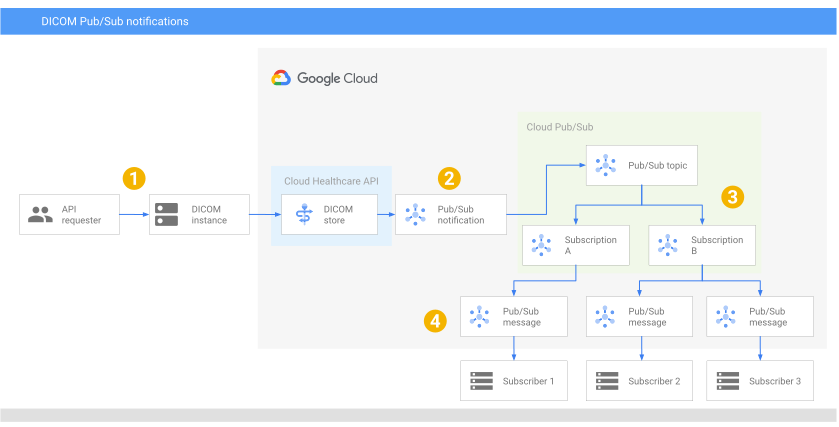

**Figure 1.** Receiving Pub/Sub notifications about clinical events in a DICOM store.
Figure 1 shows the following steps:
1. A caller makes a request to store or import a DICOM instance.
2. The DICOM store receives the request, creates a Pub/Sub message, and sends it to the Pub/Sub topic configured on the DICOM store.
3. Pub/Sub forwards the message to the subscriptions attached to the topic.
4. The subscribers receive the message from their subscription. Each subscription can have one or more subscribers for increased parallelism.
## Before you begin
1. [Create a topic](https://docs.cloud.google.com/pubsub/docs/create-topic.md.txt).
2. [Create a pull subscription](https://docs.cloud.google.com/pubsub/docs/create-subscription.md.txt).
### Add Pub/Sub publisher permissions
To publish messages from the Cloud Healthcare API to Pub/Sub, you
must add the `pubsub.publisher` role to
your project's **Cloud Healthcare Service Agent** [service account](https://docs.cloud.google.com/iam/docs/service-accounts).
For more information, see [DICOM, FHIR, and HL7v2 store Pub/Sub permissions](https://docs.cloud.google.com/healthcare-api/docs/how-tos/permissions-healthcare-api-gcp-products#dicom_fhir_and_hl7v2_store_cloud_pubsub_permissions).
## Notification configuration
You can configure Pub/Sub notifications and their behavior in a
[`DicomNotificationConfig`](https://docs.cloud.google.com/healthcare-api/docs/reference/rest/v1/projects.locations.datasets.dicomStores.md.txt#DicomNotificationConfig)
object on a DICOM store. Each DICOM store can have multiple `DicomNotificationConfig`
objects configured.
The following table describes the fields in the `DicomNotificationConfig`
object:
> [!CAUTION]
> **Caution:** DICOM resource information might contain protected health information (PHI). Use caution when sending PHI in a Pub/Sub message.
| Field | Description | Example |
|---|---|---|
| [`pubsubTopic`](https://docs.cloud.google.com/healthcare-api/docs/reference/rest/v1/projects.locations.datasets.dicomStores.md.txt#DicomNotificationConfig.FIELDS.pubsub_topic) | The Pub/Sub topic to attach to the DICOM store. Notifications are sent to the specified topic. | `projects/my-project/topics/my-topic` |
## Notification format and content
A Pub/Sub notification contains a [`Message`](https://docs.cloud.google.com/pubsub/docs/reference/rest/v1/projects.subscriptions/pull.md.txt#ReceivedMessage.FIELDS.message)
object that includes information about the clinical event. The `Message` object
looks similar to the following:
```json
{
"message": {
"attributes": {
"action": "ACTION",
"lastUpdatedTime": "RFC_1123_FORMAT_DATETIME",
"storeName": "projects/PROJECT_ID/locations/LOCATION/datasets/DATASET_ID/dicomStores/DICOM_STORE_ID",
"studyInstanceUID": "STUDY_UID",
"seriesInstanceUID": "SERIES_UID",
"sopInstanceUID": "INSTANCE_UID",
"versionId": "VERSION_ID",
"modality": "MODALITY",
"storageClass": "STORAGE_CLASS",
"previousStorageClass": "PREVIOUS_STORAGE_CLASS"
},
"data": "BASE_64_ENCODED_DATA",
"messageId": "MESSAGE_ID",
"publishTime": "YYYY-MM-DDTHH:MM:SS+ZZ:ZZ"
}
}
```
For more information about the fields included in each Pub/Sub message,
see [`ReceivedMessage`](https://docs.cloud.google.com/pubsub/docs/reference/rest/v1/projects.subscriptions/pull.md.txt#ReceivedMessage)
and [`PubsubMessage`](https://docs.cloud.google.com/pubsub/docs/reference/rest/v1/PubsubMessage.md.txt).
The following table describes each field in the `attributes` object:
| Attribute | Description | Example |
|---|---|---|
| `action` | The action that occurred on a DICOM resource. Possible values include: - `StoreInstances` - `ImportDicomData` - `SetBlobSettings` - `DeleteInstances` | `StoreInstances` |
| `lastUpdatedTime` | A timestamp of the most recent time the DICOM resource was modified. The timestamp uses the RFC 1123 format. | `Mon, 01 Jan 2020 00:00:00 UTC` |
| `storeName` | The full resource name of the DICOM store where the action occurred. | `projects/my-project/locations/us/datasets/my-dataset/dicomStores/my-dicom-store` |
| `studyInstanceUID` | The DICOM study instance unique identifier (UID). | `1.2.3.4.5.6` |
| `seriesInstanceUID` | The DICOM series instance unique identifier (UID). | `1.2.3.4.5.6` |
| `sopInstanceUID` | The DICOM SOP instance unique identifier (UID). | `1.2.3.4.5.6` |
| `versionId` | The ID of the most recent version of the DICOM resource that the action occurred on. | `MTY4MzA2MDQzOTI5NjIxMDAwMA` |
| `modality` | The modality tag of the DICOM resource. Possible values include but not limited to: - `CT` - `MR` - `MG` | `CT` |
| `storageClass` | The storage class of the DICOM resource. Possible values include: - `STANDARD` - `NEARLINE` - `COLDLINE` - `ARCHIVE` | `STANDARD` |
| `previousStorageClass` | The previous storage class of the DICOM resource. Possible values include: - `STANDARD` - `NEARLINE` - `COLDLINE` - `ARCHIVE` | `NEARLINE` |
The following table describes the remaining fields in the `message` object:
| Field | Description |
|---|---|
| `data` | A base 64-encoded string of the following identifier: `projects/PROJECT_ID/locations/LOCATION/datasets/DATASET_ID/dicomStores/DICOM_STORE_ID/dicomWeb/studies/STUDY_UID/series/SERIES_UID/instances/INSTANCE_UID` |
| `messageId` | An identifier for the Pub/Sub message. |
| `publishTime` | The time at which the Pub/Sub server published the message. |
## Configure and view notifications
This section describes how to enable Pub/Sub notifications on
a DICOM store, store or import a DICOM instance to publish a notification,
and view the notification.
### Configure the DICOM store
#### Permissions required for this task
To perform this task, you must have been granted the following permissions
*or* the following [Identity and Access Management (IAM)](https://docs.cloud.google.com/iam/docs.md.txt) roles:
**Permissions**
- `healthcare.dicomStores.update`
**Roles**
- [Healthcare DICOM Store Administrator
(`roles/healthcare.dicomStoreAdmin`)](https://docs.cloud.google.com/healthcare-api/docs/access-control#healthcare.dicomStoreAdmin)
You can ask your administrator to grant you these Identity and Access Management roles. For instructions on
granting roles, see [Manage access](https://docs.cloud.google.com/iam/docs/granting-changing-revoking-access.md.txt) or
[Control access to Cloud Healthcare API resources](https://docs.cloud.google.com/healthcare-api/docs/controlling-access.md.txt#using_cloud_iam_with_datasets).
You might also be able to get the required permissions through
[custom roles](https://docs.cloud.google.com/iam/docs/creating-custom-roles.md.txt) or other
[predefined roles](https://docs.cloud.google.com/iam/docs/understanding-roles).
> [!NOTE]
> **Note** : If you created a Google Cloud project for this guide, then, as the project creator, you're automatically granted the Owner (`roles/owner`) IAM role, which has the permissions. You don't need to be granted any additional IAM roles.
The following samples show how to enable Pub/Sub notifications
on a DICOM store when a new DICOM instance is stored or imported from Cloud Storage.
### REST
Use the [`projects.locations.datasets.dicomStores.patch`](https://docs.cloud.google.com/healthcare-api/docs/reference/rest/v1/projects.locations.datasets.dicomStores/patch.md.txt) method.
Before using any of the request data,
make the following replacements:
- `PROJECT_ID`: the ID of your Google Cloud project
- `LOCATION`: the dataset location
- `DATASET_ID`: the DICOM store's parent dataset
- `DICOM_STORE_ID`: the DICOM store ID
- `PUBSUB_TOPIC`: a Pub/Sub topic to which messages are published when an event occurs in a data store
Request JSON body:
```
{
"notificationConfigs": [
{
"pubsubTopic": "projects/PROJECT_ID/topics/PUBSUB_TOPIC",
}
]
}
```
To send your request, choose one of these options:
#### curl
> [!NOTE]
> **Note:** The following command assumes that you have logged in to the `gcloud` CLI with your user account by running [`gcloud init`](https://docs.cloud.google.com/sdk/gcloud/reference/init) or [`gcloud auth login`](https://docs.cloud.google.com/sdk/gcloud/reference/auth/login.md.txt) , or by using [Cloud Shell](https://docs.cloud.google.com/shell/docs.md.txt), which automatically logs you into the `gcloud` CLI . You can check the currently active account by running [`gcloud auth list`](https://docs.cloud.google.com/sdk/gcloud/reference/auth/list.md.txt).
Save the request body in a file named `request.json`.
Run the following command in the terminal to create or overwrite
this file in the current directory:
```
cat > request.json << 'EOF'
{
"notificationConfigs": [
{
"pubsubTopic": "projects/PROJECT_ID/topics/PUBSUB_TOPIC",
}
]
}
EOF
```
Then execute the following command to send your REST request:
```
curl -X PATCH \
-H "Authorization: Bearer $(gcloud auth print-access-token)" \
-H "Content-Type: application/json; charset=utf-8" \
-d @request.json \
"https://healthcare.googleapis.com/v1/projects/PROJECT_ID/locations/LOCATION/datasets/DATASET_ID/dicomStores/DICOM_STORE_ID?updateMask=notificationConfigs"
```
#### PowerShell
> [!NOTE]
> **Note:** The following command assumes that you have logged in to the `gcloud` CLI with your user account by running [`gcloud init`](https://docs.cloud.google.com/sdk/gcloud/reference/init) or [`gcloud auth login`](https://docs.cloud.google.com/sdk/gcloud/reference/auth/login.md.txt) . You can check the currently active account by running [`gcloud auth list`](https://docs.cloud.google.com/sdk/gcloud/reference/auth/list.md.txt).
Save the request body in a file named `request.json`.
Run the following command in the terminal to create or overwrite
this file in the current directory:
```
@'
{
"notificationConfigs": [
{
"pubsubTopic": "projects/PROJECT_ID/topics/PUBSUB_TOPIC",
}
]
}
'@ | Out-File -FilePath request.json -Encoding utf8
```
Then execute the following command to send your REST request:
```
$cred = gcloud auth print-access-token
$headers = @{ "Authorization" = "Bearer $cred" }
Invoke-WebRequest `
-Method PATCH `
-Headers $headers `
-ContentType: "application/json; charset=utf-8" `
-InFile request.json `
-Uri "https://healthcare.googleapis.com/v1/projects/PROJECT_ID/locations/LOCATION/datasets/DATASET_ID/dicomStores/DICOM_STORE_ID?updateMask=notificationConfigs" | Select-Object -Expand Content
```
#### APIs Explorer
Copy the request body and open the
[method reference page](https://docs.cloud.google.com/healthcare-api/docs/reference/rest/v1/projects.locations.datasets.dicomStores/patch.md.txt).
The APIs Explorer panel opens on the right side of the page.
You can interact with this tool to send requests.
Paste the request body in this tool, complete any other required fields, and click **Execute**.
You should receive a response similar to the following.
If you configured any fields in the [`DicomStore`](https://cloud.google.com/healthcare-api/docs/reference/rest/v1/projects.locations.datasets.dicomStores#resource-dicomstore) resource, they also appear in the response.
#### Response
```
{
"name": "projects/PROJECT_ID/locations/LOCATION/datasets/DATASET_ID/dicomStores/DICOM_STORE_ID",
"notificationConfigs": [
{
"pubsubTopic": "projects/PROJECT_ID/topics/PUBSUB_TOPIC"
}
]
}
```
### gcloud
Run the [`gcloud healthcare dicom-stores update`](https://docs.cloud.google.com/sdk/gcloud/reference/healthcare/dicom-stores/update)
command.
Before using any of the command data below,
make the following replacements:
- `PROJECT_ID`: the ID of your Google Cloud project
- `LOCATION`: the dataset location
- `DATASET_ID`: the DICOM store's parent dataset
- `DICOM_STORE_ID`: the DICOM store ID
- `PUBSUB_TOPIC`: a Pub/Sub topic to which messages are published when an event occurs in a data store
Execute the
following
command:
#### Linux, macOS, or Cloud Shell
> [!NOTE]
> **Note:** Ensure you have initialized the Google Cloud CLI with authentication and a project by running either [gcloud init](https://docs.cloud.google.com/sdk/gcloud/reference/init); or [gcloud auth login](https://docs.cloud.google.com/sdk/gcloud/reference/auth/login.md.txt) and [gcloud config set project](https://docs.cloud.google.com/sdk/gcloud/reference/config/set.md.txt).
```bash
gcloud healthcare dicom-stores update DICOM_STORE_ID \
--dataset=DATASET_ID \
--location=LOCATION \
--pubsub-topic=projects/PROJECT_ID/topics/PUBSUB_TOPIC \
--send-for-bulk-import
```
#### Windows (PowerShell)
> [!NOTE]
> **Note:** Ensure you have initialized the Google Cloud CLI with authentication and a project by running either [gcloud init](https://docs.cloud.google.com/sdk/gcloud/reference/init); or [gcloud auth login](https://docs.cloud.google.com/sdk/gcloud/reference/auth/login.md.txt) and [gcloud config set project](https://docs.cloud.google.com/sdk/gcloud/reference/config/set.md.txt).
```bash
gcloud healthcare dicom-stores update DICOM_STORE_ID `
--dataset=DATASET_ID `
--location=LOCATION `
--pubsub-topic=projects/PROJECT_ID/topics/PUBSUB_TOPIC `
--send-for-bulk-import
```
#### Windows (cmd.exe)
> [!NOTE]
> **Note:** Ensure you have initialized the Google Cloud CLI with authentication and a project by running either [gcloud init](https://docs.cloud.google.com/sdk/gcloud/reference/init); or [gcloud auth login](https://docs.cloud.google.com/sdk/gcloud/reference/auth/login.md.txt) and [gcloud config set project](https://docs.cloud.google.com/sdk/gcloud/reference/config/set.md.txt).
```bash
gcloud healthcare dicom-stores update DICOM_STORE_ID ^
--dataset=DATASET_ID ^
--location=LOCATION ^
--pubsub-topic=projects/PROJECT_ID/topics/PUBSUB_TOPIC ^
--send-for-bulk-import
```
You should receive a response similar to the following:
#### Response
```
Updated dicomStore [DICOM_STORE_ID].
...
name: projects/PROJECT_ID/locations/LOCATION/datasets/DATASET_ID/dicomStores/DICOM_STORE_ID
notificationConfig:
pubsubTopic: projects/PROJECT_ID/topics/PUBSUB_TOPIC
sendForBulkImport: true
```
### Store or import a DICOM instance and view the Pub/Sub notification
#### Permissions required for this task
To perform this task, you must have been granted the following permissions
*or* the following [Identity and Access Management (IAM)](https://docs.cloud.google.com/iam/docs.md.txt) roles:
**Permissions**
- `healthcare.dicomStores.dicomWebWrite` to store DICOM instances in the requested DICOM store.
- `healthcare.dicomStores.import` to import DICOM instances into the requested DICOM store.
**Roles**
- [Healthcare DICOM Editor
(`roles/healthcare.dicomEditor`)](https://docs.cloud.google.com/healthcare-api/docs/access-control#healthcare.dicomEditor)
You can ask your administrator to grant you these Identity and Access Management roles. For instructions on
granting roles, see [Manage access](https://docs.cloud.google.com/iam/docs/granting-changing-revoking-access.md.txt) or
[Control access to Cloud Healthcare API resources](https://docs.cloud.google.com/healthcare-api/docs/controlling-access.md.txt#using_cloud_iam_with_datasets).
You might also be able to get the required permissions through
[custom roles](https://docs.cloud.google.com/iam/docs/creating-custom-roles.md.txt) or other
[predefined roles](https://docs.cloud.google.com/iam/docs/understanding-roles).
> [!NOTE]
> **Note** : If you created a Google Cloud project for this guide, then, as the project creator, you're automatically granted the Owner (`roles/owner`) IAM role, which has the permissions. You don't need to be granted any additional IAM roles.
To store or import a DICOM instance and pull the generated Pub/Sub message,
complete the following steps:
1. [Store](https://docs.cloud.google.com/healthcare-api/docs/how-tos/dicomweb.md.txt#store-dicom) or
[import](https://docs.cloud.google.com/healthcare-api/docs/how-tos/dicom-import-export.md.txt#importing_dicom_objects)
a DICOM instance. The request causes the Cloud Healthcare API to publish a
message to the configured Pub/Sub topic.
2. Pull the message. If you import multiple
DICOM instances in a single request, a message is generated for each DICOM instance.
To view the Identity and Access Management permissions needed to pull
Pub/Sub messages, see [Access control for Pub/Sub](https://docs.cloud.google.com/pubsub/docs/access-control.md.txt).
### REST
Use the
[`projects.subscriptions.pull`](https://docs.cloud.google.com/pubsub/docs/reference/rest/v1/projects.subscriptions/pull.md.txt)
method. The following sample uses the `?maxMessages=10` query parameter to
specify the [maximum number of messages to return in the request](https://docs.cloud.google.com/pubsub/docs/reference/rest/v1/projects.subscriptions/pull.md.txt#body.request_body.FIELDS.max_messages). Adjust this value to your use case.
Before using any of the request data,
make the following replacements:
- `PROJECT_ID`: the ID of your Google Cloud project
- `PUBSUB_SUBSCRIPTION_ID`: the ID of the subscription attached to the Pub/Sub topic configured on the DICOM store
To send your request, choose one of these options:
#### curl
> [!NOTE]
> **Note:** The following command assumes that you have logged in to the `gcloud` CLI with your user account by running [`gcloud init`](https://docs.cloud.google.com/sdk/gcloud/reference/init) or [`gcloud auth login`](https://docs.cloud.google.com/sdk/gcloud/reference/auth/login.md.txt) , or by using [Cloud Shell](https://docs.cloud.google.com/shell/docs.md.txt), which automatically logs you into the `gcloud` CLI . You can check the currently active account by running [`gcloud auth list`](https://docs.cloud.google.com/sdk/gcloud/reference/auth/list.md.txt).
Execute the following command:
```
curl -X POST \
-H "Authorization: Bearer $(gcloud auth print-access-token)" \
-H "Content-Type: application/json; charset=utf-8" \
-d "" \
"https://pubsub.googleapis.com/v1/projects/PROJECT_ID/subscriptions/PUBSUB_SUBSCRIPTION_ID:pull?maxMessages=10"
```
#### PowerShell
> [!NOTE]
> **Note:** The following command assumes that you have logged in to the `gcloud` CLI with your user account by running [`gcloud init`](https://docs.cloud.google.com/sdk/gcloud/reference/init) or [`gcloud auth login`](https://docs.cloud.google.com/sdk/gcloud/reference/auth/login.md.txt) . You can check the currently active account by running [`gcloud auth list`](https://docs.cloud.google.com/sdk/gcloud/reference/auth/list.md.txt).
Execute the following command:
```
$cred = gcloud auth print-access-token
$headers = @{ "Authorization" = "Bearer $cred" }
Invoke-WebRequest `
-Method POST `
-Headers $headers `
-Uri "https://pubsub.googleapis.com/v1/projects/PROJECT_ID/subscriptions/PUBSUB_SUBSCRIPTION_ID:pull?maxMessages=10" | Select-Object -Expand Content
```
#### APIs Explorer
Open the
[method reference page](https://docs.cloud.google.com/healthcare-api/docs/reference/rest/v1/projects.locations.datasets.dicomStores/patch.md.txt).
The APIs Explorer panel opens on the right side of the page.
You can interact with this tool to send requests.
Complete any required fields and click **Execute**.
You should receive a JSON response similar to the following:
#### Response
```
{
"receivedMessages": [
{
"ackId": "RFAGFixdRkhRNxkIaFEOT14jPzUgKEUaAggUBXx9cEFLdVhUcGhRDRlyfWB9bQ5GAgpGWixfURsHaE5tdR",
"ackStatus": "SUCCESS",
"message": {
"attributes": {
"action": "ImportDicomData",
"lastUpdatedTime": "YYYY-MM-DDTHH:MM:SS+ZZ:ZZ",
"storeName": "projects/PROJECT_ID/locations/LOCATION/datasets/DATASET_ID/dicomStores/DICOM_STORE_ID",
"studyInstanceUID": "1.3.6.1.4.1.1129.5.111396399361969898205364400549799252857604",
"seriesInstanceUID": "1.3.6.1.4.1.1129.5.111396399361969898205364400549799252857605",
"sopInstanceUID": "1.3.6.1.4.1.1129.5.111396399361969898205364400549799252857606",
"versionId": "MTY4MzA2MDQzOTI5NjIxMDAwMA",
"modality": "CT",
"storageClass": "STANDARD",
},
"data": "cHJvamVjdHMvbXlwcm9qZWN0L2xvY2F0aW9ucy91cy1jZW50cmFsMS9kYXRhc2V0cy9teS1kYXRhc2V0L2RpY29tU3RvcmVzL215LWRpY29tLXN0b3JlL2RpY29tV2ViL3N0dWRpZXMvMS4zLjYuMS40LjEuMTExMjkuNS41LjExMTM5NjM5OTM2MTk2OTg5ODIwNTM2NDQwMDU0OTc5OTI1Mjg1NzYwNC9zZXJpZXMvMS4zLjYuMS40LjEuMTExMjkuNS41LjE5NTYyODIxMzY5NDMwMDQ5ODk0Njc2MDc2NzQ4MTI5MTI2MzUxMTcyNC9pbnN0YW5jZXMvMS4zLjYuMS40LjEuMTExMjkuNS41LjE1Mzc1MTAwOTgzNTEwNzYxNDY2NjgzNDU2MzI5NDY4NDMzOTc0NjQ4MA==",
"messageId": "7586159156345265",
"publishTime": "YYYY-MM-DDTHH:MM:SS+ZZ:ZZ"
}
}
]
}
```
### gcloud
Run the
[`gcloud pubsub subscriptions pull`](https://docs.cloud.google.com/sdk/gcloud/reference/pubsub/subscriptions/pull)
command.
The sample uses the following Google Cloud CLI flags:
- [`--limit=10`](https://docs.cloud.google.com/sdk/gcloud/reference/pubsub/subscriptions/pull#--limit): Returns a maximum of 10 messages. Adjust this value to your use case.
- [`--format=json`](https://docs.cloud.google.com/sdk/gcloud/reference.md.txt#--format): Renders the output as JSON.
- [`--auto-ack`](https://docs.cloud.google.com/sdk/gcloud/reference/pubsub/subscriptions/pull#--auto-ack): Automatically acknowledges every message pulled.
Before using any of the command data below,
make the following replacements:
- `PROJECT_ID`: the ID of your Google Cloud project
- `PUBSUB_SUBSCRIPTION_ID`: the ID of the subscription attached to the Pub/Sub topic configured on the DICOM store
Execute the
following
command:
#### Linux, macOS, or Cloud Shell
> [!NOTE]
> **Note:** Ensure you have initialized the Google Cloud CLI with authentication and a project by running either [gcloud init](https://docs.cloud.google.com/sdk/gcloud/reference/init); or [gcloud auth login](https://docs.cloud.google.com/sdk/gcloud/reference/auth/login.md.txt) and [gcloud config set project](https://docs.cloud.google.com/sdk/gcloud/reference/config/set.md.txt).
```bash
gcloud pubsub subscriptions pull \
projects/PROJECT_ID/subscriptions/PUBSUB_SUBSCRIPTION_ID \
--limit=10 \
--auto-ack \
--format=json
```
#### Windows (PowerShell)
> [!NOTE]
> **Note:** Ensure you have initialized the Google Cloud CLI with authentication and a project by running either [gcloud init](https://docs.cloud.google.com/sdk/gcloud/reference/init); or [gcloud auth login](https://docs.cloud.google.com/sdk/gcloud/reference/auth/login.md.txt) and [gcloud config set project](https://docs.cloud.google.com/sdk/gcloud/reference/config/set.md.txt).
```bash
gcloud pubsub subscriptions pull `
projects/PROJECT_ID/subscriptions/PUBSUB_SUBSCRIPTION_ID `
--limit=10 `
--auto-ack `
--format=json
```
#### Windows (cmd.exe)
> [!NOTE]
> **Note:** Ensure you have initialized the Google Cloud CLI with authentication and a project by running either [gcloud init](https://docs.cloud.google.com/sdk/gcloud/reference/init); or [gcloud auth login](https://docs.cloud.google.com/sdk/gcloud/reference/auth/login.md.txt) and [gcloud config set project](https://docs.cloud.google.com/sdk/gcloud/reference/config/set.md.txt).
```bash
gcloud pubsub subscriptions pull ^
projects/PROJECT_ID/subscriptions/PUBSUB_SUBSCRIPTION_ID ^
--limit=10 ^
--auto-ack ^
--format=json
```
You should receive a response similar to the following:
```
[
{
"ackId": "RFAGFixdRkhRNxkIaFEOT14jPzUgKEUaAggUBXx9cEFLdVhUcGhRDRlyfWB9bQ5GAgpGWixfURsHaE5tdR",
"ackStatus": "SUCCESS",
"message": {
"attributes": {
"action": "ImportDicomData",
"lastUpdatedTime": "YYYY-MM-DDTHH:MM:SS+ZZ:ZZ",
"storeName": "projects/PROJECT_ID/locations/LOCATION/datasets/DATASET_ID/dicomStores/DICOM_STORE_ID",
"studyInstanceUID": "1.3.6.1.4.1.1129.5.111396399361969898205364400549799252857604",
"seriesInstanceUID": "1.3.6.1.4.1.1129.5.111396399361969898205364400549799252857605",
"sopInstanceUID": "1.3.6.1.4.1.1129.5.111396399361969898205364400549799252857606",
"versionId": "MTY4MzA2MDQzOTI5NjIxMDAwMA",
"modality": "CT",
"storageClass": "STANDARD",
},
"data": "cHJvamVjdHMvbXlwcm9qZWN0L2xvY2F0aW9ucy91cy1jZW50cmFsMS9kYXRhc2V0cy9teS1kYXRhc2V0L2RpY29tU3RvcmVzL215LWRpY29tLXN0b3JlL2RpY29tV2ViL3N0dWRpZXMvMS4zLjYuMS40LjEuMTExMjkuNS41LjExMTM5NjM5OTM2MTk2OTg5ODIwNTM2NDQwMDU0OTc5OTI1Mjg1NzYwNC9zZXJpZXMvMS4zLjYuMS40LjEuMTExMjkuNS41LjE5NTYyODIxMzY5NDMwMDQ5ODk0Njc2MDc2NzQ4MTI5MTI2MzUxMTcyNC9pbnN0YW5jZXMvMS4zLjYuMS40LjEuMTExMjkuNS41LjE1Mzc1MTAwOTgzNTEwNzYxNDY2NjgzNDU2MzI5NDY4NDMzOTc0NjQ4MA==",
"messageId": "7586159156345265",
"publishTime": "YYYY-MM-DDTHH:MM:SS+ZZ:ZZ"
}
}
]
```
### Migrate from `notificationConfig` to `notificationConfigs`
For existing DICOM store users, if you are using the `notificationConfig` field
to configure your Pub/Sub topic, you should migrate to the
`notificationConfigs` field. Here are the key differences:
1. `dicomStore.notificationConfig` supports only one subscriber, while
`dicomStore.notificationConfigs` supports multiple subscribers.
2. `dicomStore.notificationConfig` uses [`NotificationConfig`](https://docs.cloud.google.com/healthcare-api/docs/reference/rest/v1/NotificationConfig.md.txt),
which is being deprecated and replaced by [`DicomNotificationConfig`](https://docs.cloud.google.com/healthcare-api/docs/reference/rest/v1/projects.locations.datasets.dicomStores.md.txt#DicomNotificationConfig).
3. `dicomStore.notificationConfigs` supports sending notifications for all
available DICOM operations automatically, such as `ImportDicomData`,
`DeleteInstances`, and others. Consequently, [`NotificationConfig.sendForBulkImport`](https://docs.cloud.google.com/healthcare-api/docs/reference/rest/v1/NotificationConfig.md.txt#FIELDS.send_for_bulk_import)
is no longer supported.
4. If you want to choose which messages to receive or filter out unwanted
messages for a specific subscriber, you can use the [Filter messages from a subscription](https://docs.cloud.google.com/pubsub/docs/subscription-message-filter.md.txt)
feature. For example, you can use `attributes.action != "ImportDicomData"` to
filter out all messages sent from the `ImportDicomData` operation.
### REST
Use the
[`dicomStores.patch`](https://docs.cloud.google.com/healthcare-api/docs/reference/rest/v1/projects.locations.datasets.dicomStores/patch.md.txt)
method, assume you already have a topic set in your store using
`notificationConfig`.
Before using any of the request data,
make the following replacements:
- `PROJECT_ID`: the ID of your Google Cloud project
- `LOCATION`: the dataset location
- `DATASET_ID`: the DICOM store's parent dataset
- `DICOM_STORE_ID`: the DICOM store ID
Request JSON body:
```
{
"notificationConfigs": [
{
"pubsubTopic": "projects/PROJECT_ID/topics/PUBSUB_TOPIC_SAMPLE_1",
},
{
"pubsubTopic": "projects/PROJECT_ID/topics/PUBSUB_TOPIC_SAMPLE_2",
}
]
}
```
To send your request, choose one of these options:
#### curl
> [!NOTE]
> **Note:** The following command assumes that you have logged in to the `gcloud` CLI with your user account by running [`gcloud init`](https://docs.cloud.google.com/sdk/gcloud/reference/init) or [`gcloud auth login`](https://docs.cloud.google.com/sdk/gcloud/reference/auth/login.md.txt) , or by using [Cloud Shell](https://docs.cloud.google.com/shell/docs.md.txt), which automatically logs you into the `gcloud` CLI . You can check the currently active account by running [`gcloud auth list`](https://docs.cloud.google.com/sdk/gcloud/reference/auth/list.md.txt).
Save the request body in a file named `request.json`.
Run the following command in the terminal to create or overwrite
this file in the current directory:
```
cat > request.json << 'EOF'
{
"notificationConfigs": [
{
"pubsubTopic": "projects/PROJECT_ID/topics/PUBSUB_TOPIC_SAMPLE_1",
},
{
"pubsubTopic": "projects/PROJECT_ID/topics/PUBSUB_TOPIC_SAMPLE_2",
}
]
}
EOF
```
Then execute the following command to send your REST request:
```
curl -X PATCH \
-H "Authorization: Bearer $(gcloud auth print-access-token)" \
-H "Content-Type: application/json; charset=utf-8" \
-d @request.json \
"https://healthcare.googleapis.com/v1/projects/PROJECT_ID/locations/LOCATION/datasets/DATASET_ID/dicomStores/DICOM_STORE_ID?updateMask=notificationConfig,notificationConfigs"
```
#### PowerShell
> [!NOTE]
> **Note:** The following command assumes that you have logged in to the `gcloud` CLI with your user account by running [`gcloud init`](https://docs.cloud.google.com/sdk/gcloud/reference/init) or [`gcloud auth login`](https://docs.cloud.google.com/sdk/gcloud/reference/auth/login.md.txt) . You can check the currently active account by running [`gcloud auth list`](https://docs.cloud.google.com/sdk/gcloud/reference/auth/list.md.txt).
Save the request body in a file named `request.json`.
Run the following command in the terminal to create or overwrite
this file in the current directory:
```
@'
{
"notificationConfigs": [
{
"pubsubTopic": "projects/PROJECT_ID/topics/PUBSUB_TOPIC_SAMPLE_1",
},
{
"pubsubTopic": "projects/PROJECT_ID/topics/PUBSUB_TOPIC_SAMPLE_2",
}
]
}
'@ | Out-File -FilePath request.json -Encoding utf8
```
Then execute the following command to send your REST request:
```
$cred = gcloud auth print-access-token
$headers = @{ "Authorization" = "Bearer $cred" }
Invoke-WebRequest `
-Method PATCH `
-Headers $headers `
-ContentType: "application/json; charset=utf-8" `
-InFile request.json `
-Uri "https://healthcare.googleapis.com/v1/projects/PROJECT_ID/locations/LOCATION/datasets/DATASET_ID/dicomStores/DICOM_STORE_ID?updateMask=notificationConfig,notificationConfigs" | Select-Object -Expand Content
```
#### APIs Explorer
Copy the request body and open the
[method reference page](https://docs.cloud.google.com/healthcare-api/docs/reference/rest/v1/projects.locations.datasets.dicomStores/patch.md.txt).
The APIs Explorer panel opens on the right side of the page.
You can interact with this tool to send requests.
Paste the request body in this tool, complete any other required fields, and click **Execute**.
You should receive a response similar to the following.
If you configured any fields in the [`DicomStore`](https://cloud.google.com/healthcare-api/docs/reference/rest/v1/projects.locations.datasets.dicomStores#resource-dicomstore) resource, they also appear in the response.
#### Response
```
{
"name": "projects/PROJECT_ID/locations/LOCATION/datasets/DATASET_ID/dicomStores/DICOM_STORE_ID",
"notificationConfigs": [
{
"pubsubTopic": "projects/PROJECT_ID/topics/PUBSUB_TOPIC_SAMPLE_1"
},
{
"pubsubTopic": "projects/PROJECT_ID/topics/PUBSUB_TOPIC_SAMPLE_2"
}
]
}
```
## Cloud Healthcare API and Pub/Sub message storage policy
To ensure that your Cloud Healthcare API data and the associated data in Pub/Sub
messages reside in the same region, you must set a Pub/Sub
[message storage policy](https://docs.cloud.google.com/pubsub/docs/resource-location-restriction.md.txt).
You must explicitly set the message storage policy on the Pub/Sub
topic configured on the data store to ensure that the data stays in the same
region. For example, if your Cloud Healthcare API dataset and FHIR store are in
`us-central1`, the message storage policy must only allow the `us-central1` region.
To configure a message storage policy, see [Configuring message store policies](https://docs.cloud.google.com/pubsub/docs/resource-location-restriction.md.txt#configuring_message_storage_policies).
## Troubleshoot missed Pub/Sub messages
If a notification can't be published to Pub/Sub, an error is
logged to [Cloud Logging](https://docs.cloud.google.com/logging/docs.md.txt). For more information, see
[Viewing error logs in Cloud Logging](https://docs.cloud.google.com/healthcare-api/docs/how-tos/logging.md.txt).
If the rate of error generation exceeds a limit, errors in excess of the limit
aren't submitted to Cloud Logging.
## What's next
- [Handle transient spikes with flow control](https://docs.cloud.google.com/pubsub/docs/flow-control.md.txt)
- [Handle message failures](https://docs.cloud.google.com/pubsub/docs/handling-failures)
- [Replay and purge messages](https://docs.cloud.google.com/pubsub/docs/replay-overview.md.txt)
- [Architectural overview of Pub/Sub](https://docs.cloud.google.com/pubsub/architecture.md.txt)