> [!WARNING]
>
> **Preview**
>
>
> This feature is
>
> subject to the "Pre-GA Offerings Terms" in the General Service Terms section of the
> [Service Specific
> Terms](https://docs.cloud.google.com/terms/service-terms#1).
>
> Pre-GA features are available "as is" and might have limited support.
>
> For more information, see the
> [launch stage descriptions](https://cloud.google.com/products/#product-launch-stages).
This document describes how to enable [Model Armor](https://docs.cloud.google.com/security-command-center/docs/model-armor-overview)
for Gemini Notebook Enterprise. Model Armor is a Google Cloud service that enhances
the security and safety of your AI applications by proactively screening the
prompts and responses given using Gemini Notebook Enterprise. This helps
protect against various risks and ensures
responsible AI practices. Model Armor is supported on
Gemini Notebook Enterprise at no additional cost.
Model Armor does not remove or alter personally identifiable
information (PII) or mask sensitive data. However, Gemini Notebook Enterprise
blocks any response that triggers Sensitive Data Protection detectors.
> [!NOTE]
> **Note:** Enabling Model Armor in Gemini Notebook Enterprise can increase latency.
Model Armor's response to potential issues in user queries or responses from
Gemini Notebook Enterprise is governed by the template's enforcement type.
- If the enforcement type is *Inspect and block*,
Gemini Notebook Enterprise blocks the request and displays an error message. This is
the default enforcement type when you create a Model Armor template using the
console.
- If the enforcement type is *Inspect only*, Gemini Notebook Enterprise
does not block the requests or responses.
For more information, see
[Define the enforcement type](https://docs.cloud.google.com/security-command-center/docs/model-armor-overview#define-enforcement-type).
## Before you begin
Make sure you have the required roles assigned to you and the service account:
- To enable Model Armor in Gemini Notebook Enterprise, you need the
[Gemini Enterprise Admin](https://docs.cloud.google.com/gemini/enterprise/docs/access-control.md.txt#discoveryengine.agentspaceAdmin)
(`roles/discoveryengine.agentspaceAdmin`) role.
- To create the Model Armor templates, you need the [Model Armor Admin](https://docs.cloud.google.com/iam/docs/roles-permissions/modelarmor.md.txt#modelarmor.admin)
role (`roles/modelarmor.admin`).
- To call the Model Armor APIs, you need the [Model Armor User](https://docs.cloud.google.com/iam/docs/roles-permissions/modelarmor.md.txt#modelarmor.user)
role (`roles/modelarmor.user`).
- If your Model Armor template is in a different project than
your notebook in Gemini Notebook Enterprise, the template's project
must grant the
[Model Armor User](https://docs.cloud.google.com/iam/docs/roles-permissions/modelarmor.md.txt#modelarmor.user)
role (`roles/modelarmor.user`) to the notebook's [service
account](https://docs.cloud.google.com/iam/docs/service-agents#discovery-engine-service-account). The
service account ID is
`service-PROJECT_NUMBER@gcp-sa-discoveryengine.iam.gserviceaccount.com`,
where `PROJECT_NUMBER` is the project number
of your Gemini Notebook Enterprise instance.
## Create a Model Armor template
You can create and use the same Model Armor template for user
prompts and responses from the assistant, or you can create two separate
Model Armor templates. For more information, see [Create and
manage Model Armor
templates](https://docs.cloud.google.com/security-command-center/docs/manage-model-armor-templates).
When creating a Model Armor template for
Gemini Notebook Enterprise, consider these configurations:
- You can create Model Armor templates centrally in one project
and reuse them across different projects. If you use a cross-project template,
ensure that the cross-project permissions are configured as described in
[Before you begin](https://docs.cloud.google.com/gemini/enterprise/notebooklm-enterprise/docs/enable-model-armor.md.txt#before-you-begin).
- Select **Multi-region** in the
**Regions** field. The following table shows you how to map
Model Armor template regions to Gemini Notebook Enterprise
regions:
> [!NOTE]
> **Note:** After a Model Armor template and Gemini Notebook Enterprise is created, the regions can't be changed.
| Gemini Notebook Enterprise multi-region | Model Armor multi-region |
|---|---|
| Global | - US (multiple regions in United States) - EU (multiple regions in the Europe Union) |
| US (multiple regions in United States) | US (multiple regions in United States) |
| EU (multiple regions in the Europe Union) | EU (multiple regions in the Europe Union) |
- Google does not recommend configuring Cloud Logging in the
Model Armor template for Gemini Notebook Enterprise. This
configuration can expose sensitive data to users with the Private Logs Viewer
(`roles/logging.privateLogViewer`) IAM role. Instead, consider
the following options:
- If you need to log the data that goes through the Model Armor
template, you can reroute logs to a secure storage like BigQuery,
which offers stricter access controls. For more information, see [Route logs
to supported destinations](https://docs.cloud.google.com/logging/docs/export/configure_export_v2).
- You can configure Data Access audit logs to analyze and report on the
request and response screening verdicts generated by
Model Armor. For more information, see [Configure audit
logs](https://docs.cloud.google.com/gemini/enterprise/notebooklm-enterprise/docs/enable-model-armor#configure_audit_logs).
## Configure Gemini Notebook Enterprise with the Model Armor templates
The following steps describe how to add the Model Armor templates
to Gemini Notebook Enterprise.
### REST
To add the Model Armor templates to
Gemini Notebook Enterprise, run the following command :
```bash
curl -X PATCH \
-H "Authorization: Bearer $(gcloud auth print-access-token)" \
-H "Content-Type: application/json" \
-H "X-Goog-User-Project: PROJECT_ID" \
"https://ENDPOINT_LOCATION-discoveryengine.googleapis.com/v1alpha/projects/PROJECT_NUMBER?update_mask=customerProvidedConfig" \
-d '{
"customerProvidedConfig": {
"notebooklmConfig": {
"modelArmorConfig": {
"userPromptTemplate": "QUERY_PROMPT_TEMPLATE",
"responseTemplate": "RESPONSE_PROMPT_TEMPLATE"
}
}
}
}'
```
Replace the following:
- `PROJECT_ID`: the ID of your project.
- `PROJECT_NUMBER`: the number of your Google Cloud project.
- `ENDPOINT_LOCATION`: the multi-region for your API request. Specify one of the following values:
- `us` for the US multi-region
- `eu` for the EU multi-region
- `global` for the Global location
For more information, see [Specify a multi-region
for your data store](https://docs.cloud.google.com/gemini/enterprise/docs/locations#specify_a_multi-region_for_your_data_store).
- `QUERY_PROMPT_TEMPLATE`: the **Resource name**
of the Model Armor templates you created.
To get the **Resource name** ,
follow the steps in the [View a Model Armor template](https://docs.cloud.google.com/security-command-center/docs/manage-model-armor-templates#view-ma-template)
documentation, and copy the **Resource name** value.
> [!NOTE]
> **Note:** You can use Model Armor templates created in the same project as the notebook in Gemini Notebook Enterprise or use Model Armor templates from a different project. If you use a template from a different project, ensure the cross-project permissions are configured as described in [Before you begin](https://docs.cloud.google.com/gemini/enterprise/notebooklm-enterprise/docs/enable-model-armor.md.txt#before-you-begin).
- `RESPONSE_PROMPT_TEMPLATE`: the **Resource name**
of the Model Armor templates you created. You can use
Model Armor templates created in the same project or from a
different project.
#### Example command and result
```
curl -X PATCH \
-H "Authorization: Bearer $(gcloud auth print-access-token)" \
-H "Content-Type: application/json" \
-H "X-Goog-User-Project: my-project-123" \
"https://discoveryengine.googleapis.com/v1/projects/123456?update_mask=customerProvidedConfig" \
-d '{
"customerProvidedConfig": {
"notebooklmConfig": {
"modelArmorConfig": {
"userPromptTemplate": "projects/my-project-123/locations/us/templates/model-armor-template",
"responseTemplate": "projects/my-project-123/locations/us/templates/model-armor-template"
}
}
}
}'
{
"name": "projects/123456",
"createTime": "2025-04-18T19:38:23.299346527Z",
"provisionCompletionTime": "2025-04-18T19:38:23.299346527Z",
"customerProvidedConfig": {
"notebooklmConfig": {
"modelArmorConfig": {
"userPromptTemplate": "projects/my-project-123/locations/us/templates/model-armor-template",
"responseTemplate": "projects/my-project-123/locations/us/templates/model-armor-template"
}
}
}
}
```
> [!NOTE]
> **Note:** The Model Armor templates takes 10 minutes or more to take effect.
## Test if the Model Armor template is enabled
After configuring the Model Armor template, test if
Gemini Notebook Enterprise proactively screens and blocks user prompts and
responses according to the confidence levels set in the
Model Armor filters.
When the Model Armor template is configured to **Inspect and
block** requests that violate the policy, the following policy violation message
is shown:
### Console
For example, you see the policy violation message:
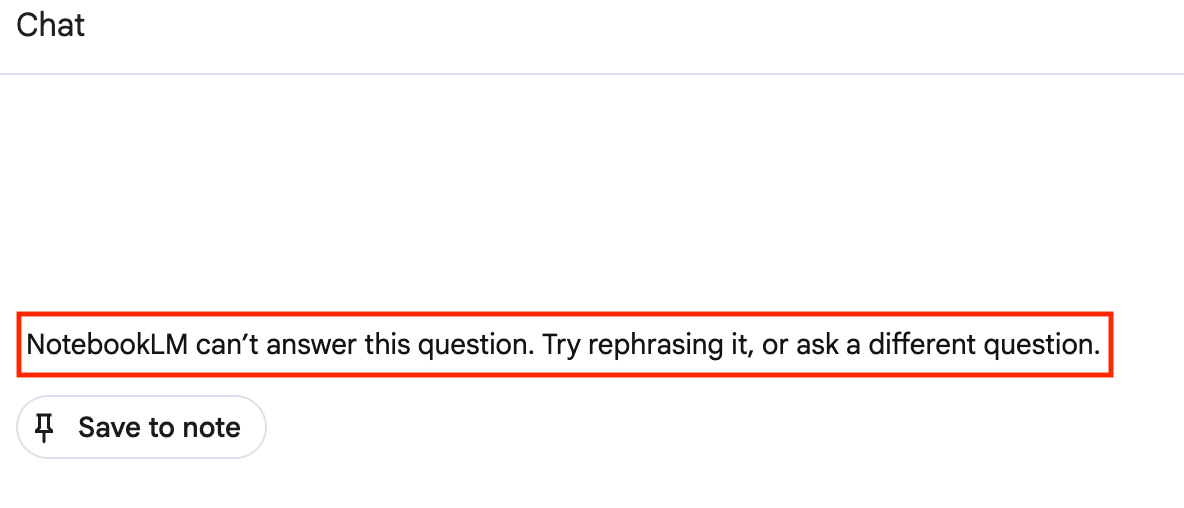 Model Armor policy violation message
### REST
A JSON response which includes the following:
For example:
`json
"answer.state": "SKIPPED",
"answer.assist_skipped_reasons": "CUSTOMER_POLICY_VIOLATION_REASON"`
## Remove the Model Armor templates from Gemini Notebook Enterprise
To remove the Model Armor templates from
Gemini Notebook Enterprise, run the following command:
### REST
```bash
curl -X PATCH \
-H "Authorization: Bearer $(gcloud auth print-access-token)" \
-H "Content-Type: application/json" \
-H "X-Goog-User-Project: PROJECT_ID" \
"https://ENDPOINT_LOCATION-discoveryengine.googleapis.com/v1alpha/projects/PROJECT_NUMBER?update_mask=customerProvidedConfig" \
-d '{
"customerProvidedConfig": {
"notebooklmConfig": {
"modelArmorConfig": {}
}
}
}'
```
Replace the following:
- `PROJECT_ID`: the ID of your project.
- `PROJECT_NUMBER`: the number of your Google Cloud project.
- `ENDPOINT_LOCATION`: the multi-region for your API request. Specify one of the following values:
- `us` for the US multi-region
- `eu` for the EU multi-region
- `global` for the Global location
For more information, see [Specify a multi-region
for your data store](https://docs.cloud.google.com/gemini/enterprise/docs/locations#specify_a_multi-region_for_your_data_store).
#### Example command and result
```
curl -X PATCH \
-H "Authorization: Bearer $(gcloud auth print-access-token)" \
-H "Content-Type: application/json" \
-H "X-Goog-User-Project: my-project-123" \
"https://discoveryengine.googleapis.com/v1/projects/123456?update_mask=customerProvidedConfig" \
-d '{
"customerProvidedConfig": {
"notebooklmConfig": {
}
}
}'
{
"name": "projects/123456",
"createTime": "2025-04-18T19:38:23.299346527Z",
"provisionCompletionTime": "2025-04-18T19:38:23.299346527Z",
"customerProvidedConfig": {
"notebooklmConfig": {}
}
}
```
## Considerations when using Model Armor
When using Model Armor with Gemini Notebook Enterprise,
consider the following:
| **De-identification and masking** | When Model Armor uses a Sensitive Data Protection template for scanning prompts or responses, Model Armor checks if the content matches the detector criteria defined in the template. Although Sensitive Data Protection supports de-identification based on the template configuration, Model Armor does not pass de-identified or masked data back to Gemini Notebook Enterprise. If the content triggers any detectors from Sensitive Data Protection and the enforcement type is `INSPECT_AND_BLOCK`, Gemini Notebook Enterprise blocks the request or response rather than de-identifying it. |
| **Token limits and quotas** | Although there are no direct token limits when you use Model Armor with Gemini Notebook Enterprise, the total throughput of your Model Armor evaluations is still indirectly governed by [Gemini Enterprise system quotas](https://docs.cloud.google.com/gemini/enterprise/docs/quotas-and-pay-as-you-go-usage.md.txt) and [Model Armor API rate limits](https://docs.cloud.google.com/model-armor/quotas.md.txt#quotas). |
| **Service Level Agreement** | Gemini Notebook Enterprise provides a [Service Level Agreement](https://cloud.google.com/terms/gemini/enterprise/sla). When Gemini Notebook Enterprise is configured to use Model Armor, blocked queries don't count as SLA violations, regardless of whether the **fail-open** or **fail-closed** mode is used. |
| **Compliance** | Both Gemini Notebook Enterprise and Model Armor offer various compliance certifications. When used together, the effective compliance certifications are the common subset of both products. Review the compliance certifications for both products to ensure that they meet your regulatory requirements. |
| **Document screening** | If a Model Armor template is configured to screen user prompts or responses, document text extracted from sources is screened when sent in requests. However, images embedded within documents are not screened. For the list of supported document types, see [Document screening](https://docs.cloud.google.com/security-command-center/docs/model-armor-overview#ma-support-screening-pdfs). |
|---|---|
## Configure audit logs
Model Armor records [Data Access audit
logs](https://docs.cloud.google.com/logging/docs/audit#data-access) that you can use to analyze the request
and response screening verdicts. These logs don't contain the user queries or
responses from Gemini Notebook Enterprise, so they are safe for reporting
and analytics. For more information, see [Audit logging for
Model Armor](https://docs.cloud.google.com/security-command-center/docs/audit-logging-model-armor).
To access these logs, you need to have the
[Private Logs Viewer](https://docs.cloud.google.com/iam/docs/roles-permissions/logging.md.txt#logging.privateLogViewer)
(`roles/logging.privateLogViewer`) IAM role.
### Enable Data Access audit logs
To enable the Data Access audit logs, follow these steps:
1. In the Google Cloud console, go to **IAM \& Admin** \>
**Audit Logs**.
2. Select the **Model Armor API**.
3. In the **Permission type** section, select the **Data read** permission type.
4. Click **Save**.
### Examine Data Access audit logs
To examine the Data Access audit logs, follow these steps:
1. In the Google Cloud console, go to **Logs Explorer**.
2. Search the logs for the following method names:
- `google.cloud.modelarmor.v1.ModelArmor.SanitizeUserPrompt`
to view the user requests that were screened.
- `google.cloud.modelarmor.v1.ModelArmor.SanitizeModelResponse`
to view the responses that were screened.