Share the chat agents that you've created and launched using Workflow Builder with other users within your organization. Depending on your web app's [feature control configurations](https://docs.cloud.google.com/gemini/enterprise/docs/manage-web-app-features.md.txt#configure_feature_controls), you might need a Gemini Enterprise app administrator to [review and approve](https://docs.cloud.google.com/gemini/enterprise/docs/workflow-builder/share-chat-agent.md.txt#review-request) to share a chat agent.
> [!CAUTION]
> **Caution:** When you share an agent, consider the following data access behaviors:
>
> - **Knowledge files:** Any user with access to the shared agent can query and view information from files uploaded to the agent's **Knowledge** section, even if they don't have direct access or permissions to the source files. For example, if you upload a confidential file to the **Knowledge** section, all users with access to the shared agent can ask questions about that file's content.
> - **Connectors and data stores:** When an agent accesses data through connectors, user access control lists (ACLs) and permissions are preserved. Users can only query and retrieve data from data stores and connectors that their individual user accounts are authorized to access.
## Share a chat agent
To share a chat agent, do the following:
### App
1. Open your Gemini Enterprise app and go to the **Agent Gallery** page.
The **Agent Gallery** page appears displaying all the prebuilt agents and custom-built agents.
2. In the **Your Agents section**, find the chat agent that you want to share.
> [!NOTE]
> **Note:** You can't share a chat agent that is in a `draft` state.
3. Click **Actions menu** , and select **Share**.
4. In the share dialog, enter the email addresses of the users you want to share the agent with. You can also click **Copy link** to generate a shareable link.
> [!NOTE]
> **Notes:**
> - You can share your chat agent with individual user email addresses. Sharing with Google Groups isn't supported.
> - If your web app is connected to a [People Search data store](https://docs.cloud.google.com/gemini/enterprise/docs/connectors/connect-people.md.txt#create) with [autocomplete](https://docs.cloud.google.com/gemini/enterprise/docs/configure-autocomplete.md.txt) configured for user data, the share dialog provides autofill suggestions as you enter user email addresses.
5. Click **Done**.
The chat agent is shared with the users in your access list.
> [!NOTE]
> **Note:** If your web app administrator has enabled administrator review for agent sharing, a share request is sent to the app administrator for review and approval. After the app administrator approves the request, the chat agent is shared with the users in the access list. You can, at any time, edit the share request to add or remove users, or cancel the request.
## Administrator review control
By default, agent owners can share their agents with any user within their organization without approval from an app administrator. However, app administrators can change the app [feature control configurations](https://docs.cloud.google.com/gemini/enterprise/docs/manage-web-app-features.md.txt#configure_feature_controls) to require administrator review and approval for sharing agents in the app.
Agent sharing follows a two-step process when administrator review is enabled:
1. The agent owner [shares the agent](https://docs.cloud.google.com/gemini/enterprise/docs/workflow-builder/share-chat-agent.md.txt#share-agent) with one or more users.
2. The app administrator [reviews the sharing request](https://docs.cloud.google.com/gemini/enterprise/docs/workflow-builder/share-chat-agent.md.txt#review-request) and approves or denies it.
### Review a share request
App administrators are responsible for reviewing and managing agent sharing requests.
> [!NOTE]
> **Notes:**
>
> - This section only applies if the **Enable agent sharing without admin approval** feature is disabled in the app's feature controls.
> - Only app administrators with the [Gemini Enterprise Admin](https://docs.cloud.google.com/gemini/enterprise/docs/access-control.md.txt#discoveryengine.agentspaceAdmin) IAM role can review and approve share requests.
### Console
To review a share request as an app administrator, do the following:
1. In the Google Cloud console, go to the **Gemini Enterprise \> Apps** page.
[Gemini Enterprise](https://console.cloud.google.com/gemini-enterprise/)
2. Click the name of the app containing the agent.
3. In the app navigation menu, click **Agents**.
4. Find the agent with a **Review share request** action in the **User permissions** column.
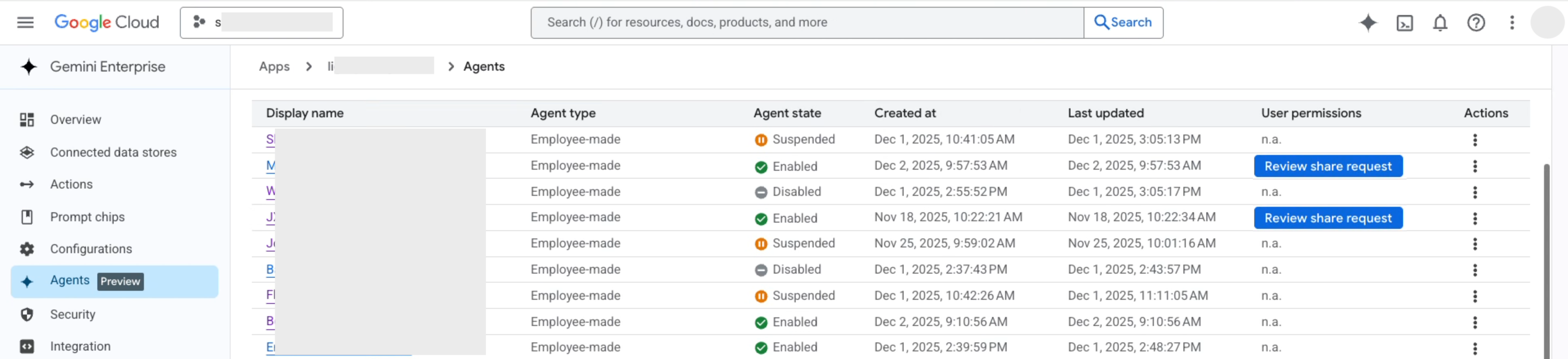
5. Click **Review share request**.
6. In the **Share request** pane:
- Review the access list under **Requested to share with the following users**.
- Optional: Modify the access list to remove user accounts, Google groups, or Workforce Identity Federation (WIF) identity pools. To grant access to additional users, groups, or Workforce Identity Federation principals, use the agent's **User permissions** tab in the console. For the required principal formats, see [Principal set formats](https://docs.cloud.google.com/gemini/enterprise/docs/share-custom-agents.md.txt#principal_sets).
7. To approve the request and grant access, click **Approve and enable**.
8. To reject the request, click **Deny**.
## Sharing limits
When sharing a chat agent, the following limits apply:
- **Maximum 1,500 individual accounts:** Gemini Enterprise manages agent access using underlying Google Cloud IAM allow policies, which enforce a hard cap of 1,500 members per policy. Sharing an agent with more than 1,500 individual user accounts causes the operation to fail with the following error:
```text
The number of members in the policy (1,501) is larger than the maximum allowed size 1,500.
```
For a full list of system constraints, see [Workflow Builder quotas and limits](https://docs.cloud.google.com/gemini/enterprise/docs/workflow-builder/quotas-and-limits.md.txt).
## Considerations
- When you share a chat agent, users can query the content of files uploaded to the **Knowledge** section regardless of direct file access, while data accessed through connectors continues to respect individual user permissions and Access Control Lists (ACLs).
- App administrators can add and remove users from the access list at any time.
- Only app administrators can share the agent with Google groups and Workforce Identity Federation (WIF) identity pools in your organization. For Workforce Identity Federation, group or pool access uses `principalSet://iam.googleapis.com/locations/global/workforcePools/POOL_ID/...`, whereas individual user access uses `principal://iam.googleapis.com/locations/global/workforcePools/POOL_ID/subject/SUBJECT_ID` (where `SUBJECT_ID` is case-sensitive and must match the exact case returned by your identity provider). For more information, see [Principal set formats](https://docs.cloud.google.com/gemini/enterprise/docs/share-custom-agents.md.txt#principal_sets).
- Agent owners can remove any user from the access list at any time (including those added by the app admin).
- App administrators can transfer ownership of a shared chat agent to another user or to themselves in the Google Cloud console. For more information, see [Transfer agent ownership](https://docs.cloud.google.com/gemini/enterprise/docs/share-custom-agents.md.txt#transfer-ownership).
- You can also share a chat agent from the chat agent builder canvas.
## What's next
- Learn how to [use a chat agent](https://docs.cloud.google.com/gemini/enterprise/docs/workflow-builder/use-chat-agent.md.txt).
- Learn how to [schedule chat agent runs](https://docs.cloud.google.com/gemini/enterprise/docs/workflow-builder/schedule-chat-agent.md.txt).
- Learn how to [edit a chat agent](https://docs.cloud.google.com/gemini/enterprise/docs/workflow-builder/edit-chat-agent.md.txt).
- Learn how to [delete a chat agent](https://docs.cloud.google.com/gemini/enterprise/docs/workflow-builder/delete-chat-agent.md.txt).
- View [Workflow Builder quotas and limits](https://docs.cloud.google.com/gemini/enterprise/docs/workflow-builder/quotas-and-limits.md.txt).