

This page describes the concepts related to Gemini Enterprise.
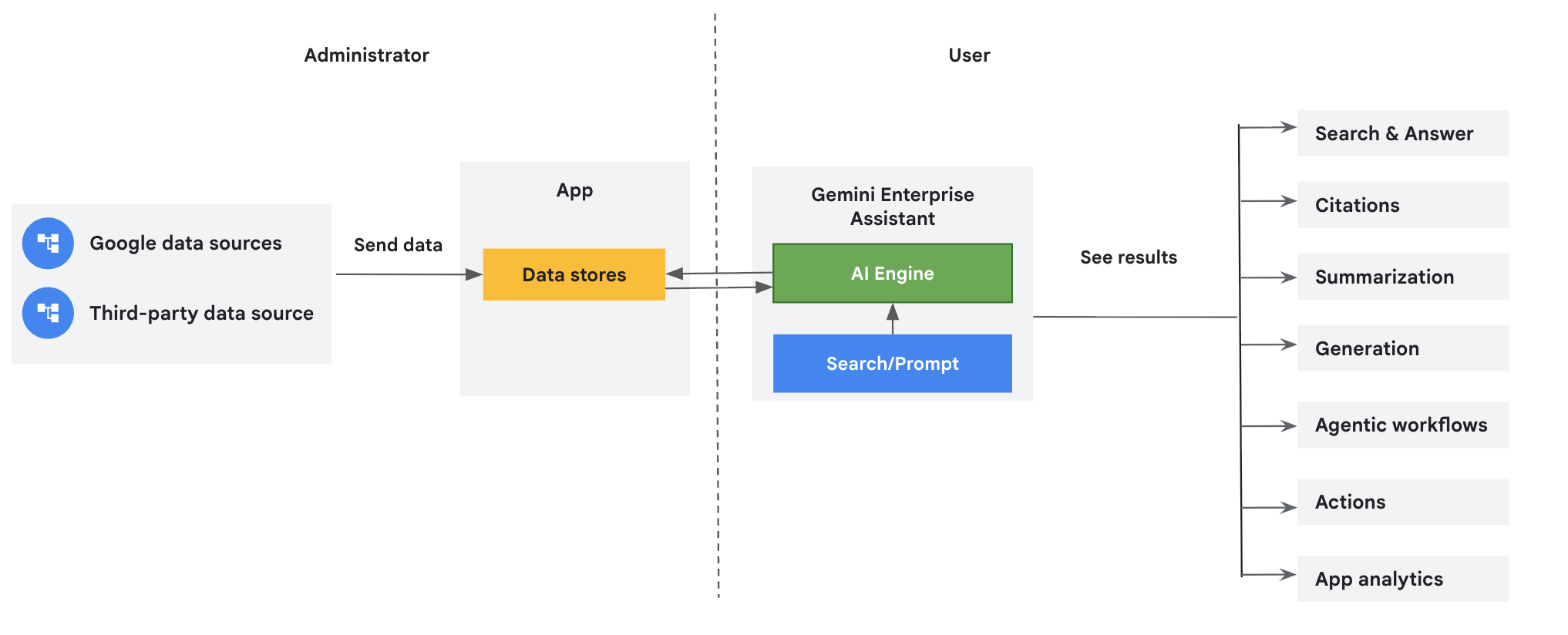
Gemini Enterprise consists of several key concepts that work together to provide a powerful search and action platform. These concepts include data sources, data stores, apps, assistants, actions, agents, skills, analytics, and observability.
| Concept | Description |
|---|---|
Data sources |
You can connect Google and third-party data sources to Gemini Enterprise and store the data in dedicated data stores. To connect your data sources, see Connect a Google data source and Connect a third-party data source. |
Data stores |
Each data source supports a set of entity types. For example, Jira Cloud has entities such as issues, attachments, comments, and worklogs, which are unique to the data source. Gemini Enterprise creates a separate data store for each entity. Therefore, when you create a data store using the Google Cloud console, you get a collection of data stores representing these ingested data entities. To learn about Gemini Enterprise data stores, see Introduction to connectors and data stores. |
Apps |
A Gemini Enterprise app provides
search results, actions, and agents to your end users. The term app
can be used interchangeably with the term engine in the context of
APIs. An app must be connected to a data store in order to use the data
from it to serve search results, answers, or actions.
Apps have a many-to-many relationship with data stores. When multiple data stores are connected to a single app, this is referred to as blended search. For information about connecting a search app to more than one data store, see About blended search. To learn more about creating an app, see Create an app. |
Assistant |
The in-app chat box, known as the assistant, is grounded with the
content in your data stores and adheres to defined security, privacy,
and compliance safeguards.
The assistant performs multiple functions, including:
|
Actions |
Assistant actions allow Gemini Enterprise to perform tasks on behalf of users.
For example, if your app connects to Google Calendar and Jira Cloud data
sources, users can instruct the assistant to create Google Calendar events
or edit Jira Cloud issues.
For more information about using assistant actions, see Extend the assistant with actions. |
Agents |
Agents are applications built to accomplish specific objectives. By connecting to your enterprise data and utilizing a range of tools, these agents can automate multi-step processes, analyze information, and generate new content. In Gemini Enterprise, you can find prebuilt agents in the Agent Gallery or use Agent Designer to create your own custom agents. |
Skills |
Skills provide reusable instructions and standardized prompts that customize how the assistant completes specific tasks. Users can create, save, and share custom skills across their team without writing code. For more information, see Create and manage skills. |
Analytics |
Analytics gives you insight into the usage trends, search quality, and end-user engagement of your app. The console provides an interactive dashboard experience powered by Looker. For more information, see View and export analytics data. |
Observability |
Observability provides real-time telemetry and monitoring across your enterprise search and agent workflows. You can inspect end-to-end execution request traces, trace spans, and usage audit logs to diagnose latency, monitor agent step execution, and analyze system activity.
To learn about configuring observability, see Manage observability settings. To inspect execution telemetry, see Access traces and spans and Access usage audit logs. |