This page documents production updates to Gemini for Google Cloud. Check this page for announcements about new or updated features, bug fixes, known issues, and deprecated functionality.
> [!NOTE]
> **Note:** We have unified our tools into a single, multi-agent platform called Antigravity, with Antigravity CLI now available. Starting June 18, 2026, Gemini Code Assist IDE Extensions and Gemini CLI stopped serving requests for the Gemini Code Assist for individuals, Google AI Pro, and Google AI Ultra tiers. Affected users should migrate to Antigravity and Antigravity CLI. To learn more, see the [deprecation page](https://developers.google.com/gemini-code-assist/docs/deprecations/code-assist-individuals).
You can see the latest product updates for all of Google Cloud on the
[Google Cloud](https://docs.cloud.google.com/release-notes.md.txt) page, browse and filter all release notes in the
[Google Cloud console](https://console.cloud.google.com/release-notes),
or programmatically access release notes in
[BigQuery](https://console.cloud.google.com/bigquery?p=bigquery-public-data&d=google_cloud_release_notes&t=release_notes&page=table).
To get the latest product updates delivered to you, add the URL of this page to your
[feed
reader](https://wikipedia.org/wiki/Comparison_of_feed_aggregators), or add the
[feed URL](https://docs.cloud.google.com/feeds/gemini-release-notes.xml) directly.
## October 09, 2026
**Gemini Code Assist** Announcement Sale of Gemini Code Assist subscriptions is ending. Starting October 9, 2026,
new Gemini Code Assist Standard and Enterprise subscriptions can no longer be
purchased. Existing subscriptions will continue to auto-renew through the rest
of 2026, but auto-renewal will end in 2027. For more information, see
[Gemini Code Assist
Standard and Enterprise subscriptions](https://docs.cloud.google.com/gemini/docs/codeassist/sunset).
For alternative AI developer tools, use Antigravity, which is available through
eligible [Gemini Enterprise subscriptions](https://docs.cloud.google.com/gemini/enterprise/docs/ai-developer-tools-overview.md.txt)
and through [Gemini Enterprise Agent Platform](https://antigravity.google/docs/enterprise/#gemini-enterprise-agent-platform-api-setup).
## September 04, 2026
**Gemini Code Assist** Announcement New subscriptions for Gemini Code Assist can no longer be purchased through the
Google Cloud console using billing accounts that don't have an active
Gemini Code Assist subscription. Billing accounts that currently have an active
Gemini Code Assist subscription are unaffected.
For billing accounts that don't have an active Gemini Code Assist
subscription, you can obtain a new Gemini Code Assist subscription by
[contacting Google Cloud sales](https://cloud.google.com/contact).
For alternative AI developer tools, use Antigravity, which is available through
eligible [Gemini Enterprise subscriptions](https://docs.cloud.google.com/gemini/enterprise/docs/ai-developer-tools-overview.md.txt)
and through [Gemini Enterprise Agent Platform](https://antigravity.google/docs/enterprise/#gemini-enterprise-agent-platform-api-setup).
## August 20, 2026
Announcement Credits for the first month of Gemini Code Assist usage are discontinued.
Customers currently receiving these credits are unaffected by this change.
[Previously](https://docs.cloud.google.com/gemini/docs/release-notes.md.txt#January_30_2025), these
credits had been available to new customers with billing accounts if they had
never had a Gemini Code Assist subscription.
## August 04, 2026
VERSION_UNSPECIFIED Feature Gemini Cloud Assist is now supported within VPC Service Controls perimeters. For
more information, see
[VPC Service Controls supported services](https://docs.cloud.google.com/vpc-service-controls/docs/supported-products.md.txt#table_cloud_assist).
## June 08, 2026
**VS Code Gemini Code Assist** \& **IntelliJ Gemini Code Assist** Announcement
### Gemini 3.5 Flash is generally available
[Gemini 3.5 Flash](https://docs.cloud.google.com/gemini/docs/codeassist/gemini-3.md.txt)
is now generally available to Gemini Code Assist users in VS Code and IntelliJ.
You can use this model for [agent mode](https://docs.cloud.google.com/gemini/docs/codeassist/agent-mode.md.txt),
[chat](https://docs.cloud.google.com/gemini/docs/codeassist/chat-gemini.md.txt), and
[code generation](https://docs.cloud.google.com/gemini/docs/codeassist/write-code-gemini.md.txt#generate_code_with_prompts).
## May 13, 2026
**VS Code Gemini Code Assist 2.81.0** Fixed
### Agent mode bug fix in Cloud Workstations
Fixed a bug that prevented agent mode from working on Cloud Workstations.
**IntelliJ Gemini Code Assist 1.51.1** Other
### Bug fixes in IntelliJ
Various bug fixes and minor product enhancements.
## April 22, 2026
**Gemini Cloud Assist** Feature
### Model Context Protocol support
MCP support is available in Private Preview. To request access, contact your
Google Cloud account team. You can interact with Gemini Cloud Assist agents from
various surfaces, including third-party client agents and IDEs, using the Model
Context Protocol (MCP). For more information, see
[Integrating with MCP](https://docs.cloud.google.com/cloud-assist/configure-mcp.md.txt).
**Gemini Cloud Assist** Feature
### Proactive agents for issue investigation
Proactive agents are available in Private Preview to Premium Support customers.
Enable Gemini Cloud Assist to autonomously investigate issues triggered by Cloud
Alerting policies or cost anomalies in the background. These investigations
don't modify or make any changes to your environment. Results and insights, such
as root cause analysis for alerts or cost spike drivers, are delivered via
Eventarc. You can view these results in the Google Cloud console. This feature requires
administrator enablement and configuration of an agent identity. For more
information, see [Configure proactive agents](https://docs.cloud.google.com/cloud-assist/proactive-agents-setup.md.txt).
**Gemini Cloud Assist** Feature
### Page context awareness
Page context awareness is available in Public Preview. Gemini Cloud Assist
automatically uses the context of the content currently visible on your
Google Cloud console page to provide more relevant and accurate responses to your
prompts. For more information, see
[Manage page context sharing](https://docs.cloud.google.com/cloud-assist/chat-panel.md.txt#page-context-sharing).
**Gemini Cloud Assist** Feature
### Enhanced agent administration controls
[Enhanced agent administration controls](https://docs.cloud.google.com/cloud-assist/admin-settings.md.txt) are available in Public Preview.
Administrators have the following options in the Cloud Assist settings panel:
- **Web grounding settings:** Choose how Gemini Cloud Assist uses Google Search to ground its responses, with options for either the most comprehensive results or stricter data residency compliance. For more information, see [Configure web grounding](https://docs.cloud.google.com/cloud-assist/configure-grounding.md.txt).
- **Custom instructions:** Define persistent system instructions to customize the agent's persona, response formatting, and awareness of organizational standards or business context for all users within the project. For more information, see [Set custom instructions](https://docs.cloud.google.com/cloud-assist/custom-instructions.md.txt).
## April 17, 2026
**IntelliJ Gemini Code Assist 1.49.4** Other
### Bug fixes in IntelliJ
Various bug fixes and minor product enhancements.
## April 16, 2026
**Gemini Cloud Assist** Announcement
### geminicloudassist API automatically enabled for Gemini Cloud Assist chat users
As of April 16th, 2026, the `geminicloudassist.googleapis.com` API has been
automatically enabled on projects that meet **all** of the following criteria:
- Had used [Gemini Cloud Assist chat](https://docs.cloud.google.com/cloud-assist/chat-panel.md.txt) in the prior 60 days.
- Had the `cloudaicompanion.googleapis.com` API enabled on April 16, 2026.
- Did not have the `geminicloudassist.googleapis.com` API enabled on April 16, 2026.
The Gemini Cloud Assist chat functionality that was previously served by
`cloudaicompanion.googleapis.com` is now served by
`geminicloudassist.googleapis.com`, and both APIs are dependencies to use
Gemini Cloud Assist. This automatic API enablement ensures that users have
access to the same functionality without any loss of service.
## April 13, 2026
**VS Code Gemini Code Assist 2.77.3** Fixed
### Quota issues fixed in VS Code
Various bug fixes related to quota issues.
## April 10, 2026
**Gemini Cloud Assist** Breaking
### Update for Gemini Cloud Assist investigations
From April 10, 2026, creating, running, and editing Gemini Cloud Assist
[investigations](https://docs.cloud.google.com/cloud-assist/investigations.md.txt) will only be available to users
with a Premium Support contract or who have requested access through their
account team. If you ran an investigation prior to April 10, 2026, the results
of the investigation continue to be available to you in the Google Cloud console.
## April 09, 2026
**IntelliJ Gemini Code Assist 1.49.3** Other
### Bug fixes in IntelliJ
Various bug fixes and minor product enhancements.
**Gemini Cloud Assist** Deprecated
### VPC Service Controls support for Gemini Cloud Assist investigations deprecation
Starting April 13, 2026, Gemini Cloud Assist investigations will no longer be
supported within VPC Service Controls perimeters. You do not need to remove the
Gemini Cloud Assist API (`geminicloudassist.googleapis.com`) from your
Restricted Service configurations, but if you keep it there, access to it will
still be blocked within the perimeter. To continue using this feature, you must
make requests to the service from outside any VPC Service Controls perimeter.
For more information, see the
[Deprecated VPC Service Controls support for Gemini Cloud Assist investigations](https://docs.cloud.google.com/cloud-assist/deprecations/vpcsc-support)
page.
**VS Code Gemini Code Assist 2.77.1** Fixed
### Agent mode logs now attributed to Gemini Code Assist
VS Code Gemini Code Assist `2.77.1` now attributes agent mode logs to Gemini
Code Assist. In previous versions, agent mode logs are being attributed to
Gemini CLI instead of Gemini Code Assist. This discrepancy is resolved in the
latest release, and we recommend that you update to version `2.77.1` or higher
to ensure your usage metrics are correctly reported.
## April 08, 2026
**Gemini Cloud Assist** Breaking
### Custom IAM roles permission update for Gemini Cloud Assist
Gemini Cloud Assist has replaced the `cloudaicompanion.instances.completeTask`
IAM permission with `geminicloudassist.agents.invoke`. If you
have access to Gemini Cloud Assist through a custom IAM role,
you must update the role to continue having access. For more information, see the
[deprecated IAM permissions](https://docs.cloud.google.com/cloud-assist/deprecations/permissions.md.txt)
document.
## April 06, 2026
**Gemini Cloud Assist** Deprecated
### Custom IAM roles permission update for Gemini Cloud Assist
On April 8, 2026, Gemini Cloud Assist is replacing the
`cloudaicompanion.instances.completeTask` IAM permission with
`geminicloudassist.agents.invoke`. Updates to standard IAM roles
will be done automatically, but if you have access to Gemini Cloud Assist
through a custom IAM role, you must update the role before
April 8, 2026 to ensure continued access. For more information, see the
[deprecated IAM permissions](https://docs.cloud.google.com/cloud-assist/deprecations/permissions.md.txt)
document.
## March 24, 2026
**IntelliJ Gemini Code Assist 1.49.2** Other
### Bug fixes in IntelliJ
Various bug fixes and minor product enhancements.
## March 13, 2026
**VS Code and IntelliJ Gemini Code Assist** Announcement
### Gemini 3.1 Pro and 3.0 Flash are available (Preview)
[Gemini 3.1 Pro and Gemini 3.0 Flash](https://docs.cloud.google.com/gemini/docs/codeassist/gemini-3.md.txt)
are now available to Gemini Code Assist users in VS Code and IntelliJ, in
[Preview](https://cloud.google.com/products#product-launch-stages). You can use
these models for [agent mode](https://docs.cloud.google.com/gemini/docs/codeassist/agent-mode.md.txt),
[chat](https://docs.cloud.google.com/gemini/docs/codeassist/chat-gemini.md.txt), and
[code generation](https://docs.cloud.google.com/gemini/docs/codeassist/write-code-gemini.md.txt#generate_code_with_prompts).
## March 04, 2026
**VS Code Gemini Code Assist 2.73.0** Feature
### File outline and finish changes features in VS Code general availability
The [file outline](https://docs.cloud.google.com/gemini/docs/codeassist/chat-gemini.md.txt#outline)
and [finish changes](https://docs.cloud.google.com/gemini/docs/codeassist/write-code-gemini.md.txt#finish-changes)
features are now available in VS Code and generally available (GA).
## February 24, 2026
**IntelliJ Gemini Code Assist 1.47.0** Announcement
### File outline feature in IntelliJ general availability
The [file outline](https://docs.cloud.google.com/gemini/docs/codeassist/chat-gemini.md.txt#outline)
feature is now generally available (GA).
**IntelliJ Gemini Code Assist 1.46.0** Announcement
### Finish changes feature in IntelliJ general availability
The [finish changes](https://docs.cloud.google.com/gemini/docs/codeassist/write-code-gemini.md.txt#finish-changes)
features is now generally available (GA).
## January 08, 2026
Feature [VPC Service Controls for Gemini Cloud Assist investigations](https://docs.cloud.google.com/vpc-service-controls/docs/supported-products.md.txt#table_cloud_assist)
is now available in [Preview](https://cloud.google.com/products#product-launch-stages).
## January 01, 2026
Announcement
### Gemini Cloud Assist documentation migration
Gemini Cloud Assist release notes are now published here. If you are looking for
Gemini Cloud Assist release notes prior to January 2026, see the
[Gemini for Google Cloud release notes](https://docs.cloud.google.com/gemini/docs/release-notes.md.txt).
## December 16, 2025
**VS Code Gemini Code Assist 2.56.0** Fixed
### VS Code model selection issue fixed as of version 2.63.1
The [model selection issue](https://docs.cloud.google.com/gemini/docs/release-notes.md.txt#known_issue_for_the_model_selection_feature_in_vs_code_gemini_code_assist)
affecting free tier customers using Gemini Code Assist releases 2.56 and later
is fixed as of version 2.63.1.
## December 12, 2025
**VS Code Gemini Code Assist 2.56.0** Issue
### Known issue for the model selection feature in VS Code Gemini Code Assist
The VS Code Gemini Code Assist
[model selection feature](https://docs.cloud.google.com/gemini/docs/codeassist/chat-gemini.md.txt#select-model)
incorrectly appears for users of the free tier of Gemini Code Assist for
individuals.
- The feature shouldn't appear for such users and does not function for them.
## December 05, 2025
**IntelliJ Gemini Code Assist 1.40.0** Feature
### Finish Changes in IntelliJ (Preview)
The [finish changes](https://docs.cloud.google.com/gemini/docs/codeassist//write-code-gemini#finish-changes)
feature acts as an AI pair programmer that observes your in-progress work and
completes the job, eliminating the need to write complex prompts. The core
strength of the finish changes feature lies in its flexibility, allowing you to
use a mix of input styles, such as pseudocode, #TODOs, or half-written code.
This combination minimizes distraction and ensures you remain in control of the
high-level design.
**IntelliJ Gemini Code Assist 1.40.0** Feature
### Outline in IntelliJ (Preview)
The [outline feature](https://docs.cloud.google.com/gemini/docs/codeassist/chat-gemini.md.txt#outline) automatically
creates AI-assisted documentation by generating short, English summaries of code
blocks within the **Outline** tab of the Gemini Code Assist plugin. Outlines
help developers to achieve rapid understanding and to focus on abstraction,
without getting bogged down by syntactical details.
You can [change the settings](https://docs.cloud.google.com/gemini/docs/codeassist/chat-gemini.md.txt#outline-settings)
to disable automatic outline generation, which instead lets you generate
outlines of files manually.

## December 04, 2025
**VS Code Gemini Code Assist 2.56.0** Feature
### Model selection for VS Code Gemini Code Assist
The following VS Code Gemini Code Assist users can now
[manually select the model](https://docs.cloud.google.com/gemini/docs/codeassist/chat-gemini.md.txt#select-model)
used by Gemini Code Assist:
- Gemini Code Assist Enterprise users
- Gemini Code Assist Standard users
- Gemini Code Assist for individuals, if you have a Google AI Pro or Ultra subscription
## November 13, 2025
**VS Code Gemini Code Assist 2.57.0** \& **VS Code Gemini Code Assist 2.58.0** Fixed
### VS Code server connection issue fixed as of version 2.58.1
The [server connection issue](https://docs.cloud.google.com/gemini/docs/release-notes.md.txt#known_issue_in_vs_code_257_and_later) affecting
Gemini Code Assist 2.57 and 2.58 releases is fixed as of version 2.58.1
**VS Code Gemini Code Assist 2.57.0** \& **VS Code Gemini Code Assist 2.58.0** Issue
### Known issue in VS Code 2.57 and later
The Gemini Code Assist 2.57 and later releases for VS Code have a known issue
that prevents the extension from connecting to the server if you are using a
gnc c runtime version that's earlier than 2.36.
- You can permanently fix this issue by upgrading your gnu c runtime version to
2.36 or higher.
- Alternatively, you can downgrade the Gemini Code Assist VS Code extension
to version 2.56 until a fix is released.
## November 12, 2025
Feature
### Chat performance metrics
Gain deeper insights into Gemini for Google Cloud's chat performance with
metrics for chat acceptance rate and lines of chat accepted, including
interactions in Agent mode and non-agentic chat. Combine these metrics with
existing code metrics to calculate total acceptance and total lines of code
accepted, providing a complete picture of Gemini's performance. For more
information, see
[View Gemini for Google Cloud logs](https://docs.cloud.google.com/gemini/docs/log-gemini.md.txt).
Feature
### Code customization available in agent mode and Gemini CLI (Preview)
[Code customization](https://docs.cloud.google.com/gemini/docs/codeassist/code-customization-overview.md.txt) is now
supported when using [Gemini CLI](https://docs.cloud.google.com/gemini/docs/codeassist/gemini-cli.md.txt) and
[agent mode](https://docs.cloud.google.com/gemini/docs/codeassist/agent-mode.md.txt) in Gemini Code Assist.
**IntelliJ Gemini Code Assist 1.38.0** Feature
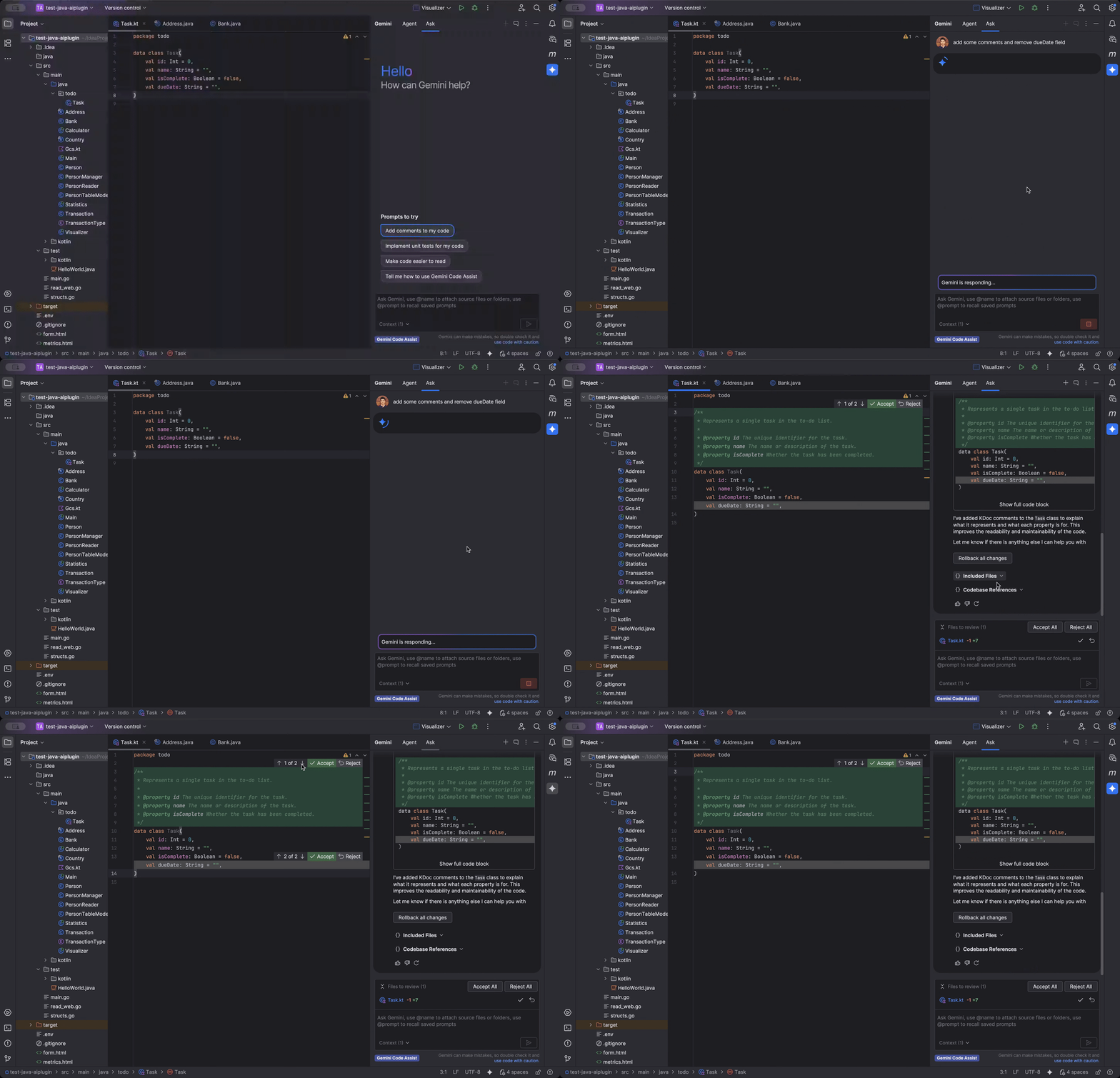
### Inline diff is generally available (GA) for IntelliJ
[Inline diff](https://docs.cloud.google.com/gemini/docs/codeassist/chat-gemini.md.txt#view_code_diffs) is generally
available for IntelliJ Gemini Code Assist. With the inline diff view, chat
generated code suggestions are visually highlighted directly in your editor.
This feature can boost productivity by offering immediate visibility on
modifications, streamlining reviews and enabling precise control over
integrating new code, all without leaving your current view.
If preferred, you can also
[change the diff view settings](https://docs.cloud.google.com/gemini/docs/codeassist/chat-gemini.md.txt#change_diff_view_settings)
to have a side-by-side diff window instead of the inline diff.
## November 10, 2025
Feature
### Persistent memory for Gemini Code Assist on GitHub (Preview)
- [Gemini Code Assist on GitHub](https://developers.google.com/gemini-code-assist/docs/review-github-code#versions)
now supports persistent memory, which stores your previous interactions with
Gemini Code Assist on GitHub so that it has context during your future
interactions.
- For users of the enterprise version, persistent memory is enabled from the
connection settings within the Google Cloud console. For users of the consumer
version, persistent memory is enabled from the Gemini Code Assist site. For
more information, see
[manage configuration files across multiple repositories](https://developers.google.com/gemini-code-assist/docs/customize-gemini-behavior-github#bulk-config).
## October 14, 2025
Breaking
### Gemini Code Assist tools are no longer available and are replaced by agent mode (Preview)
Effective October 14, 2025, Gemini Code Assist tools are no longer available.
This completes the deprecation process that was
[announced](https://docs.cloud.google.com/gemini/docs/release-notes.md.txt#October_02_2025) on October 2, 2025.
Using the `@` symbol followed by the name of a tool no longer connects to
Gemini Code Assist tools.
To connect to external services, use Model Context Protocol (MCP) servers
in Gemini Code Assist [agent mode](https://docs.cloud.google.com/gemini/docs/codeassist/agent-mode.md.txt).
For more information, see:
- [Configure MCP servers](https://docs.cloud.google.com/gemini/docs/codeassist/use-agentic-chat-pair-programmer.md.txt#configure-mcp-servers)
- [Gemini feature deprecations](https://docs.cloud.google.com/gemini/docs/deprecations/features.md.txt)
## October 13, 2025
Feature
### Enterprise version of Gemini Code Assist on GitHub (Preview)
- Gemini Code Assist on GitHub provides Gemini-powered reviews of pull requests
in your GitHub repositories.
- The [enterprise version](https://developers.google.com/gemini-code-assist/docs/review-github-code#versions)
enables consolidated control of Gemini Code Assist reviews across multiple
repositories, provides increased quotas, supports GitHub Enterprise Cloud and
GitHub Enterprise Server, and operates under the Google Cloud Terms of
Service.
## October 09, 2025
**Gemini in BigQuery** Announcement
### Security, privacy, and compliance for Gemini in BigQuery
[Security, privacy, and compliance for Gemini in
BigQuery](https://docs.cloud.google.com/gemini/docs/bigquery/security-privacy-compliance) details how
customer data is protected and processed by Gemini in BigQuery.
## October 08, 2025
**IntelliJ Gemini Code Assist 1.33.1** Feature
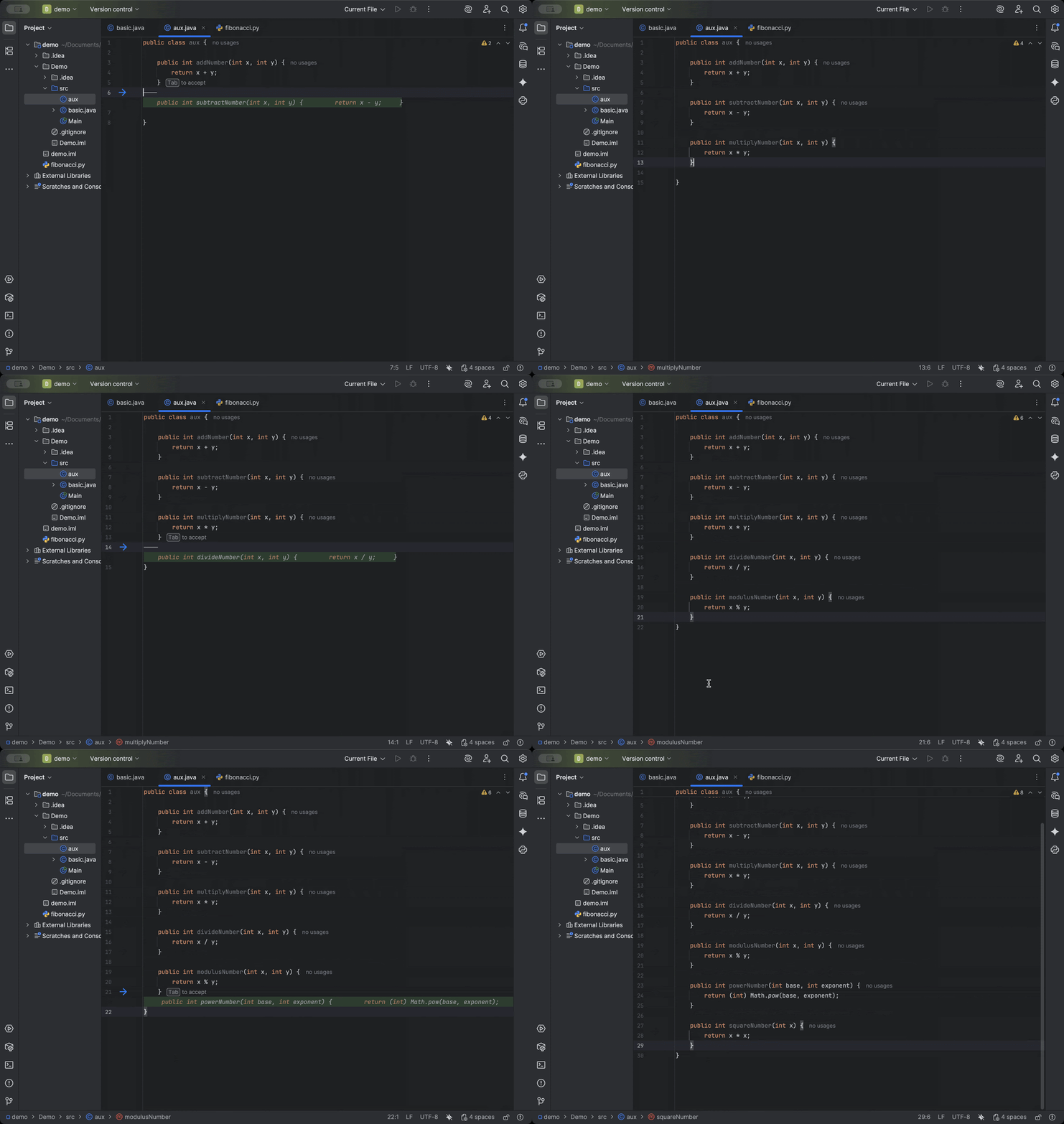
### Next Edit Predictions in IntelliJ (Preview)
[Next Edit Predictions](https://cloud.google.com/gemini/docs/codeassist/write-code-gemini#use_next_edit_predictions),
which predicts the next code suggestions throughout the code file that you're
currently in, are now available in IntelliJ Gemini Code Assist, in
[Preview](https://cloud.google.com/terms/service-terms).
You can cycle through multiple suggestions, dismiss suggestions, or ignore them
and continue coding.
[Enable Next Edit Predictions](https://cloud.google.com/gemini/docs/codeassist/write-code-gemini#use_next_edit_predictions)
in your IDE to get started.
Feature
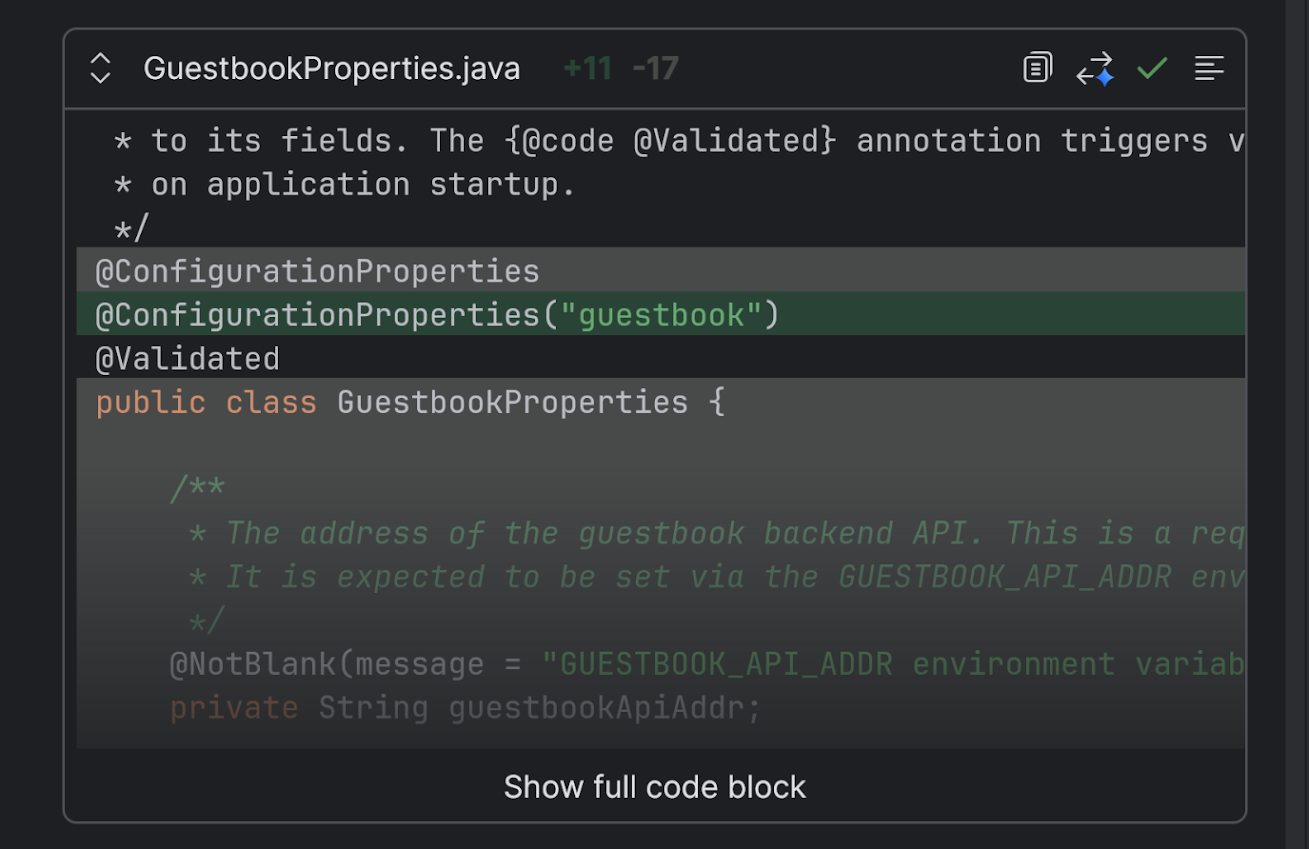
### Chat code suggestion preview in IntelliJ
Chat code suggestions are [displayed in a preview block](https://cloud.google.com/gemini/docs/codeassist/chat-gemini#configure_code_preview_pane)
by default with IntelliJ Gemini Code Assist, improving the readability of
generated chat responses.
## October 02, 2025
Deprecated
### Gemini Code Assist tools are deprecated and replaced by agent mode
Gemini Code Assist tools are deprecated and will be removed on October 14, 2025.
Gemini Code Assist tools are replaced by Gemini Code Assist agent mode. After
October 14, 2025, using the `@` symbol followed by the name of a tool won't
connect to Gemini Code Assist tools.
Agent mode in Gemini Code Assist can connect to external services using Model
Context Protocol (MCP) servers. For more information, read
[Configure MCP servers](https://docs.cloud.google.com/gemini/docs/codeassist/use-agentic-chat-pair-programmer.md.txt#configure-mcp-servers).
## September 29, 2025
**IntelliJ Gemini Code Assist 1.32.0** Feature
### Add code snippets to the chat context
You can now select, attach, and direct Gemini to focus on code snippets with
IntelliJ Gemini Code Assist. [Code snippet selection](https://cloud.google.com/gemini/docs/codeassist/chat-gemini#add_selected_code_snippets_to_context)
enables discrete analysis of smaller code blocks instead of entire files.
## September 26, 2025
**VS Code Gemini Code Assist 2.51.0** Feature
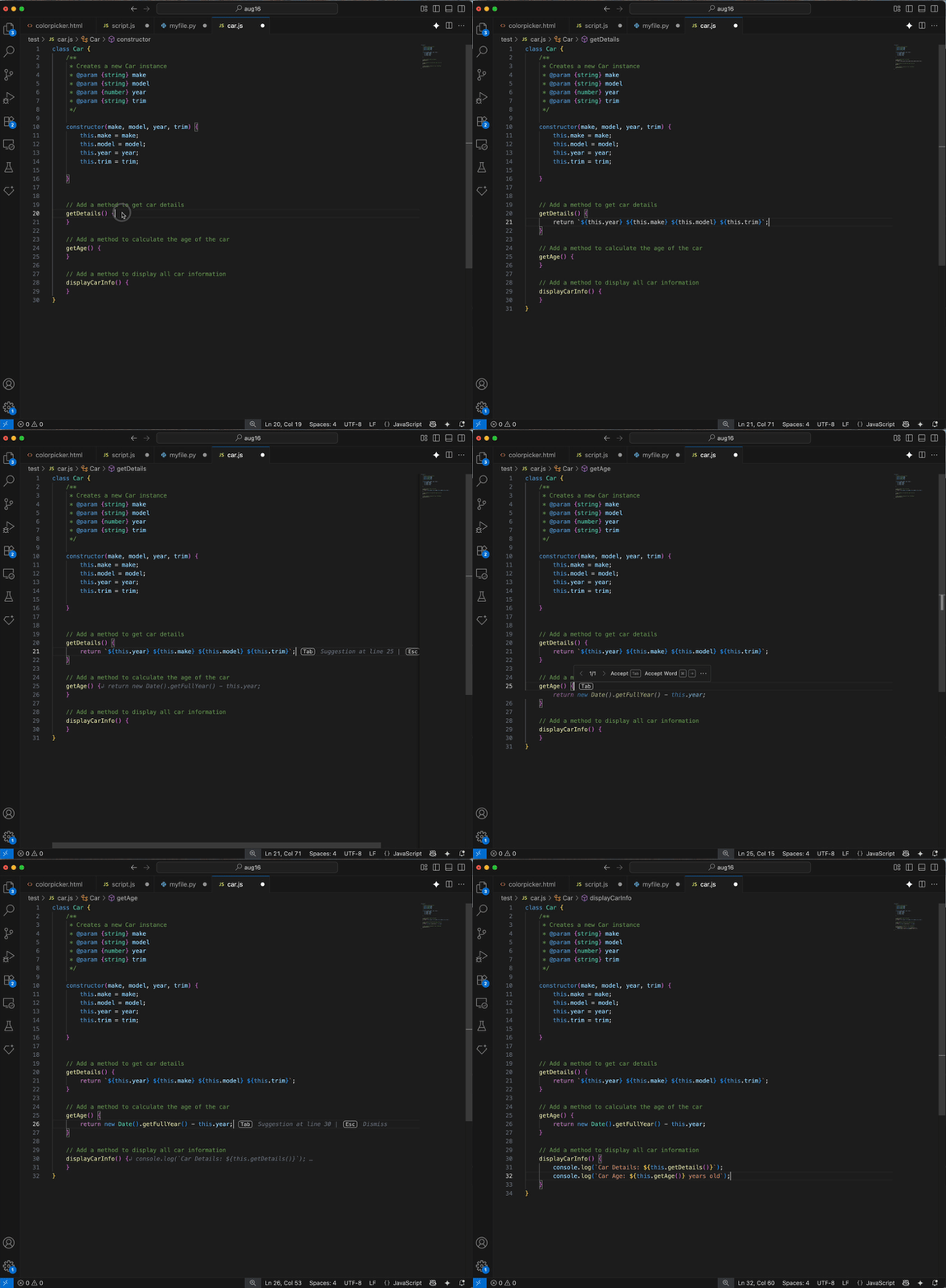
### Next Edit Predictions in VS Code (Preview)
[Next Edit Predictions](https://cloud.google.com/gemini/docs/codeassist/write-code-gemini#use_next_edit_predictions),
which predicts the next code suggestions throughout the code file that you're
currently in, are now available in VS Code Gemini Code Assist, in
[Preview](https://cloud.google.com/terms/service-terms).
You can cycle through multiple suggestions, dismiss suggestions, or ignore them
and continue coding.
[Enable Next Edit Predictions](https://cloud.devsite.com/gemini/docs/codeassist/write-code-gemini#use_next_edit_predictions)
in your IDE to get started.
**Gemini Cloud Assist** Feature
### Cloud Hub Optimization and Cost Explorer integrations
Gemini Cloud Assist can now answer questions about your
[resource cost and utilization](https://cloud.google.com/gemini/docs/cloud-assist/overview#optimize_cost_and_usage).
To learn more about what permissions you need to enable this functionality, see
the [Optimize resource costs and utilization setup](https://cloud.google.com/hub/docs/optimize#before_you_begin)
and the [Optimize costs with Cost Explorer setup](https://cloud.google.com/stackdriver/docs/costs/optimize-costs#before-you-begin).
## September 23, 2025
Feature
### Copy sign-in link
As an alternative to clicking **Sign in** when signing into your Google Account
to use IntelliJ Gemini Code Assist, you can [click **Copy link**](https://cloud.google.com/gemini/docs/discover/set-up-gemini#sign-in-select-gcp-project)
and manually paste the link in your browser's URL bar.
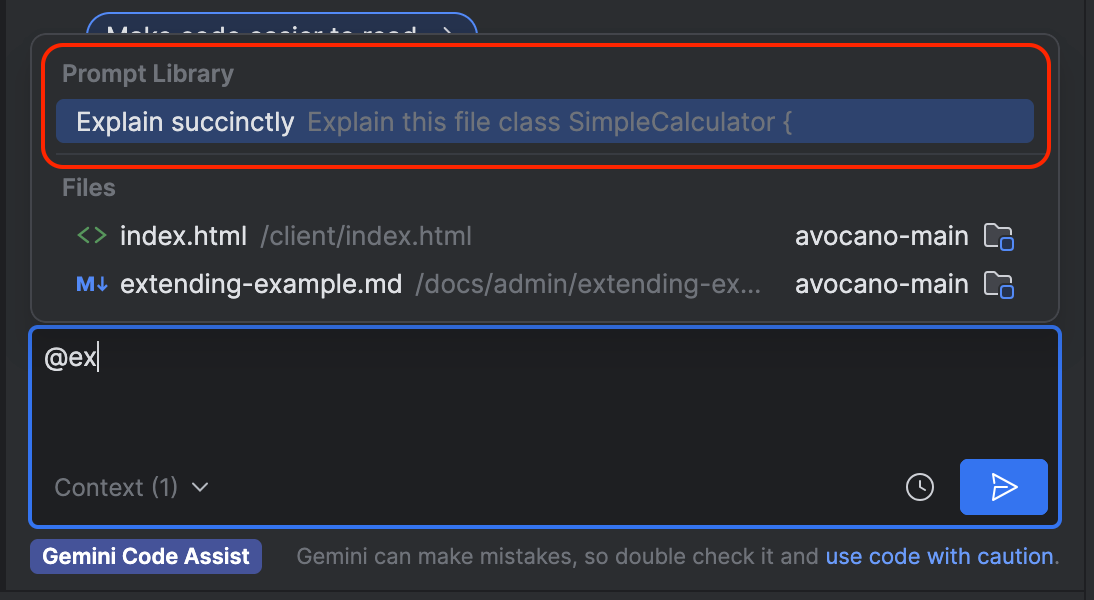
Feature
### Access saved prompts in the Prompt Library
You can [access saved prompts](https://cloud.google.com/gemini/docs/codeassist/chat-gemini#create_custom_commands)
in the Prompt Library when you type `@` in Gemini chat and select the prompt you
want.
To view the Prompt Library settings, go to **Settings** \> **Tools** \>
**Gemini** \> **Prompt Library**.
**VS Code Gemini Code Assist 2.50.0** Feature
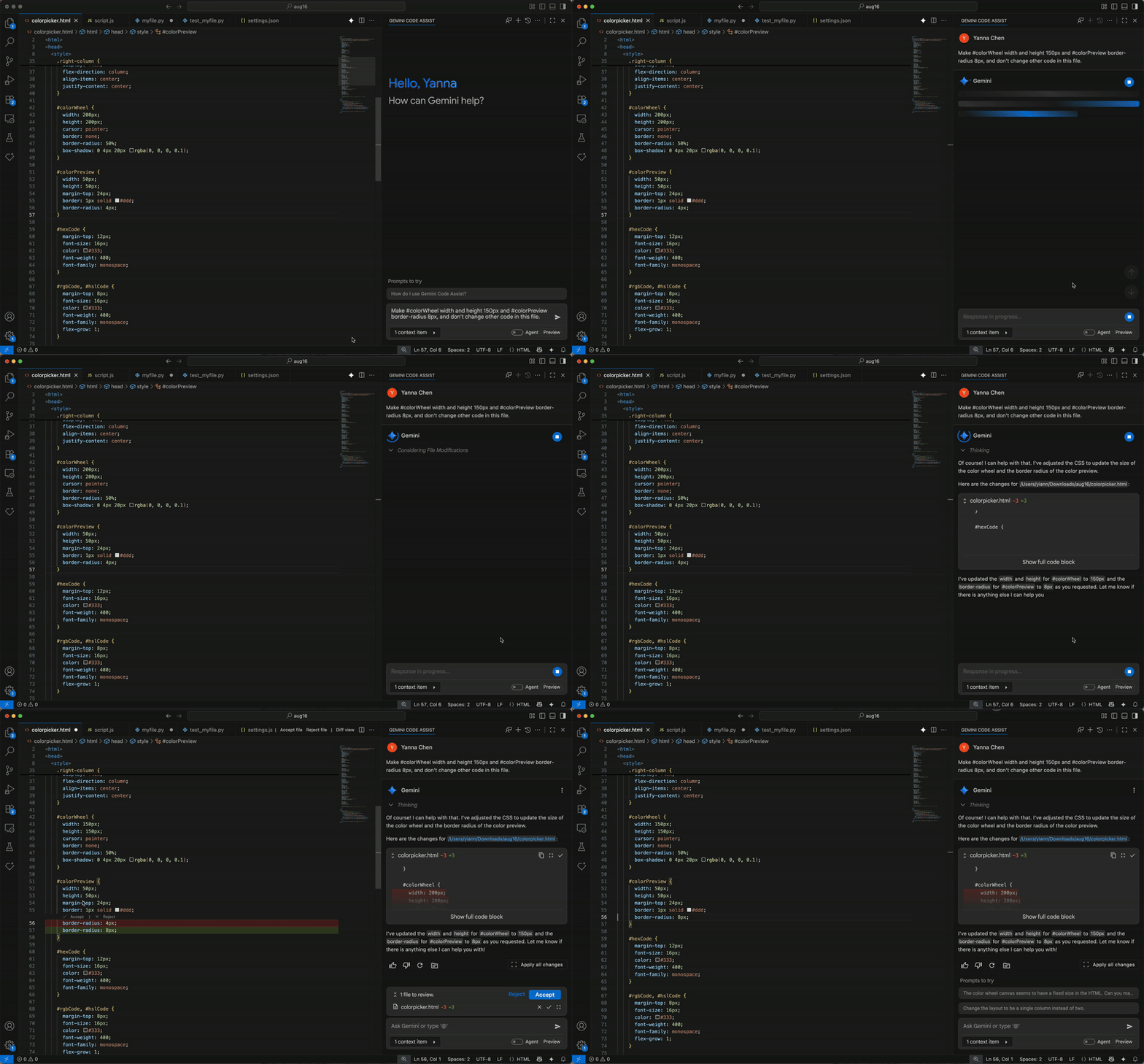
### Inline diff is generally available (GA) for VS Code
[Inline diff](https://cloud.google.com/gemini/docs/codeassist/chat-gemini#view_code_diffs)
is generally available for VS Code Gemini Code Assist. With the inline diff
view, you can visually highlight code changes directly in your editor---green for
additions, red for deletions. This feature boosts productivity by offering
immediate visibility on modifications, streamlining reviews, and enabling
precise control over integrating new code, all without leaving your current
view.
If preferred, you can also
[change the diff view settings to have a side-by-side diff window](https://cloud.google.com/gemini/docs/codeassist/chat-gemini#change_diff_view_settings)
instead of the inline diff.
**IntelliJ Gemini Code Assist 1.31.3** Feature
### Revert to a checkpoint in IntelliJ (GA)
[Reverting to a checkpoint for chat code suggestions](https://cloud.google.com/gemini/docs/codeassist/chat-gemini#revert_to_a_checkpoint_in_chat)
with IntelliJ Gemini Code Assist is now generally available. Reverting to a
checkpoint lets you revert affected source files to a point before any code
suggestions were applied.
## September 18, 2025
**VS Code Gemini Code Assist 2.49.0** Feature
### See code customization status directly in IDE
You'll now get a one-time notification the first time code customization is
enabled for you, so you know right away that the feature is active.
Additionally, you can now check the status of code customization directly by
clicking on the Gemini icon in your IDE. This makes it simple to confirm that
the feature is configured correctly and ready to go. For more information, see
[Code customization overview](https://cloud.google.com/gemini/docs/codeassist/code-customization-overview).
## September 11, 2025
**VS Code Gemini Code Assist 2.49.0** Fixed
### Performance and stability improvements for VS Code
Numerous performance and stability improvements have been made to the Gemini
Code Assist extension, further reducing extension crashes and related adverse
functional events.
Feature
### Edit a prior prompt in VS Code
You can [edit a prior prompt](https://cloud.google.com/gemini/docs/codeassist/chat-gemini#edit_a_prior_prompt) in Gemini Code Assist and receive a regenerated
response based on your edited prompt.
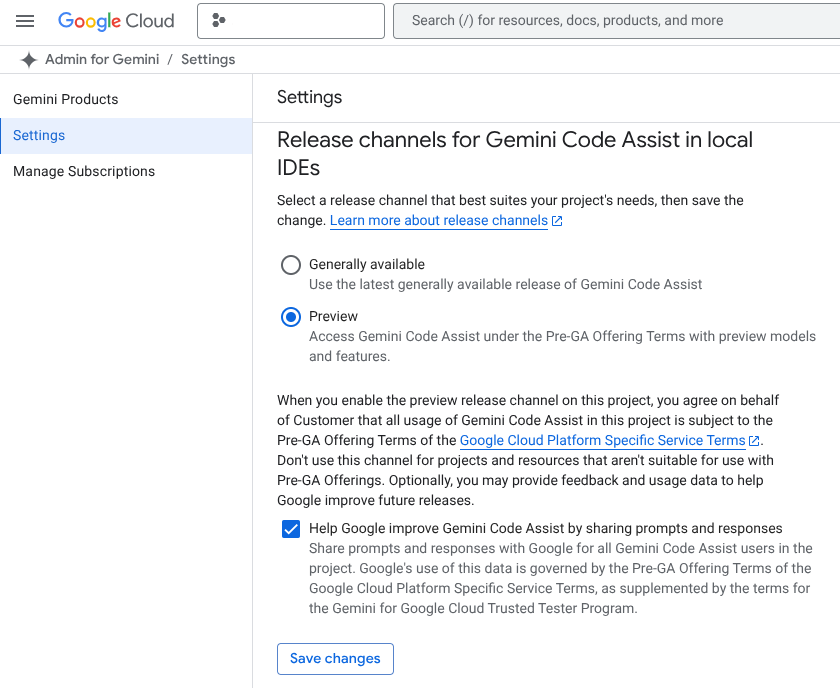
Feature
### Introducing Release Channels in Gemini Code Assist
We're rolling out Release Channels in Gemini Code Assist Standard and Enterprise
to give you more control over the features and models you access, helping us
deliver new capabilities faster. This means direct access to our latest features,
minimizing the need for sign-ups.
You can choose between the Preview Channel for early access to cutting-edge
features (no SLA) or the GA Channel for stable, fully supported features with a
standard Google Cloud SLA. Project leads and administrators can easily configure
these settings at the Google Cloud Platform project level within the Admin for
Gemini settings, making it simple to opt in your entire team to the Preview
channel if desired. Note that at launch, the two release channels have
identical features. For more information, see
[Configure Gemini Code Assist release channels](https://cloud.google.com/gemini/docs/codeassist/configure-release-channels).
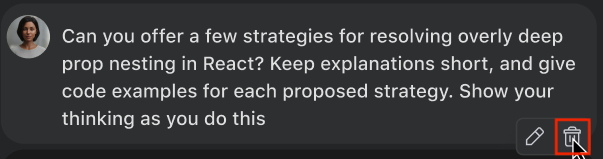
Feature
### Delete prompt and response pair in VS Code
You can [delete your prompt and Gemini's response to that prompt](https://cloud.google.com/gemini/docs/codeassist/chat-gemini#delete_prompt_and_response_pairs) in your chat with
Gemini Code Assist. This works as an alternative to deleting your entire chat
history, allowing you to remove a single prompt and response within a chat,
while maintaining the rest of your chat history with Gemini Code Assist.
Feature
### Regenerate a prompt response in VS Code
You can [regenerate a prompt response](https://cloud.google.com/gemini/docs/codeassist/chat-gemini#regenerate_a_prompt_response) to your most recent prompt, where
Gemini Code Assist re-evaluates your prompt and provides a new response.
## September 10, 2025
**VS Code Gemini Code Assist 2.48.0** Feature
### Deploy apps to Cloud Run in Gemini Code Assist agent mode (Preview)
Leverage the power of Gemini CLI extensions in VS Code Gemini Code Assist agent
mode with the `/deploy` custom slash command. The `/deploy` command lets you deploy
your existing web application to Cloud Run directly from agent mode. `/deploy`
takes care of what used to be a multi-step process of building, containerizing,
pushing, and configuring, and then returns a public URL for your live
application.
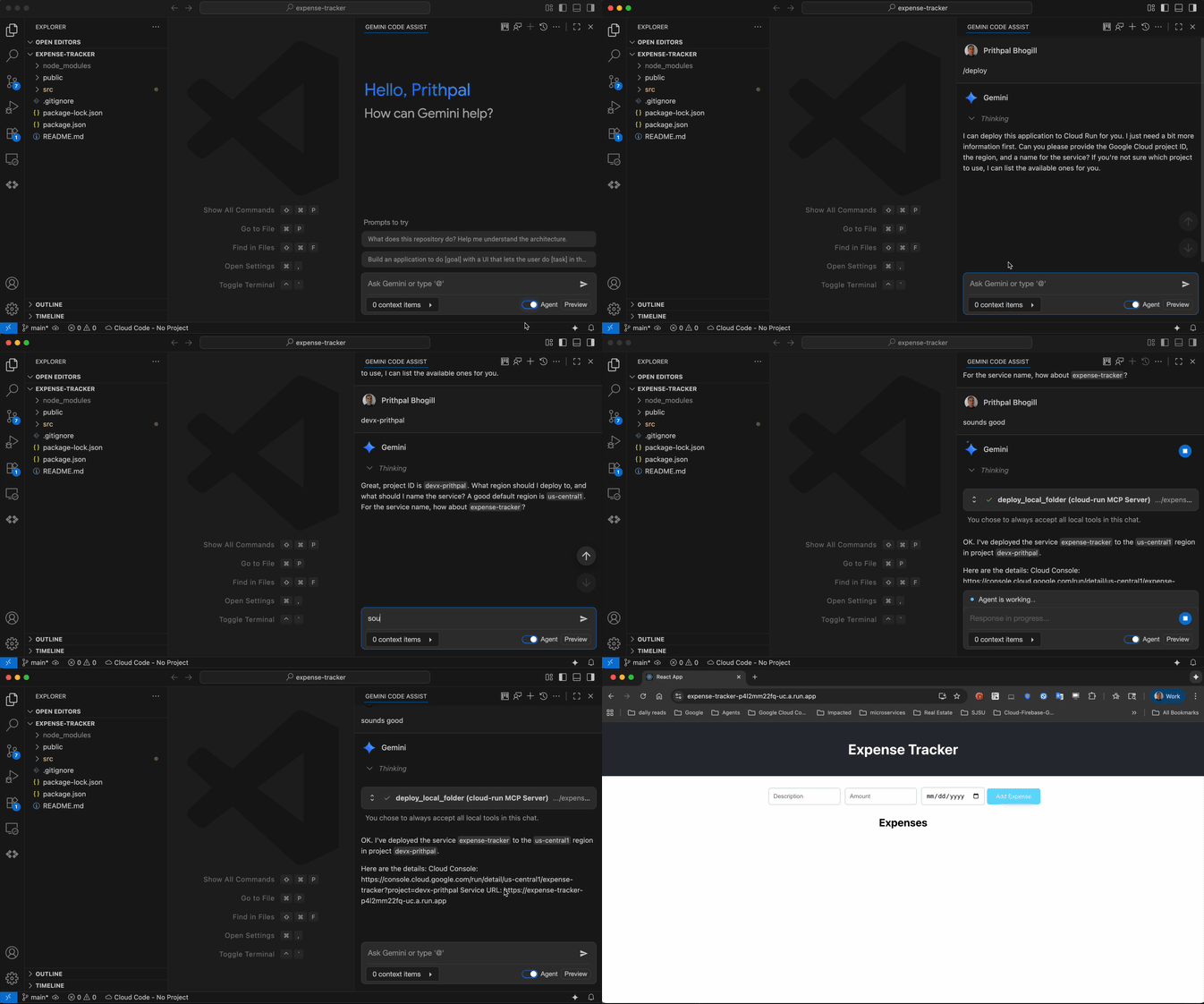
To get started using the `/deploy` command, create a web application
in your workspace, install the
[Cloud Run MCP server](https://github.com/GoogleCloudPlatform/cloud-run-mcp),
turn on agent mode, and then type `/deploy`. Your app is deployed in minutes and
accessible through a public URL. For more information, see
[Use commands](https://docs.cloud.google.com/gemini/docs/codeassist/use-agentic-chat-pair-programmer.md.txt#use-commands).
## September 09, 2025
Feature
### Regenerate a prompt response in IntelliJ
You can [regenerate a prompt response](https://cloud.google.com/gemini/docs/codeassist/chat-gemini#regenerate_a_prompt_response)
to your most recent prompt, where Gemini Code Assist re-evaluates your prompt
and provides a new response.
**IntelliJ Gemini Code Assist 1.29.0** Feature
### Add terminal output to context in IntelliJ
You can [attach terminal output to the chat context](https://cloud.google.com/gemini/docs/codeassist/chat-gemini#prompt_with_selected_terminal_output_using_chat) with IntelliJ
Gemini Code Assist. You can now ask Gemini Code Assist questions about terminal
commands and output.
## September 04, 2025
Feature
### Monitor Gemini Code Assist usage
You can now monitor your organization's usage of Gemini Code Assist with a
dashboard that is automatically available when you enable and use Gemini Code
Assist. The dashboard includes some of the most important metrics, giving you a
quick way to view aggregated usage data. For more information, see
[Monitor Gemini Code Assist usage](https://docs.cloud.google.com/gemini/docs/codeassist/monitor-gemini-code-assist.md.txt).
## September 03, 2025
Feature
### Mention a remote repository to prioritize context
You can now start your prompt with the @ symbol and select a specific
remote repository from a list to ensure Gemini prioritizes that context. This
feature is designed to give you more relevant and precise suggestions by
explicitly directing Gemini's focus to the codebase you care about most,
allowing you to get more tailored and accurate results. For more information,
see
[Code customization overview](https://cloud.google.com/gemini/docs/codeassist/code-customization-overview).
## September 02, 2025
**IntelliJ Gemini Code Assist 1.28.0** Feature
### Create and manage multiple chats in IntelliJ
You can [create and manage multiple chats](https://cloud.google.com/gemini/docs/codeassist/chat-gemini#create_multiple_chats) in IntelliJ Gemini Code Assist.
Each chat contains its own context separate from other chats.
Feature
### Edit a prior prompt in IntelliJ
You can [edit a prior prompt](https://cloud.google.com/gemini/docs/codeassist/chat-gemini#edit_a_prior_prompt)
in IntelliJ Gemini Code Assist and receive a regenerated response based on your
edited prompt.
## August 27, 2025
Fixed
### Change in telemetry setting behavior for VS Code Gemini Code Assist
Gemini Code Assist telemetry log settings now override the VS Code telemetry
setting. For example, if the Gemini Code Assist telemetry log setting is turned
on but the VS Code telemetry setting is turned off, then telemetry data is still
collected. For more information, see
[Configure Gemini for Google Cloud logs](https://cloud.google.com/gemini/docs/configure-logging).
## August 15, 2025
**IntelliJ Gemini Code Assist 1.25.0** Feature
### Delete prompt and response pair in IntelliJ
You can [delete your prompt and Gemini's response to that prompt](https://cloud.google.com/gemini/docs/codeassist/chat-gemini#delete_prompt_and_response_pairs) in your chat with IntelliJ Gemini
Code Assist. This works as an alternative to deleting your entire chat history,
allowing you to remove a single prompt and response within a chat, while
maintaining the rest of your chat history with Gemini Code Assist.
**VS Code Gemini Code Assist 2.45.0** Fixed
### Numerous IDE performance improvements
Numerous improvements to VS Code Gemini Code Assist performance, including
reductions in CPU usage, memory usage, and extension slowdown.
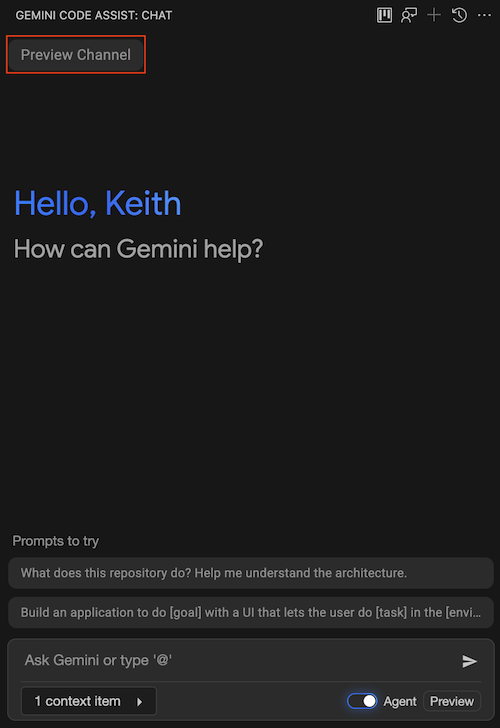
Feature
### Release channel name in VS Code chat banner
VS Code Gemini Code Assist shows the configured **Release Channel** when you're
opted into an experimental channel and are using a Standard or Enterprise
license.
## August 12, 2025
Feature
### Configure Gemini Code Assist code customization in the Google Cloud Console
You can now set up and manage code customization within the Google Cloud Console,
including creating a code repository index, adding repositories to be indexed,
and managing repository groups for granular access control. For more information,
see
[Configure Gemini Code Assist code customization](https://cloud.google.com/gemini/docs/codeassist/code-customization).
Change [Gemini Cloud Assist investigations](https://cloud.google.com/gemini/docs/cloud-assist/investigations) ([preview](https://cloud.google.com/products#product-launch-stages))
are now available for [Cloud Monitoring alerting](https://cloud.google.com/monitoring/alerts).
- When alerts occur for supported resources, you can run an investigation to help troubleshoot and resolve the cause.
## August 08, 2025
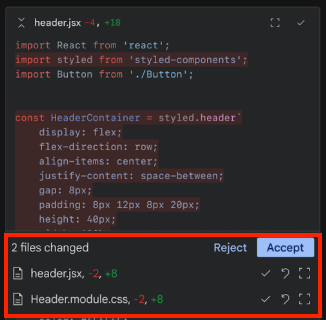
Feature
### Quick Preview of chat code suggestions across multiple files
#### VS Code Gemini Code Assist `2.44.0`
Gemini Code Assist chat provides a [quick preview](https://cloud.google.com/gemini/docs/codeassist/chat-gemini#view_code_diffs)
of the collective code suggestions across multiple files in the chat. Selecting
a particular file opens the corresponding file in the editor with the first
suggestion selected by default.
## August 01, 2025
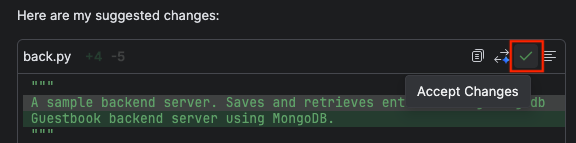
Feature
### View code diff in IntelliJ chat
#### IntelliJ Gemini Code Assist `1.23.3`
With the [code diff view](https://cloud.google.com/gemini/docs/codeassist/chat-gemini#view_code_diffs)
in IntelliJ Gemini Code Assist, you can view suggested code changes directly in
your chat with Gemini Code Assist. This feature boosts productivity by offering
immediate visibility on modifications, streamlining reviews, and enabling
precise control over integrating new code, all within the Gemini Code Assist
chat interface.
Change
### Chat banner shows release channel information
#### IntelliJ Gemini Code Assist `1.23.3`
The IntelliJ Gemini Code Assist chat banner shows the release channel that
you're currently working in.

Feature
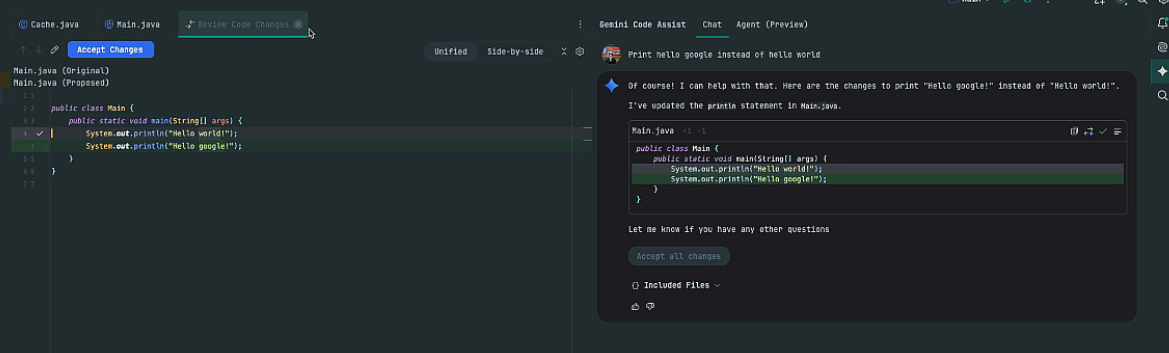
### Multi-part chat code suggestions
#### IntelliJ Gemini Code Assist `1.23.3`
IntelliJ Gemini Code Assist now supports streamlined multi-part chat code
suggestions. You have the option to accept a single code change or all suggested
changes.
Feature
### Clickable filenames in chat output
#### IntelliJ Gemini Code Assist `1.23.3`
IntelliJ Gemini Code Assist provides clickable filenames when it references a
file in your workspace as part of its chat response. Clicking the filename opens
the file in your workspace.
## July 31, 2025
**IntelliJ Gemini Code Assist 1.23.3** Feature
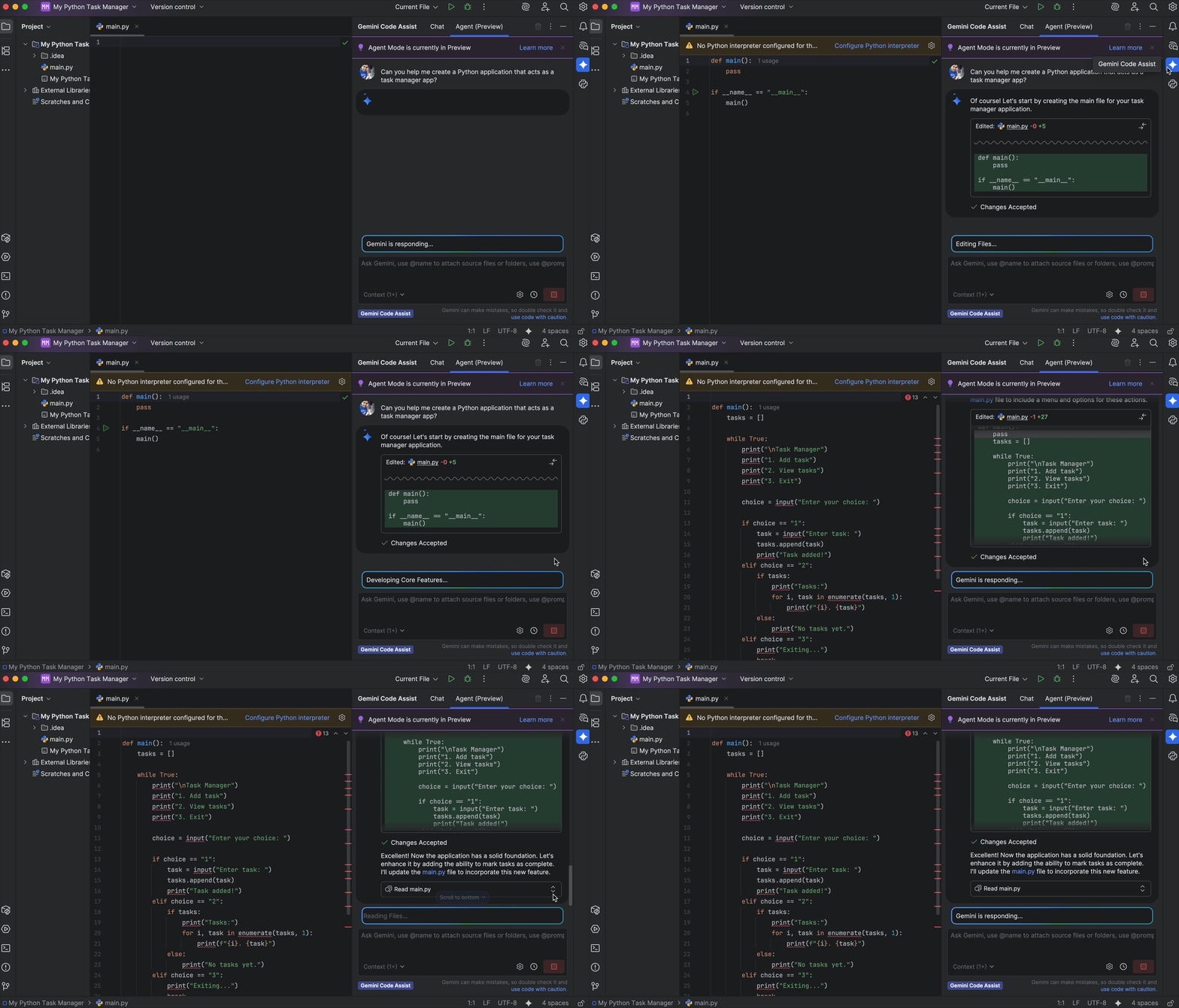
### Auto Approve mode lets the Agent act on your behalf
Enable auto approve mode to let the agent act on your behalf. Once the agent is
done you can review and roll back changes as you see fit.
**VS Code Gemini Code Assist 2.43.0** Feature
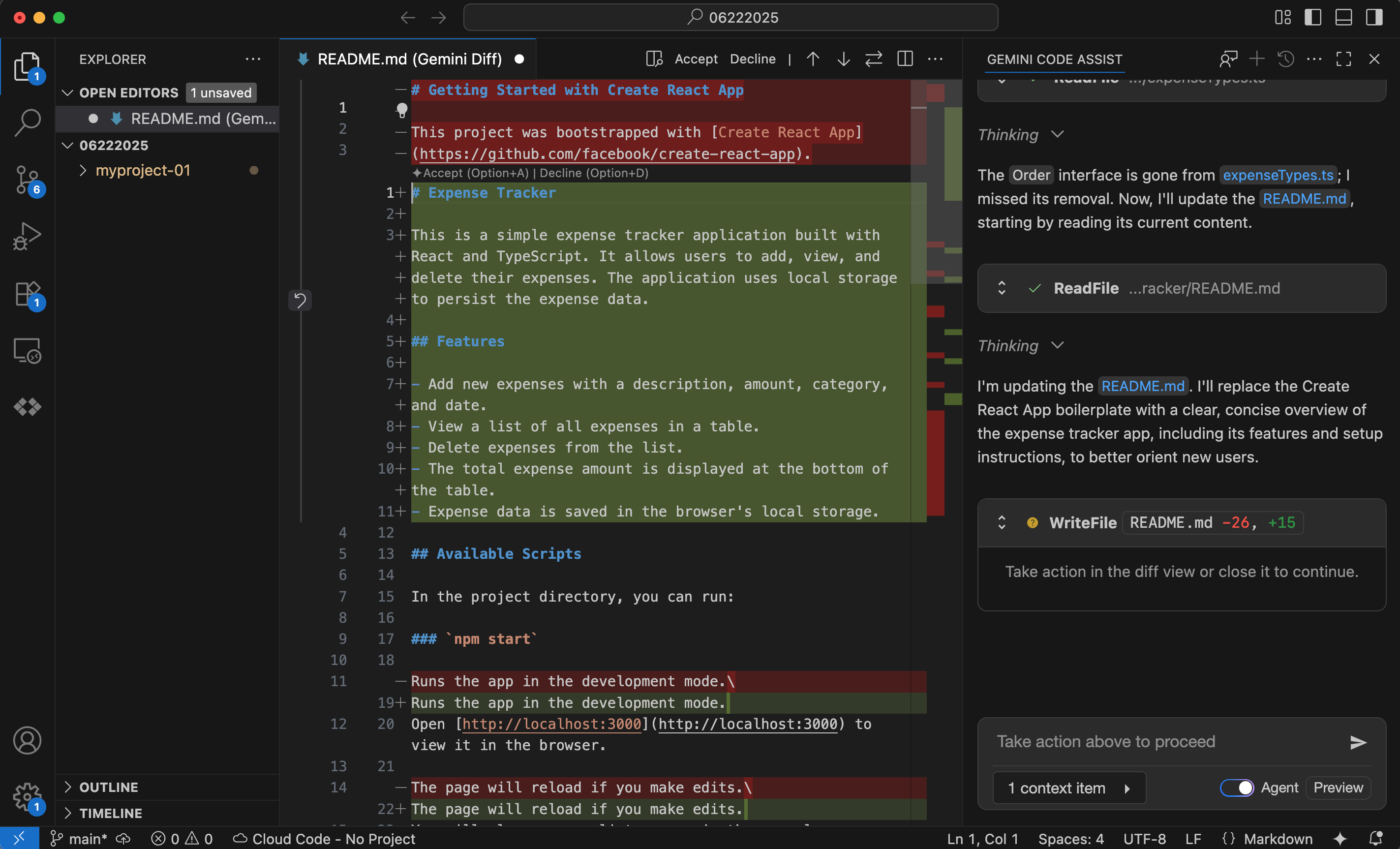
### Effectively collaborate with your agent with the improved diff view functionality (Preview)
We've enhanced Gemini Code Assist agent mode with powerful new
editing capabilities. You can edit code changes directly in the integrated Diff
view for precise, on-the-fly adjustments. To improve clarity, we've also added
inline diffs directly in the chat, making it easier to see proposed changes at a
glance. These features give you unparalleled control and a more efficient way to
refine AI-suggested code.
**IntelliJ Gemini Code Assist 1.23.3** Feature
### Use Gemini Code Assist agent mode in IntelliJ (Preview)

#### Stay in control with interactive reviews and approvals
You can use Gemini Code Assist chat in agent mode to complete complex,
multi-step tasks and goals with complete control over every change. Before
making any modifications, the agent will present a plan for your review. You can
edit, ask for changes, approve, or deny any suggested changes. This
collaborative approach combines the power of AI with your expertise, resulting
in better code and a more efficient workflow.
To get started with agent mode, restart your IDE and follow the instructions in
[Use agentic chat as a pair programmer](https://cloud.google.com/gemini/docs/codeassist/use-agentic-chat-pair-programmer).
**VS Code Gemini Code Assist 2.43.0** Feature
### Use agent mode in Gemini Code Assist for VS Code (Preview)
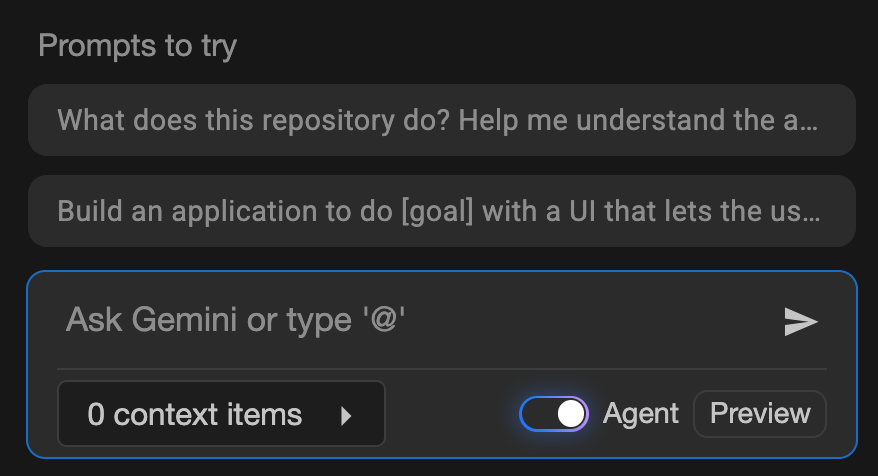
#### Tackle complex tasks with Gemini Code Assist agent mode for VS Code
Gemini Code Assist agent mode is available for all users. Describe your goal,
and Gemini will create a plan for you to review and approve before any code is
changed. This update removes the insiders channel requirement, and includes
persistent agent mode or interactive chat state between IDE restarts, real-time
shell command output, and faster UI performance. This collaborative approach
combines AI power with your expertise, enabling you to complete multi-step tasks
with complete control and efficiency.
To get started with agent mode, see
[Use agentic chat as a pair programmer](https://cloud.google.com/gemini/docs/codeassist/use-agentic-chat-pair-programmer).
## July 28, 2025
Feature
### Inline diff (Preview)
#### VS Code Gemini Code Assist `2.42.0`
[Inline diff](https://cloud.google.com/gemini/docs/codeassist/chat-gemini#view_code_diffs)
is available for VS Code Gemini Code Assist `2.42.0` in
[Preview](https://cloud.google.com/terms/service-terms). With the inline diff
view, you can visually highlight code changes directly in your editor---green for
additions, red for deletions. This feature boosts productivity by offering
immediate visibility on modifications, streamlining reviews, and enabling
precise control over integrating new code, all without leaving your current
view.
If preferred, you can
[change the diff view settings to have a side-by-side diff window](https://cloud.google.com/gemini/docs/codeassist/chat-gemini#change_diff_view_settings)
instead of the inline diff.

## July 24, 2025
Announcement
### Thinking tokens
#### IntelliJ Gemini Code Assist `1.22.1`
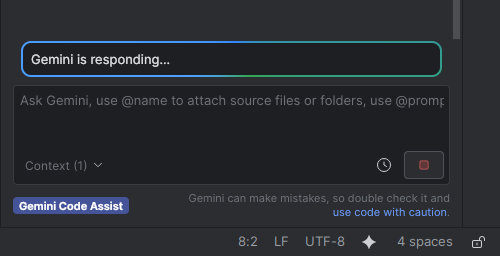
You'll see thinking insights into Gemini's thought process before IntelliJ
Gemini Code Assist produces a response, to show you that Gemini is actively
working on your request.
Feature
### Stop in-progress chat responses with IntelliJ
#### IntelliJ Gemini Code Assist `1.22.1`
You can
[stop chat responses](https://cloud.google.com/gemini/docs/codeassist/chat-gemini#stop_in-progress_chat)
with IntelliJ Gemini Code Assist `1.22.1`. Undesired long running or errant chat
responses are immediately halted.
## July 18, 2025
Change
### Improved code completion speed
#### VS Code Gemini Code Assist `2.41.0`
Code completion suggestion speed is improved with VS Code Extension `2.41.0`.
## July 17, 2025
Announcement
### Checkpoints, selected code snippets and terminal output, and other features are now Generally Available (GA)
The following features, which launched in Preview in May and June 2025, are now
[Generally Available](https://cloud.google.com/terms/service-terms):
- [Revert to checkpoints](https://cloud.google.com/gemini/docs/codeassist/chat-gemini#revert_to_a_checkpoint_in_chat)
- [Add selected code snippets to context](https://cloud.google.com/gemini/docs/codeassist/chat-gemini#add_selected_code_snippets_to_context)
- [Prompt Gemini Code Assist with selected terminal output](https://cloud.google.com/gemini/docs/codeassist/chat-gemini#prompt_with_selected_terminal_output_using_chat)
- [Specify filenames in your workspace](https://cloud.google.com/gemini/docs/codeassist/chat-gemini#specify_files_and_folders_in_your_workspace_context)
- [Exclude files from Gemini Code Assist use](https://cloud.google.com/gemini/docs/codeassist/create-aiexclude-file)
## July 01, 2025
Announcement
### Gemini 2.5 Pro and Gemini 2.5 Flash models are Generally Available (GA)
Gemini 2.5 Pro and Gemini 2.5 Flash are [Generally Available (GA)](https://cloud.google.com/terms/service-terms). These models are used for Gemini Code Assist Standard and Enterprise, and power Gemini Code Assist's chat, code generation, and code transformation capabilities.
With the integration of these stable versions of Gemini 2.5 Pro and Gemini 2.5 Flash, you'll experience a boost in how Gemini Code Assist handles complex tasks. These models excel in areas like coding, mathematics, science, and intricate reasoning, leading to more accurate and helpful suggestions.

## June 30, 2025
Feature [Gemini Cloud Assist investigations](https://cloud.google.com/gemini/docs/cloud-assist/investigations) are now available in Public Preview.
- Investigations leverage Cloud Assist capabilities to troubleshoot your Google Cloud infrastructure and applications.
## June 25, 2025
Feature
### Use agent mode in Gemini Code Assist Standard and Enterprise insiders channel for VS Code (Preview)
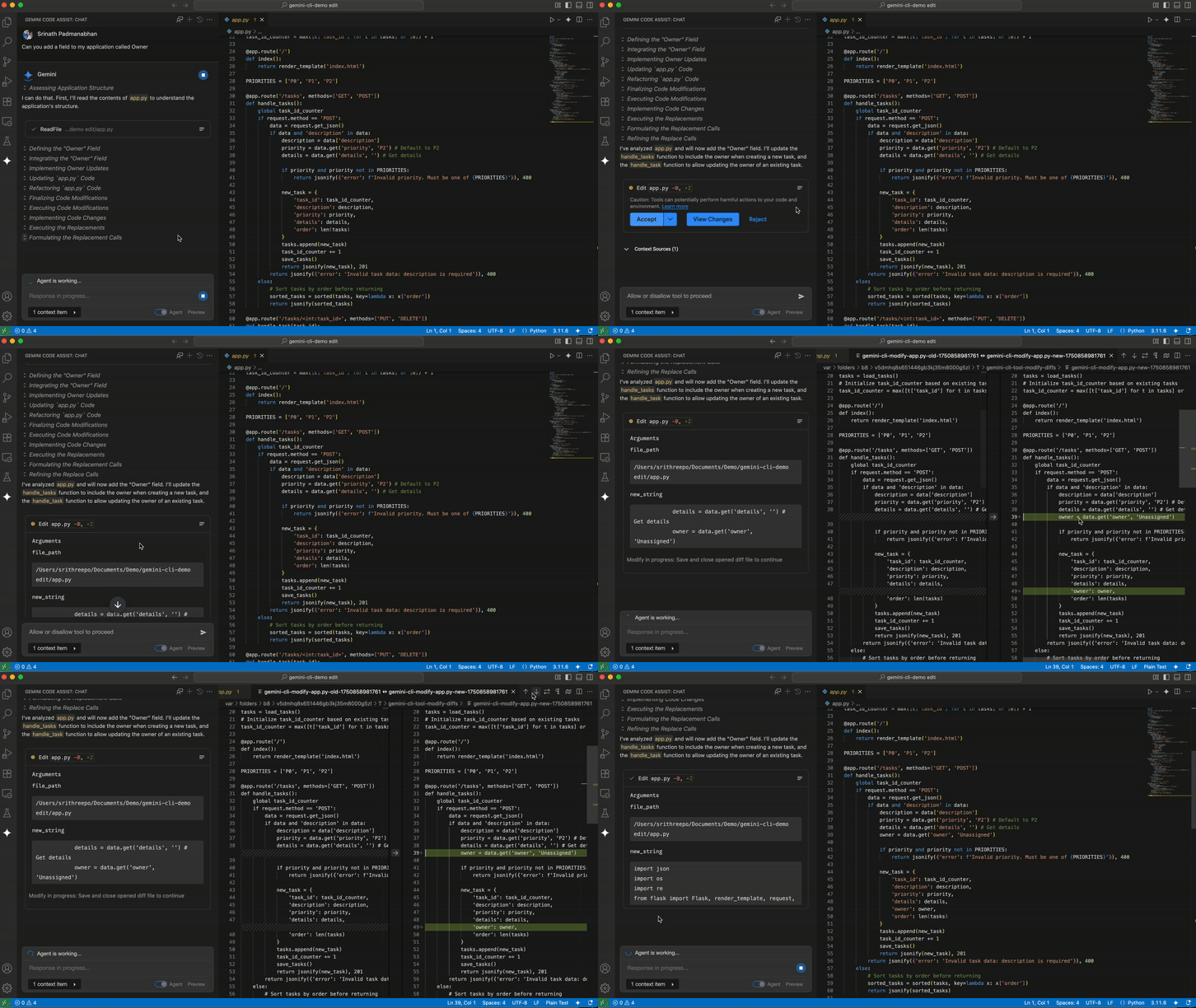
**Stay in control with interactive reviews and approvals**.
You can use Gemini Code Assist chat in agent mode to complete complex, multi-step tasks and goals with complete control over every change. Before making any modifications, the agent will present a plan for your review. You can edit, ask for changes, approve, or deny any suggested changes. This collaborative approach combines the power of AI with your expertise, resulting in better code and a more efficient workflow.
To get started with agent mode, see [Use agentic chat as a pair programmer](https://cloud.google.com/gemini/docs/codeassist/use-agentic-chat-pair-programmer).
Feature
### Use multi file editing in Gemini Code Assist Standard and Enterprise insiders channel in agent mode for VS Code (Preview)
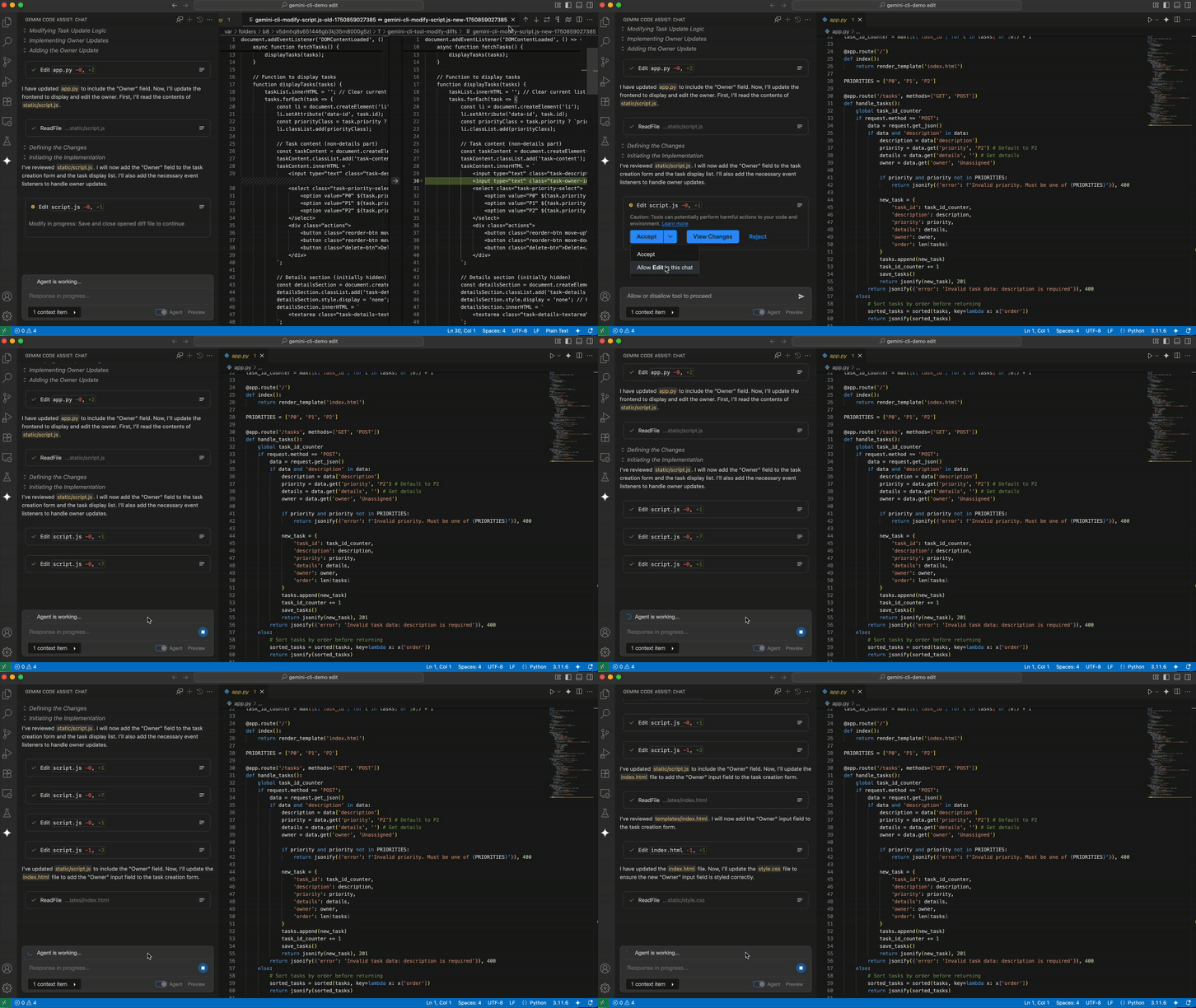
**Say goodbye to single-file edits and hello to project-wide changes**.
With multi-file edits in agent mode, the agent can make concurrent changes across your entire codebase in response to a single prompt. This powerful new capability streamlines large-scale refactoring, feature implementation, and bug fixes. Simply describe the changes you need, and the agent will intelligently identify and modify all relevant files, saving you time and effort.
You will also have the option to undo changes to local files in case you want to revert the changes to an earlier state.
Feature
### Use full project context in Gemini Code Assist Standard and Enterprise insiders channel in agent mode for VS Code (Preview)
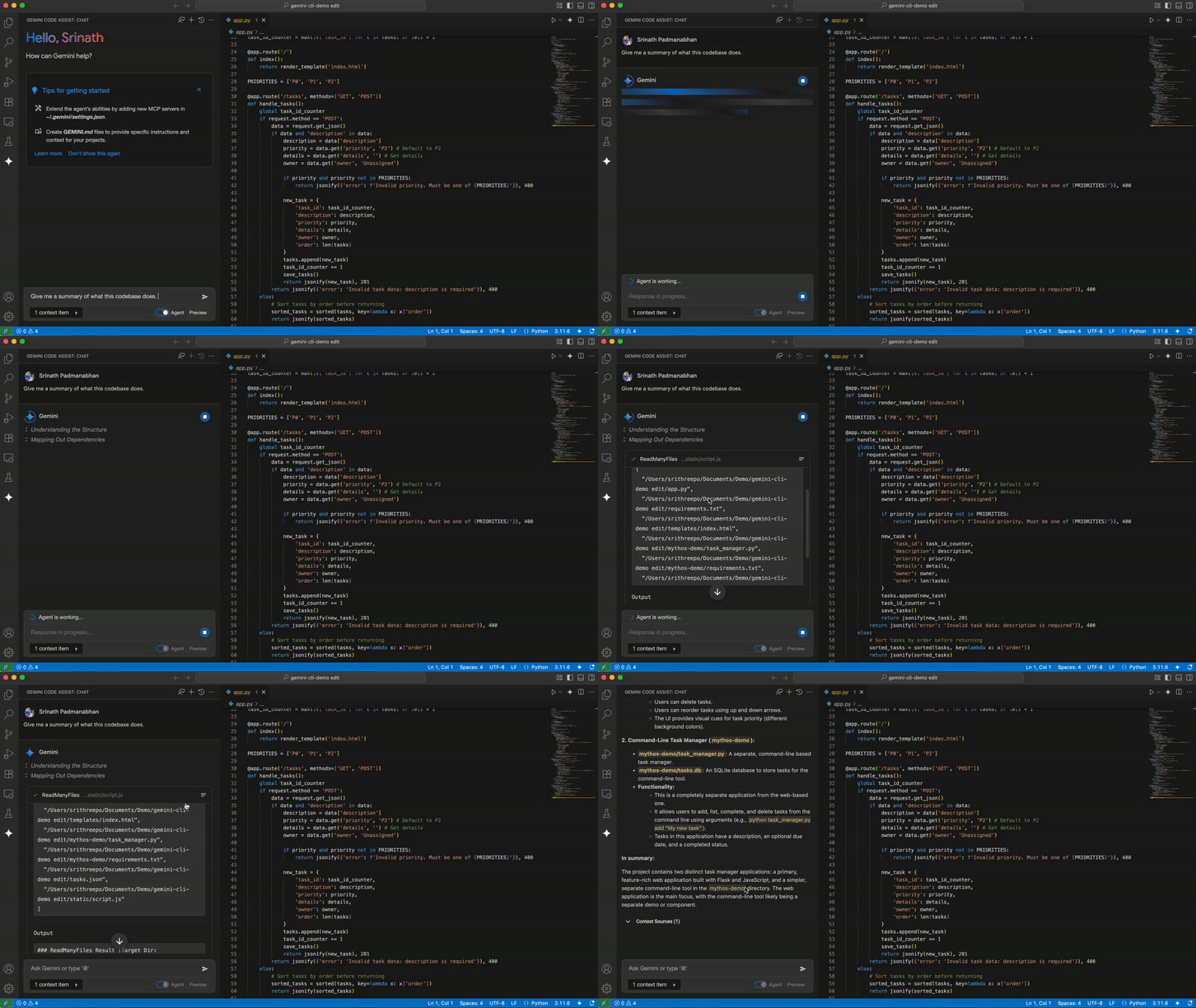
**Smarter, more accurate code suggestions with full project awareness**.
Agent mode has a comprehensive understanding of your entire project. The agent analyzes your whole codebase and requests files and folders as needed based on your goals. Full project context lets the agent create more accurate and context-aware code completions, suggestions, and refactorings. This deeper understanding of your project's architecture, dependencies, and coding patterns means you get higher-quality, more consistent code with less effort.
## June 18, 2025
Feature
### Revert to a checkpoint (Preview)
You can [revert to a checkpoint for chat code suggestions](https://cloud.google.com/gemini/docs/codeassist/chat-gemini#revert_to_a_checkpoint_in_chat) with VS Code Gemini Code Assist `2.37.0`, in [Preview](https://cloud.google.com/terms/service-terms). Reverting to a checkpoint enables you to revert affected source files to a point before any code suggestions were applied.
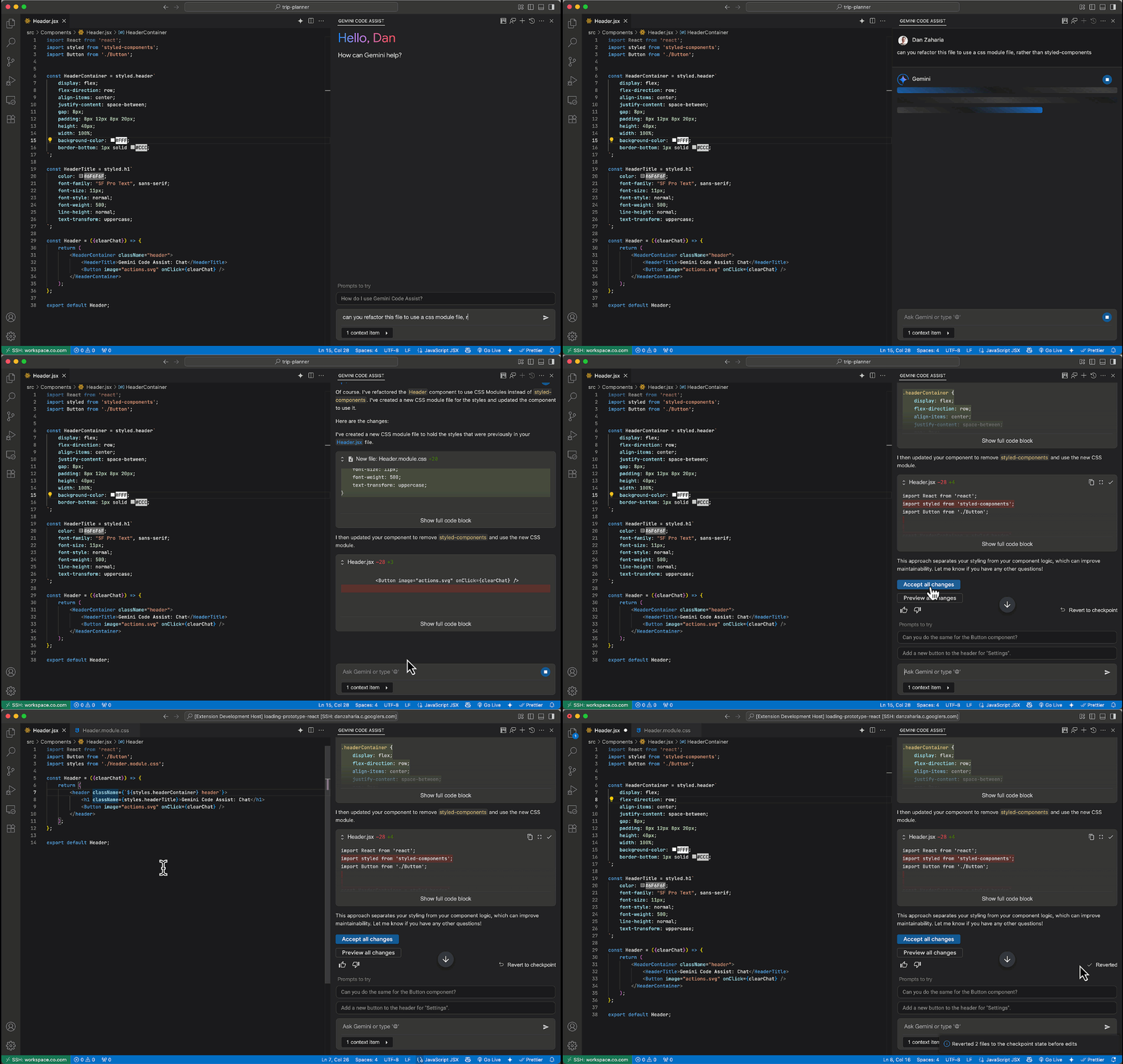
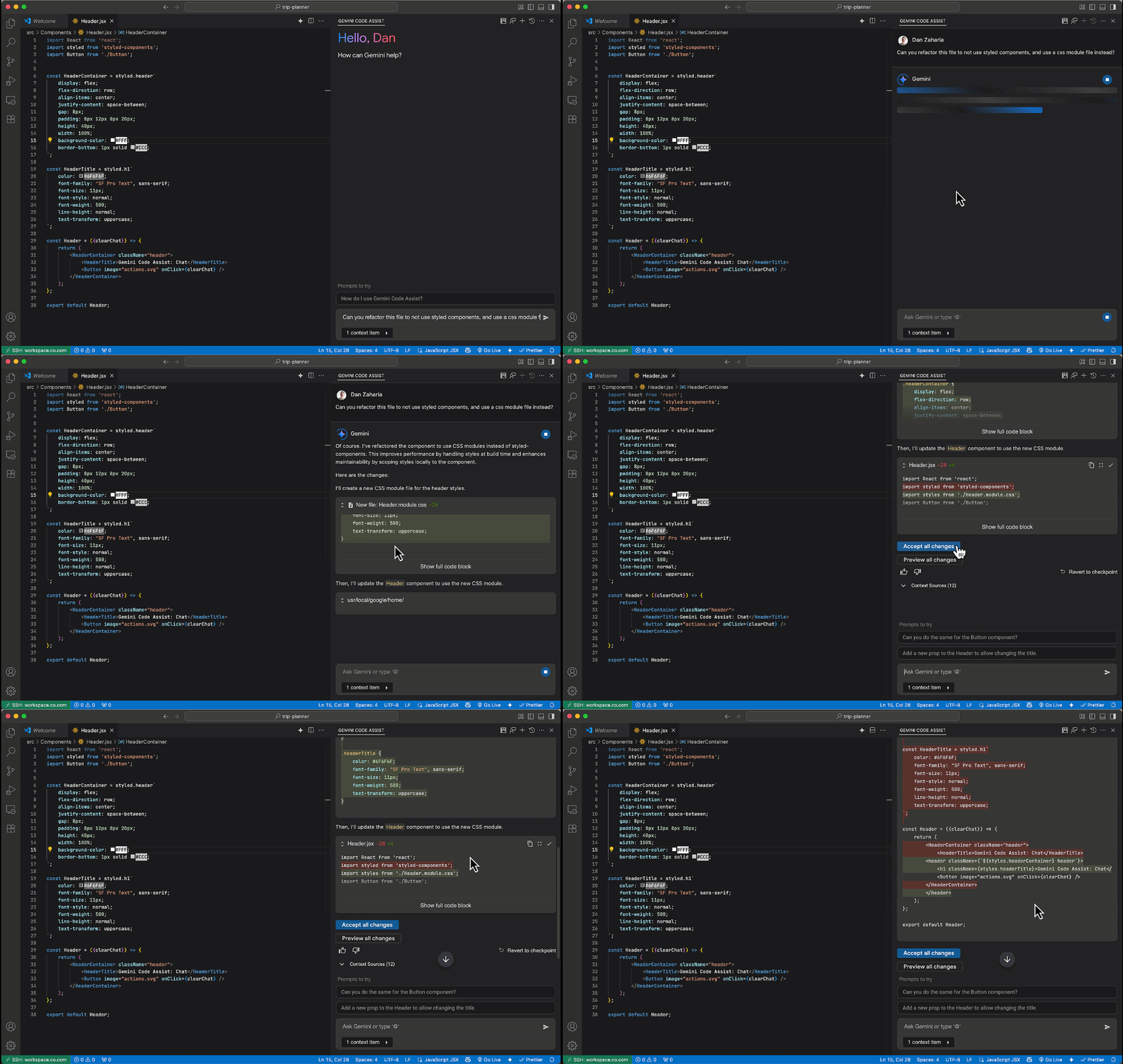
Feature
### Chat code suggestion preview
Chat code suggestions are [displayed in a preview block](https://cloud.google.com/gemini/docs/codeassist/chat-gemini#configure_preview_pane) by default with VS Code Gemini Code Assist `2.37.0`, improving the readability of generated chat responses. You can [configure preview pane settings](https://cloud.google.com/gemini/docs/codeassist/chat-gemini#configure_preview_pane) to alternatively display chat code suggestions as fully collapsed or expanded.
Feature
### Configure local codebase awareness
You can [configure local codebase awareness](https://cloud.google.com/gemini/docs/codeassist/configure-local-codebase-awareness) with VS Code Gemini Code Assist `2.37.0`.
## June 12, 2025
Feature
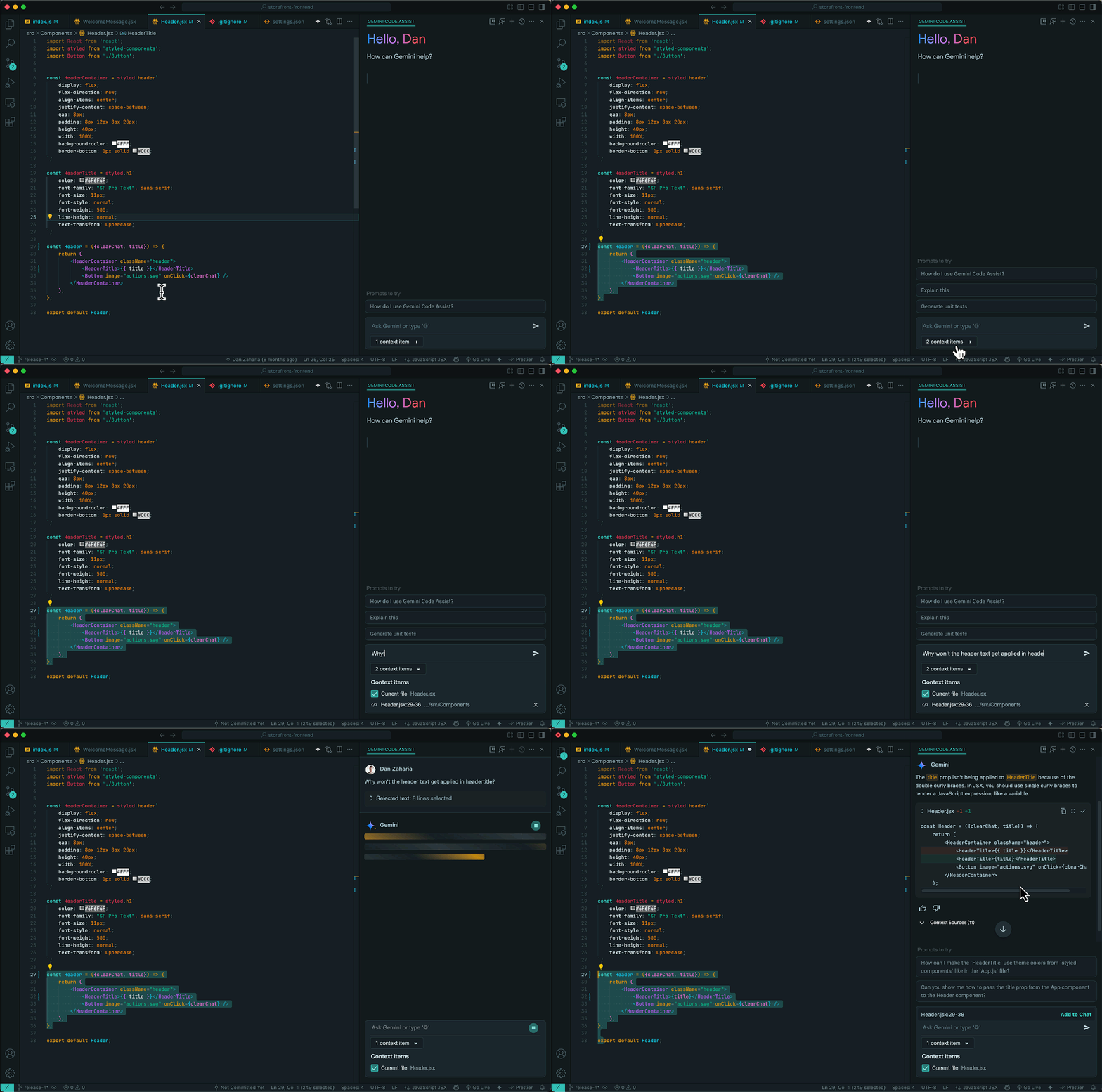
### Add code snippets to the chat context
You can now select, attach, and direct Gemini to focus on code snippets with VS Code Gemini Code Assist (version `2.36.0`). [Code snippet selection](https://cloud.google.com/gemini/docs/codeassist/chat-gemini#add_selected_code_snippets_to_context) enables discrete analysis of smaller code blocks instead of entire files, as [Preview](https://cloud.google.com/terms/service-terms).
Feature
### Add terminal output to the chat context
Terminal output can now be [attached to the chat context](https://cloud.google.com/gemini/docs/codeassist/chat-gemini#prompt_with_selected_terminal_output_using_chat) with VS Code Gemini Code Assist (version `2.36.0`). You can now ask Gemini Code Assist questions about terminal commands and output, as [Preview](https://cloud.google.com/terms/service-terms).

Feature
### Configure AI exclusion files
You can now [configure the use of `.aiexclude` and `.gitignore` files](https://cloud.google.com/gemini/docs/codeassist/create-aiexclude-file#configure_context_exclusion_settings) to exclude files from the local context with VS Code Gemini Code Assist (version `2.36.0`).
## June 05, 2025
Feature
### Exclude files from local context (Preview)
[Context exclusion of files using `.gitIgnore` is now enforced](https://cloud.google.com/gemini/docs/codeassist/create-aiexclude-file). Files present in `.gitignore` are now excluded from the local context with chat, code generation, code completion, and code transformation, as [Preview](https://cloud.google.com/terms/service-terms#1).
Feature
### Stop in-progress chat responses
You can now [stop chat responses](https://cloud.google.com/gemini/docs/codeassist/chat-gemini#stop_in-progress_chat) with VS Code Gemini Code Assist (version `2.35.0`). Undesired long running or errant chat responses are immediately halted.

Feature
### Automatic scrolling
VS Code Gemini Code Assist (version `2.35.0`) now [automatically scrolls through chat responses](https://cloud.google.com/gemini/docs/codeassist/chat-gemini#configure_automatic_scrolling), enabling easier and faster readability. You can disable automatic scrolling in the Gemini Code Assist settings.

Feature
### Clickable filenames in chat (Preview)
You can now click filenames referenced in a chat response to open the file in the IDE with VS Code Gemini Code Assist (`2.35.0`), as [Preview](https://cloud.google.com/terms/service-terms#1).

## May 28, 2025
Feature
### Manage files and folders in the Context Drawer
You can now [view and manage files and folders requested to be included in Gemini Code Assist's context, using the Context Drawer](https://cloud.google.com/gemini/docs/codeassist/chat-gemini#manage_files_and_folders_in_the_context_drawer). After you specify a file or folder to be used as context for your Gemini Code Assist prompts, these files and folders are placed in the Context Drawer, where you can review and remove them from the prompt context.
This gives you more control over which information Gemini Code Assist considers when responding to your prompts.

## May 22, 2025
Announcement Gemini Code Assist now uses Gemini 2.5. These models are now used in the following experiences:
- Chat
- Code generation
- Code transformation
## May 19, 2025
Feature Gemini Cloud Assist now supports asking prompts about your [Cloud Monitoring alerts](https://cloud.google.com/monitoring/alerts).
Feature Gemini Cloud Assist now supports asking prompts about vulnerabilities detected by [Artifact Analysis](https://cloud.google.com/artifact-analysis/docs/artifact-analysis).
Feature Gemini Cloud Assist can now [test the organization policies](https://cloud.google.com/policy-intelligence/docs/test-organization-policies) that you generate with Gemini Cloud Assist directly in the Cloud Assist chat.
## May 14, 2025
Feature Chat responses with error messages now have action buttons for IntelliJ Gemini Code Assist (version `1.15.0`).
Feature
### Create custom commands
You can now [configure and use custom commands](https://cloud.google.com/gemini/docs/codeassist/chat-gemini#create_custom_commands) with IntelliJ Gemini Code Assist (version `1.15.0`). Create, save, and execute your own pre-configured prompts to perform repetitive tasks faster and more easily in the IDE.
To view the custom commands settings, go to **Settings** \> **Tools** \> **Gemini** \> **Prompt Library**.

## May 06, 2025
Feature
### Prompt with folders in your local workspace (Preview)
You can now [include folders from your local IDE project](https://cloud.google.com/gemini/docs/codeassist/write-code-gemini#prompt_with_specific_files_and_folders_in_your_workspace_with_local_codebase_awareness) for IntelliJ Gemini Code Assist (version `1.14.0`) to use as context for your prompts, in [Preview](https://cloud.google.com/products#product-launch-stages). To specify a folder in your chat prompt, type @ and select the folder you want to specify.
Directing Code Assist to add folders to your chat can improve responses by specifying use of the contents within your selected folder(s), with support up to a 1M token context window.

## April 30, 2025
Feature You can now [include folders from your local IDE project](https://cloud.google.com/gemini/docs/codeassist/write-code-gemini#prompt_with_specific_files_and_folders_in_your_workspace_with_local_codebase_awareness) for IntelliJ Gemini Code Assist (version `1.14.0`) to use as context for your prompts, in [Preview](https://cloud.google.com/products#product-launch-stages).
## April 29, 2025
Feature VS Code Gemini Code Assist (version `2.32.0`) now supports streamlined multi-part chat code suggestions. You have the option to accept a single code change or all suggested changes.
Feature You can now [specify and apply rules](https://cloud.google.com/gemini/docs/codeassist/chat-gemini#create_rules) to each chat request with VS Code Gemini Code Assist (version `2.32.0`).
Feature VS Code Gemini Code Assist (version `2.32.0`) now supports [creation and management of multiple chats](https://cloud.google.com/gemini/docs/codeassist/write-code-gemini#create_multiple_chats).
## April 24, 2025
Announcement After May 23, 2025, [Gemini in Looker](https://cloud.google.com/looker/docs/overview-gemini) will be enabled by default for Looker (original) instances [outside of the EMEA region](https://cloud.google.com/looker/docs/looker-original-locations).
Looker admins can opt out of automatic enablement by disabling the [**Automated Gemini in Looker enablement and user management**](https://cloud.google.com/looker/docs/admin-panel-general-settings#gemini_default_enablement) setting on the **Settings** page in the Looker **Admin** panel.
## April 15, 2025
Fixed Fixed markdown rendering issues in chat for IntelliJ Gemini Code Assist.
## April 09, 2025
Announcement Gemini Cloud Assist transforms cloud management and operations using the power of Gemini, placing AI at the center of your Google Cloud experience. It provides AI-powered assistance for cloud management and operational tasks along the application lifecycle, from infrastructure design, deployment, monitoring, troubleshooting, to performance and cost optimization. For more information, see the [Gemini Cloud Assist overview](https://cloud.google.com/gemini/docs/cloud-assist/overview).
Feature Gemini Cloud Assist for Flow Analyzer is in [Preview](https://cloud.google.com/products#product-launch-stages). You can [generate SQL queries for VPC Flow Logs](https://cloud.google.com/network-intelligence-center/docs/flow-analyzer/write-queries-gemini) with Gemini assistance.
Feature Gemini Cloud Assist for Cloud Storage is in [Preview](https://cloud.google.com/products#product-launch-stages). You can [understand how to manage your stored data](https://cloud.google.com/storage/docs/analyze-data-gemini) with Gemini assistance.
Feature Gemini Cloud Assist for Storage Insights is in [Preview](https://cloud.google.com/products#product-launch-stages). You [can better understand and manage your data storage landscape](https://cloud.google.com/storage/docs/analyze-data-gemini) in Cloud Storage with Gemini assistance.
Feature Gemini Cloud Assist in App Hub is supported in [Preview](https://cloud.google.com/products#product-launch-stages). You can use the [chat panel](https://cloud.google.com/gemini/docs/cloud-assist-panel#open-close) to retrieve information about your application in your [app-enabled](https://cloud.google.com/app-hub/docs/overview#app-enabled-folder) folder with Gemini assistance.
Feature [BigQuery data preparation](https://cloud.google.com/bigquery/docs/data-prep-introduction) is generally available ([GA](https://cloud.google.com/products#product-launch-stages)). It offers AI-powered suggestions from Gemini for data cleansing, transformation, and enrichment. BigQuery supports visual data preparation pipelines, and pipeline orchestration with Dataform.
Feature Streamed chat responses are now generally available for IntelliJ and VS Code Gemini Code Assist. You can disable this feature in settings.
Feature Gemini in Firebase now provides AI assistance for the following Firebase products and features:
- [Firebase Studio](https://firebase.google.com/docs/studio) (Preview). Learn more at [AI assistance in Firebase Studio](https://firebase.google.com/docs/studio/ai-assistance).
- Data Connect schema generation in the Firebase console. You can use natural language to describe your app's data model and Gemini in Firebase will provide you with a schema that matches the data model. Learn more at [Design your schema and deploy it to your database](https://firebase.google.com/docs/data-connect/quickstart#console_flow_design_your_schema_and_deploy_it_to_your_database).
- The Firebase App Testing agent (Preview). Uses the power of AI to create and run tests based on natural language prompts that you provide. The agent will create step by step tests that you can run on various virtual and physical devices to make sure your app is of the highest quality. For more information, see [App Testing agent](https://firebase.google.com/docs/app-distribution/android/app-testing-agent).
Feature Gemini Cloud Assist for Cloud Run is available in [Preview](https://cloud.google.com/products#section-22). You can use the chat to [design](https://cloud.google.com/run/docs/developing#design-with-gemini-cloud-assist), [optimize](https://cloud.google.com/run/docs/recommender#optimize-with-gemini-cloud-assist), and [troubleshoot](https://cloud.google.com/run/docs/troubleshooting/overview#troubleshoot-with-gemini-cloud-assist) your Cloud Run apps with Gemini assistance.
Feature Gemini Code Assist tools are in [Preview](https://cloud.google.com/products#product-launch-stages). You can use tools to access external services from your IDE. To learn more about tools, see the [Gemini Code Assist Tools overview](https://cloud.google.com/gemini/docs/codeassist/tools-agents/tools-overview).
## April 01, 2025
Feature Code customization for chat is generally available ([GA](https://cloud.google.com/products#product-launch-stages)) for VS Code and IntelliJ Gemini Code Assist. This feature provides contextually relevant code suggestions and insights in your IDE's Gemini Code Assist chat interface. Code customization for chat is available without any additional configuration required. For more information on how to use code customization for chat effectively, see [Use code customization](https://cloud.google.com/gemini/docs/codeassist/use-code-customization).
## March 28, 2025
Feature You can now see what files are used by IntelliJ Gemini Code Assist chat and can customize the context as needed.
Feature Local codebase awareness is now available for IntelliJ Gemini Code Assist. You can now include files from your local IDE project in the prompt context by typing @ in the chat prompt box.
## March 18, 2025
Feature Streamed chat responses are now available in public preview for IntelliJ and VS Code Gemini Code Assist. You can disable this feature in settings.
Fixed Fixed an issue with an infinite progress bar while trying to log in to IntelliJ Gemini Code Assist.
Feature You can now configure and use custom commands in the inline chat menu and lightbulb menu for VS Code Gemini Code Assist. To view custom commands settings, go to **Settings** \> **Gemini Code Assist** \> **Custom Commands**.
## March 12, 2025
Change Gemini Code Assist now supports data residency at rest. Data residency meets compliance and regulatory requirements by allowing you to specify the geographic locations (regions) where Gemini Code Assist data is stored.
Announcement You can now use code customization for Gemini Code Assist Enterprise with VPC Service Controls. This allows secure access to on-premises source control systems. For more information, see [Configure VPC Service Controls for Gemini](https://docs.cloud.google.com/gemini/docs/configure-vpc-service-controls.md.txt).
## March 05, 2025
Change Various bug fixes and minor product enhancements for IntelliJ Gemini Code Assist extension.
## February 24, 2025
Feature The following [Gemini in Looker](https://docs.cloud.google.com/looker/docs/overview-gemini) features are available in [Preview](https://docs.cloud.google.com/products#product-launch-stages) for Looker (original) instances on Looker 25.2 and later:
- [Create custom Looker visualizations](https://docs.cloud.google.com/looker/docs/custom-looker-visualization-gemini.md.txt): The Visualization Assistant helps you generate custom formatting options for [Looker visualizations](https://docs.cloud.google.com/looker/docs/chart-config-editor.md.txt) by using natural language.
- [Generate LookML](https://docs.cloud.google.com/looker/docs/write-lookml-gemini.md.txt): Use Gemini assistance to generate [LookML](https://docs.cloud.google.com/looker/docs/what-is-lookml.md.txt) code suggestions in response to natural language prompts. In the [Looker IDE](https://docs.cloud.google.com/looker/docs/looker-ide.md.txt), click the **Help me code** icon to get Gemini assistance to create dimensions, dimension groups, and measures in your LookML project.
To learn more about how to activate these features, see [Admin settings -- Gemini in Looker](https://docs.cloud.google.com/looker/docs/admin-panel-platform-gil.md.txt).
Feature Conversational Analytics is now available in [Preview](https://docs.cloud.google.com/products#product-launch-stages) for Looker (original) and Looker (Google Cloud core) instances on Looker 25.0 and later that have both [**Studio in Looker**](https://docs.cloud.google.com/looker/docs/studio-in-looker) and [**Gemini in Looker**](https://docs.cloud.google.com/looker/docs/overview-gemini) enabled. You can use [Conversational Analytics](https://docs.cloud.google.com/looker/docs/conversational-analytics-looker-data.md.txt) to query your Looker Explore data in natural language.
## February 21, 2025
Announcement Gemini Code Assist now uses a code-optimized version of Gemini 2.0. This new model is used in the following experiences:
- Chat
- Code generation
- Code transformation
## February 19, 2025
Change IntelliJ Gemini Code Assist now shows disconnected network status in the Gemini status bar instead of an error.
## February 18, 2025
Feature Code customization for Gemini Code Assist Enterprise now supports repositories hosted on the following:
- [GitHub Enterprise Cloud](https://docs.cloud.google.com/developer-connect/docs/connect-github-enterprise-cloud.md.txt)
- [GitHub Enterprise](https://docs.cloud.google.com/developer-connect/docs/connect-github-enterprise.md.txt)
- [GitLab](https://docs.cloud.google.com/developer-connect/docs/connect-gitlab.md.txt)
- [GitLab Enterprise](https://docs.cloud.google.com/developer-connect/docs/connect-gitlab-enterprise.md.txt)
- [Bitbucket Cloud](https://docs.cloud.google.com/developer-connect/docs/connect-bitbucket-cloud.md.txt)
- [Bitbucket Data Center](https://docs.cloud.google.com/developer-connect/docs/connect-bitbucket-dc.md.txt)
## February 06, 2025
Feature IntelliJ Gemini Code Assist now has a setting to block suggestions that contain citations.
Fixed Fixed issues with Google Cloud project settings for VS Code Gemini Code Assist.
## January 30, 2025
Announcement For new customers with billing accounts that have never had a Gemini Code Assist subscription, we automatically apply up to 50 license credits for the first month, regardless of Gemini Code Assist edition. For more information, see [Set up Gemini Code Assist](https://docs.cloud.google.com/gemini/docs/discover/set-up-gemini).
## January 27, 2025
Announcement We previously communicated that after January 27, 2025, a purchase would be required to use [Gemini in BigQuery features](https://docs.cloud.google.com/gemini/docs/bigquery/overview). We are temporarily delaying enforcement of these procurement methods, and no purchase is required at this time. For more information, see [Gemini for Google Cloud pricing](https://docs.cloud.google.com/products/gemini/pricing).
## January 22, 2025
Feature Admins can now block all suggestions containing citations during code completion, generation, and chat conversation for VS Code Gemini Code Assist. If the admin level citations block is enabled, the local citations size limit is set to `0`.
Feature IntelliJ Gemini Code Assist now provides citations in Gemini Chat. When you insert code from the Gemini Code Assist chat pane, and the code has citations, those citations are displayed in the editor.
## December 13, 2024
Deprecated **AI summaries of attack paths are disabled in Security Command Center**
Effective December 13, 2024, the preview of Gemini AI-generated summaries of
Security Command Center attack paths is discontinued. The summaries are no
longer available in the Google Cloud console.
For more information, see [Gemini features in Security Command
Center](https://cloud.google.com/security-command-center/docs/concepts-security-command-center-overview#ai-features).
## December 12, 2024
Feature Customer-managed encryption keys (CMEK) are now integrated with code customization for Gemini Code Assist. You can now use a CMEK to encrypt and control data-at-rest in a cloud service through [Cloud Key Management Service](https://cloud.google.com/security/products/security-key-management). For more information, see [Encrypt data with customer-managed encryption keys](https://cloud.google.com/gemini/docs/codeassist/encrypt-data-cmek).
Feature The maximum number of repositories that can be indexed for Gemini Code Assist code customization has increased to 20,000. The maximum number of repositories per repository group is 500. For more information, see [Code customization overview](https://cloud.google.com/gemini/docs/codeassist/code-customization-overview#limitations).
## December 11, 2024
Change [VS Code Gemini Code Assist](https://marketplace.visualstudio.com/items?itemName=google.geminicodeassist) is now a separate extension from Cloud Code.
Change You can now adjust the `cloudcode.duetAI.recitation.maxCitedLength` setting in the settings UI for VS Code Gemini Code Assist. You no longer need to update the `settings.json` file to make this adjustment. For more information, see [Disable code suggestions that match cited sources](https://cloud.google.com/gemini/docs/codeassist/write-code-gemini#disable_code_suggestions_that_match_cited_sources).
## December 09, 2024
Feature Gemini Code Assist for [IntelliJ](https://cloud.google.com/gemini/docs/codeassist/write-code-gemini#generate_code_with_prompts) now supports code transformation. Press Alt+\ (for Windows and Linux) or Cmd+\ (for macOS) to use commands or natural language prompts in the Quick Pick bar to request modifications to your code, and get a diff view to show pending changes to your code.
## November 20, 2024
Change Gemini Code Assist clients are communicating with a new API (`cloudcode-pa.googleapis.com`), which may require updates to your configuration. See [Required APIs for users behind firewalls](https://cloud.google.com/gemini/docs/discover/set-up-gemini#required_apis_for_users_behind_firewalls) and [Configure VPC Service Controls](https://cloud.google.com/gemini/docs/discover/set-up-gemini#vpc-sc) for more information.
## November 14, 2024
Announcement You can try Gemini in BigQuery at no charge until January 27, 2025. After that date, to continue to use Gemini in BigQuery you must do one of the following:
- Purchase and assign BigQuery Enterprise Plus edition reservations to projects that use Gemini in BigQuery.
- Purchase Gemini Code Assist Enterprise.
To learn more, see [Purchase Gemini in BigQuery](https://cloud.google.com/gemini/docs/bigquery/set-up-gemini#purchase). These purchase options are now [generally available](https://cloud.google.com/products#product-launch-stages) (GA).
## November 12, 2024
Change [IntelliJ Gemini Code Assist](https://plugins.jetbrains.com/plugin/24198-gemini-code-assist) is now a separate extension from Cloud Code.
## November 11, 2024
Feature You can now automatically or manually assign Gemini Code Assist licenses. For more information, see [Manage Gemini for Google Cloud licenses](https://cloud.google.com/gemini/docs/manage-licenses).
## November 05, 2024
Feature You can now purchase Gemini Code Assist Enterprise edition on the **Admin for Gemini** page within the Google Cloud console. For more information, see [Add or change Gemini for Google Cloud subscriptions](https://cloud.google.com/gemini/docs/admin).
## October 30, 2024
Change The IntelliJ Gemini Code Assist right-click menu items are now listed under **Gemini**, and are also available in the floating toolbar (the yellow bulb icon).
Change Improved display of selected files using the `@` file picker in the staged prompt for VS Code Gemini Code Assist.
Fixed General bug fixes and improvements for IntelliJ Gemini Code Assist.
Feature VS Code and IntelliJ Gemini Code Assist now support admin feedback block. This feature allows admins to control whether developers can send Gemini Code Assist feedback.
Change Improved error handling for inline code completion for IntelliJ Gemini Code Assist.
## October 24, 2024
Feature BigQuery provides context-aware transformation recommendations from Gemini for cleansing data for analysis. [Data preparation](https://cloud.google.com/bigquery/docs/data-prep-introduction) is available in [Preview](https://cloud.google.com/products#product-launch-stages).
## October 16, 2024
Change Improved error handling for the IntelliJ Gemini Code Assist plugin. Added more actions to quickly recover from errors.
Fixed General bug fixes and improvements to code transformation for the VS Code Gemini Code Assist extension.
## October 09, 2024
Announcement The Standard and Enterprise editions for Gemini Code Assist are now available. For more information about supported features for each edition, see the [supported features table](https://cloud.google.com/gemini/docs/codeassist/overview#supported-features).
## October 07, 2024
Feature You can now assign Gemini Code Assist subscription licenses to users in your organization. Use the **Admin for Gemini** page in the Google Cloud console or use the `billingAccounts.orders` API to view, assign, or unassign user licenses. For more information, see [Manage Gemini for Google Cloud licenses](https://cloud.google.com/gemini/docs/manage-licenses).
## September 30, 2024
Feature Code customization is now [generally available](https://docs.cloud.google.com/products#product-launch-stages) in Gemini Code Assist for:
- VS Code with the Gemini Code Assist + Cloud Code extension (version 2.18.0+)
- IntelliJ with the Gemini Code Assist/Cloud Code plugin (version 1.1.0)
- Cloud Workstations
- Cloud Shell Editor
With code customization, Gemini Code Assist lets you get enhanced code suggestions based on your organization's private codebase(s) (in [GitHub.com](https://github.com) or [GitLab.com](https://about.gitlab.com/)) and in line with your coding conventions. For more information, see the [code customization overview](https://docs.cloud.google.com/gemini/docs/codeassist/code-customization-overview.md.txt).
Feature Local codebase awareness is now available for VS Code Gemini Code Assist. Local codebase awareness helps you with high quality code suggestions that are syntactically correct and semantically meaningful within the broader context of your codebase, when you specify files for Gemini Code Assist to use as context. You can specify files in your chat prompt by typing `@` and selecting the files. For more information, see [Code with Gemini Code Assist](https://docs.cloud.google.com/code/docs/vscode/write-code-gemini#prompt_with_specific_files_in_your_workspace_with_local_codebase_awareness).
Feature Gemini Code Assist for [VS Code](https://docs.cloud.google.com/code/docs/vscode/write-code-gemini#generate_code_with_prompts), [Cloud Shell](https://docs.cloud.google.com/code/docs/shell/write-code-gemini.md.txt#use-code-transformation-features), and [Cloud Workstations](https://docs.cloud.google.com/workstations/docs/write-code-gemini#use-code-transformation-features) now supports code transformation. You can use commands or natural language prompts in the Quick Pick bar to request modifications to your code, and get a diff view to show pending changes to your code.
Fixed Improved error handling for the IntelliJ Gemini Code Assist plugin. Error messages are now actionable with precise error reasons and are supported for chat, code completion, and code generation.
## September 24, 2024
Feature The following [Gemini in Looker](https://docs.cloud.google.com/gemini/docs/looker/overview) features are available in [Public Preview](https://docs.cloud.google.com/products#product-launch-stages):
- [Create custom Looker visualizations](https://docs.cloud.google.com/looker/docs/looker-core-visualization-gemini-assistance): The Visualization Assistant lets you customize formatting options for [Looker visualizations](https://docs.cloud.google.com/looker/docs/chart-config-editor.md.txt) using natural language.
- [Generate LookML](https://docs.cloud.google.com/looker/docs/looker-core-lookml-gemini-assistance): Gemini in Looker assists you in generating [LookML](https://docs.cloud.google.com/looker/docs/what-is-lookml.md.txt) parameters based on a natural language prompt.
To learn more about how to activate these features, see [Administer Gemini on your Looker (Google Cloud core) instance](https://docs.cloud.google.com/looker/docs/looker-core-admin-gemini.md.txt).
## September 19, 2024
Feature Available now in [Preview](https://docs.cloud.google.com/products?e=0#product-launch-stages), you can monitor Gemini for Google Cloud usage in your organization. For more information, see [Monitor Gemini for Google Cloud usage](https://docs.cloud.google.com/gemini/docs/monitor-gemini).
## September 12, 2024
Feature The following [Gemini in Looker](https://docs.cloud.google.com/gemini/docs/looker/overview) feature is available in [Public Preview](https://docs.cloud.google.com/products#product-launch-stages):
- [Query your data in natural language](https://support.google.com/looker-studio/answer/14198158): Conversational Analytics is a Gemini-powered data querying experience that makes it easier to find answers, explore data, and share insights using natural language.
To learn more about how to activate Conversation Analytics, see [Enable and disable Gemini in Looker in Looker Studio](https://support.google.com/looker-studio/answer/15067638).
## August 28, 2024
Feature The following [Gemini in BigQuery](https://docs.cloud.google.com/gemini/docs/bigquery/overview) features are now [generally available](https://docs.cloud.google.com/products#product-launch-stages) (GA):
- [Data insights](https://docs.cloud.google.com/bigquery/docs/data-insights.md.txt)
- [Data canvas](https://docs.cloud.google.com/bigquery/docs/data-canvas.md.txt)
- SQL and Python code assistance features:
- [Use the SQL generation tool](https://docs.cloud.google.com/bigquery/docs/write-sql-gemini.md.txt#use_the_sql_generation_tool)
- [Prompt to generate SQL queries](https://docs.cloud.google.com/bigquery/docs/write-sql-gemini.md.txt#prompt_to_generate_sql_queries)
- [Explain a SQL query](https://docs.cloud.google.com/bigquery/docs/write-sql-gemini.md.txt#explain_a_sql_query)
- [Generate Python code](https://docs.cloud.google.com/bigquery/docs/write-sql-gemini.md.txt#generate_python_code)
- [Partitioning and clustering recommendations](https://docs.cloud.google.com/bigquery/docs/manage-partition-cluster-recommendations.md.txt)
To learn how to enable and activate Gemini in BigQuery features, see [Set up Gemini in BigQuery](https://docs.cloud.google.com/gemini/docs/bigquery/set-up-gemini).
## August 12, 2024
Feature Updated IntelliJ Gemini Code Assist chat UX and styling.
Change Improved performance and reliability in IntelliJ Gemini Code Assist.
Feature You can now use the arrow keys to traverse previous chat history entries to repeat and edit questions in IntelliJ Gemini Code Assist.
Change The IntelliJ Gemini Code Assist/Cloud Code plugin now installs a bundle of two plugins:
- Google Cloud Code
- Gemini Code Assist
Feature Code completions for IntelliJ Gemini Code Assist are now completely integrated with native IDE completion framework, which makes it easier to use and override key combinations to trigger, and less conflicting with various IDE or Tab based actions.
Feature Chat conversation history now persists across IDE sessions and restarts for IntelliJ Gemini Code Assist.
Feature You can now exclude any files from AI completions and chat interactions using `.aiexclude` in IntelliJ Gemini Code Assist, with a format similar to `.gitignore`.
## August 07, 2024
Feature Available in [Preview](https://docs.cloud.google.com/products?e=48754805#product-launch-stages), you can now use Gemini to create functional playbooks based on your prompts in [Google Security Operations](https://docs.cloud.google.com/chronicle). For more information, see [Create playbooks with Gemini](https://docs.cloud.google.com/chronicle/docs/secops/gemini-chronicle#playbook-gemini).
## July 30, 2024
Feature The VS Code Gemini Code Assist extension now supports Code Transformation. Press `Ctrl+I` for Windows and Linux or `Cmd+I` for macOS and use the `/generate` command to generate code based on your prompt anywhere in the file. For more information, see [Code with Gemini Code Assist](https://docs.cloud.google.com/code/docs/vscode/write-code-gemini#prompt-gemini-in-code-file).
Fixed Fixed crashing issue when using VS Code Gemini Code Assist completions.
## July 29, 2024
Feature Conversational assistance in Gemini in Databases is now available in [Preview](https://docs.cloud.google.com/products?e=48754805#product-launch-stages) for standard and enhanced query insights, system insights, index advisor, and active queries (AlloyDB for PostgreSQL, Cloud SQL for MySQL, and Cloud SQL for PostgreSQL). In the Gemini pane in the Google Cloud console, you can enter prompts to generate troubleshooting guidance for your database workloads and to accelerate the resolution of complex database performance issues. For more information, see [Conversational assistance for query insights and system insights](https://docs.cloud.google.com/gemini/docs/databases/overview#conversational-assistance-query-insights-system-insights).
## July 25, 2024
Feature Gemini conversion assistant in Database Migration Service conversion workspaces is now available in [Preview](https://docs.cloud.google.com/products/#product-launch-stages) as part of Gemini in Databases. For more information, see:
- [Convert Oracle code and schema with Gemini assistance for Oracle to AlloyDB for PostgreSQL](https://docs.cloud.google.com/database-migration/docs/oracle-to-alloydb/code-conversion-with-gemini.md.txt)
- [Convert Oracle code and schema with Gemini assistance for Oracle to CloudSQL for PostgreSQL](https://docs.cloud.google.com/database-migration/docs/oracle-to-postgresql/code-conversion-with-gemini.md.txt)
## July 17, 2024
Feature Available now in [Preview](https://docs.cloud.google.com/products?e=0#product-launch-stages), you can enable the collection and storage of user input, contextual information, and responses when you use Gemini for Google Cloud. For more information, see [View Gemini for Google Cloud logs](https://docs.cloud.google.com/gemini/docs/log-gemini.md.txt).
## July 16, 2024
Feature [Database Center](https://docs.cloud.google.com/database-center/docs/overview.md.txt), which is part of [Gemini in Databases](https://docs.cloud.google.com/gemini/docs/databases/overview), now has the following features in [Public Preview](https://docs.cloud.google.com/products#product-launch-stages):
- New health issues
- CSV export
- **All Resources** page
- Additional resource metadata
For more information, see [Database Center release notes](https://docs.cloud.google.com/database-center/docs/release-notes.md.txt).
## July 10, 2024
Announcement The following [Gemini in Looker](https://docs.cloud.google.com/gemini/docs/looker/overview) features are now available in [Public Preview](https://docs.cloud.google.com/products#product-launch-stages):
- [Create calculated fields](https://support.google.com/looker-studio/answer/14196955): create custom fields and calculations in Looker Studio without prerequisite knowledge or experience with Looker Studio formula language.
- [Add Looker Studio content to Google Slides](https://support.google.com/looker-studio/answer/14198075): import components from your Looker Studio reports into a Google Slides presentation.
Learn more about [Gemini in Looker](https://support.google.com/looker-studio/answer/15067516) and how to [enable it in Looker Studio](https://support.google.com/looker-studio/answer/15067638).
## July 02, 2024
Announcement Gemini Code Assist is available to try at no cost until November 8, 2024, limited to one user per billing account. Customers can purchase a license on the [Gemini Admin page](https://console.docs.cloud.google.com/gemini-admin) in the Google Cloud console. For more information, see [Set up Gemini Code Assist for a project](https://docs.cloud.google.com/gemini/docs/discover/set-up-gemini).
## June 25, 2024
Feature Added a tips card in chat showing useful keyboard shortcuts for using the VS Code Gemini Code Assist plug-in.
Feature Added a diff button to code snippets in chat so that code returned from Gemini Code Assist can be easily compared to the code in the VS Code editor.
Change Rejected Gemini Code Assist code suggestions will no longer come back in the VS Code Gemini plug-in.
## June 11, 2024
Feature Updated Gemini Code Assist to use [Gemini 1.5 Flash model](https://deepmind.google/technologies/gemini/flash/) (with 32k token window), with improved support for code explanation, unit test generation, and code transformations. Automatically triggered code completions use an 8k token window.
## May 14, 2024
Feature You can now [create Gemini-enhanced translation rules](https://cloud.google.com/bigquery/docs/interactive-sql-translator#create_a_translation_rule) to use with the [BigQuery interactive SQL translator](https://cloud.google.com/bigquery/docs/interactive-sql-translator). Translation rules let you customize and adjust the results of the interactive translator as you migrate your SQL queries into BigQuery. This feature is in [preview](https://cloud.google.com/products/#product-launch-stages).
## April 09, 2024
Feature Added ability to provide direct links to Cloud console pages that are relevant to users' prompts. Also improved response formatting to better handle longer responses.
Feature Enabled contextualization in responses by incorporating a set of basic user data and their environment data into the prompts. Also, expanded data sources for grounding and improved response accuracy via RAG.
Feature The Code Transformation features in Gemini Code Assist are now available in [Public Preview](https://cloud.google.com/products#product-launch-stages) for Cloud Shell. For more information, see [Use Code Transformation features](https://cloud.google.com/code/docs/shell/write-code-gemini#use-code-transformation-features).
Feature Gemini in Security Command Center is released to [General Availability](https://cloud.google.com/products#product-launch-stages). For more information, see [Gemini features in Security Command Center](https://cloud.google.com/security-command-center/docs/concepts-security-command-center-overview#ai-features).
Feature The Transform Code features in Gemini Code Assist are now available in [Public Preview](https://cloud.google.com/products#product-launch-stages) for [Workstations](https://cloud.google.com/workstations/docs/write-code-gemini#use-code-transformation-features) and [Cloud Shell](https://cloud.google.com/code/docs/shell/write-code-gemini#use-code-transformation-features).
Announcement Gemini Code Assist is available to try at no cost until July 11, 2024, limited to one user per billing account. Customers can purchase a license on the [Gemini Admin page](https://console.cloud.google.com/gemini-admin) in the Google Cloud console. For more information, see [Set up Gemini Code Assist for a project](https://cloud.google.com/gemini/docs/discover/set-up-gemini).
Feature The following [Gemini in BigQuery](https://cloud.google.com/gemini/docs/bigquery/overview) features are now available in [Public Preview](https://cloud.google.com/products#product-launch-stages):
- [Data insights](https://cloud.google.com/bigquery/docs/data-insights): an automated and intuitive way to explore and understand your data.
- [Data canvas](https://cloud.google.com/bigquery/docs/data-canvas): a graphic interface that lets you discover, transform, query, and visualize data using natural language.
- [SQL and Python code assistance](https://cloud.google.com/bigquery/docs/write-sql-gemini): Gemini-assisted code generation, completion, and explanation.
- [Materialized views](https://cloud.google.com/bigquery/docs/manage-materialized-recommendations), [partitioning, and clustering](https://cloud.google.com/bigquery/docs/view-partition-cluster-recommendations) recommendations: recommendations to reduce cost and improve performance.
- [Autotune](https://cloud.google.com/dataproc-serverless/docs/concepts/autotuning) and [troubleshoot](https://cloud.google.com/dataproc-serverless/docs/guides/monitor-troubleshoot-batches#advanced-troubleshooting) serverless Spark: optimize and explain Spark workloads.
To learn how to enable and activate Gemini in BigQuery features, see [Set up Gemini in BigQuery](https://cloud.google.com/gemini/docs/bigquery/set-up-gemini).
Feature The following [Gemini in Databases](https://cloud.google.com/gemini/docs/databases/overview) features are now available in [Public Preview](https://cloud.google.com/products#product-launch-stages):
- [Database Center](https://cloud.google.com/database-center/docs/overview): an AI-assisted dashboard that gives you one centralized view across your entire database fleet.
- [AlloyDB Studio (GA)](https://cloud.google.com/alloydb/docs/manage-data-using-studio): lets authorized users interact directly with the SQL database and run SQL queries from the Google Cloud console to access and manipulate data.
- [Monitor active queries](https://cloud.google.com/alloydb/docs/monitor-instance): monitor and troubleshoot the queries that are active in your database.
- [Index advisor](https://cloud.google.com/alloydb/docs/index-advisor-overview): a fully managed index advisor that tracks the queries your database handles regularly.
- [Enhanced Query Insights](https://cloud.google.com/alloydb/docs/enhanced-query-insights-overview): an assistive query performance diagnostics platform that lets you detect, troubleshoot, and prevent database and query performance problems in near real-time.
- 4-week query metric retention in the [Query Insights dashboard](https://cloud.google.com/alloydb/docs/using-query-insights).
- 5 new database insight recommendations.
To learn how to enable and activate Gemini in Databases, see [Set up Gemini in Databases](https://cloud.google.com/gemini/docs/databases/set-up-gemini).
Feature The following [Gemini in Databases](https://cloud.google.com/gemini/docs/databases/overview) features are now available in [Public Preview](https://cloud.google.com/products#product-launch-stages):
- [Database Center](https://cloud.google.com/database-center/docs/overview): an AI-assisted dashboard that gives you one centralized view across your entire database fleet.
- [Cloud SQL Studio](https://cloud.google.com/sql/docs/sqlserver/manage-data-using-studio): lets authorized users interact directly with the SQL database and run SQL queries from the Google Cloud console to access and manipulate data.
- [Monitor active queries](https://cloud.google.com/sql/docs/mysql/monitor-active-queries): monitor and troubleshoot the queries that are active in your database.
- [Index advisor](https://cloud.google.com/sql/docs/mysql/index-advisor-overview): a fully managed index advisor that tracks the queries your database handles regularly.
- 4-week query metric retention in the [Query Insights dashboard](https://cloud.google.com/sql/docs/mysql/using-query-insights).
- 15 new database insight recommendations.
To learn how to enable and activate Gemini in Databases, see [Set up Gemini in Databases](https://cloud.google.com/gemini/docs/databases/set-up-gemini).
Feature The following [Gemini in Databases](https://cloud.google.com/gemini/docs/databases/overview) features are now available in [Public Preview](https://cloud.google.com/products#product-launch-stages):
- [Spanner Studio (GA)](https://cloud.google.com/spanner/docs/manage-data-using-console): lets users interact with the SQL database and run SQL queries from the Google Cloud console to access and manipulate data.
- Spanner now supports the use of Gemini models with GoogleSQL and PostgreSQL machine learning prediction functions.
To learn how to enable and activate Gemini in Databases, see [Set up Gemini in Databases](https://cloud.google.com/gemini/docs/databases/set-up-gemini).
## April 03, 2024
Feature The Gemini Code Assist code generation feature now allows users to generate code repeatedly at the same cursor location.
Fixed Fixed an issue where handling very small .csv, .tsv, and .jsonl files crashed the Gemini Cloud Code extension.
Fixed Fixed an issue where empty files weren't being included as chat context.
Fixed Fixed telemetry data issue in the [VSCode Gemini Code Assist plug-in](https://cloud.google.com/code).
## March 26, 2024
VERSION_UNSPECIFIED Announcement Duet AI in Google Cloud is now Gemini for Google Cloud. See our [blog post](https://blog.google/technology/ai/google-gemini-update-sundar-pichai-2024/) for more information.
## March 20, 2024
VERSION_UNSPECIFIED Feature Retrieval-augmented generation is rolling out in the [Intellij Duet AI plug-in](https://cloud.google.com/code) as an experiment to select users to improve code suggestions for their repository.
VERSION_UNSPECIFIED Feature Added thumbs up and thumbs down buttons in the [Intellij Duet AI plug-in](https://cloud.google.com/code) chat window for quick response quality feedback .
VERSION_UNSPECIFIED Change The [Intellij Duet AI plug-in](https://cloud.google.com/code) [Skaffold version](https://cloud.google.com/deploy/docs/using-skaffold/select-skaffold) has been updated to 2.10.1
VERSION_UNSPECIFIED Change Improved notifications when the [Intellij Duet AI plug-in](https://cloud.google.com/code) needs action or has an error.
VERSION_UNSPECIFIED Feature The context source panel in the [VSCode Duet AI plug-in](https://cloud.google.com/code) chat window now displays which file was included in the user's chat request.
VERSION_UNSPECIFIED Feature Local code customization is enabled in the [VSCode Duet AI plug-in](https://cloud.google.com/code) as an experiment to select users to improve code suggestions. Additional files in the user's local directory will open when the user requests code generation. Local files are scored and included in the response based on relevance to the user's active context.
VERSION_UNSPECIFIED Change Improved error handling and messaging in the [VSCode Duet AI plug-in](https://cloud.google.com/code) code editor and in chat. Error specific actions are now provided to better assist users in resolving errors.
VERSION_UNSPECIFIED Change Improved confusing messaging and troubleshooting steps for permission denied errors and API enablement errors in the [VSCode Duet AI plug-in](https://cloud.google.com/code).
## March 19, 2024
VERSION_UNSPECIFIED Feature You can now use Duet AI to help you create a synthetic monitor in [Cloud Monitoring](https://cloud.google.com/monitoring). This feature is in Public Preview. For more information, see [Create a synthetic monitor](https://cloud.google.com/monitoring/synthetic-monitors/create).
## March 14, 2024
VERSION_UNSPECIFIED Change Updated Duet AI for Developers chat assistance and Smart Actions to use [Gemini 1.0 Pro models](https://ai.google.dev/models/gemini).
VERSION_UNSPECIFIED Change Updated Duet AI for Developers code completion model to increase response accuracy.
VERSION_UNSPECIFIED Change Duet AI Chat in Google Cloud console now uses Gemini 1.0 Pro models when giving responses.
VERSION_UNSPECIFIED Change Improved code completion triggering logic to reduce occurrences of code completion previously dismissed.
## February 21, 2024
VERSION_UNSPECIFIED Announcement Duet AI admin controls are now available to add or change your subscriptions on the [Duet AI Admin page](https://cloud.google.com/duet-ai/docs/admin) in the Google Cloud console.
VERSION_UNSPECIFIED Announcement Duet AI Chat in the Google Cloud Console includes basic contextual information (project ID, product area, page title, and organization ID) when giving responses. Google Cloud CLI (`gcloud`) commands and other code may incorporate user context directly into the generated code snippet.
## January 31, 2024
VERSION_UNSPECIFIED Announcement Duet AI for Developers is available to try at no cost until May 11, 2024, limited to one user per billing account. Customers can purchase a license on the [Duet AI Admin page](https://console.cloud.google.com/duet-ai-admin) in the Google Cloud console. For more information, see [Set up Duet AI for a project](https://cloud.google.com/duet-ai/docs/discover/set-up-duet-ai).
## December 13, 2023
VERSION_UNSPECIFIED Announcement [Duet AI](https://cloud.google.com/duet-ai/docs), an AI-powered collaborator in Google Cloud, is [Generally available](https://cloud.google.com/products#product-launch-stages). The Generally available release includes the following:
- [Duet AI for Developers](https://cloud.google.com/duet-ai/docs/discover/developers) is [Generally available](https://cloud.google.com/products#product-launch-stages).
- The Duet AI pane in [VSCode](https://cloud.google.com/code/docs/vscode/write-code-duet-ai), [JetBrains](https://cloud.google.com/code/docs/intellij/write-code-duet-ai), [Cloud Workstations](https://cloud.google.com/workstations/docs/write-code-duet-ai) and [Cloud Shell Editor](https://cloud.google.com/code/docs/shell/write-code-duet-ai) uses an improved model with higher accuracy and more complete responses.
- In [VSCode](https://cloud.google.com/code/docs/vscode/write-code-duet-ai), a sign-in expiration issue for Duet AI has been fixed.
- In [VSCode](https://cloud.google.com/code/docs/vscode/write-code-duet-ai) and [JetBrains](https://cloud.google.com/code/docs/intellij/write-code-duet-ai) IDEs, you can enable Duet AI entirely from the IDE instead of visiting the Google Cloud console.
- In [VSCode](https://cloud.google.com/code/docs/vscode/write-code-duet-ai) and [JetBrains](https://cloud.google.com/code/docs/intellij/write-code-duet-ai) IDEs, improved filtering and sorting reduces the amount of generated code that contains only comments.
- Improved logic for defining the final code completion token. This resolves issues where extra closing brackets were suggested and where lines of code broken in the middle were returned.
- In [JetBrains](https://cloud.google.com/code/docs/intellij/write-code-duet-ai) IDEs, Duet AI cancels code generation when the user changes the code position before a response is returned. This ensures generated code isn't rendered in the wrong place.
## November 01, 2023
VERSION_UNSPECIFIED Feature [Duet AI](https://cloud.google.com/duet-ai/docs) added multi-file support for code generation.
VERSION_UNSPECIFIED Change [Duet AI](https://cloud.google.com/duet-ai/docs) has an improved threshold to filter out low quality code completions.
VERSION_UNSPECIFIED Feature [Duet AI for Cloud Workstations](https://cloud.google.com/workstations/docs/write-code-duet-ai) is available.
VERSION_UNSPECIFIED Feature [VPC Service Controls for Duet AI](https://cloud.google.com/duet-ai/docs/configure-vpc-service-controls) is [Generally Available](https://cloud.google.com/products#product-launch-stages).
VERSION_UNSPECIFIED Feature You don't need to switch between using REST and gRPC when using [Duet AI](https://cloud.google.com/duet-ai/docs). Duet AI does this for you.
VERSION_UNSPECIFIED Feature [Duet AI for VS Code](https://cloud.google.com/code/docs/vscode/write-code-duet-ai) provides an indication that code generation is in progress.
VERSION_UNSPECIFIED Change The following improvements have been made when using [using IntelliJ IDEA and other JetBrains IDEs with Duet AI](https://cloud.google.com/code/docs/intellij/write-code-duet-ai):
- Duet AI supports linux ARM builds in IntelliJ
- A daily sign-in expiration issue has been fixed.
- Linux support on JetBrains IDE's has been improved.
- Chat in IntelliJ and JetBrains IDEs is available in [Preview](https://cloud.google.com/products#product-launch-stages).
- Confidence scoring is enabled which should improve code completion quality.
VERSION_UNSPECIFIED Change [Duet AI](https://cloud.google.com/duet-ai/docs) in Google Cloud has fewer false positive responses and increased its response length for questions about code.
VERSION_UNSPECIFIED Feature Chat in [Duet AI](https://cloud.google.com/duet-ai/docs) in Google Cloud can be opened in a new browser tab while maintaining your current chat session.
VERSION_UNSPECIFIED Change [Duet AI](https://cloud.google.com/duet-ai/docs) code generation and code completion latency has been reduced when it's used in IntelliJ and VSCode.
VERSION_UNSPECIFIED Feature [Duet AI for VS Code](https://cloud.google.com/code/docs/vscode/write-code-duet-ai) is available in [Cloud Shell Editor](https://cloud.google.com/code/docs/shell/write-code-duet-ai).
## August 29, 2023
VERSION_UNSPECIFIED Announcement [Duet AI](https://cloud.google.com/duet-ai/docs), an AI-powered collaborator in Google Cloud, is now available in [Preview](https://cloud.google.com/products/#product-launch-stages).