


בדף הזה מוסבר איך לכתוב הוראות מערכת לסוכני נתונים שמשתמשים במקורות נתונים של Looker, שמבוססים על ניתוחים ב-Looker.
הקשר שנוצר על ידי המשתמש הוא הנחיות שבעלי סוכני נתונים יכולים לספק כדי לעצב את ההתנהגות של סוכן נתונים ולשפר את התשובות של ה-API. הקשר יעיל שנוצר על ידי מחבר מספק לסוכני הנתונים של Conversational Analytics API הקשר שימושי למענה על שאלות לגבי מקורות הנתונים שלכם.
במקורות נתונים של Looker, אפשר לספק הקשר שנכתב באמצעות שילוב של הקשר מובנה והוראות מערכת. ככל האפשר, כדאי לספק הקשר באמצעות שדות הקשר המובנים. אחר כך תוכלו להשתמש בפרמטר system_instruction כדי להוסיף הנחיות שלא נכללות בשדות המובנים. הוראות מערכת הן סוג של הקשר שנוצר על ידי בעלי סוכני נתונים, והן מספקות לסוכן מידע על התפקיד שלו, על הטון ועל ההתנהגות הכללית שלו. לעתים קרובות, הוראות למערכת יכולות להיות יותר חופשיות מהקשר מובנה.
שדות ההקשר המובנה וההוראות למערכת הם אופציונליים, אבל אם מספקים הקשר מפורט, הסוכן יכול לתת תשובות מדויקות ורלוונטיות יותר. במהלך יצירת סוכן הנתונים, כל מידע הקשר המובנה שסיפקתם יתווסף אוטומטית להוראות המערכת.
הגדרת הקשר מובנה
אתם יכולים לספק שאלות ותשובות לדוגמה בהקשר מובנה לסוכן הנתונים שלכם. אחרי שמגדירים את ההקשר המובנה, אפשר לספק אותו לסוכן הנתונים באמצעות בקשות HTTP ישירות או באמצעות Python SDK.
במקורות נתונים של Looker, שאילתות מוצלחות נשמרות במפתח looker_golden_queries, שמגדיר זוגות של שאלות בשפה טבעית והשאילתות התואמות שלהן ב-Looker. כדי שהסוכן יספק תוצאות איכותיות ועקביות יותר, אפשר לספק לו זוג של שאלות בשפה טבעית ומטא-נתונים תואמים של Explore. בדף הזה מופיעות דוגמאות לשאילתות מוצלחות ב-Looker.
כדי להגדיר כל שאילתה לדוגמה של Looker, צריך לספק ערכים לשני השדות הבאים:
-
natural_language_questions: שאלה בשפה טבעית שמשתמש עשוי לשאול -
looker_query: שאילתת הזהב של Looker שמתאימה לשאלה בשפה טבעית
דוגמה לצמד natural_language_questions — looker_query מתוך ניתוח נתונים שנקרא 'שדות תעופה':
  natural_language_questions: ["What are the major airport codes and cities in CA?"]
  looker_query": {
        "model": "airports",
        "explore": "airports",
        "fields": ["airports.city", "airports.code"],
        "filters": [
          {
            "field": "airports.major",
            "value": "Y"
          },
          {
            "field": "airports.state",
            "value": "CA"
          }
        ]
  }
הגדרת שאילתה לדוגמה ב-Looker
כדי להגדיר שאילתה לדוגמה של Looker עבור Explore מסוים, צריך לספק ערכים לשדות natural_language_questions ו-looker_query. בשדה natural_language_questions, כדאי לחשוב על השאלות שמשתמש עשוי לשאול לגבי התכונה 'ניתוח נתונים', ולכתוב את השאלות האלה בשפה טבעית. אפשר לכלול יותר משאלה אחת בערך של השדה הזה. אפשר לקבל את הערך של השדה looker_query ממטא-נתוני השאילתה של Explore.
אובייקט השאילתה של Looker תומך בשדות הבאים:
-
model(מחרוזת): מודל LookML שמשמש ליצירת השאילתה. זהו שדה חובה. -
explore(string): הניתוח באמצעות Explore ששימש ליצירת השאילתה. זהו שדה חובה. -
fields[](string): השדות לאחזור מהניתוח, כולל מאפיינים ומדדים. השדה הזה אופציונלי. -
filters[](object (Filter)): המסננים להחלה על החיפוש. השדה הזה אופציונלי. -
sorts[](string): המיון שיוחל על החיפוש. השדה הזה הוא אופציונלי. limit(string): מגבלת השורות של הנתונים שיוחלו על החיפוש. זהו שדה אופציונלי.
אפשר לאחזר את המטא-נתונים של השאילתה של הניתוח בדרכים הבאות:
- אחזור המטא-נתונים של השאילתה מדף הניתוח
- אחזור אובייקט השאילתה של Looker מנקודת קצה ל-API
GetQueryForSlug
אחזור מטא-נתונים של שאילתות מממשק המשתמש של Explore
- ב-Explore, בוחרים בתפריט פעולות ב-Explore ואז באפשרות קבלת LookML.
- לוחצים על הכרטיסייה מרכז בקרה.
- מעתיקים את פרטי השאילתה מ-LookML. לדוגמה, בתמונה הבאה מוצג קוד LookML של Explore בשם Order Items (פריטים בהזמנה):
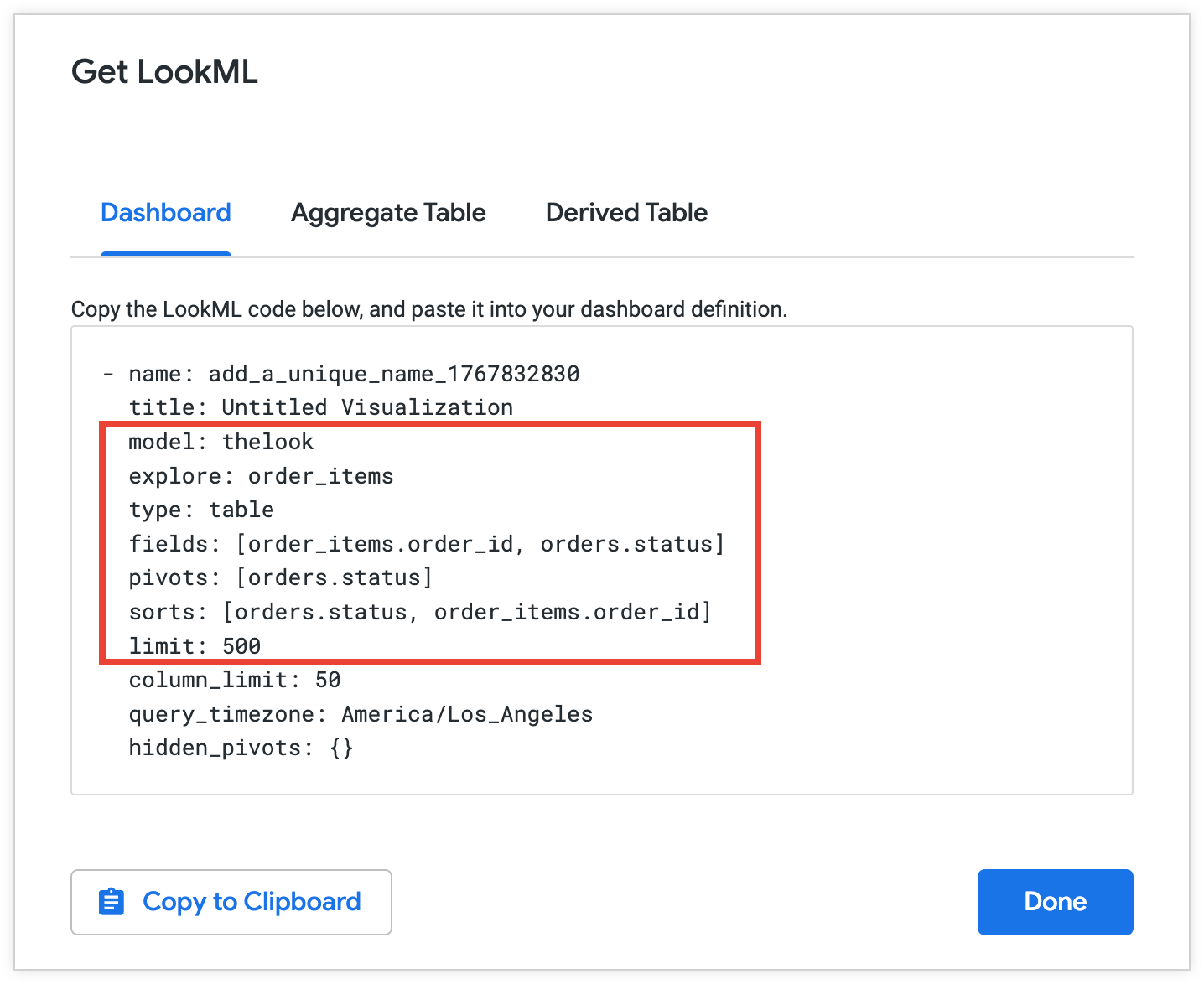
מעתיקים את המטא-נתונים שנבחרו לשימוש בשאילתה לדוגמה של Looker:
  model: thelook
  explore: order_items
  fields: [order_items.order_id, orders.status]
  sorts: [orders.status, order_items.order_id]
  limit: 500
אחזור אובייקט השאילתה של Looker באמצעות Looker API
כדי לאחזר מידע על ניתוח באמצעות Looker API, פועלים לפי השלבים הבאים:
- בכרטיסייה 'ניתוח נתונים', לוחצים על התפריט פעולות בניתוח הנתונים ואז על שיתוף. ב-Looker מוצגות כתובות URL שאפשר להעתיק כדי לשתף את הכלי 'ניתוח נתונים'. כתובות URL לשיתוף בדרך כלל נראות כך:
https://looker.yourcompany/x/vwGSbfc. הסיומתvwGSbfcבכתובת ה-URL של השיתוף היא ה-slug של השיתוף. - מעתיקים את ה-slug של השיתוף.
- שולחים בקשה ל-Looker API:
GET /queries/slug/Explore_slugמעבירים את הסלאג של כתובת ה-URL של הניתוח כ-string ב-Explore_slug. בבקשה, כוללים את השדות ממטא-נתוני השאילתה ב-Explore שרוצים להחזיר. מידע נוסף זמין בדף ההפניה ל-API בנושא קבלת שאילתה עבור Slug. - מעתיקים את המטא-נתונים של השאילתה מתגובת ה-API.
דוגמאות לשאילתות לדוגמה ב-Looker
בדוגמאות הבאות מוצגות דרכים לספק שאילתות לדוגמה ל-airports באמצעות בקשות HTTP ישירות ועם Python SDK.
HTTP
בבקשת HTTP ישירה, צריך לספק רשימה של אובייקטים של שאילתות זהב של Looker עבור המפתח looker_golden_queries. כל אובייקט חייב להכיל מפתח natural_Language_questions ומפתח looker_query תואם.
looker_golden_queries = [
  {
    "natural_language_questions": ["What is the highest observed positive longitude?"],
    "looker_query": {
      "model": "airports",
      "explore": "airports",
      "fields": ["airports.longitude"],
      "filters": [
        {
          "field": "airports.longitude",
          "value": ">0"
        }
      ],
      "sorts": ["airports.longitude desc"],
      "limit": "1"
    }
  },
 {
    "natural_language_questions": ["What are the major airport codes and cities in CA?", "Can you list the cities and airport codes of airports in CA?"],
    "looker_query": {
      "model": "airports",
      "explore": "airports",
      "fields": ["airports.city", "airports.code"],
      "filters": [
        {
          "field": "airports.major",
          "value": "Y"
        },
        {
          "field": "airports.state",
          "value": "CA"
        }
      ]
    }
  },
]
Python SDK
כשמשתמשים ב-Python SDK, אפשר לספק רשימה של אובייקטים LookerGoldenQuery. לכל אובייקט, מציינים ערכים לפרמטרים natural_language_questions ו-looker_query.
looker_golden_queries = [geminidataanalytics.LookerGoldenQuery(
      natural_language_questions=[
          "What is the highest observed positive longitude?"
      ],
      looker_query=geminidataanalytics.LookerQuery(
          model="airports",
          explore="airports",
          fields=["airports.longitude"],
          filters=[
              geminidataanalytics.LookerQuery.Filter(
                  field="airports.longitude", value=">0"
              )
          ],
          sorts=["airports.longitude desc"],
          limit="1",
      ),
  ),
  geminidataanalytics.LookerGoldenQuery(
      natural_language_questions=[
          "What are the major airport codes and cities in CA?",
          "Can you list the cities and airport codes of airports in CA?",
      ],
      looker_query=geminidataanalytics.LookerQuery(
          model="airports",
          explore="airports",
          fields=["airports.city", "airports.code"],
          filters=[
              geminidataanalytics.LookerQuery.Filter(
                  field="airports.major", value="Y"
              ),
              geminidataanalytics.LookerQuery.Filter(
                  field="airports.state", value="CA"
              ),
          ],
      ),
  ),
]
הגדרת הקשר נוסף בהוראות המערכת
ההוראות למערכת מורכבות מסדרה של רכיבים ואובייקטים מרכזיים שמספקים לסוכן הנתונים פרטים על מקור הנתונים והנחיות לגבי התפקיד של הסוכן במתן תשובות לשאלות. אפשר לספק סוג של הוראות למערכת לסוכן הנתונים בפרמטר system_instruction כמחרוזת בפורמט YAML.
תבנית ה-YAML הבאה מציגה דוגמה לאופן שבו אפשר לבנות הוראות למערכת עבור מקור נתונים ב-Looker:
-   system_instruction: str # Describe the expected behavior of the agent
-   glossaries: # Define business terms, jargon, and abbreviations that are relevant to your use case
    -   glossary:
            -   term: str
            -   description: str
            -   synonyms: list[str]
-   additional_descriptions: # List any additional general instructions
    -   text: str
תיאורים של רכיבים מרכזיים בהוראות המערכת
בקטעים הבאים מופיעות דוגמאות לרכיבים מרכזיים של הוראות מערכת ב-Looker. המקשים האלה כוללים את:
system_instruction
משתמשים במפתח system_instruction כדי להגדיר את התפקיד והפרסונה של הסוכן. ההוראה הראשונית הזו קובעת את הטון והסגנון של התשובות של ה-API ועוזרת לסוכן להבין את המטרה העיקרית שלו.
לדוגמה, אתם יכולים להגדיר סוכן כנתח מכירות לחנות מסחר אלקטרוני פיקטיבית באופן הבא:
-   system_instruction: You are an expert sales analyst for a fictitious
    ecommerce store. You will answer questions about sales, orders, and customer
    data. Your responses should be concise and data-driven.
glossaries
בglossaries מפורטות הגדרות של מונחים עסקיים, סלנג וקיצורים שרלוונטיים לנתונים ולתרחיש לדוגמה שלכם, אבל לא מופיעים כבר בנתונים. לדוגמה, אפשר להגדיר מונחים כמו סטטוסים נפוצים של עסקים ו'לקוח נאמן' בהתאם להקשר העסקי הספציפי שלכם באופן הבא:
-   glossaries:
    -   glossary:
            -   term: Loyal Customer
            -   description: A customer who has made more than one purchase.
                Maps to the dimension 'user_order_facts.repeat_customer' being
                'Yes'. High value loyal customers are those with high
                'user_order_facts.lifetime_revenue'.
            -   synonyms:
                -   repeat customer
                -   returning customer
additional_descriptions
המפתח additional_descriptions מפרט הוראות כלליות נוספות או הקשר שלא נכללים במקומות אחרים בהוראות המערכת. לדוגמה,
אתם יכולים להשתמש במקש additional_descriptions כדי לספק מידע על הסוכן שלכם באופן הבא:
-   additional_descriptions:
    -   text: The user is typically a Sales Manager, Product Manager, or
        Marketing Analyst. They need to understand performance trends, build
        customer lists for campaigns, and analyze product sales.
דוגמה: הוראות מערכת ב-Looker
בדוגמה הבאה מוצגות הוראות מערכת לדוגמה לסוכן שהוא אנליסט מכירות פיקטיבי:
-   system_instruction: "You are an expert sales, product, and operations
    analyst for our e-commerce store. Your primary function is to answer
    questions by querying the 'Order Items' Explore. Always be concise and
    data-driven. When asked about 'revenue' or 'sales', use
    'order_items.total_sale_price'. For 'profit' or 'margin', use
    'order_items.total_gross_margin'. For 'customers' or 'users', use
    'users.count'. The default date for analysis is 'order_items.created_date'
    unless specified otherwise. For advanced statistical questions, such as
    correlation or regression analysis, use the Python tool to fetch the
    necessary data, perform the calculation, and generate a plot (like a scatter
    plot or heatmap)."
-   glossaries:
    -   term: Revenue
    -   description: The total monetary value from items sold. Maps to the
        measure 'order_items.total_sale_price'.
    -   synonyms:
        -   sales
        -   total sales
        -   income
        -   turnover
    -   term: Profit
    -   description: Revenue minus the cost of goods sold. Maps to the measure
        'order_items.total_gross_margin'.
    -   synonyms:
        -   margin
        -   gross margin
        -   contribution
    -   term: Buying Propensity
    -   description: Measures the likelihood of a customer to purchase again
        soon. Primarily maps to the 'order_items.30_day_repeat_purchase_rate'
        measure.
    -   synonyms:
        -   repeat purchase rate
        -   repurchase likelihood
        -   customer velocity
    -   term: Customer Lifetime Value
    -   description: The total revenue a customer has generated over their
        entire history with us. Maps to 'user_order_facts.lifetime_revenue'.
    -   synonyms:
        -   CLV
        -   LTV
        -   lifetime spend
        -   lifetime value
    -   term: Loyal Customer
    -   description: "A customer who has made more than one purchase. Maps to
        the dimension 'user_order_facts.repeat_customer' being 'Yes'. High value
        loyal customers are those with high
        'user_order_facts.lifetime_revenue'."
    -   synonyms:
        -   repeat customer
        -   returning customer
    -   term: Active Customer
    -   description: "A customer who is currently considered active based on
        their recent purchase history. Mapped to
        'user_order_facts.currently_active_customer' being 'Yes'."
    -   synonyms:
        -   current customer
        -   engaged shopper
    -   term: Audience
    -   description: A list of customers, typically identified by their email
        address, for marketing or analysis purposes.
    -   synonyms:
        -   audience list
        -   customer list
        -   segment
    -   term: Return Rate
    -   description: The percentage of items that are returned by customers
        after purchase. Mapped to 'order_items.return_rate'.
    -   synonyms:
        -   returns percentage
        -   RMA rate
    -   term: Processing Time
    -   description: The time it takes to prepare an order for shipment from the
        moment it is created. Maps to 'order_items.average_days_to_process'.
    -   synonyms:
        -   fulfillment time
        -   handling time
    -   term: Inventory Turn
    -   description: "A concept related to how quickly stock is sold. This can
        be analyzed using 'inventory_items.days_in_inventory' (lower days means
        higher turn)."
    -   synonyms:
        -   stock turn
        -   inventory turnover
        -   sell-through
    -   term: New vs Returning Customer
    -   description: "A classification of whether a purchase was a customer's
        first ('order_facts.is_first_purchase' is Yes) or if they are a repeat
        buyer ('user_order_facts.repeat_customer' is Yes)."
    -   synonyms:
        -   customer type
        -   first-time buyer
-   additional_descriptions:
    -   text: The user is typically a Sales Manager, Product Manager, or
        Marketing Analyst. They need to understand performance trends, build
        customer lists for campaigns, and analyze product sales.
    -   text: This agent can answer complex questions by joining data about
        sales line items, products, users, inventory, and distribution centers.
המאמרים הבאים
אחרי שמגדירים את השדות המובנים ואת הוראות המערכת שמרכיבים את ההקשר שנוצר, אפשר לספק את ההקשר הזה ל-API של ניתוח שיחות באחת מהקריאות הבאות:
- יצירת סוכן נתונים קבוע: כדי להגדיר התנהגות של סוכן שנשמרת בכמה שיחות, צריך לכלול הקשר שנוצר על ידי מחבר באובייקט
published_contextבגוף הבקשה. מידע נוסף זמין במאמרים יצירת סוכן נתונים (HTTP) או הגדרת הקשר לשיחה עם שמירת סטטוס או ללא שמירת סטטוס (Python SDK). - שליחת בקשה ללא מצב: כדי להגדיר את ההתנהגות של הסוכן עבור קריאה ספציפית ל-API, צריך לספק הקשר שנוצר בתוך אובייקט
inline_contextבבקשה לצ'אט. מידע נוסף אפשר למצוא במאמר יצירת שיחה מרובת תפניות ללא שמירת מצב (HTTP) או במאמר שליחת בקשת צ'אט ללא שמירת מצב עם הקשר מוטבע (Python SDK). - שליחת בקשה לנתוני שאילתה: במקורות נתונים של מסד נתונים, צריך לציין את מזהה קבוצת ההקשר של ההקשר שנוצר באובייקט
agent_context_referenceבבקשה לנתוני שאילתה. מידע נוסף זמין במאמר הגדרת ההקשר של סוכן הנתונים למקורות נתונים של מסדי נתונים.