This page documents production updates to Gemini Code Assist. Check this page for announcements about new or updated features, bug fixes, known issues, and deprecated functionality.
> [!NOTE]
> **Note:** We have unified our tools into a single, multi-agent platform called Antigravity, with Antigravity CLI now available. Starting June 18, 2026, Gemini Code Assist IDE Extensions and Gemini CLI stopped serving requests for the Gemini Code Assist for individuals, Google AI Pro, and Google AI Ultra tiers. Affected users should migrate to Antigravity and Antigravity CLI. To learn more, see the [deprecation page](https://developers.google.com/gemini-code-assist/docs/deprecations/code-assist-individuals).
You can see the latest product updates for all of Google Cloud on the
[Google Cloud](https://docs.cloud.google.com/release-notes.md.txt) page, browse and filter all release notes in the
[Google Cloud console](https://console.cloud.google.com/release-notes),
or programmatically access release notes in
[BigQuery](https://console.cloud.google.com/bigquery?p=bigquery-public-data&d=google_cloud_release_notes&t=release_notes&page=table).
To get the latest product updates delivered to you, add the URL of this page to your
[feed
reader](https://wikipedia.org/wiki/Comparison_of_feed_aggregators), or add the
[feed URL](https://docs.cloud.google.com/feeds/gemini-codeassist-release-notes.xml) directly.
## October 29, 2026
**VS Code Gemini Code Assist 2.107.0** Other
### Bug fixes in VS Code
Various bug fixes and minor product enhancements.
## October 13, 2026
**IntelliJ Gemini Code Assist 1.60.1** Other
### Bug fixes in IntelliJ
Various bug fixes and minor product enhancements.
## October 09, 2026
**Gemini Code Assist** Announcement Sale of Gemini Code Assist subscriptions is ending. Starting October 9, 2026,
new Gemini Code Assist Standard and Enterprise subscriptions can no longer be
purchased. Existing subscriptions will continue to auto-renew through the rest
of 2026, but auto-renewal will end in 2027. For more information, see
[Gemini Code Assist
Standard and Enterprise subscriptions](https://docs.cloud.google.com/gemini/docs/codeassist/sunset).
For alternative AI developer tools, use Antigravity, which is available through
eligible [Gemini Enterprise subscriptions](https://docs.cloud.google.com/gemini/enterprise/docs/ai-developer-tools-overview.md.txt)
and through [Gemini Enterprise Agent Platform](https://antigravity.google/docs/enterprise/#gemini-enterprise-agent-platform-api-setup).
## October 08, 2026
**VS Code Gemini Code Assist 2.104.0** Other
### Bug fixes in VS Code
Various bug fixes and minor product enhancements.
## September 15, 2026
**IntelliJ Gemini Code Assist 1.59.0** Other
### Bug fixes in IntelliJ
Various bug fixes and minor product enhancements.
## September 09, 2026
**VS Code Gemini Code Assist 2.100.0** Other
### Bug fixes in VS Code
Various bug fixes and minor product enhancements.
## September 04, 2026
**Gemini Code Assist** Announcement New subscriptions for Gemini Code Assist can no longer be purchased through the
Google Cloud console using billing accounts that don't have an active
Gemini Code Assist subscription. Billing accounts that currently have an active
Gemini Code Assist subscription are unaffected.
For billing accounts that don't have an active Gemini Code Assist
subscription, you can obtain a new Gemini Code Assist subscription by
[contacting Google Cloud sales](https://cloud.google.com/contact).
For alternative AI developer tools, use Antigravity, which is available through
eligible [Gemini Enterprise subscriptions](https://docs.cloud.google.com/gemini/enterprise/docs/ai-developer-tools-overview.md.txt)
and through [Gemini Enterprise Agent Platform](https://antigravity.google/docs/enterprise/#gemini-enterprise-agent-platform-api-setup).
## September 01, 2026
**IntelliJ Gemini Code Assist 1.58.1** Other
### Bug fixes in IntelliJ
Various bug fixes and minor product enhancements.
## August 26, 2026
**VS Code Gemini Code Assist 2.98.0** Other
### Bug fixes in VS Code
Various bug fixes and minor product enhancements.
## August 20, 2026
**IntelliJ Gemini Code Assist 1.57.0** Other
### Bug fixes in IntelliJ
Various bug fixes and minor product enhancements.
Announcement Credits for the first month of Gemini Code Assist usage are discontinued.
Customers currently receiving these credits are unaffected by this change.
[Previously](https://docs.cloud.google.com/gemini/docs/release-notes.md.txt#January_30_2025), these
credits had been available to new customers with billing accounts if they had
never had a Gemini Code Assist subscription.
## August 10, 2026
**VS Code Gemini Code Assist 2.95.0** Other
### Bug fixes in VS Code
Various bug fixes and minor product enhancements.
## July 22, 2026
**VS Code Gemini Code Assist 2.93.0** Other
### Bug fixes in VS Code
Various bug fixes and minor product enhancements.
## July 21, 2026
**IntelliJ Gemini Code Assist 1.55.8** Other
### Bug fixes in IntelliJ
Various bug fixes and minor product enhancements.
## July 20, 2026
**VS Code Gemini Code Assist 2.92.0** Other
### Bug fixes in VS Code
Various bug fixes and minor product enhancements.
## June 19, 2026
**VS Code Gemini Code Assist 2.87.0** Other
### Bug fixes in VS Code
Various bug fixes and minor product enhancements.
## June 18, 2026
**IntelliJ Gemini Code Assist 1.54.1** Other
### Bug fixes in IntelliJ
Various bug fixes and minor product enhancements.
## June 11, 2026
**VS Code Gemini Code Assist 2.86.0** Other
### Bug fixes in VS Code
Various bug fixes and minor product enhancements.
## June 08, 2026
**VS Code Gemini Code Assist** \& **IntelliJ Gemini Code Assist** Announcement
### Gemini 3.5 Flash is generally available
[Gemini 3.5 Flash](https://docs.cloud.google.com/gemini/docs/codeassist/gemini-3.md.txt)
is now generally available to Gemini Code Assist users in VS Code and IntelliJ.
You can use this model for [agent mode](https://docs.cloud.google.com/gemini/docs/codeassist/agent-mode.md.txt),
[chat](https://docs.cloud.google.com/gemini/docs/codeassist/chat-gemini.md.txt), and
[code generation](https://docs.cloud.google.com/gemini/docs/codeassist/write-code-gemini.md.txt#generate_code_with_prompts).
## June 04, 2026
**VS Code Gemini Code Assist 2.85.0** Other
### Bug fixes in VS Code
Various bug fixes and minor product enhancements.
## June 03, 2026
**IntelliJ Gemini Code Assist 1.53.2** Other
### Bug fixes in IntelliJ
Various bug fixes and minor product enhancements.
## May 29, 2026
**VS Code Gemini Code Assist 2.84.0** Other
### Bug fixes in VS Code
Various bug fixes and minor product enhancements.
## May 14, 2026
**VS Code Gemini Code Assist 2.82.0** Other
### Bug fixes in VS Code
Various bug fixes and minor product enhancements.
## May 13, 2026
**VS Code Gemini Code Assist 2.81.0** Fixed
### Agent mode bug fix in Cloud Workstations
Fixed a bug that prevented agent mode from working on Cloud Workstations.
**IntelliJ Gemini Code Assist 1.51.1** Other
### Bug fixes in IntelliJ
Various bug fixes and minor product enhancements.
## May 08, 2026
**VS Code Gemini Code Assist 2.81.0** Other
### Bug fixes in VS Code
Various bug fixes and minor product enhancements.
## April 22, 2026
**VS Code Gemini Code Assist 2.79.0** Other
### Bug fixes in VS Code
Various bug fixes and minor product enhancements.
## April 17, 2026
**IntelliJ Gemini Code Assist 1.49.4** Other
### Bug fixes in IntelliJ
Various bug fixes and minor product enhancements.
## April 16, 2026
**VS Code Gemini Code Assist 2.78.0** Other
### Bug fixes in VS Code
Various bug fixes and minor product enhancements.
## April 13, 2026
**VS Code Gemini Code Assist 2.77.3** Fixed
### Quota issues fixed in VS Code
Various bug fixes related to quota issues.
## April 09, 2026
**IntelliJ Gemini Code Assist 1.49.3** Other
### Bug fixes in IntelliJ
Various bug fixes and minor product enhancements.
**VS Code Gemini Code Assist 2.77.1** Fixed
### Agent mode logs now attributed to Gemini Code Assist
VS Code Gemini Code Assist `2.77.1` now attributes agent mode logs to Gemini
Code Assist. In previous versions, agent mode logs are being attributed to
Gemini CLI instead of Gemini Code Assist. This discrepancy is resolved in the
latest release, and we recommend that you update to version `2.77.1` or higher
to ensure your usage metrics are correctly reported.
## April 01, 2026
**VS Code Gemini Code Assist 2.77.0** Other
### Bug fixes in VS Code
Various bug fixes and minor product enhancements.
## March 24, 2026
**IntelliJ Gemini Code Assist 1.49.2** Fixed
### Bug fixes in IntelliJ
Various bug fixes and minor product enhancements.
## March 13, 2026
**VS Code Gemini Code Assist 2.75.0** Other
### Bug fixes in VS Code
Various bug fixes and minor product enhancements.
**VS Code and IntelliJ Gemini Code Assist** Announcement
### Gemini 3.1 Pro and 3.0 Flash are available (Preview)
[Gemini 3.1 Pro and Gemini 3.0 Flash](https://docs.cloud.google.com/gemini/docs/codeassist/gemini-3.md.txt)
are now available to Gemini Code Assist users in VS Code and IntelliJ, in
[Preview](https://cloud.google.com/products#product-launch-stages). You can use
these models for [agent mode](https://docs.cloud.google.com/gemini/docs/codeassist/agent-mode.md.txt),
[chat](https://docs.cloud.google.com/gemini/docs/codeassist/chat-gemini.md.txt), and
[code generation](https://docs.cloud.google.com/gemini/docs/codeassist/write-code-gemini.md.txt#generate_code_with_prompts).
## March 06, 2026
**IntelliJ Gemini Code Assist 1.49.0** Other
### Bug fixes in IntelliJ
Various bug fixes and minor product enhancements.
**VS Code Gemini Code Assist 2.74.0** Other
### Bug fixes in VS Code
Various bug fixes and minor product enhancements.
## March 04, 2026
**VS Code Gemini Code Assist 2.73.0** Feature
### File outline and finish changes features in VS Code general availability
The [file outline](https://docs.cloud.google.com/gemini/docs/codeassist/chat-gemini.md.txt#outline)
and [finish changes](https://docs.cloud.google.com/gemini/docs/codeassist/write-code-gemini.md.txt#finish-changes)
features are now available in VS Code and generally available (GA).
## February 25, 2026
**VS Code Gemini Code Assist 2.73.0** Other
### Bug fixes in VS Code
Various bug fixes and minor product enhancements.
**IntelliJ Gemini Code Assist 1.48.0** Other
### Bug fixes in IntelliJ
Various bug fixes and minor product enhancements.
## February 24, 2026
**IntelliJ Gemini Code Assist 1.47.0** Announcement
### File outline feature in IntelliJ general availability
The [file outline](https://docs.cloud.google.com/gemini/docs/codeassist/chat-gemini.md.txt#outline)
feature is now generally available (GA).
**IntelliJ Gemini Code Assist 1.46.0** Announcement
### Finish changes feature in IntelliJ general availability
The [finish changes](https://docs.cloud.google.com/gemini/docs/codeassist/write-code-gemini.md.txt#finish-changes)
features is now generally available (GA).
## February 20, 2026
**VS Code Gemini Code Assist 2.72.0** Other
### Bug fixes in VS Code
Various bug fixes and minor product enhancements.
## February 13, 2026
**VS Code Gemini Code Assist 2.71.0** Other
### Bug fixes in VS Code
Various bug fixes and minor product enhancements.
## February 06, 2026
**VS Code Gemini Code Assist 2.70.0** Other
### Bug fixes in VS Code
Various bug fixes and minor product enhancements.
## February 02, 2026
**VS Code Gemini Code Assist 2.69.0** Other
### Bug fixes in VS Code
Various bug fixes and minor product enhancements.
## January 23, 2026
**VS Code Gemini Code Assist 2.68.0** Other
### Bug fixes in VS Code
Various bug fixes and minor product enhancements.
## January 16, 2026
**VS Code Gemini Code Assist 2.67.0** Other
### Bug fixes in VS Code
Various bug fixes and minor product enhancements.
## December 16, 2025
**VS Code Gemini Code Assist 2.56.0** Fixed
### VS Code model selection issue fixed as of version 2.63.1
The [model selection issue](https://docs.cloud.google.com/gemini/docs/codeassist/release-notes.md.txt#known_issue_for_the_model_selection_feature_in_vs_code_gemini_code_assist)
affecting free tier customers using Gemini Code Assist releases 2.56 and later
is fixed as of version 2.63.1.
## December 12, 2025
**VS Code Gemini Code Assist 2.56.0** Issue
### Known issue for the model selection feature in VS Code Gemini Code Assist
The VS Code Gemini Code Assist
[model selection feature](https://docs.cloud.google.com/gemini/docs/codeassist/chat-gemini.md.txt#select-model)
incorrectly appears for users of the free tier of Gemini Code Assist for
individuals.
- The feature shouldn't appear for such users and does not function for them.
**IntelliJ Gemini Code Assist 1.41.0** Other
### Bug fixes in IntelliJ
Various bug fixes and minor product enhancements.
## December 05, 2025
**IntelliJ Gemini Code Assist 1.40.0** Feature
### Finish Changes in IntelliJ (Preview)
The [finish changes](https://docs.cloud.google.com/gemini/docs/codeassist//write-code-gemini#finish-changes)
feature acts as an AI pair programmer that observes your in-progress work and
completes the job, eliminating the need to write complex prompts. The core
strength of the finish changes feature lies in its flexibility, allowing you to
use a mix of input styles, such as pseudocode, #TODOs, or half-written code.
This combination minimizes distraction and ensures you remain in control of the
high-level design.
**IntelliJ Gemini Code Assist 1.40.0** Feature
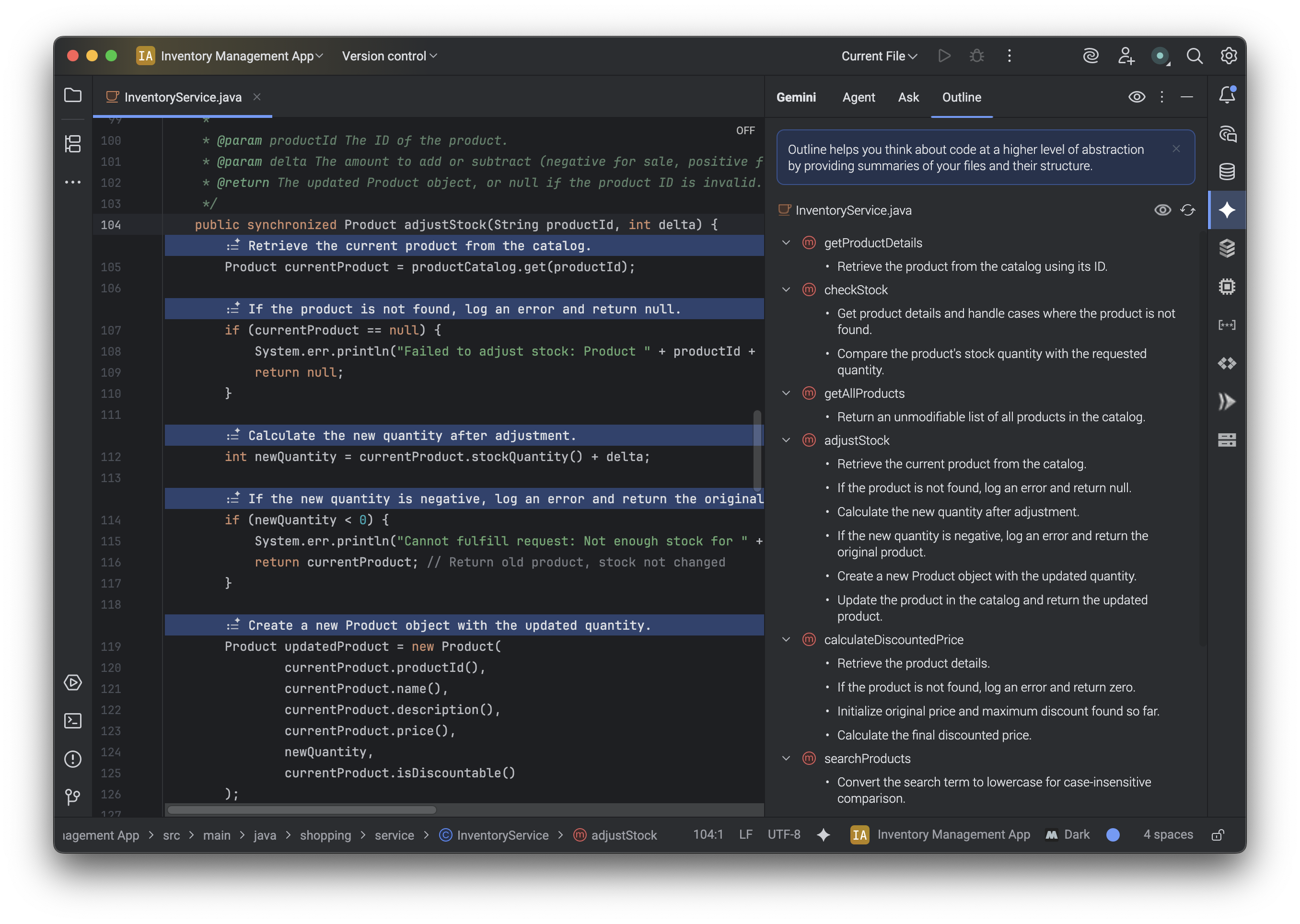
### Outline in IntelliJ (Preview)
The [outline feature](https://docs.cloud.google.com/gemini/docs/codeassist/chat-gemini.md.txt#outline) automatically
creates AI-assisted documentation by generating short, English summaries of code
blocks within the **Outline** tab of the Gemini Code Assist plugin. Outlines
help developers to achieve rapid understanding and to focus on abstraction,
without getting bogged down by syntactical details.
You can [change the settings](https://docs.cloud.google.com/gemini/docs/codeassist/chat-gemini.md.txt#outline-settings)
to disable automatic outline generation, which instead lets you generate
outlines of files manually.
## December 04, 2025
**VS Code Gemini Code Assist 2.56.0** Feature
### Model selection for VS Code Gemini Code Assist
The following VS Code Gemini Code Assist users can now
[manually select the model](https://docs.cloud.google.com/gemini/docs/codeassist/chat-gemini.md.txt#select-model)
used by Gemini Code Assist:
- Gemini Code Assist Enterprise users
- Gemini Code Assist Standard users
- Gemini Code Assist for individuals, if you have a Google AI Pro or Ultra subscription
## November 20, 2025
**IntelliJ Gemini Code Assist 1.39.1** Other
### Bug fixes in IntelliJ
Various bug fixes and minor product enhancements.
## November 13, 2025
**VS Code Gemini Code Assist 2.57.0** \& **VS Code Gemini Code Assist 2.58.0** Fixed
### VS Code server connection issue fixed as of version 2.58.1
The [server connection issue](https://docs.cloud.google.com/gemini/docs/codeassist/release-notes.md.txt#known_issue_in_vs_code_257_and_later) affecting
Gemini Code Assist 2.57 and 2.58 releases is fixed as of version 2.58.1
**VS Code Gemini Code Assist 2.57.0** \& **VS Code Gemini Code Assist 2.58.0** Issue
### Known issue in VS Code 2.57 and later
The Gemini Code Assist 2.57 and later releases for VS Code have a known issue
that prevents the extension from connecting to the server if you are using a
gnc c runtime version that's earlier than 2.36.
- You can permanently fix this issue by upgrading your gnu c runtime version to
2.36 or higher.
- Alternatively, you can downgrade the Gemini Code Assist VS Code extension
to version 2.56 until a fix is released.
## November 12, 2025
Feature
### Chat performance metrics
Gain deeper insights into Gemini for Google Cloud's chat performance with
metrics for chat acceptance rate and lines of chat accepted, including
interactions in Agent mode and non-agentic chat. Combine these metrics with
existing code metrics to calculate total acceptance and total lines of code
accepted, providing a complete picture of Gemini's performance. For more
information, see
[View Gemini for Google Cloud logs](https://docs.cloud.google.com/gemini/docs/log-gemini.md.txt).
Feature
### Code customization available in agent mode and Gemini CLI (Preview)
[Code customization](https://docs.cloud.google.com/gemini/docs/codeassist/code-customization-overview.md.txt) is now
supported when using [Gemini CLI](https://docs.cloud.google.com/gemini/docs/codeassist/gemini-cli.md.txt) and
[agent mode](https://docs.cloud.google.com/gemini/docs/codeassist/agent-mode.md.txt) in Gemini Code Assist.
**IntelliJ Gemini Code Assist 1.38.0** Feature
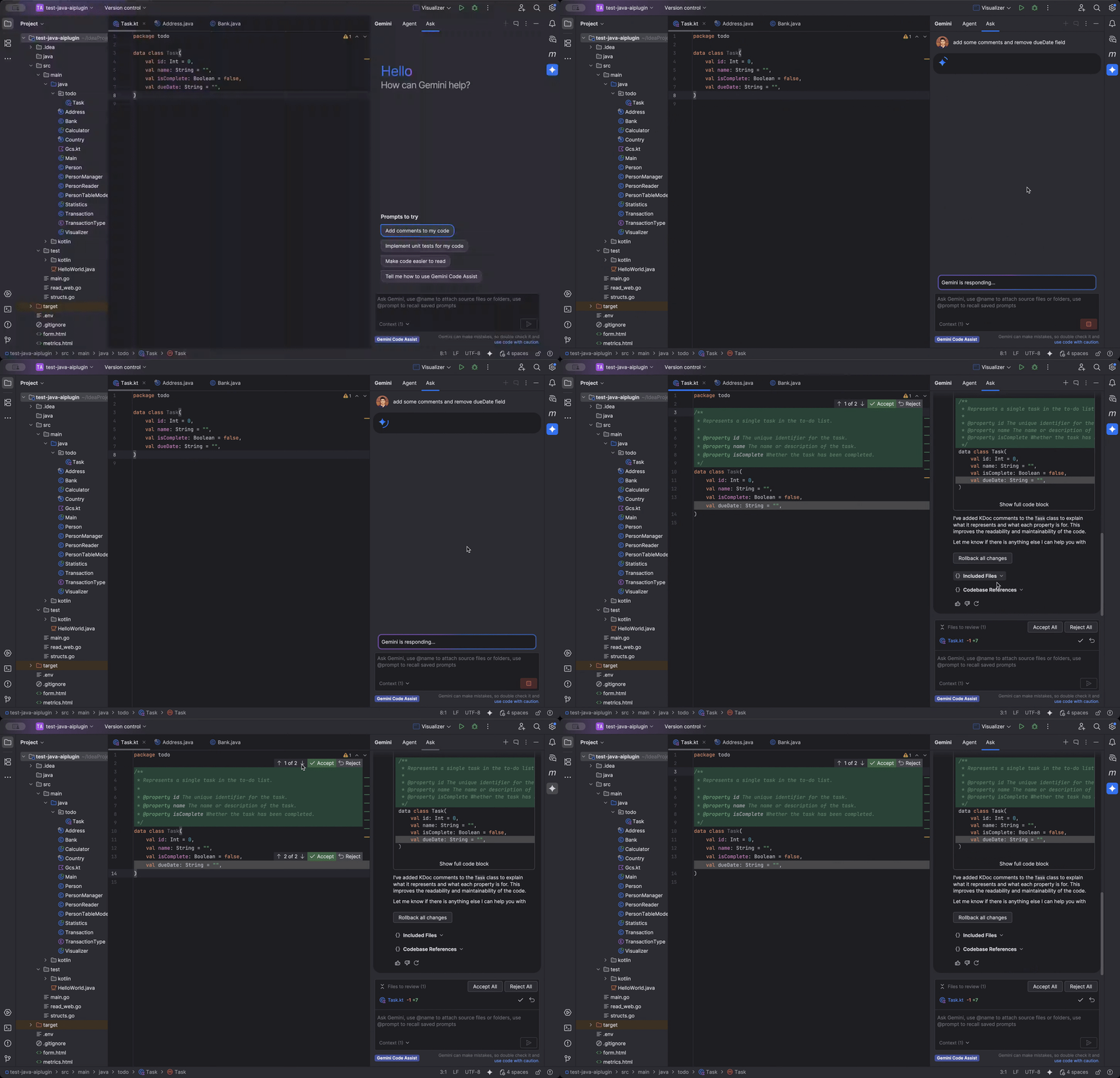
### Inline diff is generally available (GA) for IntelliJ
[Inline diff](https://docs.cloud.google.com/gemini/docs/codeassist/chat-gemini.md.txt#view_code_diffs) is generally
available for IntelliJ Gemini Code Assist. With the inline diff view, chat
generated code suggestions are visually highlighted directly in your editor.
This feature can boost productivity by offering immediate visibility on
modifications, streamlining reviews and enabling precise control over
integrating new code, all without leaving your current view.
If preferred, you can also
[change the diff view settings](https://docs.cloud.google.com/gemini/docs/codeassist/chat-gemini.md.txt#change_diff_view_settings)
to have a side-by-side diff window instead of the inline diff.
## November 10, 2025
Feature
### Persistent memory for Gemini Code Assist on GitHub (Preview)
- [Gemini Code Assist on GitHub](https://developers.google.com/gemini-code-assist/docs/review-github-code#versions)
now supports persistent memory, which stores your previous interactions with
Gemini Code Assist on GitHub so that it has context during your future
interactions.
- For users of the enterprise version, persistent memory is enabled from the
connection settings within the Google Cloud console. For users of the consumer
version, persistent memory is enabled from the Gemini Code Assist site. For
more information, see
[manage configuration files across multiple repositories](https://developers.google.com/gemini-code-assist/docs/customize-gemini-behavior-github#bulk-config).
## November 07, 2025
**VS Code Gemini Code Assist 2.57.0** Other
### Bug fixes in VS Code
Various bug fixes and minor product enhancements.
## October 30, 2025
**VS Code Gemini Code Assist 2.56.0** Other
### Bug fixes in VS Code
Various bug fixes and minor product enhancements.
## October 24, 2025
**IntelliJ Gemini Code Assist 1.36.0** Other
### Bug fixes in IntelliJ
Various bug fixes and minor product enhancements.
## October 23, 2025
**VS Code Gemini Code Assist 2.55.0** Other
### Bug fixes in VS Code
Various bug fixes and minor product enhancements.
## October 17, 2025
**IntelliJ Gemini Code Assist 1.35.0** Other
### Bug fixes in IntelliJ
Various bug fixes and minor product enhancements.
## October 16, 2025
**VS Code Gemini Code Assist 2.54.0** Other
### Bug fixes in VS Code
Various bug fixes and minor product enhancements.
## October 14, 2025
Breaking
### Gemini Code Assist tools are no longer available and are replaced by agent mode (Preview)
Effective October 14, 2025, Gemini Code Assist tools are no longer available.
This completes the deprecation process that was
[announced](https://docs.cloud.google.com/gemini/docs/codeassist/release-notes.md.txt#October_02_2025) on October 2, 2025.
Using the `@` symbol followed by the name of a tool no longer connects to
Gemini Code Assist tools.
To connect to external services, use Model Context Protocol (MCP) servers
in Gemini Code Assist [agent mode](https://docs.cloud.google.com/gemini/docs/codeassist/agent-mode.md.txt).
For more information, see:
- [Configure MCP servers](https://docs.cloud.google.com/gemini/docs/codeassist/use-agentic-chat-pair-programmer.md.txt#configure-mcp-servers)
- [Gemini feature deprecations](https://docs.cloud.google.com/gemini/docs/deprecations/features.md.txt)
## October 13, 2025
Feature
### Enterprise version of Gemini Code Assist on GitHub (Preview)
- Gemini Code Assist on GitHub provides Gemini-powered reviews of pull requests
in your GitHub repositories.
- The [enterprise version](https://developers.google.com/gemini-code-assist/docs/review-github-code#versions)
enables consolidated control of Gemini Code Assist reviews across multiple
repositories, provides increased quotas, supports GitHub Enterprise Cloud and
GitHub Enterprise Server, and operates under the Google Cloud Terms of
Service.
## October 10, 2025
**IntelliJ Gemini Code Assist 1.34.0** Other
### Bug fixes in IntelliJ
Various bug fixes and minor product enhancements.
## October 09, 2025
**VS Code Gemini Code Assist 2.53.0** Other
### Bug fixes in VS Code
Various bug fixes and minor product enhancements.
## October 08, 2025
**IntelliJ Gemini Code Assist 1.33.1** Feature
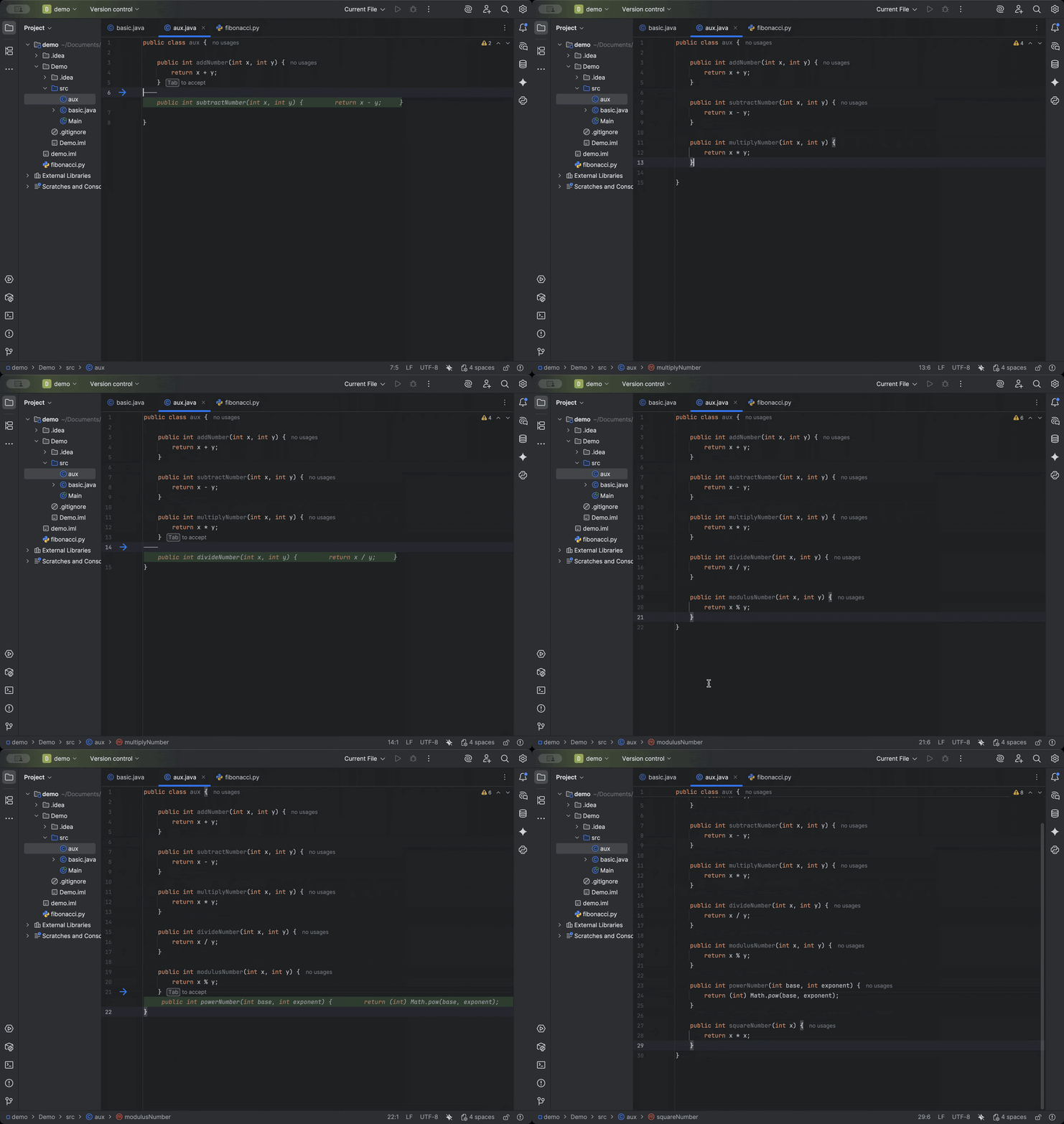
### Next Edit Predictions in IntelliJ (Preview)
[Next Edit Predictions](https://cloud.google.com/gemini/docs/codeassist/write-code-gemini#use_next_edit_predictions),
which predicts the next code suggestions throughout the code file that you're
currently in, are now available in IntelliJ Gemini Code Assist, in
[Preview](https://cloud.google.com/terms/service-terms).
You can cycle through multiple suggestions, dismiss suggestions, or ignore them
and continue coding.
[Enable Next Edit Predictions](https://cloud.google.com/gemini/docs/codeassist/write-code-gemini#use_next_edit_predictions)
in your IDE to get started.
Feature
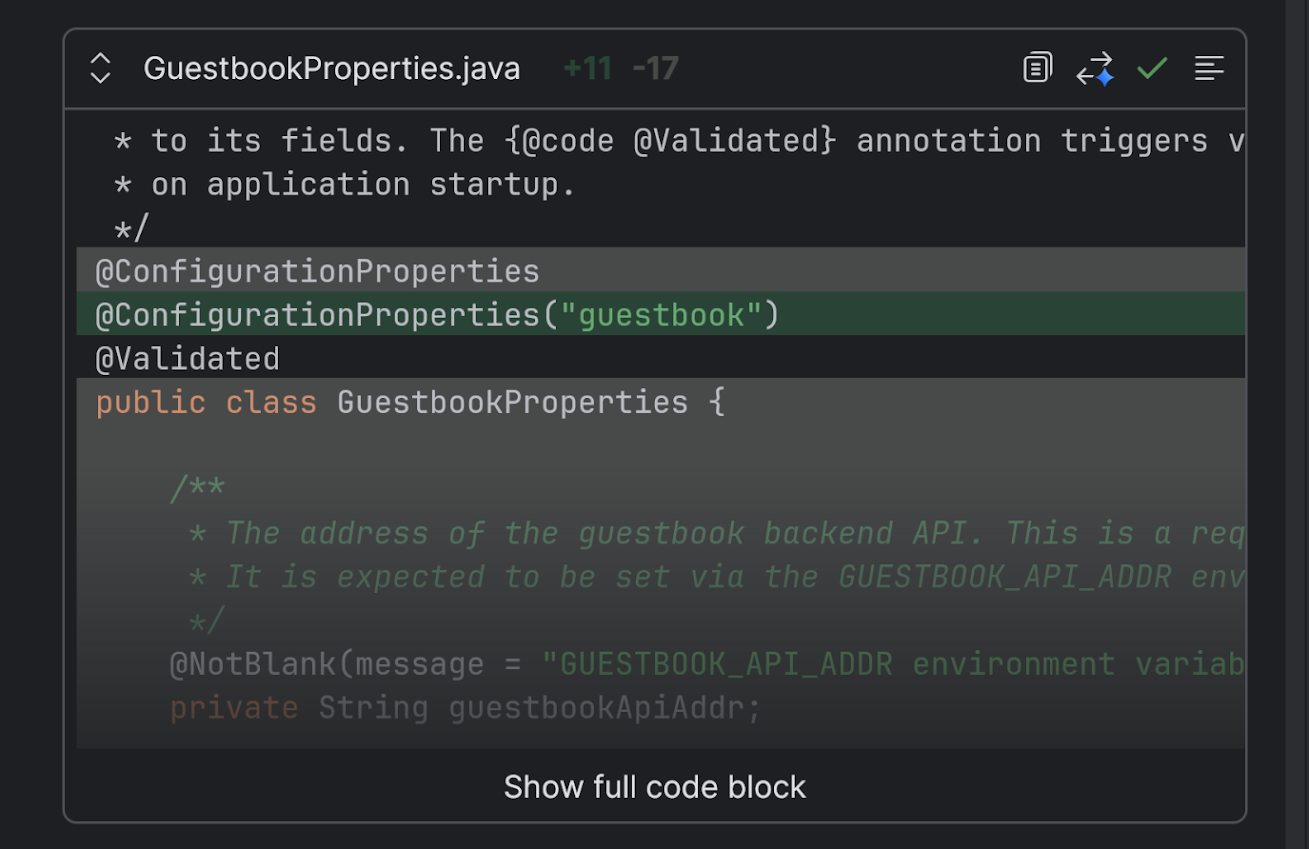
### Chat code suggestion preview in IntelliJ
Chat code suggestions are [displayed in a preview block](https://cloud.google.com/gemini/docs/codeassist/chat-gemini#configure_code_preview_pane)
by default with IntelliJ Gemini Code Assist, improving the readability of
generated chat responses.
## October 07, 2025
**VS Code Gemini Code Assist 2.52.1** Other
### Bug fixes in VS Code
Various bug fixes and minor product enhancements.
## October 03, 2025
**VS Code Gemini Code Assist 2.52.0** Other
### Bug fixes in VS Code
Various bug fixes and minor product enhancements.
## October 02, 2025
Deprecated
### Gemini Code Assist tools are deprecated and replaced by agent mode (Preview)
Gemini Code Assist tools are deprecated and will be removed on October 14, 2025.
Gemini Code Assist tools are replaced by Gemini Code Assist agent mode. After
October 14, 2025, using the `@` symbol followed by the name of a tool won't
connect to Gemini Code Assist tools.
Agent mode in Gemini Code Assist can connect to external services using Model
Context Protocol (MCP) servers. For more information, read
[Configure MCP servers](https://docs.cloud.google.com/gemini/docs/codeassist/use-agentic-chat-pair-programmer.md.txt#configure-mcp-servers).
## September 29, 2025
**IntelliJ Gemini Code Assist 1.32.0** Feature
### Add code snippets to the chat context
You can now select, attach, and direct Gemini to focus on code snippets with
IntelliJ Gemini Code Assist. [Code snippet selection](https://cloud.google.com/gemini/docs/codeassist/chat-gemini#add_selected_code_snippets_to_context)
enables discrete analysis of smaller code blocks instead of entire files.
## September 26, 2025
**VS Code Gemini Code Assist 2.51.0** Feature
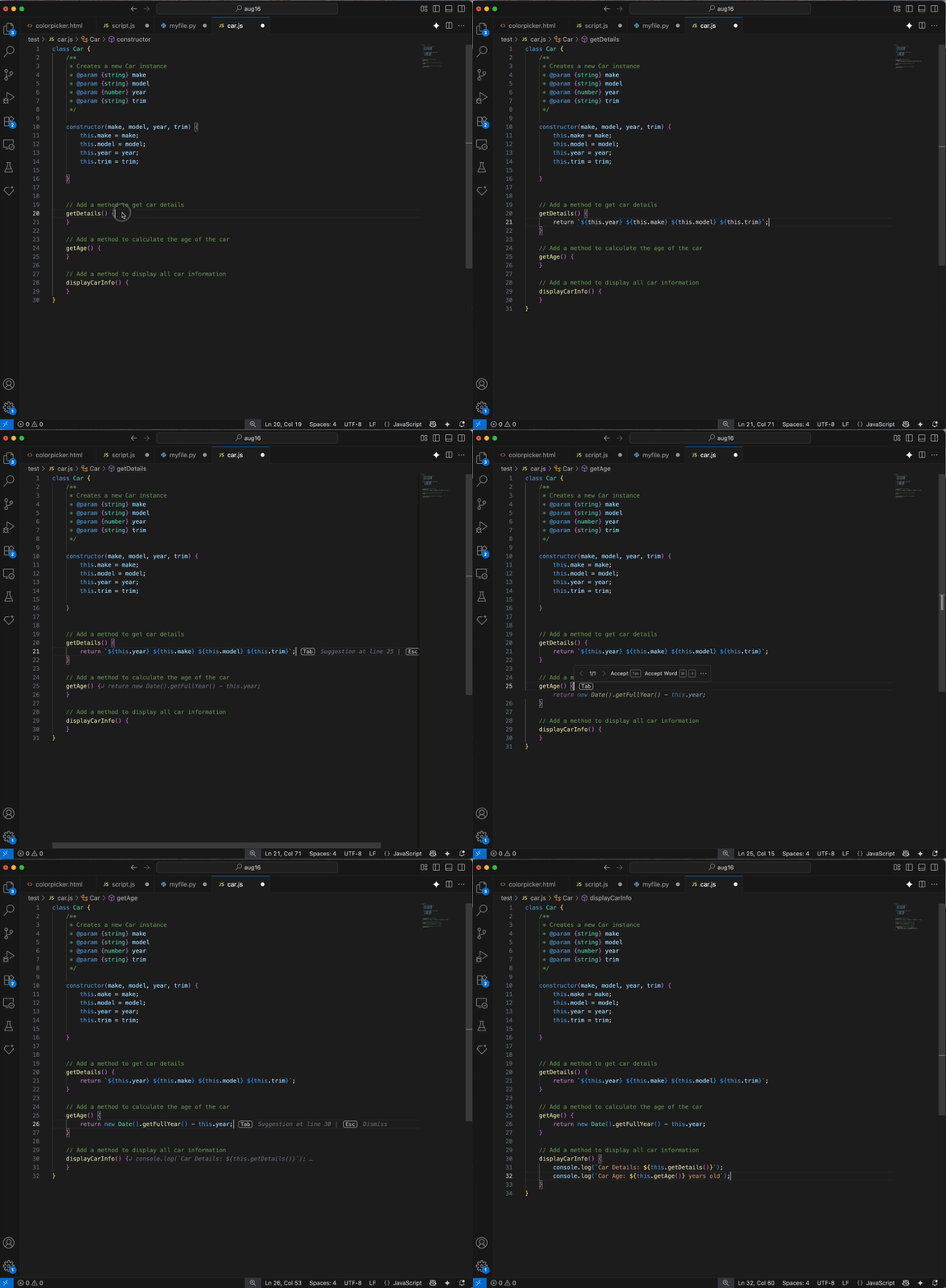
### Next Edit Predictions in VS Code (Preview)
[Next Edit Predictions](https://cloud.google.com/gemini/docs/codeassist/write-code-gemini#use_next_edit_predictions),
which predicts the next code suggestions throughout the code file that you're
currently in, are now available in VS Code Gemini Code Assist, in
[Preview](https://cloud.google.com/terms/service-terms).
You can cycle through multiple suggestions, dismiss suggestions, or ignore them
and continue coding.
[Enable Next Edit Predictions](https://cloud.google.com/gemini/docs/codeassist/write-code-gemini#use_next_edit_predictions)
in your IDE to get started.
## September 23, 2025
Feature
### Copy sign-in link
As an alternative to clicking **Sign in** when signing into your Google Account
to use IntelliJ Gemini Code Assist, you can [click **Copy link**](https://cloud.google.com/gemini/docs/discover/set-up-gemini#sign-in-select-gcp-project)
and manually paste the link in your browser's URL bar.
**VS Code Gemini Code Assist 2.50.0** Feature
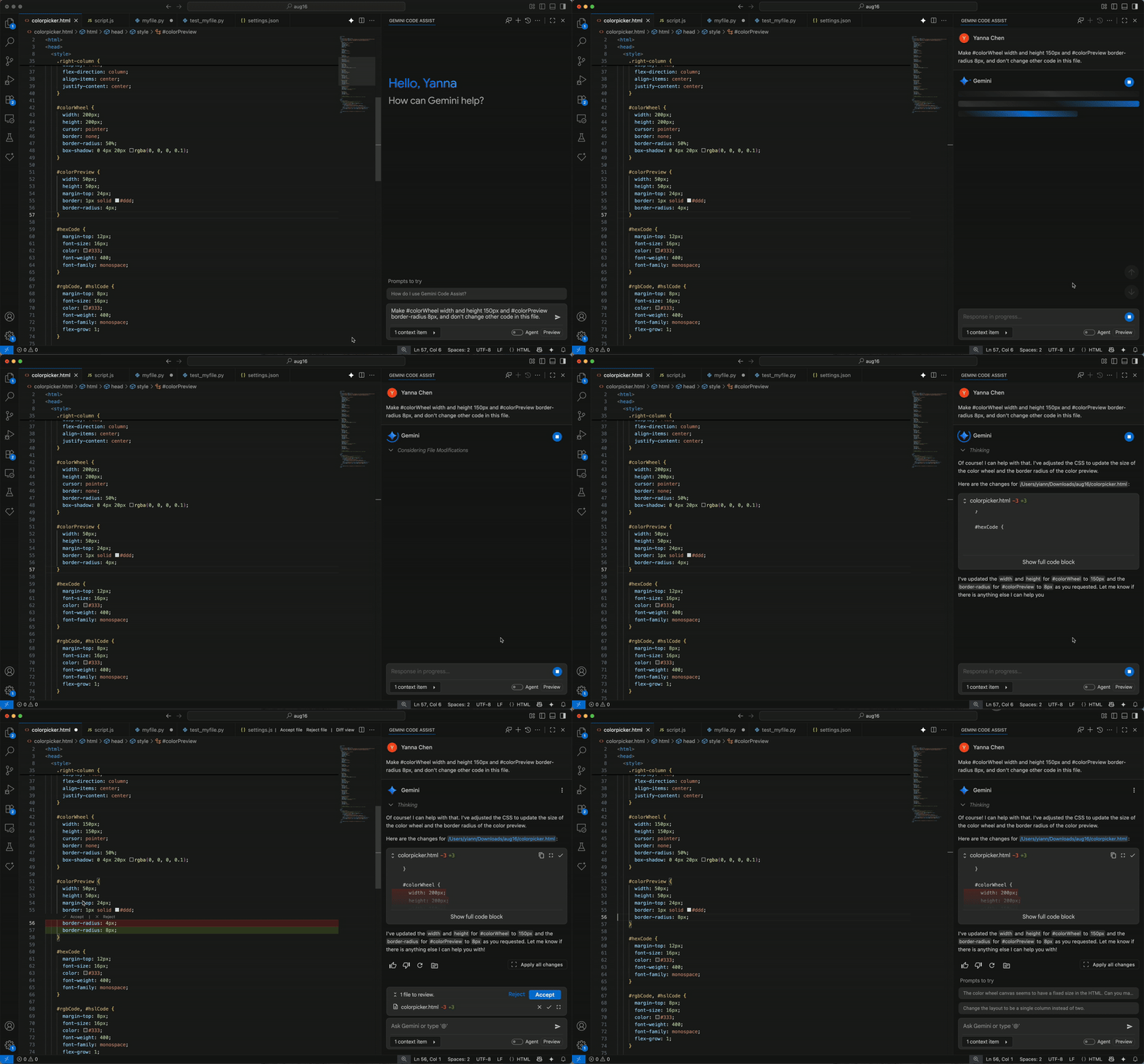
### Inline diff is generally available (GA) for VS Code
[Inline diff](https://cloud.google.com/gemini/docs/codeassist/chat-gemini#view_code_diffs)
is generally available for VS Code Gemini Code Assist. With the inline diff
view, chat generated code suggestions are visually highlighted directly in your
editor---green for additions, red for deletions. This feature boosts productivity
by offering immediate visibility on modifications, streamlining reviews, and
enabling precise control over integrating new code, all without leaving your
current view.
If preferred, you can also
[change the diff view settings to have a side-by-side diff window](https://cloud.google.com/gemini/docs/codeassist/chat-gemini#change_diff_view_settings)
instead of the inline diff.
Feature
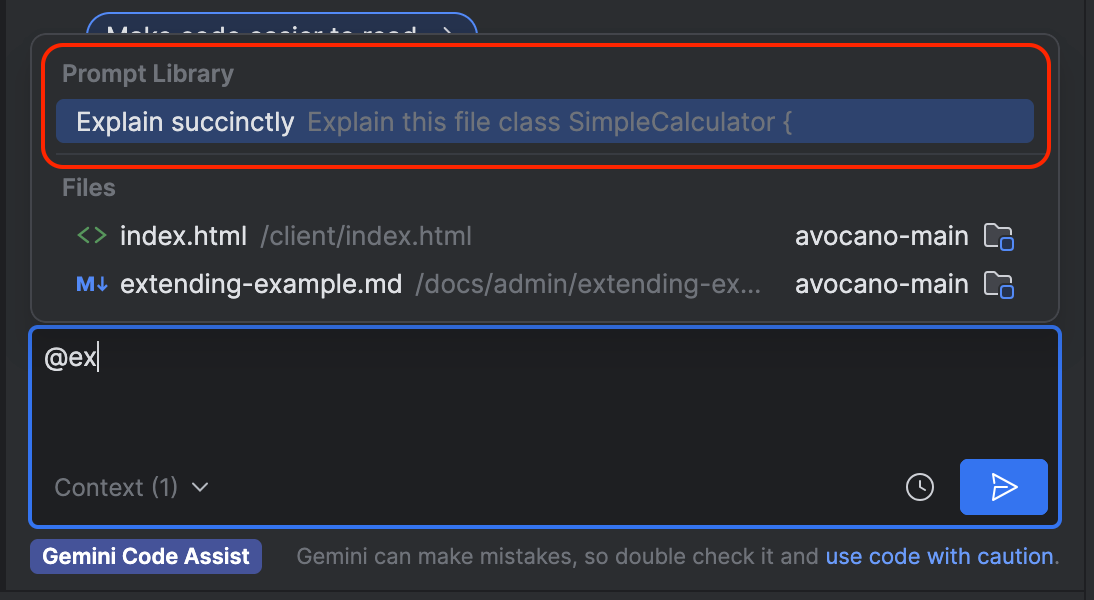
### Access saved prompts in the Prompt Library
You can [access saved prompts](https://cloud.google.com/gemini/docs/codeassist/chat-gemini#create_custom_commands)
in the Prompt Library when you type `@` in Gemini chat and select the prompt you
want.
To view the Prompt Library settings, go to **Settings** \> **Tools** \>
**Gemini** \> **Prompt Library**.
**IntelliJ Gemini Code Assist 1.31.3** Feature
### Revert to a checkpoint in IntelliJ (GA)
[Reverting to a checkpoint for chat code suggestions](https://cloud.google.com/gemini/docs/codeassist/chat-gemini#revert_to_a_checkpoint_in_chat)
with IntelliJ Gemini Code Assist is now generally available. Reverting to a
checkpoint lets you revert affected source files to a point before any code
suggestions were applied.
## September 18, 2025
**VS Code Gemini Code Assist 2.49.0** Feature
### See code customization status directly in IDE
You'll now get a one-time notification the first time code customization is
enabled for you, so you know right away that the feature is active.
Additionally, you can now check the status of code customization directly by
clicking on the Gemini icon in your IDE. This makes it simple to confirm that
the feature is configured correctly and ready to go. For more information, see
[Code customization overview](https://cloud.google.com/gemini/docs/codeassist/code-customization-overview).
## September 11, 2025
**VS Code Gemini Code Assist 2.49.0** Fixed
### Performance and stability improvements for VS Code
Numerous performance and stability improvements have been made to the Gemini
Code Assist extension, further reducing extension crashes and related adverse
functional events.
Feature
### Edit a prior prompt in VS Code
You can [edit a prior prompt](https://cloud.google.com/gemini/docs/codeassist/chat-gemini#edit_a_prior_prompt) in Gemini Code Assist and receive a regenerated
response based on your edited prompt.
Feature
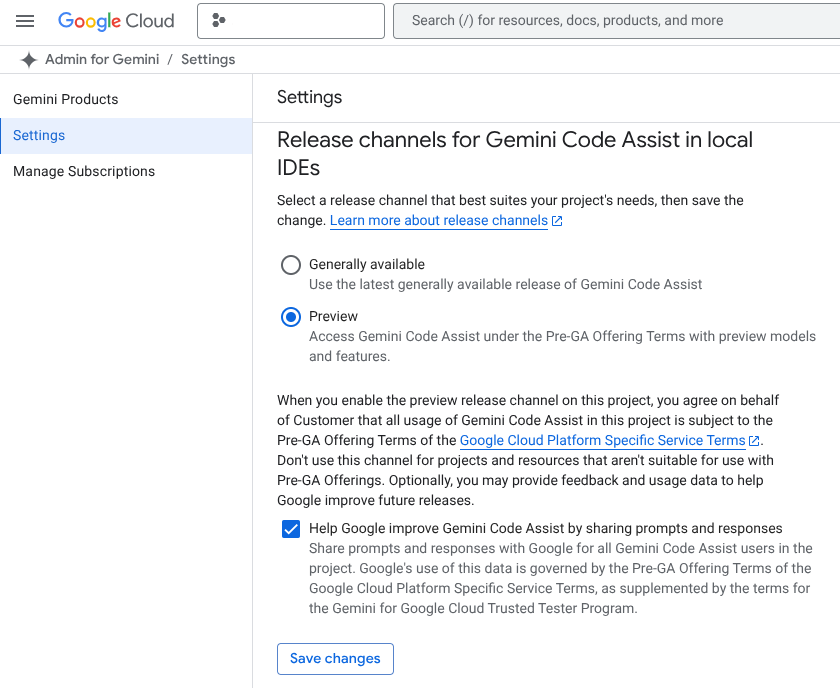
### Introducing Release Channels in Gemini Code Assist
We're rolling out Release Channels in Gemini Code Assist Standard and Enterprise
to give you more control over the features and models you access, helping us
deliver new capabilities faster. This means direct access to our latest features,
minimizing the need for sign-ups.
You can choose between the Preview Channel for early access to cutting-edge
features (no SLA) or the GA Channel for stable, fully supported features with a
standard Google Cloud SLA. Project leads and administrators can easily configure
these settings at the Google Cloud Platform project level within the Admin for
Gemini settings, making it simple to opt in your entire team to the Preview
channel if desired. Note that at launch, the two release channels have
identical features. For more information, see
[Configure Gemini Code Assist release channels](https://cloud.google.com/gemini/docs/codeassist/configure-release-channels).
Feature
### Delete prompt and response pair in VS Code
You can [delete your prompt and Gemini's response to that prompt](https://cloud.google.com/gemini/docs/codeassist/chat-gemini#delete_prompt_and_response_pairs) in your chat with
Gemini Code Assist. This works as an alternative to deleting your entire chat
history, allowing you to remove a single prompt and response within a chat,
while maintaining the rest of your chat history with Gemini Code Assist.
Feature
### Regenerate a prompt response in VS Code
You can [regenerate a prompt response](https://cloud.google.com/gemini/docs/codeassist/chat-gemini#regenerate_a_prompt_response) to your most recent prompt, where
Gemini Code Assist re-evaluates your prompt and provides a new response.
## September 10, 2025
**VS Code Gemini Code Assist 2.48.0** Feature
### Deploy apps to Cloud Run in Gemini Code Assist agent mode (Preview)
Leverage the power of Gemini CLI extensions in VS Code Gemini Code Assist agent
mode with the `/deploy` custom slash command. The `/deploy` command lets you deploy
your existing web application to Cloud Run directly from agent mode. `/deploy`
takes care of what used to be a multi-step process of building, containerizing,
pushing, and configuring, and then returns a public URL for your live
application.
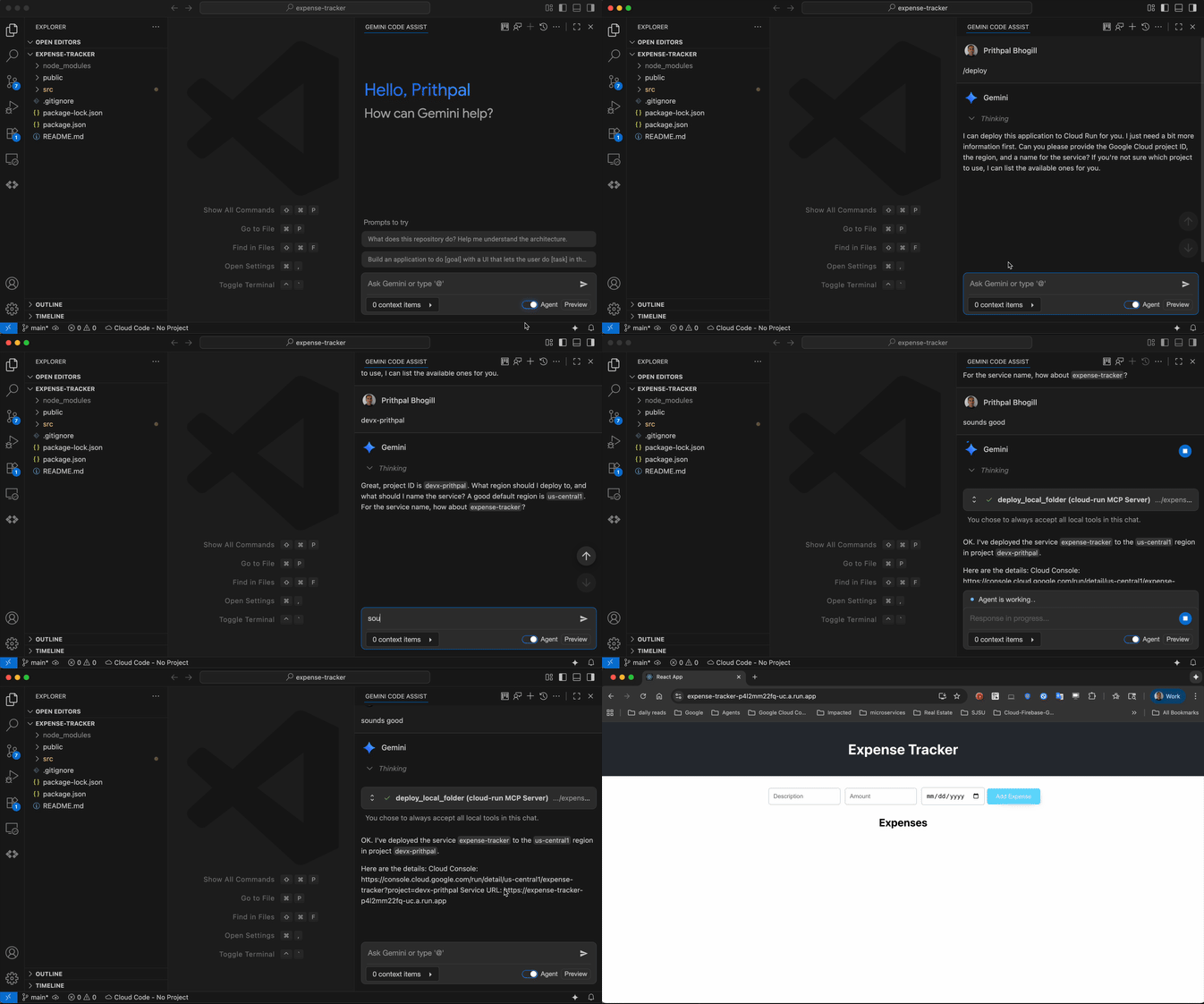
To get started using the `/deploy` command, create a web application
in your workspace, install the
[Cloud Run MCP server](https://github.com/GoogleCloudPlatform/cloud-run-mcp),
turn on agent mode, and then type `/deploy`. Your app is deployed in minutes and
accessible through a public URL. For more information, see
[Use commands](https://docs.cloud.google.com/gemini/docs/codeassist/use-agentic-chat-pair-programmer.md.txt#use-commands).
## September 09, 2025
Feature
### Regenerate a prompt response in IntelliJ
You can [regenerate a prompt response](https://cloud.google.com/gemini/docs/codeassist/chat-gemini#regenerate_a_prompt_response)
to your most recent prompt, where Gemini Code Assist re-evaluates your prompt
and provides a new response.
**IntelliJ Gemini Code Assist 1.29.0** Feature
### Add terminal output to context in IntelliJ
You can [attach terminal output to the chat context](https://cloud.google.com/gemini/docs/codeassist/chat-gemini#prompt_with_selected_terminal_output_using_chat) with IntelliJ
Gemini Code Assist. You can now ask Gemini Code Assist questions about terminal
commands and output.
## September 04, 2025
Feature
### Monitor Gemini Code Assist usage
You can now monitor your organization's usage of Gemini Code Assist with a
dashboard that is automatically available when you enable and use Gemini Code
Assist. The dashboard includes some of the most important metrics, giving you a
quick way to view aggregated usage data. For more information, see
[Monitor Gemini Code Assist usage](https://docs.cloud.google.com/gemini/docs/codeassist/monitor-gemini-code-assist.md.txt).
## September 03, 2025
Feature
### Mention a remote repository to prioritize context
You can now start your prompt with the @ symbol and select a specific
remote repository from a list to ensure Gemini prioritizes that context. This
feature is designed to give you more relevant and precise suggestions by
explicitly directing Gemini's focus to the codebase you care about most,
allowing you to get more tailored and accurate results. For more information,
see
[Code customization overview](https://cloud.google.com/gemini/docs/codeassist/code-customization-overview).
## September 02, 2025
**IntelliJ Gemini Code Assist 1.28.0** Feature
### Create and manage multiple chats in IntelliJ
You can [create and manage multiple chats](https://cloud.google.com/gemini/docs/codeassist/chat-gemini#create_multiple_chats) in IntelliJ Gemini Code Assist.
Each chat contains its own context separate from other chats.
Feature
### Edit a prior prompt in IntelliJ
You can [edit a prior prompt](https://cloud.google.com/gemini/docs/codeassist/chat-gemini#edit_a_prior_prompt)
in IntelliJ Gemini Code Assist and receive a regenerated response based on your
edited prompt.
## August 29, 2025
Feature
### Full Remote Codebase Awareness
Comprehensive understanding of your entire remote codebase directly within the
chat interface. This new capability improves the quality of suggestions and
answers to general questions about your project. To use it, ask an abstract
question about your remote context, such as "What does this repository do?" and
Gemini uses its deep knowledge of the codebase to provide a detailed and
accurate response. For more information, see
[Code customization overview](https://cloud.google.com/gemini/docs/codeassist/code-customization-overview).
Feature
### Get suggestions from your documentation stored in Markdown files
Gemini Code Assist code customization can now index and understand your
organization's internal documentation, stored in Markdown files. This means that
when you ask a question or request a code snippet, Gemini will use the context
available in your team's documentation to provide more accurate and tailored
responses, improving both the quality of the suggestions and the overall
relevance of the information you receive. To take advantage of this, ask a
question that is related to the context available in your remote Markdown files,
and Gemini will use that knowledge to assist you. For more information, see
[Code customization overview](https://cloud.google.com/gemini/docs/codeassist/code-customization-overview).
## August 27, 2025
Fixed
### Change in telemetry setting behavior for VS Code Gemini Code Assist
Gemini Code Assist telemetry log settings now override the VS Code telemetry
setting. For example, if the Gemini Code Assist telemetry log setting is turned
on but the VS Code telemetry setting is turned off, then telemetry data is still
collected. For more information, see
[Configure Gemini for Google Cloud logs](https://cloud.google.com/gemini/docs/configure-logging).
## August 15, 2025
**IntelliJ Gemini Code Assist 1.25.0** Feature
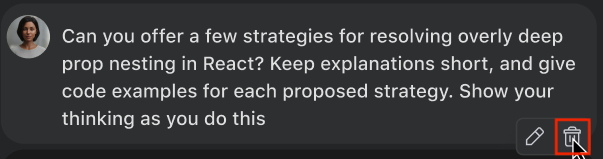
### Delete prompt and response pair in IntelliJ
You can [delete your prompt and Gemini's response to that prompt](https://cloud.google.com/gemini/docs/codeassist/chat-gemini#delete_prompt_and_response_pairs) in your chat with IntelliJ Gemini
Code Assist. This works as an alternative to deleting your entire chat history,
allowing you to remove a single prompt and response within a chat, while
maintaining the rest of your chat history with Gemini Code Assist.
**VS Code Gemini Code Assist 2.45.0** Fixed
### Numerous IDE performance improvements
Numerous improvements to VS Code Gemini Code Assist performance, including
reductions in CPU usage, memory usage, and extension slowdown.
Feature
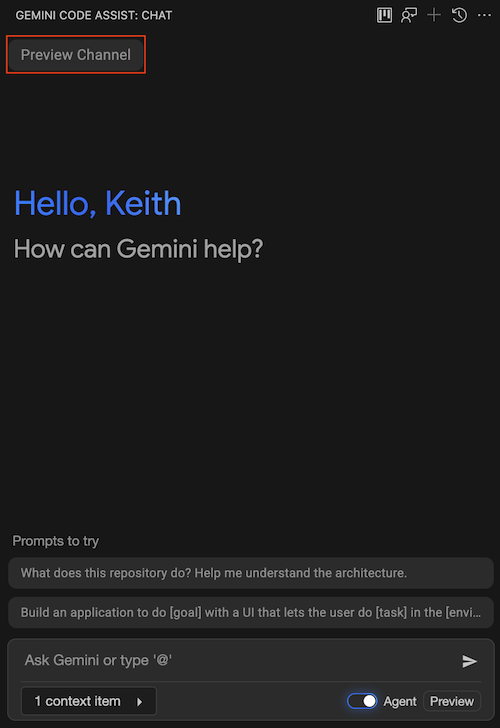
### Release channel name in VS Code chat banner
VS Code Gemini Code Assist shows the configured **Release Channel** when you're
opted into an experimental channel and are using a Standard or Enterprise
license.
## August 12, 2025
Feature
### Configure Gemini Code Assist code customization in the Google Cloud Console
You can now set up and manage code customization within the Google Cloud Console,
including creating a code repository index, adding repositories to be indexed,
and managing repository groups for granular access control. For more information,
see
[Configure Gemini Code Assist code customization](https://cloud.google.com/gemini/docs/codeassist/code-customization).
## August 08, 2025
Feature
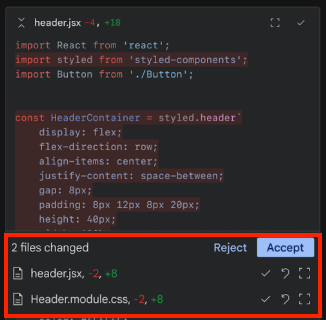
### Quick Preview of chat code suggestions across multiple files
#### VS Code Gemini Code Assist `2.44.0`
Gemini Code Assist chat provides a [quick preview](https://cloud.google.com/gemini/docs/codeassist/chat-gemini#view_code_diffs)
of the collective code suggestions across multiple files in the chat. Selecting
a particular file opens the corresponding file in the editor with the first
suggestion selected by default.
## August 01, 2025
Feature
### View code diff in IntelliJ chat
#### IntelliJ Gemini Code Assist `1.23.3`
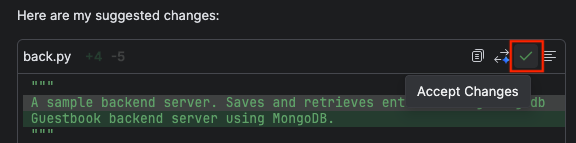
With the [code diff view](https://cloud.google.com/gemini/docs/codeassist/chat-gemini#view_code_diffs)
in IntelliJ Gemini Code Assist, you can view suggested code changes directly in
your chat with Gemini Code Assist. This feature boosts productivity by offering
immediate visibility on modifications, streamlining reviews, and enabling
precise control over integrating new code, all within the Gemini Code Assist
chat interface.
Change
### Chat banner shows release channel information
#### IntelliJ Gemini Code Assist `1.23.3`
The IntelliJ Gemini Code Assist chat banner shows the release channel that
you're currently working in.

Feature
### Multi-part chat code suggestions
#### IntelliJ Gemini Code Assist `1.23.3`
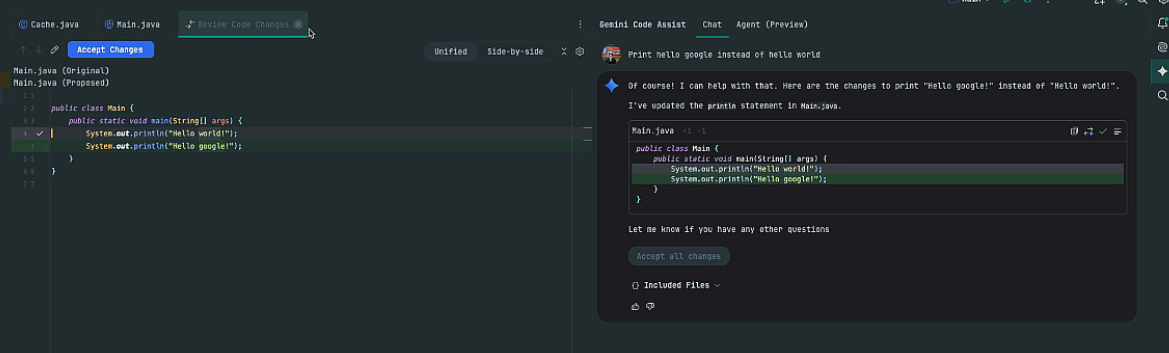
IntelliJ Gemini Code Assist now supports streamlined multi-part chat code
suggestions. You have the option to accept a single code change or all suggested
changes.
Feature
### Clickable filenames in chat output
#### IntelliJ Gemini Code Assist `1.23.3`
IntelliJ Gemini Code Assist provides clickable filenames when it references a
file in your workspace as part of its chat response. Clicking the filename opens
the file in your workspace.
## July 31, 2025
**VS Code Gemini Code Assist 2.43.0** Feature
### Effectively collaborate with your agent with the improved diff view functionality (Preview)
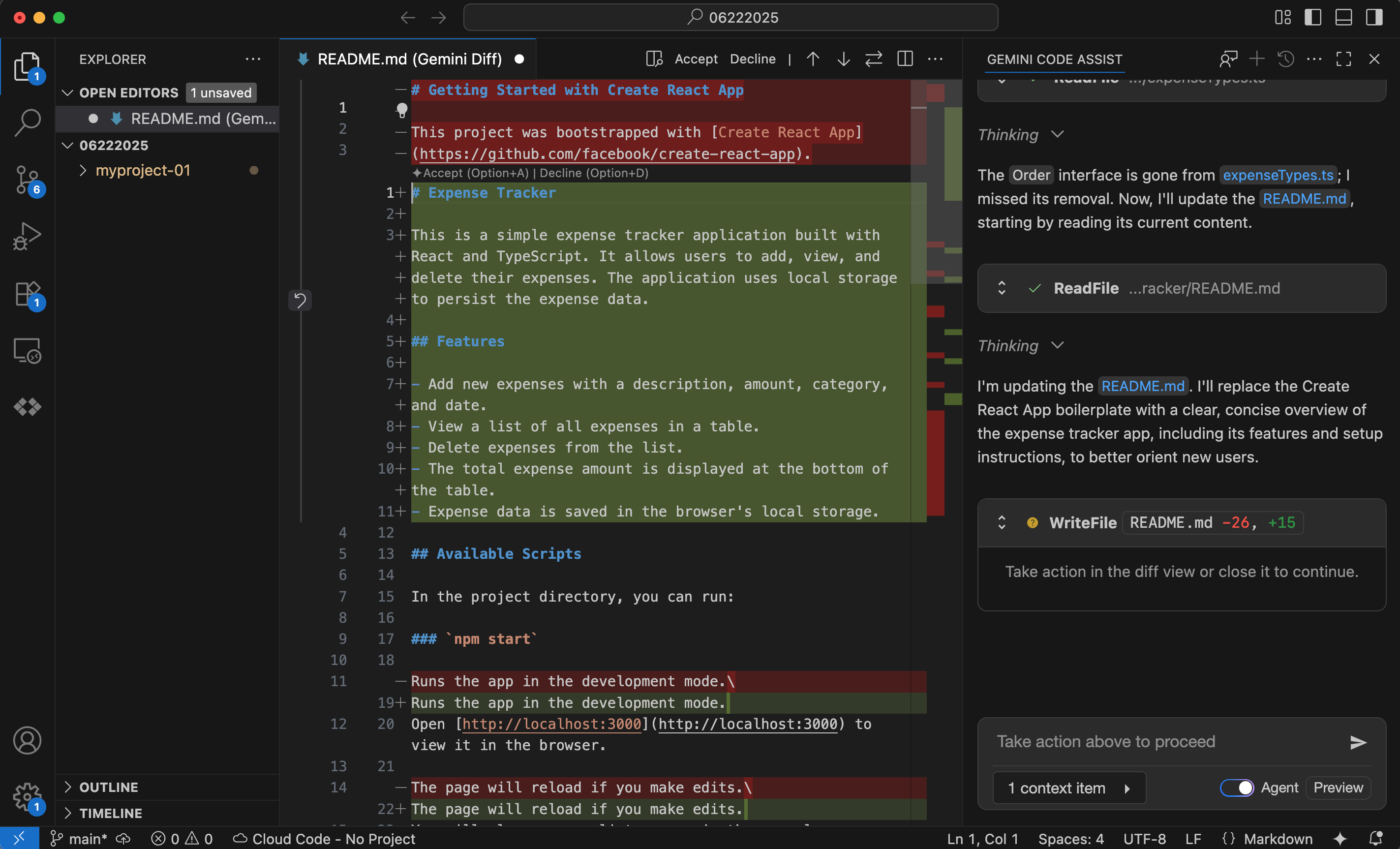
We've enhanced Gemini Code Assist agent mode with powerful new
editing capabilities. You can edit code changes directly in the integrated Diff
view for precise, on-the-fly adjustments. To improve clarity, we've also added
inline diffs directly in the chat, making it easier to see proposed changes at a
glance. These features give you unparalleled control and a more efficient way to
refine AI-suggested code.
**IntelliJ Gemini Code Assist 1.23.3** Feature
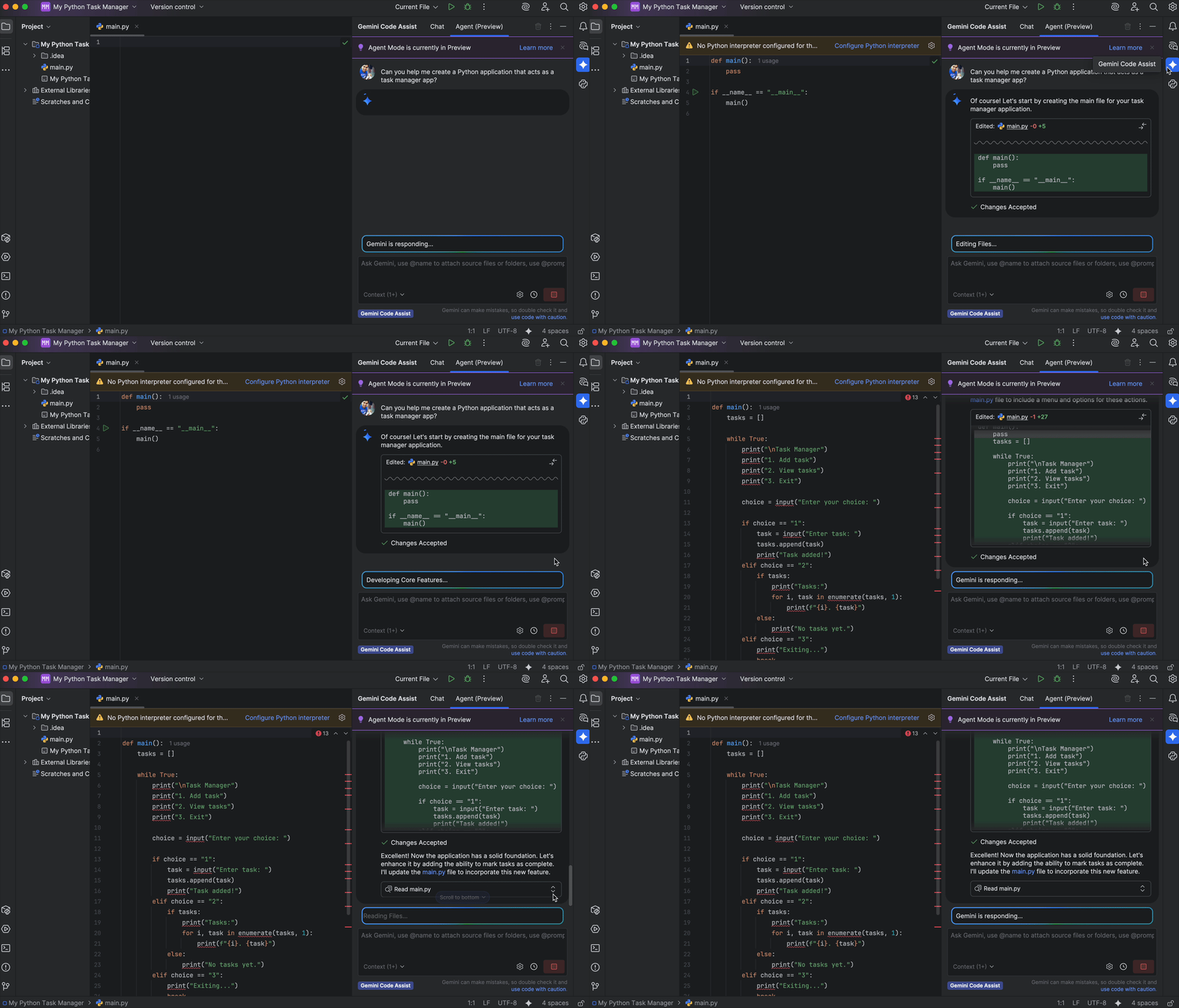
### Use Gemini Code Assist agent mode in IntelliJ (Preview)

#### Stay in control with interactive reviews and approvals
You can use Gemini Code Assist chat in agent mode to complete complex,
multi-step tasks and goals with complete control over every change. Before
making any modifications, the agent will present a plan for your review. You can
edit, ask for changes, approve, or deny any suggested changes. This
collaborative approach combines the power of AI with your expertise, resulting
in better code and a more efficient workflow.
To get started with agent mode, restart your IDE and follow the instructions in
[Use agentic chat as a pair programmer](https://cloud.google.com/gemini/docs/codeassist/use-agentic-chat-pair-programmer).
**VS Code Gemini Code Assist 2.43.0** Feature
### Use agent mode in Gemini Code Assist for VS Code (Preview)
#### Tackle complex tasks with Gemini Code Assist agent mode for VS Code
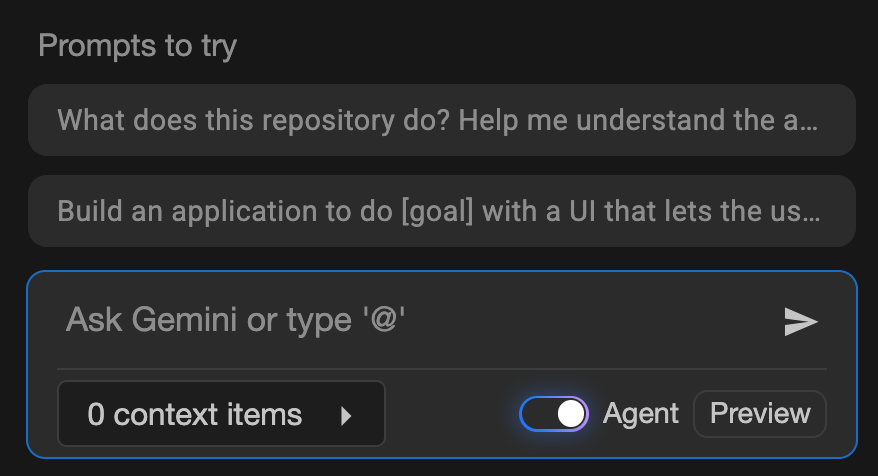
Gemini Code Assist agent mode is available for all users. Describe your goal,
and Gemini will create a plan for you to review and approve before any code is
changed. This update removes the insiders channel requirement, and includes
persistent agent mode or interactive chat state between IDE restarts, real-time
shell command output, and faster UI performance. This collaborative approach
combines AI power with your expertise, enabling you to complete multi-step tasks
with complete control and efficiency.
To get started with agent mode, see
[Use agentic chat as a pair programmer](https://cloud.google.com/gemini/docs/codeassist/use-agentic-chat-pair-programmer).
**IntelliJ Gemini Code Assist 1.23.3** Feature
### Auto Approve mode lets the agent act on your behalf (Preview)
Enable auto approve mode to let the agent act on your behalf. Once the agent is
done you can review and roll back changes as you see fit.
## July 28, 2025
Feature
### Inline diff (Preview)
#### VS Code Gemini Code Assist `2.42.0`
[Inline diff](https://cloud.google.com/gemini/docs/codeassist/chat-gemini#view_code_diffs)
is available for VS Code Gemini Code Assist `2.42.0` in
[Preview](https://cloud.google.com/terms/service-terms). With the inline diff
view, you can visually highlight code changes directly in your editor---green for
additions, red for deletions. This feature boosts productivity by offering
immediate visibility on modifications, streamlining reviews, and enabling
precise control over integrating new code, all without leaving your current
view.
If preferred, you can
[change the diff view settings to have a side-by-side diff window](https://cloud.google.com/gemini/docs/codeassist/chat-gemini#change_diff_view_settings)
instead of the inline diff.

## July 24, 2025
Announcement
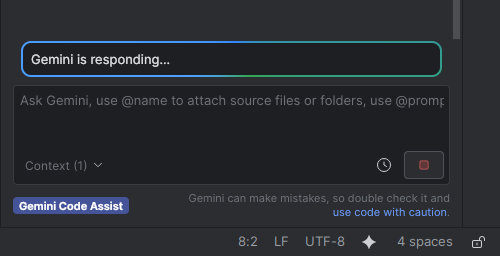
### Thinking tokens
#### IntelliJ Gemini Code Assist `1.22.1`
You'll see thinking insights into Gemini's thought process before IntelliJ
Gemini Code Assist produces a response, to show you that Gemini is actively
working on your request.
Feature
### Stop in-progress chat responses with IntelliJ
#### IntelliJ Gemini Code Assist `1.22.1`
You can
[stop chat responses](https://cloud.google.com/gemini/docs/codeassist/chat-gemini#stop_in-progress_chat)
with IntelliJ Gemini Code Assist `1.22.1`. Undesired long running or errant chat
responses are immediately halted.
## July 18, 2025
Change
### Improved code completion speed
#### VS Code Gemini Code Assist `2.41.0`
Code completion suggestion speed is improved with VS Code Extension `2.41.0`.
## July 17, 2025
Announcement
### Checkpoints, selected code snippets and terminal output, and other features are now Generally Available (GA)
The following features, which launched in Preview in May and June 2025, are now
[Generally Available](https://cloud.google.com/terms/service-terms):
- [Revert to checkpoints](https://cloud.google.com/gemini/docs/codeassist/chat-gemini#revert_to_a_checkpoint_in_chat)
- [Add selected code snippets to context](https://cloud.google.com/gemini/docs/codeassist/chat-gemini#add_selected_code_snippets_to_context)
- [Prompt Gemini Code Assist with selected terminal output](https://cloud.google.com/gemini/docs/codeassist/chat-gemini#prompt_with_selected_terminal_output_using_chat)
- [Specify filenames in your workspace](https://cloud.google.com/gemini/docs/codeassist/chat-gemini#specify_files_and_folders_in_your_workspace_context)
- [Exclude files from Gemini Code Assist use](https://cloud.google.com/gemini/docs/codeassist/create-aiexclude-file)
## July 01, 2025
Announcement
### Gemini 2.5 Pro and Gemini 2.5 Flash models are Generally Available (GA)
Gemini 2.5 Pro and Gemini 2.5 Flash are [Generally Available (GA)](https://cloud.google.com/terms/service-terms). These models are used for Gemini Code Assist Standard and Enterprise, and power Gemini Code Assist's chat, code generation, and code transformation capabilities.
With the integration of these stable versions of Gemini 2.5 Pro and Gemini 2.5 Flash, you'll experience a boost in how Gemini Code Assist handles complex tasks. These models excel in areas like coding, mathematics, science, and intricate reasoning, leading to more accurate and helpful suggestions.

## June 25, 2025
VERSION_UNSPECIFIED Feature
### Use agent mode in Gemini Code Assist Standard and Enterprise insiders channel for VS Code (Preview)
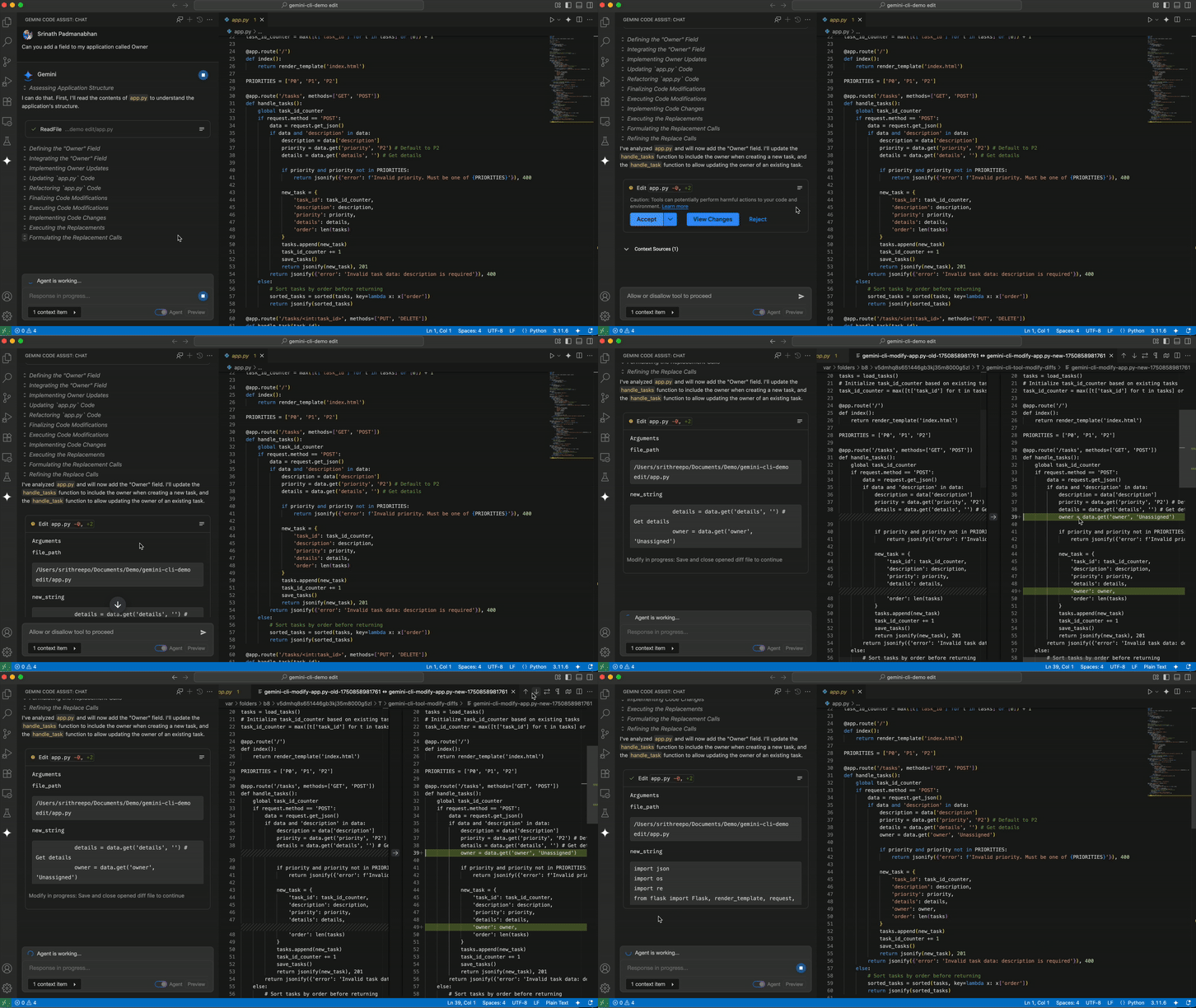
**Stay in control with interactive reviews and approvals**.
You can use Gemini Code Assist chat in agent mode to complete complex, multi-step tasks and goals with complete control over every change. Before making any modifications, the agent will present a plan for your review. You can edit, ask for changes, approve, or deny any suggested changes. This collaborative approach combines the power of AI with your expertise, resulting in better code and a more efficient workflow.
To get started with agent mode, see [Use agentic chat as a pair programmer](https://cloud.google.com/gemini/docs/codeassist/use-agentic-chat-pair-programmer).
VERSION_UNSPECIFIED Feature
### Use multi file editing in Gemini Code Assist Standard and Enterprise insiders channel in agent mode for VS Code (Preview)
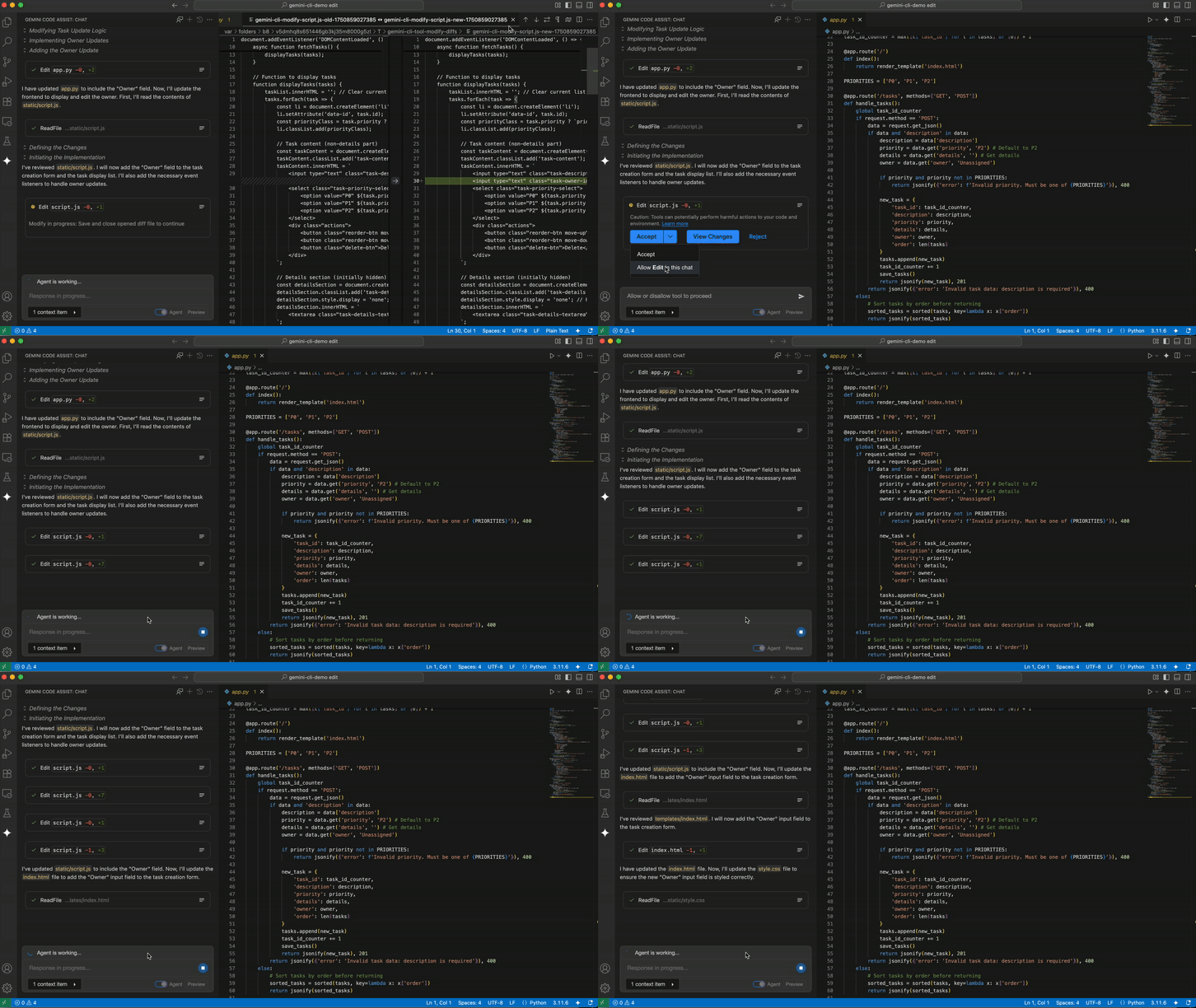
**Say goodbye to single-file edits and hello to project-wide changes**.
With multi-file edits in agent mode, the agent can make concurrent changes across your entire codebase in response to a single prompt. This powerful new capability streamlines large-scale refactoring, feature implementation, and bug fixes. Simply describe the changes you need, and the agent will intelligently identify and modify all relevant files, saving you time and effort.
You will also have the option to undo changes to local files in case you want to revert the changes to an earlier state.
VERSION_UNSPECIFIED Feature
### Use full project context in Gemini Code Assist Standard and Enterprise insiders channel in agent mode for VS Code (Preview)
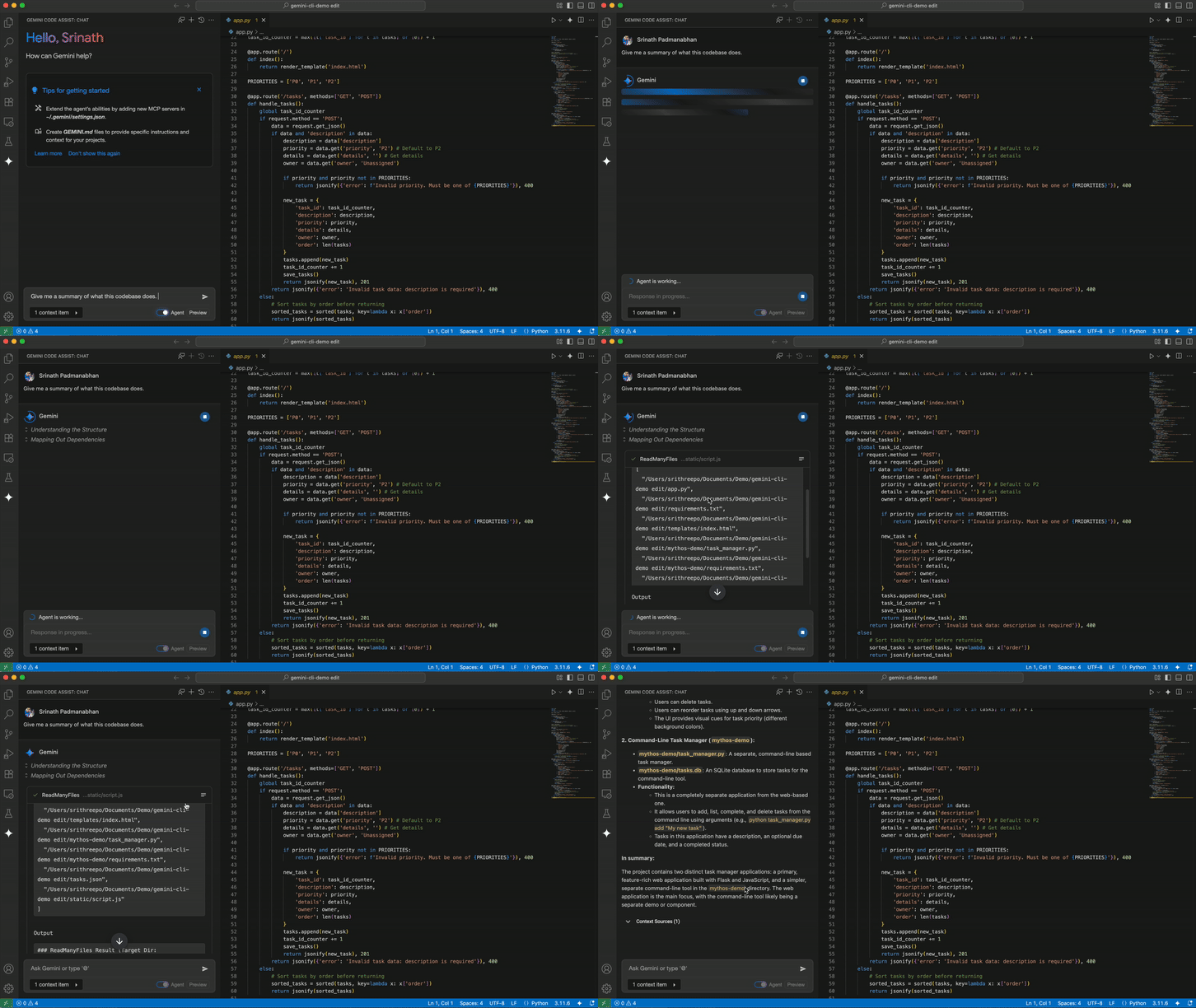
**Smarter, more accurate code suggestions with full project awareness**.
Agent mode has a comprehensive understanding of your entire project. The agent analyzes your whole codebase and requests files and folders as needed based on your goals. Full project context lets the agent create more accurate and context-aware code completions, suggestions, and refactorings. This deeper understanding of your project's architecture, dependencies, and coding patterns means you get higher-quality, more consistent code with less effort.
## June 18, 2025
Feature
### Revert to a checkpoint (Preview)
You can [revert to a checkpoint for chat code suggestions](https://cloud.google.com/gemini/docs/codeassist/chat-gemini#revert_to_a_checkpoint_in_chat) with VS Code Gemini Code Assist `2.37.0`, in [Preview](https://cloud.google.com/terms/service-terms). Reverting to a checkpoint enables you to revert affected source files to a point before any code suggestions were applied.
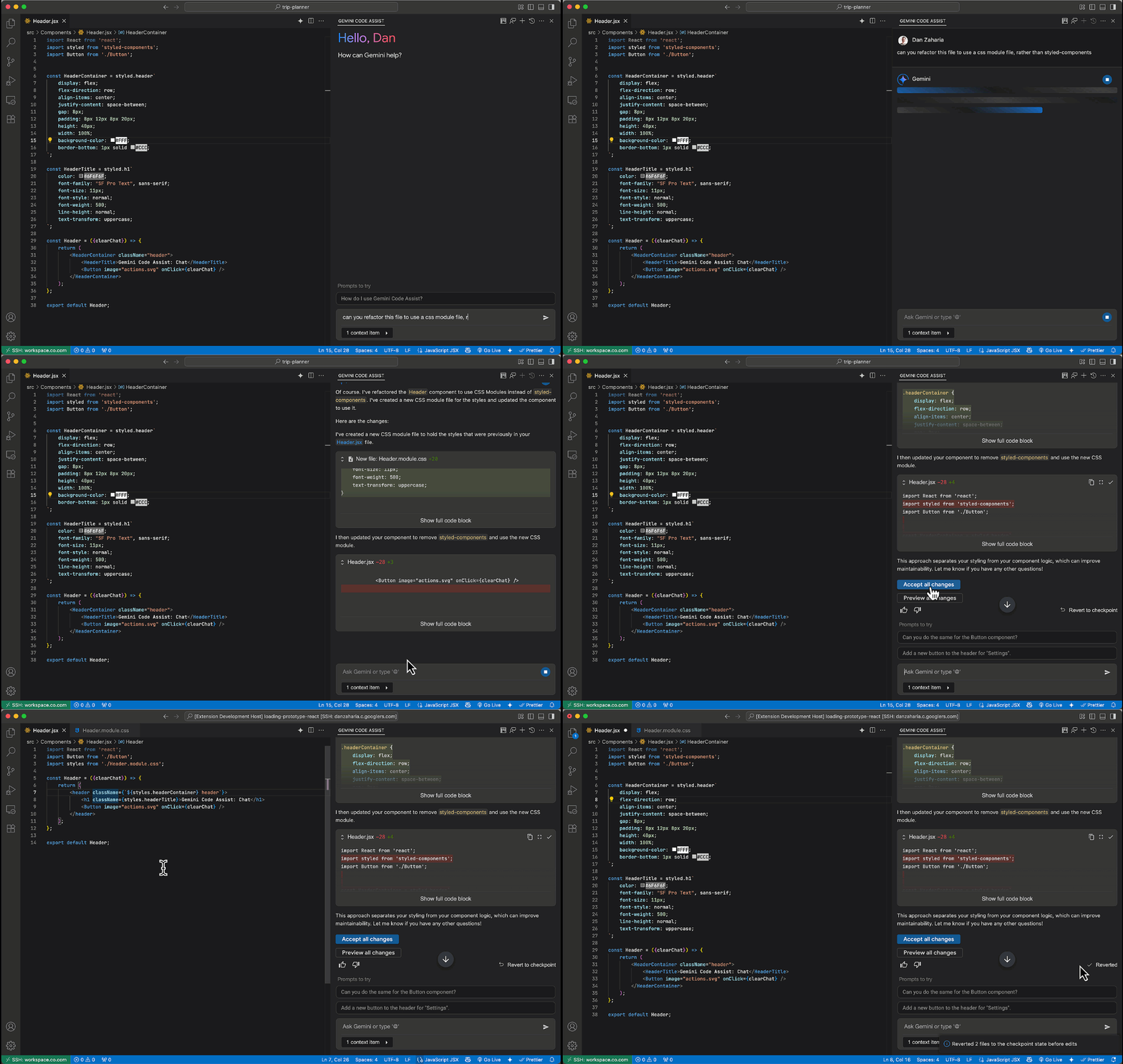
Feature
### Chat code suggestion preview
Chat code suggestions are [displayed in a preview block](https://cloud.google.com/gemini/docs/codeassist/chat-gemini#configure_preview_pane) by default with VS Code Gemini Code Assist `2.37.0`, improving the readability of generated chat responses. You can [configure preview pane settings](https://cloud.google.com/gemini/docs/codeassist/chat-gemini#configure_preview_pane) to alternatively display chat code suggestions as fully collapsed or expanded.
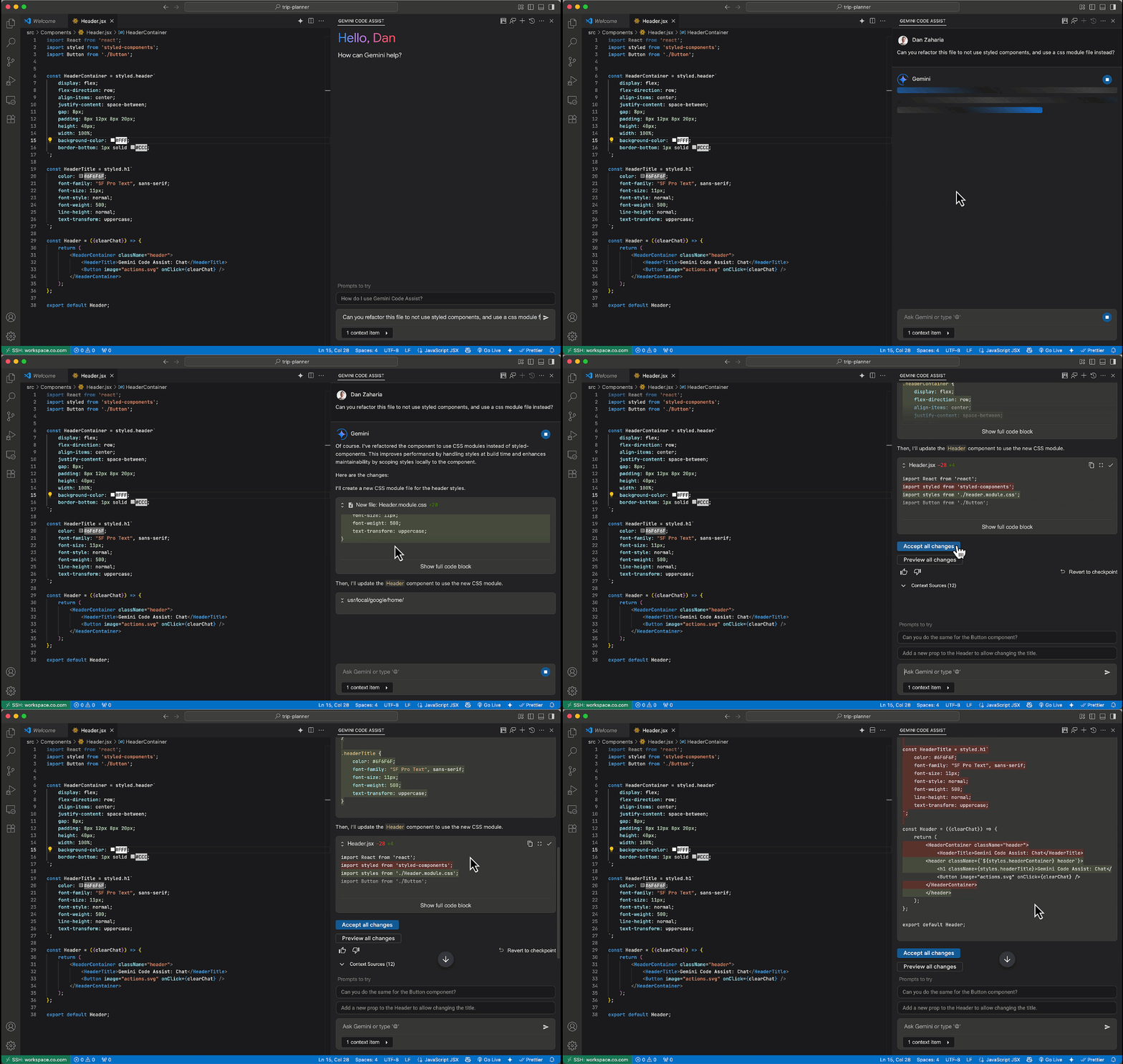
Feature
### Configure local codebase awareness
You can [configure local codebase awareness](https://cloud.google.com/gemini/docs/codeassist/configure-local-codebase-awareness) with VS Code Gemini Code Assist `2.37.0`.
## June 12, 2025
Feature
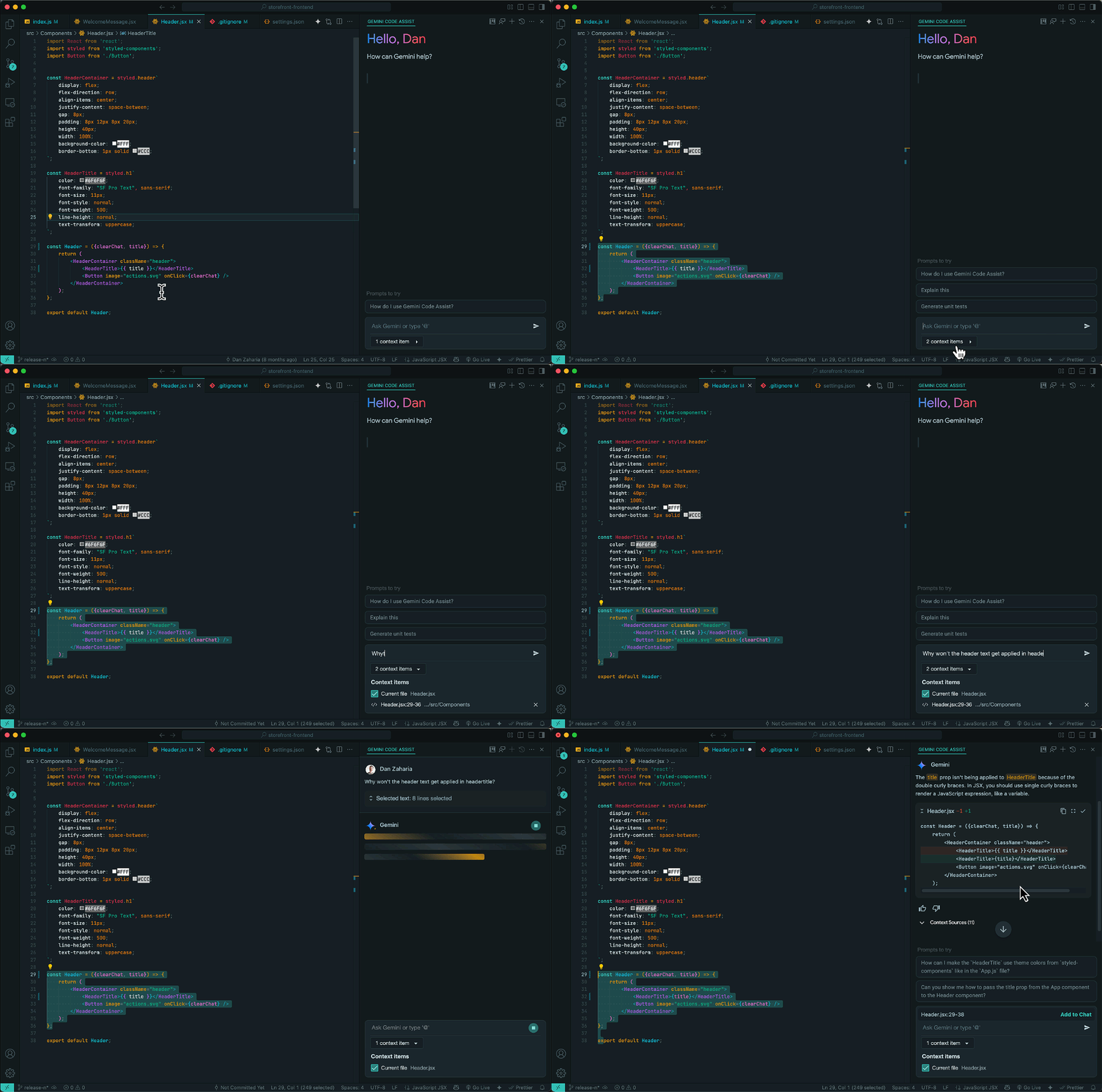
### Add code snippets to the chat context
You can now select, attach, and direct Gemini to focus on code snippets with VS Code Gemini Code Assist (version `2.36.0`). [Code snippet selection](https://cloud.google.com/gemini/docs/codeassist/chat-gemini#add_selected_code_snippets_to_context) enables discrete analysis of smaller code blocks instead of entire files, as [Preview](https://cloud.google.com/terms/service-terms).
Feature
### Add terminal output to the chat context
Terminal output can now be [attached to the chat context](https://cloud.google.com/gemini/docs/codeassist/chat-gemini#prompt_with_selected_terminal_output_using_chat) with VS Code Gemini Code Assist (version `2.36.0`). You can now ask Gemini Code Assist questions about terminal commands and output, as [Preview](https://cloud.google.com/terms/service-terms).

Feature
### Configure AI exclusion files
You can now [configure the use of `.aiexclude` and `.gitignore` files](https://cloud.google.com/gemini/docs/codeassist/create-aiexclude-file#configure_context_exclusion_settings) to exclude files from the local context with VS Code Gemini Code Assist (version `2.36.0`).
## June 05, 2025
Feature
### Exclude files from local context (Preview)
[Context exclusion of files using `.gitIgnore` is now enforced](https://cloud.google.com/gemini/docs/codeassist/create-aiexclude-file). Files present in `.gitignore` are now excluded from the local context with chat, code generation, code completion, and code transformation, as [Preview](https://cloud.google.com/terms/service-terms#1).
Feature
### Stop in-progress chat responses
You can now [stop chat responses](https://cloud.google.com/gemini/docs/codeassist/chat-gemini#stop_in-progress_chat) with VS Code Gemini Code Assist (version `2.35.0`). Undesired long running or errant chat responses are immediately halted.

Feature
### Automatic scrolling
VS Code Gemini Code Assist (version `2.35.0`) now [automatically scrolls through chat responses](https://cloud.google.com/gemini/docs/codeassist/chat-gemini#configure_automatic_scrolling), enabling easier and faster readability. You can disable automatic scrolling in the Gemini Code Assist settings.

Feature
### Clickable filenames in chat (Preview)
You can now click filenames referenced in a chat response to open the file in the IDE with VS Code Gemini Code Assist (`2.35.0`), as [Preview](https://cloud.google.com/terms/service-terms#1).

## May 28, 2025
Feature
### Manage files and folders in the Context Drawer
You can now [view and manage files and folders requested to be included in Gemini Code Assist's context, using the Context Drawer](https://cloud.google.com/gemini/docs/codeassist/chat-gemini#manage_files_and_folders_in_the_context_drawer). After you specify a file or folder to be used as context for your Gemini Code Assist prompts, these files and folders are placed in the Context Drawer, where you can review and remove them from the prompt context.
This gives you more control over which information Gemini Code Assist considers when responding to your prompts.

## May 22, 2025
Announcement Gemini Code Assist now uses Gemini 2.5. These models are now used in the following experiences:
- Chat
- Code generation
- Code transformation
## May 14, 2025
Feature
### Create custom commands
You can now [configure and use custom commands](https://cloud.google.com/gemini/docs/codeassist/chat-gemini#create_custom_commands) with IntelliJ Gemini Code Assist (version `1.15.0`). Create, save, and execute your own pre-configured prompts to perform repetitive tasks faster and more easily in the IDE.
To view the custom commands settings, go to **Settings** \> **Tools** \> **Gemini** \> **Prompt Library**.

Feature Chat responses with error messages now have action buttons for IntelliJ Gemini Code Assist (version `1.15.0`).
## May 06, 2025
Feature
### Prompt with folders in your local workspace (Preview)
You can now [include folders from your local IDE project](https://cloud.google.com/gemini/docs/codeassist/write-code-gemini#prompt_with_specific_files_and_folders_in_your_workspace_with_local_codebase_awareness) for IntelliJ Gemini Code Assist (version `1.14.0`) to use as context for your prompts, in [Preview](https://cloud.google.com/products#product-launch-stages). To specify a folder in your chat prompt, type @ and select the folder you want to specify.
Directing Code Assist to add folders to your chat can improve responses by specifying use of the contents within your selected folder(s), with support up to a 1M token context window.

## April 30, 2025
Feature You can now [include folders from your local IDE project](https://cloud.google.com/gemini/docs/codeassist/write-code-gemini#prompt_with_specific_files_and_folders_in_your_workspace_with_local_codebase_awareness) for IntelliJ Gemini Code Assist (version `1.14.0`) to use as context for your prompts, in [Preview](https://cloud.google.com/products#product-launch-stages).
## April 29, 2025
Feature VS Code Gemini Code Assist (version `2.32.0`) now supports streamlined multi-part chat code suggestions. You have the option to accept a single code change or all suggested changes.
Feature You can now [specify and apply rules](https://cloud.google.com/gemini/docs/codeassist/chat-gemini#create_rules) to each chat request with VS Code Gemini Code Assist (version `2.32.0`).
Feature VS Code Gemini Code Assist (version `2.32.0`) now supports [creation and management of multiple chats](https://cloud.google.com/gemini/docs/codeassist/write-code-gemini#create_multiple_chats).
## April 15, 2025
Fixed Fixed markdown rendering issues in chat for IntelliJ Gemini Code Assist.
## April 09, 2025
VERSION_UNSPECIFIED Feature Gemini Code Assist tools are in [Preview](https://cloud.google.com/products#product-launch-stages). You can use tools to access external services from your IDE. To learn more about tools, see the [Gemini Code Assist Tools overview](https://cloud.google.com/gemini/docs/codeassist/tools-agents/tools-overview).
Feature Streamed chat responses are now generally available for IntelliJ and VS Code Gemini Code Assist. You can disable this feature in settings.
## April 01, 2025
Feature Code customization for chat is generally available ([GA](https://cloud.google.com/products#product-launch-stages)) for VS Code and IntelliJ Gemini Code Assist. This feature provides contextually relevant code suggestions and insights in your IDE's Gemini Code Assist chat interface. Code customization for chat is available without any additional configuration required. For more information on how to use code customization for chat effectively, see [Use code customization](https://cloud.google.com/gemini/docs/codeassist/use-code-customization).
## March 28, 2025
Feature You can now see what files are used by IntelliJ Gemini Code Assist chat and can customize the context as needed.
Feature Local codebase awareness is now available for IntelliJ Gemini Code Assist. You can now include files from your local IDE project in the prompt context by typing @ in the chat prompt box.
## March 18, 2025
Feature Streamed chat responses are now available in public preview for IntelliJ and VS Code Gemini Code Assist. You can disable this feature in settings.
Fixed Fixed an issue with an infinite progress bar while trying to log in to IntelliJ Gemini Code Assist.
Feature You can now configure and use custom commands in the inline chat menu and lightbulb menu for VS Code Gemini Code Assist. To view custom commands settings, go to **Settings** \> **Gemini Code Assist** \> **Custom Commands**.
## March 12, 2025
Announcement You can now use code customization for Gemini Code Assist Enterprise with VPC Service Controls. This allows secure access to on-premises source control systems. For more information, see [Configure VPC Service Controls for Gemini](https://cloud.google.com/gemini/docs/configure-vpc-service-controls).
Change Gemini Code Assist now supports data residency at rest. Data residency meets compliance and regulatory requirements by allowing you to specify the geographic locations (regions) where Gemini Code Assist data is stored.
## March 05, 2025
Change Various bug fixes and minor product enhancements for IntelliJ Gemini Code Assist extension.
## February 21, 2025
Announcement Gemini Code Assist now uses a code-optimized version of Gemini 2.0. This new model is used in the following experiences:
- Chat
- Code generation
- Code transformation
## February 20, 2025
**IntelliJ Gemini Code Assist 1.47.0** Other
### Bug fixes in IntelliJ
Various bug fixes and minor product enhancements.
## February 19, 2025
Change IntelliJ Gemini Code Assist now shows disconnected network status in the Gemini status bar instead of an error.
## February 18, 2025
Feature Code customization for Gemini Code Assist Enterprise now supports repositories hosted on the following:
- [GitHub Enterprise Cloud](https://cloud.google.com/developer-connect/docs/connect-github-enterprise-cloud)
- [GitHub Enterprise](https://cloud.google.com/developer-connect/docs/connect-github-enterprise)
- [GitLab](https://cloud.google.com/developer-connect/docs/connect-gitlab)
- [GitLab Enterprise](https://cloud.google.com/developer-connect/docs/connect-gitlab-enterprise)
- [Bitbucket Cloud](https://cloud.google.com/developer-connect/docs/connect-bitbucket-cloud)
- [Bitbucket Data Center](https://cloud.google.com/developer-connect/docs/connect-bitbucket-dc)
## February 07, 2025
Change Various bug fixes and minor product enhancements for VSCode Gemini Code Assist extension.
## February 06, 2025
**IntelliJ Gemini Code Assist 1.46.0** Other
### Bug fixes in IntelliJ
Various bug fixes and minor product enhancements.
Feature IntelliJ Gemini Code Assist now has a setting to block suggestions that contain citations.
Fixed Fixed issues with Google Cloud project settings for VS Code Gemini Code Assist.
## January 30, 2025
**IntelliJ Gemini Code Assist 1.45.0** Other
### Bug fixes in IntelliJ
Various bug fixes and minor product enhancements.
Announcement For new customers with billing accounts that have never had a Gemini Code Assist subscription, we automatically apply up to 50 license credits for the first month, regardless of Gemini Code Assist edition. For more information, see [Set up Gemini Code Assist](https://cloud.google.com/gemini/docs/discover/set-up-gemini).
## January 26, 2025
**IntelliJ Gemini Code Assist 1.44.0** Other
### Bug fixes in IntelliJ
Various bug fixes and minor product enhancements.
## January 22, 2025
Feature IntelliJ Gemini Code Assist now provides citations in Gemini Chat. When you insert code from the Gemini Code Assist chat pane, and the code has citations, those citations are displayed in the editor.
Feature Admins can now block all suggestions containing citations during code completion, generation, and chat conversation for VS Code Gemini Code Assist. If the admin level citations block is enabled, the local citations size limit is set to `0`.
## January 16, 2025
**IntelliJ Gemini Code Assist 1.43.0** Other
### Bug fixes in IntelliJ
Various bug fixes and minor product enhancements.
## January 09, 2025
**IntelliJ Gemini Code Assist 1.42.0** Other
### Bug fixes in IntelliJ
Various bug fixes and minor product enhancements.
Change Various bug fixes and minor product enhancements for VSCode and IntelliJ Gemini Code Assist extension.
## December 12, 2024
Feature Customer-managed encryption keys (CMEK) are now integrated with code customization for Gemini Code Assist. You can now use a CMEK to encrypt and control data-at-rest in a cloud service through [Cloud Key Management Service](https://cloud.google.com/security/products/security-key-management). For more information, see [Encrypt data with customer-managed encryption keys](https://cloud.google.com/gemini/docs/codeassist/encrypt-data-cmek).
Feature The maximum number of repositories that can be indexed for Gemini Code Assist code customization has increased to 20,000. The maximum number of repositories per repository group is 500. For more information, see [Code customization overview](https://cloud.google.com/gemini/docs/codeassist/code-customization-overview#limitations).
## December 11, 2024
Change [VS Code Gemini Code Assist](https://marketplace.visualstudio.com/items?itemName=google.geminicodeassist) is now a separate extension from Cloud Code.
Change You can now adjust the `cloudcode.duetAI.recitation.maxCitedLength` setting in the settings UI for VS Code Gemini Code Assist. You no longer need to update the `settings.json` file to make this adjustment. For more information, see [Disable code suggestions that match cited sources](https://cloud.google.com/gemini/docs/codeassist/write-code-gemini#disable_code_suggestions_that_match_cited_sources).
## December 09, 2024
Feature Gemini Code Assist for [IntelliJ](https://cloud.google.com/gemini/docs/codeassist/write-code-gemini#generate_code_with_prompts) now supports code transformation. Press Alt+\ (for Windows and Linux) or Cmd+\ (for macOS) to use commands or natural language prompts in the Quick Pick bar to request modifications to your code, and get a diff view to show pending changes to your code.
## November 20, 2024
Change Gemini Code Assist clients are communicating with a new API (`cloudcode-pa.googleapis.com`), which may require updates to your configuration. See [Required APIs for users behind firewalls](https://cloud.google.com/gemini/docs/discover/set-up-gemini#required_apis_for_users_behind_firewalls) and [Configure VPC Service Controls](https://cloud.google.com/gemini/docs/discover/set-up-gemini#vpc-sc) for more information.
## November 12, 2024
Change [IntelliJ Gemini Code Assist](https://plugins.jetbrains.com/plugin/24198-gemini-code-assist) is now a separate extension from Cloud Code.
## November 11, 2024
Feature You can now automatically or manually assign Gemini Code Assist licenses. For more information, see [Manage Gemini for Google Cloud licenses](https://cloud.google.com/gemini/docs/manage-licenses).
## November 05, 2024
Feature You can now purchase Gemini Code Assist Enterprise edition on the **Admin for Gemini** page within the Google Cloud console. For more information, see [Add or change Gemini for Google Cloud subscriptions](https://cloud.google.com/gemini/docs/admin).
## October 30, 2024
Change The IntelliJ Gemini Code Assist right-click menu items are now listed under **Gemini**, and are also available in the floating toolbar (the yellow bulb icon).
Change Improved display of selected files using the `@` file picker in the staged prompt for VS Code Gemini Code Assist.
Fixed General bug fixes and improvements for IntelliJ Gemini Code Assist.
Feature VS Code and IntelliJ Gemini Code Assist now support admin feedback block. This feature allows admins to control whether developers can send Gemini Code Assist feedback.
Change Improved error handling for inline code completion for IntelliJ Gemini Code Assist.
## October 16, 2024
Change Improved error handling for the IntelliJ Gemini Code Assist plugin. Added more actions to quickly recover from errors.
Fixed General bug fixes and improvements to code transformation for the VS Code Gemini Code Assist extension.
## October 09, 2024
Announcement The Standard and Enterprise editions for Gemini Code Assist are now available. For more information about supported features for each edition, see the [supported features table](https://cloud.google.com/gemini/docs/codeassist/overview#supported-features).
## October 07, 2024
Feature You can now assign Gemini Code Assist subscription licenses to users in your organization. Use the **Admin for Gemini** page in the Google Cloud console or use the `billingAccounts.orders` API to view, assign, or unassign user licenses. For more information, see [Manage Gemini for Google Cloud licenses](https://cloud.google.com/gemini/docs/manage-licenses).
## September 30, 2024
Feature Code customization is now [generally available](https://cloud.google.com/products#product-launch-stages) in Gemini Code Assist for:
- VS Code with the Gemini Code Assist + Cloud Code extension (version 2.18.0+)
- IntelliJ with the Gemini Code Assist/Cloud Code plugin (version 1.1.0)
- Cloud Workstations
- Cloud Shell Editor
With code customization, Gemini Code Assist lets you get enhanced code suggestions based on your organization's private codebase(s) (in [GitHub.com](https://github.com) or [GitLab.com](https://about.gitlab.com/)) and in line with your coding conventions. For more information, see the [code customization overview](https://cloud.google.com/gemini/docs/codeassist/code-customization-overview).
Feature Local codebase awareness is now available for VS Code Gemini Code Assist. Local codebase awareness helps you with high quality code suggestions that are syntactically correct and semantically meaningful within the broader context of your codebase, when you specify files for Gemini Code Assist to use as context. You can specify files in your chat prompt by typing `@` and selecting the files. For more information, see [Code with Gemini Code Assist](https://cloud.google.com/code/docs/vscode/write-code-gemini#prompt_with_specific_files_in_your_workspace_with_local_codebase_awareness).
Feature Gemini Code Assist for [VS Code](https://cloud.google.com/code/docs/vscode/write-code-gemini#generate_code_with_prompts), [Cloud Shell](https://cloud.google.com/code/docs/shell/write-code-gemini#use-code-transformation-features), and [Cloud Workstations](https://cloud.google.com/workstations/docs/write-code-gemini#use-code-transformation-features) now supports code transformation. You can use commands or natural language prompts in the Quick Pick bar to request modifications to your code, and get a diff view to show pending changes to your code.
Fixed Improved error handling for the IntelliJ Gemini Code Assist plugin. Error messages are now actionable with precise error reasons and are supported for chat, code completion, and code generation.
## September 05, 2024
Feature You can now use Gemini Code Assist's **Commit** message button, which is integrated into JetBrains IDEs' default **Commit** tool window, to generate a commit message based on your changes.
Fixed General bug fixes for IntelliJ Gemini Code Assist.
## August 12, 2024
Change The IntelliJ Gemini Code Assist/Cloud Code plugin now installs a bundle of two plugins:
- Google Cloud Code
- Gemini Code Assist
Feature Updated IntelliJ Gemini Code Assist chat UX and styling.
Change Improved performance and reliability in IntelliJ Gemini Code Assist.
Feature You can now use the arrow keys to traverse previous chat history entries to repeat and edit questions in IntelliJ Gemini Code Assist.
Feature Code completions for IntelliJ Gemini Code Assist are now completely integrated with native IDE completion framework, which makes it easier to use and override key combinations to trigger, and less conflicting with various IDE or Tab based actions.
Feature Chat conversation history now persists across IDE sessions and restarts for IntelliJ Gemini Code Assist.
Feature You can now exclude any files from AI completions and chat interactions using `.aiexclude` in IntelliJ Gemini Code Assist, with a format similar to `.gitignore`.
## July 30, 2024
Feature The VS Code Gemini Code Assist extension now supports Code Transformation. Press `Ctrl+I` for Windows and Linux or `Cmd+I` for macOS and use the `/generate` command to generate code based on your prompt anywhere in the file. For more information, see [Code with Gemini Code Assist](https://cloud.google.com/code/docs/vscode/write-code-gemini#prompt-gemini-in-code-file).
Fixed Fixed crashing issue when using VS Code Gemini Code Assist completions.
## July 02, 2024
Announcement Gemini Code Assist is available to try at no cost until November 8, 2024, limited to one user per billing account. Customers can purchase a license on the [Gemini Admin page](https://console.cloud.google.com/gemini-admin) in the Google Cloud console. For more information, see [Set up Gemini Code Assist for a project](https://cloud.google.com/gemini/docs/discover/set-up-gemini).
## June 25, 2024
Feature Added a tips card in chat showing useful keyboard shortcuts for using the VS Code Gemini Code Assist plug-in.
Feature Added a diff button to code snippets in chat so that code returned from Gemini Code Assist can be easily compared to the code in the VS Code editor.
Change Rejected Gemini Code Assist code suggestions will no longer come back in the VS Code Gemini plug-in.
## June 11, 2024
Feature Updated Gemini Code Assist to use [Gemini 1.5 Flash model](https://deepmind.google/technologies/gemini/flash/) (with 32k token window), with improved support for code explanation, unit test generation, and code transformations. Automatically triggered code completions use an 8k token window.
Fixed General bug fixes and completion speed improvements in the Intellij Gemini plug-in.
Fixed Fixed issue where citation warnings would persist after being ignored or deleted.
## May 15, 2024
Change API hub interaction from Cloud Code: An update to Cloud Code extension enables you to interact with any API in your API hub using a local mock server in Cloud Code, make changes to the API, and publish it back to API hub.
Change API management: Use Gemini Code Assist to facilitate API design including OpenAPI spec generation with enterprise context from natural language prompts and built in visual API designer to further refine the specification.
## May 08, 2024
Change Added notification on how to set up [VPC configuration for Gemini Code Assist](https://cloud.google.com/gemini/docs/configure-vpc-service-controls#configure-perimeter).
Change Gemini Code Assist is transitioning to a new API. This release adds a safeguard should users encounter errors.
## April 29, 2024
Change The Intellij Gemini plug-in name updated to Gemini Code Assist / Cloud Code for easier discoverability in the marketplace.
Change Yaml file support is now disabled by default for new installations of the Intellij Gemini plug-in. To enable support, please visit the settings (Settings \> Tools \> Gemini + Google Cloud Code \> Kubernetes).
Change The VS Code Gemini plug-in name is updated in the marketplace to Gemini Code Assist + Google Cloud Code for easier discoverability.
Change Revamped our Gemini Code Assist enablement flow in VSCode Gemini plug-in. It now requires less steps, is more intuitive, and has a sleek new look.
## April 16, 2024
Fixed Various fixes for Gemini error handling.
## April 09, 2024
Feature The Code Transformation features in Gemini Code Assist are now available in [Public Preview](https://cloud.google.com/products#product-launch-stages) for Cloud Shell. For more information, see [Use Code Transformation features](https://cloud.google.com/code/docs/shell/write-code-gemini#use-code-transformation-features).
Announcement Gemini Code Assist is available to try at no cost until July 11, 2024, limited to one user per billing account. Customers can purchase a license on the [Gemini Admin page](https://console.cloud.google.com/gemini-admin) in the Google Cloud console. For more information, see [Set up Gemini Code Assist for a project](https://cloud.google.com/gemini/docs/discover/set-up-gemini).
Feature The Transform Code features in Gemini Code Assist are now available in [Public Preview](https://cloud.google.com/products#product-launch-stages) for [Workstations](https://cloud.google.com/workstations/docs/write-code-gemini#use-code-transformation-features) and [Cloud Shell](https://cloud.google.com/code/docs/shell/write-code-gemini#use-code-transformation-features).
## April 08, 2024
Feature Code Transformations for Gemini Code Assist in Cloud Shell are now available for [Public Preview](https://cloud.google.com/products#product-launch-stages). You can now use an inline text box directly in your code file to do the following:
- Generate comment lines to document your code.
- Troubleshoot code with issues.
- Improve code readability.
- Make code more efficient.
You can also view context sources of a generated response in the **Gemini: Chat** pane.
For more information, see [Code with Gemini Code Assist](https://cloud.google.com/code/docs/shell/write-code-gemini#use-code-transformation-features).
## April 03, 2024
Feature The Gemini Code Assist code generation feature now allows users to generate code repeatedly at the same cursor location.
Fixed Fixed an issue where empty files weren't being included as chat context.
Fixed Fixed an issue where handling very small .csv, .tsv, and .jsonl files crashed the Gemini Cloud Code extension.
Fixed Fixed telemetry data issue in the [VSCode Gemini Code Assist plug-in](https://cloud.google.com/code).
## April 02, 2024
Announcement Duet AI for Developers is now Gemini Code Assist.
Feature The code generation feature has been updated to the Intellij Duet AI plug-in to allow users to generate code repeatedly at the same cursor location.
Fixed Fixed an issue in the Intellij Duet AI plug-in where empty files were not being included as chat context.
## March 19, 2024
Feature Retrieval-augmented generation is rolling out in the [Intellij Duet AI plug-in](https://cloud.google.com/code) as an experiment to select users to improve code suggestions for their repository.
Feature Added thumbs up and thumbs down buttons in the [Intellij Duet AI plug-in](https://cloud.google.com/code) chat window for quick response quality feedback .
Feature You can now use Duet AI to help you create a synthetic monitor in [Cloud Monitoring](https://cloud.google.com/monitoring). This feature is in Public Preview. For more information, see [Create a synthetic monitor](https://cloud.google.com/monitoring/synthetic-monitors/create).
Change Improved notifications when Duet AI needs action or has an error.
Feature Local code customization is enabled in the [VSCode Duet AI plug-in](https://cloud.google.com/code) as an experiment to select users to improve code suggestions. Additional files in the user's local directory will open when the user requests code generation. Local files are scored and included in the response based on relevance to the user's active context.
Change Improved notifications when the [Intellij Duet AI plug-in](https://cloud.google.com/code) needs action or has an error.
Change The [Intellij Duet AI plug-in](https://cloud.google.com/code) [Skaffold version](https://cloud.google.com/deploy/docs/using-skaffold/select-skaffold) has been updated to 2.10.1
Feature The context source panel in the [VSCode Duet AI plug-in](https://cloud.google.com/code) chat window now displays which file was included in the user's chat request.
Feature Thumbs up and down in Duet AI chat for quick response quality feedback.
Change Improved error handling and messaging in the [VSCode Duet AI plug-in](https://cloud.google.com/code) code editor and in chat. Error specific actions are now provided to better assist users in resolving errors.
Change Improved confusing messaging and troubleshooting steps for permission denied errors and API enablement errors in the [VSCode Duet AI plug-in](https://cloud.google.com/code).
## March 14, 2024
Change Updated Duet AI for Developers chat assistance and Smart Actions to use [Gemini 1.0 Pro models](https://ai.google.dev/models/gemini).
Change Updated Duet AI for Developers code completion model to increase response accuracy.
Change Duet AI Chat in Google Cloud console now uses Gemini 1.0 Pro models when giving responses.
Change Improved code completion triggering logic to reduce occurrences of code completion previously dismissed.
## March 05, 2024
Change Duet AI Chat UI improvements, such as better message rendering and code formatting when using "Explain this" smart action
## January 31, 2024
Announcement Duet AI for Developers is available to try at no cost until May 11, 2024, limited to one user per billing account. Customers can purchase a license on the [Duet AI Admin page](https://console.cloud.google.com/duet-ai-admin) in the Google Cloud console. For more information, see [Set up Duet AI for a project](https://cloud.google.com/duet-ai/docs/discover/set-up-duet-ai).
## January 23, 2024
Fixed Fixed an issue where users with certain network/firewall configurations are unable to use Duet AI Chat.
Change Fixed an issue in VSCode Duet AI plug-in where users might get a notification about an unexpected error when enabling Duet AI.
Fixed Fixed an issue where some users were frequently asked to log in with VSCode Duet AI plug-in.
Fixed Fixed an issue where VSCode Duet AI plug-in is occasionally unable to start after log in.
## December 13, 2023
Announcement Duet AI for Developers is now GA!
Feature Added a Duet AI code generation hint tooltip.
Feature Allow enabling Duet API during onboarding flow
Announcement [Duet AI](https://cloud.google.com/duet-ai/docs), an AI-powered collaborator in Google Cloud, is [Generally available](https://cloud.google.com/products#product-launch-stages). The Generally available release includes the following:
- [Duet AI for Developers](https://cloud.google.com/duet-ai/docs/discover/developers) is [Generally available](https://cloud.google.com/products#product-launch-stages).
- The Duet AI pane in [VSCode](https://cloud.google.com/code/docs/vscode/write-code-duet-ai), [JetBrains](https://cloud.google.com/code/docs/intellij/write-code-duet-ai), [Cloud Workstations](https://cloud.google.com/workstations/docs/write-code-duet-ai) and [Cloud Shell Editor](https://cloud.google.com/code/docs/shell/write-code-duet-ai) uses an improved model with higher accuracy and more complete responses.
- In [VSCode](https://cloud.google.com/code/docs/vscode/write-code-duet-ai), a sign-in expiration issue for Duet AI has been fixed.
- In [VSCode](https://cloud.google.com/code/docs/vscode/write-code-duet-ai) and [JetBrains](https://cloud.google.com/code/docs/intellij/write-code-duet-ai) IDEs, you can enable Duet AI entirely from the IDE instead of visiting the Google Cloud console.
- In [VSCode](https://cloud.google.com/code/docs/vscode/write-code-duet-ai) and [JetBrains](https://cloud.google.com/code/docs/intellij/write-code-duet-ai) IDEs, improved filtering and sorting reduces the amount of generated code that contains only comments.
- Improved logic for defining the final code completion token. This resolves issues where extra closing brackets were suggested and where lines of code broken in the middle were returned.
- In [JetBrains](https://cloud.google.com/code/docs/intellij/write-code-duet-ai) IDEs, Duet AI cancels code generation when the user changes the code position before a response is returned. This ensures generated code isn't rendered in the wrong place.
Change Added Duet AI smart actions. Highlight the desired code, right-click, and select:
- "Explain this" to have Duet AI explain the code
- "Generate Unit Tests" to have Duet AI generate unit tests for you
Feature Partially accept a Duet AI code suggestion with `Shift` + `Enter`
Change Added detailed and actionable message to Duet AI error notification.
Change Added a Duet AI code generation hint tooltip in VSCode Duet AI plug-in.
Feature Easier onboarding in VSCode Duet AI plug-in for Duet AI with API enable button.
Fixed Fixed completion result only displaying one suggestion in VSCode Duet AI plug-in.
Feature Added project selection from VSCode Duet AI plug-in quickpick.
Fixed Fix Duet AI generation hint re-appearing between sessions in VSCode Duet AI plug-in.
Change Updated code generation shortcut to avoid key binding conflict with Intellij new UI
## November 01, 2023
Feature Duet AI for Cloud Shell is now available. Use Duet AI, your AI-powered collaborator, to accomplish tasks more effectively and efficiently. Duet AI provides contextualized responses to your prompts to help guide you on what you're trying to do with your code. It also shares source citations regarding which documentation and code samples the assistant used to generate its responses.
If you use the latest version of the Cloud Shell editor, which is Code - OSS based, you can use Duet AI for Cloud Shell. For more information, see the [Duet AI in Google Cloud overview](https://cloud.google.com/duet-ai/docs/overview) and [Code with Duet AI assistance](https://cloud.google.com/code/docs/shell/write-code-duet-ai).
Feature [VPC Service Controls for Duet AI](https://cloud.google.com/duet-ai/docs/configure-vpc-service-controls) is [Generally Available](https://cloud.google.com/products#product-launch-stages).
Feature [Duet AI](https://cloud.google.com/duet-ai/docs) added multi-file support for code generation.
Feature [Duet AI](https://cloud.google.com/duet-ai/docs) has an improved threshold to filter out low quality code completions.
Feature [Duet AI for Cloud Workstations](https://cloud.google.com/workstations/docs/write-code-duet-ai) is available.
Feature You don't need to switch between using REST and gRPC when using [Duet AI](https://cloud.google.com/duet-ai/docs). Duet AI does this for you.
Feature [Duet AI for VS Code](https://cloud.google.com/code/docs/vscode/write-code-duet-ai) provides an indication that code generation is in progress.
Feature [Duet AI for VS Code](https://cloud.google.com/code/docs/vscode/write-code-duet-ai) is available in [Cloud Shell Editor](https://cloud.google.com/code/docs/shell/write-code-duet-ai).
Change [Duet AI](https://cloud.google.com/duet-ai/docs) for Developers code generation and code completion latency has been reduced when it's used in IntelliJ and VSCode.
Change The following improvements have been made when using [using IntelliJ IDEA and other JetBrains IDEs with Duet AI](https://cloud.google.com/code/docs/intellij/write-code-duet-ai):
- Duet AI supports linux ARM builds in IntelliJ
- A daily sign-in expiration issue has been fixed.
- Linux support on JetBrains IDE's has been improved.
- Chat in IntelliJ and JetBrains IDEs is available in [Preview](https://cloud.google.com/products#product-launch-stages).
- Confidence scoring is enabled which should improve code completion quality.
Change [Duet AI](https://cloud.google.com/duet-ai/docs) in Google Cloud has fewer false positive responses and increased its response length for questions about code.
## October 31, 2023
Feature Duet AI Chat is now in preview for IntelliJ and JetBrains IDEs.
Feature VPC Service Controls for Duet AI is in preview in the Intellij Duet AI plug-in.
Change Improvements to the Duet AI code generation behavior including more relevant results and better feedback.
Change Update the Intellij Duet AI plug-in code generation gutter icon
Change Improving the way the Intellij Duet AI plug-in code suggestions interact with the IDE's built in code completions. Duet AI will not display its suggestions when the IDE's code completions are available. To trigger Duet AI instead: hit "Escape" to dismiss the IDE's suggestions and Duet will automatically trigger.
Change Improvements to the Intellij Duet AI plug-in error handling.
Feature You can ask the VSCode Duet AI plug-in to generate code, explain the currently opened file, or generate unit tests
Feature In the VSCode Duet AI plug-in, updated Duet AI Chat to include a button to open a code sample in a new file, and buttons to provide feedback on Duet AI response.
Feature Generating code in the VSCode Duet AI plug-in will now give a clear indication that generation is in progress
Change Updated the button to generate code with the VSCode Duet AI plug-in.
## October 03, 2023
Fixed Improved Intellij Duet AI plug-in filtering logic to provide better results.
Fixed Decreased the latency of VSCode Duet AI plug-in requests.
Fixed VSCode Duet AI plug-in should show more relevant completion results and fewer "noisy" results.
## September 20, 2023
Fixed Improved Intellij Duet AI plug-in filtering logic to provide better results.
## August 29, 2023
Announcement The Intellij Duet AI plug-in and VSCode Duet AI plug-in are now available in public preview. Use Duet AI, your AI-powered collaborator, to accomplish tasks more effectively and efficiently. Duet AI provides contextualized responses to your prompts to help guide you on what you're trying to do with your code. It also shares source citations regarding which documentation and code samples the assistant used to generate its responses. You can do this right in the IDE to avoid having to context-switch out to your browser or documentation.
Announcement [Duet AI](https://cloud.google.com/duet-ai/docs), an AI-powered collaborator in Google Cloud, is now available in [Preview](https://cloud.google.com/products/#product-launch-stages).