


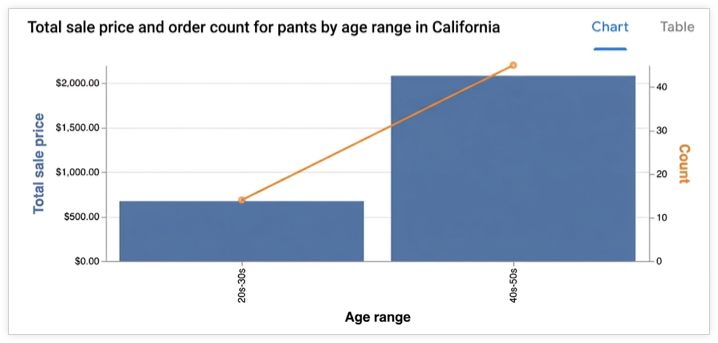
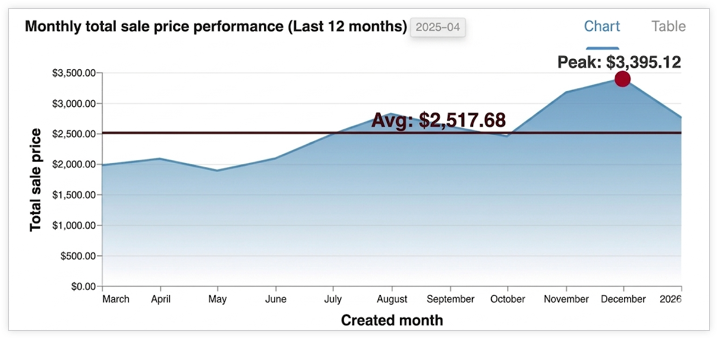
Conversational Analytics API は、ユーザーの質問に基づいてインタラクティブな可視化を生成できます。API は、グラフを Vega-Lite JSON 構成または SVG 画像として返します(Looker データソースの場合、v1alpha と v1beta の API バージョンのみ)。特定要件のグラフを生成するようにエージェントに指示することもできます。可視化は、ユーザーの質問に対する回答として取得したデータ結果を使用して作成されます。
サポートされている可視化
API は Vega-Lite を使用して可視化を作成し、標準の Vega-Lite 機能をすべてサポートしています。次のグラフタイプがサポートされています。
- 地域
- バー
- ジオシェイプ
- ヒートマップ
- 折れ線(時系列)
- 円
- 散布
グラフの生成方法
エージェントは関連するデータ結果を特定し、サブエージェントに渡します。このサブエージェントは Python コードを実行して、グラフの Vega-Lite JSON 構成を生成します。API は会話コンテキストを使用して、グラフを生成する際のユーザーの意図をより深く理解します。Python を活用することで、API はより複雑なグラフを作成できます。
エージェントは、グラフの関連性と読みやすさを高めるために、集計やフィルタの適用など、軽微なデータ変換を行うことがあります。
出力形式
グラフは chart 結果メッセージで返され、次の形式で提供できます。
- Vega-Lite JSON
- SVG 画像
コンテキストの ChartOptions フィールド を使用して画像をリクエストできます。画像がリクエストされると、API は画像と Vega-Lite JSON 出力を両方提供します。
エージェントの回答を可視化としてレンダリングする
このセクションでは、Python SDK を使用して、Conversational Analytics API レスポンスで提供されるグラフ仕様から可視化をレンダリングする方法について説明します。サンプルコードでは、レスポンスの chart フィールドからグラフ仕様(Vega-Lite 形式)を抽出して、Altair ライブラリ(Vega-Lite 上に構築)を使用してグラフをレンダリングし、画像として保存して表示します。
Vega-Lite と Vega-Lite エコシステムを使用したグラフのレンダリングの詳細については、Vega-Lite 可視化の作成ツールをご覧ください。
例: Vega-Lite 出力からグラフをレンダリングする
この例では、Conversational Analytics API エージェントのレスポンスから棒グラフをレンダリングする方法を示します。この例では、次のプロンプトを使用してリクエストを送信します。
"Create a bar graph that shows the top five states by the total number of airports."
サンプルコードでは、次のヘルパー関数を定義しています。
render_chart_response:chartメッセージから Vega-Lite 構成を抽出して、Altair ライブラリで使用可能な形式に変換してグラフをレンダリングし、chart.pngに保存して表示します。chat:inline_context変数と現在のmessagesリストを使用して Conversational Analytics API にリクエストを送信し、ストリーミング レスポンスを処理します。グラフが返された場合は、render_chart_responseを呼び出してグラフを表示します。
次のサンプルコードを使用するには、次のように置き換えます。
- sqlgen-testing: 必要な API が有効になっている課金プロジェクトの ID。
- Create a bar graph that shows the top five states by the total number of airports: Conversational Analytics API に送信するプロンプト。
from google.cloud import geminidataanalytics
from google.protobuf.json_format import MessageToDict
import altair as alt
import proto

# Helper function for rendering chart response
def render_chart_response(resp):
  def _convert(v):
    if isinstance(v, proto.marshal.collections.maps.MapComposite):
      return {k: _convert(val) for k, val in v.items()}
    elif isinstance(v, proto.marshal.collections.RepeatedComposite):
      return [_convert(el) for el in v]
    elif isinstance(v, (int, float, str, bool, type(None))):
      return v
    else:
      return MessageToDict(v)

  try:
    vega_config = _convert(resp.result.vega_config)
    chart = alt.Chart.from_dict(vega_config)
    chart.save('chart.png')
    chart.display()
    print("Chart rendered and saved as chart.png")
  except Exception as e:
    print(f"Error rendering chart: {e}")

# Helper function for calling the API
def chat(q: str, inline_context, messages):
  billing_project = "sqlgen-testing"

  input_message = geminidataanalytics.Message(
      user_message=geminidataanalytics.UserMessage(text=q)
  )
  messages.append(input_message)

  client = geminidataanalytics.DataChatServiceClient()
  request = geminidataanalytics.ChatRequest(
      inline_context=inline_context,
      parent=f"projects/{billing_project}/locations/global",
      messages=messages,
  )

  # Make the request
  try:
    stream = client.chat(request=request)

    for reply in stream:
      if reply.system_message and hasattr(reply.system_message, 'chart'):
        # ChartMessage includes `query` for generating a chart and `result` with the generated chart.
        if hasattr(reply.system_message.chart, 'result'):
          print("Chart result found in response.")
          render_chart_response(reply.system_message.chart)
        else:
          print("Chart message found, but no result yet.")
      # Append system messages to maintain context for follow-up turns
      if reply.system_message:
          messages.append(geminidataanalytics.Message(system_message=reply.system_message))

  except Exception as e:
    print(f"Error calling API: {e}")

# Example Usage:
# Assuming 'inline_context' and 'messages' are initialized as per "Build a data agent using the Python SDK"
# Example initialization (replace with your actual context and message history):
# inline_context = geminidataanalytics.InlineContext(...)
# messages = []

# Send the prompt to make a bar graph
chat("Create a bar graph that shows the top five states by the total number of airports")