

The Conversational Analytics API can generate interactive visualizations that are based on user questions. The API returns charts as either Vega-Lite JSON configurations or SVG images (for Looker data sources and only in the v1alpha and v1beta API versions). You can also instruct an agent to generate charts with specific requirements. The visualizations are created using the data results obtained in response to the user's question.
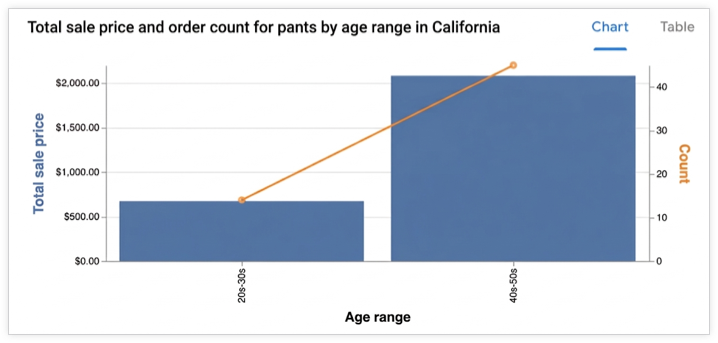
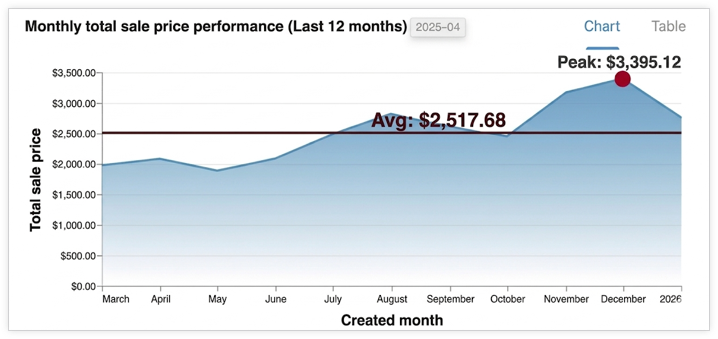
Supported visualizations
The API uses Vega-Lite to create visualizations and supports all standard Vega-Lite features. The following chart types are supported:
- Area
- Bar
- Geoshape
- Heatmap
- Line (Time series)
- Pie
- Scatter
How charts are generated
The agent identifies the relevant data result and passes it to a subagent. This subagent executes Python code to generate a Vega-Lite JSON configuration for the chart. The API uses the conversation context to better understand the user's intent when generating charts. By leveraging Python, the API can create more complex charts.
The agent might perform minor data transformations, such as aggregations or applying filters, to make the chart more relevant and readable.
Output formats
The chart is returned in a chart result message and can be provided in the following formats:
- Vega-Lite JSON
- SVG image
You can request images using the ChartOptions field in the context. When an image is requested, the API provides both the image and the Vega-Lite JSON output.
Render an agent response as a visualization
This section demonstrates how to use the Python SDK to render a visualization from the chart specifications provided in a Conversational Analytics API response. The sample code extracts the chart specification (in Vega-Lite format) from the response's chart field and uses the Altair library (which is built on Vega-Lite) to render the chart, save it as an image, and display it.
For more details on rendering charts with Vega-Lite and the Vega-Lite ecosystem, see Tools for Authoring Vega-Lite Visualizations.
Example: Render a chart from Vega-Lite output
This example shows how to render a bar chart from a Conversational Analytics API agent response. The example sends a request with the following prompt:
"Create a bar graph that shows the top five states by the total number of airports."
The sample code defines the following helper functions:
render_chart_response: Extracts the Vega-Lite configuration from thechartmessage, converts it to a format usable by the Altair library, renders the chart, saves it tochart.png, and displays it.chat: Sends a request to the Conversational Analytics API using theinline_contextvariable and the currentmessageslist, processes the streaming response, and if a chart is returned, callsrender_chart_responseto display it.
To use the following sample code, replace the following:
- sqlgen-testing: The ID of your billing project that has the required APIs enabled.
- Create a bar graph that shows the top five states by the total number of airports: The prompt that you want to send to the Conversational Analytics API.
from google.cloud import geminidataanalytics
from google.protobuf.json_format import MessageToDict
import altair as alt
import proto

# Helper function for rendering chart response
def render_chart_response(resp):
  def _convert(v):
    if isinstance(v, proto.marshal.collections.maps.MapComposite):
      return {k: _convert(val) for k, val in v.items()}
    elif isinstance(v, proto.marshal.collections.RepeatedComposite):
      return [_convert(el) for el in v]
    elif isinstance(v, (int, float, str, bool, type(None))):
      return v
    else:
      return MessageToDict(v)

  try:
    vega_config = _convert(resp.result.vega_config)
    chart = alt.Chart.from_dict(vega_config)
    chart.save('chart.png')
    chart.display()
    print("Chart rendered and saved as chart.png")
  except Exception as e:
    print(f"Error rendering chart: {e}")

# Helper function for calling the API
def chat(q: str, inline_context, messages):
  billing_project = "sqlgen-testing"

  input_message = geminidataanalytics.Message(
      user_message=geminidataanalytics.UserMessage(text=q)
  )
  messages.append(input_message)

  client = geminidataanalytics.DataChatServiceClient()
  request = geminidataanalytics.ChatRequest(
      inline_context=inline_context,
      parent=f"projects/{billing_project}/locations/global",
      messages=messages,
  )

  # Make the request
  try:
    stream = client.chat(request=request)

    for reply in stream:
      if reply.system_message and hasattr(reply.system_message, 'chart'):
        # ChartMessage includes `query` for generating a chart and `result` with the generated chart.
        if hasattr(reply.system_message.chart, 'result'):
          print("Chart result found in response.")
          render_chart_response(reply.system_message.chart)
        else:
          print("Chart message found, but no result yet.")
      # Append system messages to maintain context for follow-up turns
      if reply.system_message:
          messages.append(geminidataanalytics.Message(system_message=reply.system_message))

  except Exception as e:
    print(f"Error calling API: {e}")

# Example Usage:
# Assuming 'inline_context' and 'messages' are initialized as per "Build a data agent using the Python SDK"
# Example initialization (replace with your actual context and message history):
# inline_context = geminidataanalytics.InlineContext(...)
# messages = []

# Send the prompt to make a bar graph
chat("Create a bar graph that shows the top five states by the total number of airports")