This guide describes recommended approaches for rendering outputs from the Conversational Analytics API in a user interface (UI) using Looker data sources.
When a user queries the API, the response can include intermediate reasoning steps in addition to the final answer. This guide describes how to render API responses with different levels of detail by implementing a *main answer view* and a *full details view*:
- The **main answer view** displays the answer to the user's question directly. This view provides a concise presentation and doesn't include details about the agent's reasoning upfront.
- The **full details view** displays the full reasoning process that the agent follows to reach the final answer, including all the elements from the main answer view.
A recommended UI pattern is to display the main answer view by default and provide a UI control, such as a button or toggle, that lets users switch to the full details view. While reasoning details are useful for validating logic, displaying them by default can add unnecessary detail for users who are primarily interested in the final answer.
## Main answer view
To render only the final direct answer to the user's question, follow the steps in this section. This view focuses on the final output and excludes intermediate steps.
### System message rendering guidance
The following table describes the system messages that are considered final direct answers, along with recommendations for how to render these messages.
| System message | Rendering guidance |
|---|---|
| [`DataQuery`](https://docs.cloud.google.com/gemini/data-agents/reference/rest/v1/Message.md.txt#dataquery) | **Render with the associated result.** Render this message only in cases where you render the corresponding `DataResult` message.
Don't render `DataQuery` messages in the following cases: - The `name` field of the `DataQuery` message ends in `_sample_values` (for example, `products_brand_sample_values`). - The `name` field of the corresponding `DataResult` message ends in `_sample_values`. - The `data` field in the corresponding `DataResult` message is empty. We recommend placing the query text inside a toggle to display the source query on demand. For example, [Conversational Analytics in Looker](https://docs.cloud.google.com/looker/docs/conversational-analytics-looker-data.md.txt#how-was-this-calculated) uses a "How was this calculated?" control. |
| [`DataResult`](https://docs.cloud.google.com/gemini/data-agents/reference/rest/v1/Message.md.txt#dataresult) | **Render all `DataResult` messages, except for intermediate and empty results.**
Don't render `DataResult` messages in the following cases: - The `name` field ends in `_sample_values`. These are intermediate steps for retrieving sample values for a specific field. - The `data` field is empty. These results are summarized in the final `TextMessage` response. |
| [`ChartResult`](https://docs.cloud.google.com/gemini/data-agents/reference/rest/v1/Message.md.txt#chartresult) | **Render all charts.** Render all `ChartResult` messages in the API response. |
| [`TextMessage`](https://docs.cloud.google.com/gemini/data-agents/reference/rest/v1/Message.md.txt#textmessage) | **Render final responses only.** Render `TextMessage` messages only when the [`TextType`](https://docs.cloud.google.com/gemini/data-agents/reference/rest/v1/Message.md.txt#texttype) value is `FINAL_RESPONSE`. |
### Example: Render the main answer view
You can implement a toggle, such as **Show reasoning**, to let users switch from the main answer view to the full details view.

The following transcript demonstrates the main answer view. For `DataQuery` messages, we recommend hiding the query details behind an inline toggle, indicated in the transcript by a collapsed icon (), to provide optional access to the underlying query logic.
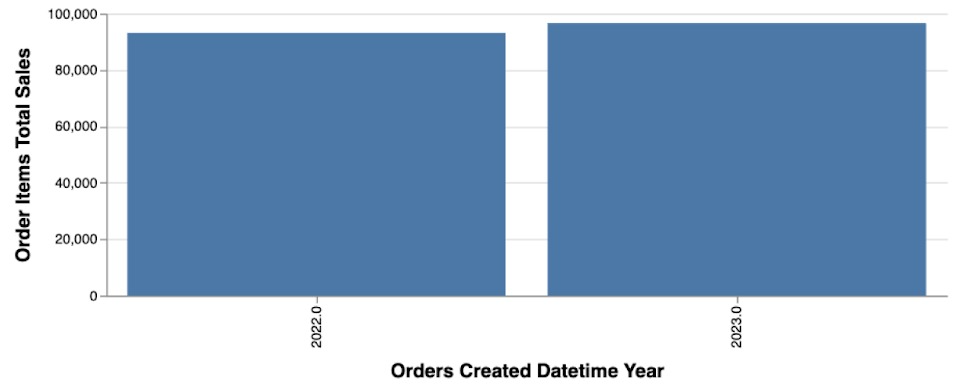
> **User**: Compare total sales for Cymbal Group in 2022 versus 2023. Plot the result on a chart.
>
> **Agent**:
>
> Here's the query result for Total Sales Cymbal Group 2022 2023.
>
> | Created Year | Total Sales |
> |---|---|
> | 2023 | $96,627.00 |
> | 2022 | $93,095.50 |
>
> **Total Sales for Cymbal Group in 2022 and 2023**
>
> 
>
> Total sales for Cymbal Group in 2022 were **$93,095.50** and in 2023 they were **$96,627.00**.
The following table maps the elements from the sample interaction to their corresponding API system messages.
| Element | Source message |
|---|---|
| Generated query (JSON hidden behind toggle by default) | `DataQuery` |
| Data table | `DataResult` |
| Bar chart | `ChartResult` |
| Final text answer | `TextMessage` (`FINAL_RESPONSE`) |
## Full details view
Use this guidance to render the complete reasoning process. This view includes everything from the main answer view and shows the content and steps in the order in which they are generated by the agent. This view displays all steps that the agent takes to reach the final answer, including its reasoning and intermediate data.
### Rendering guidance for reasoning and granular data retrieval
The following table describes the system messages that represent the agent's reasoning and granular retrieval steps, along with recommendations for how to render these messages.
| System message | Rendering guidance |
|---|---|
| [`TextMessage` with a `TextType` value of `THOUGHT`](https://docs.cloud.google.com/gemini/data-agents/reference/rest/v1/Message.md.txt#textmessage) | **Render reasoning steps.** Display these messages to show the agent's internal thought process. These messages contain two parts: - `parts[0]` is the thought summary, which briefly summarizes the full thought text - `parts[1]` is the full thought text If your application displays status updates (such as a loading indicator or progress bar), we recommend displaying the thought summary (`parts[0]`) as the transient status indicator. |
| [`TextMessage` with a `TextType` value of `PROGRESS`](https://docs.cloud.google.com/gemini/data-agents/reference/rest/v1/Message.md.txt#textmessage) | **Display `PROGRESS` messages.** Display these messages to provide insights into the agent's actions. These are informational messages about the agent's progress, such as a tool that's being invoked. This is distinct from the agent's internal thought process (`THOUGHT`) and the final answer to the user (`FINAL_RESPONSE`). These messages contain two parts: - `parts[0]` is the summary. - `parts[1]` is the full progress text. |
| [`DataQuery`](https://docs.cloud.google.com/gemini/data-agents/reference/rest/v1/Message.md.txt#dataquery) and [`DataResult`](https://docs.cloud.google.com/gemini/data-agents/reference/rest/v1/Message.md.txt#dataresult) with a name ending in `_sample_values` | **Display intermediate `DataQuery` and `DataResult` messages.** Both `DataQuery` and `DataResult` messages with a `name` field that ends in `_sample_values` are intermediate steps for granular data retrieval and aren't displayed in the main answer view. Include these in the full answer view (behind a toggle) to show the steps that the agent takes. |
| [`DataResult` with an empty `data` field](https://docs.cloud.google.com/gemini/data-agents/reference/rest/v1/Message.md.txt#dataresult) | **Display only the associated `DataQuery` message** . Don't display `DataResult` messages with an empty `data` field in any view. In the full detail view, display the `DataQuery` message that led to the empty result (behind a toggle). This lets the user see the query that was executed even though that query yielded no results. The final answer summary (`TextMessage` with the type `FINAL_RESPONSE`) will have already informed the user that the query returned no data. |
### Example: Render the full details view
When a user switches the **Show reasoning** toggle to the expanded state, the UI reveals the agent's step-by-step reasoning.
The following transcript demonstrates the full details view, including reasoning steps. For `DataQuery` messages, query details can be shown by default, optionally behind an inline toggle indicated by an expanded icon (), as shown in the transcript.
> **User**: Compare total sales for Cymbal Group in 2022 versus 2023. Plot the result on a chart.
>
> **Agent**:
>
> **Understanding the schema**
>
> To compare total sales for 'Cymbal Group' in 2022 versus 2023, I need to query the 'Order Items' Explore. I will filter by product name 'Cymbal Group' and by the years 2022 and 2023. I will then retrieve the `Total Sales` and `Created Year` fields.
>
> Here's the query result for Total Sales Cymbal Group 2022 2023.
>
> ```json
> [
> {"model":"thelook","view":"order_items","fields":["order_items.total_sale_price","order_items.created_year"],
> "filters":{"order_items.created_year":"2022,2023","products.brand":"Cymbal Group"}}
> ]
> ```
>
> | Created Year | Total Sales |
> |---|---|
> | 2023 | $96,627.00 |
> | 2022 | $93,095.50 |
>
> **Plotting sales distribution**
>
> I have retrieved the total sales for 'Cymbal Group' for 2022 and 2023. Now I will generate a chart to visualize this comparison and then provide the final answer.
>
> Generate a bar chart comparing total sales for 'Cymbal Group' in 2022 and 2023. The x-axis should represent the year and the y-axis should represent the total sales.
>
> 
>
> Total sales for Cymbal Group in 2022 were **$93,095.50** and in 2023 they were **$96,627.00**.
The following table maps the steps from the sample interaction to their corresponding API system messages.
| Element | Source message |
|---|---|
| **"Understanding the schema"** (thought summary) | `TextMessage` (type `THOUGHT`, `parts[0]`) |
| "To compare total sales..." (full thought text) | `TextMessage` (type `THOUGHT`, `parts[1]`) |
| Generated query (JSON shown when the toggle is expanded) | `DataQuery` |
| Data table | `DataResult` |
| **"Plotting sales distribution"** (thought summary) | `TextMessage` (type `THOUGHT`, `parts[0]`) |
| "I have retrieved..." (full thought text) | `TextMessage` (type `THOUGHT`, `parts[1]`) |
| Bar chart | `ChartResult` |
| Final text answer | `TextMessage` (`FINAL_RESPONSE`) |