


このページでは、 Looker Explore に基づく Looker データソースを使用するデータ エージェントのシステム指示を作成する方法について説明します。
作成されたコンテキストは、データ エージェントのオーナーがデータ エージェントの動作を形成し、API の回答を絞り込むために提供できるガイダンスです。効果的な作成済みコンテキストにより、Conversational Analytics API データ エージェントは、データソースに関する質問に回答するための有用なコンテキストを取得できます。
Looker データソースの場合、構造化されたコンテキストとシステム指示を組み合わせて、作成されたコンテキストを提供できます。可能な場合は、構造化されたコンテキスト フィールドを使用してコンテキストを提供します。構造化フィールドでカバーされていない補足的なガイダンスには、system_instruction パラメータを使用できます。システム指示は、データ エージェントのオーナーがエージェントに提供して、エージェントのロール、トーン、全体的な動作を通知できる作成済みコンテキストの一種です。多くの場合、システム指示は構造化されたコンテキストよりも自由形式にできます。
構造化されたコンテキスト フィールドとシステム指示はどちらも省略可能ですが、強力なコンテキストを提供することで、エージェントはより正確で関連性の高い回答を提供できます。データ エージェントの作成時に指定した構造化コンテキスト情報は、システム指示に自動的に追加されます。
構造化コンテキストを定義する
データ エージェントの構造化されたコンテキストで、ゴールデン質問と回答を指定できます。構造化コンテキストを定義したら、直接 HTTP リクエストまたは Python SDK を使用してデータ エージェントに提供できます。
Looker データソースの場合、ゴールデン クエリは looker_golden_queries キーでキャプチャされます。このキーは、自然言語の質問とそれに対応する Looker クエリのペアを定義します。自然言語の質問とそれに対応する Explore メタデータのペアをエージェントに提供することで、エージェントがより高品質で一貫性のある結果を提供できるようにガイドできます。このページでは、Looker のゴールデン クエリの例を紹介します。
各 Looker ゴールデン クエリを定義するには、次の両方のフィールドに値を指定します。
natural_language_questions: ユーザーが尋ねる可能性のある自然言語の質問looker_query: 自然言語の質問に対応する Looker のゴールデン クエリ
「Airports」という名前の Explore の natural_language_questions - looker_query ペアの例を次に示します。
  natural_language_questions: ["What are the major airport codes and cities in CA?"]
  looker_query": {
        "model": "airports",
        "explore": "airports",
        "fields": ["airports.city", "airports.code"],
        "filters": [
          {
            "field": "airports.major",
            "value": "Y"
          },
          {
            "field": "airports.state",
            "value": "CA"
          }
        ]
  }
Looker のゴールデン クエリを定義する
natural_language_questions フィールドと looker_query フィールドの値を指定して、特定の Explore の Looker ゴールデン クエリを定義します。natural_language_questions フィールドには、ユーザーがそのデータ探索について質問する可能性のある質問を自然言語で記述します。このフィールドの値には複数の質問を含めることができます。looker_query フィールドの値は、Explore のクエリ メタデータから取得できます。
Looker クエリ オブジェクトは、次のフィールドをサポートしています。
model(文字列): クエリの生成に使用される LookML モデル。必須フィールドです。explore(文字列): クエリの生成に使用された Explore。このフィールドは必須です。fields[](文字列): ディメンションや測定値など、Explore から取得するフィールド。このフィールドは省略できます。filters[](オブジェクト(Filter)): Explore に適用するフィルタ。このフィールドは省略できます。sorts[](文字列): Explore に適用する並べ替え。このフィールドは省略可能です。limit(文字列): Explore に適用するデータ行の上限。このフィールドは省略可能です。
Explore のクエリ メタデータは、次の方法で取得できます。
Explore ユーザー インターフェースからクエリ メタデータを取得する
- Explore で、[Explore アクション メニュー] を選択し、[LookML を取得] を選択します。
- [ダッシュボード] タブを選択します。
- LookML からクエリの詳細をコピーします。たとえば、次の図は、Order Items という Explore の LookML を示しています。
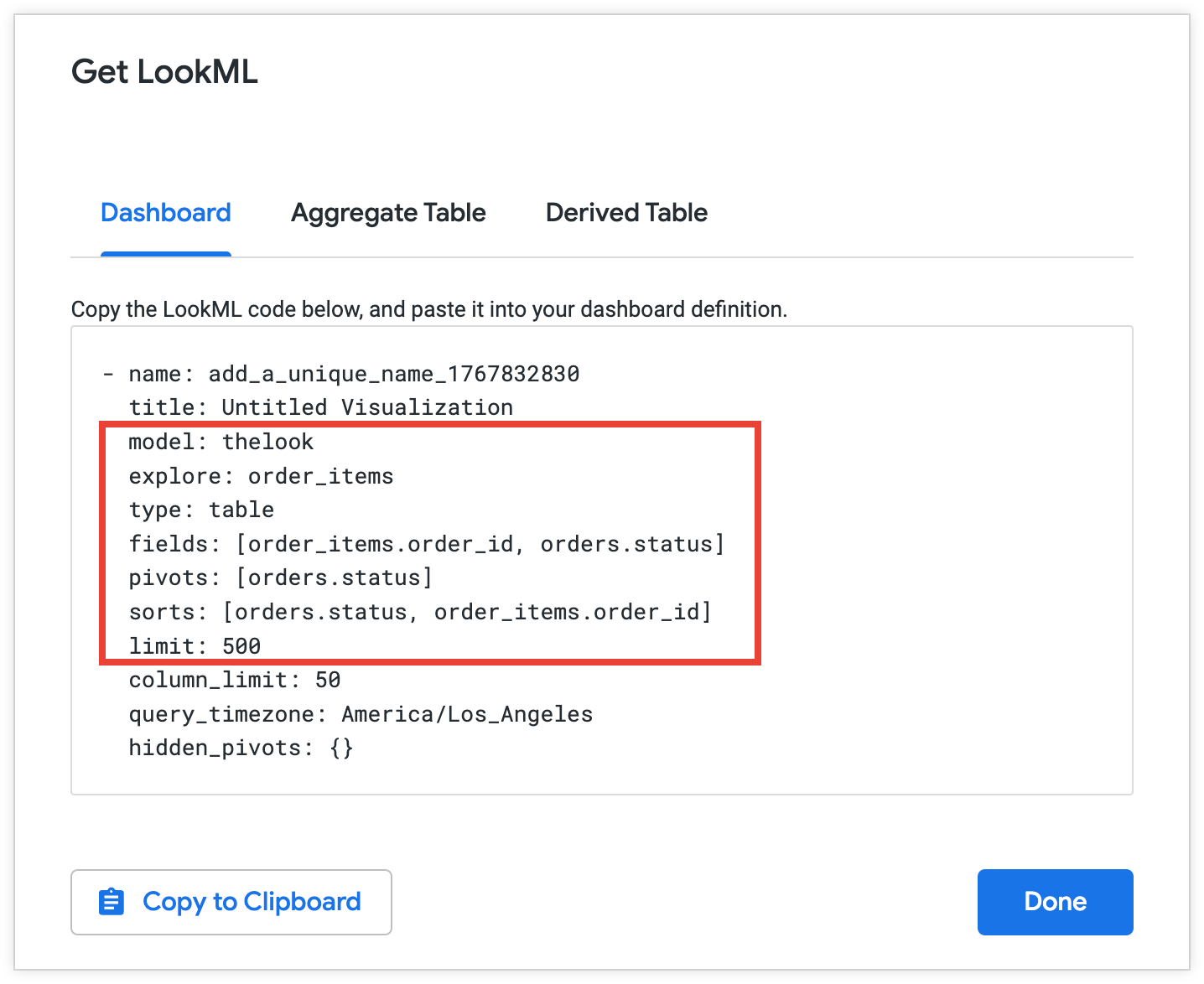
選択したメタデータをコピーして、Looker のゴールデン クエリで使用します。
  model: thelook
  explore: order_items
  fields: [order_items.order_id, orders.status]
  sorts: [orders.status, order_items.order_id]
  limit: 500
Looker API を使用して Looker クエリ オブジェクトを取得する
Looker API を使用して Explore に関する情報を取得する手順は次のとおりです。
- [Explore] で、[Explore アクション メニュー] を選択し、[共有] を選択します。Looker に、Explore を共有するためにコピーできる URL が表示されます。共有 URL は通常、
https://looker.yourcompany/x/vwGSbfcのような形式になります。共有 URL の末尾のvwGSbfcは共有スラッグです。 - 共有スラッグをコピーします。
- Looker API にリクエストを送信します。
Explore_slugで Explore の URL スラッグを文字列として渡すGET /queries/slug/Explore_slug。リクエストには、返す Explore クエリ メタデータのフィールドを含めます。詳細については、Get Query for Slug API リファレンス ページをご覧ください。 - API レスポンスからクエリ メタデータをコピーします。
Looker のゴールデン クエリの例
次の例は、直接 HTTP リクエストと Python SDK を使用して、airports エクスプローラのゴールデン クエリを指定する方法を示しています。
HTTP
直接 HTTP リクエストでは、looker_golden_queries キーに Looker のゴールデン クエリ オブジェクトのリストを指定します。各オブジェクトには、natural_Language_questions キーと対応する looker_query キーが含まれている必要があります。
looker_golden_queries = [
  {
    "natural_language_questions": ["What is the highest observed positive longitude?"],
    "looker_query": {
      "model": "airports",
      "explore": "airports",
      "fields": ["airports.longitude"],
      "filters": [
        {
          "field": "airports.longitude",
          "value": ">0"
        }
      ],
      "sorts": ["airports.longitude desc"],
      "limit": "1"
    }
  },
 {
    "natural_language_questions": ["What are the major airport codes and cities in CA?", "Can you list the cities and airport codes of airports in CA?"],
    "looker_query": {
      "model": "airports",
      "explore": "airports",
      "fields": ["airports.city", "airports.code"],
      "filters": [
        {
          "field": "airports.major",
          "value": "Y"
        },
        {
          "field": "airports.state",
          "value": "CA"
        }
      ]
    }
  },
]
Python SDK
Python SDK を使用する場合は、LookerGoldenQuery オブジェクトのリストを指定できます。各オブジェクトの natural_language_questions パラメータと looker_query パラメータに値を指定します。
looker_golden_queries = [geminidataanalytics.LookerGoldenQuery(
      natural_language_questions=[
          "What is the highest observed positive longitude?"
      ],
      looker_query=geminidataanalytics.LookerQuery(
          model="airports",
          explore="airports",
          fields=["airports.longitude"],
          filters=[
              geminidataanalytics.LookerQuery.Filter(
                  field="airports.longitude", value=">0"
              )
          ],
          sorts=["airports.longitude desc"],
          limit="1",
      ),
  ),
  geminidataanalytics.LookerGoldenQuery(
      natural_language_questions=[
          "What are the major airport codes and cities in CA?",
          "Can you list the cities and airport codes of airports in CA?",
      ],
      looker_query=geminidataanalytics.LookerQuery(
          model="airports",
          explore="airports",
          fields=["airports.city", "airports.code"],
          filters=[
              geminidataanalytics.LookerQuery.Filter(
                  field="airports.major", value="Y"
              ),
              geminidataanalytics.LookerQuery.Filter(
                  field="airports.state", value="CA"
              ),
          ],
      ),
  ),
]
システム指示で追加のコンテキストを定義する
システム指示は、データ エージェントにデータソースの詳細と、質問に回答する際のエージェントのロールに関するガイダンスを提供する一連の主要コンポーネントとオブジェクトで構成されます。system_instruction パラメータで、YAML 形式の文字列としてデータ エージェントへのシステム指示を指定できます。
次の YAML テンプレートは、Looker データソースのシステム指示を構成する方法の例を示しています。
-   system_instruction: str # Describe the expected behavior of the agent
-   glossaries: # Define business terms, jargon, and abbreviations that are relevant to your use case
    -   glossary:
            -   term: str
            -   description: str
            -   synonyms: list[str]
-   additional_descriptions: # List any additional general instructions
    -   text: str
システム指示のキー コンポーネントの説明
以降のセクションでは、Looker のシステム指示のキー コンポーネントの例を示します。これらのキーには、次のものがあります。
system_instruction
system_instruction キーを使用して、エージェントのロールとペルソナを定義します。この最初の指示は、API の回答のトーンとスタイルを設定し、エージェントがその主な目的を理解するのに役立ちます。
たとえば、次のように、架空の e コマースストアのセールス アナリストとしてエージェントを定義できます。
-   system_instruction: You are an expert sales analyst for a fictitious
    ecommerce store. You will answer questions about sales, orders, and customer
    data. Your responses should be concise and data-driven.
glossaries
glossaries キーには、データとユースケースに関連するビジネス用語、専門用語、略語の定義のリストが記述されますが、これは、データにはまだ表示されません。たとえば、特定のビジネス コンテキストに従って、一般的なビジネス ステータスや「Loyal Customer」などの用語を次のように定義できます。
-   glossaries:
    -   glossary:
            -   term: Loyal Customer
            -   description: A customer who has made more than one purchase.
                Maps to the dimension 'user_order_facts.repeat_customer' being
                'Yes'. High value loyal customers are those with high
                'user_order_facts.lifetime_revenue'.
            -   synonyms:
                -   repeat customer
                -   returning customer
additional_descriptions
additional_descriptions キーには、システム指示の他の部分で説明されていない追加の指示やコンテキストのリストが記述されます。たとえば、additional_descriptions キーを使用して、エージェントに関する情報を次のように提供できます。
-   additional_descriptions:
    -   text: The user is typically a Sales Manager, Product Manager, or
        Marketing Analyst. They need to understand performance trends, build
        customer lists for campaigns, and analyze product sales.
例: Looker のシステム指示
次の例は、架空のセールス アナリストとして定義したエージェントへのシステム指示のサンプルを示しています。
-   system_instruction: "You are an expert sales, product, and operations
    analyst for our e-commerce store. Your primary function is to answer
    questions by querying the 'Order Items' Explore. Always be concise and
    data-driven. When asked about 'revenue' or 'sales', use
    'order_items.total_sale_price'. For 'profit' or 'margin', use
    'order_items.total_gross_margin'. For 'customers' or 'users', use
    'users.count'. The default date for analysis is 'order_items.created_date'
    unless specified otherwise. For advanced statistical questions, such as
    correlation or regression analysis, use the Python tool to fetch the
    necessary data, perform the calculation, and generate a plot (like a scatter
    plot or heatmap)."
-   glossaries:
    -   term: Revenue
    -   description: The total monetary value from items sold. Maps to the
        measure 'order_items.total_sale_price'.
    -   synonyms:
        -   sales
        -   total sales
        -   income
        -   turnover
    -   term: Profit
    -   description: Revenue minus the cost of goods sold. Maps to the measure
        'order_items.total_gross_margin'.
    -   synonyms:
        -   margin
        -   gross margin
        -   contribution
    -   term: Buying Propensity
    -   description: Measures the likelihood of a customer to purchase again
        soon. Primarily maps to the 'order_items.30_day_repeat_purchase_rate'
        measure.
    -   synonyms:
        -   repeat purchase rate
        -   repurchase likelihood
        -   customer velocity
    -   term: Customer Lifetime Value
    -   description: The total revenue a customer has generated over their
        entire history with us. Maps to 'user_order_facts.lifetime_revenue'.
    -   synonyms:
        -   CLV
        -   LTV
        -   lifetime spend
        -   lifetime value
    -   term: Loyal Customer
    -   description: "A customer who has made more than one purchase. Maps to
        the dimension 'user_order_facts.repeat_customer' being 'Yes'. High value
        loyal customers are those with high
        'user_order_facts.lifetime_revenue'."
    -   synonyms:
        -   repeat customer
        -   returning customer
    -   term: Active Customer
    -   description: "A customer who is currently considered active based on
        their recent purchase history. Mapped to
        'user_order_facts.currently_active_customer' being 'Yes'."
    -   synonyms:
        -   current customer
        -   engaged shopper
    -   term: Audience
    -   description: A list of customers, typically identified by their email
        address, for marketing or analysis purposes.
    -   synonyms:
        -   audience list
        -   customer list
        -   segment
    -   term: Return Rate
    -   description: The percentage of items that are returned by customers
        after purchase. Mapped to 'order_items.return_rate'.
    -   synonyms:
        -   returns percentage
        -   RMA rate
    -   term: Processing Time
    -   description: The time it takes to prepare an order for shipment from the
        moment it is created. Maps to 'order_items.average_days_to_process'.
    -   synonyms:
        -   fulfillment time
        -   handling time
    -   term: Inventory Turn
    -   description: "A concept related to how quickly stock is sold. This can
        be analyzed using 'inventory_items.days_in_inventory' (lower days means
        higher turn)."
    -   synonyms:
        -   stock turn
        -   inventory turnover
        -   sell-through
    -   term: New vs Returning Customer
    -   description: "A classification of whether a purchase was a customer's
        first ('order_facts.is_first_purchase' is Yes) or if they are a repeat
        buyer ('user_order_facts.repeat_customer' is Yes)."
    -   synonyms:
        -   customer type
        -   first-time buyer
-   additional_descriptions:
    -   text: The user is typically a Sales Manager, Product Manager, or
        Marketing Analyst. They need to understand performance trends, build
        customer lists for campaigns, and analyze product sales.
    -   text: This agent can answer complex questions by joining data about
        sales line items, products, users, inventory, and distribution centers.
次のステップ
作成したコンテキストを構成する構造化フィールドとシステム指示を定義したら、次のいずれかの呼び出しで Conversational Analytics API にコンテキストを提供できます。
- 永続データ エージェントの作成: 作成されたコンテキストをリクエスト本文の
published_contextオブジェクト内に含めて、複数の会話にわたって持続するエージェントの動作を構成します。詳細については、データ エージェントを作成する(HTTP)またはステートフルまたはステートレス チャットのコンテキストを設定する(Python SDK)をご覧ください。 - ステートレス リクエストの送信: チャット リクエストの
inline_contextオブジェクト内で作成されたコンテキストを指定して、特定の API 呼び出しにおけるエージェントの動作を定義します。詳細については、ステートレス マルチターンの会話を作成する(HTTP)またはインライン コンテキストを含むステートレス チャット リクエストを送信する(Python SDK)をご覧ください。 - クエリデータ リクエストを送信する: データベース データソースの場合は、クエリデータ リクエストの
agent_context_referenceオブジェクト内で、作成されたコンテキストのコンテキスト セット ID を指定します。詳細については、データベースのデータソースのデータ エージェント コンテキストを定義するをご覧ください。