This page describes the user event object, including listing potential
user event types, and provides sample data for all user event types.
AI Commerce Search uses real-time user events to generate recommendations and
search results. When you upload data, both
recommendations and search are able to use that
data, so you don't need to upload the same events twice if you use both
services.
- Configure and [implement your user events](https://docs.cloud.google.com/gemini-enterprise-cx/ai-commerce-search/implement-user-events.md.txt#configure-user-events).
- Learn more about [user event types](https://docs.cloud.google.com/gemini-enterprise-cx/ai-commerce-search/user-events.md.txt#types).
- Learn more about [attribution tokens](https://docs.cloud.google.com/gemini-enterprise-cx/ai-commerce-search/attribution-tokens.md.txt).
## How search attribution works
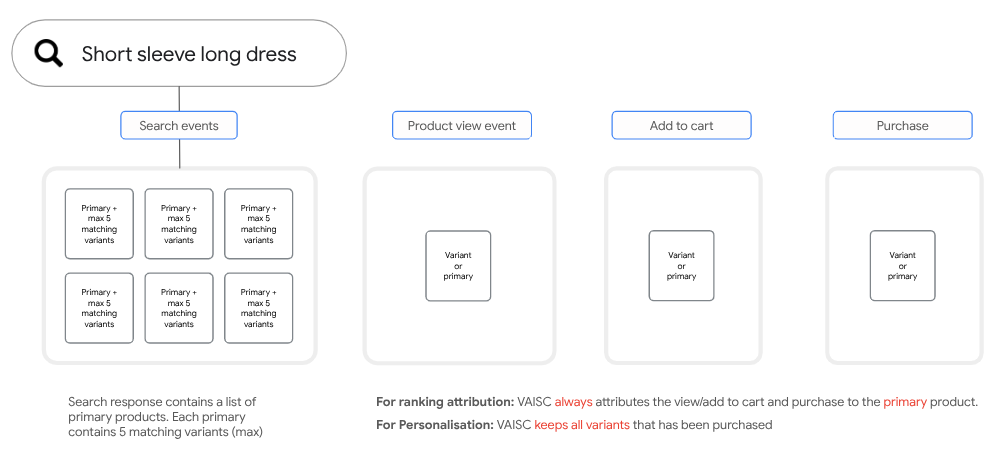
## User event types overview
There are several user event types that you can record as users browse your
retail site:
| User event name | User action | Google Analytics 4 `event_name` |
|---|---|---|
| [home-page-view](https://docs.cloud.google.com/gemini-enterprise-cx/ai-commerce-search/user-events.md.txt#home-page-view) | Views homepage. | `view_homepage` |
| [search](https://docs.cloud.google.com/gemini-enterprise-cx/ai-commerce-search/user-events.md.txt#search) (Search and browse) | Searches the catalog. | `view_item_list` + \[`searchQuery` OR `pageCategories` + `filter`\] |
| [category-page-view](https://docs.cloud.google.com/gemini-enterprise-cx/ai-commerce-search/user-events.md.txt#category-page-view) (Recommendations only) | Views special pages, such as sale or promotion pages. | `view_item_list` + `pageCategories` |
| [detail-page-view](https://docs.cloud.google.com/gemini-enterprise-cx/ai-commerce-search/user-events.md.txt#detail-page-view) | Views product detail page. | `view_item` |
| [add-to-cart](https://docs.cloud.google.com/gemini-enterprise-cx/ai-commerce-search/user-events.md.txt#add-to-cart) | Adds product to cart. | `add_to_cart` |
| [shopping-cart-page-view](https://docs.cloud.google.com/gemini-enterprise-cx/ai-commerce-search/user-events.md.txt#shopping-cart-page-view) | Views shopping cart. | `view_cart` |
| [purchase-complete](https://docs.cloud.google.com/gemini-enterprise-cx/ai-commerce-search/user-events.md.txt#purchase-complete) | Completes checkout. | `purchase` |
Out of these event types, AI Commerce Search specifically uses these four for popularity signaling:
- `SEARCH`
- `DETAIL_PAGE_VIEW`
- `ADD_TO_CART`
- `PURCHASE_COMPLETE`
For an extensive list of GA4 event fields, see [Google Analytics 4 user event fields](https://docs.cloud.google.com/gemini-enterprise-cx/ai-commerce-search/user-events.md.txt#ga4-mapping).
For detailed information about the `UserEvent` object, see
[UserEvent](https://docs.cloud.google.com/gemini-enterprise-cx/ai-commerce-search/reference/rest/v2/projects.locations.catalogs.userEvents.md.txt).
## User event requirements
The following tables list requirements and best practices for user event types
that recommendations and search use. Check that
your user events fulfill these requirements so that AI Commerce Search
can generate quality results.
This section lists:
- [Requirements for user events](https://docs.cloud.google.com/gemini-enterprise-cx/ai-commerce-search/user-events.md.txt#retail-reqs): General user event requirements. These requirements apply whether you use recommendations and search.
- [Recommendations-specific requirements](https://docs.cloud.google.com/gemini-enterprise-cx/ai-commerce-search/user-events.md.txt#rec-reqs): User event requirements for recommendations.
- [Search-specific requirements](https://docs.cloud.google.com/gemini-enterprise-cx/ai-commerce-search/user-events.md.txt#search-reqs): User event requirements for search.
If you use recommendations models, also see
[Model type data requirements](https://docs.cloud.google.com/gemini-enterprise-cx/ai-commerce-search/create-models.md.txt#import-reqs), which lists additional requirements
depending on the recommendation model type and optimization objective you plan
to use.
You can view data quality metrics for search on the
[**Data quality**](https://console.cloud.google.com/ai/retail/catalogs/default_catalog/data_quality/) page in the
AI Commerce Search in Gemini Enterprise for Customer Experience console. These metrics show the
percentages of products and user events that fulfill recommended standards of
data quality. For information about how to view search data quality, see
[Unlock search performance tiers](https://docs.cloud.google.com/gemini-enterprise-cx/ai-commerce-search/data-quality.md.txt).
### General user event requirements
Make sure your user events meet the following requirements so that the
AI Commerce Search can generate quality results. These apply to both
recommendations and search.
| Event type | Requirement | Impact |
|---|---|---|
| All events | Don't include synthetic data or duplicate events. | Synthetic or duplicate events negatively impact model quality and often prevent successful model training. Duplicate events can cause incorrect metrics values. |
| All events | Include at least 100 unique visitor IDs for each type of event ingested. | This verifies that AI Commerce Search has enough data to generate quality results. |
| All events | Visitor IDs must be formatted exactly the same across event import or event recording and in API requests. | Using a consistent format for visitor IDs helps correctly identify visitor patterns and provide better-quality results based on user behavior. |
| All events | Products included in the events should exist in your catalog of products. | The unjoined events ratio should be kept as low as possible. A high ratio can negatively impact the quality of recommendation or search results. Unjoined event data is not used to train models. However, unjoined events can be joined later, after the associated products have been ingested. For more information, see [Rejoin user events](https://docs.cloud.google.com/gemini-enterprise-cx/ai-commerce-search/manage-user-events.md.txt#rejoin-event). |
| All events | Some user events should have the same visitor ID. | To construct valid behavior sequence histories, AI Commerce Search must be able to see multiple events with the same visitor ID. For example, `visitor123` has viewed five product detail pages, added three products to their cart, then bought two of the original five products. If these events all provide the same consistently formatted visitor ID, AI Commerce Search can consider that behavior sequence in its models. |
| `detail-page-view` | Include exactly one product per event. | The event can't be used if no product exists. If multiple products are included, the event is malformed and can't be used. |
| `add-to-cart` | Include exactly one product per event. | If multiple products are included, the event is malformed and can't be used. |
| `purchase-complete` | Include `purchase_transaction.revenue`. | `purchase-complete` events that are missing the `revenue` field are not used to train models. |
| `purchase-complete` | Include exactly one `purchase_transaction.currency_code` across all purchase events. There is no default currency code; a code must be supplied. | Purchase events without this field result in incorrect revenue metrics. |
| `purchase-complete` | Check that some purchase events include multiple products. | Having some purchase events with multiple products helps the model learn co-purchase patterns. |
### Recommendations-specific requirements
If you are using recommendations, make sure your user events meet
the following requirements.
If you use recommendations models, also see
[Model type data requirements](https://docs.cloud.google.com/gemini-enterprise-cx/ai-commerce-search/create-models.md.txt#import-reqs), which lists additional requirements
depending on the recommendation model type and optimization objective you plan
to use.
| Event type | Requirement | Impact |
|---|---|---|
| `purchase-complete` | Don't flatten multi-item baskets into multiple purchase events. They should remain as single purchase events that include multiple products. | This verifies that valid co-purchase patterns are generated. |
### Search-specific requirements
If you are using search, make sure your user events meet
the following minimum requirements to get results.
| Event type | Requirement | Impact |
|---|---|---|
| `search` | `searchQuery` must exist for search events, and `pageCategories` must exist for browsing events. | Not including this field can have a severe negative impact on search result quality and metrics. |
| `search` | The visitor ID in search requests should match the visitor ID sent in events related to that search request. | If they don't match, the events are malformed and metrics could be incorrect. |
| `search` | The list of product IDs in search events must match the list of products shown to the user in its entirety. | If they don't match, the negative impact to search result quality can be severe, and metrics will be incorrect. |
| `search` | If the search uses a filter, `filter` must exist and parse correctly. | If this field does not exist, AI Commerce Search can't use the filter part of the data, which can negatively impact search result quality. |
| `search` | Include the `attribution_token` field to link other events back to search events. | Not including an attribution token will trigger an error in the AI Commerce Search in Gemini Enterprise for Customer Experience and have a severe negative impact on search quality and metrics accuracy. |
#### Search optimization requirements
To let search automatically optimize the search experience based
on overall user trends, upload the following data.
Events should be uploaded at least daily with a maximum delay of 24 hours.
| Events metric | Events volume/frequency | Description |
|---|---|---|
| Volume of `search` events | 250K in last 90 days | At least 250,000 events in the last 90 days are **required** to optimize the search experience based on events ingested. Uploading events at least daily is recommended to maintain good data quality. During historical event imports make sure that data distribution skews toward the most recent timestamp. The number of events on the last timestamp day should be equal to or more than the average daily event count. |
| Volume of `detail-page-view` attributable to a `search` event | 500,000 in last 30 days | At least 500,000 events are **required** for optimizing search results using user events. |
| Average `detail-page-view` events attributable to a `search` event per product | 10 in last 30 days | **Required** for optimizing search results using the events ingested unless events for past 21 days are uploaded. |
| Proportion of `search` events with parseable filters | 0.1 in last 30 days | Recommended for optimizing the order of dynamic facets in the search response. |
| Proportion of searched products with price | 0.95 in last 30 days | **Required** for optimizing search results using the events ingested. |
| Average `add-to-cart` events attributable to a `search` event per priced product | 0.5 in last 30 days | Recommended for revenue optimized search results. |
| Average `purchase-complete` events attributable to a `search` event per searchable priced product | 0.5 in last 30 days | Recommended for revenue optimized search results. |
#### Search personalization requirements
Search requires the following data to personalize text search
and browse search results for your users based on their activity.
After you upload the following data, search can personalize
results automatically.
| Events metric | Events volume/frequency | Description |
|---|---|---|
| Volume of `search` events served by search | 100,000 in last 30 days | At least 100,000 events served by search in the last 30 days are required to provide personalization. |
| search results are not cached | Less than 1% of the most recent 100,000 user events | Don't cache search results for text search or browse searches if you plan to use personalization. Reusing the same results across visitors prevents search from providing truly personalized results to any given user and risks exposing users' private data. Search automatically turns off personalization if caching is detected. If you cache only search results, search can still personalize browse results. Conversely, if you cache only browse results, search can still personalize text query search results. |
| Visitor ID matches between `SearchRequests` and user events | More than 10% match for the most recent 100,000 user events | Make sure that visitor ID spacing and formatting matches across `SearchRequests` and user events. Consistent visitor ID formatting verifies that search can identify user activity correctly. |
## User event best practices
This section describes best practices for user events in AI Commerce Search.
### Product impressions check
When ingesting events to AI Commerce Search historic events or production live events, make sure the following limits are met for the model to be trained, as described here.
It's important to note that the minimum volume of events that are required is not a blanket volume number. For example, if the limits says 150k detail-page-view events are needed, then it mustn't be thought of as 150k random detail-page-view events. The events need to be related to other events like `SEARCH` or `ADD TO CART`.
The model trains on the events, particularly for click rate optimization, on `SEARCH` events and the subsequent detail page view event. In effect, every detail page view event must be traceable to a search event product ID list.
The same is for add-to-cart and purchase events. That is to say, if you draw a timeline of events using the event timestamps for a particular visitor ID, you can infer a search to click or buy behavior. So if you find a random detail page view event that is not associated with any search event, then that event cannot be used for model training.
So make sure that ingested events are linked back to a search event, which means the timestamps, visitor ID, and product ID details should be accurate for the model to train.
### Event type priority
For the highest quality results, record user events for
all event types. The following table describes the priority of the different
user event types. You must log the highest priority user events to achieve
quality data models.
| Priority | User event types |
|---|---|
| Required for initial live experimentation for recommendations (event types depend on the [recommendation model type](https://docs.cloud.google.com/gemini-enterprise-cx/ai-commerce-search/models.md.txt)) | [`detail-page-view`](https://docs.cloud.google.com/gemini-enterprise-cx/ai-commerce-search/user-events.md.txt#detail-page-view) [`add-to-cart`](https://docs.cloud.google.com/gemini-enterprise-cx/ai-commerce-search/user-events.md.txt#add-to-cart) [`purchase-complete`](https://docs.cloud.google.com/gemini-enterprise-cx/ai-commerce-search/user-events.md.txt#purchase-complete) [`home-page-view`](https://docs.cloud.google.com/gemini-enterprise-cx/ai-commerce-search/user-events.md.txt#home-page-view) |
| Additional event required for search live experiment | [`search`](https://docs.cloud.google.com/gemini-enterprise-cx/ai-commerce-search/user-events.md.txt#search) |
Based on these events, AI Commerce Search can determine which product was clicked, added to cart, and purchased. This will help train the model while the product is getting more interaction and conversions, which will help it rank the product better for optimized revenue uplift.
Apart from this, the user events are also the basis for KPI measurement, including revenue per user, CTR, and CVR.
In order to train a model based on historical data generated by your previous search engine, user events should be initially backfilled from historical site engagement data (typically provided by a site analytics framework). You might need to transform the existing historical events to the user events schema prescribed for AI Commerce Search. This is needed to train the model to revenue optimization. Post this, events need to be sent continuously to AI Commerce Search using collect or bulk import.
### Events attribution
The sequence flow of user events describes the way users performed the activities on the website.
The ideal user flow is:
1. The user performs a search on a query.
2. The user runs page views on the product of interest.
3. The user adds the product to the cart they intend to buy.
4. The user runs a purchase transaction for the products they decide to buy.
Similarly, user events are expected to run in a similar pattern for a given visitor ID. This means that on a time scale, there cannot be an adds-a-product-to-the-cart event following a purchase transaction for any given visitor ID for the product purchased.
> [!NOTE]
> **Note:** Scenarios can, however, exist, where some websites directly allow customers to add-products-to-cart from search. In such cases, AI Commerce Search does not detect any detailed page views.
The ideal events flow is:
- **Path 1**: Search event → Detail page view event → Add-to-cart event → Purchase event
- **Path 2**: Search event → Add-to-cart event → Purchase event
In a non-cached search API call, the event flow is as follows:
- Each visitor is served by a unique search response and the respective attribution token follows.
- There is a clear distinction between `visitorID1` and `visitorID2` tracking, since the attribution token is different.
## User event type examples and schemas
This section provides the data formats for each event type supported.
Examples for JavaScript Pixel and Tag Manager are provided. For
BigQuery, the full table schema for each type is provided.
For all user events types, `userId` is optional. The product information
fields (`priceInfo` and `availability`) are
optional.
Note that:
- The `experimentIds` field is needed only if you are running an A/B experiment.
- The `attributionToken` field is required for AI Commerce Search only. It is used to [measure performance](https://docs.cloud.google.com/gemini-enterprise-cx/ai-commerce-search/metrics.md.txt). Attribution tokens shouldn't be sent to `predict`, `search`, and `detail-page-view`, or click events.
- Make sure your events all use a single currency, especially if you plan to use Google Cloud console to get revenue metrics. The AI Commerce Search API does not support using multiple currencies per catalog.
For more details about the user event object, see the
[`UserEvent` API reference documentation](https://docs.cloud.google.com/gemini-enterprise-cx/ai-commerce-search/reference/rest/v2/projects.locations.catalogs.userEvents.md.txt).
### Add to cart
The following shows the `add-to-cart` user event format in an example only using required fields.
The product quantity in an `add-to-cart` event must be an incremental value representing the quantity of the product associated with that specific user event. For example, if two units of a product are added to the shopping cart, the quantity field for that `add-to-cart` event should be `2`. For `add-to-cart` events, include exactly one product per event.
When you import events, you must provide the timestamp in the
[`eventTime`](https://docs.cloud.google.com/gemini-enterprise-cx/ai-commerce-search/reference/rest/v2/projects.locations.catalogs.userEvents.md.txt#UserEvent.FIELDS.event_time) field in the format specified by
[RFC 3339](https://tools.ietf.org/html/rfc3339).
Other fields might be required depending on the API method used or if
additional fields are used. (For example, if the user event is associated with
an [entity](https://docs.cloud.google.com/gemini-enterprise-cx/ai-commerce-search/entities.md.txt), make sure to specify the [`entity`](https://docs.cloud.google.com/gemini-enterprise-cx/ai-commerce-search/reference/rest/v2/projects.locations.catalogs.userEvents.md.txt#UserEvent.FIELDS.entity) field.)
For full details of each field and when they are required, see the
[`UserEvent` API reference documentation](https://docs.cloud.google.com/gemini-enterprise-cx/ai-commerce-search/reference/rest/v2/projects.locations.catalogs.userEvents.md.txt).
### JavaScript Pixel
```json
var user_event = {
"eventType": "add-to-cart",
"visitorId": "visitor-id",
"productDetails": [{
"product": {
"id": "product-id"
},
"quantity": { "value": product-quantity }
}]
};
```
### Tag Manager
```javascript
```
### BigQuery
This is the complete JSON schema for this user event type. Specify this schema
when creating tables for this user event type in BigQuery.
Modes for required fields are set to `REQUIRED` or `REPEATED`. Modes for
optional fields are set to `NULLABLE`.
Note that [`eventTime`](https://docs.cloud.google.com/gemini-enterprise-cx/ai-commerce-search/reference/rest/v2/projects.locations.catalogs.userEvents.md.txt#UserEvent.FIELDS.event_time) is required for importing events with
BigQuery. `eventTime` is a string with a timestamp format.
```javascript
[
{
"name": "eventType",
"type": "STRING",
"mode": "REQUIRED"
},
{
"name": "visitorId",
"type": "STRING",
"mode": "REQUIRED"
},
{
"name": "eventTime",
"type": "STRING",
"mode": "REQUIRED"
},
{
"name": "experimentIds",
"type": "STRING",
"mode": "REPEATED"
},
{
"name": "attributionToken",
"type": "STRING",
"mode": "NULLABLE"
},
{
"name": "productDetails",
"type": "RECORD",
"mode": "REPEATED",
"fields": [
{
"name": "product",
"type": "RECORD",
"mode": "REQUIRED",
"fields": [
{
"name": "id",
"type": "STRING",
"mode": "REQUIRED"
}
]
},
{
"name": "quantity",
"type": "INTEGER",
"mode": "REQUIRED"
}
]
},
{
"name": "cartId",
"type": "STRING",
"mode": "NULLABLE"
},
{
"name": "userInfo",
"type": "RECORD",
"mode": "NULLABLE",
"fields": [
{
"name": "userId",
"type": "STRING",
"mode": "NULLABLE"
},
{
"name": "ipAddress",
"type": "STRING",
"mode": "NULLABLE"
},
{
"name": "userAgent",
"type": "STRING",
"mode": "NULLABLE"
},
{
"name": "directUserRequest",
"type": "BOOLEAN",
"mode": "NULLABLE"
}
]
},
{
"name": "uri",
"type": "STRING",
"mode": "NULLABLE"
},
{
"name": "referrerUri",
"type": "STRING",
"mode": "NULLABLE"
},
{
"name": "pageViewId",
"type": "STRING",
"mode": "NULLABLE"
},
{
"name": "entity",
"type": "STRING",
"mode": "NULLABLE"
}
]
```
#### Complete add-to-cart object example
The following examples include both required and optional fields for the
`add-to-cart` user event. If you include the pricing information,
the `currencyCode` field is required.
### JavaScript Pixel
```json
var user_event = {
"eventType": "add-to-cart",
"visitorId": "visitor0",
"eventTime": "2020-01-01T03:33:33.000001Z",
"experimentIds": ["321"],
"attributes": {
"example_text_attribute": {
"text": ["text_1", "text_2"]
},
"example_number_attribute": {
"numbers": [3.14, 42, 1.2345]
}
},
"attributionToken": "abc",
"productDetails": [{
"product": {
"id": "abc"
},
"quantity": 2
}],
"cartId": "mobile",
"userInfo": {
"userId": "abc@example.com",
"ipAddress": "8.8.8.8",
"userAgent": "Mozilla/5.0",
"directUserRequest": true
},
"uri": "http://example",
"referrerUri": "http://example",
"pageViewId": "currentPageUri",
"entity": "entity_1"
};
```
### Tag Manager
```javascript
```
### BigQuery
This is the complete JSON schema for this user event type. Specify this schema
when creating tables for this user event type in BigQuery.
Modes for required fields are set to `REQUIRED` or `REPEATED`. Modes for
optional fields are set to `NULLABLE`.
Note that [`eventTime`](https://docs.cloud.google.com/gemini-enterprise-cx/ai-commerce-search/reference/rest/v2/projects.locations.catalogs.userEvents.md.txt#UserEvent.FIELDS.event_time) is required for importing events with
BigQuery. `eventTime` is a string with a timestamp format.
```javascript
[
{
"name": "eventType",
"type": "STRING",
"mode": "REQUIRED"
},
{
"name": "visitorId",
"type": "STRING",
"mode": "REQUIRED"
},
{
"name": "eventTime",
"type": "STRING",
"mode": "REQUIRED"
},
{
"name": "experimentIds",
"type": "STRING",
"mode": "REPEATED"
},
{
"name": "attributionToken",
"type": "STRING",
"mode": "NULLABLE"
},
{
"name": "productDetails",
"type": "RECORD",
"mode": "REPEATED",
"fields": [
{
"name": "product",
"type": "RECORD",
"mode": "REQUIRED",
"fields": [
{
"name": "id",
"type": "STRING",
"mode": "REQUIRED"
}
]
},
{
"name": "quantity",
"type": "INTEGER",
"mode": "REQUIRED"
}
]
},
{
"name": "cartId",
"type": "STRING",
"mode": "NULLABLE"
},
{
"name": "userInfo",
"type": "RECORD",
"mode": "NULLABLE",
"fields": [
{
"name": "userId",
"type": "STRING",
"mode": "NULLABLE"
},
{
"name": "ipAddress",
"type": "STRING",
"mode": "NULLABLE"
},
{
"name": "userAgent",
"type": "STRING",
"mode": "NULLABLE"
},
{
"name": "directUserRequest",
"type": "BOOLEAN",
"mode": "NULLABLE"
}
]
},
{
"name": "uri",
"type": "STRING",
"mode": "NULLABLE"
},
{
"name": "referrerUri",
"type": "STRING",
"mode": "NULLABLE"
},
{
"name": "pageViewId",
"type": "STRING",
"mode": "NULLABLE"
},
{
"name": "entity",
"type": "STRING",
"mode": "NULLABLE"
}
]
```
### Category page view
The following shows the `category-page-view` user event format.
The following examples show only the required fields of the `category-page-view`
user event format.
While there is usually only one category associated with a page, the
`pageCategories` field also supports a category hierarchy, which you can provide
as a list.
> [!NOTE]
> **Note:** The `category-page-view` field is *not* for browsing on product categories. Rather, it's only for special `page_categories` for recommendations only. For example, `(sales > Black Friday)`.
When you import events, you must provide the timestamp in the
[`eventTime`](https://docs.cloud.google.com/gemini-enterprise-cx/ai-commerce-search/reference/rest/v2/projects.locations.catalogs.userEvents.md.txt#UserEvent.FIELDS.event_time) field in the format specified by
[RFC 3339](https://tools.ietf.org/html/rfc3339).
Other fields might be required depending on the API method used or if
additional fields are used. (For example, if the user event is associated with
an [entity](https://docs.cloud.google.com/gemini-enterprise-cx/ai-commerce-search/entities.md.txt), make sure to specify the [`entity`](https://docs.cloud.google.com/gemini-enterprise-cx/ai-commerce-search/reference/rest/v2/projects.locations.catalogs.userEvents.md.txt#UserEvent.FIELDS.entity) field.)
For full details of each field and when they are required, see the
[`UserEvent` API reference documentation](https://docs.cloud.google.com/gemini-enterprise-cx/ai-commerce-search/reference/rest/v2/projects.locations.catalogs.userEvents.md.txt).
### JavaScript Pixel
```json
var user_event = {
"eventType": "category-page-view",
"visitorId": "visitor-id",
"pageCategories": ["category1 > category2"]
};
```
### Tag Manager
```javascript
```
### BigQuery
This is the complete JSON schema for this user event type. Specify this schema
when creating tables for this user event type in BigQuery.
Modes for required fields are set to `REQUIRED` or `REPEATED`. Modes for
optional fields are set to `NULLABLE`.
Note that [`eventTime`](https://docs.cloud.google.com/gemini-enterprise-cx/ai-commerce-search/reference/rest/v2/projects.locations.catalogs.userEvents.md.txt#UserEvent.FIELDS.event_time) is required for importing events with
BigQuery. `eventTime` is a string with a timestamp format.
```javascript
[
{
"name": "eventType",
"type": "STRING",
"mode": "REQUIRED"
},
{
"name": "visitorId",
"type": "STRING",
"mode": "REQUIRED"
},
{
"name": "eventTime",
"type": "STRING",
"mode": "REQUIRED"
},
{
"name": "experimentIds",
"type": "STRING",
"mode": "REPEATED"
},
{
"name": "attributionToken",
"type": "STRING",
"mode": "NULLABLE"
},
{
"name": "productDetails",
"type": "RECORD",
"mode": "REPEATED",
"fields": [
{
"name": "product",
"type": "RECORD",
"mode": "REQUIRED",
"fields": [
{
"name": "id",
"type": "STRING",
"mode": "REQUIRED"
}
]
}
]
},
{
"name": "pageCategories",
"type": "STRING",
"mode": "REPEATED"
},
{
"name": "userInfo",
"type": "RECORD",
"mode": "NULLABLE",
"fields": [
{
"name": "userId",
"type": "STRING",
"mode": "NULLABLE"
},
{
"name": "ipAddress",
"type": "STRING",
"mode": "NULLABLE"
},
{
"name": "userAgent",
"type": "STRING",
"mode": "NULLABLE"
},
{
"name": "directUserRequest",
"type": "BOOLEAN",
"mode": "NULLABLE"
}
]
},
{
"name": "uri",
"type": "STRING",
"mode": "NULLABLE"
},
{
"name": "referrerUri",
"type": "STRING",
"mode": "NULLABLE"
},
{
"name": "pageViewId",
"type": "STRING",
"mode": "NULLABLE"
},
{
"name": "entity",
"type": "STRING",
"mode": "NULLABLE"
}
]
```
#### Complete category-page-view object example
The following examples include both required and optional fields for the
`category-page-view` user event.
### JavaScript Pixel
```json
var user_event = {
"eventType": "category-page-view",
"visitorId": "visitor0",
"eventTime": "2020-01-01T03:33:33.000001Z",
"experimentIds": ["321"],
"attributionToken": "abc",
"attributes": {
"example_text_attribute": {
"text": ["text_1", "text_2"]
},
"example_number_attribute": {
"numbers": [3.14, 42, 1.2345]
}
},
"productDetails": [{
"product": {
"id": "abc"
}
}],
"pageCategories": ["Sales > New Year Deals"],
"userInfo": {
"userId": "abc@example.com",
"ipAddress": "8.8.8.8",
"userAgent": "Mozilla/5.0",
"directUserRequest": true
},
"uri": "http://example",
"referrerUri": "https://google",
"pageViewId": "currentPageUri",
"entity": "entity_1"
};
```
### Tag Manager
```javascript
```
### BigQuery
This is the complete JSON schema for this user event type. Specify this schema
when creating tables for this user event type in BigQuery.
Modes for required fields are set to `REQUIRED` or `REPEATED`. Modes for
optional fields are set to `NULLABLE`.
Note that [`eventTime`](https://docs.cloud.google.com/gemini-enterprise-cx/ai-commerce-search/reference/rest/v2/projects.locations.catalogs.userEvents.md.txt#UserEvent.FIELDS.event_time) is required for importing events with
BigQuery. `eventTime` is a string with a timestamp format.
```javascript
[
{
"name": "eventType",
"type": "STRING",
"mode": "REQUIRED"
},
{
"name": "visitorId",
"type": "STRING",
"mode": "REQUIRED"
},
{
"name": "eventTime",
"type": "STRING",
"mode": "REQUIRED"
},
{
"name": "experimentIds",
"type": "STRING",
"mode": "REPEATED"
},
{
"name": "attributionToken",
"type": "STRING",
"mode": "NULLABLE"
},
{
"name": "productDetails",
"type": "RECORD",
"mode": "REPEATED",
"fields": [
{
"name": "product",
"type": "RECORD",
"mode": "REQUIRED",
"fields": [
{
"name": "id",
"type": "STRING",
"mode": "REQUIRED"
}
]
}
]
},
{
"name": "pageCategories",
"type": "STRING",
"mode": "REPEATED"
},
{
"name": "userInfo",
"type": "RECORD",
"mode": "NULLABLE",
"fields": [
{
"name": "userId",
"type": "STRING",
"mode": "NULLABLE"
},
{
"name": "ipAddress",
"type": "STRING",
"mode": "NULLABLE"
},
{
"name": "userAgent",
"type": "STRING",
"mode": "NULLABLE"
},
{
"name": "directUserRequest",
"type": "BOOLEAN",
"mode": "NULLABLE"
}
]
},
{
"name": "uri",
"type": "STRING",
"mode": "NULLABLE"
},
{
"name": "referrerUri",
"type": "STRING",
"mode": "NULLABLE"
},
{
"name": "pageViewId",
"type": "STRING",
"mode": "NULLABLE"
},
{
"name": "entity",
"type": "STRING",
"mode": "NULLABLE"
}
]
```
### Detail page view
The following shows the `detail-page-view` user event data format.
The following examples show only the required fields of the `detail-page-view`
user event format.
In most cases, `productDetails` contains details for the associated product,
unless a bundle of items are being sold together.
When you import events, you must provide the timestamp in the
[`eventTime`](https://docs.cloud.google.com/gemini-enterprise-cx/ai-commerce-search/reference/rest/v2/projects.locations.catalogs.userEvents.md.txt#UserEvent.FIELDS.event_time) field in the format specified by
[RFC 3339](https://tools.ietf.org/html/rfc3339).
Other fields might be required depending on the API method used or if
additional fields are used. (For example, if the user event is associated with
an [entity](https://docs.cloud.google.com/gemini-enterprise-cx/ai-commerce-search/entities.md.txt), make sure to specify the [`entity`](https://docs.cloud.google.com/gemini-enterprise-cx/ai-commerce-search/reference/rest/v2/projects.locations.catalogs.userEvents.md.txt#UserEvent.FIELDS.entity) field.)
For full details of each field and when they are required, see the
[`UserEvent` API reference documentation](https://docs.cloud.google.com/gemini-enterprise-cx/ai-commerce-search/reference/rest/v2/projects.locations.catalogs.userEvents.md.txt).
### JavaScript Pixel
```json
var user_event = {
"eventType": "detail-page-view",
"visitorId": "visitor-id",
"productDetails": [{
"product": {
"id": "product-id"
}
}]
};
```
### Tag Manager
```javascript
```
### BigQuery
This is the complete JSON schema for this user event type. Specify this schema
when creating tables for this user event type in BigQuery.
Modes for required fields are set to `REQUIRED` or `REPEATED`. Modes for
optional fields are set to `NULLABLE`.
Note that [`eventTime`](https://docs.cloud.google.com/gemini-enterprise-cx/ai-commerce-search/reference/rest/v2/projects.locations.catalogs.userEvents.md.txt#UserEvent.FIELDS.event_time) is required for importing events with
BigQuery. `eventTime` is a string with a timestamp format.
```javascript
[
{
"name": "eventType",
"type": "STRING",
"mode": "REQUIRED"
},
{
"name": "visitorId",
"type": "STRING",
"mode": "REQUIRED"
},
{
"name": "eventTime",
"type": "STRING",
"mode": "REQUIRED"
},
{
"name": "experimentIds",
"type": "STRING",
"mode": "REPEATED"
},
{
"name": "attributionToken",
"type": "STRING",
"mode": "NULLABLE"
},
{
"name": "productDetails",
"type": "RECORD",
"mode": "REPEATED",
"fields": [
{
"name": "product",
"type": "RECORD",
"mode": "REQUIRED",
"fields": [
{
"name": "id",
"type": "STRING",
"mode": "REQUIRED"
}
]
}
]
},
{
"name": "userInfo",
"type": "RECORD",
"mode": "NULLABLE",
"fields": [
{
"name": "userId",
"type": "STRING",
"mode": "NULLABLE"
},
{
"name": "ipAddress",
"type": "STRING",
"mode": "NULLABLE"
},
{
"name": "userAgent",
"type": "STRING",
"mode": "NULLABLE"
},
{
"name": "directUserRequest",
"type": "BOOLEAN",
"mode": "NULLABLE"
}
]
},
{
"name": "uri",
"type": "STRING",
"mode": "NULLABLE"
},
{
"name": "referrerUri",
"type": "STRING",
"mode": "NULLABLE"
},
{
"name": "pageViewId",
"type": "STRING",
"mode": "NULLABLE"
},
{
"name": "entity",
"type": "STRING",
"mode": "NULLABLE"
}
]
```
#### Complete detail-page-view object example
The following examples include both required and optional fields for the
`detail-page-view` user event.
### JavaScript Pixel
```json
var user_event = {
"eventType": "detail-page-view",
"visitorId": "visitor0",
"eventTime": "2020-01-01T03:33:33.000001Z",
"experimentIds": ["321"],
"attributionToken": "abc",
"attributes": {
"example_text_attribute": {
"text": ["text_1", "text_2"]
},
"example_number_attribute": {
"numbers": [3.14, 42, 1.2345]
}
},
"productDetails": [{
"product": {
"id": "abc"
}
}],
"userInfo": {
"userId": "abc@example.com",
"ipAddress": "8.8.8.8",
"userAgent": "Mozilla/5.0",
"directUserRequest": true
},
"uri": "http://example",
"referrerUri": "https://google",
"pageViewId": "currentPageUri",
"entity": "entity_1"
};
```
### Tag Manager
```javascript
```
### BigQuery
This is the complete JSON schema for this user event type. Specify this schema
when creating tables for this user event type in BigQuery.
Modes for required fields are set to `REQUIRED` or `REPEATED`. Modes for
optional fields are set to `NULLABLE`.
Note that [`eventTime`](https://docs.cloud.google.com/gemini-enterprise-cx/ai-commerce-search/reference/rest/v2/projects.locations.catalogs.userEvents.md.txt#UserEvent.FIELDS.event_time) is required for importing events with
BigQuery. `eventTime` is a string with a timestamp format.
```javascript
[
{
"name": "eventType",
"type": "STRING",
"mode": "REQUIRED"
},
{
"name": "visitorId",
"type": "STRING",
"mode": "REQUIRED"
},
{
"name": "eventTime",
"type": "STRING",
"mode": "REQUIRED"
},
{
"name": "experimentIds",
"type": "STRING",
"mode": "REPEATED"
},
{
"name": "attributionToken",
"type": "STRING",
"mode": "NULLABLE"
},
{
"name": "productDetails",
"type": "RECORD",
"mode": "REPEATED",
"fields": [
{
"name": "product",
"type": "RECORD",
"mode": "REQUIRED",
"fields": [
{
"name": "id",
"type": "STRING",
"mode": "REQUIRED"
}
]
}
]
},
{
"name": "userInfo",
"type": "RECORD",
"mode": "NULLABLE",
"fields": [
{
"name": "userId",
"type": "STRING",
"mode": "NULLABLE"
},
{
"name": "ipAddress",
"type": "STRING",
"mode": "NULLABLE"
},
{
"name": "userAgent",
"type": "STRING",
"mode": "NULLABLE"
},
{
"name": "directUserRequest",
"type": "BOOLEAN",
"mode": "NULLABLE"
}
]
},
{
"name": "uri",
"type": "STRING",
"mode": "NULLABLE"
},
{
"name": "referrerUri",
"type": "STRING",
"mode": "NULLABLE"
},
{
"name": "pageViewId",
"type": "STRING",
"mode": "NULLABLE"
},
{
"name": "entity",
"type": "STRING",
"mode": "NULLABLE"
}
]
```
### Home page view
The following shows the `home-page-view` user event format.
The following examples show only the required fields of the `home-page-view`
user event format.
When you import events, you must provide the timestamp in the
[`eventTime`](https://docs.cloud.google.com/gemini-enterprise-cx/ai-commerce-search/reference/rest/v2/projects.locations.catalogs.userEvents.md.txt#UserEvent.FIELDS.event_time) field in the format specified by
[RFC 3339](https://tools.ietf.org/html/rfc3339).
Other fields might be required depending on the API method used or if
additional fields are used. (For example, if the user event is associated with
an [entity](https://docs.cloud.google.com/gemini-enterprise-cx/ai-commerce-search/entities.md.txt), make sure to specify the [`entity`](https://docs.cloud.google.com/gemini-enterprise-cx/ai-commerce-search/reference/rest/v2/projects.locations.catalogs.userEvents.md.txt#UserEvent.FIELDS.entity) field.)
For full details of each field and when they are required, see the
[`UserEvent` API reference documentation](https://docs.cloud.google.com/gemini-enterprise-cx/ai-commerce-search/reference/rest/v2/projects.locations.catalogs.userEvents.md.txt).
### JavaScript Pixel
```json
var user_event = {
"eventType": "home-page-view",
"visitorId": "visitor-id",
};
```
### Tag Manager
```javascript
```
### BigQuery
This is the complete JSON schema for this user event type. Specify this schema
when creating tables for this user event type in BigQuery.
Modes for required fields are set to `REQUIRED` or `REPEATED`. Modes for
optional fields are set to `NULLABLE`.
Note that [`eventTime`](https://docs.cloud.google.com/gemini-enterprise-cx/ai-commerce-search/reference/rest/v2/projects.locations.catalogs.userEvents.md.txt#UserEvent.FIELDS.event_time) is required for importing events with
BigQuery. `eventTime` is a string with a timestamp format.
```javascript
[
{
"name": "eventType",
"type": "STRING",
"mode": "REQUIRED"
},
{
"name": "visitorId",
"type": "STRING",
"mode": "REQUIRED"
},
{
"name": "eventTime",
"type": "STRING",
"mode": "REQUIRED"
},
{
"name": "experimentIds",
"type": "STRING",
"mode": "REPEATED"
},
{
"name": "attributionToken",
"type": "STRING",
"mode": "NULLABLE"
},
{
"name": "productDetails",
"type": "RECORD",
"mode": "REPEATED",
"fields": [
{
"name": "product",
"type": "RECORD",
"mode": "REQUIRED",
"fields": [
{
"name": "id",
"type": "STRING",
"mode": "REQUIRED"
}
]
},
{
"name": "quantity",
"type": "INTEGER",
"mode": "REQUIRED"
}
]
},
{
"name": "userInfo",
"type": "RECORD",
"mode": "NULLABLE",
"fields": [
{
"name": "userId",
"type": "STRING",
"mode": "NULLABLE"
},
{
"name": "ipAddress",
"type": "STRING",
"mode": "NULLABLE"
},
{
"name": "userAgent",
"type": "STRING",
"mode": "NULLABLE"
},
{
"name": "directUserRequest",
"type": "BOOLEAN",
"mode": "NULLABLE"
}
]
},
{
"name": "uri",
"type": "STRING",
"mode": "NULLABLE"
},
{
"name": "referrerUri",
"type": "STRING",
"mode": "NULLABLE"
},
{
"name": "pageViewId",
"type": "STRING",
"mode": "NULLABLE"
},
{
"name": "entity",
"type": "STRING",
"mode": "NULLABLE"
}
]
```
#### Complete home-page-view object example
The following examples include both required and optional fields for the
`home-page-view` user event.
### JavaScript Pixel
```json
var user_event = {
"eventType": "home-page-view",
"visitorId": "visitor0",
"eventTime": "2020-01-01T03:33:33.000001Z",
"experimentIds": ["321"],
"attributes": {
"example_text_attribute": {
"text": ["text_1", "text_2"]
},
"example_number_attribute": {
"numbers": [3.14, 42, 1.2345]
}
},
"attributionToken": "abc",
"productDetails": [{
"product": {
"id": "abc"
},
"quantity": 2
}],
"userInfo": {
"userId": "abc@example.com",
"ipAddress": "8.8.8.8",
"userAgent": "Mozilla/5.0",
"directUserRequest": true
},
"uri": "http://example",
"referrerUri": "https://google",
"pageViewId": "currentPageUri",
"entity": "entity_1"
};
```
### Tag Manager
```javascript
```
### BigQuery
This is the complete JSON schema for this user event type. Specify this schema
when creating tables for this user event type in BigQuery.
Modes for required fields are set to `REQUIRED` or `REPEATED`. Modes for
optional fields are set to `NULLABLE`.
Note that [`eventTime`](https://docs.cloud.google.com/gemini-enterprise-cx/ai-commerce-search/reference/rest/v2/projects.locations.catalogs.userEvents.md.txt#UserEvent.FIELDS.event_time) is required for importing events with
BigQuery. `eventTime` is a string with a timestamp format.
```javascript
[
{
"name": "eventType",
"type": "STRING",
"mode": "REQUIRED"
},
{
"name": "visitorId",
"type": "STRING",
"mode": "REQUIRED"
},
{
"name": "eventTime",
"type": "STRING",
"mode": "REQUIRED"
},
{
"name": "experimentIds",
"type": "STRING",
"mode": "REPEATED"
},
{
"name": "attributionToken",
"type": "STRING",
"mode": "NULLABLE"
},
{
"name": "productDetails",
"type": "RECORD",
"mode": "REPEATED",
"fields": [
{
"name": "product",
"type": "RECORD",
"mode": "REQUIRED",
"fields": [
{
"name": "id",
"type": "STRING",
"mode": "REQUIRED"
}
]
},
{
"name": "quantity",
"type": "INTEGER",
"mode": "REQUIRED"
}
]
},
{
"name": "userInfo",
"type": "RECORD",
"mode": "NULLABLE",
"fields": [
{
"name": "userId",
"type": "STRING",
"mode": "NULLABLE"
},
{
"name": "ipAddress",
"type": "STRING",
"mode": "NULLABLE"
},
{
"name": "userAgent",
"type": "STRING",
"mode": "NULLABLE"
},
{
"name": "directUserRequest",
"type": "BOOLEAN",
"mode": "NULLABLE"
}
]
},
{
"name": "uri",
"type": "STRING",
"mode": "NULLABLE"
},
{
"name": "referrerUri",
"type": "STRING",
"mode": "NULLABLE"
},
{
"name": "pageViewId",
"type": "STRING",
"mode": "NULLABLE"
},
{
"name": "entity",
"type": "STRING",
"mode": "NULLABLE"
}
]
```
### Purchase complete
The following shows the `purchase-complete` user event data format.
The following examples show only the required fields of the `purchase-complete`
user event format.
When you import events, you must provide the timestamp in the
[`eventTime`](https://docs.cloud.google.com/gemini-enterprise-cx/ai-commerce-search/reference/rest/v2/projects.locations.catalogs.userEvents.md.txt#UserEvent.FIELDS.event_time) field in the format specified by
[RFC 3339](https://tools.ietf.org/html/rfc3339).
Other fields might be required depending on the API method used or if
additional fields are used. (For example, if the user event is associated with
an [entity](https://docs.cloud.google.com/gemini-enterprise-cx/ai-commerce-search/entities.md.txt), make sure to specify the [`entity`](https://docs.cloud.google.com/gemini-enterprise-cx/ai-commerce-search/reference/rest/v2/projects.locations.catalogs.userEvents.md.txt#UserEvent.FIELDS.entity) field.)
For full details of each field and when they are required, see the
[`UserEvent` API reference documentation](https://docs.cloud.google.com/gemini-enterprise-cx/ai-commerce-search/reference/rest/v2/projects.locations.catalogs.userEvents.md.txt).
### JavaScript Pixel
```json
var user_event = {
"eventType": "purchase-complete",
"visitorId": "visitor-id",
"productDetails": [{
"product": {
"id": "product-id"
},
"quantity": product-quantity
}],
"purchaseTransaction": {
"revenue": revenue,
"currencyCode": "currency-code"
}
};
```
### Tag Manager
```javascript
```
### BigQuery
This is the complete JSON schema for this user event type. Specify this schema
when creating tables for this user event type in BigQuery.
Modes for required fields are set to `REQUIRED` or `REPEATED`. Modes for
optional fields are set to `NULLABLE`.
Note that [`eventTime`](https://docs.cloud.google.com/gemini-enterprise-cx/ai-commerce-search/reference/rest/v2/projects.locations.catalogs.userEvents.md.txt#UserEvent.FIELDS.event_time) is required for importing events with
BigQuery. `eventTime` is a string with a timestamp format.
```javascript
[
{
"name": "eventType",
"type": "STRING",
"mode": "REQUIRED"
},
{
"name": "visitorId",
"type": "STRING",
"mode": "REQUIRED"
},
{
"name": "eventTime",
"type": "STRING",
"mode": "REQUIRED"
},
{
"name": "experimentIds",
"type": "STRING",
"mode": "REPEATED"
},
{
"name": "attributionToken",
"type": "STRING",
"mode": "NULLABLE"
},
{
"name": "productDetails",
"type": "RECORD",
"mode": "REPEATED",
"fields": [
{
"name": "product",
"type": "RECORD",
"mode": "REQUIRED",
"fields": [
{
"name": "id",
"type": "STRING",
"mode": "REQUIRED"
},
{
"name": "priceInfo",
"type": "RECORD",
"mode": "NULLABLE",
"fields": [
{
"name": "price",
"type": "FLOAT",
"mode": "REQUIRED"
},
{
"name": "originalPrice",
"type": "FLOAT",
"mode": "NULLABLE"
},
{
"name": "currencyCode",
"type": "STRING",
"mode": "REQUIRED"
},
{
"name": "cost",
"type": "FLOAT",
"mode": "NULLABLE"
}
]
}
]
},
{
"name": "quantity",
"type": "INTEGER",
"mode": "REQUIRED"
}
]
},
{
"name": "cartId",
"type": "STRING",
"mode": "NULLABLE"
},
{
"name": "purchaseTransaction",
"type": "RECORD",
"mode": "REQUIRED",
"fields": [
{
"name": "id",
"type": "STRING",
"mode": "NULLABLE"
},
{
"name": "revenue",
"type": "FLOAT",
"mode": "REQUIRED"
},
{
"name": "tax",
"type": "FLOAT",
"mode": "NULLABLE"
},
{
"name": "cost",
"type": "FLOAT",
"mode": "NULLABLE"
},
{
"name": "currencyCode",
"type": "STRING",
"mode": "REQUIRED"
}
]
},
{
"name": "userInfo",
"type": "RECORD",
"mode": "NULLABLE",
"fields": [
{
"name": "userId",
"type": "STRING",
"mode": "NULLABLE"
},
{
"name": "ipAddress",
"type": "STRING",
"mode": "NULLABLE"
},
{
"name": "userAgent",
"type": "STRING",
"mode": "NULLABLE"
},
{
"name": "directUserRequest",
"type": "BOOLEAN",
"mode": "NULLABLE"
}
]
},
{
"name": "uri",
"type": "STRING",
"mode": "NULLABLE"
},
{
"name": "referrerUri",
"type": "STRING",
"mode": "NULLABLE"
},
{
"name": "pageViewId",
"type": "STRING",
"mode": "NULLABLE"
},
{
"name": "entity",
"type": "STRING",
"mode": "NULLABLE"
}
]
```
#### Complete purchase-complete object example
The following examples include both required and optional fields for the
`purchase-complete` user event.
In this example, the full price information is provided for the purchased
product. When the user event is ingested and processed, if
`priceInfo` information is provided, this is used in place of
stored price information for the product.
### JavaScript Pixel
```json
var user_event = {
"eventType": "purchase-complete",
"visitorId": "visitor0",
"eventTime": "2020-01-01T03:33:33.000001Z",
"experimentIds": ["321"],
"attributes": {
"example_text_attribute": {
"text": ["text_1", "text_2"]
},
"example_number_attribute": {
"numbers": [3.14, 42, 1.2345]
}
},
"attributionToken": "abc",
"productDetails": [{
"product": {
"id": "abc",
"priceInfo": {
"price": 99.99,
"originalPrice": 129.99,
"currencyCode": "EUR"
}
},
"quantity": 2
}],
"cartId": "mobile",
"purchaseTransaction": {
"revenue": 10.0,
"currencyCode": "EUR"
},
"userInfo": {
"userId": "abc@example.com",
"ipAddress": "8.8.8.8",
"userAgent": "Mozilla/5.0",
"directUserRequest": true
},
"uri": "http://example",
"referrerUri": "https://google",
"pageViewId": "currentPageUri",
"entity": "entity_1"
};
```
### Tag Manager
```javascript
```
### BigQuery
This is the complete JSON schema for this user event type. Specify this schema
when creating tables for this user event type in BigQuery.
Modes for required fields are set to `REQUIRED` or `REPEATED`. Modes for
optional fields are set to `NULLABLE`.
Note that [`eventTime`](https://docs.cloud.google.com/gemini-enterprise-cx/ai-commerce-search/reference/rest/v2/projects.locations.catalogs.userEvents.md.txt#UserEvent.FIELDS.event_time) is required for importing events with
BigQuery. `eventTime` is a string with a timestamp format.
```javascript
[
{
"name": "eventType",
"type": "STRING",
"mode": "REQUIRED"
},
{
"name": "visitorId",
"type": "STRING",
"mode": "REQUIRED"
},
{
"name": "eventTime",
"type": "STRING",
"mode": "REQUIRED"
},
{
"name": "experimentIds",
"type": "STRING",
"mode": "REPEATED"
},
{
"name": "attributionToken",
"type": "STRING",
"mode": "NULLABLE"
},
{
"name": "productDetails",
"type": "RECORD",
"mode": "REPEATED",
"fields": [
{
"name": "product",
"type": "RECORD",
"mode": "REQUIRED",
"fields": [
{
"name": "id",
"type": "STRING",
"mode": "REQUIRED"
},
{
"name": "priceInfo",
"type": "RECORD",
"mode": "NULLABLE",
"fields": [
{
"name": "price",
"type": "FLOAT",
"mode": "REQUIRED"
},
{
"name": "originalPrice",
"type": "FLOAT",
"mode": "NULLABLE"
},
{
"name": "currencyCode",
"type": "STRING",
"mode": "REQUIRED"
},
{
"name": "cost",
"type": "FLOAT",
"mode": "NULLABLE"
}
]
}
]
},
{
"name": "quantity",
"type": "INTEGER",
"mode": "REQUIRED"
}
]
},
{
"name": "cartId",
"type": "STRING",
"mode": "NULLABLE"
},
{
"name": "purchaseTransaction",
"type": "RECORD",
"mode": "REQUIRED",
"fields": [
{
"name": "id",
"type": "STRING",
"mode": "NULLABLE"
},
{
"name": "revenue",
"type": "FLOAT",
"mode": "REQUIRED"
},
{
"name": "tax",
"type": "FLOAT",
"mode": "NULLABLE"
},
{
"name": "cost",
"type": "FLOAT",
"mode": "NULLABLE"
},
{
"name": "currencyCode",
"type": "STRING",
"mode": "REQUIRED"
}
]
},
{
"name": "userInfo",
"type": "RECORD",
"mode": "NULLABLE",
"fields": [
{
"name": "userId",
"type": "STRING",
"mode": "NULLABLE"
},
{
"name": "ipAddress",
"type": "STRING",
"mode": "NULLABLE"
},
{
"name": "userAgent",
"type": "STRING",
"mode": "NULLABLE"
},
{
"name": "directUserRequest",
"type": "BOOLEAN",
"mode": "NULLABLE"
}
]
},
{
"name": "uri",
"type": "STRING",
"mode": "NULLABLE"
},
{
"name": "referrerUri",
"type": "STRING",
"mode": "NULLABLE"
},
{
"name": "pageViewId",
"type": "STRING",
"mode": "NULLABLE"
},
{
"name": "entity",
"type": "STRING",
"mode": "NULLABLE"
}
]
```
### Search
The following shows the `search` user event format.
#### Minimum required search object
These are the minimum required fields for AI Commerce Search to return a list of search results:
- `searchQuery` is read from the `search_term` parameter or from `view_search_results` events.
- `productDetails` is read from the `items` parameter of the `view_item_list` event. It should include the list of product IDs. shown to the end user in the search results page.
- `userEvents` captures all metadata information AI Commerce Search API needs to know about how end users interact with customer's website.
The following examples show only the required fields of the `search` user event
format.
When you import events, you must provide the timestamp in the
[`eventTime`](https://docs.cloud.google.com/gemini-enterprise-cx/ai-commerce-search/reference/rest/v2/projects.locations.catalogs.userEvents.md.txt#UserEvent.FIELDS.event_time) field in the format specified by
[RFC 3339](https://tools.ietf.org/html/rfc3339).
Other fields might be required depending on the API method used or if
additional fields are used. (For example, if the user event is associated with
an [entity](https://docs.cloud.google.com/gemini-enterprise-cx/ai-commerce-search/entities.md.txt), make sure to specify the [`entity`](https://docs.cloud.google.com/gemini-enterprise-cx/ai-commerce-search/reference/rest/v2/projects.locations.catalogs.userEvents.md.txt#UserEvent.FIELDS.entity) field.)
For full details of each field and when they are required, see the
[`UserEvent` API reference documentation](https://docs.cloud.google.com/gemini-enterprise-cx/ai-commerce-search/reference/rest/v2/projects.locations.catalogs.userEvents.md.txt).
### JavaScript Pixel
```json
var user_event = {
"eventType": "search",
"visitorId": "visitor-id",
"searchQuery": "search-query",
"pageCategories": ["category1 > category2"],
"productDetails": [
{
"product": {
"id": "product-id1"
}
}, {
"product": {
"id": "product-id2"
}
}
]
};
```
### Tag Manager
```javascript
```
### BigQuery
This is the complete JSON schema for this user event type. Specify this schema
when creating tables for this user event type in BigQuery.
Modes for required fields are set to `REQUIRED` or `REPEATED`. Modes for
optional fields are set to `NULLABLE`.
Note that [`eventTime`](https://docs.cloud.google.com/gemini-enterprise-cx/ai-commerce-search/reference/rest/v2/projects.locations.catalogs.userEvents.md.txt#UserEvent.FIELDS.event_time) is required for importing events with
BigQuery. `eventTime` is a string with a timestamp format.
```javascript
[
{
"name": "eventType",
"type": "STRING",
"mode": "REQUIRED"
},
{
"name": "visitorId",
"type": "STRING",
"mode": "REQUIRED"
},
{
"name": "eventTime",
"type": "STRING",
"mode": "REQUIRED"
},
{
"name": "productDetails",
"type": "RECORD",
"mode": "REPEATED",
"fields": [
{
"name": "product",
"type": "RECORD",
"mode": "REQUIRED",
"fields": [
{
"name": "id",
"type": "STRING",
"mode": "REQUIRED"
}
]
}
]
},
{
"name": "searchQuery",
"type": "STRING",
"mode": "NULLABLE"
},
{
"name": "pageCategories",
"type": "STRING",
"mode": "REPEATED"
},
{
"name": "entity",
"type": "STRING",
"mode": "NULLABLE"
}
]
```
#### Autocomplete
This field is only required for search events if you want to use
[Autocomplete](https://docs.cloud.google.com/gemini-enterprise-cx/ai-commerce-search/completion-overview.md.txt). It is not required for search.
The following examples show the `completionDetail` field when a user types "sh"
and clicks the second suggestion, "shoes", in the suggestion list to trigger a
search event. If the user doesn't click any suggestions, the `completionDetail`
field remains empty.
`eventType` must be `"search"`.
`completionAttributionToken` is the `attributionToken` from
[`completeQuery`](https://docs.cloud.google.com/gemini-enterprise-cx/ai-commerce-search/reference/rest/v2/projects.locations.catalogs/completeQuery.md.txt) response.
`selectedSuggestion` should be the same as `searchQuery`.
### JavaScript Pixel
```json
var user_event = {
"eventType": "search",
"visitorId": "visitor-id",
"searchQuery": "search-query",
"pageCategories": ["category1 > category2"],
"productDetails": [
{
"product": {
"id": "product-id1"
}
}, {
"product": {
"id": "product-id2"
}
}
]
"completionDetail": {
"completionAttributionToken": "completion_token",
"selectedSuggestion": "search-query",
"selectedPosition": completion_position
}
};
```
### Tag Manager
```javascript
```
### BigQuery
This is the complete JSON schema for this user event type. Specify this schema
when creating tables for this user event type in BigQuery.
Modes for required fields are set to `REQUIRED` or `REPEATED`. Modes for
optional fields are set to `NULLABLE`.
Note that [`eventTime`](https://docs.cloud.google.com/gemini-enterprise-cx/ai-commerce-search/reference/rest/v2/projects.locations.catalogs.userEvents.md.txt#UserEvent.FIELDS.event_time) is required for importing events with
BigQuery. `eventTime` is a string with a timestamp format.
```javascript
[
{
"name": "eventType",
"type": "STRING",
"mode": "REQUIRED"
},
{
"name": "visitorId",
"type": "STRING",
"mode": "REQUIRED"
},
{
"name": "eventTime",
"type": "STRING",
"mode": "REQUIRED"
},
{
"name": "productDetails",
"type": "RECORD",
"mode": "REPEATED",
"fields": [
{
"name": "product",
"type": "RECORD",
"mode": "REQUIRED",
"fields": [
{
"name": "id",
"type": "STRING",
"mode": "REQUIRED"
}
]
}
]
},
{
"name": "searchQuery",
"type": "STRING",
"mode": "NULLABLE"
},
{
"name": "pageCategories",
"type": "STRING",
"mode": "REPEATED"
},
{
"name": "completionDetail",
"type": "RECORD"
"mode": "NULLABLE"
"fields": [
{
"name": "completionAttributionToken",
"type": "STRING",
"mode": "REQUIRED"
},
{
"name": "selectedSuggestion",
"type": "STRING",
"mode": "REQUIRED"
},
{
"name": "selectedPosition",
"type": "INTEGER",
"mode": "REQUIRED"
}
]
}
]
```
#### Complete search object example
The following examples include both required and optional fields for the
`search` user event.
### JavaScript Pixel
```json
var user_event = {
"eventType": "search",
"visitorId": "visitor0",
"searchQuery": "Rainbow Unicorn",
"filter": "(brands: ANY(\"brand_1\") AND price: IN(0, 100))",
"orderBy": "rating",
"offset": 60,
"eventTime": "2020-01-01T03:33:33.000001Z",
"experimentIds": ["321"],
"attributionToken": "abc",
"attributes": {
"example_text_attribute": {
"text": ["text_1", "text_2"]
},
"example_number_attribute": {
"numbers": [3.14, 42, 1.2345]
}
},
"productDetails": [
{
"product": {
"id": "abc"
}
}, {
"product": {
"id": "def"
}
}
],
"pageCategories": ["Sales > New Year Deals"],
"userInfo": {
"userId": "abc@example.com",
"ipAddress": "8.8.8.8",
"userAgent": "Mozilla/5.0",
"directUserRequest": true
},
"uri": "https://awesome",
"referrerUri": "https://google",
"pageViewId": "currentPageUri",
"entity": "entity_1",
"completionDetail": {
"completionAttributionToken": "efg",
"selectedSuggestion": "Rainbow Unicorn",
"selectedPosition": 3
}
};
```
### Tag Manager
```javascript
```
### BigQuery
This is the complete JSON schema for this user event type. Specify this schema
when creating tables for this user event type in BigQuery.
Modes for required fields are set to `REQUIRED` or `REPEATED`. Modes for
optional fields are set to `NULLABLE`.
Note that [`eventTime`](https://docs.cloud.google.com/gemini-enterprise-cx/ai-commerce-search/reference/rest/v2/projects.locations.catalogs.userEvents.md.txt#UserEvent.FIELDS.event_time) is required for importing events with
BigQuery. `eventTime` is a string with a timestamp format.
```javascript
[
{
"name": "eventType",
"type": "STRING",
"mode": "REQUIRED"
},
{
"name": "visitorId",
"type": "STRING",
"mode": "REQUIRED"
},
{
"name": "eventTime",
"type": "STRING",
"mode": "REQUIRED"
},
{
"name": "productDetails",
"type": "RECORD",
"mode": "REPEATED",
"fields": [
{
"name": "product",
"type": "RECORD",
"mode": "REQUIRED",
"fields": [
{
"name": "id",
"type": "STRING",
"mode": "REQUIRED"
}
]
}
]
},
{
"name": "searchQuery",
"type": "STRING",
"mode": "NULLABLE"
},
{
"name": "pageCategories",
"type": "STRING",
"mode": "REPEATED"
},
{
"name": "completionDetail",
"type": "RECORD"
"mode": "NULLABLE"
"fields": [
{
"name": "completionAttributionToken",
"type": "STRING",
"mode": "REQUIRED"
},
{
"name": "selectedSuggestion",
"type": "STRING",
"mode": "REQUIRED"
},
{
"name": "selectedPosition",
"type": "INTEGER",
"mode": "REQUIRED"
}
]
}
]
```
#### Shopping cart page view
The following shows the `shopping-cart-page-view` user event data format.
The following examples show only the required fields of the
`shopping-cart-page-view` user event format.
Provide the `productDetails` and `userEvents` objects unless the shopping cart is empty.
When you import events, you must provide the timestamp in the
[`eventTime`](https://docs.cloud.google.com/gemini-enterprise-cx/ai-commerce-search/reference/rest/v2/projects.locations.catalogs.userEvents.md.txt#UserEvent.FIELDS.event_time) field in the format specified by
[RFC 3339](https://tools.ietf.org/html/rfc3339).
Other fields might be required depending on the API method used or if
additional fields are used. (For example, if the user event is associated with
an [entity](https://docs.cloud.google.com/gemini-enterprise-cx/ai-commerce-search/entities.md.txt), make sure to specify the [`entity`](https://docs.cloud.google.com/gemini-enterprise-cx/ai-commerce-search/reference/rest/v2/projects.locations.catalogs.userEvents.md.txt#UserEvent.FIELDS.entity) field.)
For full details of each field and when they are required, see the
[`UserEvent` API reference documentation](https://docs.cloud.google.com/gemini-enterprise-cx/ai-commerce-search/reference/rest/v2/projects.locations.catalogs.userEvents.md.txt).
### JavaScript Pixel
```json
var user_event = {
"eventType": "shopping-cart-page-view"",
"visitorId": "VISITOR-ID"
"cartId": "CART-ID",
"productDetails": [{
"product": {
"id": "PRODUCT-ID"
},
"quantity": PRODUCT-QUANTITY
}]
};
```
Replace `PRODUCT-ID`, `PRODUCT-QUANTITY`, `VISOTOR-ID`, and `CART-ID` with your product ID, product quantity, session ID, and shopping cart ID.
### Tag Manager
```javascript
```
Replace `PRODUCT-ID`, `PRODUCT-QUANTITY`, `VISOTOR-ID`, and `CART-ID` with your product ID, product quantity, session ID, and shopping cart ID.
### BigQuery
This is the complete JSON schema for this user event type. Specify this schema
when creating tables for this user event type in BigQuery.
Modes for required fields are set to `REQUIRED` or `REPEATED`. Modes for
optional fields are set to `NULLABLE`.
Note that [`eventTime`](https://docs.cloud.google.com/gemini-enterprise-cx/ai-commerce-search/reference/rest/v2/projects.locations.catalogs.userEvents.md.txt#UserEvent.FIELDS.event_time) is required for importing events with
BigQuery. `eventTime` is a string with a timestamp format.
```javascript
[
{
"name": "eventType",
"type": "STRING",
"mode": "REQUIRED"
},
{
"name": "visitorId",
"type": "STRING",
"mode": "REQUIRED"
},
{
"name": "eventTime",
"type": "STRING",
"mode": "REQUIRED"
},
{
"name": "experimentIds",
"type": "STRING",
"mode": "REPEATED"
},
{
"name": "attributionToken",
"type": "STRING",
"mode": "NULLABLE"
},
{
"name": "productDetails",
"type": "RECORD",
"mode": "REPEATED",
"fields": [
{
"name": "product",
"type": "RECORD",
"mode": "REQUIRED",
"fields": [
{
"name": "id",
"type": "STRING",
"mode": "REQUIRED"
}
]
},
{
"name": "quantity",
"type": "INTEGER",
"mode": "REQUIRED"
}
]
},
{
"name": "cartId",
"type": "STRING",
"mode": "NULLABLE"
},
{
"name": "userInfo",
"type": "RECORD",
"mode": "NULLABLE",
"fields": [
{
"name": "userId",
"type": "STRING",
"mode": "NULLABLE"
},
{
"name": "ipAddress",
"type": "STRING",
"mode": "NULLABLE"
},
{
"name": "userAgent",
"type": "STRING",
"mode": "NULLABLE"
},
{
"name": "directUserRequest",
"type": "BOOLEAN",
"mode": "NULLABLE"
}
]
},
{
"name": "uri",
"type": "STRING",
"mode": "NULLABLE"
},
{
"name": "referrerUri",
"type": "STRING",
"mode": "NULLABLE"
},
{
"name": "pageViewId",
"type": "STRING",
"mode": "NULLABLE"
},
{
"name": "entity",
"type": "STRING",
"mode": "NULLABLE"
}
]
```
#### Complete shopping-cart-page-view object example
The following examples include both required and optional fields for the
`shopping-cart-page-view` user event.
### JavaScript Pixel
```json
var user_event = {
"eventType": "shopping-cart-page-view",
"visitorId": "visitor0",
"eventTime": "2020-01-01T03:33:33.000001Z",
"experimentIds": ["321"],
"attributes": {
"example_text_attribute": {
"text": ["text_1", "text_2"]
},
"example_number_attribute": {
"numbers": [3.14, 42, 1.2345]
}
},
"attributionToken": "abc",
"productDetails": [{
"product": {
"id": "abc"
},
"quantity": 2
}],
"cartId": "mobile",
"userInfo": {
"userId": "abc@example.com",
"ipAddress": "8.8.8.8",
"userAgent": "Mozilla/5.0",
"directUserRequest": true
},
"uri": "http://example",
"referrerUri": "https://google",
"pageViewId": "currentPageUri",
"entity": "entity_1"
};
```
### Tag Manager
```javascript
```
### BigQuery
This is the complete JSON schema for this user event type. Specify this schema
when creating tables for this user event type in BigQuery.
Modes for required fields are set to `REQUIRED` or `REPEATED`. Modes for
optional fields are set to `NULLABLE`.
Note that [`eventTime`](https://docs.cloud.google.com/gemini-enterprise-cx/ai-commerce-search/reference/rest/v2/projects.locations.catalogs.userEvents.md.txt#UserEvent.FIELDS.event_time) is required for importing events with
BigQuery. `eventTime` is a string with a timestamp format.
```javascript
[
{
"name": "eventType",
"type": "STRING",
"mode": "REQUIRED"
},
{
"name": "visitorId",
"type": "STRING",
"mode": "REQUIRED"
},
{
"name": "eventTime",
"type": "STRING",
"mode": "REQUIRED"
},
{
"name": "experimentIds",
"type": "STRING",
"mode": "REPEATED"
},
{
"name": "attributionToken",
"type": "STRING",
"mode": "NULLABLE"
},
{
"name": "productDetails",
"type": "RECORD",
"mode": "REPEATED",
"fields": [
{
"name": "product",
"type": "RECORD",
"mode": "REQUIRED",
"fields": [
{
"name": "id",
"type": "STRING",
"mode": "REQUIRED"
}
]
},
{
"name": "quantity",
"type": "INTEGER",
"mode": "REQUIRED"
}
]
},
{
"name": "cartId",
"type": "STRING",
"mode": "NULLABLE"
},
{
"name": "userInfo",
"type": "RECORD",
"mode": "NULLABLE",
"fields": [
{
"name": "userId",
"type": "STRING",
"mode": "NULLABLE"
},
{
"name": "ipAddress",
"type": "STRING",
"mode": "NULLABLE"
},
{
"name": "userAgent",
"type": "STRING",
"mode": "NULLABLE"
},
{
"name": "directUserRequest",
"type": "BOOLEAN",
"mode": "NULLABLE"
}
]
},
{
"name": "uri",
"type": "STRING",
"mode": "NULLABLE"
},
{
"name": "referrerUri",
"type": "STRING",
"mode": "NULLABLE"
},
{
"name": "pageViewId",
"type": "STRING",
"mode": "NULLABLE"
},
{
"name": "entity",
"type": "STRING",
"mode": "NULLABLE"
}
]
```
## Google Analytics 4 user event fields
The following table shows how Google Analytics 4 user event fields map
to AI Commerce Search fields.
Before you import or record user events from Google Analytics 4, make
sure your Google Analytics 4 user events use the following fields so
that AI Commerce Search can integrate your data correctly.
| Google Analytics 4 | Retail |
|---|---|
| `ecommerce.purchase_revenue` | `purchaseTransaction.revenue` |
| `event_name` | `eventType` |
| `event_timestamp` | `eventTime` |
| `items.item_id` | `productDetails.product.id` |
| `items.price` | `productDetails.product.priceInfo.price` |
| `items.quantity` | `productDetails.quantity` |
| Key: `event_params.key` set to `"currency"` Value: `event_params.value.string_value` | `productDetails.product.priceInfo.currencyCode` |
| Key: `event_params.key` set to `"currency"` Value: `event_params.value.string_value` | `purchaseTransaction.currencyCode` |
| Key: `event_params.key` set to `"search_term"` Value: `event_params.value.string_value` | `searchQuery` |
| `user_id` | `userInfo.userId` |
| `user_pseudo_id` | `visitorId` |
## What's next
- Learn how to [record user events](https://docs.cloud.google.com/gemini-enterprise-cx/ai-commerce-search/record-events.md.txt).