> [!NOTE]
> To see an example of function calling,
> run the "Intro to Function Calling with the Gemini API" notebook in one of the following
> environments:
>
> [Open in Colab](https://colab.research.google.com/github/GoogleCloudPlatform/generative-ai/blob/main/gemini/function-calling/intro_function_calling.ipynb)
>
>
> \|
>
> [Open in Colab Enterprise](https://console.cloud.google.com/agent-platform/colab/import/https%3A%2F%2Fraw.githubusercontent.com%2FGoogleCloudPlatform%2Fgenerative-ai%2Fmain%2Fgemini%2Ffunction-calling%2Fintro_function_calling.ipynb)
>
>
> \|
>
> [Open
> in Agent Platform Workbench](https://console.cloud.google.com/agent-platform/workbench/deploy-notebook?download_url=https://raw.githubusercontent.com/GoogleCloudPlatform/generative-ai/main/gemini/function-calling/intro_function_calling.ipynb)
>
>
> \|
>
> [View on GitHub](https://github.com/GoogleCloudPlatform/generative-ai/blob/main/gemini/function-calling/intro_function_calling.ipynb)
[Video](https://www.youtube.com/watch?v=gyOTxdULtIw)
**Function calling** , also known as *tool use* , provides the LLM with
definitions of external tools (for example, a `get_current_weather` function).
When processing a prompt, the model intelligently determines if a tool is needed
and, if so, outputs structured data specifying the tool to call and its
parameters (for example, `get_current_weather(location='Boston')`). Your
application then executes this tool, feeds the result back to the model,
allowing it to complete its response with dynamic, real-world information or the
outcome of an action. This effectively bridges the LLM with your systems and
extends its capabilities.
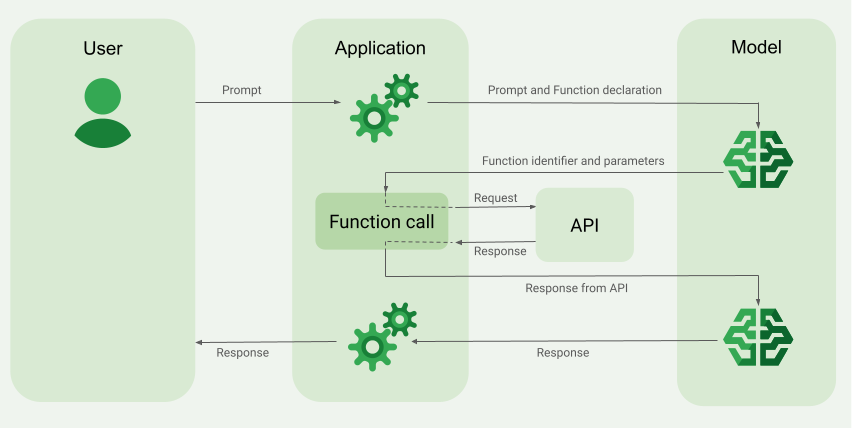
Function calling enables two primary use cases:
- **Fetching data**: Retrieve up-to-date information for model responses, such
as current weather, currency conversion, or specific data from knowledge
bases and APIs (RAG).
- **Taking action**: Perform external operations like submitting forms,
updating application state, or orchestrating agentic workflows (e.g.,
conversation handoffs).
For more use cases and examples that are powered by function calling, see [Use
cases](https://docs.cloud.google.com/gemini-enterprise-agent-platform/models/tools/function-calling#use-cases).
## Features and limitations
- The following models support function calling:
- Gemini models:
#### Click to expand supported models
- [Gemini Robotics ER 2](https://docs.cloud.google.com/gemini-enterprise-agent-platform/models/gemini/robotics-er-2.md.txt) preview
- [Gemini 4 Hydrogen](https://docs.cloud.google.com/gemini-enterprise-agent-platform/models/gemini/4-hydrogen.md.txt)
- [Gemini 4 Carbon for cyber](https://docs.cloud.google.com/gemini-enterprise-agent-platform/models/gemini/4-carbon.md.txt#cyber)
- [Gemini 4 Carbon](https://docs.cloud.google.com/gemini-enterprise-agent-platform/models/gemini/4-carbon.md.txt)
- [Gemini 4 Argon Cyber Permissive](https://docs.cloud.google.com/gemini-enterprise-agent-platform/models/gemini/4-argon.md.txt#cyber)
- [Gemini 4 Argon](https://docs.cloud.google.com/gemini-enterprise-agent-platform/models/gemini/4-argon.md.txt)
- [Gemini 3.8 Live](https://docs.cloud.google.com/gemini-enterprise-agent-platform/models/gemini/3-8-live.md.txt)
- [Gemini 3.8 Flash Cyber](https://docs.cloud.google.com/gemini-enterprise-agent-platform/models/gemini/3-8-flash-cyber.md.txt)
- [Gemini 3.8 Flash](https://docs.cloud.google.com/gemini-enterprise-agent-platform/models/gemini/3-8-flash.md.txt)
- [Gemini 3.7 Flash](https://docs.cloud.google.com/gemini-enterprise-agent-platform/models/gemini/3-7-flash.md.txt)
- [Gemini 3.6 Flash](https://docs.cloud.google.com/gemini-enterprise-agent-platform/models/gemini/3-6-flash.md.txt)
- [Gemini 3.5 Flash-Lite](https://docs.cloud.google.com/gemini-enterprise-agent-platform/models/gemini/3-5-flash-lite.md.txt)
- [Gemini 3.5 Flash](https://docs.cloud.google.com/gemini-enterprise-agent-platform/models/gemini/3-5-flash.md.txt)
- [Gemini 3.1 Pro](https://docs.cloud.google.com/gemini-enterprise-agent-platform/models/gemini/3-1-pro.md.txt) preview
- [Gemini 3.1 Flash-Lite](https://docs.cloud.google.com/gemini-enterprise-agent-platform/models/gemini/3-1-flash-lite.md.txt)
- [Gemini 3 Flash](https://docs.cloud.google.com/gemini-enterprise-agent-platform/models/gemini/3-flash.md.txt) preview
- [Gemini 2.5 Pro](https://docs.cloud.google.com/gemini-enterprise-agent-platform/models/gemini/2-5-pro.md.txt)
- [Gemini 2.5 Flash-Lite](https://docs.cloud.google.com/gemini-enterprise-agent-platform/models/gemini/2-5-flash-lite.md.txt)
- [Gemini 2.5 Flash with Gemini Live API native audio](https://docs.cloud.google.com/gemini-enterprise-agent-platform/models/gemini/2-5-flash-live-api.md.txt)
- [Gemini 2.5 Flash](https://docs.cloud.google.com/gemini-enterprise-agent-platform/models/gemini/2-5-flash.md.txt)
- Open models:
- [DeepSeek-V4.1-Flash](https://docs.cloud.google.com/gemini-enterprise-agent-platform/models/maas/deepseek/deepseek-v41-flash.md.txt)
- [Gemma 4 26B A4B IT](https://docs.cloud.google.com/gemini-enterprise-agent-platform/models/maas/google/gemma-4-26b-a4b-it.md.txt)
- [GLM 5.2](https://docs.cloud.google.com/gemini-enterprise-agent-platform/models/maas/zaiorg/glm-52.md.txt)
- [Llama 4 Maverick](https://docs.cloud.google.com/gemini-enterprise-agent-platform/models/partner-models/llama/llama4-maverick.md.txt)
- [Llama 4 Scout](https://docs.cloud.google.com/gemini-enterprise-agent-platform/models/partner-models/llama/llama4-scout.md.txt)
- [OpenAI gpt-oss 120B](https://docs.cloud.google.com/gemini-enterprise-agent-platform/models/maas/openai/gpt-oss-120b.md.txt)
- Define your functions in the [OpenAPI schema](https://spec.openapis.org/oas/v3.0.3#schema) format.
- For Gemini 3 and later models, you can include multimodal content
(images and PDFs) in `functionResponse` messages that you send back to
the model. For more information, see [Multimodal function responses](https://docs.cloud.google.com/gemini-enterprise-agent-platform/models/tools/function-calling.md.txt#mm-fr).
- For Gemini 3 and later models, you can stream
function call arguments as they are generated by setting
`streamFunctionCallArguments` to `true` in the `functionCallingConfig`.
For more information, see [Streaming function call arguments](https://docs.cloud.google.com/gemini-enterprise-agent-platform/models/tools/function-calling.md.txt#streaming-fc).
- For best practices related to the function declarations, including tips for names and descriptions, see [Best practices](https://docs.cloud.google.com/gemini-enterprise-agent-platform/models/tools/function-calling.md.txt#best-practices).
- For Open Models, follow this [user guide](https://docs.cloud.google.com/gemini-enterprise-agent-platform/models/maas/capabilities/function-calling.md.txt).
## How to create a function calling application
To use function calling, perform the following tasks:
1. [Submit function declarations and prompt to the model](https://docs.cloud.google.com/gemini-enterprise-agent-platform/models/tools/function-calling.md.txt#submit-prompt).
2. [Provide the API output to the model](https://docs.cloud.google.com/gemini-enterprise-agent-platform/models/tools/function-calling.md.txt#submit-api-output).
### Step 1: Submit the prompt and function declarations to the model
Declare a [`Tool`](https://docs.cloud.google.com/python/docs/reference/aiplatform/latest/vertexai.generative_models.Tool) in a schema format that's compatible with the [OpenAPI schema](https://spec.openapis.org/oas/v3.0.3#schema). For more information, see [Schema examples](https://docs.cloud.google.com/gemini-enterprise-agent-platform/models/tools/function-calling.md.txt#schema-examples).
The following examples submit a prompt and function declaration to the Gemini models:
### REST
#### GenerateContent API
Before using any of the request data,
make the following replacements:
- LOCATION: The region to process the request, such as `us-central1`.
- PROJECT_ID: Your [project ID](https://docs.cloud.google.com/resource-manager/docs/creating-managing-projects.md.txt#identifiers).
HTTP method and URL:
```
POST https://LOCATION-aiplatform.googleapis.com/v1/projects/PROJECT_ID/locations/LOCATION/publishers/google/models/gemini-2.5-flash:generateContent
```
Request JSON body:
```
{
"contents": [
{
"role": "user",
"parts": [
{
"text": "What is the weather in Boston?"
}
]
}
],
"tools": [
{
"functionDeclarations": [
{
"name": "get_current_weather",
"description": "Get the current weather in a given location",
"parameters": {
"type": "object",
"properties": {
"location": {
"type": "string",
"description": "The city name of the location for which to get the weather.",
"default": {
"string_value": "Boston, MA"
}
}
},
"required": [
"location"
]
}
}
]
}
]
}
```
To send your request, choose one of these options:
#### curl
> [!NOTE]
> **Note:** The following command assumes that you have logged in to the `gcloud` CLI with your user account by running [`gcloud init`](https://docs.cloud.google.com/sdk/gcloud/reference/init) or [`gcloud auth login`](https://docs.cloud.google.com/sdk/gcloud/reference/auth/login.md.txt) , or by using [Cloud Shell](https://docs.cloud.google.com/shell/docs.md.txt), which automatically logs you into the `gcloud` CLI . You can check the currently active account by running [`gcloud auth list`](https://docs.cloud.google.com/sdk/gcloud/reference/auth/list.md.txt).
Save the request body in a file named `request.json`,
and execute the following command:
```
curl -X POST \
-H "Authorization: Bearer $(gcloud auth print-access-token)" \
-H "Content-Type: application/json; charset=utf-8" \
-d @request.json \
"https://LOCATION-aiplatform.googleapis.com/v1/projects/PROJECT_ID/locations/LOCATION/publishers/google/models/gemini-2.5-flash:generateContent"
```
#### PowerShell
> [!NOTE]
> **Note:** The following command assumes that you have logged in to the `gcloud` CLI with your user account by running [`gcloud init`](https://docs.cloud.google.com/sdk/gcloud/reference/init) or [`gcloud auth login`](https://docs.cloud.google.com/sdk/gcloud/reference/auth/login.md.txt) . You can check the currently active account by running [`gcloud auth list`](https://docs.cloud.google.com/sdk/gcloud/reference/auth/list.md.txt).
Save the request body in a file named `request.json`,
and execute the following command:
```
$cred = gcloud auth print-access-token
$headers = @{ "Authorization" = "Bearer $cred" }
Invoke-WebRequest `
-Method POST `
-Headers $headers `
-ContentType: "application/json; charset=utf-8" `
-InFile request.json `
-Uri "https://LOCATION-aiplatform.googleapis.com/v1/projects/PROJECT_ID/locations/LOCATION/publishers/google/models/gemini-2.5-flash:generateContent" | Select-Object -Expand Content
```
#### Interactions API
Before using any of the request data,
make the following replacements:
- PROJECT_ID: Your [project ID](https://docs.cloud.google.com/resource-manager/docs/creating-managing-projects.md.txt#identifiers).
HTTP method and URL:
```
POST https://aiplatform.googleapis.com/v1/projects/PROJECT_ID/locations/global/interactions
```
Request JSON body:
```
{
"model": "gemini-3.8-flash",
"input": [
{
"type": "user_input",
"content": [
{
"type": "text",
"text": "What is the weather in Boston?"
}
]
}
],
"tools": [
{
"type": "function",
"name": "get_current_weather",
"description": "Get the current weather in a given location",
"parameters": {
"type": "object",
"properties": {
"location": {
"type": "string",
"description": "The city name of the location for which to get the weather.",
"default": "Boston, MA"
}
},
"required": [
"location"
]
}
}
]
}
```
To send your request, choose one of these options:
#### curl
> [!NOTE]
> **Note:** The following command assumes that you have logged in to the `gcloud` CLI with your user account by running [`gcloud init`](https://docs.cloud.google.com/sdk/gcloud/reference/init) or [`gcloud auth login`](https://docs.cloud.google.com/sdk/gcloud/reference/auth/login.md.txt) , or by using [Cloud Shell](https://docs.cloud.google.com/shell/docs.md.txt), which automatically logs you into the `gcloud` CLI . You can check the currently active account by running [`gcloud auth list`](https://docs.cloud.google.com/sdk/gcloud/reference/auth/list.md.txt).
Save the request body in a file named `request.json`,
and execute the following command:
```
curl -X POST \
-H "Authorization: Bearer $(gcloud auth print-access-token)" \
-H "Content-Type: application/json; charset=utf-8" \
-d @request.json \
"https://aiplatform.googleapis.com/v1/projects/PROJECT_ID/locations/global/interactions"
```
#### PowerShell
> [!NOTE]
> **Note:** The following command assumes that you have logged in to the `gcloud` CLI with your user account by running [`gcloud init`](https://docs.cloud.google.com/sdk/gcloud/reference/init) or [`gcloud auth login`](https://docs.cloud.google.com/sdk/gcloud/reference/auth/login.md.txt) . You can check the currently active account by running [`gcloud auth list`](https://docs.cloud.google.com/sdk/gcloud/reference/auth/list.md.txt).
Save the request body in a file named `request.json`,
and execute the following command:
```
$cred = gcloud auth print-access-token
$headers = @{ "Authorization" = "Bearer $cred" }
Invoke-WebRequest `
-Method POST `
-Headers $headers `
-ContentType: "application/json; charset=utf-8" `
-InFile request.json `
-Uri "https://aiplatform.googleapis.com/v1/projects/PROJECT_ID/locations/global/interactions" | Select-Object -Expand Content
```
### Google Gen AI SDK for Python
#### GenerateContent API
```python
from google import genai
from google.genai.types import GenerateContentConfig, Part
# The project and location are passed directly to the client,
# and vertexai=True is added to specify the use of the Agent Platform backend.
client = genai.Client(vertexai=True, project="PROJECT_ID", location="global")
def get_current_weather(location: str) -> str:
"""Returns the current weather.
Args:
location: The city and state, e.g. San Francisco, CA
"""
return 'sunny'
response = client.models.generate_content(
model="gemini-2.5-flash",
contents="What is the weather in boston?",
config=GenerateContentConfig(tools=[get_current_weather]),
)
```
#### Interactions API
```python
from google import genai
client = genai.Client(
enterprise=True,
project="PROJECT_ID",
location="global",
)
weather_tool = {
"type": "function",
"name": "get_current_weather",
"description": "Get the current weather in a given location",
"parameters": {
"type": "object",
"properties": {
"location": {
"type": "string",
"description": "The city name of the location for which to get the weather.",
"default": "Boston, MA",
}
},
"required": ["location"],
},
}
interaction = client.interactions.create(
model="gemini-3.8-flash",
input="What is the weather in Boston?",
tools=[weather_tool],
)
for step in interaction.steps:
if step.type == "function_call":
print(f"Function call: {step.name}({step.arguments})")
```
### Agent Platform SDK
You can specify the schema either manually using a Python dictionary or
automatically with the `from_func` helper function. The
following example demonstrates how to declare a function manually:
```python
import vertexai
from vertexai.generative_models import (
Content,
FunctionDeclaration,
GenerationConfig,
GenerativeModel,
Part,
Tool,
ToolConfig
)
# Initialize Agent Platform
# TODO(developer): Update the project
vertexai.init(project="PROJECT_ID", location="us-central1")
# Initialize Gemini model
model = GenerativeModel(model_name="gemini-2.5-flash")
# Manual function declaration
get_current_weather_func = FunctionDeclaration(
name="get_current_weather",
description="Get the current weather in a given location",
# Function parameters are specified in JSON schema format
parameters={
"type": "object",
"properties": {
"location": {
"type": "string",
"description": "The city name of the location for which to get the weather.",
"default": {
"string_value": "Boston, MA"
}
}
},
},
)
response = model.generate_content(
contents = [
Content(
role="user",
parts=[
Part.from_text("What is the weather like in Boston?"),
],
)
],
generation_config = GenerationConfig(temperature=0),
tools = [
Tool(
function_declarations=[get_current_weather_func],
)
]
)
```
Alternatively, you can declare the function automatically with the
`from_func` helper function as shown in the following
example:
```python
def get_current_weather(location: str = "Boston, MA"):
"""
Get the current weather in a given location
Args:
location: The city name of the location for which to get the weather.
"""
# This example uses a mock implementation.
# You can define a local function or import the requests library to call an API
return {
"location": "Boston, MA",
"temperature": 38,
"description": "Partly Cloudy",
"icon": "partly-cloudy",
"humidity": 65,
"wind": {
"speed": 10,
"direction": "NW"
}
}
get_current_weather_func = FunctionDeclaration.from_func(get_current_weather)
```
### Node.js
Before trying this sample, follow the Node.js setup instructions in the
[Agent Platform quickstart using
client libraries](https://docs.cloud.google.com/gemini-enterprise-agent-platform/machine-learning/start/client-libraries).
To authenticate to Agent Platform, set up Application Default Credentials.
For more information, see
[Set up authentication for a local development environment](https://docs.cloud.google.com/docs/authentication/set-up-adc-local-dev-environment.md.txt).
This example demonstrates a text scenario with one function and one prompt.
```javascript
const {GoogleGenAI} = require('@google/genai');
const tools = [
{
functionDeclarations: [
{
name: 'get_current_weather',
description: 'get weather in a given location',
parameters: {
type: 'OBJECT',
properties: {
location: {type: 'STRING'},
unit: {type: 'STRING', enum: ['celsius', 'fahrenheit']},
},
required: ['location'],
},
},
],
},
];
const functionResponseParts = [
{
functionResponse: {
name: 'get_current_weather',
response: {weather: 'super nice'},
},
},
];
/**
* TODO(developer): Update these variables before running the sample.
*/
async function functionCallingStreamContent(
projectId = 'PROJECT_ID',
location = 'us-central1',
model = 'gemini-2.5-flash'
) {
// Initialize client with your Cloud project and location
const client = new GoogleGenAI({
vertexai: true,
project: projectId,
location: location,
});
const request = [
{role: 'user', parts: [{text: 'What is the weather in Boston?'}]},
{
role: 'model',
parts: [
{
functionCall: {
name: 'get_current_weather',
args: {location: 'Boston'},
},
},
],
},
{role: 'user', parts: functionResponseParts},
];
const streamingResp = await client.models.generateContentStream({
model: model,
contents: request,
config: {tools: tools},
});
let completeResponseText = '';
for await (const chunk of streamingResp) {
if (chunk.text) {
completeResponseText += chunk.text;
}
}
console.log(completeResponseText);
}
```
### Go
Learn how to install or update the [Go](https://docs.cloud.google.com/vertex-ai/generative-ai/docs/sdks/overview).
To learn more, see the
[SDK reference documentation](https://pkg.go.dev/google.golang.org/genai).
Set environment variables to use the Google Gen AI SDK with Vertex AI:
```bash
# Replace the `GOOGLE_CLOUD_PROJECT` and `GOOGLE_CLOUD_LOCATION` values
# with appropriate values for your project.
export GOOGLE_CLOUD_PROJECT=GOOGLE_CLOUD_PROJECT
export GOOGLE_CLOUD_LOCATION=global
export GOOGLE_GENAI_USE_ENTERPRISE=True
```
import (
"context"
"fmt"
"io"
genai "google.golang.org/genai"
)
// generateWithFuncCall shows how to submit a prompt and a function declaration to the model,
// allowing it to suggest a call to the function to fetch external data. Returning this data
// enables the model to generate a text response that incorporates the data.
func generateWithFuncCall(w io.Writer) error {
ctx := context.Background()
client, err := genai.NewClient(ctx, &genai.ClientConfig{
HTTPOptions: genai.HTTPOptions{APIVersion: "v1"},
})
if err != nil {
return fmt.Errorf("failed to create genai client: %w", err)
}
weatherFunc := &genai.FunctionDeclaration{
Description: "Returns the current weather in a location.",
Name: "getCurrentWeather",
Parameters: &genai.Schema{
Type: "object",
Properties: map[string]*genai.Schema{
"location": {Type: "string"},
},
Required: []string{"location"},
},
}
config := &genai.GenerateContentConfig{
Tools: []*genai.Tool{
{FunctionDeclarations: []*genai.FunctionDeclaration{weatherFunc}},
},
Temperature: genai.Ptr(float32(0.0)),
}
modelName := "gemini-2.5-flash"
contents := []*genai.Content{
{Parts: []*genai.Part{
{Text: "What is the weather like in Boston?"},
},
Role: genai.RoleUser},
}
resp, err := client.Models.GenerateContent(ctx, modelName, contents, config)
if err != nil {
return fmt.Errorf("failed to generate content: %w", err)
}
var funcCall *genai.FunctionCall
for _, p := range resp.Candidates[0].Content.Parts {
if p.FunctionCall != nil {
funcCall = p.FunctionCall
fmt.Fprint(w, "The model suggests to call the function ")
fmt.Fprintf(w, "%q with args: %v\n", funcCall.Name, funcCall.Args)
// Example response:
// The model suggests to call the function "getCurrentWeather" with args: map[location:Boston]
}
}
if funcCall == nil {
return fmt.Errorf("model did not suggest a function call")
}
// Use synthetic data to simulate a response from the external API.
// In a real application, this would come from an actual weather API.
funcResp := &genai.FunctionResponse{
Name: "getCurrentWeather",
Response: map[string]any{
"location": "Boston",
"temperature": "38",
"temperature_unit": "F",
"description": "Cold and cloudy",
"humidity": "65",
"wind": `{"speed": "10", "direction": "NW"}`,
},
}
// Return conversation turns and API response to complete the model's response.
contents = []*genai.Content{
{Parts: []*genai.Part{
{Text: "What is the weather like in Boston?"},
},
Role: genai.RoleUser},
{Parts: []*genai.Part{
{FunctionCall: funcCall},
}},
{Parts: []*genai.Part{
{FunctionResponse: funcResp},
}},
}
resp, err = client.Models.GenerateContent(ctx, modelName, contents, config)
if err != nil {
return fmt.Errorf("failed to generate content: %w", err)
}
respText := resp.Text()
fmt.Fprintln(w, respText)
// Example response:
// The weather in Boston is cold and cloudy with a temperature of 38 degrees Fahrenheit. The humidity is ...
return nil
}
### C#
Before trying this sample, follow the C# setup instructions in the
[Agent Platform quickstart using
client libraries](https://docs.cloud.google.com/gemini-enterprise-agent-platform/machine-learning/start/client-libraries).
To authenticate to Agent Platform, set up Application Default Credentials.
For more information, see
[Set up authentication for a local development environment](https://docs.cloud.google.com/docs/authentication/set-up-adc-local-dev-environment.md.txt).
This example demonstrates a text scenario with one function and one prompt.
```c#
using Google.Cloud.AIPlatform.V1;
using System;
using System.Threading.Tasks;
using Type = Google.Cloud.AIPlatform.V1.Type;
using Value = Google.Protobuf.WellKnownTypes.Value;
public class FunctionCalling
{
public async Task GenerateFunctionCall(
string projectId = "your-project-id",
string location = "us-central1",
string publisher = "google",
string model = "gemini-2.5-flash")
{
var predictionServiceClient = new PredictionServiceClientBuilder
{
Endpoint = $"{location}-aiplatform.googleapis.com"
}.Build();
// Define the user's prompt in a Content object that we can reuse in
// model calls
var userPromptContent = new Content
{
Role = "USER",
Parts =
{
new Part { Text = "What is the weather like in Boston?" }
}
};
// Specify a function declaration and parameters for an API request
var functionName = "get_current_weather";
var getCurrentWeatherFunc = new FunctionDeclaration
{
Name = functionName,
Description = "Get the current weather in a given location",
Parameters = new OpenApiSchema
{
Type = Type.Object,
Properties =
{
["location"] = new()
{
Type = Type.String,
Description = "Get the current weather in a given location"
},
["unit"] = new()
{
Type = Type.String,
Description = "The unit of measurement for the temperature",
Enum = {"celsius", "fahrenheit"}
}
},
Required = { "location" }
}
};
// Send the prompt and instruct the model to generate content using the tool that you just created
var generateContentRequest = new GenerateContentRequest
{
Model = $"projects/{projectId}/locations/{location}/publishers/{publisher}/models/{model}",
GenerationConfig = new GenerationConfig
{
Temperature = 0f
},
Contents =
{
userPromptContent
},
Tools =
{
new Tool
{
FunctionDeclarations = { getCurrentWeatherFunc }
}
}
};
GenerateContentResponse response = await predictionServiceClient.GenerateContentAsync(generateContentRequest);
var functionCall = response.Candidates[0].Content.Parts[0].FunctionCall;
Console.WriteLine(functionCall);
string apiResponse = "";
// Check the function name that the model responded with, and make an API call to an external system
if (functionCall.Name == functionName)
{
// Extract the arguments to use in your API call
string locationCity = functionCall.Args.Fields["location"].StringValue;
// Here you can use your preferred method to make an API request to
// fetch the current weather
// In this example, we'll use synthetic data to simulate a response
// payload from an external API
apiResponse = @"{ ""location"": ""Boston, MA"",
""temperature"": 38, ""description"": ""Partly Cloudy""}";
}
// Return the API response to Gemini so it can generate a model response or request another function call
generateContentRequest = new GenerateContentRequest
{
Model = $"projects/{projectId}/locations/{location}/publishers/{publisher}/models/{model}",
Contents =
{
userPromptContent, // User prompt
response.Candidates[0].Content, // Function call response,
new Content
{
Parts =
{
new Part
{
FunctionResponse = new()
{
Name = functionName,
Response = new()
{
Fields =
{
{ "content", new Value { StringValue = apiResponse } }
}
}
}
}
}
}
},
Tools =
{
new Tool
{
FunctionDeclarations = { getCurrentWeatherFunc }
}
}
};
response = await predictionServiceClient.GenerateContentAsync(generateContentRequest);
string responseText = response.Candidates[0].Content.Parts[0].Text;
Console.WriteLine(responseText);
return responseText;
}
}
```
### Java
Before trying this sample, follow the Java setup instructions in the
[Agent Platform quickstart using
client libraries](https://docs.cloud.google.com/gemini-enterprise-agent-platform/machine-learning/start/client-libraries).
To authenticate to Agent Platform, set up Application Default Credentials.
For more information, see
[Set up authentication for a local development environment](https://docs.cloud.google.com/docs/authentication/set-up-adc-local-dev-environment.md.txt).
```java
import com.google.genai.Client;
import com.google.genai.types.FunctionCall;
import com.google.genai.types.FunctionDeclaration;
import com.google.genai.types.GenerateContentConfig;
import com.google.genai.types.GenerateContentResponse;
import com.google.genai.types.HttpOptions;
import com.google.genai.types.Schema;
import com.google.genai.types.Tool;
import com.google.genai.types.Type;
import java.util.List;
import java.util.Map;
public class ToolFunctionDescriptionWithText {
public static void main(String[] args) {
// TODO(developer): Replace these variables before running the sample.
String modelId = "gemini-2.5-flash";
String contents = "What is the weather like in Boston?";
generateContent(modelId, contents);
}
// Generates content with text input and function declaration that
// the model may use to retrieve external data for the response
public static String generateContent(String modelId, String contents) {
// Initialize client that will be used to send requests. This client only needs to be created
// once, and can be reused for multiple requests.
try (Client client =
Client.builder()
.location("global")
.vertexAI(true)
.httpOptions(HttpOptions.builder().apiVersion("v1").build())
.build()) {
FunctionDeclaration getCurrentWeather =
FunctionDeclaration.builder()
.name("get_current_weather")
.description("Get the current weather in a given location")
// Function parameters are specified in schema format
.parameters(
Schema.builder()
.type(Type.Known.OBJECT)
.properties(
Map.of(
"location",
Schema.builder()
.type(Type.Known.STRING)
.description(
"The city name of the location for which to get the weather.")
.build()))
.required(List.of("location"))
.build()) // End parameters schema
.build(); // End function declaration
Tool weatherTool = Tool.builder().functionDeclarations(getCurrentWeather).build();
GenerateContentConfig config =
GenerateContentConfig.builder().tools(weatherTool).temperature(0.0f).build();
GenerateContentResponse response = client.models.generateContent(modelId, contents, config);
// response.functionCalls() returns an ImmutableList.
List functionCalls = response.functionCalls();
if (functionCalls != null && !functionCalls.isEmpty()) {
System.out.println(functionCalls.get(0));
return functionCalls.toString();
}
System.out.println("No function calls found in response.");
return "";
// Example response:
// [FunctionCall{args=Optional[{location=Boston, MA}], name=Optional[get_current_weather]}]
}
}
}
```
If the model determines that it needs the output of a particular function, the
response that the application receives from the model contains the function name
and the parameter values that the function should be called with.
The following is an example of a model response to the user prompt "What is the weather like in Boston?". The model proposes calling
the `get_current_weather` function with the parameter `Boston, MA`.
```
candidates {
content {
role: "model"
parts {
function_call {
name: "get_current_weather"
args {
fields {
key: "location"
value {
string_value: "Boston, MA"
}
}
}
}
}
}
...
}
```
### Step 2: Provide the API output to the model
Invoke the external API and pass the API output back to the model.
The following example uses synthetic data to simulate a response payload from an
external API and submits the output back to the model:
### REST
#### GenerateContent API
Before using any of the request data,
make the following replacements:
- LOCATION: The region to process the request, such as `us-central1`.
- PROJECT_ID: Your [project ID](https://docs.cloud.google.com/resource-manager/docs/creating-managing-projects.md.txt#identifiers).
HTTP method and URL:
```
POST https://LOCATION-aiplatform.googleapis.com/v1/projects/PROJECT_ID/locations/LOCATION/publishers/google/models/gemini-2.5-flash:generateContent
```
Request JSON body:
```
{
"contents": [
{
"role": "user",
"parts": {
"text": "What is the weather in Boston?"
}
},
{
"role": "model",
"parts": [
{
"functionCall": {
"name": "get_current_weather",
"args": {
"location": "Boston, MA"
}
}
}
]
},
{
"role": "user",
"parts": [
{
"functionResponse": {
"name": "get_current_weather",
"response": {
"temperature": 20,
"unit": "C"
}
}
}
]
}
],
"tools": [
{
"function_declarations": [
{
"name": "get_current_weather",
"description": "Get the current weather in a specific location",
"parameters": {
"type": "object",
"properties": {
"location": {
"type": "string",
"description": "The city name of the location for which to get the weather."
}
},
"required": [
"location"
]
}
}
]
}
]
}
```
To send your request, choose one of these options:
#### curl
> [!NOTE]
> **Note:** The following command assumes that you have logged in to the `gcloud` CLI with your user account by running [`gcloud init`](https://docs.cloud.google.com/sdk/gcloud/reference/init) or [`gcloud auth login`](https://docs.cloud.google.com/sdk/gcloud/reference/auth/login.md.txt) , or by using [Cloud Shell](https://docs.cloud.google.com/shell/docs.md.txt), which automatically logs you into the `gcloud` CLI . You can check the currently active account by running [`gcloud auth list`](https://docs.cloud.google.com/sdk/gcloud/reference/auth/list.md.txt).
Save the request body in a file named `request.json`,
and execute the following command:
```
curl -X POST \
-H "Authorization: Bearer $(gcloud auth print-access-token)" \
-H "Content-Type: application/json; charset=utf-8" \
-d @request.json \
"https://LOCATION-aiplatform.googleapis.com/v1/projects/PROJECT_ID/locations/LOCATION/publishers/google/models/gemini-2.5-flash:generateContent"
```
#### PowerShell
> [!NOTE]
> **Note:** The following command assumes that you have logged in to the `gcloud` CLI with your user account by running [`gcloud init`](https://docs.cloud.google.com/sdk/gcloud/reference/init) or [`gcloud auth login`](https://docs.cloud.google.com/sdk/gcloud/reference/auth/login.md.txt) . You can check the currently active account by running [`gcloud auth list`](https://docs.cloud.google.com/sdk/gcloud/reference/auth/list.md.txt).
Save the request body in a file named `request.json`,
and execute the following command:
```
$cred = gcloud auth print-access-token
$headers = @{ "Authorization" = "Bearer $cred" }
Invoke-WebRequest `
-Method POST `
-Headers $headers `
-ContentType: "application/json; charset=utf-8" `
-InFile request.json `
-Uri "https://LOCATION-aiplatform.googleapis.com/v1/projects/PROJECT_ID/locations/LOCATION/publishers/google/models/gemini-2.5-flash:generateContent" | Select-Object -Expand Content
```
#### Interactions API
Before using any of the request data,
make the following replacements:
- PROJECT_ID: Your [project ID](https://docs.cloud.google.com/resource-manager/docs/creating-managing-projects.md.txt#identifiers).
HTTP method and URL:
```
POST https://aiplatform.googleapis.com/v1/projects/PROJECT_ID/locations/global/interactions
```
Request JSON body:
```
{
"model": "gemini-3.8-flash",
"input": [
{
"type": "user_input",
"content": [
{
"type": "text",
"text": "What is the weather in Boston?"
}
]
},
{
"type": "function_call",
"id": "call_98231",
"name": "get_current_weather",
"arguments": {
"location": "Boston, MA"
}
},
{
"type": "function_result",
"call_id": "call_98231",
"name": "get_current_weather",
"result": {
"temperature": 20,
"unit": "C"
}
}
],
"tools": [
{
"type": "function",
"name": "get_current_weather",
"description": "Get the current weather in a specific location",
"parameters": {
"type": "object",
"properties": {
"location": {
"type": "string",
"description": "The city name of the location for which to get the weather."
}
},
"required": [
"location"
]
}
}
]
}
```
To send your request, choose one of these options:
#### curl
> [!NOTE]
> **Note:** The following command assumes that you have logged in to the `gcloud` CLI with your user account by running [`gcloud init`](https://docs.cloud.google.com/sdk/gcloud/reference/init) or [`gcloud auth login`](https://docs.cloud.google.com/sdk/gcloud/reference/auth/login.md.txt) , or by using [Cloud Shell](https://docs.cloud.google.com/shell/docs.md.txt), which automatically logs you into the `gcloud` CLI . You can check the currently active account by running [`gcloud auth list`](https://docs.cloud.google.com/sdk/gcloud/reference/auth/list.md.txt).
Save the request body in a file named `request.json`,
and execute the following command:
```
curl -X POST \
-H "Authorization: Bearer $(gcloud auth print-access-token)" \
-H "Content-Type: application/json; charset=utf-8" \
-d @request.json \
"https://aiplatform.googleapis.com/v1/projects/PROJECT_ID/locations/global/interactions"
```
#### PowerShell
> [!NOTE]
> **Note:** The following command assumes that you have logged in to the `gcloud` CLI with your user account by running [`gcloud init`](https://docs.cloud.google.com/sdk/gcloud/reference/init) or [`gcloud auth login`](https://docs.cloud.google.com/sdk/gcloud/reference/auth/login.md.txt) . You can check the currently active account by running [`gcloud auth list`](https://docs.cloud.google.com/sdk/gcloud/reference/auth/list.md.txt).
Save the request body in a file named `request.json`,
and execute the following command:
```
$cred = gcloud auth print-access-token
$headers = @{ "Authorization" = "Bearer $cred" }
Invoke-WebRequest `
-Method POST `
-Headers $headers `
-ContentType: "application/json; charset=utf-8" `
-InFile request.json `
-Uri "https://aiplatform.googleapis.com/v1/projects/PROJECT_ID/locations/global/interactions" | Select-Object -Expand Content
```
### Google Gen AI SDK for Python
#### GenerateContent API
```python
from google.genai import types
response = client.models.generate_content(
model="gemini-2.5-flash",
contents=[
types.Content(
role="user",
parts=[types.Part.from_text(text="What is the weather like in Boston?")],
),
response.candidates[0].content,
types.Content(
role="user",
parts=[
types.Part.from_function_response(
name="get_current_weather",
response={
"contents": {
"location": "Boston, MA",
"temperature": 38,
"description": "Partly Cloudy",
}
},
)
],
),
],
config=types.GenerateContentConfig(tools=[get_current_weather]),
)
print(response.text)
```
#### Interactions API
```python
for step in interaction.steps:
if step.type == "function_call":
print(f"Function call: {step.name}")
# Use synthetic data to simulate a response payload from an external API
api_response = {
"location": "Boston, MA",
"temperature": 38,
"description": "Partly Cloudy",
}
next_interaction = client.interactions.create(
model="gemini-3.8-flash",
previous_interaction_id=interaction.id,
input=[
{
"type": "function_result",
"call_id": step.id,
"name": step.name,
"result": api_response,
}
],
)
print(next_interaction.output_text)
```
### Agent Platform SDK
```python
function_response_contents = []
function_response_parts = []
# Iterates through the function calls in the response in case there are parallel function call requests
for function_call in response.candidates[0].function_calls:
print(f"Function call: {function_call.name}")
# In this example, we'll use synthetic data to simulate a response payload from an external API
if (function_call.args['location'] == "Boston, MA"):
api_response = { "location": "Boston, MA", "temperature": 38, "description": "Partly Cloudy" }
if (function_call.args['location'] == "San Francisco, CA"):
api_response = { "location": "San Francisco, CA", "temperature": 58, "description": "Sunny" }
function_response_parts.append(
Part.from_function_response(
name=function_call.name,
response={"contents": api_response}
)
)
# Add the function call response to the contents
function_response_contents = Content(role="user", parts=function_response_parts)
# Submit the User's prompt, model's response, and API output back to the model
response = model.generate_content(
[
Content( # User prompt
role="user",
parts=[
Part.from_text("What is the weather like in Boston?"),
],
),
response.candidates[0].content, # Function call response
function_response_contents # API output
],
tools=[
Tool(
function_declarations=[get_current_weather_func],
)
],
)
# Get the model summary response
print(response.text)
```
For best practices related to API invocation, see [Best practices - API invocation](https://docs.cloud.google.com/gemini-enterprise-agent-platform/models/tools/function-calling.md.txt#invoke-api-bp).
If the model had proposed several parallel function calls, the application must
provide all of the responses back to the model. To learn more, see
[Parallel function calling example](https://docs.cloud.google.com/gemini-enterprise-agent-platform/models/tools/function-calling.md.txt#parallel-samples).
The model may determine that the
output of another function is necessary for responding to the prompt. In this case,
the response that the application receives from the model contains another
function name and another set of parameter values.
If the model determines that the API response is sufficient for responding to
the user's prompt, it creates a natural language response and returns it to the
application. In this case, the application must pass the response back to the
user. The following is an example of a natural language response:
```
It is currently 38 degrees Fahrenheit in Boston, MA with partly cloudy skies.
```
## Function calling with thoughts
> [!NOTE]
> To see an example of how to use thought signatures,
> run the "Intro to thought signatures" notebook in one of the following
> environments:
>
> [Open in Colab](https://colab.research.google.com/github/GoogleCloudPlatform/generative-ai/blob/main/gemini/thinking/intro_thought_signatures.ipynb)
>
>
> \|
>
> [Open in Colab Enterprise](https://console.cloud.google.com/agent-platform/colab/import/https%3A%2F%2Fraw.githubusercontent.com%2FGoogleCloudPlatform%2Fgenerative-ai%2Fmain%2Fgemini%2Fthinking%2Fintro_thought_signatures.ipynb)
>
>
> \|
>
> [Open
> in Agent Platform Workbench](https://console.cloud.google.com/agent-platform/workbench/deploy-notebook?download_url=https://raw.githubusercontent.com/GoogleCloudPlatform/generative-ai/main/gemini/thinking/intro_thought_signatures.ipynb)
>
>
> \|
>
> [View on GitHub](https://github.com/GoogleCloudPlatform/generative-ai/blob/main/gemini/thinking/intro_thought_signatures.ipynb)
When calling functions with [thinking](https://docs.cloud.google.com/gemini-enterprise-agent-platform/models/thinking.md.txt) enabled, you'll
need to get the [`thought_signature`](https://docs.cloud.google.com/gemini-enterprise-agent-platform/models/thinking/thought-signatures.md.txt) from
the model response object and return it when you send the result of the function
execution back to the model. For example:
### Python
#### GenerateContent API
```python
# Call the model with function declarations
# ...Generation config, Configure the client, and Define user prompt (No changes)
# Send request with declarations (using a thinking model)
response = client.models.generate_content(
model="gemini-2.5-flash", config=config, contents=contents)
# See thought signatures
for part in response.candidates[0].content.parts:
if not part.text:
continue
if part.thought and part.thought_signature:
print("Thought signature:")
print(part.thought_signature)
```
#### Interactions API
```python
# Send request with function declarations (using a thinking model)
interaction = client.interactions.create(
model="gemini-3.8-flash",
input="What is the weather in Boston?",
tools=[weather_tool],
generation_config={"thinking_summaries": "auto"},
)
# See thought summaries and signatures
for step in interaction.steps:
if step.type == "thought":
if step.summary:
print("Thought summary:", step.summary[0].text)
if step.signature:
print("Thought signature:", step.signature)
```
Viewing thought signatures isn't required, but you will need to adjust [Step
2](https://docs.cloud.google.com/gemini-enterprise-agent-platform/models/tools/function-calling#invoke-api) to return them along with the result of the function execution
so it can incorporate the thoughts into its final response:
### Python
#### GenerateContent API
```python
# Create user friendly response with function result and call the model again
# ...Create a function response part (No change)
# Append thought signatures, function call and result of the function execution to contents
function_call_content = response.candidates[0].content
# Append the model's function call message, which includes thought signatures
contents.append(function_call_content)
contents.append(types.Content(role="user", parts=[function_response_part])) # Append the function response
final_response = client.models.generate_content(
model="gemini-2.5-flash",
config=config,
contents=contents,
)
print(final_response.text)
```
#### Interactions API
```python
# Option 1 (Stateful): Pass previous_interaction_id so the server preserves thought steps automatically
final_interaction = client.interactions.create(
model="gemini-3.8-flash",
previous_interaction_id=interaction.id,
input=[
{
"type": "function_result",
"call_id": function_call_step.id,
"name": function_call_step.name,
"result": api_response,
}
],
)
# Option 2 (Stateless): Append all steps from the previous turn (including thought steps and signatures)
steps = list(interaction.steps)
steps.append(
{
"type": "function_result",
"call_id": function_call_step.id,
"name": function_call_step.name,
"result": api_response,
}
)
final_interaction = client.interactions.create(
model="gemini-3.8-flash",
input=steps,
tools=[weather_tool],
)
print(final_interaction.output_text)
```
When returning thought signatures, follow these guidelines:
- The model returns signatures within other parts in the response, for example function calling or text, text, or thought summaries parts. Return the entire response with all parts back to the model in subsequent turns.
- Don't merge part with one signature with another part which also contains a signature. Signatures can't be concatenated together.
- Don't merge one part with a signature with another part without a signature. This breaks the correct positioning of the thought represented by the signature.
Learn more about limitations and usage of [thought signatures](https://docs.cloud.google.com/gemini-enterprise-agent-platform/models/thinking/thought-signatures.md.txt), and about
[thinking models](https://docs.cloud.google.com/gemini-enterprise-agent-platform/models/thinking.md.txt).
## Parallel function calling
For prompts such as "Get weather details in Boston and San Francisco?",
the model may propose several parallel function calls. For a list of models that
support parallel function calling, see [Supported models](https://docs.cloud.google.com/gemini-enterprise-agent-platform/models/tools/function-calling.md.txt#features).
When the model returns multiple `functionCall` parts in a single response, you
must return all corresponding `functionResponse` parts together in a single
`Content` object in the next turn. Don't interleave `functionCall` and
`functionResponse` parts across separate turns.
To ensure that each `functionResponse` is matched to the correct `functionCall`,
return your `functionResponse` parts in the `parts` array in the exact same
order as the `functionCall` parts returned by the model, with each
`functionResponse.name` set to the corresponding `functionCall.name`. This
positional ordering works across all supported Gemini models and API
versions.
For Gemini 3 and later models, the API also supports matching parallel
function responses to function calls in the following order of precedence:
1. **By `id`** : If `id` is populated in the `functionCall` (supported in the `v1beta1` API for Gemini 3 and later models) and you include the matching `id` in the `functionResponse`, the API matches the response to the call with the same `id`, regardless of the order in the `parts` array. The `functionResponse.name` must still match the corresponding `functionCall.name`, or the request fails with a `400` error.
2. **By `name` and sequential order** : If `id` isn't provided (such as in the `v1` API), the API matches each `functionResponse` to an unmatched `functionCall` with the same `name`. When the model makes multiple parallel calls to the same function name in a single turn, responses with that `name` are matched sequentially in the order they appear in the `parts` array.
> [!NOTE]
> To learn about parallel function calling with an end-to-end Jupyter notebook tutorial, see [Working with Parallel Function Calls and Multiple Function Responses in Gemini](https://github.com/GoogleCloudPlatform/generative-ai/blob/main/gemini/function-calling/parallel_function_calling.ipynb)
### REST
This example demonstrates a scenario with one `get_current_weather` function. The user prompt is "Get weather details in Boston and San Francisco?". The model proposes two parallel `get_current_weather` function calls: one with the parameter `Boston` and the other with the parameter `San Francisco`.
```json
{
"candidates": [
{
"content": {
"role": "model",
"parts": [
{
"functionCall": {
"name": "get_current_weather",
"args": {
"location": "Boston"
}
}
},
{
"functionCall": {
"name": "get_current_weather",
"args": {
"location": "San Francisco"
}
}
}
]
},
...
}
],
...
}
```
The following command demonstrates how you can provide the function output to the model:
#### GenerateContent API
Before using any of the request data,
make the following replacements:
- LOCATION: The region to process the request, such as `global`, `us`, or `en`.
- PROJECT_ID: Your [project ID](https://docs.cloud.google.com/resource-manager/docs/creating-managing-projects.md.txt#identifiers).
HTTP method and URL:
```
POST https://LOCATION-aiplatform.googleapis.com/v1/projects/PROJECT_ID/locations/LOCATION/publishers/google/models/gemini-4-argon:generateContent
```
Request JSON body:
```
{
"contents": [
{
"role": "user",
"parts": {
"text": "What is difference in temperature in Boston and San Francisco?"
}
},
{
"role": "model",
"parts": [
{
"functionCall": {
"name": "get_current_weather",
"args": {
"location": "Boston"
}
}
},
{
"functionCall": {
"name": "get_current_weather",
"args": {
"location": "San Francisco"
}
}
}
]
},
{
"role": "user",
"parts": [
{
"functionResponse": {
"name": "get_current_weather",
"response": {
"temperature": 30.5,
"unit": "C"
}
}
},
{
"functionResponse": {
"name": "get_current_weather",
"response": {
"temperature": 20,
"unit": "C"
}
}
}
]
}
],
"tools": [
{
"function_declarations": [
{
"name": "get_current_weather",
"description": "Get the current weather in a specific location",
"parameters": {
"type": "object",
"properties": {
"location": {
"type": "string",
"description": "The city name of the location for which to get the weather."
}
},
"required": [
"location"
]
}
}
]
}
]
}
```
To send your request, choose one of these options:
#### curl
> [!NOTE]
> **Note:** The following command assumes that you have logged in to the `gcloud` CLI with your user account by running [`gcloud init`](https://docs.cloud.google.com/sdk/gcloud/reference/init) or [`gcloud auth login`](https://docs.cloud.google.com/sdk/gcloud/reference/auth/login.md.txt) , or by using [Cloud Shell](https://docs.cloud.google.com/shell/docs.md.txt), which automatically logs you into the `gcloud` CLI . You can check the currently active account by running [`gcloud auth list`](https://docs.cloud.google.com/sdk/gcloud/reference/auth/list.md.txt).
Save the request body in a file named `request.json`,
and execute the following command:
```
curl -X POST \
-H "Authorization: Bearer $(gcloud auth print-access-token)" \
-H "Content-Type: application/json; charset=utf-8" \
-d @request.json \
"https://LOCATION-aiplatform.googleapis.com/v1/projects/PROJECT_ID/locations/LOCATION/publishers/google/models/gemini-4-argon:generateContent"
```
#### PowerShell
> [!NOTE]
> **Note:** The following command assumes that you have logged in to the `gcloud` CLI with your user account by running [`gcloud init`](https://docs.cloud.google.com/sdk/gcloud/reference/init) or [`gcloud auth login`](https://docs.cloud.google.com/sdk/gcloud/reference/auth/login.md.txt) . You can check the currently active account by running [`gcloud auth list`](https://docs.cloud.google.com/sdk/gcloud/reference/auth/list.md.txt).
Save the request body in a file named `request.json`,
and execute the following command:
```
$cred = gcloud auth print-access-token
$headers = @{ "Authorization" = "Bearer $cred" }
Invoke-WebRequest `
-Method POST `
-Headers $headers `
-ContentType: "application/json; charset=utf-8" `
-InFile request.json `
-Uri "https://LOCATION-aiplatform.googleapis.com/v1/projects/PROJECT_ID/locations/LOCATION/publishers/google/models/gemini-4-argon:generateContent" | Select-Object -Expand Content
```
The natural language response created by the model is similar to the following:
#### Response
```
[
{
"candidates": [
{
"content": {
"parts": [
{
"text": "The temperature in Boston is 30.5C and the temperature in San Francisco is 20C. The difference is 10.5C. \n"
}
]
},
"finishReason": "STOP",
...
}
]
...
}
]
```
#### Interactions API
Before using any of the request data,
make the following replacements:
- PROJECT_ID: Your [project ID](https://docs.cloud.google.com/resource-manager/docs/creating-managing-projects.md.txt#identifiers).
HTTP method and URL:
```
POST https://aiplatform.googleapis.com/v1/projects/PROJECT_ID/locations/global/interactions
```
Request JSON body:
```
{
"model": "gemini-3.8-flash",
"input": [
{
"type": "user_input",
"content": [
{
"type": "text",
"text": "What is difference in temperature in Boston and San Francisco?"
}
]
},
{
"type": "function_call",
"id": "call_98231",
"name": "get_current_weather",
"arguments": {
"location": "Boston"
}
},
{
"type": "function_call",
"id": "call_98232",
"name": "get_current_weather",
"arguments": {
"location": "San Francisco"
}
},
{
"type": "function_result",
"call_id": "call_98231",
"name": "get_current_weather",
"result": {
"temperature": 30.5,
"unit": "C"
}
},
{
"type": "function_result",
"call_id": "call_98232",
"name": "get_current_weather",
"result": {
"temperature": 20,
"unit": "C"
}
}
],
"tools": [
{
"type": "function",
"name": "get_current_weather",
"description": "Get the current weather in a specific location",
"parameters": {
"type": "object",
"properties": {
"location": {
"type": "string",
"description": "The city name of the location for which to get the weather."
}
},
"required": [
"location"
]
}
}
]
}
```
To send your request, choose one of these options:
#### curl
> [!NOTE]
> **Note:** The following command assumes that you have logged in to the `gcloud` CLI with your user account by running [`gcloud init`](https://docs.cloud.google.com/sdk/gcloud/reference/init) or [`gcloud auth login`](https://docs.cloud.google.com/sdk/gcloud/reference/auth/login.md.txt) , or by using [Cloud Shell](https://docs.cloud.google.com/shell/docs.md.txt), which automatically logs you into the `gcloud` CLI . You can check the currently active account by running [`gcloud auth list`](https://docs.cloud.google.com/sdk/gcloud/reference/auth/list.md.txt).
Save the request body in a file named `request.json`,
and execute the following command:
```
curl -X POST \
-H "Authorization: Bearer $(gcloud auth print-access-token)" \
-H "Content-Type: application/json; charset=utf-8" \
-d @request.json \
"https://aiplatform.googleapis.com/v1/projects/PROJECT_ID/locations/global/interactions"
```
#### PowerShell
> [!NOTE]
> **Note:** The following command assumes that you have logged in to the `gcloud` CLI with your user account by running [`gcloud init`](https://docs.cloud.google.com/sdk/gcloud/reference/init) or [`gcloud auth login`](https://docs.cloud.google.com/sdk/gcloud/reference/auth/login.md.txt) . You can check the currently active account by running [`gcloud auth list`](https://docs.cloud.google.com/sdk/gcloud/reference/auth/list.md.txt).
Save the request body in a file named `request.json`,
and execute the following command:
```
$cred = gcloud auth print-access-token
$headers = @{ "Authorization" = "Bearer $cred" }
Invoke-WebRequest `
-Method POST `
-Headers $headers `
-ContentType: "application/json; charset=utf-8" `
-InFile request.json `
-Uri "https://aiplatform.googleapis.com/v1/projects/PROJECT_ID/locations/global/interactions" | Select-Object -Expand Content
```
The natural language response created by the model is similar to the following:
#### Response
```
{
"id": "INTERACTION_ID",
"model": "gemini-3.8-flash",
"status": "completed",
"steps": [
{
"type": "model_output",
"content": [
{
"type": "text",
"text": "The temperature in Boston is 30.5C and the temperature in San Francisco is 20C. The difference is 10.5C. \n"
}
]
}
],
"usage": {
"total_tokens": 118,
"total_input_tokens": 90,
"input_tokens_by_modality": [
{
"modality": "text",
"tokens": 90
}
],
"total_output_tokens": 28,
"output_tokens_by_modality": [
{
"modality": "text",
"tokens": 28
}
]
},
"object": "interaction",
"created": "2026-05-29T02:17:56Z",
"updated": "2026-05-29T02:17:56Z"
}
```
### Python
This example demonstrates a scenario with one `get_current_weather` function. The user prompt is "What is the weather like in Boston and San Francisco?".
Replace PROJECT_ID with your Google Cloud project ID.
#### GenerateContent API
```python
import vertexai
from vertexai.generative_models import (
Content,
FunctionDeclaration,
GenerationConfig,
GenerativeModel,
Part,
Tool,
ToolConfig
)
# Initialize Agent Platform
# TODO(developer): Update the project
vertexai.init(project="my-project", location="us-central1")
# Initialize Gemini model
model = GenerativeModel(model_name="gemini-2.5-flash")
# Manual function declaration
get_current_weather_func = FunctionDeclaration(
name="get_current_weather",
description="Get the current weather in a given location",
# Function parameters are specified in JSON schema format
parameters={
"type": "object",
"properties": {
"location": {
"type": "string",
"description": "The city name of the location for which to get the weather.",
"default": {
"string_value": "Boston, MA"
}
}
},
},
)
response = model.generate_content(
contents = [
Content(
role="user",
parts=[
Part.from_text("What is the weather like in Boston and San Francisco?"),
],
)
],
generation_config = GenerationConfig(temperature=0),
tools = [
Tool(
function_declarations=[get_current_weather_func],
)
]
)
```
The following command demonstrates how you can provide the function output to the model:
```python
function_response_contents = []
function_response_parts = []
# You can have parallel function call requests for the same function type.
# For example, 'location_to_lat_long("London")' and 'location_to_lat_long("Paris")'
# In that case, collect API responses in parts and send them back to the model
for function_call in response.candidates[0].function_calls:
print(f"Function call: {function_call.name}")
# In this example, we'll use synthetic data to simulate a response payload from an external API
if (function_call.args['location'] == "Boston, MA"):
api_response = { "location": "Boston, MA", "temperature": 38, "description": "Partly Cloudy" }
if (function_call.args['location'] == "San Francisco, CA"):
api_response = { "location": "San Francisco, CA", "temperature": 58, "description": "Sunny" }
function_response_parts.append(
Part.from_function_response(
name=function_call.name,
response={"contents": api_response}
)
)
# Add the function call response to the contents
function_response_contents = Content(role="user", parts=function_response_parts)
function_response_contents
response = model.generate_content(
contents = [
Content(
role="user",
parts=[
Part.from_text("What is the weather like in Boston and San Francisco?"),
],
), # User prompt
response.candidates[0].content, # Function call response
function_response_contents, # Function response
],
tools = [
Tool(
function_declarations=[get_current_weather_func],
)
]
)
# Get the model summary response
print(response.text)
```
#### Interactions API
```python
from google import genai
client = genai.Client(
enterprise=True,
project="PROJECT_ID",
location="global",
)
get_current_weather_tool = {
"type": "function",
"name": "get_current_weather",
"description": "Get the current weather in a given location",
"parameters": {
"type": "object",
"properties": {
"location": {
"type": "string",
"description": "The city name of the location for which to get the weather.",
"default": "Boston, MA",
}
},
"required": ["location"],
},
}
interaction = client.interactions.create(
model="gemini-3.8-flash",
input="What is the weather like in Boston and San Francisco?",
tools=[get_current_weather_tool],
)
```
The following example demonstrates how you can provide the function outputs to the model:
```python
function_results = []
# Collect API responses for each parallel function call step and send them back to the model
for step in interaction.steps:
if step.type == "function_call":
print(f"Function call: {step.name}({step.arguments})")
# Use synthetic data to simulate a response payload from an external API
api_response = {}
if step.arguments.get("location") in ("Boston", "Boston, MA"):
api_response = {
"location": "Boston, MA",
"temperature": 38,
"description": "Partly Cloudy",
}
elif step.arguments.get("location") in ("San Francisco", "San Francisco, CA"):
api_response = {
"location": "San Francisco, CA",
"temperature": 58,
"description": "Sunny",
}
function_results.append(
{
"type": "function_result",
"call_id": step.id,
"name": step.name,
"result": api_response,
}
)
final_interaction = client.interactions.create(
model="gemini-3.8-flash",
previous_interaction_id=interaction.id,
input=function_results,
)
print(final_interaction.output_text)
```
### Go
```go
import (
"context"
"errors"
"fmt"
"io"
genai "google.golang.org/genai"
)
// generateWithParallelFunctionCalling shows how to execute multiple function calls in parallel
// and return their results to the model for generating a complete response.
func generateWithParallelFunctionCalling(w io.Writer) error {
ctx := context.Background()
// Initialize the unified GenAI client for Vertex AI.
client, err := genai.NewClient(ctx, &genai.ClientConfig{
HTTPOptions: genai.HTTPOptions{APIVersion: "v1"},
Backend: genai.BackendVertexAI,
})
if err != nil {
return fmt.Errorf("failed to create genai client: %w", err)
}
funcName := "getCurrentWeather"
funcDecl := &genai.FunctionDeclaration{
Name: funcName,
Description: "Get the current weather in a given location",
Parameters: &genai.Schema{
Type: "object",
Properties: map[string]*genai.Schema{
"location": {
Type: "string",
Description: "The location for which to get the weather. " +
"It can be a city name, a city name and state, or a zip code. " +
"Examples: 'San Francisco', 'San Francisco, CA', '95616', etc.",
},
},
Required: []string{"location"},
},
}
config := &genai.GenerateContentConfig{
Temperature: genai.Ptr(float32(0.0)),
Tools: []*genai.Tool{
{
FunctionDeclarations: []*genai.FunctionDeclaration{funcDecl},
},
},
}
// Initialize the conversation history with the user prompt.
prompt := "Get weather details in New Delhi and San Francisco?"
contents := []*genai.Content{
{
Role: "user",
Parts: []*genai.Part{
{Text: prompt},
},
},
}
modelName := "gemini-2.5-flash"
// First API call: The model determines it needs to call tools based on the prompt.
resp, err := client.Models.GenerateContent(ctx, modelName, contents, config)
if err != nil {
return fmt.Errorf("failed to generate content: %w", err)
}
if len(resp.Candidates) == 0 || resp.Candidates[0].Content == nil {
return errors.New("got empty response from model")
}
// Extract the parallel function call requests from the model's response.
var functionCalls []*genai.FunctionCall
for _, part := range resp.Candidates[0].Content.Parts {
if part.FunctionCall != nil {
functionCalls = append(functionCalls, part.FunctionCall)
fmt.Fprintf(w, "Model suggests to call the function %q with args: %v\n", part.FunctionCall.Name, part.FunctionCall.Args)
}
}
if len(functionCalls) == 0 {
return errors.New("got no function call suggestions from model")
}
// Append the model's tool call request to the conversation history.
contents = append(contents, resp.Candidates[0].Content)
// Simulate external API responses. The SDK now directly accepts map[string]any.
mockAPIResp1 := map[string]any{
"location": "New Delhi",
"temperature": "42",
"temperature_unit": "C",
"description": "Hot and humid",
"humidity": "65",
}
mockAPIResp2 := map[string]any{
"location": "San Francisco",
"temperature": "36",
"temperature_unit": "F",
"description": "Cold and cloudy",
"humidity": "N/A",
}
// Bundle the API responses into a single Content block as Parts.
funcRespContent := &genai.Content{
Role: "user",
Parts: []*genai.Part{
{
FunctionResponse: &genai.FunctionResponse{
Name: funcName,
Response: mockAPIResp1,
},
},
{
FunctionResponse: &genai.FunctionResponse{
Name: funcName,
Response: mockAPIResp2,
},
},
},
}
// Append the tool response to the conversation history
contents = append(contents, funcRespContent)
// Final API call: The model synthesizes the tool results into a natural language response.
resp, err = client.Models.GenerateContent(ctx, modelName, contents, config)
if err != nil {
return fmt.Errorf("failed to generate content: %w", err)
}
if len(resp.Candidates) == 0 || resp.Candidates[0].Content == nil || len(resp.Candidates[0].Content.Parts) == 0 {
return errors.New("got empty response from model")
}
for _, part := range resp.Candidates[0].Content.Parts {
if part.Text != "" {
fmt.Fprintln(w, part.Text)
}
}
// Example response:
// The weather in New Delhi is hot and humid with a temperature of 42 degrees Celsius. The weather in San Francisco is ...
return nil
}
```
## Multimodal function responses
> [!WARNING]
>
> **Preview**
>
>
> This feature is
>
> subject to the "Pre-GA Offerings Terms" in the General Service Terms section of the
> [Service Specific
> Terms](https://docs.cloud.google.com/terms/service-terms#1).
>
> Pre-GA features are available "as is" and might have limited support.
>
> For more information, see the
> [launch stage descriptions](https://cloud.google.com/products/#product-launch-stages).
For Gemini 3 and later models, you can include multimodal content in
the function response parts that you send to the model. The model can process
this multimodal content in its next turn to produce a more informed response.
The following MIME types are supported for multimodal content in function
responses:
- **Images** : `image/png`, `image/jpeg`, `image/webp`
- **Documents** : `application/pdf`, `text/plain`
To include multimodal data in a function response, include it as one or more
parts nested within the `functionResponse` part. Each multimodal part must
contain `inlineData` or `fileData`. If you reference a multimodal part from
within the structured `response` field, it must contain a unique `displayName`.
You can also reference a multimodal part from within the structured `response`
field of the `functionResponse` part by using the JSON reference format
`{"$ref": ""}`. The model substitutes the reference with the
multimodal content when processing the response. Each `displayName` can only be
referenced once in the structured `response` field.
The following example shows a message containing a `functionResponse` for a
function named `get_image` and a nested part containing image data. The
`functionResponse`'s `response` field references this image part:
### Python
#### GenerateContent API
```python
from google import genai
from google.genai import types
client = genai.Client()
# This is a manual, two turn multimodal function calling workflow:
# 1. Define the function tool
get_image_declaration = types.FunctionDeclaration(
name="get_image",
description="Retrieves the image file reference for a specific order item.",
parameters={
"type": "object",
"properties": {
"item_name": {
"type": "string",
"description": "The name or description of the item ordered (e.g., 'green shirt')."
}
},
"required": ["item_name"],
},
)
tool_config = types.Tool(function_declarations=[get_image_declaration])
# 2. Send a message that triggers the tool
prompt = "Show me the green shirt I ordered last month."
response_1 = client.models.generate_content(
model="gemini-3.5-flash",
contents=[prompt],
config=types.GenerateContentConfig(
tools=[tool_config],
)
)
# 3. Handle the function call
function_call = response_1.function_calls[0]
requested_item = function_call.args["item_name"]
print(f"Model wants to call: {function_call.name}")
# Execute your tool (e.g., call an API)
# (This is a mock response for the example)
print(f"Calling external tool for: {requested_item}")
function_response_data = {
"image_ref": {"$ref": "dress.jpg"},
}
function_response_multimodal_data = types.FunctionResponsePart(
file_data=types.FunctionResponseFileData(
mime_type="image/png",
display_name="dress.jpg",
file_uri="gs://cloud-samples-data/generative-ai/image/dress.jpg",
)
)
# 4. Send the tool's result back
# Append this turn's messages to history for a final response.
history = [
types.Content(role="user", parts=[types.Part(text=prompt)]),
response_1.candidates[0].content,
types.Content(
role="tool",
parts=[
types.Part.from_function_response(
name=function_call.name,
response=function_response_data,
parts=[function_response_multimodal_data]
)
],
)
]
response_2 = client.models.generate_content(
model="gemini-3.5-flash",
contents=history,
config=types.GenerateContentConfig(
tools=[tool_config],
thinking_config=types.ThinkingConfig(include_thoughts=True)
),
)
print(f"\nFinal model response: {response_2.text}")
```
#### Interactions API
```python
from google import genai
client = genai.Client(
enterprise=True,
project="PROJECT_ID",
location="global",
)
# 1. Define the function tool
get_image_tool = {
"type": "function",
"name": "get_image",
"description": "Retrieves the image file reference for a specific order item.",
"parameters": {
"type": "object",
"properties": {
"item_name": {
"type": "string",
"description": "The name or description of the item ordered (e.g., 'green shirt').",
}
},
"required": ["item_name"],
},
}
# 2. Send a message that triggers the tool
prompt = "Show me the green shirt I ordered last month."
interaction_1 = client.interactions.create(
model="gemini-3.8-flash",
input=prompt,
tools=[get_image_tool],
)
# 3. Handle the function call and send multimodal content in the function result
for step in interaction_1.steps:
if step.type == "function_call":
requested_item = step.arguments.get("item_name")
print(f"Model called: {step.name} for {requested_item}")
interaction_2 = client.interactions.create(
model="gemini-3.8-flash",
previous_interaction_id=interaction_1.id,
input=[
{
"type": "function_result",
"call_id": step.id,
"name": step.name,
"result": [
{
"type": "image",
"uri": "gs://cloud-samples-data/generative-ai/image/dress.jpg",
"mime_type": "image/jpeg",
}
],
}
],
)
print(f"\nFinal model response: {interaction_2.output_text}")
```
### REST
```json
"contents": [
...,
{
"role": "user",
"parts": [
{
"functionResponse": {
"name": "get_image",
"response": {
"image_ref": {
"$ref": "wakeupcat.jpg"
}
},
"parts": [
{
"fileData": {
"displayName": "wakeupcat.jpg",
"mimeType": "image/jpeg",
"fileUri": "gs://cloud-samples-data/vision/label/wakeupcat.jpg"
}
}
]
}
}
]
}
]
```
## Streaming function call arguments
> [!WARNING]
>
> **Preview**
>
>
> This feature is
>
> subject to the "Pre-GA Offerings Terms" in the General Service Terms section of the
> [Service Specific
> Terms](https://docs.cloud.google.com/terms/service-terms#1).
>
> Pre-GA features are available "as is" and might have limited support.
>
> For more information, see the
> [launch stage descriptions](https://cloud.google.com/products/#product-launch-stages).
For Gemini 3 and later models, you can request that
function call arguments be streamed as they are generated by the model, rather
than waiting for the full set of arguments to be generated. This is useful for
reducing perceived latency when functions need to be called.
This feature has the following limitations:
- This feature is available in both `v1` and `v1beta1` API versions.
> [!NOTE]
> **Note:** Streaming function call arguments is not supported in Gemini 3.1 Flash-Lite.
To enable streaming for function call arguments, set
`streamFunctionCallArguments` to `true` inside `toolConfig.functionCallingConfig`
when calling `streamGenerateContent`.
When `streamFunctionCallArguments` is enabled, intermediate responses will contain
a `functionCall` object with `partialArgs` and `willContinue` fields.
`partialArgs` contains argument fragments as they are generated, and
`willContinue` indicates if more fragments for the function call are expected.
- `partialArgs`: An array of `PartialArg` objects, each containing:
- `jsonPath`: A JSONPath string indicating the path to this fragment within the function's parameters object. The path can point to an argument (e.g. `$.location`) or an element inside an argument if the argument is an object (e.g. `$.location.latitude`).
- A value for the fragment, which can be `numberValue`, `stringValue`, `boolValue`, or `nullValue`.
- `willContinue`: A boolean within a `partialArgs` object. This field is only `true` for `stringValue` fragments when the string value is being streamed in chunks and more chunks are expected for this argument.
- `willContinue`: A boolean within the `functionCall` object. If `true`, more `partialArgs` are expected for the overall function call in subsequent streamed responses. If `false` or absent, this is the final streamed response for the current function call.
The following example shows a sequence of streamed `generateContent` chunks
where arguments for a single function call are streamed:
```json
{
"parts": [
{
"functionCall": {
"name": "controlLight",
"partialArgs": [
{
"jsonPath": "$.brightness",
"numberValue": 50
}
],
"willContinue": true
}
}
],
"role": "model"
}
{
"parts": [
{
"functionCall": {
"partialArgs": [
{
"jsonPath": "$.colorTemperature",
"stringValue": "warm",
"willContinue": true
}
],
"willContinue": true
}
}
],
"role": "model"
}
{
"parts": [
{
"functionCall": {
"partialArgs": [
{
"jsonPath": "$.colorTemperature"
}
],
"willContinue": true
}
}
],
"role": "model"
}
{
"parts": [
{
"functionCall": {}
}
],
"role": "model"
}
```
The following example shows how arguments for parallel function calls might be
streamed across multiple responses for the prompt "What is difference in
temperature in New Delhi and San Francisco?":
```json
{
"candidates": [{
"content": {
"role": "model",
"parts": [{
"functionCall": {
"name": "get_current_weather",
"willContinue": true
},
}]
}
}],
}
{
"candidates": [{
"content": {
"role": "model",
"parts": [{
"functionCall": {
"partialArgs": [{
"jsonPath": "$.location",
"stringValue": "New Delhi",
"willContinue": true
}],
"willContinue": true
}
}]
}
}],
}
{
"candidates": [{
"content": {
"role": "model",
"parts": [{
"functionCall": {
"partialArgs": [{
"jsonPath": "$.location",
"stringValue": ""
}],
"willContinue": true
}
}]
}
}],
}
{
"candidates": [{
"content": {
"role": "model",
"parts": [{
"functionCall": {
}
}]
}
}],
}
{
"candidates": [{
"content": {
"role": "model",
"parts": [{
"functionCall": {
"name": "get_current_weather",
"willContinue": true
},
}]
}
}],
}
{
"candidates": [{
"content": {
"role": "model",
"parts": [{
"functionCall": {
"partialArgs": [{
"jsonPath": "$.location",
"stringValue": "San Francisco",
"willContinue": true
}],
"willContinue": true
}
}]
}
}],
}
{
"candidates": [{
"content": {
"role": "model",
"parts": [{
"functionCall": {
"partialArgs": [{
"jsonPath": "$.location",
"stringValue": ""
}],
"willContinue": true
}
}]
}
}],
}
{
"candidates": [{
"content": {
"role": "model",
"parts": [{
"functionCall": {
}
}]
}
}],
}
```
### Python
#### GenerateContent API
```python
from google import genai
from google.genai import types
client = genai.Client()
get_weather_declaration = types.FunctionDeclaration(
name="get_weather",
description="Gets the current weather temperature for a given location.",
parameters={
"type": "object",
"properties": {"location": {"type": "string"}},
"required": ["location"],
},
)
get_weather_tool = types.Tool(function_declarations=[get_weather_declaration])
for chunk in client.models.generate_content_stream(
model="gemini-3.5-flash",
contents="What's the weather in London and New York?",
config=types.GenerateContentConfig(
tools=[get_weather_tool],
tool_config = types.ToolConfig(
function_calling_config=types.FunctionCallingConfig(
mode=types.FunctionCallingConfigMode.AUTO,
stream_function_call_arguments=True,
)
),
),
):
function_call = chunk.function_calls[0]
if function_call and function_call.name:
print(f"{function_call.name}")
print(f"will_continue={function_call.will_continue}")
```
#### Interactions API
```python
from google import genai
client = genai.Client(
enterprise=True,
project="PROJECT_ID",
location="global",
)
get_weather_tool = {
"type": "function",
"name": "get_weather",
"description": "Gets the current weather temperature for a given location.",
"parameters": {
"type": "object",
"properties": {"location": {"type": "string"}},
"required": ["location"],
},
}
stream = client.interactions.create(
model="gemini-3.8-flash",
input="What's the weather in London and New York?",
tools=[get_weather_tool],
stream=True,
)
for event in stream:
if event.event_type == "step.start" and event.step:
if getattr(event.step, "type", None) == "function_call":
print(f"Calling: {event.step.name}")
elif event.event_type == "step.delta" and event.delta:
if getattr(event.delta, "type", None) in ("arguments_delta", "arguments"):
print(f" args: {event.delta.arguments}")
elif getattr(event.delta, "type", None) == "text" and getattr(event.delta, "text", None):
print(event.delta.text, end="")
```
## Function calling modes
You can control how the model uses the provided tools (function declarations) by setting the mode within the `function_calling_config`.
| Mode | Description |
|---|---|
| `AUTO` | The default model behavior. The model decides whether to predict function calls or respond with natural language based on the context. This is the most flexible mode and recommended for most scenarios. |
| `VALIDATED` | The model is constrained to predict either function calls or natural language, and ensures function schema adherence. If `allowed_function_names` is not provided, the model picks from all of the available function declarations. If `allowed_function_names` is provided, the model picks from the set of allowed functions. Starting with Gemini 3, this mode also enforces the presence of required parameters. |
| `ANY` | The model is constrained to always predict one or more function calls and ensures function schema adherence. If `allowed_function_names` is not provided, the model picks from all of the available function declarations. If `allowed_function_names` is provided, the model picks from the set of allowed functions. Use this mode when you require a function call response to every prompt (if applicable). |
| `NONE` | The model is *prohibited* from making function calls. This is equivalent to sending a request without any function declarations. Use this mode to temporarily disable function calling without removing your tool definitions. |
### Forced function calling
Instead of allowing the model to choose between a natural language response and a function call, you can force it to only predict function calls. This is known as *forced function calling*. You can also choose to provide the model with a full set of function declarations, but restrict its responses to a subset of these functions.
The following example is forced to predict only `get_weather` function calls:
### Python
#### GenerateContent API
```python
response = model.generate_content(
contents = [
Content(
role="user",
parts=[
Part.from_text("What is the weather like in Boston?"),
],
)
],
generation_config = GenerationConfig(temperature=0),
tools = [
Tool(
function_declarations=[get_weather_func, some_other_function],
)
],
tool_config=ToolConfig(
function_calling_config=ToolConfig.FunctionCallingConfig(
# ANY mode forces the model to predict only function calls
mode=ToolConfig.FunctionCallingConfig.Mode.ANY,
# Allowed function calls to predict when the mode is ANY. If empty, any of
# the provided function calls will be predicted.
allowed_function_names=["get_weather"],
)
)
)
```
#### Interactions API
```python
interaction = client.interactions.create(
model="gemini-3.8-flash",
input="What is the weather like in Boston?",
tools=[get_weather_tool, some_other_tool],
generation_config={
"tool_choice": {
"allowed_tools": {
# "any" mode forces the model to predict only function calls
"mode": "any",
# Allowed function calls to predict when the mode is "any". If empty, any of
# the provided function calls can be predicted.
"tools": ["get_weather"],
}
},
},
)
```
## Function schema examples
Function declarations are compatible with the [OpenAPI schema](https://spec.openapis.org/oas/v3.0.3#schema). We support the following attributes: `type`, `nullable`, `required`, `format`, `description`, `properties`, `items`, `enum`, `anyOf`, `$ref`, and `$defs`. Remaining attributes are not supported.
#### Function with object and array parameters
The following example uses a Python dictionary to declare a function that takes both object and array parameters:
#### GenerateContent API
```python
extract_sale_records_func = FunctionDeclaration(
name="extract_sale_records",
description="Extract sale records from a document.",
parameters={
"type": "object",
"properties": {
"records": {
"type": "array",
"description": "A list of sale records",
"items": {
"description": "Data for a sale record",
"type": "object",
"properties": {
"id": {"type": "integer", "description": "The unique id of the sale."},
"date": {"type": "string", "description": "Date of the sale, in the format of MMDDYY, e.g., 031023"},
"total_amount": {"type": "number", "description": "The total amount of the sale."},
"customer_name": {"type": "string", "description": "The name of the customer, including first name and last name."},
"customer_contact": {"type": "string", "description": "The phone number of the customer, e.g., 650-123-4567."},
},
"required": ["id", "date", "total_amount"],
},
},
},
"required": ["records"],
},
)
```
#### Interactions API
```python
extract_sale_records_tool = {
"type": "function",
"name": "extract_sale_records",
"description": "Extract sale records from a document.",
"parameters": {
"type": "object",
"properties": {
"records": {
"type": "array",
"description": "A list of sale records",
"items": {
"description": "Data for a sale record",
"type": "object",
"properties": {
"id": {"type": "integer", "description": "The unique id of the sale."},
"date": {"type": "string", "description": "Date of the sale, in the format of MMDDYY, e.g., 031023"},
"total_amount": {"type": "number", "description": "The total amount of the sale."},
"customer_name": {"type": "string", "description": "The name of the customer, including first name and last name."},
"customer_contact": {"type": "string", "description": "The phone number of the customer, e.g., 650-123-4567."},
},
"required": ["id", "date", "total_amount"],
},
},
},
"required": ["records"],
},
}
```
#### Function with enum parameter
The following example uses a Python dictionary to declare a function that takes an integer `enum` parameter:
#### GenerateContent API
```python
set_status_func = FunctionDeclaration(
name="set_status",
description="set a ticket's status field",
# Function parameters are specified in JSON schema format
parameters={
"type": "object",
"properties": {
"status": {
"type": "integer",
"enum": [ "10", "20", "30" ], # Provide integer (or any other type) values as strings.
}
},
},
)
```
#### Interactions API
```python
set_status_tool = {
"type": "function",
"name": "set_status",
"description": "set a ticket's status field",
# Function parameters are specified in JSON schema format
"parameters": {
"type": "object",
"properties": {
"status": {
"type": "integer",
"enum": ["10", "20", "30"], # Provide integer (or any other type) values as strings.
}
},
},
}
```
#### Function with ref and def
The following JSON function declaration uses the `ref` and `defs` attributes:
#### GenerateContent API
```json
{
"contents": ...,
"tools": [
{
"function_declarations": [
{
"name": "get_customer",
"description": "Search for a customer by name",
"parameters": {
"type": "object",
"properties": {
"first_name": { "ref": "#/defs/name" },
"last_name": { "ref": "#/defs/name" }
},
"defs": {
"name": { "type": "string" }
}
}
}
]
}
]
}
```
#### Interactions API
```json
{
"input": ...,
"tools": [
{
"type": "function",
"name": "get_customer",
"description": "Search for a customer by name",
"parameters": {
"type": "object",
"properties": {
"first_name": { "$ref": "#/$defs/name" },
"last_name": { "$ref": "#/$defs/name" }
},
"$defs": {
"name": { "type": "string" }
}
}
}
]
}
```
Consider the following schema usage notes:
- In the GenerateContent API OpenAPI schema, specify `ref` and `defs` without the `$` symbol. The Interactions API uses standard JSON Schema with `$ref` and `$defs`.
- `ref` must refer to direct child of `defs`; no external references.
- The maximum depth of nested schema is 32.
- Recursion depth in `defs` (self-reference) is limited to two.
#### `from_func` with array parameter
The following code sample declares a function that multiplies an array of numbers and uses `from_func` to generate the `FunctionDeclaration` schema.
```python
from typing import List
# Define a function. Could be a local function or you can import the requests library to call an API
def multiply_numbers(numbers: List[int] = [1, 1]) -> int:
"""
Calculates the product of all numbers in an array.
Args:
numbers: An array of numbers to be multiplied.
Returns:
The product of all the numbers. If the array is empty, returns 1.
"""
if not numbers: # Handle empty array
return 1
product = 1
for num in numbers:
product *= num
return product
multiply_number_func = FunctionDeclaration.from_func(multiply_numbers)
"""
multiply_number_func contains the following schema:
{'name': 'multiply_numbers',
'description': 'Calculates the product of all numbers in an array.',
'parameters': {'properties': {'numbers': {'items': {'type': 'INTEGER'},
'description': 'list of numbers',
'default': [1.0, 1.0],
'title': 'Numbers',
'type': 'ARRAY'}},
'description': 'Calculates the product of all numbers in an array.',
'title': 'multiply_numbers',
'property_ordering': ['numbers'],
'type': 'OBJECT'}}
"""
```
## Best practices for function calling
To improve your results when using function calling, follow these best practices:
### Write clear and detailed function names, parameter descriptions, and instructions
- Function names should start with a letter or an underscore and contain only characters a-z, A-Z, 0-9, underscores, dots or dashes with a maximum length of 64.
- Be extremely clear and specific in your function and parameter descriptions.
The model relies on these to choose the correct function and provide
appropriate arguments. For example, a `book_flight_ticket` function could
have the description `book flight tickets after confirming users' specific requirements, such as time, departure, destination, party size and preferred airline`
### Use strong typed parameters
If the parameter values are from a finite set, add an `enum` field instead of putting the set of values into the description. If the parameter value is always an integer, set the type to `integer` rather than `number`.
### Tool Selection
While the model can use an arbitrary number of tools, providing too many can
increase the risk of selecting an incorrect or suboptimal tool. For best
results, aim to provide only the relevant tools for the context or task,
ideally keeping the active set to a maximum of 10-20. If you have a large
total number of tools, consider dynamic tool selection based on
conversation context.
If you provide generic, low-level tools (like `bash`) the model might use the tool
more often, but with less accuracy. If you provide a specific, high-level tool
(like `get_weather`), the model will be able to use the tool more accurately, but
the tool might not be used as often.
### Use system instructions
When using functions with date, time, or location parameters, include the
current date, time, or relevant location information (for example, city and
country) in the system instruction. This provides the model with the necessary
context to process the request accurately, even if the user's prompt lacks
details.
### Prompt engineering
For best results, prepend the user prompt with the following details:
- Additional context for the model-for example, `You are a flight API assistant to help with searching flights based on user preferences.`
- Details or instructions on how and when to use the functions-for example, `Don't make assumptions on the departure or destination airports. Always use a future date for the departure or destination time.`
- Instructions to ask clarifying questions if user queries are ambiguous-for example, `Ask clarifying questions if not enough information is available.`
### Use generation configuration
For the temperature parameter, use `0` or another low value. This instructs
the model to generate more confident results and reduces hallucinations.
### Use structured output
Function calling can be used together with [structured output](https://docs.cloud.google.com/gemini-enterprise-agent-platform/models/capabilities/control-generated-output.md.txt) to let the model always predict function calls or outputs that adheres to a specific schema, so that you receive consistently formatted responses when model does not generate function calls.
### Validate the API call
If the model proposes the invocation of a function that would send an order,
update a database, or otherwise have significant consequences, validate the
function call with the user before executing it.
### Use thought signatures
[Thought signatures](https://docs.cloud.google.com/gemini-enterprise-agent-platform/models/thinking/thought-signatures.md.txt) should always be used
with function calling for best results.
## Pricing
The pricing for function calling is based on the number of characters within the
text inputs and outputs. To learn more, see
[Gemini Enterprise Agent Platform pricing](https://cloud.google.com/products/gemini-enterprise-agent-platform/pricing).
Here, text input (prompt)
refers to the user prompt for the current conversation turn, the function
declarations for the current conversation turn, and the history of the
conversation. The history of the conversation includes the queries, the function
calls, and the function responses of previous conversation turns.
Gemini Enterprise Agent Platform truncates the history of the conversation at 32,000 characters.
Text output (response) refers to the function calls and the text responses
for the current conversation turn.
## Use cases of function calling
You can use function calling for the following tasks:
| Use Case | Example description | Example link |
|---|---|---|
| Integrate with external APIs | Get weather information using a meteorological API | [Notebook tutorial](https://github.com/GoogleCloudPlatform/generative-ai/blob/main/gemini/function-calling/intro_function_calling.ipynb) |
| Integrate with external APIs | Convert addresses to latitude/longitude coordinates | [Notebook tutorial](https://github.com/GoogleCloudPlatform/generative-ai/blob/main/gemini/function-calling/intro_function_calling.ipynb) |
| Integrate with external APIs | Convert currencies using a currency exchange API | [Codelab](https://codelabs.developers.google.com/codelabs/gemini-function-calling) |
| Build advanced chatbots | Answer customer questions about products and services | [Notebook tutorial](https://github.com/GoogleCloudPlatform/generative-ai/blob/main/gemini/function-calling/intro_function_calling.ipynb) |
| Build advanced chatbots | Create an assistant to answer financial and news questions about companies | [Notebook tutorial](https://github.com/GoogleCloudPlatform/generative-ai/blob/main/gemini/function-calling/use_case_company_news_and_insights.ipynb) |
| Structure and control function calls | Extract structured entities from raw log data | [Notebook tutorial](https://github.com/GoogleCloudPlatform/generative-ai/blob/main/gemini/function-calling/intro_function_calling.ipynb) |
| Structure and control function calls | Extract single or multiple parameters from user input | [Notebook tutorial](https://github.com/GoogleCloudPlatform/generative-ai/blob/main/gemini/function-calling/function_calling_data_structures.ipynb) |
| Structure and control function calls | Handle lists and nested data structures in function calls | [Notebook tutorial](https://github.com/GoogleCloudPlatform/generative-ai/blob/main/gemini/function-calling/function_calling_data_structures.ipynb) |
| Handle function calling behavior | Handle parallel function calls and responses | [Notebook tutorial](https://github.com/GoogleCloudPlatform/generative-ai/blob/main/gemini/function-calling/parallel_function_calling.ipynb) |
| Handle function calling behavior | Manage when and which functions the model can call | [Notebook tutorial](https://github.com/GoogleCloudPlatform/generative-ai/blob/main/gemini/function-calling/forced_function_calling.ipynb) |
| Query databases with natural language | Convert natural language questions into SQL queries for BigQuery | [Sample app](https://github.com/GoogleCloudPlatform/generative-ai/tree/main/gemini/function-calling/sql-talk-app) |
| Multimodal function calling | Use images, videos, audio, and PDFs as input to trigger function calls | [Notebook tutorial](https://github.com/GoogleCloudPlatform/generative-ai/blob/main/gemini/function-calling/multimodal_function_calling.ipynb) |
Here are some more use cases:
- **Interpret voice commands**: Create functions that correspond with
in-vehicle tasks. For example, you can create functions that turn on the
radio or activate the air conditioning. Send audio files of the user's voice
commands to the model, and ask the model to convert the audio into text and
identify the function that the user wants to call.
- **Automate workflows based on environmental triggers**: Create functions to
represent processes that can be automated. Provide the model with data from
environmental sensors and ask it to parse and process the data to determine
whether one or more of the workflows should be activated. For example, a
model could process temperature data in a warehouse and choose to activate a
sprinkler function.
- **Automate the assignment of support tickets**: Provide the model with
support tickets, logs, and context-aware rules. Ask the model to process all
of this information to determine who the ticket should be assigned to. Call
a function to assign the ticket to the person suggested by the model.
- **Retrieve information from a knowledge base**: Create functions that
retrieve academic articles on a given subject and summarize them. Enable the
model to answer questions about academic subjects and provide citations for
its answers.
## What's next
- See the [API reference for function calling](https://docs.cloud.google.com/gemini-enterprise-agent-platform/reference/models/function-calling.md.txt).