This page describes Web Grounding for Enterprise compliance controls and how to use
the Web Grounding for Enterprise API to generate responses that are grounded on the
web. The indexed content is a subset of what's available on
Google Search and suitable for customers in highly-regulated
industries, such as finance, healthcare, and the public sector.
If you don't require the additional compliance controls, use [Ground with
Google Search](https://docs.cloud.google.com/gemini-enterprise-agent-platform/models/grounding/grounding-with-google-search),
because it offers access to a broader and even more up-to-date web index.
## Overview
Web Grounding for Enterprise uses a web index that is used to generate grounded
responses. The service doesn't log customer data and supports VPC service
controls. For more information, see [Security controls for generative AI](https://docs.cloud.google.com/gemini-enterprise-agent-platform/models/security-controls.md.txt). Because no customer
data is persisted, Customer-managed encryption keys (CMEK) and
Access Transparency (AxT) aren't applicable.
> [!IMPORTANT]
> **Important:** If you receive Search suggestions with a response, that response is a *grounded result* subject to the Grounding with Search terms in the [Service Terms section of the Service
> Specific Terms](https://cloud.google.com/terms/service-terms). For more information about using Google Search suggestions, see [Use
> Search suggestions](https://docs.cloud.google.com/gemini-enterprise-agent-platform/models/grounding/web-grounding-enterprise#use-google-search-suggestions).
**Important:** If you receive Web Grounding for Enterprise suggestions with a response, that response is a "Grounded Result", which is defined as Google Cloud web index subject to the Web Grounding for Enterprise terms in the [Service
Terms](https://docs.cloud.google.com/terms/service-terms) subsection 20k of the Service Specific Terms. To use Web Grounding for Enterprise suggestions, see [Use Google Search suggestions](https://docs.cloud.google.com/gemini-enterprise-agent-platform/models/grounding/grounding-with-google-search.md.txt#use-google-search-suggestions).
## Index freshness and curation
The web index of Web Grounding for Enterprise is automatically selected to meet the
expected needs of customers in the healthcare, finance, and public sector
verticals. While specific update schedules can vary, fast-changing content is updated every 6 hours, and the whole index is updated every 24 hours.
## Choose a product
Choosing the right grounding tool depends on your organization's specific needs
regarding compliance controls and the required freshness of information.
- **Grounding with Google Search** : This is the recommended option
for customers seeking the highest quality and freshness in their grounded
responses. Freshness relates to how recent the web information is that's
being used to generate the response. It is crucial for use cases where accessing the most up-to-date and comprehensive information from the web is critical. Grounding with Google Search stores reliability logs for up to 3 days as per the [the Service Specific Terms](https://cloud.google.com/terms/service-terms).
Google does not train on customer data processed by Grounding
with Google Search.
- **Web Grounding for Enterprise**: This solution is specifically designed
for enterprise customers who have stringent compliance requirements that
include 'no logging of customer data'. Web Grounding for Enterprise is the preferred choice for organizations in highly-regulated industries that require the additional compliance controls. Web Grounding for Enterprise doesn't store customer data.
## Supported models
This section lists the models that support Web Grounding for Enterprise.
#### Click to expand supported models
- [Gemini Robotics ER 2](https://docs.cloud.google.com/gemini-enterprise-agent-platform/models/gemini/robotics-er-2.md.txt) preview
- [Gemini Nano Banana 2.1](https://docs.cloud.google.com/gemini-enterprise-agent-platform/models/gemini/nano-banana-2-1.md.txt)
- [Gemini 4 Hydrogen](https://docs.cloud.google.com/gemini-enterprise-agent-platform/models/gemini/4-hydrogen.md.txt)
- [Gemini 4 Carbon for cyber](https://docs.cloud.google.com/gemini-enterprise-agent-platform/models/gemini/4-carbon.md.txt#cyber)
- [Gemini 4 Carbon](https://docs.cloud.google.com/gemini-enterprise-agent-platform/models/gemini/4-carbon.md.txt)
- [Gemini 4 Argon Cyber Permissive](https://docs.cloud.google.com/gemini-enterprise-agent-platform/models/gemini/4-argon.md.txt#cyber)
- [Gemini 4 Argon](https://docs.cloud.google.com/gemini-enterprise-agent-platform/models/gemini/4-argon.md.txt)
- [Gemini 3.8 Live](https://docs.cloud.google.com/gemini-enterprise-agent-platform/models/gemini/3-8-live.md.txt)
- [Gemini 3.8 Flash Cyber](https://docs.cloud.google.com/gemini-enterprise-agent-platform/models/gemini/3-8-flash-cyber.md.txt)
- [Gemini 3.8 Flash](https://docs.cloud.google.com/gemini-enterprise-agent-platform/models/gemini/3-8-flash.md.txt)
- [Gemini 3.7 Flash](https://docs.cloud.google.com/gemini-enterprise-agent-platform/models/gemini/3-7-flash.md.txt)
- [Gemini 3.6 Flash](https://docs.cloud.google.com/gemini-enterprise-agent-platform/models/gemini/3-6-flash.md.txt)
- [Gemini 3.5 Flash-Lite](https://docs.cloud.google.com/gemini-enterprise-agent-platform/models/gemini/3-5-flash-lite.md.txt)
- [Gemini 3.5 Flash](https://docs.cloud.google.com/gemini-enterprise-agent-platform/models/gemini/3-5-flash.md.txt)
- [Gemini 3.1 Pro](https://docs.cloud.google.com/gemini-enterprise-agent-platform/models/gemini/3-1-pro.md.txt) preview
- [Gemini 3.1 Flash-Lite](https://docs.cloud.google.com/gemini-enterprise-agent-platform/models/gemini/3-1-flash-lite.md.txt)
- [Gemini 3.1 Flash Image](https://docs.cloud.google.com/gemini-enterprise-agent-platform/models/gemini/3-1-flash-image.md.txt)
- [Gemini 3 Pro Image](https://docs.cloud.google.com/gemini-enterprise-agent-platform/models/gemini/3-pro-image.md.txt)
- [Gemini 3 Flash](https://docs.cloud.google.com/gemini-enterprise-agent-platform/models/gemini/3-flash.md.txt) preview
- [Gemini 2.5 Pro](https://docs.cloud.google.com/gemini-enterprise-agent-platform/models/gemini/2-5-pro.md.txt)
- [Gemini 2.5 Flash-Lite](https://docs.cloud.google.com/gemini-enterprise-agent-platform/models/gemini/2-5-flash-lite.md.txt)
- [Gemini 2.5 Flash with Gemini Live API native audio](https://docs.cloud.google.com/gemini-enterprise-agent-platform/models/gemini/2-5-flash-live-api.md.txt)
- [Gemini 2.5 Flash](https://docs.cloud.google.com/gemini-enterprise-agent-platform/models/gemini/2-5-flash.md.txt)
Gemini 3 Pro and Gemini 3 Pro Image are limited to 5,000
search queries per day.
## Use the API
This section provides sample requests of using the Generative AI API [Gemini 2](https://docs.cloud.google.com/gemini-enterprise-agent-platform/models.md.txt) on
Gemini Enterprise Agent Platform to create grounded responses with Gemini. To use the API, you
must set the following fields:
- **`Contents.parts.text`**: The text query users want to send to the API.
- **`tools.enterpriseWebSearch`**: When this tool is provided, Web Grounding for Enterprise can be used by Gemini.
### Python
#### Install
```
pip install --upgrade google-genai
```
To learn more, see the
[SDK reference documentation](https://googleapis.github.io/python-genai/).
Set environment variables to use the Google Gen AI SDK with Vertex AI:
```bash
# Replace the `GOOGLE_CLOUD_PROJECT` and `GOOGLE_CLOUD_LOCATION` values
# with appropriate values for your project.
export GOOGLE_CLOUD_PROJECT=GOOGLE_CLOUD_PROJECT
export GOOGLE_CLOUD_LOCATION=global
export GOOGLE_GENAI_USE_ENTERPRISE=True
```
from google import genai
from google.genai.types import (
EnterpriseWebSearch,
GenerateContentConfig,
HttpOptions,
Tool,
)
client = genai.Client(http_options=HttpOptions(api_version="v1"))
response = client.models.generate_content(
model="gemini-3.5-flash",
contents="When is the next total solar eclipse in the United States?",
config=GenerateContentConfig(
tools=[
# Use Enterprise Web Search Tool
Tool(enterprise_web_search=EnterpriseWebSearch())
],
),
)
print(response.text)
# Example response:
# 'The next total solar eclipse in the United States will occur on ...'
### REST
Replace the following variables with values:
- PROJECT_NUMBER: Your project number.
- LOCATION: The region to process the request. To use the [`global` endpoint](https://docs.cloud.google.com/gemini-enterprise-agent-platform/resources/locations.md.txt#use_the_global_endpoint), exclude the location from the endpoint name, and configure the location of the resource to `global`.
- PROMPT: Your prompt.
```bash
curl -X POST -H "Authorization: Bearer $(gcloud auth print-access-token)" -H "Content-Type: application/json" -H "x-server-timeout: 60" https://LOCATION-aiplatform.googleapis.com/v1/projects/PROJECT_NUMBER/locations/LOCATION/publishers/google/models/gemini-2.5-flash:generateContent -d '
{
"contents": [{
"role": "user",
"parts": [{
"text": PROMPT
}]
}],
"tools": [{
"enterpriseWebSearch": {
}
}]
}
'
```
## Use Google Search suggestions
When you use Web Grounding for Enterprise, and you receive
Search suggestions in your response, you must display the
Search suggestions in production and in your applications.
Specifically, you must display the search queries that are included in the
grounded response's metadata. The response includes:
- **`"content"`**: The LLM-generated response.
- **`"webSearchQueries"`**: The queries to be used for Search suggestions.
For example, in the following code snippet, Gemini responds to a
Search grounded prompt, which asks about a type of
tropical plant.
```json
"predictions": [
{
"content": "Monstera is a type of vine that thrives in bright indirect light...",
"groundingMetadata": {
"webSearchQueries": ["What's a monstera?"],
}
}
]
```
You can take this output, and display it by using Search
suggestions.
### Requirements for Search suggestions
The following are requirements for suggestions:
| **Requirement** | **Description** |
|---|---|
| Do | - While complying with the [display requirements](https://docs.cloud.google.com/gemini-enterprise-agent-platform/models/grounding/web-grounding-enterprise.md.txt#display-requirements), the Search suggestion is displayed exactly as provided without any changes. - When you interact with the Search suggestion, you're taken directly to the Search results page (SRP). |
| Don't | - Include any screens or additional steps between the user's tap and the display of the SRP. - Display any other search results or suggestions next to the Search suggestion or the associated grounded LLM response. |
#### Display requirements
The following are the display requirements:
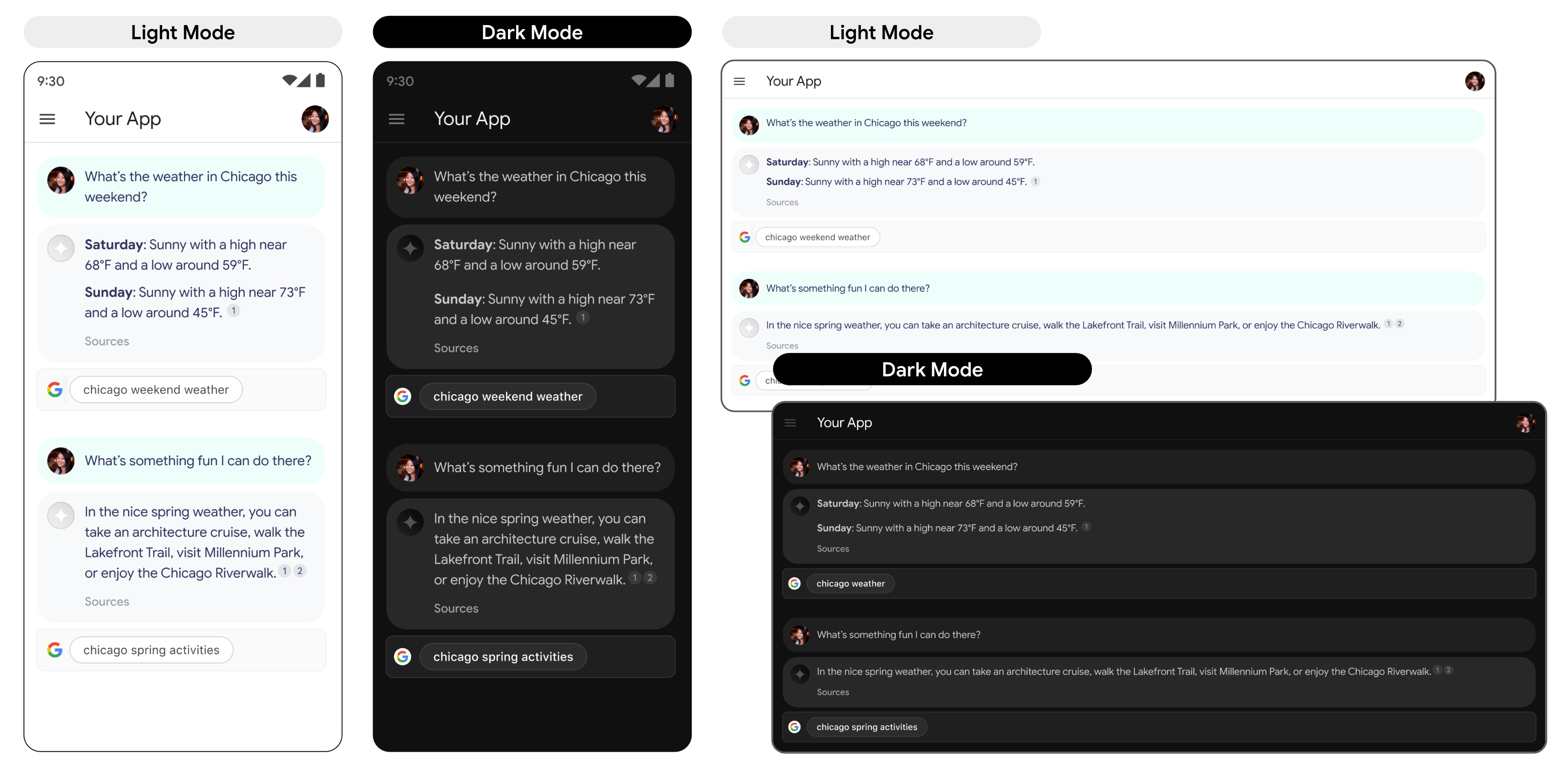
- Display the Search suggestion exactly as provided, and don't make any modifications to colors, fonts, or appearance. Ensure the Search suggestion renders as specified in the following mocks such as light and dark mode:
- Whenever a grounded response is shown, its corresponding Search suggestion should remain visible.
- For branding, you must strictly follow Google's guidelines for third-party use of Google brand features at the [Welcome to our Brand Resource
Center](https://about.google/brand-resource-center/).
- When you use Web Grounding for Enterprise, Search suggestion chips display. The field that contains the suggestion chips must be the same width as the grounded response from the LLM.
#### Behavior on tap
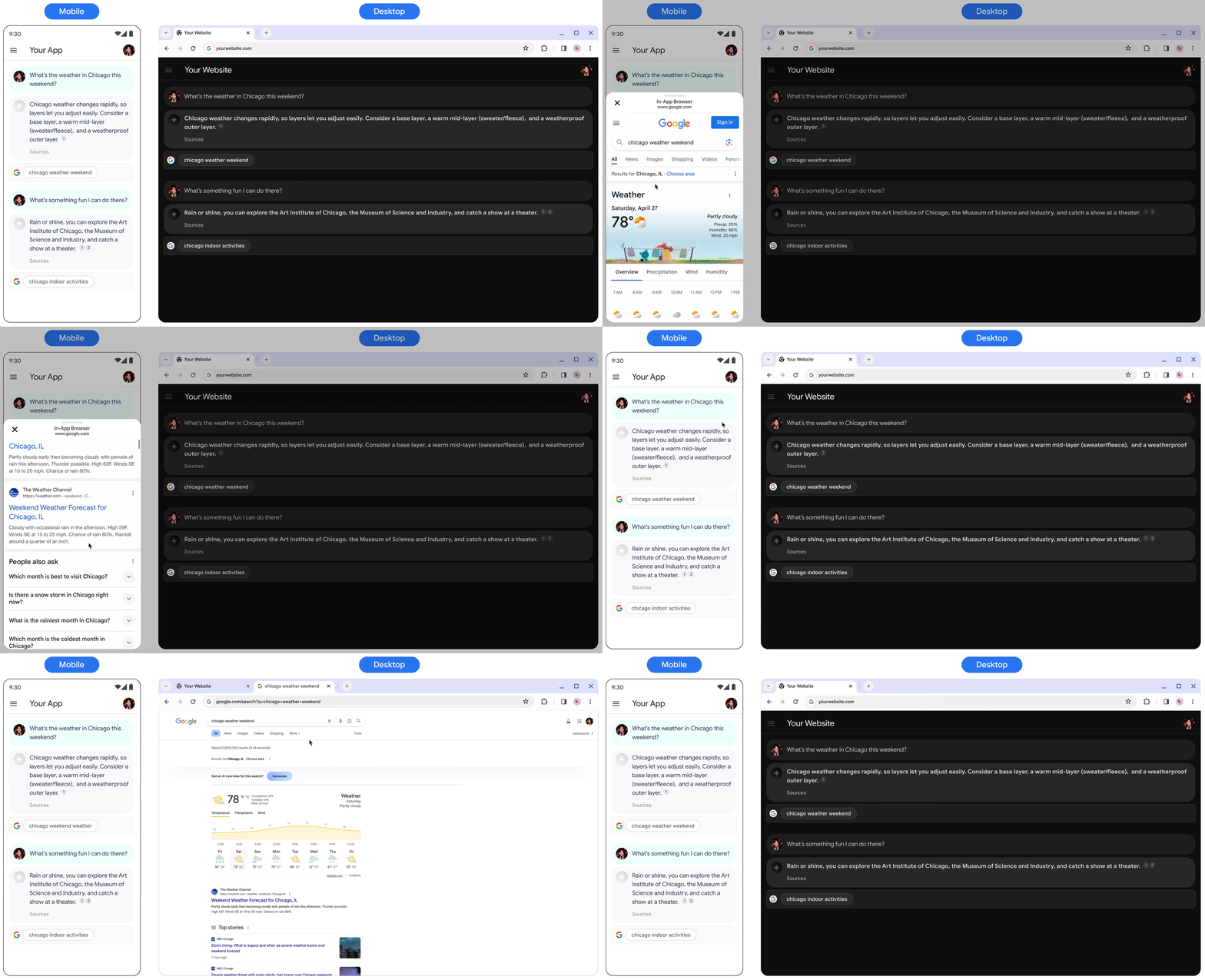
When a user taps the chip, they are taken directly to a
Search results page (SRP) for the search term displayed in
the chip. The SRP can open either within your in-application browser or in a
separate browser application. It's important to not minimize, remove, or
obstruct the SRP's display in any way. The following animated mockup illustrates
the tap-to-SRP interaction.
### Code to implement a Search suggestion
When you use the API to ground a response to search, the model response provides
compliant HTML and CSS styling in the `renderedContent` field, which you
implement to display Search suggestions in your
application.
> [!NOTE]
> **Note:** The provided HTML and CSS provided in the API response automatically adapts to your device settings, which displays in either light or dark mode based on the your preference indicated by `@media(prefers-color-scheme)`.
## What's next
- To learn more about how to ground Gemini models to your data, see [Grounding with Agent Search on Gemini Enterprise Agent Platform](https://docs.cloud.google.com/gemini-enterprise-agent-platform/models/grounding/grounding-with-vertex-ai-search.md.txt).
- To learn more about responsible AI best practices and Gemini Enterprise Agent Platform's safety filters, see [Responsible AI](https://docs.cloud.google.com/gemini-enterprise-agent-platform/models/responsible-ai.md.txt).