[Video](https://www.youtube.com/watch?v=VRQXIiNLdAk)
Gemini Enterprise Agent Platform provides a managed training service that helps you
operationalize large scale model training. You can use Gemini Enterprise Agent Platform to run
training applications based on any machine learning (ML) framework on
Google Cloud infrastructure. For the following popular ML frameworks,
Gemini Enterprise Agent Platform also has integrated support that simplifies the preparation
process for model training and serving:
- [PyTorch](https://docs.cloud.google.com/gemini-enterprise-agent-platform/machine-learning/start/pytorch.md.txt)
- [TensorFlow](https://docs.cloud.google.com/gemini-enterprise-agent-platform/machine-learning/start/tensorflow.md.txt)
- [scikit-learn](https://scikit-learn.org/stable/)
- [XGBoost](https://xgboost.readthedocs.io/en/stable/)
This page explains the benefits of serverless training
on Gemini Enterprise Agent Platform, the workflow involved, and the various training options
that are available.
### Gemini Enterprise Agent Platform operationalizes training at scale
There are several challenges to operationalizing model training. These
challenges include the time and cost needed to train models, the depth of skills
required to manage the compute infrastructure, and the need to provide
enterprise-level security. Gemini Enterprise Agent Platform addresses these challenges while
providing a host of other benefits.
#### Fully managed compute infrastructure
|---|---|
|  | Model training on Gemini Enterprise Agent Platform is a fully managed service that requires no administration of physical infrastructure. You can train ML models without the need to provision or manage servers. You only pay for the compute resources that you consume. Gemini Enterprise Agent Platform also handles job logging, queuing, and monitoring. |
#### High-performance
|---|---|
|  | Gemini Enterprise Agent Platform training jobs are optimized for ML model training, which can provide faster performance than directly running your training application on a Google Kubernetes Engine (GKE) cluster. You can also identify and debug performance bottlenecks in your training job by using Cloud Profiler. |
#### Distributed training
|---|---|
|  | [Reduction Server](https://cloud.google.com/blog/topics/developers-practitioners/optimize-training-performance-reduction-server-vertex-ai) is an all-reduce algorithm in Gemini Enterprise Agent Platform that can increase throughput and reduce latency of multi-node distributed training on NVIDIA graphics processing units (GPUs). This optimization helps reduce the time and cost of completing large training jobs. |
#### Hyperparameter optimization
|---|---|
|  | [Hyperparameter tuning jobs](https://docs.cloud.google.com/gemini-enterprise-agent-platform/machine-learning/training/hyperparameter-tuning-overview.md.txt) run multiple trials of your training application using different hyperparameter values. You specify a range of values to test, and Gemini Enterprise Agent Platform discovers the optimal values for your model within that range. |
#### Enterprise security
|---|---|
|  | Gemini Enterprise Agent Platform provides the following enterprise security features: - [VPC peering](https://docs.cloud.google.com/gemini-enterprise-agent-platform/machine-learning/general/vpc-peering.md.txt) to limit network access. - [VPC Service Controls](https://docs.cloud.google.com/gemini-enterprise-agent-platform/machine-learning/general/vpc-service-controls.md.txt) to mitigate the risks of data exfiltration. - [Customer-managed encryption keys](https://docs.cloud.google.com/gemini-enterprise-agent-platform/machine-learning/general/cmek.md.txt) to help you meet specific compliance or regulatory requirements related to data protection. - [Identity and Access Management](https://docs.cloud.google.com/gemini-enterprise-agent-platform/machine-learning/general/access-control.md.txt) for fine-grained control over service account access. - Data isolation with single-tenant project boundaries.
|
#### ML operations (MLOps) integrations
|---|---|
|  | Gemini Enterprise Agent Platform provides a suite of [integrated MLOps tools](https://docs.cloud.google.com/gemini-enterprise-agent-platform/machine-learning/start/introduction-mlops.md.txt) and features that you can use for the following purposes: - Orchestrate end-to-end ML workflows. - Perform feature engineering. - Run experiments. - Manage and iterate your models. - Track ML metadata. - Monitor and evaluate model quality.
|
## Workflow for serverless training
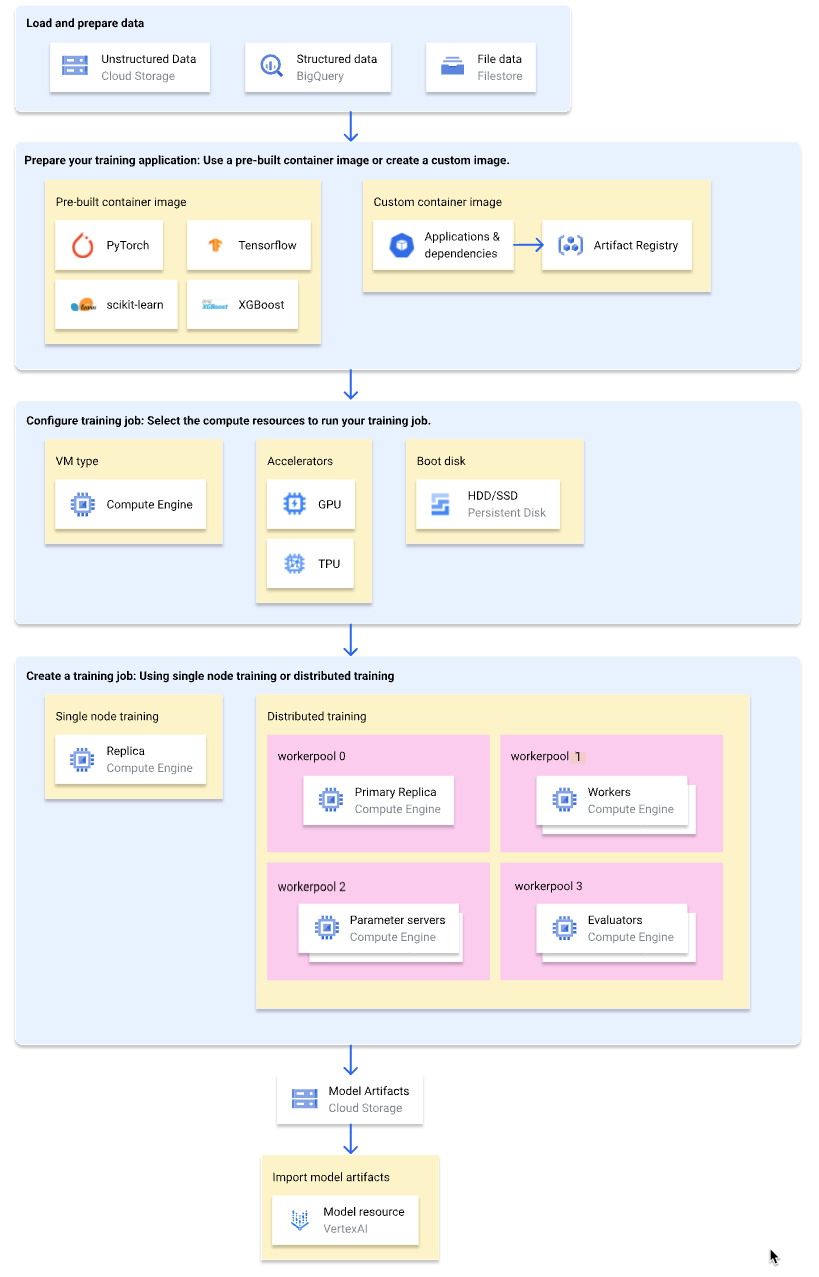
The following diagram shows a high-level overview of the serverless training
workflow on Gemini Enterprise Agent Platform. The sections that follow describe each step in
detail.
### Load and prepare training data
For the best performance and support, use one of the
following Google Cloud services as your data source:
- [Cloud Storage](https://docs.cloud.google.com/gemini-enterprise-agent-platform/machine-learning/training/cloud-storage-file-system.md.txt)
- [BigQuery](https://docs.cloud.google.com/bigquery/docs/introduction.md.txt)
- High-performance file systems, such as [NFS shares on
Google Cloud](https://docs.cloud.google.com/gemini-enterprise-agent-platform/machine-learning/training/train-nfs-share) using services like [Google Cloud NetApp Volumes](https://docs.cloud.google.com/netapp/volumes/docs/discover/overview.md.txt) or [Filestore](https://docs.cloud.google.com/filestore/docs/overview.md.txt).
For a comparison of these services, see
[Data preparation overview](https://docs.cloud.google.com/gemini-enterprise-agent-platform/machine-learning/training/data-preparation-overview.md.txt).
You can also specify a
[Gemini Enterprise Agent Platform managed dataset](https://docs.cloud.google.com/gemini-enterprise-agent-platform/machine-learning/training/using-managed-datasets.md.txt)
as the data source when using a training pipeline to train your model. Training
a custom model and an AutoML model using the same dataset lets you
compare the performance of the two models.
### Prepare your training application
To prepare your training application for use on Gemini Enterprise Agent Platform, do
the following:
- Implement training code best practices for Gemini Enterprise Agent Platform.
- Determine a type of container image to use.
- Package your training application into a supported format based on the selected container image type.
#### Implement training code best practices
Your training application should implement the
[training code best practices for Gemini Enterprise Agent Platform](https://docs.cloud.google.com/gemini-enterprise-agent-platform/machine-learning/training/code-requirements.md.txt#requirements_for_all_custom_training_code).
These best practices relate to the ability of your training application to do
the following:
- Access Google Cloud services.
- Load input data.
- Enable autologging for experiment tracking.
- Export model artifacts.
- Use the environment variables of Gemini Enterprise Agent Platform.
- Ensure resilience to VM restarts.
#### Select a container type
Gemini Enterprise Agent Platform runs your training application in a
[Docker container image](https://www.docker.com/resources/what-container/).
A Docker container image is a self-contained software package that includes code
and all dependencies, which can run in almost any computing environment. You can
either specify the URI of a
[prebuilt container image](https://docs.cloud.google.com/gemini-enterprise-agent-platform/machine-learning/training/pre-built-containers.md.txt)
to use, or create and upload a
[custom container image](https://docs.cloud.google.com/gemini-enterprise-agent-platform/machine-learning/training/containers-overview.md.txt)
that has your training application and dependencies pre-installed.
The following table shows the differences between prebuilt and custom container
images:
| Specifications | Prebuilt container images | Custom container images |
|---|---|---|
| **ML framework** | Each container image is specific to an ML framework. | Use any ML framework or use none. |
| **ML framework version** | Each container image is specific to an ML framework version. | Use any ML framework version, including minor versions and nightly builds. |
| **Application dependencies** | Common dependencies for the ML framework are pre-installed. You can specify additional dependencies to install in your training application. | Pre-install the dependencies that your training application needs. |
| **Application delivery format** | - Python source distribution. - Single Python file. | Pre-install the training application in the custom container image. |
| **Effort to set up** | Low | High |
| **Recommended for** | Python training applications based on an ML framework and framework version that has a prebuilt container image available. | - Greater customization and control. - Non-Python training applications. - Private or custom dependencies. - Training applications that use an ML framework or framework version that has no prebuilt container image available. |
#### Package your training application
After you've determined the type of container image to use, package your
training application into one of the following formats based on the container
image type:
- **Single Python file for use in a prebuilt container**
Write your training application as a single Python file and use the
[Agent Platform SDK for Python](https://docs.cloud.google.com/gemini-enterprise-agent-platform/machine-learning/python-sdk/use-python-sdk.md.txt) to create a
`CustomJob` or `CustomTrainingJob` class. The Python file is packaged into a
Python source distribution and installed to a prebuilt container image.
Delivering your training application as a single Python file is suitable for
prototyping. For production training applications, you'll likely have your
training application arranged into more than one file.
- **Python source distribution for use in a prebuilt container**
[Package your training application](https://docs.cloud.google.com/gemini-enterprise-agent-platform/machine-learning/training/create-python-pre-built-container.md.txt)
into one or more Python source distributions and upload them to a
Cloud Storage bucket. Gemini Enterprise Agent Platform installs the source distributions
to a prebuilt container image when you create a training job.
- **Custom container image**
[Create your own Docker container image](https://docs.cloud.google.com/gemini-enterprise-agent-platform/machine-learning/training/create-custom-container.md.txt)
that has your training application and dependencies pre-installed, and
upload it to Artifact Registry. If your training application is written in Python,
you can
[perform these steps by using one Google Cloud CLI command](https://docs.cloud.google.com/gemini-enterprise-agent-platform/machine-learning/training/create-custom-job.md.txt#create_custom_job-gcloud).
### Configure training job
A Gemini Enterprise Agent Platform training job performs the following tasks:
- Provisions one (single node training) or more (distributed training) virtual machines (VMs).
- Runs your containerized training application on the provisioned VMs.
- Deletes the VMs after the training job completes.
Gemini Enterprise Agent Platform offers
[three types of training jobs](https://docs.cloud.google.com/gemini-enterprise-agent-platform/machine-learning/training/custom-training-methods.md.txt)
for running your training application:
- **[Custom job](https://docs.cloud.google.com/gemini-enterprise-agent-platform/machine-learning/training/create-custom-job.md.txt)**
A custom job
([`CustomJob`](https://docs.cloud.google.com/python/docs/reference/aiplatform/latest/google.cloud.aiplatform.CustomJob.md.txt))
runs your training application. If you're using a prebuilt container image,
model artifacts are output to the specified Cloud Storage bucket. For
custom container images, your training application can also output model
artifacts to other locations.
- **[Hyperparameter tuning job](https://docs.cloud.google.com/gemini-enterprise-agent-platform/machine-learning/training/hyperparameter-tuning-overview.md.txt)**
A hyperparameter tuning job
([`HyperparameterTuningJob`](https://docs.cloud.google.com/python/docs/reference/aiplatform/latest/google.cloud.aiplatform.HyperparameterTuningJob.md.txt))
runs multiple trials of your training
application using different hyperparameter values until it produces model
artifacts with the optimal performing hyperparameter values. You specify the
range of hyperparameter values to test and the metrics to optimize for.
- **[Training pipeline](https://docs.cloud.google.com/gemini-enterprise-agent-platform/machine-learning/training/create-training-pipeline.md.txt)**
A training pipeline
([`CustomTrainingJob`](https://docs.cloud.google.com/python/docs/reference/aiplatform/latest/google.cloud.aiplatform.CustomTrainingJob.md.txt))
runs a custom job or hyperparameter tuning job and optionally exports the
model artifacts to Gemini Enterprise Agent Platform to create a model resource. You can
specify a Gemini Enterprise Agent Platform managed dataset as your data source.
When creating a training job, specify the compute resources to use
for running your training application and configure your container settings.
#### Compute configurations
[Specify the compute resources](https://docs.cloud.google.com/gemini-enterprise-agent-platform/machine-learning/training/configure-compute.md.txt) to
use for a training job. Gemini Enterprise Agent Platform supports single-node training, where
the training job runs on one VM, and
[distributed training](https://docs.cloud.google.com/gemini-enterprise-agent-platform/machine-learning/training/distributed-training.md.txt), where the training
job runs on multiple VMs.
The compute resources that you can specify for your training job are as follows:
- **VM machine type**
Different machine types offer different CPUs, memory size, and bandwidth.
- **Graphics processing units (GPUs)**
You can add one or more GPUs to A2 or N1 type VMs. If your training
application is designed to use GPUs, adding GPUs can significantly improve
performance.
- **Tensor Processing Units (TPUs)**
TPUs are designed specifically for accelerating machine learning workloads.
When using a TPU VM for training, you can specify only one worker pool.
That worker pool can have only one replica.
- **Boot disks**
You can use SSDs (default) or HDDs for your boot disk. If your training
application reads and writes to disk, using SSDs can improve performance.
You can also specify the size of your boot disk based on the amount of
temporary data that your training application writes to disk. Boot disks can
have between 100 GiB (default) and 64,000 GiB. All VMs in a worker pool must
use the same type and size of boot disk.
#### Container configurations
The
[container configurations](https://docs.cloud.google.com/gemini-enterprise-agent-platform/machine-learning/training/configure-container-settings.md.txt)
that you need to make depend on whether you're using a prebuilt or custom
container image.
- **Prebuilt container configurations:**
- Specify the URI of the prebuilt container image that you want to use.
- If your training application is packaged as a Python source distribution, specify the Cloud Storage URI where the package is located.
- Specify the entry point module of your training application.
- Optional: Specify a list of command-line arguments to pass to the entry point module of your training application.
- **Custom container configurations:**
- Specify the URI of your custom container image, which can be a URI from Artifact Registry or Docker Hub.
- **Optional** : Override the `ENTRYPOINT` or `CMD` instructions in your container image.
### Create a training job
After your data and training application are prepared, run your training
application by creating one of the following training jobs:
- [Create a custom job](https://docs.cloud.google.com/gemini-enterprise-agent-platform/machine-learning/training/create-custom-job.md.txt).
- [Create a hyperparameter tuning job](https://docs.cloud.google.com/gemini-enterprise-agent-platform/machine-learning/training/using-hyperparameter-tuning.md.txt).
- [Create a training pipeline](https://docs.cloud.google.com/gemini-enterprise-agent-platform/machine-learning/training/create-training-pipeline.md.txt).
To create the training job, you can use the Google Cloud console, Google Cloud CLI,
Agent Platform SDK for Python, or the Agent Platform API.
### (Optional) Import model artifacts into Gemini Enterprise Agent Platform
Your training application likely outputs one or more model artifacts to a
specified location, usually a Cloud Storage bucket. Before you can get
inferences in Gemini Enterprise Agent Platform from your model artifacts, first
[import the model artifacts into Gemini Enterprise Agent Platform Model Registry](https://docs.cloud.google.com/gemini-enterprise-agent-platform/machine-learning/training/exporting-model-artifacts.md.txt).
Like container images for training, Gemini Enterprise Agent Platform gives you the choice of
using [prebuilt](https://docs.cloud.google.com/gemini-enterprise-agent-platform/machine-learning/predictions/pre-built-containers.md.txt) or
[custom](https://docs.cloud.google.com/gemini-enterprise-agent-platform/machine-learning/predictions/custom-container-requirements.md.txt) container images for
inferences. If a prebuilt container image for inferences is available for your
ML framework and framework version, we recommend using a prebuilt container
image.
## What's next
- [Get inferences](https://docs.cloud.google.com/gemini-enterprise-agent-platform/machine-learning/predictions/get-predictions) from your model.
- [Evaluate your model](https://docs.cloud.google.com/gemini-enterprise-agent-platform/machine-learning/evaluation/introduction.md.txt).
- Try the [Hello serverless training](https://docs.cloud.google.com/gemini-enterprise-agent-platform/machine-learning/tutorials/image-classification-custom.md.txt) tutorial for step-by-step instructions on training a TensorFlow Keras image classification model on Gemini Enterprise Agent Platform.