This page introduces tabular data journeys with AutoML. To understand key
differences between AutoML and custom training, see
[Choosing a training method](https://docs.cloud.google.com/gemini-enterprise-agent-platform/machine-learning/start/training-methods.md.txt).
## Tabular data use cases
Imagine you work in the marketing department for a digital retailer. You and your team are
creating a personalized email program based on customer personas. You've created the personas
and the marketing emails are ready to go. Now you need to create a system that buckets customers
into each persona based on retail preferences and spending behavior, even when they're new
customers. To maximize customer engagement, you also want to predict their spending habits so you
can optimize when to send them the emails.
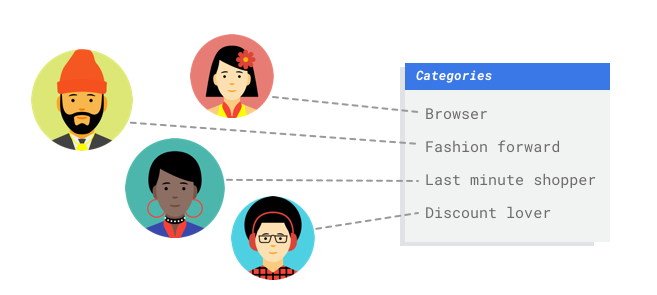
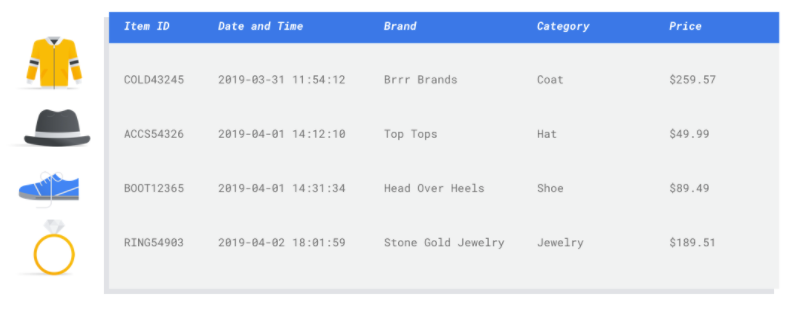
Because you're a digital retailer, you have data on your customers and the purchases they've made.
But what about new customers? Traditional approaches can calculate these values for existing
customers with long purchase histories, but don't do well with customers with little historical
data. What if you could create a system to predict these values and increase the speed at which
you deliver personalized marketing programs to all your customers?
Fortunately, machine learning and Agent Platform is well positioned to solve these problems.
This guide walks you through how Agent Platform works for
AutoML datasets and models, and illustrates the kinds of problems
Agent Platform is designed to solve.
## How does Agent Platform work?
Agent Platform applies [supervised machine learning](https://developers.google.com/machine-learning/glossary#supervised_machine_learning)
to achieve a desired outcome.
The specifics of the algorithm and training methods change based on the data
type and use case. Many different subcategories of machine learning solve
different problems and work within different constraints.
You train a machine learning model with example data. Agent Platform
uses tabular (structured) data to train a machine learning model to make
inferences on new data. One column from your dataset, called the target, is
what your model will learn to predict. Some number of the other data columns
are inputs (called features) that the model will learn patterns from. You can
use the same input features to build multiple kinds of models just by changing
the target column and training options. From the email marketing example, this
means you could build models with the same input features but with different
target inferences. One model could predict a customer's persona (a
categorical target), another model could predict their monthly spending (a
numerical target), and another could forecast daily demand of your products
for the next three months (series of numerical targets).
## Agent Platform workflow
Agent Platform uses a standard machine learning workflow:
1. Gather your data: Determine the data you need for training and testing your model based on the outcome you want to achieve.
2. Prepare your data: Make sure your data is properly formatted and labeled.
3. Train: Set parameters and build your model.
4. Evaluate: Review model metrics.
5. Deploy and predict: Make your model available to use.
Before you start gathering your data, think about the
problem you're trying to solve. This informs your data requirements.
### Data preparation
#### Assess your use case
Start with your problem: What outcome do you want to achieve?
What kind of data is the target column? How much data do you have access to?
Depending on your answers, Agent Platform creates
the necessary model to solve your use case:
- **Binary classification** models predict a binary outcome (one of two classes). Use this model type for yes or no questions. For example, you might want to build a binary classification model to predict whether a customer would buy a subscription. Generally, a binary classification problem requires less data than other model types.
- **Multi-class classification** models predict one class from three or more discrete classes. Use this model type for categorization. For example, as a retailer, you might want to build a multi-class classification model to segment customers into different personas.
- **Regression** models predict a continuous value. For example, as a retailer, you might want to build a regression model to predict how much a customer will spend next month.
- **Forecasting** models predict a sequence of values. For example, as a retailer, you might want to forecast daily demand of your products for the next 3 months so that you can appropriately stock product inventories in advance.
Forecasting on tabular data is different from classification and regression in
two key ways:
- In classification and regression, the target's predicted value depends only on
the values of the feature columns in the same row. In forecasting, the
predicted values also depends on the context values of the target and the
features.
- In regression and classification problems, the output is one value. In
forecasting problems, the output is a sequence of values.
#### Gather your data
After you establish your use case, gather the data that
lets you create the model you want.
After you've established your use case, you'll need to gather data to train your model.
Data sourcing and preparation are critical steps for building a machine learning model.
The data you have available informs the kind of problems you can solve. How much data do
you have available? Are your data relevant to the questions you're trying to answer? While
gathering your data, keep in mind the following key considerations.
#### Select relevant features
A feature is an input attribute used for model training. Features are how your model identifies
patterns to make inferences, so they need to be relevant to your problem. For example, to build
a model that predicts whether a credit card transaction is fraudulent or not, you'll need to
build a dataset that contains transaction details like the buyer, seller, amount, date and time,
and items purchased. Other helpful features could be historic information about the buyer and
seller, and how often the item purchased has been involved in fraud. What other features might
be relevant?
Consider the retail email marketing use case from the introduction. Here's some feature
columns you might require:
- List of items purchased (including brands, categories, prices, discounts)
- Number of items purchased (last day, week, month, year)
- Sum of money spent (last day, week, month, year)
- For each item, total number sold each day
- For each item, total in stock each day
- Whether you're running a promotion for a particular day
- Known demographic profile of shopper
#### Include enough data

In general, the more training examples you have, the better your outcome. The amount of example
data required also scales with the complexity of the problem you're trying to solve. You won't
need as much data to get an accurate binary classification model compared to a multi-class model
because it's less complicated to predict one class from two rather than many.
There's no perfect formula, but there are recommended minimums of example data:
- **Classification** problem: 50 rows x the number features
- **Forecasting** problem:
- 5000 rows x the number of features
- 10 unique values in the time series identifier column x the number of features
- **Regression** problem: 200 x the number of features
#### Capture variation
Your dataset should capture the diversity of your problem space. The more diverse examples a
model sees during training, the more readily it can generalize to new or less common examples.
Imagine if your retail model was trained only using purchase data from the winter. Would it be
able to successfully predict summer clothing preferences or purchase behaviors?
#### Prepare your data

After you've identified your available data, you need to make sure it's ready for training.
If your data is biased or contains missing or erroneous values, this affects the quality of
the model. Consider the following before you start training your model.
[Learn more](https://docs.cloud.google.com/gemini-enterprise-agent-platform/machine-learning/tabular-data/overview.md.txt).
#### Prevent data leakage and training-serving skew
Data leakage is when you use input features during training that "leak" information about the
target that you are trying to predict which is unavailable when the model is actually served.
This can be detected when a feature that is highly correlated with the target column is
included as one of the input features. For example, if you're building a model to predict
whether a customer will sign up for a subscription in the next month and one of the input
features is a future subscription payment from that customer. This can lead to strong model
performance during testing, but not when deployed in production, since future subscription
payment information isn't available at serving time.
Training-serving skew is when input features used during training time are different from the
ones provided to the model at serving time, causing poor model quality in production. For
example, building a model to predict hourly temperatures but training with data that only
contains weekly temperatures. Another example: always providing a student's grades in the
training data when predicting student dropout, but not providing this information at serving time.
Understanding your training data is important to preventing data leakage and
training-serving skew:
- Before using any data, make sure you know what the data means and whether or not you should use it as a feature
- Check the correlation in the Train tab. High correlations should be flagged for review.
- Training-serving skew: make sure you only provide input features to the model that are available in the exact same form at serving time.
#### Clean up missing, incomplete, and inconsistent data
It's common to have missing and inaccurate values in your example data. Take time to review and,
when possible, improve your data quality before using it for training. The more missing values,
the less useful your data will be for training a machine learning model.
- Check your data for missing values and correct them if possible, or leave the value blank if the column is set to be nullable. Agent Platform can handle missing values, but you are more likely to get optimal results if all values are available.
- For forecasting, check that the interval between training rows is consistent. Agent Platform can impute missing values, but you are more likely to get optimal results if all rows are available.
- Clean your data by correcting or deleting data errors or noise. Make your data consistent: Review spelling, abbreviations, and formatting.
#### Analyze your data after importing
Agent Platform provides an overview of your dataset after it's been imported. Review your
imported dataset to make sure each column has the correct variable type. Agent Platform will
automatically detect the variable type based on the columns values, but it's best to review
each one. You should also review each column's nullability, which determines whether a column
can have missing or NULL values.
### Train model
After your dataset is imported, the next step is to train a model. Agent Platform will
generate a reliable machine learning model with the training defaults, but you may want to adjust
some of the parameters based on your use case.
Try to select as many feature columns as possible for training, but review each to make sure that
it's appropriate for training. Keep in mind the following for feature selection:
- Don't select feature columns that will create noise, like randomly assigned identifier columns with a unique value for each row.
- Make sure you understand each feature column and its values.
- If you're creating multiple models from one dataset, remove target columns that aren't part of the current inference problem.
- Recall the fairness principles: Are you training your model with a feature that could lead to biased or unfair decision-making for marginalized groups?
#### How Agent Platform uses your dataset
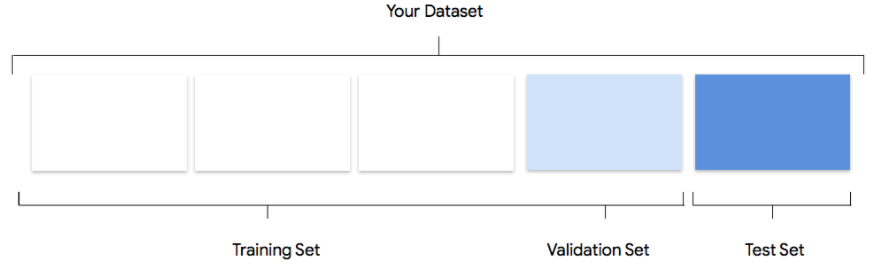
Your dataset will be split into training, validation and testing sets. The
default split Agent Platform applies depends on the type of model that
you are training. You can also specify the splits (manual splits) if
necessary. For more information, see [About data splits for AutoML
models](https://docs.cloud.google.com/gemini-enterprise-agent-platform/machine-learning/general/ml-use#default).
##### Training Set

The vast majority of your data should be in the training set. This is the data your model "sees"
during training: it's used to learn the parameters of the model, namely the weights of the
connections between nodes of the neural network.
##### Validation Set

The validation set, sometimes also called the "dev" set, is also used during the training process.
After the model learning framework incorporates training data during each iteration of the
training process, it uses the model's performance on the validation set to tune the model's
hyperparameters, which are variables that specify the model's structure. If you tried to use the
training set to tune the hyperparameters, it's quite likely the model would end up overly focused
on your training data, and have a hard time generalizing to examples that don't exactly match it.
Using a somewhat novel dataset to fine-tune model structure means your model will generalize
better.
##### Test Set

The test set is not involved in the training process at all. After the model has completed its
training entirely, Agent Platform uses the test set as an entirely new challenge for your model.
The performance of your model on the test set is intended to give you a pretty good idea of how
your model will perform on real-world data.
### Evaluate, test, and deploy your model
#### Evaluate model

After model training, you'll receive a summary of its performance. Model evaluation metrics are
based on how the model performed against a slice of your dataset (the test dataset). There are a
couple of key metrics and concepts to consider when determining whether your model is ready to be
used with real data.
#### Classification metrics
##### Score threshold
Consider a machine learning model that predicts whether a customer will buy a jacket in the next
year. How sure does the model need to be before predicting that a given customer will buy a
jacket? In classification models, each inference is assigned a **confidence score** -- a numeric
assessment of the model's certainty that the predicted class is correct. The **score threshold** is
the number that determines when a given score is converted into a yes or no decision; that is,
the value at which your model says "yes, this confidence score is high enough to conclude that
this customer will purchase a coat in the next year.
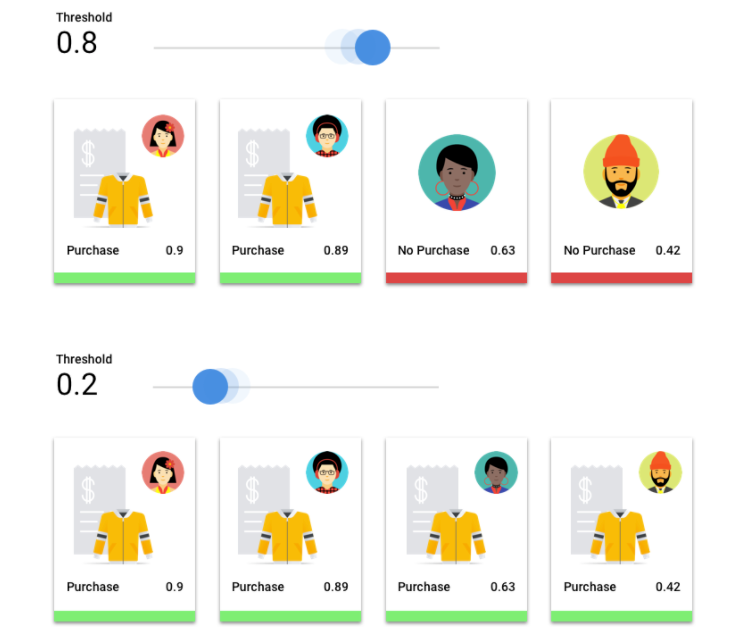
If your score threshold is low, your model will run the risk of misclassification. For that
reason, the score threshold should be based on a given use case.
##### Inference outcomes
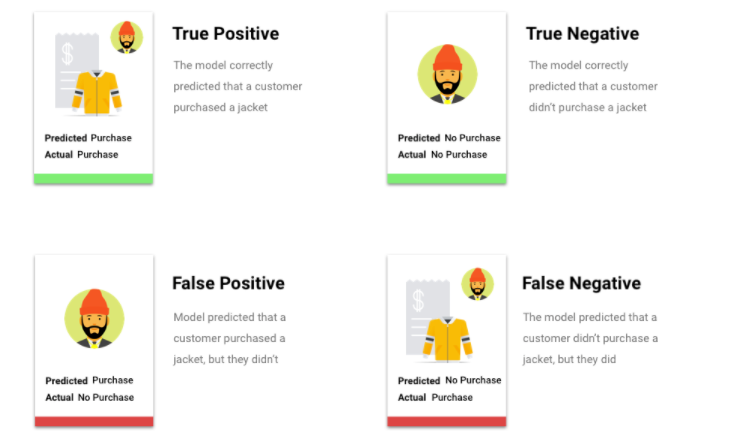
After applying the score threshold, inferences made by your model will fall into one of four
categories. To understand these categories, imagine again a jacket binary classification model.
In this example, the positive class (what the model is attempting to predict) is that the
customer will purchase a jacket in the next year.
- **True positive**: The model correctly predicts the positive class. The model correctly predicted that a customer purchased a jacket.
- **False positive**: The model incorrectly predicts the positive class. The model predicted that a customer purchased a jacket, but they didn't.
- **True negative**: The model correctly predicts the negative class. The model correctly predicted that a customer didn't purchase a jacket.
- **False negative**: The model incorrectly predicts a negative class. The model predicted that a customer didn't purchase a jacket, but they did.
##### Precision and recall
Precision and recall metrics help you understand how well your model is capturing information
and what it's leaving out. Learn more about
[precision and recall](https://developers.google.com/machine-learning/crash-course/classification/precision-and-recall).
- **Precision** is the fraction of the positive inferences that were correct. Of all the inferences of a customer purchase, what fraction were actual purchases?
- **Recall** is the fraction of rows with this label that the model correctly predicted. Of all the customer purchases that could have been identified, what fraction were?
Depending on your use case, you may need to optimize for either precision or recall.
##### Other classification metrics
- AUC PR: The area under the precision-recall (PR) curve. This value ranges from zero to one, where a higher value indicates a higher-quality model.
- AUC ROC: The area under the receiver operating characteristic (ROC) curve. This ranges from zero to one, where a higher value indicates a higher-quality model.
- Accuracy: The fraction of classification inferences produced by the model that were correct.
- Log loss: The cross-entropy between the model inferences and the target values. This ranges from zero to infinity, where a lower value indicates a higher-quality model.
- F1 score: The harmonic mean of precision and recall. F1 is a useful metric if you're looking for a balance between precision and recall and there's an uneven class distribution.
#### Forecasting and regression metrics
After your model is built, Agent Platform provides a variety of
standard metrics for you to review. There's no perfect answer on how to
evaluate your model; consider evaluation metrics in context with your problem
type and what you want to achieve with your model. The following list is an
overview of some metrics Agent Platform can provide.
##### Mean absolute error (MAE)
MAE is the average absolute difference between the target and predicted
values. It measures the average magnitude of the errors--the difference
between a target and predicted value--in a set of inferences. And because it
uses absolute values, MAE doesn't consider the relationship's direction, nor
indicate underperformance or overperformance. When evaluating MAE, a smaller
value indicates a higher-quality model (0 represents a perfect predictor).
##### Root mean square error (RMSE)
RMSE is the square root of the average squared difference between the target
and predicted values. RMSE is more sensitive to outliers than MAE, so if
you're concerned about large errors, then RMSE can be a more useful metric to
evaluate. Similar to MAE, a smaller value indicates a higher-quality model (0
represents a perfect predictor).
##### Root mean squared logarithmic error (RMSLE)
RMSLE is RMSE in logarithmic scale. RMSLE is more sensitive to relative errors
than absolute ones and cares more about underperformance than overperformance.
##### Observed quantile (forecasting only)
For a given target quantile, the observed quantile shows the actual fraction
of observed values below the specified quantile inference values. The
observed quantile shows how far or close the model is to the target quantile.
A smaller difference between the two values indicates a higher-quality model.
##### Scaled pinball loss (forecasting only)
Measures the quality of a model at a given target quantile. A lower number
indicates a higher-quality model. You can compare the scaled pinball loss
metric at different quantiles to determine the relative accuracy of your model
between those different quantiles.
#### Test your model
Evaluating your model metrics is primarily how you can determine whether your model is ready to
deploy, but you can also test it with new data. Upload new data to see if the model's
inferences match your expectations. Based on the evaluation metrics or testing with new data,
you may need to continue improving your model's performance.
#### Deploy your model
When you're satisfied with your model's performance, it's time to use the model. Perhaps that
means production-scale usage, or maybe it's a one-time inference request. Depending on your use
case, you can use your model in different ways.
#### Batch inference
Batch inference is useful for making many inference requests at once. Batch inference is
asynchronous, meaning that the model will wait until it processes all of the inference requests
before returning a CSV file or BigQuery Table with inference values.
#### Online inference
Deploy your model to make it available for inference requests using a REST API. Online
inference is synchronous (real-time), meaning that it will quickly return a inference, but
only accepts one inference request per API call. Online inference is useful if your model is
part of an application and parts of your system are dependent on a quick inference turnaround.
> [!NOTE]
> **Note:** Online inference is not available for forecasting models.
### Clean up
To help avoid unwanted charges, undeploy your model when it's not in use.
When you're finished using your model, delete the resources that you created
to avoid incurring unwanted charges to your account.
- [Hello image data: Clean up your project](https://docs.cloud.google.com/gemini-enterprise-agent-platform/machine-learning/tutorials/image-classification-custom/cleanup.md.txt)
- [Hello tabular data: Clean up your project](https://docs.cloud.google.com/gemini-enterprise-agent-platform/machine-learning/tutorials/tabular-automl/cleanup.md.txt)