This document provides an overview of the End-to-End AutoML
[pipeline and components](https://docs.cloud.google.com/gemini-enterprise-agent-platform/machine-learning/tabular-data/tabular-workflows/e2e-automl.md.txt#components). To learn how to train a model with End-to-End AutoML,
see [Train a model with End-to-End AutoML](https://docs.cloud.google.com/gemini-enterprise-agent-platform/machine-learning/tabular-data/tabular-workflows/e2e-automl-train.md.txt).
Tabular Workflow for End-to-End AutoML is a complete AutoML
pipeline for classification and regression tasks. It is similar to the
[AutoML API](https://docs.cloud.google.com/gemini-enterprise-agent-platform/machine-learning/tabular-data/classification-regression/overview.md.txt),
but allows you to choose what to control and what to automate. Instead of having
controls for the *whole* pipeline, you have controls for *every step* in the
pipeline. These pipeline controls include:
- Data splitting
- Feature engineering
- Architecture search
- Model training
- Model ensembling
- Model distillation
## Benefits
The following lists some of the benefits of Tabular Workflow for End-to-End AutoML:
- Supports **large datasets** that are multiple TB in size and have up to 1000 columns.
- Allows you to **improve stability and lower training time** by limiting the search space of architecture types or skipping architecture search.
- Allows you to **improve training speed** by manually selecting the hardware used for training and architecture search.
- Allows you to **reduce model size and improve latency** with distillation or by changing the ensemble size.
- Each AutoML component can be inspected in a powerful pipelines graph interface that lets you see the transformed data tables, evaluated model architectures, and many more details.
- Each AutoML component gets extended flexibility and transparency, such as being able to customize parameters, hardware, view process status, logs, and more.
## End-to-End AutoML on Gemini Enterprise Agent Platform Pipelines
Tabular Workflow for End-to-End AutoML is a managed instance of Gemini Enterprise Agent Platform Pipelines.
[Gemini Enterprise Agent Platform Pipelines](https://docs.cloud.google.com/gemini-enterprise-agent-platform/machine-learning/pipelines/introduction.md.txt) is a serverless
service that runs Kubeflow pipelines. You can use pipelines to automate
and monitor your machine learning and data preparation tasks. Each step in a
pipeline performs part of the pipeline's workflow. For example,
a pipeline can include steps to split data, transform data types, and train a model. Since steps
are instances of pipeline components, steps have inputs, outputs, and a
container image. Step inputs can be set from the pipeline's inputs or they can
depend on the output of other steps within this pipeline. These dependencies
define the pipeline's workflow as a directed acyclic graph.
## Overview of pipeline and components
The following diagram shows the modeling pipeline for Tabular Workflow for End-to-End AutoML:
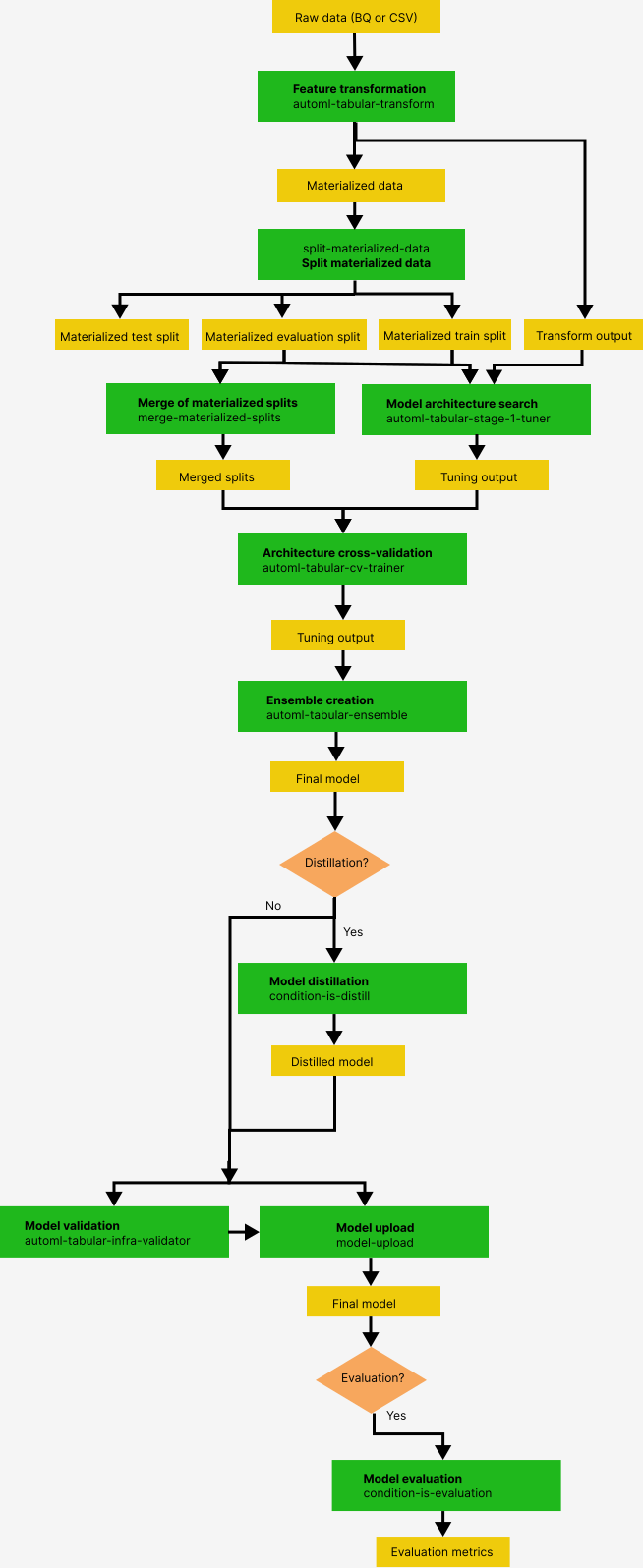
The pipeline components are:
1. **split-materialized-data** : Split the materialized data into a training set, an evaluation set, and a test set.
Input:
- Materialized data `materialized_data`.
Output:
- Materialized training split `materialized_train_split`.
- Materialized evaluation split `materialized_eval_split`.
- Materialized test set `materialized_test_split`.
2. **merge-materialized-splits** - Merges the materialized evaluation split and the materialized train split.
3. **automl-tabular-stage-1-tuner** - Performs model architecture search and tunes hyperparameters.
- An architecture is defined by a set of hyperparameters.
- Hyperparameters include the model type and the model parameters.
- Model types considered are neural networks and boosted trees.
- The system trains a model for each architecture considered.
4. **automl-tabular-cv-trainer** - Cross-validates architectures by training models on different folds of the input data.
- The architectures considered are those that give the best results in the previous step.
- The system selects approximately ten best architectures. The precise number is defined by the training budget.
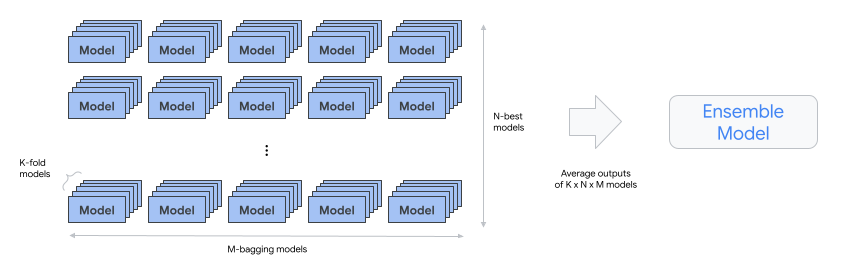
5. **automl-tabular-ensemble** - Ensembles the best architectures to produce a final model.
- The following diagram illustrates K-fold cross-validation with bagging:
6. **condition-is-distill** - **Optional**. Creates a smaller version of the ensemble model.
- A smaller model reduces latency and cost for inference.
7. **automl-tabular-infra-validator** - Validates whether the trained model is a valid model.
8. **model-upload** - Uploads the model.
9. **condition-is-evaluation** - **Optional**. Uses the test set to calculate evaluation metrics.
## What's next
- [Train a model using End-to-End
AutoML](https://docs.cloud.google.com/gemini-enterprise-agent-platform/machine-learning/tabular-data/tabular-workflows/e2e-automl-train).