> [!NOTE]
> To see an example of how to train a model with End-to-End AutoML,
> run the "AutoML Tabular Workflow pipelines" notebook in one of the following
> environments:
>
> [Open in Colab](https://colab.research.google.com/github/GoogleCloudPlatform/vertex-ai-samples/blob/main/notebooks/official/automl/automl_tabular_on_vertex_pipelines.ipynb)
>
>
> \|
>
> [Open in Colab Enterprise](https://console.cloud.google.com/agent-platform/colab/import/https%3A%2F%2Fraw.githubusercontent.com%2FGoogleCloudPlatform%2Fvertex-ai-samples%2Fmain%2Fnotebooks%2Fofficial%2Fautoml%2Fautoml_tabular_on_vertex_pipelines.ipynb)
>
>
> \|
>
> [Open
> in Agent Platform Workbench](https://console.cloud.google.com/agent-platform/workbench/deploy-notebook?download_url=https://raw.githubusercontent.com/GoogleCloudPlatform/vertex-ai-samples/main/notebooks/official/automl/automl_tabular_on_vertex_pipelines.ipynb)
>
>
> \|
>
> [View on GitHub](https://github.com/GoogleCloudPlatform/vertex-ai-samples/blob/main/notebooks/official/automl/automl_tabular_on_vertex_pipelines.ipynb)
This page shows you how to train a classification or regression model from a
tabular dataset with Tabular Workflow for End-to-End AutoML.
## Before you begin
Before you train a model, complete the following:
- [Prepare your training data](https://docs.cloud.google.com/gemini-enterprise-agent-platform/machine-learning/tabular-data/classification-regression/prepare-data.md.txt)
- [Create an Agent Platform dataset](https://docs.cloud.google.com/gemini-enterprise-agent-platform/machine-learning/tabular-data/classification-regression/create-dataset.md.txt).
- Enable the following APIs: Agent Platform, Dataflow, Compute Engine, Cloud Storage.
[Enable the APIs](https://console.cloud.google.com/apis/enableflow?apiid=ml.googleapis.com,dataflow.googleapis.com,compute_component,storage-component.googleapis.com)
- Ensure that your project's service accounts have the [necessary roles](https://docs.cloud.google.com/gemini-enterprise-agent-platform/machine-learning/tabular-data/tabular-workflows/service-accounts.md.txt)
assigned to them. To view the service accounts and their associated roles,
go to the **IAM** page and check the "Include Google-provided role grants" checkbox.
[Go to IAM](https://console.cloud.google.com/iam-admin/iam)
If you receive an error related to quotas while running Tabular Workflow for
End-to-End AutoML, you might need to request a higher quota. To learn
more, see [Manage quotas for Tabular Workflows](https://docs.cloud.google.com/gemini-enterprise-agent-platform/machine-learning/tabular-data/tabular-workflows/quotas.md.txt).
## Get the URI of the previous hyperparameter tuning result
If you previously completed an End-to-End AutoML workflow run, use
the hyperparameter tuning result from the previous run to save training
time and resources. Find the previous hyperparameter tuning result by
using the Google Cloud console or by loading it programmatically with the API.
### Google Cloud console
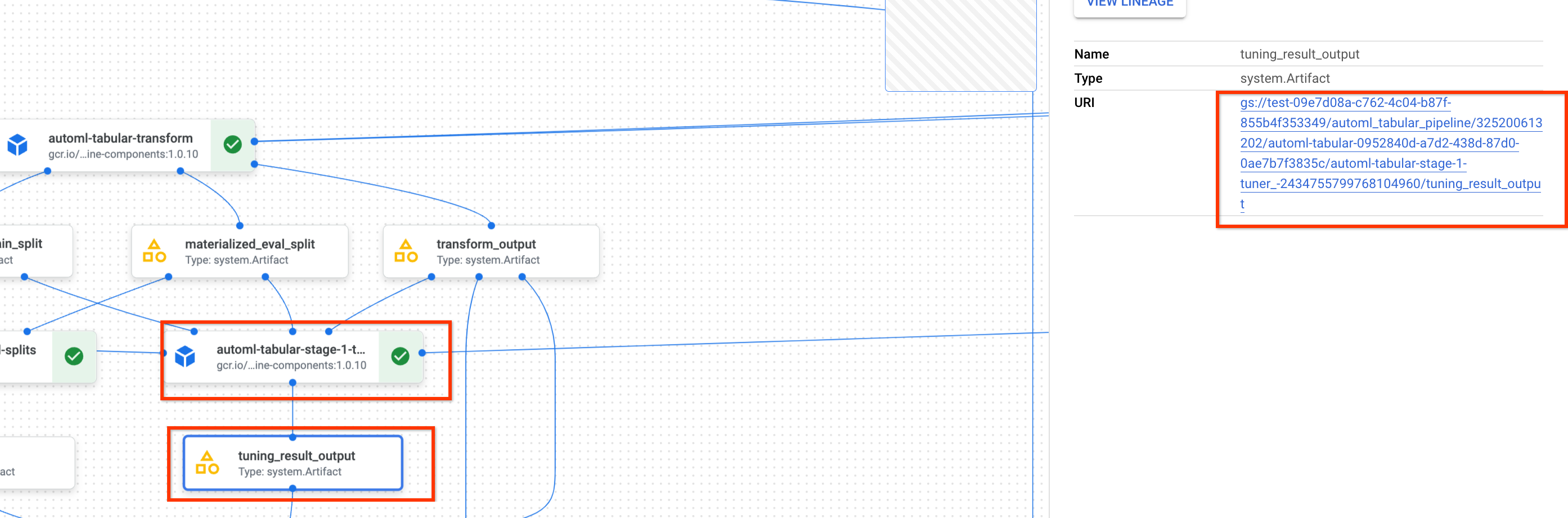
To find the hyperparameter tuning result URI by using the Google Cloud console,
perform the following steps:
1. In the Google Cloud console, in the Agent Platform section, go to
the **Pipelines** page.
[Go to the Pipelines page](https://console.cloud.google.com/agent-platform/pipelines)
2. Select the **Runs** tab.
3. Select the pipeline run you want to use.
4. Select **Expand Artifacts**.
5. Click on component **exit-handler-1**.
6. Click on component **stage_1_tuning_result_artifact_uri_empty**.
7. Find component **automl-tabular-cv-trainer-2**.
8. Click on the associated artifact **tuning_result_output**.
9. Select the **Node Info** tab.
10. Copy the URI for use in the [Train a model](https://docs.cloud.google.com/gemini-enterprise-agent-platform/machine-learning/tabular-data/tabular-workflows/e2e-automl-train.md.txt#train-model) step.
### API: Python
The following sample code demonstrates how you load the hyperparameter
tuning result by using the API. The variable `job` refers to the previous
model training pipeline run.
```python
def get_task_detail(
task_details: List[Dict[str, Any]], task_name: str
) -> List[Dict[str, Any]]:
for task_detail in task_details:
if task_detail.task_name == task_name:
return task_detail
pipeline_task_details = job.gca_resource.job_detail.task_details
stage_1_tuner_task = get_task_detail(
pipeline_task_details, "automl-tabular-stage-1-tuner"
)
stage_1_tuning_result_artifact_uri = (
stage_1_tuner_task.outputs["tuning_result_output"].artifacts[0].uri
)
```
## Train a model
### Google Cloud console
To train a model by using the Google Cloud console, perform the following steps:
1. In the Google Cloud console, in the Agent Platform section, go to
the **Pipelines** page.
[Go to the Pipelines page](https://console.cloud.google.com/agent-platform/pipelines)
2. Select the **Template Gallery** tab.
3. In the **AutoML for Tabular Classification / Regression** card,
click **Create run**.
4. In the **Run details** page, configure as follows:
1. Enter a pipeline run name.
2. **Optional:** If you want to set the **Gemini Enterprise Agent Platform Pipelines service account** or the **Dataflow worker service account** , open the **Advanced options** . [Learn more](https://docs.cloud.google.com/gemini-enterprise-agent-platform/machine-learning/tabular-data/tabular-workflows/e2e-automl-train.md.txt#service-accounts) about service accounts.
3. Click **Continue**.
5. In the **Runtime configuration** page, configure as follows:
1. Enter a Cloud Storage bucket or a folder within the bucket to use as the root output
directory. This directory will be used to save intermediate files, such as the
materialized dataset and the model. Remember to clean up the directory after training is
complete and the model and other important artifacts are copied to another Cloud Storage bucket.
Alternately, set a [Time to Live (TTL)](https://docs.cloud.google.com/storage/docs/lifecycle.md.txt) for the
Cloud Storage bucket.
The buckets for your project are listed in the Cloud Storage section of Google Cloud console.
[Go to the Buckets page](https://console.cloud.google.com/storage/browser)
2. Click **Continue**.
6. In the **Training method** page, configure as follows:
1. Select the name of the dataset you want to use to train your model.
2. Select your target column. The target column is the value that the model will predict. Learn more about [target column requirements](https://docs.cloud.google.com/gemini-enterprise-agent-platform/machine-learning/tabular-data/classification-regression/prepare-data.md.txt#data-structure).
3. Enter the display name for your new model.
4. **Optional** : To choose how to split the data between training, test, and validation sets, open the **Advanced options** . You can choose between the following data split options:
- **Random** (Default): Agent Platform randomly selects the rows associated with each of the data sets. By default, Agent Platform selects 80% of your data rows for the training set, 10% for the validation set, and 10% for the test set. Set the percentage of data rows that you want to be associated with each of the data sets.
- **Manual**: Agent Platform selects data rows for each of the data sets based on the values in a data split column. Provide the name of the data split column.
- **Chronological**: Agent Platform splits data based on the timestamp in a time column. Provide the name of the time column. You can also set the percentage of data rows that you want to be associated with the training set, the validation set, and the test set.
- **Stratified**: Agent Platform randomly selects the rows associated with each of the data sets, but preserves the distribution of target column values. Provide the name of the target column. You can also set the percentage of data rows that you want to be associated with the training set, the validation set, and the test set.
Learn more about [data splits](https://docs.cloud.google.com/gemini-enterprise-agent-platform/machine-learning/tabular-data/classification-regression/prepare-data.md.txt#split).
5. **Optional:** You can run the pipeline without the architecture search. If you choose **Skip architecture search** , you will be prompted to provide a set of hyperparameters from a previous pipeline run in the **Training options** page.
6. Click **Continue**.
7. In the **Training options** page, configure as follows:
1. **Optional:** Click **Generate statistics** . Generating statistics populates the **Transformation** dropdown menus.
2. Review your column list and exclude any columns from training that should not be used to train the model.
3. Review the transformations selected for your included features, along with whether invalid data is allowed, and make any required updates. Learn more about [transformations](https://docs.cloud.google.com/gemini-enterprise-agent-platform/machine-learning/datasets/data-types-tabular.md.txt#transformations) and [invalid data](https://docs.cloud.google.com/gemini-enterprise-agent-platform/machine-learning/datasets/data-types-tabular.md.txt#null-values).
4. If you chose to skip the architecture search in the **Training method** page, provide the path to the [hyperparameter tuning result](https://docs.cloud.google.com/gemini-enterprise-agent-platform/machine-learning/tabular-data/tabular-workflows/e2e-automl-train.md.txt#previous-result) from a previous pipeline run.
5. **Optional:** If you want to specify the weight column, open the **Advanced options** and make your selection. Learn more about [weight columns](https://docs.cloud.google.com/gemini-enterprise-agent-platform/machine-learning/tabular-data/classification-regression/prepare-data.md.txt#weight).
6. **Optional:** If you want to change your optimization objective from the default, open the **Advanced options** and make your selection. Learn more about [optimization objectives](https://docs.cloud.google.com/gemini-enterprise-agent-platform/machine-learning/tabular-data/tabular-workflows/e2e-automl-train.md.txt#optimization-objectives).
7. **Optional:** If you choose to perform the architecture search in the **Training method** page, you can specify the number of parallel trials. Open the **Advanced options** and enter your value.
8. **Optional:** You can provide fixed values for a subset of the hyperparameters. Agent Platform searches for the optimal values of the remaining unfixed hyperparameters. This option is a good choice if you have a strong preference for the model type. You can choose between neural networks and boosted trees for your model type. Open the **Advanced options** and provide a study spec override in JSON format.
For example, if you want to set the model type
to Neural Networks (NN), enter the following:
```
[
{
"parameter_id": "model_type",
"categorical_value_spec": {
"values": ["nn"]
}
}
]
```
9. Click **Continue**.
8. In the **Compute and pricing** page, configure as follows:
1. Enter the maximum number of hours you want your model to train for. Learn more about [pricing](https://cloud.google.com/products/gemini-enterprise-agent-platform/pricing#tabular-data).
2. **Optional:** In the **Compute Settings** section, you can configure the machine types and the number of machines for each stage of the workflow. This option is a good choice if you have a large dataset and want to optimize the machine hardware accordingly.
9. Click **Submit**.
### API: Python
The following sample code demonstrates how to run a model training pipeline:
```python
job = aiplatform.PipelineJob(
...
template_path=template_path,
parameter_values=parameter_values,
...
)
job.run(service_account=SERVICE_ACCOUNT)
```
The optional `service_account` parameter in `job.run()` lets you set the
Gemini Enterprise Agent Platform Pipelines service account to an account of your choice.
The pipeline and the parameter values are defined by the following function.
The training data can be either a CSV file in Cloud Storage or a table in BigQuery.
```python
template_path, parameter_values = automl_tabular_utils.get_automl_tabular_pipeline_and_parameters(...)
```
The following is a subset of `get_automl_tabular_pipeline_and_parameters` parameters:
| Parameter name | Type | Definition |
|---|---|---|
| `data_source_csv_filenames` | String | A URI for a CSV stored in Cloud Storage. |
| `data_source_bigquery_table_path` | String | A URI for a BigQuery table. |
| `dataflow_service_account` | String | (Optional) Custom service account to run Dataflow jobs. The Dataflow job can be configured to use private IPs and a specific VPC subnet. This parameter acts as an override for the default Dataflow worker service account. |
| `prediction_type` | String | Choose `classification` to train a classification model or `regression` to train a regression model. |
| `optimization_objective` | String | If you are training a binary classification model, the default objective is AUC ROC. If you are training a regression model, the default objective is RMSE. If you want a different optimization objective for your model, choose one of the options in [Optimization objectives for classification or regression models](https://docs.cloud.google.com/gemini-enterprise-agent-platform/machine-learning/tabular-data/tabular-workflows/e2e-automl-train.md.txt#optimization-objectives). |
| `enable_probabilistic_inference` | Boolean | If you are training a regression model and you set this value to `true`, Agent Platform models the probability distribution of the inference. Probabilistic inference can improve model quality by handling noisy data and quantifying uncertainty. If `quantiles` are specified, then Agent Platform also returns the quantiles of the distribution. |
| `quantiles` | List\[float\] | Quantiles to use for probabilistic inference. A quantile indicates the likelihood that a target is less than a given value. Provide a list of up to five unique numbers between `0` and `1`, exclusive. |
**Workflow customization options**
You can customize the End-to-End AutoML workflow by defining argument
values that are passed in during pipeline definition. You can customize your
workflow in the following ways:
- Override search space
- Configure hardware
- Distill the model
- Skip architecture search
**Override search space**
The following `get_automl_tabular_pipeline_and_parameters` parameter lets
you provide fixed values for a subset of the hyperparameters.
Agent Platform searches for the optimal values of the remaining
unfixed hyperparameters. Use this parameter if you want to choose
between neural networks and boosted trees for your model type.
| Parameter name | Type | Definition |
|---|---|---|
| `study_spec_parameters_override` | List\[Dict\[String, Any\]\] | (Optional) Custom subset of hyperparameters. This parameter configures the `automl-tabular-stage-1-tuner` component of the pipeline. |
The following code demonstrates how to set the model type to Neural Networks (NN):
```python
study_spec_parameters_override = [
{
"parameter_id": "model_type",
"categorical_value_spec": {
"values": ["nn"] # The default value is ["nn", "boosted_trees"], this reduces the search space
}
}
]
```
**Configure hardware**
The following `get_automl_tabular_pipeline_and_parameters` parameters let
you configure the machine types and the number of machines for training.
This option is a good choice if you have a large dataset and want to optimize
the machine hardware accordingly.
| Parameter name | Type | Definition |
|---|---|---|
| `stage_1_tuner_worker_pool_specs_override` | Dict\[String, Any\] | (Optional) Custom configuration of the machine types and the number of machines for training. This parameter configures the `automl-tabular-stage-1-tuner` component of the pipeline. |
| `cv_trainer_worker_pool_specs_override` | Dict\[String, Any\] | (Optional) Custom configuration of the machine types and the number of machines for training. This parameter configures the `automl-tabular-stage-1-tuner` component of the pipeline. |
The following code demonstrates how to set `n1-standard-8` machine type for the
TensorFlow chief node and `n1-standard-4` machine type for the
TensorFlow evaluator node:
```python
worker_pool_specs_override = [
{"machine_spec": {"machine_type": "n1-standard-8"}}, # override for TF chief node
{}, # override for TF worker node, since it's not used, leave it empty
{}, # override for TF ps node, since it's not used, leave it empty
{
"machine_spec": {
"machine_type": "n1-standard-4" # override for TF evaluator node
}
}
]
```
**Distill the model**
The following `get_automl_tabular_pipeline_and_parameters` parameter lets you
create a smaller version of the ensemble model. A smaller model reduces
latency and cost for inference.
| Parameter name | Type | Definition |
|---|---|---|
| `run_distillation` | Boolean | If `TRUE`, creates a smaller version of the ensemble model. |
**Skip architecture search**
The following `get_automl_tabular_pipeline_and_parameters` parameter
lets you run the pipeline without the architecture search and provide a set of
[hyperparameters from a previous pipeline run](https://docs.cloud.google.com/gemini-enterprise-agent-platform/machine-learning/tabular-data/tabular-workflows/e2e-automl-train.md.txt#previous-result)
instead.
| Parameter name | Type | Definition |
|---|---|---|
| `stage_1_tuning_result_artifact_uri` | String | (Optional) URI of the hyperparameter tuning result from a previous pipeline run. |
## Optimization objectives for classification or regression models
When you train a model, Agent Platform
selects a default optimization objective based on your model type and the
data type used for your target column.
Classification models are best for:
| Optimization objective | API value | Use this objective if you want to... |
|---|---|---|
| AUC ROC | `maximize-au-roc` | Maximize the area under the receiver operating characteristic (ROC) curve. Distinguishes between classes. Default value for binary classification. |
| Log loss | `minimize-log-loss` | Keep inferences probabilities as accurate as possible. Only supported objective for multi-class classification. |
| AUC PR | `maximize-au-prc` | Maximize the area under the precision-recall curve. Optimizes results for inferences for the less common class. |
| Precision at Recall | `maximize-precision-at-recall` | Optimize precision at a specific recall value. |
| Recall at Precision | `maximize-recall-at-precision` | Optimize recall at a specific precision value. |
Regression models are best for:
| Optimization objective | API value | Use this objective if you want to... |
|---|---|---|
| RMSE | `minimize-rmse` | Minimize root-mean-squared error (RMSE). Captures more extreme values accurately. Default value. |
| MAE | `minimize-mae` | Minimize mean-absolute error (MAE). Views extreme values as outliers with less impact on model. |
| RMSLE | `minimize-rmsle` | Minimize root-mean-squared log error (RMSLE). Penalizes error on relative size rather than absolute value. Useful when both predicted and actual values can be quite large. |
## What's next
- Learn about [online inferences](https://docs.cloud.google.com/gemini-enterprise-agent-platform/machine-learning/tabular-data/classification-regression/get-online-predictions.md.txt) for classification and regression models.
- Learn about [batch inferences](https://docs.cloud.google.com/gemini-enterprise-agent-platform/machine-learning/tabular-data/classification-regression/get-batch-predictions.md.txt) for classification and regression models.
- Learn about [pricing for model training](https://cloud.google.com/products/gemini-enterprise-agent-platform/pricing#tabular-data).