> [!NOTE]
> To learn more,
> run the " Endpoint and shared VM" notebook in one of the following
> environments:
>
> [Open in Colab](https://colab.research.google.com/github/GoogleCloudPlatform/vertex-ai-samples/blob/main/notebooks/community/ml_ops/stage5/get_started_with_vertex_endpoint_and_shared_vm.ipynb)
>
>
> \|
>
> [Open in Colab Enterprise](https://console.cloud.google.com/agent-platform/colab/import/https%3A%2F%2Fraw.githubusercontent.com%2FGoogleCloudPlatform%2Fvertex-ai-samples%2Fmain%2Fnotebooks%2Fcommunity%2Fml_ops%2Fstage5%2Fget_started_with_vertex_endpoint_and_shared_vm.ipynb)
>
>
> \|
>
> [Open
> in Agent Platform Workbench](https://console.cloud.google.com/agent-platform/workbench/deploy-notebook?download_url=https://raw.githubusercontent.com/GoogleCloudPlatform/vertex-ai-samples/main/notebooks/community/ml_ops/stage5/get_started_with_vertex_endpoint_and_shared_vm.ipynb)
>
>
> \|
>
> [View on GitHub](https://github.com/GoogleCloudPlatform/vertex-ai-samples/blob/main/notebooks/community/ml_ops/stage5/get_started_with_vertex_endpoint_and_shared_vm.ipynb)
A Gemini Enterprise Agent Platform model is deployed to its own virtual machine (VM) instance by default. Gemini Enterprise Agent Platform offers the capability to cohost models on the same VM, which enables the following benefits:
- Resource sharing across multiple deployments.
- Cost-effective model serving.
- Improved utilization of memory and computational resources.
This guide describes how to share resources across multiple deployments on Gemini Enterprise Agent Platform.
## Overview
Model cohosting support introduces the concept of a [`DeploymentResourcePool`](https://docs.cloud.google.com/gemini-enterprise-agent-platform/reference/rest/v1/projects.locations.deploymentResourcePools.md.txt), which groups model deployments that share resources within a single VM. Multiple endpoints can be deployed on the same VM within a `DeploymentResourcePool`. Each endpoint has one or more deployed models. The deployed models for a given endpoint can be grouped under the same or a different `DeploymentResourcePool`.
In the following example, you have four models and two endpoints:

`Model_A`, `Model_B`, and `Model_C` are deployed to `Endpoint_1` with traffic routed to all of them. `Model_D` is deployed to `Endpoint_2`, which receives 100% of the traffic for that endpoint.
Instead of having each model assigned to a separate VM, you can group the models in one of the following ways:
- Group `Model_A` and `Model_B` to share a VM, which makes them a part of `DeploymentResourcePool_X`.
- Group `Model_C` and `Model_D` (currently not in the same endpoint) to share a VM, which makes them a part of `DeploymentResourcePool_Y`.
Different deployment resource pools can't share a VM.
## Considerations
There is no upper limit on the number of models that can be deployed to a single deployment resource pool. It depends on the chosen VM shape, model sizes, and traffic patterns. Cohosting works well when you have many deployed models with sparse traffic, such that assigning a dedicated machine to each deployed model doesn't effectively utilize resources.
You can deploy models to the same deployment resource pool concurrently. However, there is a limit of 20 concurrent deployment requests at any given time.
An empty deployment resource pool doesn't consume your resource quota. Resources are provisioned to a deployment resource pool when the first model is deployed and are released when the last model is undeployed.
Models in a single deployment resource pool aren't isolated from each other and can be in competition for CPU and memory. Performance might be worse for one model if another model is processing an inference request at the same time.
## Limitations
> [!WARNING]
> **Preview:** Support for Pytorch is in [Preview](https://cloud.google.com/products#product-launch-stages). Support for TensorFlow is generally available (GA).
The following limitations exist when deploying models with resource sharing enabled:
- This feature is only supported for the following configurations:
- TensorFlow model deployments that use [prebuilt containers for TensorFlow](https://docs.cloud.google.com/gemini-enterprise-agent-platform/machine-learning/predictions/pre-built-containers.md.txt#tensorflow)
- PyTorch model deployments that use [prebuilt containers for PyTorch](https://docs.cloud.google.com/gemini-enterprise-agent-platform/machine-learning/predictions/pre-built-containers.md.txt#pytorch)
- Prebuilt containers configured for other frameworks aren't supported.
- Custom containers aren't supported.
- Only [custom-trained models](https://docs.cloud.google.com/gemini-enterprise-agent-platform/machine-learning/training/overview.md.txt) and [imported models](https://docs.cloud.google.com/gemini-enterprise-agent-platform/machine-learning/model-registry/import-model.md.txt) are supported. AutoML models aren't supported.
- Only models with the same container image (including framework version) of Gemini Enterprise Agent Platform prebuilt containers for inference for TensorFlow or PyTorch can be deployed in the same deployment resource pool.
- [Vertex Explainable AI](https://docs.cloud.google.com/vertex-ai/docs/explainable-ai/overview.md.txt) isn't supported.
## Deploy a model
To deploy a model to a `DeploymentResourcePool`, complete the following steps:
1. [Create a deployment resource pool](https://docs.cloud.google.com/gemini-enterprise-agent-platform/machine-learning/predictions/model-co-hosting.md.txt#create-deployment-resource-pool) if needed.
2. [Create an endpoint](https://docs.cloud.google.com/gemini-enterprise-agent-platform/machine-learning/predictions/model-co-hosting.md.txt#create-endpoint) if needed.
3. [Retrieve the endpoint ID](https://docs.cloud.google.com/gemini-enterprise-agent-platform/machine-learning/predictions/model-co-hosting.md.txt#retrieve-endpoint-id).
4. [Deploy the model to the endpoint](https://docs.cloud.google.com/gemini-enterprise-agent-platform/machine-learning/predictions/model-co-hosting.md.txt#deploy-model-deployment-resource-pool) in the deployment resource pool.
### Create a deployment resource pool
If you are deploying a model to an existing `DeploymentResourcePool`, skip this step:
Use [`CreateDeploymentResourcePool`](https://docs.cloud.google.com/gemini-enterprise-agent-platform/reference/rest/v1/projects.locations.deploymentResourcePools/create.md.txt) to create a resource pool.
### Cloud Console
1. In the Google Cloud console, go to the Agent Platform **Deployment Resource Pools**
page.
[Go to Deployment resource pools](https://console.cloud.google.com/agent-platform/online-prediction/deployment-resource-pools)
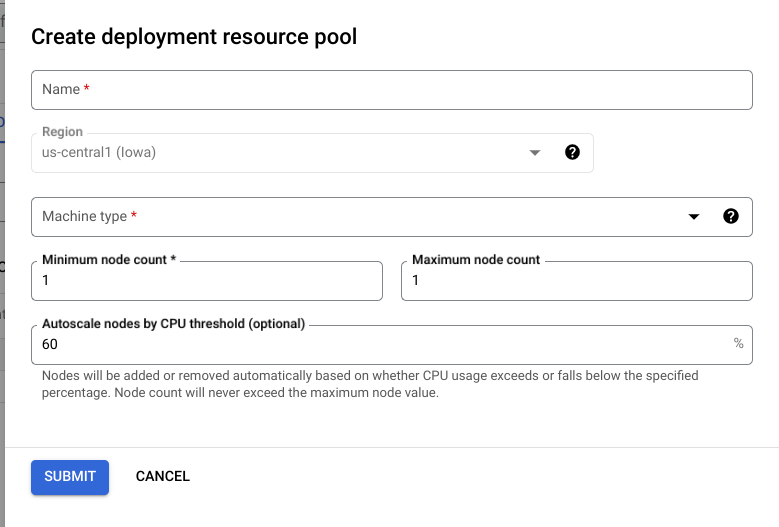
2. Click **Create** and fill out the form (shown below).
### REST
Before using any of the request data,
make the following replacements:
- LOCATION_ID: The region where you are using Agent Platform.
- PROJECT_ID: Your [project ID](https://docs.cloud.google.com/resource-manager/docs/creating-managing-projects.md.txt#identifiers). .
- MACHINE_TYPE: Optional. The machine resources used for each node of this deployment. Its default setting is `n1-standard-2`. [Learn more about machine types.](https://docs.cloud.google.com/gemini-enterprise-agent-platform/machine-learning/predictions/configure-compute.md.txt)
- ACCELERATOR_TYPE: The type of accelerator to be attached to the machine. Optional if ACCELERATOR_COUNT is not specified or is zero. Not recommended for AutoML models or custom-trained models that are using non-GPU images. [Learn more](https://docs.cloud.google.com/gemini-enterprise-agent-platform/machine-learning/predictions/configure-compute.md.txt#gpus).
- ACCELERATOR_COUNT: The number of accelerators for each replica to use. Optional. Should be zero or unspecified for AutoML models or custom-trained models that are using non-GPU images.
- MIN_REPLICA_COUNT: The minimum number of nodes for this deployment. The node count can be increased or decreased as required by the inference load, up to the maximum number of nodes and never fewer than this number of nodes. This value must be greater than or equal to 1.
- MAX_REPLICA_COUNT: The maximum number of nodes for this deployment. The node count can be increased or decreased as required by the inference load, up to this number of nodes and never fewer than the minimum number of nodes.
- REQUIRED_REPLICA_COUNT: Optional. The required number of nodes for this deployment to be marked as successful. Must be greater than or equal to 1 and fewer than or equal to the minimum number of nodes. If not specified, the default value is the minimum number of nodes.
- DEPLOYMENT_RESOURCE_POOL_ID: A name for your `DeploymentResourcePool`. The maximum length is 63 characters, and valid characters are /\^\[a-z\](\[a-z0-9-\]{0,61}\[a-z0-9\])?$/.
HTTP method and URL:
```
POST https://LOCATION_ID-aiplatform.googleapis.com/v1/projects/PROJECT_ID/locations/LOCATION_ID/deploymentResourcePools
```
Request JSON body:
```
{
"deploymentResourcePool":{
"dedicatedResources":{
"machineSpec":{
"machineType":"MACHINE_TYPE",
"acceleratorType":"ACCELERATOR_TYPE",
"acceleratorCount":"ACCELERATOR_COUNT"
},
"minReplicaCount":MIN_REPLICA_COUNT,
"maxReplicaCount":MAX_REPLICA_COUNT,
"requiredReplicaCount":REQUIRED_REPLICA_COUNT
}
},
"deploymentResourcePoolId":"DEPLOYMENT_RESOURCE_POOL_ID"
}
```
To send your request, expand one of these options:
#### curl (Linux, macOS, or Cloud Shell)
> [!NOTE]
> **Note:** The following command assumes that you have logged in to the `gcloud` CLI with your user account by running [`gcloud init`](https://docs.cloud.google.com/sdk/gcloud/reference/init) or [`gcloud auth login`](https://docs.cloud.google.com/sdk/gcloud/reference/auth/login.md.txt) , or by using [Cloud Shell](https://docs.cloud.google.com/shell/docs.md.txt), which automatically logs you into the `gcloud` CLI . You can check the currently active account by running [`gcloud auth list`](https://docs.cloud.google.com/sdk/gcloud/reference/auth/list.md.txt).
Save the request body in a file named `request.json`,
and execute the following command:
```
curl -X POST \
-H "Authorization: Bearer $(gcloud auth print-access-token)" \
-H "Content-Type: application/json; charset=utf-8" \
-d @request.json \
"https://LOCATION_ID-aiplatform.googleapis.com/v1/projects/PROJECT_ID/locations/LOCATION_ID/deploymentResourcePools"
```
#### PowerShell (Windows)
> [!NOTE]
> **Note:** The following command assumes that you have logged in to the `gcloud` CLI with your user account by running [`gcloud init`](https://docs.cloud.google.com/sdk/gcloud/reference/init) or [`gcloud auth login`](https://docs.cloud.google.com/sdk/gcloud/reference/auth/login.md.txt) . You can check the currently active account by running [`gcloud auth list`](https://docs.cloud.google.com/sdk/gcloud/reference/auth/list.md.txt).
Save the request body in a file named `request.json`,
and execute the following command:
```
$cred = gcloud auth print-access-token
$headers = @{ "Authorization" = "Bearer $cred" }
Invoke-WebRequest `
-Method POST `
-Headers $headers `
-ContentType: "application/json; charset=utf-8" `
-InFile request.json `
-Uri "https://LOCATION_ID-aiplatform.googleapis.com/v1/projects/PROJECT_ID/locations/LOCATION_ID/deploymentResourcePools" | Select-Object -Expand Content
```
You should receive a JSON response similar to the following:
```
{
"name": "projects/PROJECT_NUMBER/locations/LOCATION_ID/deploymentResourcePools/DEPLOYMENT_RESOURCE_POOL_ID/operations/OPERATION_ID",
"metadata": {
"@type": "type.googleapis.com/google.cloud.aiplatform.v1.CreateDeploymentResourcePoolOperationMetadata",
"genericMetadata": {
"createTime": "2022-06-15T05:48:06.383592Z",
"updateTime": "2022-06-15T05:48:06.383592Z"
}
}
}
```
You can poll for the status of the operation until
the response includes `"done": true`.
### Python
```python
# Create a deployment resource pool.
deployment_resource_pool = aiplatform.DeploymentResourcePool.create(
deployment_resource_pool_id="DEPLOYMENT_RESOURCE_POOL_ID", # User-specified ID
machine_type="MACHINE_TYPE", # Machine type
min_replica_count=MIN_REPLICA_COUNT, # Minimum number of replicas
max_replica_count=MAX_REPLICA_COUNT, # Maximum number of replicas
)
```
Replace the following:
- `DEPLOYMENT_RESOURCE_POOL_ID`: A name for your `DeploymentResourcePool`. The maximum length is 63 characters, and valid characters are /\^\[a-z\](\[a-z0-9-\]{0,61}\[a-z0-9\])?$/.
- `MACHINE_TYPE`: Optional. The machine resources used for each node of this deployment. The default value is `n1-standard-2`. [Learn more about machine types.](https://docs.cloud.google.com/gemini-enterprise-agent-platform/machine-learning/predictions/configure-compute.md.txt)
- `MIN_REPLICA_COUNT`: The minimum number of nodes for this deployment. The node count can be increased or decreased as required by the inference load, up to the maximum number of nodes and never fewer than this number of nodes. This value must be greater than or equal to 1.
- `MAX_REPLICA_COUNT`: The maximum number of nodes for this deployment. The node count can be increased or decreased as required by the inference load, up to this number of nodes and never fewer than the minimum number of nodes.
### Create an endpoint
To create an endpoint, see
[Create a public endpoint by using the gcloud CLI or Agent Platform API](https://docs.cloud.google.com/gemini-enterprise-agent-platform/machine-learning/predictions/create-public-endpoint.md.txt).
This step is the same as for a single-model deployment.
### Retrieve the endpoint ID
To retrieve the endpoint ID, see
[Deploy a model by using the gcloud CLI or Agent Platform API](https://docs.cloud.google.com/gemini-enterprise-agent-platform/machine-learning/predictions/deploy-model-api.md.txt#get-the-endpoint-id).
This step is the same as for a single-model deployment.
### Deploy the model in a deployment resource pool
After you create a `DeploymentResourcePool` and an endpoint, you are ready to deploy using the `DeployModel` API method. This process is similar to a single-model deployment. If there is a `DeploymentResourcePool`, specify `shared_resources` of `DeployModel` with the resource name of the `DeploymentResourcePool` that you are deploying.
### Cloud Console
1. In the Google Cloud console, go to the Agent Platform **Model Registry**
page.
[Go to Model Registry](https://console.cloud.google.com/agent-platform/models)
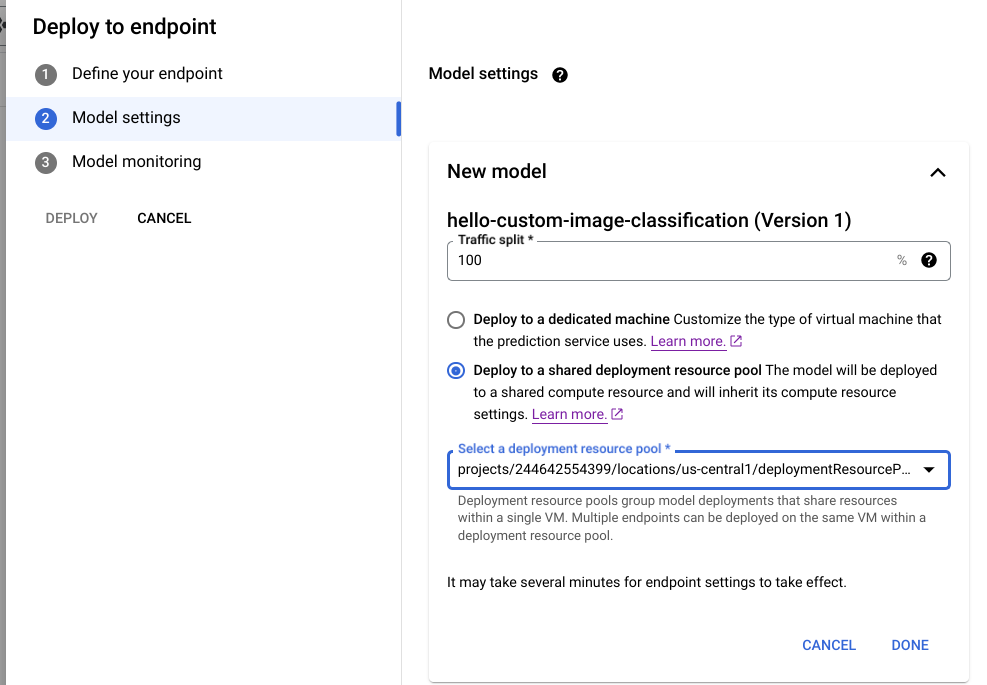
2. Find your model and click **Deploy to endpoint**.
3. Under **Model settings** (shown below), select **Deploy to a shared deployment resource pool**.
### REST
Before using any of the request data,
make the following replacements:
- LOCATION_ID: The region where you are using Agent Platform.
- PROJECT: Your [project ID](https://docs.cloud.google.com/resource-manager/docs/creating-managing-projects.md.txt#identifiers). .
- ENDPOINT_ID: The ID for the endpoint.
- MODEL_ID: The ID for the model to be deployed.
- DEPLOYED_MODEL_NAME: A name for the `DeployedModel`. You can use the display name of the `Model` for the `DeployedModel` as well.
- DEPLOYMENT_RESOURCE_POOL_ID: A name for your `DeploymentResourcePool`. The maximum length is 63 characters, and valid characters are /\^\[a-z\](\[a-z0-9-\]{0,61}\[a-z0-9\])?$/.
- TRAFFIC_SPLIT_THIS_MODEL: The percentage of the prediction traffic to this endpoint to be routed to the model being deployed with this operation. Defaults to 100. All traffic percentages must add up to 100. [Learn more about traffic splits](https://docs.cloud.google.com/gemini-enterprise-agent-platform/machine-learning/general/deployment.md.txt#models-endpoint).
- DEPLOYED_MODEL_ID_N: Optional. If other models are deployed to this endpoint, you must update their traffic split percentages so that all percentages add up to 100.
- TRAFFIC_SPLIT_MODEL_N: The traffic split percentage value for the deployed model id key.
- PROJECT_NUMBER: Your project's automatically generated [project number](https://docs.cloud.google.com/resource-manager/docs/creating-managing-projects.md.txt#identifiers)
HTTP method and URL:
```
POST https://LOCATION-aiplatform.googleapis.com/v1/projects/PROJECT/locations/LOCATION/endpoints/ENDPOINT_ID:deployModel
```
Request JSON body:
```
{
"deployedModel": {
"model": "projects/PROJECT/locations/us-central1/models/MODEL_ID",
"displayName": "DEPLOYED_MODEL_NAME",
"sharedResources":"projects/PROJECT/locations/us-central1/deploymentResourcePools/DEPLOYMENT_RESOURCE_POOL_ID"
},
"trafficSplit": {
"0": TRAFFIC_SPLIT_THIS_MODEL,
"DEPLOYED_MODEL_ID_1": TRAFFIC_SPLIT_MODEL_1,
"DEPLOYED_MODEL_ID_2": TRAFFIC_SPLIT_MODEL_2
},
}
```
To send your request, expand one of these options:
#### curl (Linux, macOS, or Cloud Shell)
> [!NOTE]
> **Note:** The following command assumes that you have logged in to the `gcloud` CLI with your user account by running [`gcloud init`](https://docs.cloud.google.com/sdk/gcloud/reference/init) or [`gcloud auth login`](https://docs.cloud.google.com/sdk/gcloud/reference/auth/login.md.txt) , or by using [Cloud Shell](https://docs.cloud.google.com/shell/docs.md.txt), which automatically logs you into the `gcloud` CLI . You can check the currently active account by running [`gcloud auth list`](https://docs.cloud.google.com/sdk/gcloud/reference/auth/list.md.txt).
Save the request body in a file named `request.json`,
and execute the following command:
```
curl -X POST \
-H "Authorization: Bearer $(gcloud auth print-access-token)" \
-H "Content-Type: application/json; charset=utf-8" \
-d @request.json \
"https://LOCATION-aiplatform.googleapis.com/v1/projects/PROJECT/locations/LOCATION/endpoints/ENDPOINT_ID:deployModel"
```
#### PowerShell (Windows)
> [!NOTE]
> **Note:** The following command assumes that you have logged in to the `gcloud` CLI with your user account by running [`gcloud init`](https://docs.cloud.google.com/sdk/gcloud/reference/init) or [`gcloud auth login`](https://docs.cloud.google.com/sdk/gcloud/reference/auth/login.md.txt) . You can check the currently active account by running [`gcloud auth list`](https://docs.cloud.google.com/sdk/gcloud/reference/auth/list.md.txt).
Save the request body in a file named `request.json`,
and execute the following command:
```
$cred = gcloud auth print-access-token
$headers = @{ "Authorization" = "Bearer $cred" }
Invoke-WebRequest `
-Method POST `
-Headers $headers `
-ContentType: "application/json; charset=utf-8" `
-InFile request.json `
-Uri "https://LOCATION-aiplatform.googleapis.com/v1/projects/PROJECT/locations/LOCATION/endpoints/ENDPOINT_ID:deployModel" | Select-Object -Expand Content
```
You should receive a JSON response similar to the following:
```
{
"name": "projects/PROJECT_NUMBER/locations/LOCATION/endpoints/ENDPOINT_ID/operations/OPERATION_ID",
"metadata": {
"@type": "type.googleapis.com/google.cloud.aiplatform.v1.DeployModelOperationMetadata",
"genericMetadata": {
"createTime": "2022-06-19T17:53:16.502088Z",
"updateTime": "2022-06-19T17:53:16.502088Z"
}
}
}
```
### Python
```python
# Deploy model in a deployment resource pool.
model = aiplatform.Model("MODEL_ID")
model.deploy(deployment_resource_pool=deployment_resource_pool)
```
Replace `MODEL_ID` with the ID for the model to be deployed.
Repeat the preceding request with different models that have the same shared resources to deploy multiple models to the same deployment resource pool.
### Get inferences
You can [send inference requests](https://docs.cloud.google.com/gemini-enterprise-agent-platform/machine-learning/predictions/get-online-predictions.md.txt) to a model in a `DeploymentResourcePool` as you would to any other model deployed on Gemini Enterprise Agent Platform.