This page describes how to prepare image training data for use in a Gemini Enterprise Agent Platform dataset to train an image object detection model.
The following objective section includes information about data requirements,
input/output schema file, and the format of the data import files
([JSON Lines](https://jsonlines.org/)
\& CSV) that are defined by the schema.
### Permissions
To use images from a Cloud Storage bucket, you must grant the [Agent Platform Service Agent](https://docs.cloud.google.com/gemini-enterprise-agent-platform/machine-learning/general/access-control.md.txt#service-agents) the `Storage Object Viewer` role for the bucket. The Service Agent is a Google-managed service account that Agent Platform uses to access your data on your behalf. For a more detailed explanation, see [Service agents](https://docs.cloud.google.com/gemini-enterprise-agent-platform/machine-learning/general/access-control.md.txt#service-agents).
### Object detection
### Data requirements
| | **General image requirements** |
|---|---|
| Supported file types | - JPEG - PNG - GIF - BMP - ICO |
| Types of images | AutoML models are optimized for photographs of objects in the real world. |
| Training image file size (MB) | 30MB maximum size. |
| Prediction image file\* size (MB) | 1.5MB maximum size. |
| Image size (pixels) | 1024 pixels by 1024 pixels suggested maximum. For images much larger than 1024 pixels by 1024 pixels some image quality may be lost during Gemini Enterprise Agent Platform's image normalization process. |
| | **Labels and bounding box requirements** |
|---|---|
| **The following requirements apply to datasets used to train AutoML models.** ||
| Label instances for training | 10 annotations (instances) minimum. |
| Annotation requirements | For each label you must have *at least* 10 images, each with *at least* one annotation (bounding box and the label). However, for model training purposes it's recommended you use about **1000 annotations per label**. In general, the more images per label you have the better your model will perform. |
| Label ratio (most common label to least common label): | The model works best when there are at most 100x more images for the most common label than for the least common label. For model performance, it is recommended that you remove very low frequency labels. |
| Bounding box edge length | At least **0.01 \* length of a side** of an image. For example, a 1000 \* 900 pixel image would require bounding boxes of at least 10 \* 9 pixels. Bound box minium size: 8 pixels by 8 pixels. > [!NOTE] > **Note:** The final bounding box pixel size is subject to preprocessing resizing. For more information, see "Internal image preprocessing" information below. |
| **The following requirements apply to datasets used to train AutoML or custom-trained models.** ||
| Bounding boxes per distinct image | 500 maximum. |
| Bounding boxes returned from a prediction request | 100 (default), 500 maximum. |
| | **Training data and dataset requirements** |
|---|---|
| **The following requirements apply to datasets used to train AutoML models.** ||
| Training image characteristics | The training data should be as close as possible to the data on which predictions are to be made. For example, if your use case involves blurry and low-resolution images (such as from a security camera), your training data should be composed of blurry, low-resolution images. In general, you should also consider providing multiple angles, resolutions, and backgrounds for your training images. Gemini Enterprise Agent Platform models can't generally predict labels that humans can't assign. So, if a human can't be trained to assign labels by looking at the image for 1-2 seconds, the model likely can't be trained to do it either. |
| Internal image preprocessing | After images are imported, Gemini Enterprise Agent Platform performs preprocessing on the data. The preprocessed images are the actual data used to train the model. Image preprocessing (resizing) occurs when the image's smallest edge is *greater* than 1024 pixels. In the case where the image's smaller side is greater than 1024 pixels, that smaller side is scaled down to 1024 pixels. The larger side *and* specified bounding boxes are both scaled down by the same amount as the smaller side. Consequently, any scaled down annotations (bounding boxes and labels) are removed if they are less than 8 pixels by 8 pixels. Images with a smaller side less than or equal to 1024 pixel are not subject to preprocessing resizing. |
| **The following requirements apply to datasets used to train AutoML or custom-trained models.** ||
| Images in each dataset | 150,000 maximum |
| Total annotated bounding boxes in each dataset | 1,000,000 maximum |
| Number of labels in each dataset | 1 minimum, 1,000 maximum |
### YAML schema file
Use the following publicly accessible schema file to import image object detection
annotations (bounding boxes and labels). This schema file dictates the format
of the data input files. This file's structure follows the
[OpenAPI schema](https://github.com/OAI/OpenAPI-Specification/blob/master/versions/3.0.2.md#schema).
[`gs://google-cloud-aiplatform/schema/dataset/ioformat/image_bounding_box_io_format_1.0.0.yaml`](https://storage.cloud.google.com/google-cloud-aiplatform/schema/dataset/ioformat/image_bounding_box_io_format_1.0.0.yaml)
#### **Full schema file**
```
title: ImageBoundingBox
description: >
Import and export format for importing/exporting images together with bounding
box annotations. Can be used in Dataset.import_schema_uri field.
type: object
required:
- imageGcsUri
properties:
imageGcsUri:
type: string
description: >
A Cloud Storage URI pointing to an image. Up to 30MB in size.
Supported file mime types: `image/jpeg`, `image/gif`, `image/png`,
`image/webp`, `image/bmp`, `image/tiff`, `image/vnd.microsoft.icon`.
boundingBoxAnnotations:
type: array
description: Multiple bounding box Annotations on the image.
items:
type: object
description: >
Bounding box anntoation. `xMin`, `xMax`, `yMin`, and `yMax` are relative
to the image size, and the point 0,0 is in the top left of the image.
properties:
displayName:
type: string
description: >
It will be imported as/exported from AnnotationSpec's display name,
i.e. the name of the label/class.
xMin:
description: The leftmost coordinate of the bounding box.
type: number
format: double
xMax:
description: The rightmost coordinate of the bounding box.
type: number
format: double
yMin:
description: The topmost coordinate of the bounding box.
type: number
format: double
yMax:
description: The bottommost coordinate of the bounding box.
type: number
format: double
annotationResourceLabels:
description: Resource labels on the Annotation.
type: object
additionalProperties:
type: string
dataItemResourceLabels:
description: Resource labels on the DataItem.
type: object
additionalProperties:
type: string
```
### Input files
### JSON Lines
JSON on each line:
```
{
"imageGcsUri": "gs://bucket/filename.ext",
"boundingBoxAnnotations": [
{
"displayName": "OBJECT1_LABEL",
"xMin": "X_MIN",
"yMin": "Y_MIN",
"xMax": "X_MAX",
"yMax": "Y_MAX",
"annotationResourceLabels": {
"aiplatform.googleapis.com/annotation_set_name": "displayName",
"env": "prod"
}
},
{
"displayName": "OBJECT2_LABEL",
"xMin": "X_MIN",
"yMin": "Y_MIN",
"xMax": "X_MAX",
"yMax": "Y_MAX"
}
],
"dataItemResourceLabels": {
"aiplatform.googleapis.com/ml_use": "test/train/validation"
}
}
```
**Field notes**:
- `imageGcsUri` - The only required field.
- `annotationResourceLabels` - Can contain any number of key-value string pairs. The only system-reserved key-value pair is the following:
- "aiplatform.googleapis.com/annotation_set_name" : "value"
Where value is one of the display names of the
existing annotation sets in the dataset.
- `dataItemResourceLabels` - Can contain any number of key-value string pairs. The only system-reserved key-value pair is the following which specifies the machine learning use set of the data item:
- "aiplatform.googleapis.com/ml_use" : "training/test/validation"
#### Example JSON Lines - `object_detection.jsonl`:
```
{"imageGcsUri": "gs://bucket/filename1.jpeg", "boundingBoxAnnotations": [{"displayName": "Tomato", "xMin": "0.3", "yMin": "0.3", "xMax": "0.7", "yMax": "0.6"}], "dataItemResourceLabels": {"aiplatform.googleapis.com/ml_use": "test"}}
{"imageGcsUri": "gs://bucket/filename2.gif", "boundingBoxAnnotations": [{"displayName": "Tomato", "xMin": "0.8", "yMin": "0.2", "xMax": "1.0", "yMax": "0.4"},{"displayName": "Salad", "xMin": "0.0", "yMin": "0.0", "xMax": "1.0", "yMax": "1.0"}], "dataItemResourceLabels": {"aiplatform.googleapis.com/ml_use": "training"}}
{"imageGcsUri": "gs://bucket/filename3.png", "boundingBoxAnnotations": [{"displayName": "Baked goods", "xMin": "0.5", "yMin": "0.7", "xMax": "0.8", "yMax": "0.8"}], "dataItemResourceLabels": {"aiplatform.googleapis.com/ml_use": "training"}}
{"imageGcsUri": "gs://bucket/filename4.tiff", "boundingBoxAnnotations": [{"displayName": "Salad", "xMin": "0.1", "yMin": "0.2", "xMax": "0.8", "yMax": "0.9"}], "dataItemResourceLabels": {"aiplatform.googleapis.com/ml_use": "validation"}}
...
```
### CSV
CSV format:
```
[ML_USE],GCS_FILE_PATH,[LABEL],[BOUNDING_BOX]*
```
**List of columns**
- `ML_USE` (Optional). For data split purposes when training a model. Use TRAINING, TEST, or VALIDATION. For more information about manual data splitting, see [About data splits for AutoML models](https://docs.cloud.google.com/gemini-enterprise-agent-platform/machine-learning/general/ml-use.md.txt).
- `GCS_FILE_PATH`. This field contains the Cloud Storage URI for the image. Cloud Storage URIs are case-sensitive.
- `LABEL`. Labels must start with a letter and only contain letters, numbers, and underscores.
- `BOUNDING_BOX`. A bounding box for an object in the image. Specifying a bounding box involves more than one column.
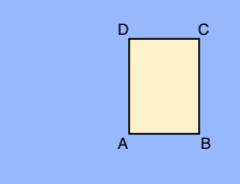
**A.** `X_MIN`,`Y_MIN`
**B.** `X_MAX`,`Y_MIN`
**C.** `X_MAX`,`Y_MAX`
**D.** `X_MIN`,`Y_MAX`
Each vertex is specified by x, y coordinate values. Coordinates are normalized float
values \[0,1\]; 0.0 is X_MIN or Y_MIN, 1.0 is X_MAX or Y_MAX.
For example, a bounding box for the entire image
is expressed as (0.0,0.0,,,1.0,1.0,,), or (0.0,0.0,1.0,0.0,1.0,1.0,0.0,1.0).
The bounding box for an object can be specified in one of two ways:
1. Two vertices (two sets of x,y coordinates) that are diagonally opposite points of the rectangle:
**A.** `X_MIN`,`Y_MIN`
**C.** `X_MAX`,`Y_MAX`
as shown in this example:
**A,,C,**
`X_MIN,Y_MIN,,,X_MAX,Y_MAX,,`
2. All four vertices specified as shown in:
`X_MIN,Y_MIN,X_MAX,Y_MIN,
X_MAX,Y_MAX,X_MIN,Y_MAX,`
If the four specified vertices don't form a rectangle parallel to image edges, Agent Platform specifies vertices that do form such a rectangle.
#### Example CSV - `object_detection.csv`:
```
test,gs://bucket/filename1.jpeg,Tomato,0.3,0.3,,,0.7,0.6,,
training,gs://bucket/filename2.gif,Tomato,0.8,0.2,,,1.0,0.4,,
gs://bucket/filename2.gif
gs://bucket/filename3.png,Baked goods,0.5,0.7,0.8,0.7,0.8,0.8,0.5,0.8
validation,gs://bucket/filename4.tiff,Salad,0.1,0.2,,,0.8,0.9,,
...
```