This page shows you how to evaluate your AutoML image object detection models so that you can iterate on your model.
Gemini Enterprise Agent Platform provides model evaluation metrics to help you determine the
performance of your models, such as precision and recall metrics.
Agent Platform calculates evaluation metrics by using the [test
set](https://docs.cloud.google.com/gemini-enterprise-agent-platform/machine-learning/general/ml-use).
## How you use model evaluation metrics
Model evaluation metrics provide quantitative measurements of how your model
performed on the test set. How you interpret and use those metrics depends on
your business need and the problem your model is trained to solve. For example,
you might have a lower tolerance for false positives than for false negatives or
the other way around. These kinds of questions affect which metrics you would
focus on.
For more information about iterating on your model to improve its performance,
see [Iterating on your model](https://docs.cloud.google.com/gemini-enterprise-agent-platform/machine-learning/image-data/object-detection/evaluate-model.md.txt#iterate).
## Evaluation metrics returned by Agent Platform
Agent Platform returns several different evaluation metrics such as
precision, recall, and confidence thresholds. The metrics that
Agent Platform returns depend on your model's objective. For example,
Agent Platform provides different evaluation metrics for an image
object detection model compared to an image object classification model.
A schema file, downloadable from a Cloud Storage location, determines which
evaluation metrics Agent Platform provides for each objective. The
following tabs provide links to the schema files and describes the evaluation
metrics for each model objective.
You can view and download schema files from the following Cloud Storage
location:
[gs://google-cloud-aiplatform/schema/modelevaluation/](https://console.cloud.google.com/storage/browser/google-cloud-aiplatform/schema/modelevaluation)
- **IoU threshold** : An [intersection
over union](https://www.pyimagesearch.com/2016/11/07/intersection-over-union-iou-for-object-detection/) threshold value that determines which inferences to return. A model returns inferences that are at this value or higher. The higher the threshold, the closer the predicted bounding box values must be to the actual bounding box values.
- **Mean average precision** : also known as the [average
precision](https://developers.google.com/machine-learning/glossary#average-precision). This value ranges from zero to one, where a higher value indicates a higher-quality model.
- **Confidence threshold** : A confidence score that determines which inferences to return. A model returns inferences that are at this value or higher. A higher confidence threshold increases precision but lowers recall. Agent Platform returns confidence metrics at different threshold values to show how the threshold affects [precision](https://developers.google.com/machine-learning/glossary#precision) and [recall](https://developers.google.com/machine-learning/glossary#recall).
- **Recall** : The fraction of inferences with this class that the model correctly predicted. Also called *true positive rate*.
- **Precision**: The fraction of classification inferences produced by the model that were correct.
- **F1 score**: The harmonic mean of precision and recall. F1 is a useful metric if you're looking for a balance between precision and recall and there's an uneven class distribution.
- **Bounding box mean average precision** : The single metric for bounding box evaluations: the `meanAveragePrecision` averaged over all `boundingBoxMetrics`.
## Getting evaluation metrics
You can get an aggregate set of evaluation metrics for your model and, for some
objectives, evaluation metrics for a particular class or label. Evaluation
metrics for a particular class or label is also known as an *evaluation slice*.
The following content describes how to get aggregate evaluation metrics and
evaluation slices by using the Google Cloud console or API.
### Google Cloud console
1. In the Google Cloud console, in the Agent Platform section, go to
the **Models** page.
[Go to the Models page](https://console.cloud.google.com/agent-platform/models)
2. In the **Region** drop-down, select the region where your model is located.
3. From the list of models, click your model, which opens the model's
**Evaluate** tab.
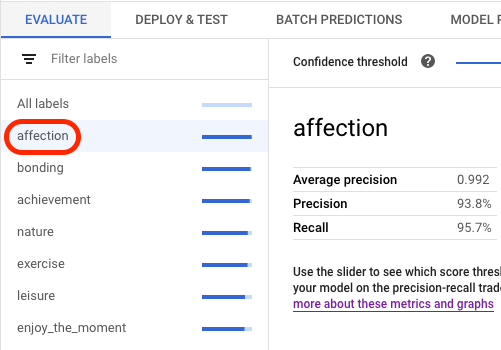
In the **Evaluate** tab, you can view your model's aggregate evaluation
metrics, such as the **Average precision** and **Recall**.
If the model objective has evaluation slices, the console shows a list of
labels. You can click a label to view evaluation metrics for that label,
as shown in the following example:
### API
API requests for getting evaluation metrics is the same for each data type and
objective, but the outputs are different. The following samples show the same
request but different responses.
#### Getting aggregate model evaluation metrics
The aggregate model evaluation metrics provide information about the model as a
whole. To see information about a specific slice, list the [model
evaluation slices](https://docs.cloud.google.com/gemini-enterprise-agent-platform/machine-learning/image-data/object-detection/evaluate-model#list-slices).
To view aggregate model evaluation metrics, use the
[`projects.locations.models.evaluations.get`](https://docs.cloud.google.com/gemini-enterprise-agent-platform/reference/rest/v1/projects.locations.models.evaluations.md.txt)
method.
For the bounding box metric, Agent Platform returns an array of metric
values at different IoU threshold values (between 0 and 1) and confidence
threshold values (between 0 and 1). For example, you can narrow in on evaluation
metrics at an IoU threshold of 0.85 and a confidence threshold of 0.8228. By
viewing these different threshold values, you can see how they affect other
metrics such as precision and recall.
Select a tab that corresponds to your language or environment:
### REST
Before using any of the request data,
make the following replacements:
- LOCATION: Region where your model is stored.
- PROJECT: Your [project ID](https://docs.cloud.google.com/resource-manager/docs/creating-managing-projects.md.txt#identifiers).
- MODEL_ID: The ID of the .
- PROJECT_NUMBER: Your project's automatically generated [project number](https://docs.cloud.google.com/resource-manager/docs/creating-managing-projects.md.txt#identifiers).
- EVALUATION_ID: ID for the model evaluation (appears in the response).
HTTP method and URL:
```
GET https://LOCATION-aiplatform.googleapis.com/v1/projects/PROJECT/locations/LOCATION/models/MODEL_ID/evaluations
```
To send your request, choose one of these options:
#### curl
> [!NOTE]
> **Note:** The following command assumes that you have logged in to the `gcloud` CLI with your user account by running [`gcloud init`](https://docs.cloud.google.com/sdk/gcloud/reference/init) or [`gcloud auth login`](https://docs.cloud.google.com/sdk/gcloud/reference/auth/login.md.txt) , or by using [Cloud Shell](https://docs.cloud.google.com/shell/docs.md.txt), which automatically logs you into the `gcloud` CLI . You can check the currently active account by running [`gcloud auth list`](https://docs.cloud.google.com/sdk/gcloud/reference/auth/list.md.txt).
Execute the following command:
```
curl -X GET \
-H "Authorization: Bearer $(gcloud auth print-access-token)" \
"https://LOCATION-aiplatform.googleapis.com/v1/projects/PROJECT/locations/LOCATION/models/MODEL_ID/evaluations"
```
#### PowerShell
> [!NOTE]
> **Note:** The following command assumes that you have logged in to the `gcloud` CLI with your user account by running [`gcloud init`](https://docs.cloud.google.com/sdk/gcloud/reference/init) or [`gcloud auth login`](https://docs.cloud.google.com/sdk/gcloud/reference/auth/login.md.txt) . You can check the currently active account by running [`gcloud auth list`](https://docs.cloud.google.com/sdk/gcloud/reference/auth/list.md.txt).
Execute the following command:
```
$cred = gcloud auth print-access-token
$headers = @{ "Authorization" = "Bearer $cred" }
Invoke-WebRequest `
-Method GET `
-Headers $headers `
-Uri "https://LOCATION-aiplatform.googleapis.com/v1/projects/PROJECT/locations/LOCATION/models/MODEL_ID/evaluations" | Select-Object -Expand Content
```
You should receive a JSON response similar to the following:
#### Response
```
{
"modelEvaluations": [
{
"name": "projects/PROJECT_NUMBER/locations/LOCATION/models/MODEL_ID/evaluations/EVALUATION_ID",
"metricsSchemaUri": "gs://google-cloud-aiplatform/schema/modelevaluation/image_object_detection_metrics_1.0.0.yaml",
"metrics": {
"evaluatedBoundingBoxCount": 190,
"boundingBoxMetrics": [
{
"iouThreshold": 0.85,
"meanAveragePrecision": 0.0818413,
"confidenceMetrics": [
{
"confidenceThreshold": 7.7341465e-06,
"recall": 0.22105263,
"precision": 0.045652173,
"f1Score": 0.075675674
},
{
"confidenceThreshold": 0.017749911,
"recall": 0.21578947,
"precision": 0.078998074,
"f1Score": 0.11565586
},
{
"confidenceThreshold": 0.022688486,
"recall": 0.21052632,
"precision": 0.08583691,
"f1Score": 0.121951215
},
...
],
"boundingBoxMeanAveragePrecision": 0.3128878
},
"createTime": "2020-10-09T23:35:43.325822Z",
"sliceDimensions": [
"annotationSpec"
]
}
]
}
```
### Java
Before trying this sample, follow the Java setup instructions in the
[Agent Platform quickstart using
client libraries](https://docs.cloud.google.com/gemini-enterprise-agent-platform/machine-learning/start/client-libraries).
For more information, see the
[Agent Platform Java API
reference documentation](https://docs.cloud.google.com/java/docs/reference/google-cloud-aiplatform/latest/com.google.cloud.aiplatform.v1).
To authenticate to Agent Platform, set up Application Default Credentials.
For more information, see
[Set up authentication for a local development environment](https://docs.cloud.google.com/docs/authentication/set-up-adc-local-dev-environment.md.txt).
```java
import com.google.cloud.aiplatform.v1.ModelEvaluation;
import com.google.cloud.aiplatform.v1.ModelEvaluationName;
import com.google.cloud.aiplatform.v1.ModelServiceClient;
import com.google.cloud.aiplatform.v1.ModelServiceSettings;
import java.io.IOException;
public class GetModelEvaluationImageObjectDetectionSample {
public static void main(String[] args) throws IOException {
// TODO(developer): Replace these variables before running the sample.
// To obtain evaluationId run the code block below after setting modelServiceSettings.
//
// try (ModelServiceClient modelServiceClient = ModelServiceClient.create(modelServiceSettings))
// {
// String location = "us-central1";
// ModelName modelFullId = ModelName.of(project, location, modelId);
// ListModelEvaluationsRequest modelEvaluationsrequest =
// ListModelEvaluationsRequest.newBuilder().setParent(modelFullId.toString()).build();
// for (ModelEvaluation modelEvaluation :
// modelServiceClient.listModelEvaluations(modelEvaluationsrequest).iterateAll()) {
// System.out.format("Model Evaluation Name: %s%n", modelEvaluation.getName());
// }
// }
String project = "YOUR_PROJECT_ID";
String modelId = "YOUR_MODEL_ID";
String evaluationId = "YOUR_EVALUATION_ID";
getModelEvaluationImageObjectDetectionSample(project, modelId, evaluationId);
}
static void getModelEvaluationImageObjectDetectionSample(
String project, String modelId, String evaluationId) throws IOException {
ModelServiceSettings modelServiceSettings =
ModelServiceSettings.newBuilder()
.setEndpoint("us-central1-aiplatform.googleapis.com:443")
.build();
// Initialize client that will be used to send requests. This client only needs to be created
// once, and can be reused for multiple requests. After completing all of your requests, call
// the "close" method on the client to safely clean up any remaining background resources.
try (ModelServiceClient modelServiceClient = ModelServiceClient.create(modelServiceSettings)) {
String location = "us-central1";
ModelEvaluationName modelEvaluationName =
ModelEvaluationName.of(project, location, modelId, evaluationId);
ModelEvaluation modelEvaluation = modelServiceClient.getModelEvaluation(modelEvaluationName);
System.out.println("Get Model Evaluation Image Object Detection Response");
System.out.format("\tName: %s\n", modelEvaluation.getName());
System.out.format("\tMetrics Schema Uri: %s\n", modelEvaluation.getMetricsSchemaUri());
System.out.format("\tMetrics: %s\n", modelEvaluation.getMetrics());
System.out.format("\tCreate Time: %s\n", modelEvaluation.getCreateTime());
System.out.format("\tSlice Dimensions: %s\n", modelEvaluation.getSliceDimensionsList());
}
}
}
```
### Node.js
Before trying this sample, follow the Node.js setup instructions in the
[Agent Platform quickstart using
client libraries](https://docs.cloud.google.com/gemini-enterprise-agent-platform/machine-learning/start/client-libraries).
For more information, see the
[Agent Platform Node.js API
reference documentation](https://docs.cloud.google.com/nodejs/docs/reference/aiplatform/latest).
To authenticate to Agent Platform, set up Application Default Credentials.
For more information, see
[Set up authentication for a local development environment](https://docs.cloud.google.com/docs/authentication/set-up-adc-local-dev-environment.md.txt).
```javascript
/**
* TODO(developer): Uncomment these variables before running the sample
* (not necessary if passing values as arguments). To obtain evaluationId,
* instantiate the client and run the following the commands.
*/
// const parentName = `projects/${project}/locations/${location}/models/${modelId}`;
// const evalRequest = {
// parent: parentName
// };
// const [evalResponse] = await modelServiceClient.listModelEvaluations(evalRequest);
// console.log(evalResponse);
// const modelId = 'YOUR_MODEL_ID';
// const evaluationId = 'YOUR_EVALUATION_ID';
// const project = 'YOUR_PROJECT_ID';
// const location = 'YOUR_PROJECT_LOCATION';
// Imports the Google Cloud Model Service Client library
const {ModelServiceClient} = require('@google-cloud/aiplatform');
// Specifies the location of the api endpoint
const clientOptions = {
apiEndpoint: 'us-central1-aiplatform.googleapis.com',
};
// Instantiates a client
const modelServiceClient = new ModelServiceClient(clientOptions);
async function getModelEvaluationImageObjectDetection() {
// Configure the name resources
const name = `projects/${project}/locations/${location}/models/${modelId}/evaluations/${evaluationId}`;
const request = {
name,
};
// Create get model evaluation request
const [response] = await modelServiceClient.getModelEvaluation(request);
console.log('Get model evaluation image object detection response');
console.log(`\tName : ${response.name}`);
console.log(`\tMetrics schema uri : ${response.metricsSchemaUri}`);
console.log(`\tCreate time : ${JSON.stringify(response.createTime)}`);
console.log(`\tSlice dimensions : ${response.sliceDimensions}`);
const modelExplanation = response.modelExplanation;
console.log('\tModel explanation');
if (modelExplanation === null) {
console.log('\t\t{}');
} else {
const meanAttributions = modelExplanation.meanAttributions;
if (meanAttributions === null) {
console.log('\t\t\t []');
} else {
for (const meanAttribution of meanAttributions) {
console.log('\t\tMean attribution');
console.log(
`\t\t\tBaseline output value : \
${meanAttribution.baselineOutputValue}`
);
console.log(
`\t\t\tInstance output value : \
${meanAttribution.instanceOutputValue}`
);
console.log(
`\t\t\tFeature attributions : \
${meanAttribution.featureAttributions}`
);
console.log(`\t\t\tOutput index : ${meanAttribution.outputIndex}`);
console.log(
`\t\t\tOutput display name : \
${meanAttribution.outputDisplayName}`
);
console.log(
`\t\t\tApproximation error : \
${meanAttribution.approximationError}`
);
}
}
}
}
getModelEvaluationImageObjectDetection();
```
### Python
To learn how to install or update the Vertex AI SDK for Python, see [Install the Vertex AI SDK for Python](https://docs.cloud.google.com/vertex-ai/docs/start/use-vertex-ai-python-sdk).
For more information, see the
[Python API reference documentation](https://docs.cloud.google.com/python/docs/reference/aiplatform/latest.md.txt).
from google.cloud import aiplatform
def get_model_evaluation_image_object_detection_sample(
project: str,
model_id: str,
evaluation_id: str,
location: str = "us-central1",
api_endpoint: str = "us-central1-aiplatform.googleapis.com",
):
"""
To obtain evaluation_id run the following commands where LOCATION
is the region where the model is stored, PROJECT is the project ID,
and MODEL_ID is the ID of your model.
model_client = aiplatform.gapic.ModelServiceClient(
client_options={
'api_endpoint':'LOCATION-aiplatform.googleapis.com'
}
)
evaluations = model_client.list_model_evaluations(parent='projects/PROJECT/locations/LOCATION/models/MODEL_ID')
print("evaluations:", evaluations)
"""
# The AI Platform services require regional API endpoints.
client_options = {"api_endpoint": api_endpoint}
# Initialize client that will be used to create and send requests.
# This client only needs to be created once, and can be reused for multiple requests.
client = aiplatform.gapic.ModelServiceClient(client_options=client_options)
name = client.model_evaluation_path(
project=project, location=location, model=model_id, evaluation=evaluation_id
)
response = client.get_model_evaluation(name=name)
print("response:", response)
#### Listing all evaluation slices
The
[`projects.locations.models.evaluations.slices.list`](https://docs.cloud.google.com/gemini-enterprise-agent-platform/reference/rest/v1/projects.locations.models.evaluations.slices/list.md.txt)
method lists all evaluation slices for your model. You must have the model's
evaluation ID, which you can get when you [view the aggregated evaluation
metrics](https://docs.cloud.google.com/gemini-enterprise-agent-platform/machine-learning/image-data/object-detection/evaluate-model#aggregate).
You can use model evaluation slices to determine how the model performed on a
specific label. The `value` field tells you which label the metrics are for.
For the bounding box metric, Agent Platform returns an array of metric
values at different IoU threshold values (between 0 and 1) and confidence
threshold values (between 0 and 1). For example, you can narrow in on evaluation
metrics at an IoU threshold of 0.85 and a confidence threshold of 0.8228. By
viewing these different threshold values, you can see how they affect other
metrics such as precision and recall.
### REST
Before using any of the request data,
make the following replacements:
- LOCATION: Region where Model is located. For example, `us-central1`.
- PROJECT: .
- MODEL_ID: The ID of your model.
- EVALUATION_ID: ID of the model evaluation that contains the evaluation slices to list.
HTTP method and URL:
```
GET https://LOCATION-aiplatform.googleapis.com/v1/projects/PROJECT/locations/LOCATION/models/MODEL_ID/evaluations/EVALUATION_ID/slices
```
To send your request, choose one of these options:
#### curl
> [!NOTE]
> **Note:** The following command assumes that you have logged in to the `gcloud` CLI with your user account by running [`gcloud init`](https://docs.cloud.google.com/sdk/gcloud/reference/init) or [`gcloud auth login`](https://docs.cloud.google.com/sdk/gcloud/reference/auth/login.md.txt) , or by using [Cloud Shell](https://docs.cloud.google.com/shell/docs.md.txt), which automatically logs you into the `gcloud` CLI . You can check the currently active account by running [`gcloud auth list`](https://docs.cloud.google.com/sdk/gcloud/reference/auth/list.md.txt).
Execute the following command:
```
curl -X GET \
-H "Authorization: Bearer $(gcloud auth print-access-token)" \
"https://LOCATION-aiplatform.googleapis.com/v1/projects/PROJECT/locations/LOCATION/models/MODEL_ID/evaluations/EVALUATION_ID/slices"
```
#### PowerShell
> [!NOTE]
> **Note:** The following command assumes that you have logged in to the `gcloud` CLI with your user account by running [`gcloud init`](https://docs.cloud.google.com/sdk/gcloud/reference/init) or [`gcloud auth login`](https://docs.cloud.google.com/sdk/gcloud/reference/auth/login.md.txt) . You can check the currently active account by running [`gcloud auth list`](https://docs.cloud.google.com/sdk/gcloud/reference/auth/list.md.txt).
Execute the following command:
```
$cred = gcloud auth print-access-token
$headers = @{ "Authorization" = "Bearer $cred" }
Invoke-WebRequest `
-Method GET `
-Headers $headers `
-Uri "https://LOCATION-aiplatform.googleapis.com/v1/projects/PROJECT/locations/LOCATION/models/MODEL_ID/evaluations/EVALUATION_ID/slices" | Select-Object -Expand Content
```
You should receive a JSON response similar to the following:
#### Response
```
{
"modelEvaluationSlices": [
{
"name": "projects/693884908213/locations/us-central1/models/9199094820113481728/evaluations/3223746102406676480/slices/466270444805616887",
"slice": {
"dimension": "annotationSpec",
"value": "Tomato"
},
"metricsSchemaUri": "gs://google-cloud-aiplatform/schema/modelevaluation/image_object_detection_metrics_1.0.0.yaml",
"metrics": {
"evaluatedBoundingBoxCount": 98,
"boundingBoxMetrics": [
{
"iouThreshold": 0.75,
"meanAveragePrecision": 0.22579378,
"confidenceMetrics": [
{
"confidenceThreshold": 8.980461e-06,
"recall": 0.3469388,
"precision": 0.15525115,
"f1Score": 0.21451104
},
{
"confidenceThreshold": 0.10109353,
"recall": 0.33673468,
"precision": 0.35106382,
"f1Score": 0.34374997
},
{
"confidenceThreshold": 0.112416565,
"recall": 0.3265306,
"precision": 0.35555556,
"f1Score": 0.34042552
},
...
]
},
{
"iouThreshold": 0.8,
"meanAveragePrecision": 0.14461963,
"confidenceMetrics": [
{
"confidenceThreshold": 8.980461e-06,
"recall": 0.25510204,
"precision": 0.11415525,
"f1Score": 0.15772872
},
{
"confidenceThreshold": 0.11577999,
"recall": 0.24489796,
"precision": 0.27272728,
"f1Score": 0.25806454
},
{
"confidenceThreshold": 0.1570652,
"recall": 0.23469388,
"precision": 0.28395063,
"f1Score": 0.25698322
},
...
]
}
],
"boundingBoxMeanAveragePrecision": 0.35238627
},
"createTime": "2020-10-09T23:35:43.654861Z"
},
{
"name": "projects/693884908213/locations/us-central1/models/9199094820113481728/evaluations/3223746102406676480/slices/2285744162687356072",
"slice": {
"dimension": "annotationSpec",
"value": "Cheese"
},
"metricsSchemaUri": "gs://google-cloud-aiplatform/schema/modelevaluation/image_object_detection_metrics_1.0.0.yaml",
"metrics": {
"evaluatedBoundingBoxCount": 46,
"boundingBoxMetrics": [
{
"iouThreshold": 0.85,
"meanAveragePrecision": 0.0110351965,
"confidenceMetrics": [
{
"confidenceThreshold": 1.1757337e-05,
"recall": 0.08695652,
"precision": 0.019607844,
"f1Score": 0.032
},
{
"confidenceThreshold": 0.32720456,
"recall": 0.06521739,
"precision": 0.125,
"f1Score": 0.08571429
},
{
"confidenceThreshold": 0.4676356,
"recall": 0.04347826,
"precision": 0.1,
"f1Score": 0.060606066
},
...
]
}
],
"boundingBoxMeanAveragePrecision": 0.3591522
},
"createTime": "2020-10-09T23:35:43.661512Z"
}
]
}
```
### Java
Before trying this sample, follow the Java setup instructions in the
[Agent Platform quickstart using
client libraries](https://docs.cloud.google.com/gemini-enterprise-agent-platform/machine-learning/start/client-libraries).
For more information, see the
[Agent Platform Java API
reference documentation](https://docs.cloud.google.com/java/docs/reference/google-cloud-aiplatform/latest/com.google.cloud.aiplatform.v1).
To authenticate to Agent Platform, set up Application Default Credentials.
For more information, see
[Set up authentication for a local development environment](https://docs.cloud.google.com/docs/authentication/set-up-adc-local-dev-environment.md.txt).
```java
import com.google.cloud.aiplatform.v1.ModelEvaluationName;
import com.google.cloud.aiplatform.v1.ModelEvaluationSlice;
import com.google.cloud.aiplatform.v1.ModelEvaluationSlice.Slice;
import com.google.cloud.aiplatform.v1.ModelServiceClient;
import com.google.cloud.aiplatform.v1.ModelServiceSettings;
import java.io.IOException;
public class ListModelEvaluationSliceSample {
public static void main(String[] args) throws IOException {
// TODO(developer): Replace these variables before running the sample.
// To obtain evaluationId run the code block below after setting modelServiceSettings.
//
// try (ModelServiceClient modelServiceClient = ModelServiceClient.create(modelServiceSettings))
// {
// String location = "us-central1";
// ModelName modelFullId = ModelName.of(project, location, modelId);
// ListModelEvaluationsRequest modelEvaluationsrequest =
// ListModelEvaluationsRequest.newBuilder().setParent(modelFullId.toString()).build();
// for (ModelEvaluation modelEvaluation :
// modelServiceClient.listModelEvaluations(modelEvaluationsrequest).iterateAll()) {
// System.out.format("Model Evaluation Name: %s%n", modelEvaluation.getName());
// }
// }
String project = "YOUR_PROJECT_ID";
String modelId = "YOUR_MODEL_ID";
String evaluationId = "YOUR_EVALUATION_ID";
listModelEvaluationSliceSample(project, modelId, evaluationId);
}
static void listModelEvaluationSliceSample(String project, String modelId, String evaluationId)
throws IOException {
ModelServiceSettings modelServiceSettings =
ModelServiceSettings.newBuilder()
.setEndpoint("us-central1-aiplatform.googleapis.com:443")
.build();
// Initialize client that will be used to send requests. This client only needs to be created
// once, and can be reused for multiple requests. After completing all of your requests, call
// the "close" method on the client to safely clean up any remaining background resources.
try (ModelServiceClient modelServiceClient = ModelServiceClient.create(modelServiceSettings)) {
String location = "us-central1";
ModelEvaluationName modelEvaluationName =
ModelEvaluationName.of(project, location, modelId, evaluationId);
for (ModelEvaluationSlice modelEvaluationSlice :
modelServiceClient.listModelEvaluationSlices(modelEvaluationName).iterateAll()) {
System.out.format("Model Evaluation Slice Name: %s\n", modelEvaluationSlice.getName());
System.out.format("Metrics Schema Uri: %s\n", modelEvaluationSlice.getMetricsSchemaUri());
System.out.format("Metrics: %s\n", modelEvaluationSlice.getMetrics());
System.out.format("Create Time: %s\n", modelEvaluationSlice.getCreateTime());
Slice slice = modelEvaluationSlice.getSlice();
System.out.format("Slice Dimensions: %s\n", slice.getDimension());
System.out.format("Slice Value: %s\n\n", slice.getValue());
}
}
}
}
```
### Node.js
Before trying this sample, follow the Node.js setup instructions in the
[Agent Platform quickstart using
client libraries](https://docs.cloud.google.com/gemini-enterprise-agent-platform/machine-learning/start/client-libraries).
For more information, see the
[Agent Platform Node.js API
reference documentation](https://docs.cloud.google.com/nodejs/docs/reference/aiplatform/latest).
To authenticate to Agent Platform, set up Application Default Credentials.
For more information, see
[Set up authentication for a local development environment](https://docs.cloud.google.com/docs/authentication/set-up-adc-local-dev-environment.md.txt).
```javascript
/**
* TODO(developer): Uncomment these variables before running the sample
* (not necessary if passing values as arguments). To obtain evaluationId,
* instantiate the client and run the following the commands.
*/
// const parentName = `projects/${project}/locations/${location}/models/${modelId}`;
// const evalRequest = {
// parent: parentName
// };
// const [evalResponse] = await modelServiceClient.listModelEvaluations(evalRequest);
// console.log(evalResponse);
// const modelId = 'YOUR_MODEL_ID';
// const evaluationId = 'YOUR_EVALUATION_ID';
// const project = 'YOUR_PROJECT_ID';
// const location = 'YOUR_PROJECT_LOCATION';
// Imports the Google Cloud Model Service Client library
const {ModelServiceClient} = require('@google-cloud/aiplatform');
// Specifies the location of the api endpoint
const clientOptions = {
apiEndpoint: 'us-central1-aiplatform.googleapis.com',
};
// Instantiates a client
const modelServiceClient = new ModelServiceClient(clientOptions);
async function listModelEvaluationSlices() {
// Configure the parent resources
const parent = `projects/${project}/locations/${location}/models/${modelId}/evaluations/${evaluationId}`;
const request = {
parent,
};
// Get and print out a list of all the evaluation slices for this resource
const [response] =
await modelServiceClient.listModelEvaluationSlices(request);
console.log('List model evaluation response', response);
console.log(response);
}
listModelEvaluationSlices();
```
### Python
To learn how to install or update the Vertex AI SDK for Python, see [Install the Vertex AI SDK for Python](https://docs.cloud.google.com/vertex-ai/docs/start/use-vertex-ai-python-sdk).
For more information, see the
[Python API reference documentation](https://docs.cloud.google.com/python/docs/reference/aiplatform/latest.md.txt).
from google.cloud import aiplatform
def list_model_evaluation_slices_sample(
project: str,
model_id: str,
evaluation_id: str,
location: str = "us-central1",
api_endpoint: str = "us-central1-aiplatform.googleapis.com",
):
"""
To obtain evaluation_id run the following commands where LOCATION
is the region where the model is stored, PROJECT is the project ID,
and MODEL_ID is the ID of your model.
model_client = aiplatform.gapic.ModelServiceClient(
client_options={
'api_endpoint':'LOCATION-aiplatform.googleapis.com'
}
)
evaluations = model_client.list_model_evaluations(parent='projects/PROJECT/locations/LOCATION/models/MODEL_ID')
print("evaluations:", evaluations)
"""
# The AI Platform services require regional API endpoints.
client_options = {"api_endpoint": api_endpoint}
# Initialize client that will be used to create and send requests.
# This client only needs to be created once, and can be reused for multiple requests.
client = aiplatform.gapic.ModelServiceClient(client_options=client_options)
parent = client.model_evaluation_path(
project=project, location=location, model=model_id, evaluation=evaluation_id
)
response = client.list_model_evaluation_slices(parent=parent)
for model_evaluation_slice in response:
print("model_evaluation_slice:", model_evaluation_slice)
#### Getting metrics for a single slice
To view evaluation metrics for a single slice, use the
[`projects.locations.models.evaluations.slices.get`](https://docs.cloud.google.com/gemini-enterprise-agent-platform/reference/rest/v1/projects.locations.models.evaluations.slices/get.md.txt)
method. You must have the slice ID, which is provided when you [list all
slices](https://docs.cloud.google.com/gemini-enterprise-agent-platform/machine-learning/image-data/object-detection/evaluate-model#list-slices). The following sample applies to all data types and
objectives.
### REST
Before using any of the request data,
make the following replacements:
- LOCATION: Region where Model is located. For example, us-central1.
- PROJECT: .
- MODEL_ID: The ID of your model.
- EVALUATION_ID: ID of the model evaluation that contains the evaluation slice to retrieve.
- SLICE_ID: ID of an evaluation slice to get.
- PROJECT_NUMBER: Your project's automatically generated [project number](https://docs.cloud.google.com/resource-manager/docs/creating-managing-projects.md.txt#identifiers).
- EVALUATION_METRIC_SCHEMA_FILE_NAME: The name of a schema file that defines the evaluation metrics to return such as `classification_metrics_1.0.0`.
HTTP method and URL:
```
GET https://LOCATION-aiplatform.googleapis.com/v1/projects/PROJECT/locations/LOCATION/models/MODEL_ID/evaluations/EVALUATION_ID/slices/SLICE_ID
```
To send your request, choose one of these options:
#### curl
> [!NOTE]
> **Note:** The following command assumes that you have logged in to the `gcloud` CLI with your user account by running [`gcloud init`](https://docs.cloud.google.com/sdk/gcloud/reference/init) or [`gcloud auth login`](https://docs.cloud.google.com/sdk/gcloud/reference/auth/login.md.txt) , or by using [Cloud Shell](https://docs.cloud.google.com/shell/docs.md.txt), which automatically logs you into the `gcloud` CLI . You can check the currently active account by running [`gcloud auth list`](https://docs.cloud.google.com/sdk/gcloud/reference/auth/list.md.txt).
Execute the following command:
```
curl -X GET \
-H "Authorization: Bearer $(gcloud auth print-access-token)" \
"https://LOCATION-aiplatform.googleapis.com/v1/projects/PROJECT/locations/LOCATION/models/MODEL_ID/evaluations/EVALUATION_ID/slices/SLICE_ID"
```
#### PowerShell
> [!NOTE]
> **Note:** The following command assumes that you have logged in to the `gcloud` CLI with your user account by running [`gcloud init`](https://docs.cloud.google.com/sdk/gcloud/reference/init) or [`gcloud auth login`](https://docs.cloud.google.com/sdk/gcloud/reference/auth/login.md.txt) . You can check the currently active account by running [`gcloud auth list`](https://docs.cloud.google.com/sdk/gcloud/reference/auth/list.md.txt).
Execute the following command:
```
$cred = gcloud auth print-access-token
$headers = @{ "Authorization" = "Bearer $cred" }
Invoke-WebRequest `
-Method GET `
-Headers $headers `
-Uri "https://LOCATION-aiplatform.googleapis.com/v1/projects/PROJECT/locations/LOCATION/models/MODEL_ID/evaluations/EVALUATION_ID/slices/SLICE_ID" | Select-Object -Expand Content
```
You should receive a JSON response similar to the following:
#### Response
```
{
"name": "projects/PROJECT_NUMBER/locations/LOCATION/models/MODEL_ID/evaluations/EVALUATION_ID/slices/SLICE_ID",
"slice": {
"dimension": "annotationSpec",
"value": "a particular class or label"
},
"metricsSchemaUri": "gs://google-cloud-aiplatform/schema/modelevaluation/EVALUATION_METRIC_SCHEMA_FILE_NAME.yaml",
"metrics": {
evaluation metrics for the slice
},
"createTime": "2020-10-08T23:35:54.770876Z"
}
```
### Java
Before trying this sample, follow the Java setup instructions in the
[Agent Platform quickstart using
client libraries](https://docs.cloud.google.com/gemini-enterprise-agent-platform/machine-learning/start/client-libraries).
For more information, see the
[Agent Platform Java API
reference documentation](https://docs.cloud.google.com/java/docs/reference/google-cloud-aiplatform/latest/com.google.cloud.aiplatform.v1).
To authenticate to Agent Platform, set up Application Default Credentials.
For more information, see
[Set up authentication for a local development environment](https://docs.cloud.google.com/docs/authentication/set-up-adc-local-dev-environment.md.txt).
```java
import com.google.cloud.aiplatform.v1.ModelEvaluationSlice;
import com.google.cloud.aiplatform.v1.ModelEvaluationSlice.Slice;
import com.google.cloud.aiplatform.v1.ModelEvaluationSliceName;
import com.google.cloud.aiplatform.v1.ModelServiceClient;
import com.google.cloud.aiplatform.v1.ModelServiceSettings;
import java.io.IOException;
public class GetModelEvaluationSliceSample {
public static void main(String[] args) throws IOException {
// TODO(developer): Replace these variables before running the sample.
// To obtain evaluationId run the code block below after setting modelServiceSettings.
//
// try (ModelServiceClient modelServiceClient = ModelServiceClient.create(modelServiceSettings))
// {
// String location = "us-central1";
// ModelName modelFullId = ModelName.of(project, location, modelId);
// ListModelEvaluationsRequest modelEvaluationsrequest =
// ListModelEvaluationsRequest.newBuilder().setParent(modelFullId.toString()).build();
// for (ModelEvaluation modelEvaluation :
// modelServiceClient.listModelEvaluations(modelEvaluationsrequest).iterateAll()) {
// System.out.format("Model Evaluation Name: %s%n", modelEvaluation.getName());
// }
// }
String project = "YOUR_PROJECT_ID";
String modelId = "YOUR_MODEL_ID";
String evaluationId = "YOUR_EVALUATION_ID";
String sliceId = "YOUR_SLICE_ID";
getModelEvaluationSliceSample(project, modelId, evaluationId, sliceId);
}
static void getModelEvaluationSliceSample(
String project, String modelId, String evaluationId, String sliceId) throws IOException {
ModelServiceSettings modelServiceSettings =
ModelServiceSettings.newBuilder()
.setEndpoint("us-central1-aiplatform.googleapis.com:443")
.build();
// Initialize client that will be used to send requests. This client only needs to be created
// once, and can be reused for multiple requests. After completing all of your requests, call
// the "close" method on the client to safely clean up any remaining background resources.
try (ModelServiceClient modelServiceClient = ModelServiceClient.create(modelServiceSettings)) {
String location = "us-central1";
ModelEvaluationSliceName modelEvaluationSliceName =
ModelEvaluationSliceName.of(project, location, modelId, evaluationId, sliceId);
ModelEvaluationSlice modelEvaluationSlice =
modelServiceClient.getModelEvaluationSlice(modelEvaluationSliceName);
System.out.println("Get Model Evaluation Slice Response");
System.out.format("Model Evaluation Slice Name: %s\n", modelEvaluationSlice.getName());
System.out.format("Metrics Schema Uri: %s\n", modelEvaluationSlice.getMetricsSchemaUri());
System.out.format("Metrics: %s\n", modelEvaluationSlice.getMetrics());
System.out.format("Create Time: %s\n", modelEvaluationSlice.getCreateTime());
Slice slice = modelEvaluationSlice.getSlice();
System.out.format("Slice Dimensions: %s\n", slice.getDimension());
System.out.format("Slice Value: %s\n", slice.getValue());
}
}
}
```
### Node.js
Before trying this sample, follow the Node.js setup instructions in the
[Agent Platform quickstart using
client libraries](https://docs.cloud.google.com/gemini-enterprise-agent-platform/machine-learning/start/client-libraries).
For more information, see the
[Agent Platform Node.js API
reference documentation](https://docs.cloud.google.com/nodejs/docs/reference/aiplatform/latest).
To authenticate to Agent Platform, set up Application Default Credentials.
For more information, see
[Set up authentication for a local development environment](https://docs.cloud.google.com/docs/authentication/set-up-adc-local-dev-environment.md.txt).
```javascript
/**
* TODO(developer): Uncomment these variables before running the sample
* (not necessary if passing values as arguments). To obtain evaluationId,
* instantiate the client and run the following the commands.
*/
// const parentName = `projects/${project}/locations/${location}/models/${modelId}`;
// const evalRequest = {
// parent: parentName
// };
// const [evalResponse] = await modelServiceClient.listModelEvaluations(evalRequest);
// console.log(evalResponse);
// const modelId = 'YOUR_MODEL_ID';
// const evaluationId = 'YOUR_EVALUATION_ID';
// const sliceId = 'YOUR_SLICE_ID';
// const project = 'YOUR_PROJECT_ID';
// const location = 'YOUR_PROJECT_LOCATION';
// Imports the Google Cloud Model Service client library
const {ModelServiceClient} = require('@google-cloud/aiplatform');
// Specifies the location of the api endpoint
const clientOptions = {
apiEndpoint: 'us-central1-aiplatform.googleapis.com',
};
// Specifies the location of the api endpoint
const modelServiceClient = new ModelServiceClient(clientOptions);
async function getModelEvaluationSlice() {
// Configure the parent resource
const name = `projects/${project}/locations/${location}/models/${modelId}/evaluations/${evaluationId}/slices/${sliceId}`;
const request = {
name,
};
// Get and print out a list of all the endpoints for this resource
const [response] =
await modelServiceClient.getModelEvaluationSlice(request);
console.log('Get model evaluation slice');
console.log(`\tName : ${response.name}`);
console.log(`\tMetrics_Schema_Uri : ${response.metricsSchemaUri}`);
console.log(`\tMetrics : ${JSON.stringify(response.metrics)}`);
console.log(`\tCreate time : ${JSON.stringify(response.createTime)}`);
console.log('Slice');
const slice = response.slice;
console.log(`\tDimension :${slice.dimension}`);
console.log(`\tValue :${slice.value}`);
}
getModelEvaluationSlice();
```
### Python
To learn how to install or update the Vertex AI SDK for Python, see [Install the Vertex AI SDK for Python](https://docs.cloud.google.com/vertex-ai/docs/start/use-vertex-ai-python-sdk).
For more information, see the
[Python API reference documentation](https://docs.cloud.google.com/python/docs/reference/aiplatform/latest.md.txt).
from google.cloud import aiplatform
def get_model_evaluation_slice_sample(
project: str,
model_id: str,
evaluation_id: str,
slice_id: str,
location: str = "us-central1",
api_endpoint: str = "us-central1-aiplatform.googleapis.com",
):
"""
To obtain evaluation_id run the following commands where LOCATION
is the region where the model is stored, PROJECT is the project ID,
and MODEL_ID is the ID of your model.
model_client = aiplatform.gapic.ModelServiceClient(
client_options={
'api_endpoint':'LOCATION-aiplatform.googleapis.com'
}
)
evaluations = model_client.list_model_evaluations(parent='projects/PROJECT/locations/LOCATION/models/MODEL_ID')
print("evaluations:", evaluations)
"""
# The AI Platform services require regional API endpoints.
client_options = {"api_endpoint": api_endpoint}
# Initialize client that will be used to create and send requests.
# This client only needs to be created once, and can be reused for multiple requests.
client = aiplatform.gapic.ModelServiceClient(client_options=client_options)
name = client.model_evaluation_slice_path(
project=project,
location=location,
model=model_id,
evaluation=evaluation_id,
slice=slice_id,
)
response = client.get_model_evaluation_slice(name=name)
print("response:", response)
## Iterate on your model
Model evaluation metrics provide a starting point for debugging your model when
the model isn't meeting your expectations. For example, low precision and recall
scores can indicate that your model needs additional training data or has
inconsistent labels. Perfect precision and recall can indicate that the
test data is too easy to predict and might not generalize well.
You can iterate on your training data and create a new model. After you create a
new model, you can compare the evaluation metrics between the existing model and
the new model.
The following suggestions can help you improve models that label items, such
as object detection or detection models:
- Consider adding more examples or a wider range of examples in your training data. For example, for an image object detection model, you might include wider angle images, higher or lower resolution images, or different points of view. For more guidance, see [Preparing data](https://docs.cloud.google.com/gemini-enterprise-agent-platform/machine-learning/image-data/object-detection/create-dataset.md.txt).
- Consider removing classes or labels that don't have a lot of examples. Insufficient examples prevent the model from consistently and confidently making predictions about those classes or labels.
- Machines can't interpret the name of your classes or labels and don't understand the nuances between them, such as "door" and "door_with_knob." You must provide data to help machines recognize such nuances.
- Augment your data with more examples of true positives and true negatives, especially examples that are close to a decision boundary to mitigate model confusion.
- Specify your own data split (training, validation, and test). Agent Platform randomly assigns items to each set. Therefore, near-duplicates can be allocated in the training and validation sets, which could lead to overfitting and then poor performance on the test set. For more information about setting your own data split, see [About data splits for AutoML
models](https://docs.cloud.google.com/gemini-enterprise-agent-platform/machine-learning/general/ml-use).
- If your model's evaluation metrics include a confusion matrix, you can see if the model is confusing two labels, where the model is predicting a particular label significantly more than the true label. Review your data and make sure the examples are correctly labeled.
- If you had a short training time (low maximum number of node hours), you might get a higher-quality model by allowing it to train for a longer period of time (higher maximum number of node hours).