By default, Gemini Enterprise Agent Platform encrypts customer content at
rest. Agent Platform handles encryption for you without any
additional actions on your part. This option is called *Google default encryption*.
If you want to control your encryption keys, then you can use customer-managed encryption keys
(CMEKs) in [Cloud KMS](https://docs.cloud.google.com/kms/docs.md.txt) with CMEK-integrated services including
Agent Platform. Using Cloud KMS keys gives you control over their protection
level, location, rotation schedule, usage and access permissions, and cryptographic boundaries.
Using Cloud KMS also lets
you [track key usage](https://docs.cloud.google.com/kms/docs/view-key-usage.md.txt), view audit logs, and
control key lifecycles.
Instead of Google owning and managing the symmetric
[key encryption keys (KEKs)](https://docs.cloud.google.com/kms/docs/envelope-encryption.md.txt#key_encryption_keys) that protect your data, you control and
manage these keys in Cloud KMS.
After you set up your resources with CMEKs, the experience of accessing your
Agent Platform resources is similar to using Google default encryption.
For more information about your encryption
options, see [Customer-managed encryption keys (CMEK)](https://docs.cloud.google.com/kms/docs/cmek.md.txt).
This guide describes some benefits of using CMEK for Gemini Enterprise Agent Platform resources
and walks through how to configure a training job to use CMEK.
For more information about how to use CMEK for Colab Enterprise, see
the [Colab Enterprise CMEK page](https://docs.cloud.google.com/colab/docs/cmek.md.txt). For more
information about how to use CMEK for Gemini Enterprise Agent Platform Workbench instances, see
the [Agent Platform Workbench instances
CMEK page](https://docs.cloud.google.com/gemini-enterprise-agent-platform/notebooks/workbench/instances/cmek).
## CMEK for Gemini Enterprise Agent Platform resources
The following sections describe basic information about CMEK for
Gemini Enterprise Agent Platform resources that you must understand before configuring CMEK for
your jobs.
### Benefits of CMEK
In general, CMEK is most useful if you need full control over the keys used to
encrypt your data. With CMEK, you can manage your keys within
Cloud Key Management Service. For example, you can rotate or disable a key or you can set
up a rotation schedule using the Cloud KMS API. For more information about
CMEK in general, including when and why to enable it, see the
[Cloud KMS documentation](https://docs.cloud.google.com/kms/docs/cmek.md.txt).
When you run an [AutoML](https://docs.cloud.google.com/gemini-enterprise-agent-platform/machine-learning/training-overview.md.txt#automl) or
[custom](https://docs.cloud.google.com/gemini-enterprise-agent-platform/machine-learning/training/overview.md.txt) **training**
job, your code runs on one or more virtual machine (VM) instances managed by
Gemini Enterprise Agent Platform.
When you enable
CMEK for Gemini Enterprise Agent Platform resources, the key that you designate, rather than a
key managed by Google, is used to encrypt data on the boot disks of these VMs.
The CMEK key encrypts the following kinds of data:
- The copy of your code on the VMs.
- Any data that gets loaded by your code.
- Any temporary data that gets saved to the local disk by your code.
- Automl-trained models.
- Media files (data) uploaded into media datasets.
In general, the CMEK key does *not* encrypt metadata associated with your
operation, like the job's name and region, or a dataset's display name.
Metadata associated with operations is always
encrypted using Google's default encryption mechanism.
For **datasets**, when a user imports data into dataset, the data items and
annotations are CMEK-encrypted. The dataset display name is not CMEK-encrypted.
For **models**, the models stored in the storage system (for example, disk) are
CMEK-encrypted. All the model evaluation results are CMEK-encrypted.
For **endpoints**, all model files used for the model deployment under the
endpoint are CMEK-encrypted. This does not include any in-memory data.
For **batch prediction**, any temporary files (such as model files, logs, VM
disks) used to execute the batch prediction job are CMEK-encrypted. Batch
prediction results are stored in the user provided destination.
Consequently, Agent Platform respects the default value of the
destination's encryption config. Otherwise, results will also be encrypted with
CMEK.
For **data labeling**, any input files (image, text, tabular), temporary
discussion (for example, questions, feedback) and output (labeling result)
are CMEK-encrypted. The annotation spec display names are not CMEK-encrypted.
For **agents**, CMEK encrypts all source files used for agent development.
Additionally, container images and deployed instances for the agent are also
CMEK-encrypted.
### External keys
You can use
[Cloud External Key Manager (Cloud EKM)](https://docs.cloud.google.com/kms/docs/ekm.md.txt) to create external keys, that you manage,
to encrypt data within Google Cloud.
When you use a Cloud EKM key, Google has no control over the
availability of your externally-managed key. If you request access to a
resource encrypted with an externally-managed key, and the key is unavailable,
then Gemini Enterprise Agent Platform will reject the request. There can be a delay of up to
10 minutes before you can access the resource
once the key becomes available.
For more considerations when using external keys, see
[Cloud EKM](https://docs.cloud.google.com/kms/docs/ekm.md.txt#considerations).
### Use CMEK with other Google Cloud products
Configuring CMEK for Gemini Enterprise Agent Platform resources does *not* automatically
configure CMEK for other Google Cloud products that you use together with
Gemini Enterprise Agent Platform. To use CMEK to encrypt data in other
Google Cloud products, additional configuration is required. For example:
- **Cloud Storage** : When you perform custom training, Agent Platform
usually loads your data from Cloud Storage. When you [use a Python
training application and a prebuilt container for
training](https://docs.cloud.google.com/gemini-enterprise-agent-platform/machine-learning/training/create-python-pre-built-container), Gemini Enterprise Agent Platform
also loads your code from a Cloud Storage bucket. In addition, some
training jobs export
trained model artifacts (for example, a TensorFlow SaveModel directory) to a
Cloud Storage bucket as part of their output.
To ensure that your data in Cloud Storage is encrypted with CMEK,
read the [Cloud Storage guide to using Customer-managed encryption keys](https://docs.cloud.google.com/storage/docs/encryption/using-customer-managed-keys.md.txt). You can set your
encryption key as the default key for the Cloud Storage bucket(s)
that you use with Gemini Enterprise Agent Platform, or you can use it to encrypt specific objects.
[Learn more about how Cloud Storage uses
CMEK.](https://docs.cloud.google.com/storage/docs/encryption/customer-managed-keys)
- **Artifact Registry** : When you [use a custom container for
training](https://docs.cloud.google.com/gemini-enterprise-agent-platform/machine-learning/training/containers-overview), you can configure
Agent Platform to load your container image from Artifact Registry.
To ensure that your container image is encrypted with CMEK, read the
[Artifact Registry guide to CMEK](https://docs.cloud.google.com/artifact-registry/docs/cmek.md.txt).
- **Cloud Logging** : When you run a training job, Gemini Enterprise Agent Platform training saves logs to
[Logging](https://docs.cloud.google.com/logging/docs.md.txt). To encrypt these logs by using CMEK,
see [Configure CMEK for Cloud Logging](https://docs.cloud.google.com/logging/docs/routing/managed-encryption.md.txt).
### Current CMEK-supported resources
The current Gemini Enterprise Agent Platform resources covered by CMEK are as follows. CMEK
support for Preview features is in Preview status as well.
| Resource | Material encrypted | Documentation links |
|---|---|---|
| [Dataset](https://docs.cloud.google.com/gemini-enterprise-agent-platform/reference/rest/v1/projects.locations.datasets.md.txt) | - All user imported data (for example, text content) for `DataItems` and `Annotations`. - User created content such as `AnnotationSpecs`, `ColumnSpecs`. | - [Create a dataset for training classification and regression models](https://docs.cloud.google.com/gemini-enterprise-agent-platform/machine-learning/tabular-data/classification-regression/create-dataset.md.txt) - [Create a dataset for training forecast models](https://docs.cloud.google.com/gemini-enterprise-agent-platform/machine-learning/tabular-data/forecasting/create-dataset.md.txt) |
| [Model](https://docs.cloud.google.com/gemini-enterprise-agent-platform/reference/rest/v1/projects.locations.models.md.txt) | - Uploaded model files. - Evaluation results of the trained model. | - [Train a classification or regression model](https://docs.cloud.google.com/gemini-enterprise-agent-platform/machine-learning/tabular-data/classification-regression/train-model.md.txt) - [Train a forecast model](https://docs.cloud.google.com/gemini-enterprise-agent-platform/machine-learning/tabular-data/forecasting/train-model.md.txt) - [Train an AutoML Edge model using the Google Cloud console](https://docs.cloud.google.com/gemini-enterprise-agent-platform/machine-learning/training/automl-edge-console.md.txt) - [Train an AutoML Edge model using the Agent Platform API](https://docs.cloud.google.com/gemini-enterprise-agent-platform/machine-learning/training/automl-edge-api.md.txt) - [Creating training pipelines](https://docs.cloud.google.com/gemini-enterprise-agent-platform/machine-learning/training/create-training-pipeline.md.txt) - [Importing models to Agent Platform](https://docs.cloud.google.com/gemini-enterprise-agent-platform/machine-learning/model-registry/import-model.md.txt) |
| [Endpoint](https://docs.cloud.google.com/gemini-enterprise-agent-platform/reference/rest/v1/projects.locations.endpoints.md.txt) | - All model files used for the model deployment under the endpoint. This does *not* include any in-memory data, but the model will be auto-undeployed if the key is disabled. | - [Deploying a model using the Google Cloud console](https://docs.cloud.google.com/gemini-enterprise-agent-platform/machine-learning/predictions/deploy-model-console.md.txt) - [Deploying a model using the Agent Platform API](https://docs.cloud.google.com/gemini-enterprise-agent-platform/machine-learning/predictions/deploy-model-api.md.txt) |
| [CustomJob](https://docs.cloud.google.com/gemini-enterprise-agent-platform/reference/rest/v1/projects.locations.customJobs.md.txt) | - The copy of your code on the VMs used to run the operation. - Any data that gets loaded by your code. - Any temporary data that gets saved to the local disk by your code. | - [Creating custom training jobs](https://docs.cloud.google.com/gemini-enterprise-agent-platform/machine-learning/training/create-custom-job.md.txt) - [Creating training pipelines](https://docs.cloud.google.com/gemini-enterprise-agent-platform/machine-learning/training/create-training-pipeline.md.txt) |
| [HyperparameterTuningJob](https://docs.cloud.google.com/gemini-enterprise-agent-platform/reference/rest/v1/projects.locations.hyperparameterTuningJobs.md.txt) | - The copy of your code on the VMs used to run the operation. - Any data that gets loaded by your code. - Any temporary data that gets saved to the local disk by your code. | - [Using hyperparameter tuning](https://docs.cloud.google.com/gemini-enterprise-agent-platform/machine-learning/training/using-hyperparameter-tuning.md.txt) |
| [TrainingPipeline](https://docs.cloud.google.com/gemini-enterprise-agent-platform/reference/rest/v1/projects.locations.trainingPipelines.md.txt) | - The copy of your code on the VMs used to run the operation. - Any data that gets loaded by your code. - Any temporary data that gets saved to the local disk by your code. - AutoML-trained models. | - [Train a classification or regression model](https://docs.cloud.google.com/gemini-enterprise-agent-platform/machine-learning/tabular-data/classification-regression/train-model.md.txt) - [Train a forecast model](https://docs.cloud.google.com/gemini-enterprise-agent-platform/machine-learning/tabular-data/forecasting/train-model.md.txt) - [Train an AutoML Edge model using the Google Cloud console](https://docs.cloud.google.com/gemini-enterprise-agent-platform/machine-learning/training/automl-edge-console.md.txt) - [Train an AutoML Edge model using the Agent Platform API](https://docs.cloud.google.com/gemini-enterprise-agent-platform/machine-learning/training/automl-edge-api.md.txt) - [Creating training pipelines](https://docs.cloud.google.com/gemini-enterprise-agent-platform/machine-learning/training/create-training-pipeline.md.txt) |
| [BatchPredictionJob](https://docs.cloud.google.com/gemini-enterprise-agent-platform/reference/rest/v1/projects.locations.batchPredictionJobs.md.txt) (excludes AutoML image batchPrediction) | - Any temporary files (for example, model files, logs, VM disks) used in the job to proceed the batch prediction job. - If the written results of the BatchPrediction are stored in the user provided destination, it will respect the encryption config of its default value. Otherwise, it will also be encrypted with CMEK. | - [Get batch predictions and explanations for a classification or regression model](https://docs.cloud.google.com/gemini-enterprise-agent-platform/machine-learning/tabular-data/classification-regression/get-batch-predictions.md.txt) - [Get predictions for a forecast model](https://docs.cloud.google.com/gemini-enterprise-agent-platform/machine-learning/tabular-data/forecasting/get-predictions.md.txt) |
| [ModelDeploymentMonitoringJob](https://docs.cloud.google.com/gemini-enterprise-agent-platform/reference/rest/v1/projects.locations.modelDeploymentMonitoringJobs.md.txt) | - Any temporary files (for example, training dataset files, logs, VM disks) used in the job to process the model deployment monitoring job. - Any data used for detection monitoring anomalies. - If the key is disabled, the model deployment monitoring job will be paused. | - [Setting up model monitoring](https://docs.cloud.google.com/gemini-enterprise-agent-platform/machine-learning/model-monitoring/overview.md.txt) |
| [PipelineJob](https://docs.cloud.google.com/gemini-enterprise-agent-platform/reference/rest/v1/projects.locations.pipelineJobs.md.txt) | - The pipeline job and all of its sub-resources. | - [Running a pipeline](https://docs.cloud.google.com/gemini-enterprise-agent-platform/machine-learning/pipelines/run-pipeline.md.txt) |
| [MetadataStore](https://docs.cloud.google.com/gemini-enterprise-agent-platform/reference/rest/v1/projects.locations.metadataStores.md.txt) | - All content in the metadata store. | - [Configuring your project's metadata store](https://docs.cloud.google.com/gemini-enterprise-agent-platform/machine-learning/ml-metadata/configure.md.txt) |
| [TensorBoard](https://docs.cloud.google.com/gemini-enterprise-agent-platform/reference/rest/v1/projects.locations.tensorboards.md.txt) | - All data from the uploaded TensorBoard logs including scalars, histograms, graph defs, images, and text. | - [Using Vertex AI TensorBoard](https://docs.cloud.google.com/gemini-enterprise-agent-platform/machine-learning/experiments/tensorboard-introduction.md.txt) |
| [Featurestore](https://docs.cloud.google.com/gemini-enterprise-agent-platform/reference/rest/v1/projects.locations.featurestores.md.txt) | - The featurestore and all content in the featurestore. | - [Create an online store that uses a CMEK](https://docs.cloud.google.com/gemini-enterprise-agent-platform/machine-learning/featurestore/latest/create-onlinestore.md.txt#create_fos_bigtable_cmek) |
| [Index](https://docs.cloud.google.com/gemini-enterprise-agent-platform/reference/rest/v1/projects.locations.indexes.md.txt) | - All data files used for Vector Search indexes stored in Cloud Storage, Pub/Sub, and internal storage. Index and IndexEndpoint must be created with the same key. | - [Manage indexes](https://docs.cloud.google.com/gemini-enterprise-agent-platform/build/vector-search/create-manage-index.md.txt) |
| [IndexEndpoint](https://docs.cloud.google.com/gemini-enterprise-agent-platform/reference/rest/v1/projects.locations.indexes.md.txt) | - All data files used for Vector Search indexes stored in Cloud Storage, Pub/Sub, and internal storage. Index and IndexEndpoint must be created with the same key. | - [Deploy and manage public endpoints](https://docs.cloud.google.com/gemini-enterprise-agent-platform/build/vector-search/deploy-index-public.md.txt) - [Deploy and manage index endpoints in a VPC network](https://docs.cloud.google.com/gemini-enterprise-agent-platform/build/vector-search/deploy-index-vpc.md.txt) - [Vector Search Private Service Connect](https://docs.cloud.google.com/gemini-enterprise-agent-platform/build/vector-search/private-service-connect.md.txt) |
| [Colab Enterprise runtime](https://docs.cloud.google.com/gemini-enterprise-agent-platform/reference/rest/v1/projects.locations.notebookRuntimes.md.txt) | - The boot disk and data disks of the runtime's VM | - [Use Customer-managed encryption keys (CMEK) in Colab Enterprise](https://docs.cloud.google.com/colab/docs/cmek.md.txt) |
| Colab Enterprise notebook | - The notebook file and its comments | - [Use Customer-managed encryption keys (CMEK) in Colab Enterprise](https://docs.cloud.google.com/colab/docs/cmek.md.txt) |
| [Agent Runtime](https://docs.cloud.google.com/gemini-enterprise-agent-platform/reference/rest/v1/projects.locations.reasoningEngines.md.txt) | - The copy of your agent source files, including code, scripts, and any dependency files - The container images built from your agent source files - The running instances deployed from your agent container images | - [Agent Runtime overview](https://docs.cloud.google.com/vertex-ai/generative-ai/docs/agent-engine/overview) |
| [Agent Platform sandboxes](https://docs.cloud.google.com/gemini-enterprise-agent-platform/reference/rest/v1/projects.locations.reasoningEngines.sandboxEnvironments.md.txt) | - Memory checkpoint states and disk storage of running sandbox instances - Custom container overlays and environment configurations - Saved sandbox snapshots and templates | - [Configure Customer-managed encryption keys (CMEK) for sandboxes](https://docs.cloud.google.com/gemini-enterprise-agent-platform/scale/sandbox/configure-cmek.md.txt) - [Sandboxes overview](https://docs.cloud.google.com/gemini-enterprise-agent-platform/scale/sandbox.md.txt) |
| `ServingProfile` | - Data stored at rest by resourceless (request-based) APIs---for example, Gemini Live API session-resumption data and Interactions API stored interactions. | - [Use CMEK with resourceless APIs](https://docs.cloud.google.com/gemini-enterprise-agent-platform/machine-learning/general/cmek.md.txt#serving-profiles) |
### CMEK support for Generative AI tuning pipelines
CMEK support is provided in the tuning pipeline of the following models:
- `BERT`
- `T5`
- `image-generation (GPU)`
### Limitations
CMEK support isn't provided in the following:
- AutoML image model batch prediction (`BatchPredictionJob`)
- TPU tuning
- Agent Platform Memory Bank or Agent Platform Sessions configured to use the global endpoint. Cloud KMS requires encryption keys to reside within a fixed geographic data residency boundary. Because the global region lacks a physical geographic boundary, it is barred from encrypting localized regional or multi-regional resources.
- Serving profile CMEK for resourceless APIs is limited to Gemini Live API and the Interactions API, in the `us` and `eu` multi-regions. The global region isn't supported.
## Configure CMEK for your resources
The following sections describe how to create a key ring and key in Cloud KMS,
grant Agent Platform encrypter and decrypter permissions for your
key, and create resources that use CMEK.
### Before you begin
This guide assumes that you use two separate Google Cloud projects to
configure CMEK for Agent Platform data:
- A project for managing your encryption key (referred to as the "Cloud KMS project").
- A project for accessing Agent Platform data or output in Cloud Storage, and interacting with any other Google Cloud products that you need for your use case (referred to as the "AI Platform project").
This recommended setup supports a [*separation of
duties*](https://docs.cloud.google.com/kms/docs/separation-of-duties).
Alternatively, you can use a single Google Cloud project for the whole
guide. To do so, use the same project for all of the following tasks that refer
to the Cloud KMS project and the tasks that refer to the
AI Platform project.
#### Set up the Cloud KMS project
#### Set up the AI Platform project
#### Set up the Google Cloud CLI
The gcloud CLI is required for some steps in this guide and optional for others.
[Install](https://docs.cloud.google.com/sdk/docs/install) the Google Cloud CLI.
After installation,
[initialize](https://docs.cloud.google.com/sdk/docs/initializing) the Google Cloud CLI by running the following command:
```bash
gcloud init
```
If you're using an external identity provider (IdP), you must first
[sign in to the gcloud CLI with your federated identity](https://docs.cloud.google.com/iam/docs/workforce-log-in-gcloud.md.txt).
> [!NOTE]
> **Note:** You can run the gcloud CLI in the Google Cloud console without installing the Google Cloud CLI. To run the gcloud CLI in the Google Cloud console, [use
> Cloud Shell](https://console.cloud.google.com/?cloudshell=true).
### Create a key ring and key
Follow the [Cloud KMS guide to creating symmetric
keys](https://docs.cloud.google.com/kms/docs/creating-keys) to create a key ring and a key. When you create
your key ring, specify [a region that supports
Agent Platform operations](https://docs.cloud.google.com/gemini-enterprise-agent-platform/machine-learning/general/locations) as
[the key ring's location](https://docs.cloud.google.com/kms/docs/locations.md.txt). Agent Platform training
only supports
CMEK when your resource and key use the same region. You must not specify a
dual-regional, multi-regional, or global location for your key ring.
> [!NOTE]
> **Note:** This requirement doesn't apply to serving profile CMEK for resourceless APIs, which instead requires a key in the `us` or `eu` multi-region. For more information, see [Use CMEK with resourceless APIs](https://docs.cloud.google.com/gemini-enterprise-agent-platform/machine-learning/general/cmek.md.txt#serving-profiles).
Make sure to create your key ring and key in your Cloud KMS project.
### Grant Agent Platform permissions
To use CMEK for your resources, you must grant Agent Platform permission to
encrypt and decrypt data using your key. Agent Platform uses a
[Google-managed service agent](https://docs.cloud.google.com/gemini-enterprise-agent-platform/machine-learning/general/access-control.md.txt#service-agents) to run
operations using your resources. This service account is identified by an email
address with the following format:
`service-PROJECT_NUMBER@gcp-sa-aiplatform.iam.gserviceaccount.com`
To find the appropriate service account for your AI Platform project, go
to the **IAM** page in the Google Cloud console and find the member that matches
this email address format, with the [project
number](https://docs.cloud.google.com/resource-manager/docs/cloud-platform-resource-hierarchy#projects) for
your AI Platform project replacing the
AI_PLATFORM_PROJECT_NUMBER variable. The service account also has the
name `Agent Platform Service Agent`.
[Go to the IAM
page](https://console.cloud.google.com/iam-admin/iam)
Make note of the email address for this service account, and use it in the
following steps to grant it permission to encrypt and decrypt data using your
key. You can grant permission by using the Google Cloud console or by using the
Google Cloud CLI:
### Google Cloud console
1. In the Google Cloud console, **Click Security** and select **Key Management** . This will take you to **Cryptographic Keys** page and
select your Cloud KMS project.
[Go to the Cryptographic Keys
page](https://console.cloud.google.com/security/kms?project=_)
2. Click on the name of the key ring that you created in [a preceding section
of this guide](https://docs.cloud.google.com/gemini-enterprise-agent-platform/machine-learning/general/cmek#creating-key-ring-and-key) to go to the **Key ring
details** page.
3. Select the checkbox for the key that you created in [a preceding section of
this guide](https://docs.cloud.google.com/gemini-enterprise-agent-platform/machine-learning/general/cmek#creating-key-ring-and-key). If an info panel labeled with the
name of your key is not already open, click **Show info panel**.
4. In the info panel, click **Add member** to open the **Add members
to "KEY_NAME"** dialog. In this dialog, do the following:
1. In the **New members** box, enter the service account email address that you made a note of in the preceding section: `service-AI_PLATFORM_PROJECT_NUMBER@gcp-sa-aiplatform.iam.gserviceaccount.com`
2. In the **Select a role** drop-down list, click **Cloud KMS**
and then select the **Cloud KMS CryptoKey Encrypter/Decrypter**
role.
3. Click **Save**.
### gcloud
Run the following command:
```bash
gcloud kms keys add-iam-policy-binding KEY_NAME \
--keyring=KEY_RING_NAME \
--location=REGION \
--project=KMS_PROJECT_ID \
--member=serviceAccount:service-AI_PLATFORM_PROJECT_NUMBER@gcp-sa-aiplatform.iam.gserviceaccount.com \
--role=roles/cloudkms.cryptoKeyEncrypterDecrypter
```
In this command, replace the following placeholders:
- KEY_NAME: The name of the key that you created in [a preceding
section of this guide](https://docs.cloud.google.com/gemini-enterprise-agent-platform/machine-learning/general/cmek#creating-key-ring-and-key).
- KEY_RING_NAME: The key ring that you created in [a preceding
section of this guide](https://docs.cloud.google.com/gemini-enterprise-agent-platform/machine-learning/general/cmek#creating-key-ring-and-key).
- REGION: The region where you created your key ring.
- KMS_PROJECT_ID: The ID of your Cloud KMS project.
- AI_PLATFORM_PROJECT_NUMBER: The project number of your AI Platform project, which you noted in the preceding section as part of a service account email address.
### Create resources with the Cloud KMS key
When you create a new [CMEK-supported resource](https://docs.cloud.google.com/gemini-enterprise-agent-platform/machine-learning/general/cmek.md.txt#resource-list) you can specify
your key as one of the create parameters.
### Console
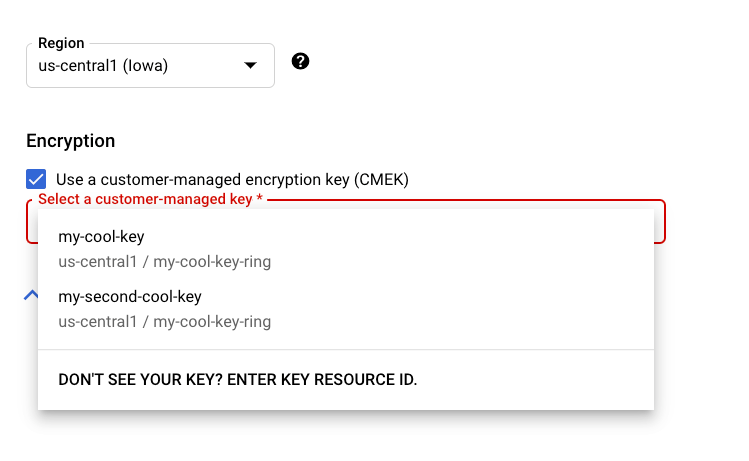
When you create a new [CMEK-supported resource](https://docs.cloud.google.com/gemini-enterprise-agent-platform/machine-learning/general/cmek.md.txt#resource-list) in the
[Agent Platform section of the
Google Cloud console](https://console.cloud.google.com/agent-platform/), you can
select your key in the general or advanced option section:
### REST \& CMD Line
When you create a [supported resource](https://docs.cloud.google.com/gemini-enterprise-agent-platform/machine-learning/general/cmek.md.txt#resource-list), add an
[`encryptionSpec`](https://docs.cloud.google.com/gemini-enterprise-agent-platform/reference/rest/v1/EncryptionSpec.md.txt) object to your request and set the
`encryptionSpec.kmsKeyName` field to point to your key
resource.
For example, when [creating a `dataset`](https://docs.cloud.google.com/gemini-enterprise-agent-platform/machine-learning/datasets/overview.md.txt) resource you would
specify your key in the request body:
{
"displayName": DATASET_NAME,
"metadataSchemaUri": METADATA_URI,"encryptionSpec": {
"kmsKeyName": "projects/PROJECT_ID/locations/LOCATION_ID/keyRings/KEY_RING_NAME/cryptoKeys/KEY_NAME"
}
}
### Java
When you create a supported resource, set the `EncryptionSpec` to
point to your key resource. See the
[Agent Platform client library for Java](https://docs.cloud.google.com/java/docs/reference/google-cloud-aiplatform/latest/overview.md.txt)
documentation for more information.
### Node.js
When you create a supported resource, set the `encryptionSpec` parameter to
point to your key resource. See the
[Agent Platform client library for Node.js](https://docs.cloud.google.com/nodejs/docs/reference/aiplatform/latest.md.txt)
documentation for more information.
### Python
When you create a supported resource, set the `encryption_spec` parameter to
point to your key resource. See the
[Agent Platform client library for Python](https://docs.cloud.google.com/python/docs/reference/aiplatform/latest.md.txt)
documentation for more information.
## Use CMEK with resourceless APIs
Some Gemini Enterprise Agent Platform APIs are *resourceless* (request-based): they serve
inference requests without creating a long-lived, top-level resource. To support
features such as session continuity and stateful conversations, these APIs can
store user data at rest for a limited time---for example,
Gemini Live API stores session-resumption data for up to 24 hours, and
the Interactions API stores stateful interaction data for up to 7 days. Because
there's no persistent resource to attach a key to when the data is created, you
use a *serving profile* to apply CMEK to this resting data.
A serving profile is a Gemini Enterprise Agent Platform resource that links a Cloud KMS
key to a project, location, and API scope. While a serving profile exists for a
request's project, location, and scope, Agent Platform automatically
encrypts that scope's persistent data with your key. Your inference request
format doesn't change.
> [!CAUTION]
> **Caution:** A serving profile applies to an entire project, location, and API scope---not to an individual user or request. An Agent Platform user can create, update, or delete a serving profile, or disable or revoke its Cloud KMS key, and any such change affects all users and workloads that use that API in the project.
> [!NOTE]
> **Note:** Serving profile CMEK support is available for Gemini Live API and the Interactions API, in the `us` and `eu` multi-regions.
### Benefits of serving profiles
- **Meet compliance requirements**: Satisfy audit criteria that require customer control over the encryption key and data lifecycle.
- **Full control of your data**: Disable or revoke key access at any time to cut off access to your encrypted data.
- **Transparent, with no code changes**: Your existing inference request format is unchanged---encryption is applied automatically while a serving profile exists.
- **Granular control**: Apply a distinct key per API scope to limit the impact if a key is compromised and follow the principle of least privilege.
### How transparent encryption works
1. You send a request to a supported resourceless API at your regional Agent Platform endpoint.
2. Agent Platform resolves the serving profile for your project, location, and scope.
3. Persistent data for that scope is automatically encrypted with your key, with no change to the request.
4. If no serving profile exists for that project, location, and scope, Agent Platform uses Google-managed encryption by default.
> [!NOTE]
> **Note:** Data stored before a serving profile is created remains under Google-managed encryption; it isn't retroactively re-encrypted with your key.
### Serving profile limitations
- Supported APIs: [Gemini Live API](https://docs.cloud.google.com/gemini-enterprise-agent-platform/models/live-api/start-manage-session.md.txt#cmek) (scope `GEMINI_LIVE`) and [Interactions API](https://docs.cloud.google.com/gemini-enterprise-agent-platform/models/capabilities/interactions/developer-guide.md.txt#cmek) (scope `INTERACTIONS_API`).
- Supported regions: the `us` and `eu` multi-regions. The global region isn't supported because of Cloud KMS and storage CMEK limitations in the global region.
- The encryption key and scope are immutable after creation. Only the display name and description can be updated. To change the key or scope, delete the serving profile and create a new one with a different `servingProfileId` (see [Disable CMEK and revert to default encryption](https://docs.cloud.google.com/gemini-enterprise-agent-platform/machine-learning/general/cmek.md.txt#serving-profile-delete)).
### Before you begin
1. Enable the Cloud KMS API and the Agent Platform API on your project.
2. Create or identify a Cloud KMS key in a supported multi-region (`us` or `eu`); don't use the global region. See [Create a key ring and
key](https://docs.cloud.google.com/gemini-enterprise-agent-platform/machine-learning/general/cmek#creating-key-ring-and-key).
3. Grant the Gemini Enterprise Agent Platform service agent the `roles/cloudkms.cryptoKeyEncrypterDecrypter` role on the key. See [Grant Agent Platform permissions](https://docs.cloud.google.com/gemini-enterprise-agent-platform/machine-learning/general/cmek.md.txt#grant-permissions).
4. Make sure you have the IAM permissions to manage serving profiles (`aiplatform.servingProfiles.create`, `get`, `list`, `update`, and `delete`).
The examples in the following sections use these values:
- LOCATION: the multi-region, `us` or `eu`.
- PROJECT: your project ID or number.
- API_VERSION: `v1` or `v1beta1`.
- SERVING_PROFILE_ID: 1-63 characters---lowercase letters, digits, and hyphens; it must start with a letter and end with a letter or digit. This value becomes the last component of the resource name.
- `scope`: the resourceless API that the serving profile applies to. Supported values are `GEMINI_LIVE` and `INTERACTIONS_API`.
- The Cloud KMS key is set in `cmekConfig.encryptionSpec.kmsKeyName` and must match `projects/*/locations/*/keyRings/*/cryptoKeys/*`.
REST requests go to the regional endpoint
`https://aiplatform.LOCATION.rep.googleapis.com` and authenticate with an OAuth 2.0
bearer token:
```bash
-H "Authorization: Bearer $(gcloud auth print-access-token)"
-H "Content-Type: application/json"
```
### Create a serving profile
Creating a serving profile enables CMEK protection for the scope's persistent
data. The `displayName`, `scope` (`GEMINI_LIVE` or `INTERACTIONS_API`), and
`cmekConfig.encryptionSpec.kmsKeyName` fields are required.
```bash
curl -X POST \
-H "Authorization: Bearer $(gcloud auth print-access-token)" \
-H "Content-Type: application/json" \
"https://aiplatform.LOCATION.rep.googleapis.com/API_VERSION/projects/PROJECT/locations/LOCATION/servingProfiles?servingProfileId=SERVING_PROFILE_ID" \
-d '{
"displayName": "My CMEK serving profile",
"description": "CMEK for Gemini Live",
"scope": "GEMINI_LIVE",
"cmekConfig": {
"encryptionSpec": {
"kmsKeyName": "projects/PROJECT/locations/LOCATION/keyRings/RING/cryptoKeys/KEY"
}
}
}'
```
Create returns a long-running operation. Poll it at
`GET https://aiplatform.LOCATION.rep.googleapis.com/API_VERSION/OPERATION_NAME` until
the response contains `"done": true`. Wait for the operation to finish before you
get, update, or delete the serving profile.
### Confirm the serving profile
After the create operation completes, use `get` or `list` to confirm the serving
profile:
```bash
# Get one serving profile.
curl -H "Authorization: Bearer $(gcloud auth print-access-token)" \
"https://aiplatform.LOCATION.rep.googleapis.com/API_VERSION/projects/PROJECT/locations/LOCATION/servingProfiles/SERVING_PROFILE_ID"
# List serving profiles in a location.
curl -H "Authorization: Bearer $(gcloud auth print-access-token)" \
"https://aiplatform.LOCATION.rep.googleapis.com/API_VERSION/projects/PROJECT/locations/LOCATION/servingProfiles?pageSize=50"
```
### Update serving profile metadata
You can update only the `displayName` and `description` fields; the key and scope
are immutable. The `updateMask` parameter is optional---if you omit it, all
populated mutable fields are updated. This call returns the updated serving
profile.
```bash
curl -X PATCH \
-H "Authorization: Bearer $(gcloud auth print-access-token)" \
-H "Content-Type: application/json" \
"https://aiplatform.LOCATION.rep.googleapis.com/API_VERSION/projects/PROJECT/locations/LOCATION/servingProfiles/SERVING_PROFILE_ID?updateMask=displayName,description" \
-d '{"displayName": "Renamed profile", "description": "Updated description"}'
```
### Disable CMEK and revert to default encryption
Delete the serving profile. New data for the scope is then encrypted with
Google-managed encryption. Data that was already encrypted with your key remains
protected until it reaches its TTL or is wiped, according to the API's retention
policy.
```bash
curl -X DELETE \
-H "Authorization: Bearer $(gcloud auth print-access-token)" \
"https://aiplatform.LOCATION.rep.googleapis.com/API_VERSION/projects/PROJECT/locations/LOCATION/servingProfiles/SERVING_PROFILE_ID"
```
After you delete a serving profile, its `servingProfileId` is reserved for 30
days so that you can [restore](https://docs.cloud.google.com/gemini-enterprise-agent-platform/machine-learning/general/cmek.md.txt#serving-profile-restore) the original key and
scope. During that period, to create a serving profile with a different key or
scope, use a different `servingProfileId`.
### Restore a deleted serving profile
Within 30 days of deleting a serving profile, you can restore it. Confirm that
the original Cloud KMS key is still enabled and that the
Gemini Enterprise Agent Platform service agent still has access. Then create a serving profile
with the same `servingProfileId`, `scope`, and key. Agent Platform
resumes protecting the scope's persistent data with your key, including data that
was encrypted before the profile was deleted.
### Key revocation
If you disable the Cloud KMS key or remove the Gemini Enterprise Agent Platform service
agent's access, the following occurs:
- Agent Platform can no longer encrypt or decrypt the scope's persistent data.
- Requests that need to access protected data fail with a `FAILED_PRECONDITION` error that indicates the key is unavailable.
Re-enable the key or restore the IAM grant to resume access.
### Serving profile pricing
There's no additional charge for serving profiles. You pay the standard
Cloud KMS key operation rates for encryption and decryption.
### Troubleshooting
- **Serving profile creation fails or is stuck** : Confirm that the Gemini Enterprise Agent Platform service agent has the `roles/cloudkms.cryptoKeyEncrypterDecrypter` role on the key, and that the key is enabled and in a supported multi-region (`us` or `eu`, not global).
- **Inference isn't using CMEK** : Confirm that a serving profile exists for the matching project, location, and scope (`GEMINI_LIVE` or `INTERACTIONS_API`).
- **`FAILED_PRECONDITION` errors**: These errors usually indicate that the key was disabled or that access was revoked. Re-enable the key or restore the IAM grant.
## What's next
- Learn more about [CMEK on Google Cloud](https://docs.cloud.google.com/kms/docs/cmek.md.txt).
- Learn [how to use CMEK with other Google Cloud
products](https://docs.cloud.google.com/kms/docs/use-keys-google-cloud).