Feature Store on Gemini Enterprise Agent Platform is a managed, cloud-native feature store service
that's integral to Gemini Enterprise Agent Platform. It streamlines your ML feature management
and online serving processes by letting you manage your feature data in a
BigQuery table or view. You can then serve features online directly from the
BigQuery data source.
Agent Platform Feature Store provisions resources that let you set up
online serving by specifying your feature data sources. It then acts as a metadata
layer interfacing with the BigQuery data sources and serves
the latest feature values directly from BigQuery for online
predictions at low latencies.
In Agent Platform Feature Store, the BigQuery tables or
views containing the feature data collectively form the *offline store*. You can
maintain feature values, including historical feature data, in the offline store.
Because all the feature data is maintained in BigQuery,
Agent Platform Feature Store doesn't need to provision a separate
offline store within Gemini Enterprise Agent Platform. Moreover, if you want to use the
data in the offline store to train ML models, you can use the APIs and
capabilities in BigQuery to export or fetch the data.
The workflow to set up and start online serving using Agent Platform Feature Store
can be summarized as follows:
1. Prepare your data source in BigQuery.
2. Optional: Register your data sources by creating feature groups and features.
3. Set up online store and feature view resources to connect the feature data sources
with online serving clusters.
4. Serve the latest feature values online from a feature view.
## Agent Platform Feature Store data model and resources
This section explains the data models and resources associated with the
following aspects of Agent Platform Feature Store:
- [Data source preparation in BigQuery](https://docs.cloud.google.com/gemini-enterprise-agent-platform/machine-learning/featurestore/latest/overview.md.txt#data_source_prep)
- [Feature Registry setup](https://docs.cloud.google.com/gemini-enterprise-agent-platform/machine-learning/featurestore/latest/overview.md.txt#feature_registry_setup)
- [Online serving setup](https://docs.cloud.google.com/gemini-enterprise-agent-platform/machine-learning/featurestore/latest/overview.md.txt#online_serving_setup)
- [Online serving](https://docs.cloud.google.com/gemini-enterprise-agent-platform/machine-learning/featurestore/latest/overview.md.txt#online_serving)
### Data source preparation in BigQuery
During online serving, Agent Platform Feature Store uses feature data
from BigQuery data sources. Before you set up Feature Registry
or online serving resources, you must store your feature data in one or more
BigQuery tables or views.
Within a BigQuery table or view, each column represents a feature.
Each row contains feature values corresponding to a unique ID. For more
information about how to prepare the feature data in BigQuery,
see [Prepare data source](https://docs.cloud.google.com/gemini-enterprise-agent-platform/machine-learning/featurestore/latest/prepare-data-source.md.txt).
For example, in figure 1, the BigQuery table includes the
following columns:
- **`f1` and `f2`**: Feature columns.
- **`entity_id`**: An ID column containing the unique IDs to identify each feature record.
- **`feature_timestamp`:** A timestamp column.
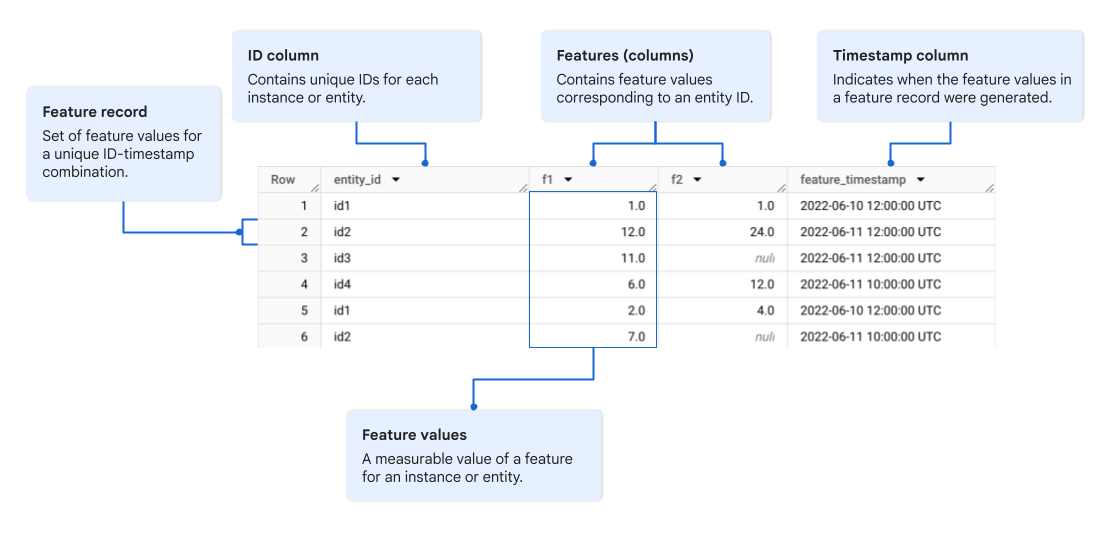 **Figure 1.** Example of a BigQuery data source.
Because you prepare the data source in BigQuery and not in Gemini Enterprise Agent Platform,
you don't need to create any Gemini Enterprise Agent Platform resources at this stage.
### Feature Registry setup
After you've prepared your data sources in BigQuery, you can
register those data sources, including specific feature columns, in
the Feature Registry.
Registering your features is optional. You can serve features online even if you
don't add your BigQuery data sources to the Feature Registry. However,
registering your features is advantageous in the following scenarios:
- Your data contains multiple instances of the same entity ID and you need
to prepare your data in a time-series format with a timestamp column. When you
register your features, Agent Platform Feature Store looks up the
timestamp and serves only the latest feature values.
- You want to register specific feature columns from a data source.
- You want to aggregate specific columns from multiple data sources to define
a feature view instance.
- You want to monitor the feature statistics and detect feature drift.
> [!CAUTION]
> **Caution:** If you choose not to register your features, you must ensure that every row contains a unique value in the `ID` column. For more information, see [Data source preparation guidelines](https://docs.cloud.google.com/gemini-enterprise-agent-platform/machine-learning/featurestore/latest/prepare-data-source.md.txt#guidelines).
There are two types of Agent Platform Feature Store resources in the
Feature Registry:
- [Feature Registry resources for feature data](https://docs.cloud.google.com/gemini-enterprise-agent-platform/machine-learning/featurestore/latest/overview.md.txt#feature_registry_resources)
- [Feature Registry resources for feature monitoring](https://docs.cloud.google.com/gemini-enterprise-agent-platform/machine-learning/featurestore/latest/overview.md.txt#feature_registry_resources_monitoring)
#### Feature Registry resources for feature data
To register your feature data in the Feature Registry, you need to create the
following Agent Platform Feature Store resources:
- **Feature group** ([`FeatureGroup`](https://docs.cloud.google.com/gemini-enterprise-agent-platform/reference/rest/v1/projects.locations.featureGroups.md.txt#resource:-featuregroup)):
A `FeatureGroup`resource is associated with a specific BigQuery source table or
view. It represents a logical grouping of feature columns, which are represented by `Feature` resources.
A feature group also contains one or multiple entity ID columns to identify
the feature records. If the feature data is in a time-series format, the feature
group must also contain a timestamp column. For information about how to create
a feature group, see [Create a feature group](https://docs.cloud.google.com/gemini-enterprise-agent-platform/machine-learning/featurestore/latest/create-featuregroup.md.txt).
- **Feature** ([`Feature`](https://docs.cloud.google.com/gemini-enterprise-agent-platform/reference/rest/v1/projects.locations.featureGroups.features.md.txt#resource:-feature)):
A `Feature`resource represents a specific column containing feature values from the feature
data source associated with its parent `FeatureGroup` resource. For information
about how to create features within a feature group, see [Create a feature](https://docs.cloud.google.com/gemini-enterprise-agent-platform/machine-learning/featurestore/latest/create-feature.md.txt).
For example, figure 2 illustrates a feature group including feature columns
`f1` and `f2`, sourced from a BigQuery table associated with the
feature group. The BigQuery data source contains four feature
columns---two columns are aggregated to form the feature group. The feature
group also contains an entity ID column and a feature timestamp column.
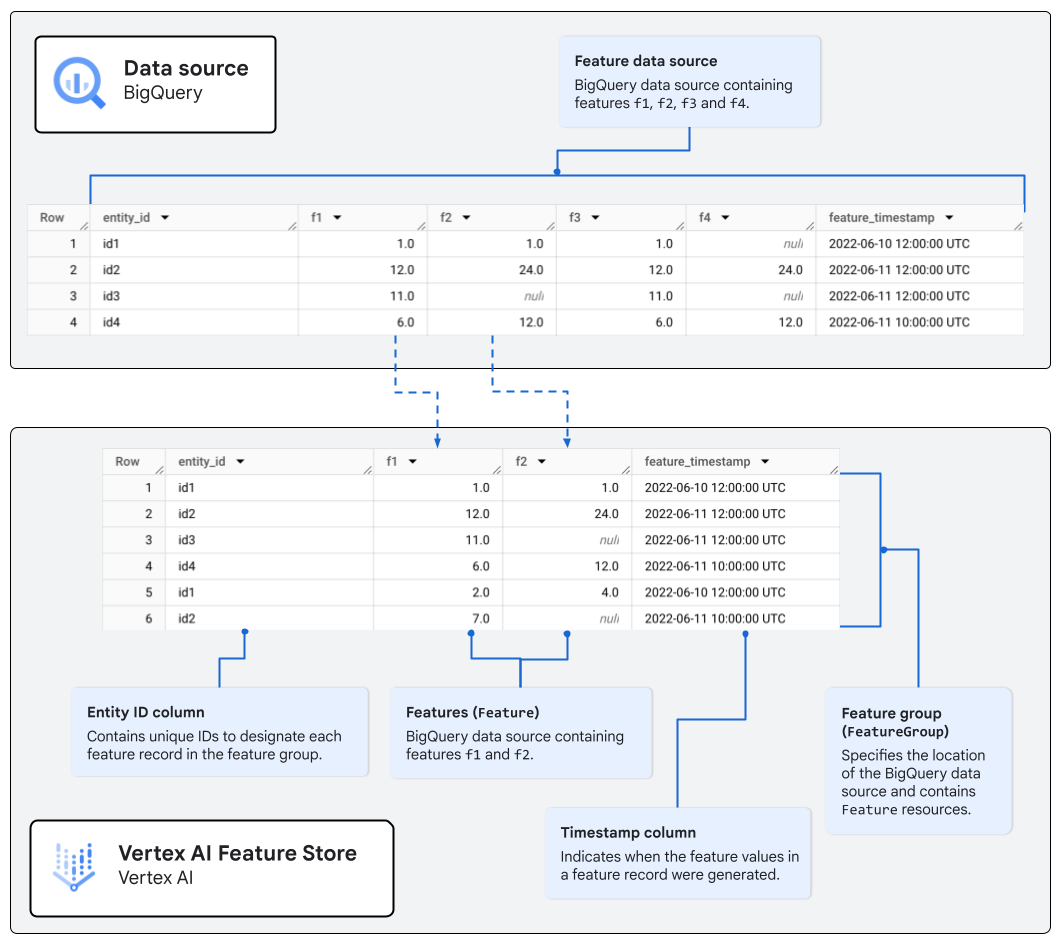 **Figure 2.** Example of a `FeatureGroup` containing two `Feature` columns sourced from a BigQuery data source.
#### Feature Registry resources for feature monitoring
Feature monitoring resources let you monitor the feature data registered using
`FeatureGroup`and `Feature` resources. You can create the following resources
related to feature monitoring:
- **Feature monitor** ([`FeatureMonitor`](https://docs.cloud.google.com/gemini-enterprise-agent-platform/reference/rest/v1beta1/projects.locations.featureGroups.featureMonitors.md.txt#FeatureMonitor)):
A `FeatureMonitor` resource is associated with a `FeatureGroup` resource and one or more features
within that feature group. It specifies the monitoring schedule. You can create
multiple feature monitor resources to set up different monitoring schedules
for the same a set of features within a feature group. For example, if the features
`f1` and `f2` are updated every hour, but the features `f3` and `f4` are
updated every day, you can create two feature monitor resources to efficiently
monitor these features:
- Feature monitor `fm1` that runs a monitoring job every hour on the features `f1` and `f2`.
- Feature monitor `fm2` that runs a monitoring job every day on the features `f3` and `f4`.
- **Feature monitor job** ([`FeatureMonitorJob`](https://docs.cloud.google.com/gemini-enterprise-agent-platform/reference/rest/v1beta1/projects.locations.featureGroups.featureMonitors.featureMonitorJobs.md.txt#FeatureMonitorJob)):
A `FeatureMonitorJob`resource contains the feature statistics and information
retrieved when a feature monitoring job is run. It can also contain information about
anomalies, such as feature drift, detected in the feature data.
For more information about how to create feature monitoring resources, see
[Monitor features for anomalies](https://docs.cloud.google.com/gemini-enterprise-agent-platform/machine-learning/featurestore/latest/monitor-features.md.txt).
### Online serving setup
To serve features for online predictions, you must define and
configure at least one online serving cluster, and associate it with your feature
data source or Feature Registry resources. In Agent Platform Feature Store,
the online serving cluster is called an *online store* instance. An online store
instance can contain multiple *feature view* instances, where each feature view
is associated with a feature data source.
#### Online serving resources
To set up online serving, you must create the following
Agent Platform Feature Store resources:
- **Online store** ([`FeatureOnlineStore`](https://docs.cloud.google.com/gemini-enterprise-agent-platform/reference/rest/v1/projects.locations.featureOnlineStores.md.txt#resource:-featureOnlineStore)):
A [`FeatureOnlineStore`](https://docs.cloud.google.com/gemini-enterprise-agent-platform/reference/rest/v1/projects.locations.featureOnlineStores.md.txt#resource:-featureOnlineStore)
resource represents an online serving cluster instance and contains the
online serving configuration, such as the number of online serving nodes. An
online store instance doesn't specify the source of the feature data, but
contains `FeatureView` resources that specify the feature data sources in either
BigQuery or the Feature Registry. For information about how to
create an online store instance, see [Create an online store instance](https://docs.cloud.google.com/gemini-enterprise-agent-platform/machine-learning/featurestore/latest/create-onlinestore.md.txt).
- **Feature view** ([`FeatureView`](https://docs.cloud.google.com/gemini-enterprise-agent-platform/reference/rest/v1/projects.locations.featureOnlineStores.featureViews.md.txt#resource:-featureView)):
A [`FeatureView`](https://docs.cloud.google.com/gemini-enterprise-agent-platform/reference/rest/v1/projects.locations.featureOnlineStores.featureViews.md.txt#resource:-featureView)
resource is a logical collection of features in an online store
instance. When you create a feature view, you can specify the location of the
feature data source in either of the following ways:
- Associate one or more feature groups and features from the Feature Registry. A
feature group specifies the location of the BigQuery data source.
A feature within the feature group points to a specific feature column
within that data source.
- Alternatively, associate a BigQuery source table or view.
For information about how to create feature view instances within an online store,
see [Create a feature view](https://docs.cloud.google.com/gemini-enterprise-agent-platform/machine-learning/featurestore/latest/create-featureview.md.txt).
For example, figure 3 illustrates a feature view comprising feature columns
`f2` and `f4`, which are sourced from two separate feature groups associated
with a BigQuery table.
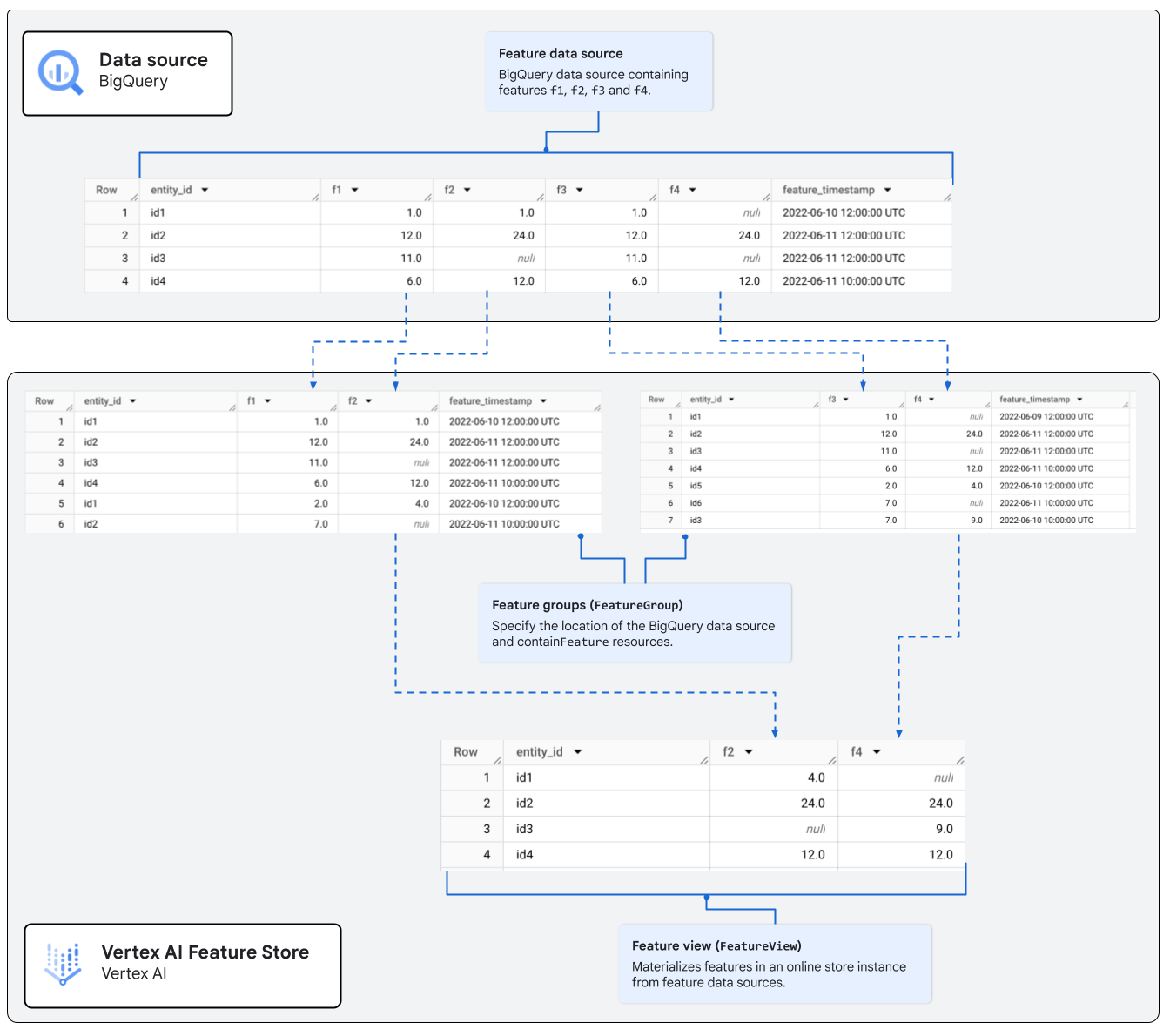 **Figure 3.** Example of a `FeatureView` containing features from two separate feature groups.
### Online serving
Agent Platform Feature Store provides the following types of online serving
for real-time online predictions:
- **Bigtable online serving** is useful for serving large data volumes
(terabytes of data). Bigtable online serving doesn't support
[embeddings](https://docs.cloud.google.com/gemini-enterprise-agent-platform/machine-learning/featurestore/latest/overview.md.txt#embedding). If you
need to serve large volumes of data that are frequently updated and don't need
to serve embeddings, use Bigtable online serving.
- **Optimized online serving ([Deprecated](https://docs.cloud.google.com/vertex-ai/docs/deprecations.md.txt))**
lets you online serve features at ultra-low latencies.
Optimized online serving also supports embeddings management.
To use Optimized online serving, you need to configure either a public
endpoint or a dedicated Private Service Connect endpoint.
To learn how to set up online serving in Agent Platform Feature Store
after you set up features, see [Online serving types](https://docs.cloud.google.com/gemini-enterprise-agent-platform/machine-learning/featurestore/latest/online-serving-types.md.txt).
## Offline serving for batch predictions or model training
Because you don't need to copy or import your feature data from BigQuery
to a separate offline store in Gemini Enterprise Agent Platform, you can use the data management
and export capabilities of BigQuery to do the following:
- Query feature data, including [historical data at a point in time](https://docs.cloud.google.com/bigquery/docs/access-historical-data.md.txt#query_data_at_a_point_in_time).
- [Preprocess](https://docs.cloud.google.com/bigquery/docs/preprocess-overview.md.txt) and [export](https://docs.cloud.google.com/bigquery/docs/exporting-data.md.txt) feature data for model training and batch predictions.
For more information about machine learning using BigQuery, see
[BigQuery ML introduction](https://docs.cloud.google.com/bigquery/docs/bqml-introduction.md.txt).
## Agent Platform Feature Store terms
### Terms related to feature engineering
##### **feature engineering**
- Feature engineering is the process of transforming raw machine learning (ML) data into features that can be used to train ML models or to make inferences.
##### **feature**
- In machine learning (ML), a feature is a characteristic or attribute of an instance or entity that's used as an input to train an ML model or to make inferences.
##### **feature value**
- A feature value corresponds to the actual and measurable value of a feature (attribute) of an instance or entity. A collection of feature values for the unique entity represent the feature record corresponding to the entity.
##### **feature timestamp**
- A feature timestamp indicates when the set of feature values in a specific feature record for an entity were generated.
##### **feature record**
- A feature record is an aggregation of all feature values that describe the attributes of a unique entity at a specific point in time.
### Terms related to Feature Registry
##### **feature registry**
- A feature registry is a central interface for recording feature data sources that you want to serve for online inferences. For more information, see [Feature Registry setup](https://cloud.google.com/vertex-ai/docs/featurestore/latest/overview#feature_registry_setup).
##### **feature group**
- A feature group is a feature registry resource that corresponds to a BigQuery source table or view containing feature data. A feature view might contain features and can be thought of as a logical grouping of feature columns in the data source.
### Terms related to feature serving
##### **feature serving**
- Feature serving is the process of exporting or fetching feature values for training or inference. In Vertex AI, there are two types of feature serving---online serving and offline serving. Online serving retrieves the latest feature values of a subset of the feature data source for online inferences. Offline or batch serving exports high volumes of feature data---including historical data---for offline processing, such as ML model training.
##### **offline store**
- The offline store is a storage facility storing recent and historical feature data, which is typically used for training ML models. An offline store also contains the latest feature values, which you can serve for online inferences.
##### **online store**
- In feature management, an online store is a storage facility for the latest feature values to be served for online inferences.
##### **feature view**
- A feature view is a logical collection of features materialized from a BigQuery data source to an online store instance. A feature view stores and periodically refreshes the customer's feature data, which is refreshed periodically from the BigQuery source. A feature view is associated with the feature data storage either directly or through associations to feature registry resources.
## Location constraints
All Agent Platform Feature Store resources must be located in the same
region or the same multi-regional location as your BigQuery data
source. For example, if the feature data source is located in `us-central1`,
you must create your `FeatureOnlineStore` instance only in `us-central1`
or in the `US` multi-region location.
> [!CAUTION]
> **Caution:** Using source data from dual-region buckets isn't supported.
### Feature labels
You can add labels to resources during or after the resource creation.
For more information about adding labels to existing
Agent Platform Feature Store resources, see
[Update labels](https://docs.cloud.google.com/gemini-enterprise-agent-platform/machine-learning/featurestore/latest/feature-labels.md.txt).
### Resource version metadata
Agent Platform Feature Store only supports the version `0` for features.
## Feature monitoring
Agent Platform Feature Store lets you set up feature monitoring to
retrieve feature statistics and detect anomalies in feature data. You can either
set up monitoring schedules to periodically run monitoring jobs, or manually
run a monitoring job. For more information about setting up feature
monitoring and running feature monitoring jobs, see
[Monitor features for anomalies](https://docs.cloud.google.com/gemini-enterprise-agent-platform/machine-learning/featurestore/latest/monitor-features.md.txt).
## Embedding management and vector retrieval
> [!CAUTION]
>
> Gemini Enterprise Agent Platform Feature Store Optimized online serving is deprecated.
> Beginning on May 17, 2026, no new features will be added and only critical
> patches will be provided. On February 17, 2027, the capability will be fully
> sunset and APIs will no longer be available.
>
>
> To improve latency and cost optimizations, migrate to
> [Bigtable online serving](https://docs.cloud.google.com/gemini-enterprise-agent-platform/machine-learning/featurestore/latest/online-serving-types.md.txt#bigtable_serving).
> To efficiently store and serve embeddings, use the purpose-built
> [Vector Search](https://docs.cloud.google.com/gemini-enterprise-agent-platform/build/vector-search/overview.md.txt).
Optimized online serving in Agent Platform Feature Store supports
embedding management. You can store embeddings in BigQuery as
regular `double` arrays. Using the embedding management capabilities of
Agent Platform Feature Store, you can perform vector similarity searches
to retrieve entities that are approximate nearest neighbors for a specified
entity or embedding value.
To use embedding management in Agent Platform Feature Store, you need to do the following:
- Set up the BigQuery data source to support embeddings by including
the `embedding` column. Optionally, include filtering and crowding columns.
For more information, see
[Data source preparation guidelines](https://docs.cloud.google.com/gemini-enterprise-agent-platform/machine-learning/featurestore/latest/prepare-data-source.md.txt#guidelines).
- [Create an online store instance for Optimized online serving.](https://docs.cloud.google.com/gemini-enterprise-agent-platform/machine-learning/featurestore/latest/create-onlinestore.md.txt#create_fos_optimized)
- Specify the `embedding` column while creating the feature view. For more
information about how to create a feature view that supports embeddings,
see [Configure vector retrieval for a feature view](https://docs.cloud.google.com/gemini-enterprise-agent-platform/machine-learning/featurestore/latest/create-featureview.md.txt#configure-vectorretrieval).
For information about how to perform a vector similarity search in Agent Platform Feature Store,
see [Perform a vector search for entities](https://docs.cloud.google.com/gemini-enterprise-agent-platform/machine-learning/featurestore/latest/embeddings-search.md.txt).
## Data retention
Agent Platform Feature Store retains the latest feature values for a
unique ID, based on the timestamp associated with the feature values in the data
source. There's no data retention limit in the online store.
Because the offline store is provisioned by BigQuery, data
retention limits or quotas from BigQuery might apply to the
feature data source, including historical feature values.
[Learn more about quotas and limits in BigQuery](https://docs.cloud.google.com/bigquery/quotas.md.txt).
## Quotas and limits
Agent Platform Feature Store enforces quotas and limits to help you
manage resources by setting usage limits, and to protect the community of
Google Cloud users by preventing unforeseen spikes in usage. To efficiently
use Agent Platform Feature Store resources without hitting these
constraints, review the [Agent Platform Feature Store
quotas and limits](https://docs.cloud.google.com/gemini-enterprise-agent-platform/machine-learning/quotas#feature_store).
## Pricing
For information about resource usage pricing for
Agent Platform Feature Store, see [Agent Platform Feature Store
pricing](https://cloud.google.com/products/gemini-enterprise-agent-platform/pricing#agent-platform-feature-store).
## Notebook tutorials
Use the following samples and tutorials to learn more about Feature Store on Gemini Enterprise Agent Platform.
### Online feature serving and fetching of BigQuery data with Vertex AI Feature Store Bigtable online serving
|---|---|
|  | In this tutorial, you learn how to use Bigtable online serving in Vertex AI Feature Store for online serving and fetching of feature values in BigQuery. [Open in Colab](https://colab.research.google.com/github/GoogleCloudPlatform/vertex-ai-samples/blob/main/notebooks/official/feature_store/online_feature_serving_and_fetching_bigquery_data_with_feature_store_bigtable.ipynb) \| [Open in Colab Enterprise](https://console.cloud.google.com/agent-platform/colab/import/https%3A%2F%2Fraw.githubusercontent.com%2FGoogleCloudPlatform%2Fvertex-ai-samples%2Fmain%2Fnotebooks%2Fofficial%2Ffeature_store%2Fonline_feature_serving_and_fetching_bigquery_data_with_feature_store_bigtable.ipynb) \| [View on GitHub](https://github.com/GoogleCloudPlatform/vertex-ai-samples/blob/main/notebooks/official/feature_store/online_feature_serving_and_fetching_bigquery_data_with_feature_store_bigtable.ipynb) |
### Online feature serving and vector retrieval of BigQuery data with Vertex AI Feature Store
|---|---|
|  | In this tutorial, you learn how to use Vertex AI Feature Store for online serving and vector retrieval of feature values in BigQuery. [Open in Colab](https://colab.research.google.com/github/GoogleCloudPlatform/vertex-ai-samples/blob/main/notebooks/official/feature_store/online_feature_serving_and_vector_retrieval_bigquery_data_with_feature_store.ipynb) \| [Open in Colab Enterprise](https://console.cloud.google.com/agent-platform/colab/import/https%3A%2F%2Fraw.githubusercontent.com%2FGoogleCloudPlatform%2Fvertex-ai-samples%2Fmain%2Fnotebooks%2Fofficial%2Ffeature_store%2Fonline_feature_serving_and_vector_retrieval_bigquery_data_with_feature_store.ipynb) \| [View on GitHub](https://github.com/GoogleCloudPlatform/vertex-ai-samples/blob/main/notebooks/official/feature_store/online_feature_serving_and_vector_retrieval_bigquery_data_with_feature_store.ipynb) |
### Vertex AI Feature Store feature view Service Agents
|---|---|
|  | In this tutorial, you learn how to enable feature view Service Agents and grant each feature view access to the specific source data that is used. [Open in Colab](https://colab.research.google.com/github/GoogleCloudPlatform/vertex-ai-samples/blob/main/notebooks/official/feature_store/vertex_ai_feature_store_feature_view_service_agents.ipynb) \| [Open in Colab Enterprise](https://console.cloud.google.com/agent-platform/colab/import/https%3A%2F%2Fraw.githubusercontent.com%2FGoogleCloudPlatform%2Fvertex-ai-samples%2Fmain%2Fnotebooks%2Fofficial%2Ffeature_store%2Fvertex_ai_feature_store_feature_view_service_agents.ipynb) \| [View on GitHub](https://github.com/GoogleCloudPlatform/vertex-ai-samples/blob/main/notebooks/official/feature_store/vertex_ai_feature_store_feature_view_service_agents.ipynb) |
### Vertex AI Feature Store based LLM grounding tutorial
|---|---|
|  | In this tutorial, you learn how to chunk user-provided data, and then generate embedding vectors for each chunk using a Large Language Model (LLM) that has embedding generation capabilities. The resulting embedding vector dataset can then be loaded into Vertex AI Feature Store, enabling fast feature retrieval and efficient online serving. [Open in Colab](https://colab.research.google.com/github/GoogleCloudPlatform/vertex-ai-samples/blob/main/notebooks/official/feature_store/vertex_ai_feature_store_based_llm_grounding_tutorial.ipynb) \| [Open in Colab Enterprise](https://console.cloud.google.com/agent-platform/colab/import/https%3A%2F%2Fraw.githubusercontent.com%2FGoogleCloudPlatform%2Fvertex-ai-samples%2Fmain%2Fnotebooks%2Fofficial%2Ffeature_store%2Fvertex_ai_feature_store_based_llm_grounding_tutorial.ipynb) \| [View on GitHub](https://github.com/GoogleCloudPlatform/vertex-ai-samples/blob/main/notebooks/official/feature_store/vertex_ai_feature_store_based_llm_grounding_tutorial.ipynb) |
### Build a GenAI RAG application with Vertex AI Feature Store and BigQuery
|---|---|
|  | In this tutorial, you learn how to build a low-latency vector search system for your Gen AI application using BigQuery vector search and Vertex AI Feature Store. [Open in Colab](https://colab.research.google.com/github/GoogleCloudPlatform/generative-ai/blob/main/gemini/use-cases/retrieval-augmented-generation/rag_qna_with_bq_and_featurestore.ipynb) \| [Open in Colab Enterprise](https://console.cloud.google.com/agent-platform/colab/import/https%3A%2F%2Fraw.githubusercontent.com%2FGoogleCloudPlatform%2Fgenerative-ai%2Fmain%2Fgemini%2Fuse-cases%2Fretrieval-augmented-generation%2Frag_qna_with_bq_and_featurestore.ipynb) \| [View on GitHub](https://github.com/GoogleCloudPlatform/generative-ai/blob/main/gemini/use-cases/retrieval-augmented-generation/rag_qna_with_bq_and_featurestore.ipynb) |
### Configure IAM Policy in Vertex AI Feature Store
|---|---|
|  | In this tutorial, you learn how to configure an IAM policy to control access to resources and data stored within Vertex AI Feature Store. [Open in Colab](https://colab.research.google.com/github/GoogleCloudPlatform/vertex-ai-samples/blob/main/notebooks/official/feature_store/vertex_ai_feature_store_iam_policy.ipynb) \| [Open in Colab Enterprise](https://console.cloud.google.com/agent-platform/colab/import/https%3A%2F%2Fraw.githubusercontent.com%2FGoogleCloudPlatform%2Fvertex-ai-samples%2Fmain%2Fnotebooks%2Fofficial%2Ffeature_store%2Fvertex_ai_feature_store_iam_policy.ipynb) \| [View on GitHub](https://github.com/GoogleCloudPlatform/vertex-ai-samples/blob/main/notebooks/official/feature_store/vertex_ai_feature_store_iam_policy.ipynb) |
## What's next
- Learn how to [set up your data in BigQuery](https://docs.cloud.google.com/gemini-enterprise-agent-platform/machine-learning/featurestore/latest/prepare-data-source.md.txt).
- Learn how to create [feature groups](https://docs.cloud.google.com/gemini-enterprise-agent-platform/machine-learning/featurestore/latest/create-featuregroup.md.txt) and [features](https://docs.cloud.google.com/gemini-enterprise-agent-platform/machine-learning/featurestore/latest/create-feature.md.txt).
- Learn how to [create an online store instance](https://docs.cloud.google.com/gemini-enterprise-agent-platform/machine-learning/featurestore/latest/create-onlinestore.md.txt).