Experience the power of state-of-the-art vector search technology with the
Vector Search interactive demo. Leveraging real-world datasets,
the demo provides a realistic example that will help you learn how
Vector Search works, explore semantic and hybrid search,
and see reranking in action. Submit a brief description of an animal,
plant, ecommerce merchandise, or other item, and let Vector Search do
the rest!
> [!NOTE]
> **Note:** Datasets are provided by [Mercari](https://www.mercari.com/) (a popular online marketplace in the US and Japan) and [GBIF (Global Biodiversity Information Facility)](https://www.gbif.org/).
## Try it!
Experiment with the different options in the demo to get a head start with
Vector Search and understand the basics of vector search technology.
To run:
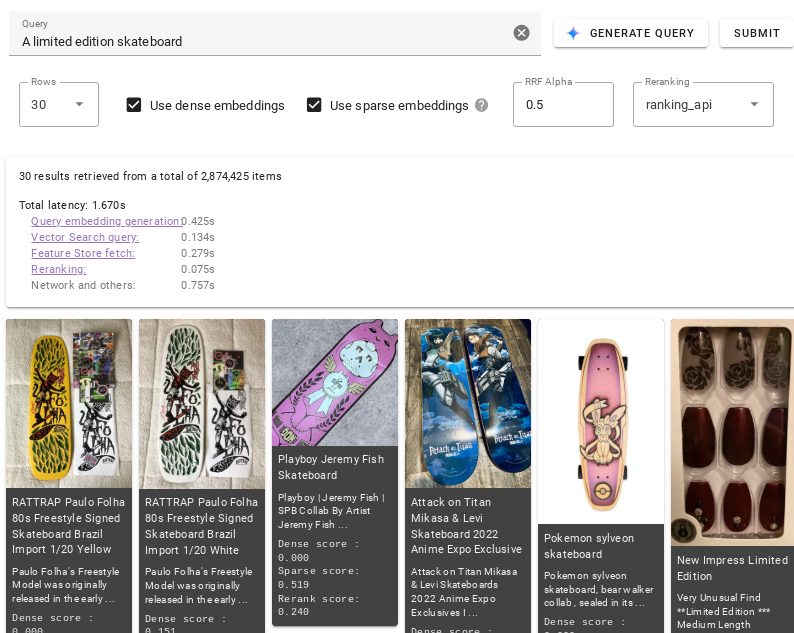
1. In the **Query** text field, describe the items you want to query for
(for example, `vintage 1970s pinball machine`). Alternatively, click
**Generate Query** to auto-generate a description.
2. Click **Submit**.
To learn more about what you can do in the demo,
see [User Interface](https://docs.cloud.google.com/gemini-enterprise-agent-platform/build/vector-search/overview.md.txt#try-ui).
## User Interface
This section describes settings in the UI you can use to control the results
Vector Search returns and how they are ranked.
*** ** * ** ***
### Dataset
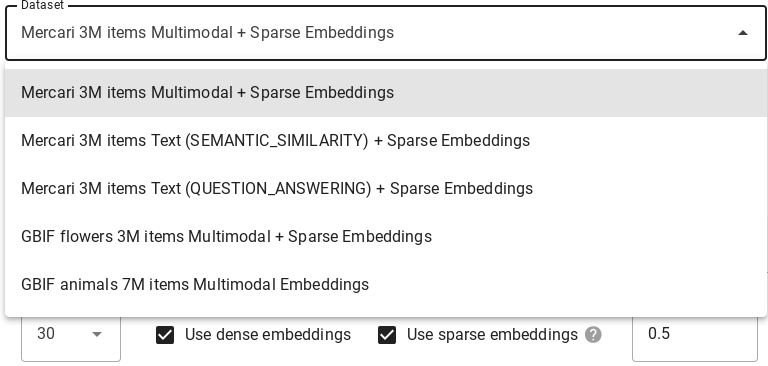
Use the **Dataset** drop-down to choose which dataset Vector Search
will run your query against. See [Datasets](https://docs.cloud.google.com/gemini-enterprise-agent-platform/build/vector-search/try-it.md.txt#datasets) for details
about each one.
*** ** * ** ***
### Query
For the **Query** field, add a description or one or more keywords to specify
what items you want Vector Search to find. Alternatively, click
**Generate Query** to auto-generate a description.

*** ** * ** ***
### Modify
Several options are available that modify the results Vector Search
returns:

- Click **Rows** and choose the maximum number of search results that you want
Vector Search to return.
- Select **Use dense embeddings** if you want Vector Search to return
semantically similar results.
- Select **Use sparse embeddings** if you want Vector Search to return
results based on your query's text syntax. Not all available datasets support
sparse embedding models.
- Select both **Use dense embeddings** and **Use sparse embeddings** if you want
Vector Search to use hybrid search. Not all datasets support
this model. Hybrid search combines elements of both dense and sparse embeddings
which can improve the quality of search results. To learn more, go to
[About hybrid search](https://docs.cloud.google.com/gemini-enterprise-agent-platform/build/vector-search/about-hybrid-search.md.txt).
- In the **RRF Alpha** field, enter between 0.0 and 1.0 to specify RRF ranking
effect.
- To rerank search results, select **ranking_api** from the **Reranking**
drop-down or select **None** to disable reranking.
*** ** * ** ***
### Metrics
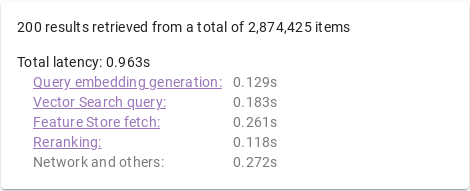
After a query runs, you are provided with latency metrics that breakdown the
time it took for different stages of search to complete.
*** ** * ** ***
### Query Process
When a query is processed, the following occurs:
1. **Query embedding generation:** An embedding is generated for the specified
query text.
2. **Vector Search query:** The query is run with the Vector Search
index.
3. **Gemini Enterprise Agent Platform Feature Store fetch:** Features are read (for example, item name, description,
or image URL) from Gemini Enterprise Agent Platform Feature Store using the list of
item IDs Vector Search returns.
4. **Reranking:** Retrieved items are sorted through ranking APIs which uses
query text, item name, and item description to calculate relevance score.
### Embeddings
**Multimodal:** Multimodal semantic search on item images. For details, go to
[What is Multimodal Search: "LLMs with vision" change businesses](https://cloud.google.com/blog/products/ai-machine-learning/multimodal-generative-ai-search).
**Text (semantic similarity):** Text semantic search on item names and
descriptions based on semantic similarity. To learn more, go to
[Agent Platform Embeddings for Text: Grounding LLMs made easy](https://cloud.google.com/blog/products/ai-machine-learning/how-to-use-grounding-for-your-llms-with-text-embeddings).
**Text (question-answering):** Text semantic search on item names and descriptions,
with improved search quality by task type QUESTION_ANSWERING. This is suited for
Q\&A types of applications. For information about task type embeddings, go to
[Enhancing your gen AI use case with Agent Platform embeddings and task types](https://cloud.google.com/blog/products/ai-machine-learning/improve-gen-ai-search-with-vertex-ai-embeddings-and-task-types).
**Sparse (Hybrid Search):** Keyword (token-based) search on item names and
descriptions, generated with the TF-IDF algorithm. For more information, go to
[About hybrid search](https://docs.cloud.google.com/gemini-enterprise-agent-platform/build/vector-search/about-hybrid-search.md.txt).
## Datasets
> [!NOTE]
> **Note:** Datasets are provided by [Mercari](https://www.mercari.com/) (a popular online marketplace in the US and Japan) and [GBIF (Global Biodiversity Information Facility)](https://www.gbif.org/).
The interactive demo includes several datasets you can run queries on. Datasets
differ from each other by embedding model, support for sparse embeddings,
embedding dimensions, and number of stored items.
| Dataset | Embedding Model | Sparse Embedding Model | Embedding Dimensions | Item Count |
|---|---|---|---|---|
| Mercari Multimodal + Sparse embeddings | [Multimodal embedding](https://docs.cloud.google.com/gemini-enterprise-agent-platform/models/embeddings/get-multimodal-embeddings.md.txt) | [TF-IDF](https://en.wikipedia.org/wiki/Tf%E2%80%93idf) (item name and description) | 1408 | \~3 million |
| Mercari Text (semantic similarity) + Sparse embeddings | [`text-embedding-005`](https://docs.cloud.google.com/gemini-enterprise-agent-platform/models/embeddings/get-text-embeddings.md.txt#supported-models) (Task type: SEMANTIC_SIMILARITY) | [TF-IDF](https://en.wikipedia.org/wiki/Tf%E2%80%93idf) (item name and description) | 768 | \~3 million |
| Mercari Text (question answering) + Sparse embeddings | [`text-embedding-005`](https://docs.cloud.google.com/gemini-enterprise-agent-platform/models/embeddings/get-text-embeddings.md.txt#supported-models) (Task type: QUESTION_ANSWERING) | [TF-IDF](https://en.wikipedia.org/wiki/Tf%E2%80%93idf) (item name and description) | 768 | \~3 million |
| GBIF Flowers Multimodal + Sparse embeddings | [Multimodal embedding](https://docs.cloud.google.com/gemini-enterprise-agent-platform/models/embeddings/get-multimodal-embeddings.md.txt) | [TF-IDF](https://en.wikipedia.org/wiki/Tf%E2%80%93idf) (item name and description) | 1408 | \~3.3 million |
| GBIF Animals Multimodal embeddings | [Multimodal embedding](https://docs.cloud.google.com/gemini-enterprise-agent-platform/models/embeddings/get-multimodal-embeddings.md.txt) | N/A | 1408 | \~7 million |
## Next steps
Now that you've familiar with the demo, you are ready to take a deeper dive into learning how to use Vector Search.
- **[Quickstart](https://docs.cloud.google.com/gemini-enterprise-agent-platform/build/vector-search/quickstart.md.txt):**
Use a example dataset to create and deploy an index in 30 minutes or less.
- **[Before you begin](https://docs.cloud.google.com/gemini-enterprise-agent-platform/build/vector-search/setup.md.txt):**
Discover what to do to prepare embeddings and decide the kind of endpoint to
deploy your index to.