> [!WARNING]
> **Preview**
>
>
> This product or feature is subject to the "Pre-GA Offerings Terms" in the
> General Service Terms section of the
> [Service Specific Terms](https://cloud.google.com/terms/service-terms#1),
> and the
> [Additional Terms for Generative AI Preview Products](https://cloud.google.com/trustedtester/aitos).
> Pre-GA products and features are available "as is" and might have limited
> support. For more information, see the
> [launch stage descriptions](https://cloud.google.com/products/#product-launch-stages).
>
>
> Pre-GA products are in various stages of internal testing and review. As such,
> customers should closely supervise the use of CodeMender, and not use CodeMender
> in situations where serious errors cannot be corrected. This product is made
> available to Customers solely for limited testing and evaluation, and may not be
> used for commercial or production purposes.
>
>
> You may only use CodeMender to analyze (i) source code that you own or are authorized to use or (ii) open source code distributed under an OSI-approved license. You must use this offering solely for legitimate security defense purposes (and not for unauthorized testing, exploitation, or cyberattacks) in compliance with the
> [Google Cloud Acceptable Use Policy](https://cloud.google.com/terms/aup?e=48754805)
> and the [Generative AI Prohibited Use Policy](https://policies.google.com/terms/generative-ai/use-policy). When using CodeMender built with a
> Google Cyber Model or Google Frontier Cyber Model, or a Google Frontier Model,
> your access to and use of those models is also governed by Sections 31 and 34 of
> the
> [Service Specific Terms](https://cloud.google.com/terms/service-terms#1),
> respectively.
>
>
> When disabling human confirmation of write and tool execution actions (as
> described in the
> [configuration file parameters](https://docs.cloud.google.com/gemini-enterprise-agent-platform/agents/codemender/set-up-environment.md.txt#configuration-file)), Customer is responsible for such
> modification under Section 20(j) ("Modifying, Disregarding, or Disabling Safety
> Filters") of the Service Specific Terms. The customer agrees not to
> automatically bypass or circumvent other responses requiring human
> confirmation.
CodeMender can scan each pull request in your continuous integration and
continuous delivery (CI/CD) pipeline. The check fails when CodeMender finds a
vulnerability with `CRITICAL` or `HIGH` severity in the code that the pull
request changes. Findings in code that the pull request didn't change appear in
the report, but they don't fail the check.
This document shows you how to do the following:
- Scan pull requests with [GitHub
Actions](https://docs.github.com/en/actions), and have CodeMender open a pull request with fixes.
- Scan pull requests with Cloud Build.
- Scan your changes before each commit with a Git pre-commit hook.
- Export structured token and session telemetry to Cloud Logging from Cloud Run jobs and Cloud Build steps.
## How pull request scans work
To scan a pull request, run `cm find` with the `--diff` flag and the pull
request's base branch:
```bash
cm find . --diff=origin/main
```
In response to this command, CodeMender does the following:
1. Compares the pull request branch with the base branch, and scans the modified source files plus the files that directly depend on them, such as callers and importers.
2. Distinguishes new vulnerabilities that the pull request introduces or exposes from pre-existing findings, which are labeled `[LEGACY /
UNTOUCHED]`. Your CI check blocks only on vulnerabilities caused by the pull request.
3. Exits with status 1 when a finding caused by the pull request matches a severity in `--fail-on`. The default is `CRITICAL,HIGH`.
For more information about how `--diff` compares with other scanning modes, see
[CodeMender find
modes](https://docs.cloud.google.com/gemini-enterprise-agent-platform/agents/codemender/find-modes).
## Before you begin
CodeMender is available to a limited set of customers in Public Preview.
Contact your sales team to get access.
Make sure that your CodeMender CLI release supports pull request scans. The
pipelines in this document download the latest stable release each time they
run. To check a local installation, run `cm find --help` and look for the
`--diff` flag. To update the CLI, run `cm update`. For more information, see
[Install and configure the
CLI](https://docs.cloud.google.com/gemini-enterprise-agent-platform/agents/codemender/set-up-environment).
### Required roles
To get the permissions that
you need to set up CI/CD integrations for CodeMender,
ask your administrator to grant you the
following IAM roles on your project:
- [Service Account Admin](https://docs.cloud.google.com/iam/docs/roles-permissions/iam.md.txt#iam.serviceAccountAdmin) (`roles/iam.serviceAccountAdmin`)
- [Project IAM Admin](https://docs.cloud.google.com/iam/docs/roles-permissions/resourcemanager.md.txt#resourcemanager.projectIamAdmin) (`roles/resourcemanager.projectIamAdmin`)
- Set up Workload Identity Federation for GitHub Actions: [Workload Identity Pool Admin](https://docs.cloud.google.com/iam/docs/roles-permissions/iam.md.txt#iam.workloadIdentityPoolAdmin) (`roles/iam.workloadIdentityPoolAdmin`)
- Create Cloud Build triggers:
- [Cloud Build Editor](https://docs.cloud.google.com/iam/docs/roles-permissions/cloudbuild.md.txt#cloudbuild.builds.editor) (`roles/cloudbuild.builds.editor`)
- [Service Account User](https://docs.cloud.google.com/iam/docs/roles-permissions/iam.md.txt#iam.serviceAccountUser) (`roles/iam.serviceAccountUser`)
- Run the Git pre-commit hook locally: [Agent Platform User](https://docs.cloud.google.com/iam/docs/roles-permissions/aiplatform.md.txt#aiplatform.user) (`roles/aiplatform.user`)
For more information about granting roles, see [Manage access to projects, folders, and organizations](https://docs.cloud.google.com/iam/docs/granting-changing-revoking-access.md.txt).
You might also be able to get
the required permissions through [custom
roles](https://docs.cloud.google.com/iam/docs/creating-custom-roles) or other [predefined
roles](https://docs.cloud.google.com/iam/docs/roles-overview#predefined).
To ensure that the CI/CD service account has the necessary
permissions to run CodeMender in a CI/CD pipeline,
ask your administrator to grant the
following IAM roles to the CI/CD service account:
**Important:** You must grant these roles to the CI/CD service account, *not* to your user account. Failure to grant the roles to the correct principal might result in permission errors.
- [Agent Platform User](https://docs.cloud.google.com/iam/docs/roles-permissions/aiplatform.md.txt#aiplatform.user) (`roles/aiplatform.user`) on your project
- Write Cloud Build build logs: [Logs Writer](https://docs.cloud.google.com/iam/docs/roles-permissions/logging.md.txt#logging.logWriter) (`roles/logging.logWriter`) on your project
- Save SARIF reports in a Cloud Storage bucket: [Storage Object User](https://docs.cloud.google.com/iam/docs/roles-permissions/storage.md.txt#storage.objectUser) (`roles/storage.objectUser`) on the bucket
For more information about granting roles, see [Manage access to projects, folders, and organizations](https://docs.cloud.google.com/iam/docs/granting-changing-revoking-access.md.txt).
Your administrator might also be able to give the CI/CD service account
the required permissions through [custom
roles](https://docs.cloud.google.com/iam/docs/creating-custom-roles) or other [predefined
roles](https://docs.cloud.google.com/iam/docs/roles-overview#predefined).
## Security considerations
When you run CodeMender in a [GitHub Actions workflow](https://docs.cloud.google.com/gemini-enterprise-agent-platform/agents/codemender/integrate-with-cicd.md.txt#github-actions), a
[Cloud Build trigger](https://docs.cloud.google.com/gemini-enterprise-agent-platform/agents/codemender/integrate-with-cicd.md.txt#cloud-build), or a [Git pre-commit
hook](https://docs.cloud.google.com/gemini-enterprise-agent-platform/agents/codemender/integrate-with-cicd#pre-commit-hook), CodeMender runs without asking for confirmation. Before
you set up these integrations, consider the following:
- **Confirmation prompts** : The `--yes` flag turns off the prompts that ask you to confirm the agent's commands and file writes. When `--sandbox=false` is set (or when running `cm fix` or `cm verify` with `--yes`), the `--bypass-warning` flag skips the warning that the agent can modify files and run commands on your system. When `cm find` runs with the default OS-level sandbox enabled and default network isolation (`permissive-closed`), the workspace is mounted read-only and `cm find` skips command confirmation prompts and the warning automatically. Before you use these flags, read the Preview terms at the beginning of this document, including the terms about disabling human confirmation.
- **Sandbox and policy boundaries** : The CI pipelines turn off the CodeMender sandbox with `--sandbox=false`. Commands that the agent runs, such as builds and tests when it fixes a finding, have the same access as the job, including its Google Cloud credentials and network access. The Linux sandbox uses user namespaces, which some CI environments, such as unprivileged containers, don't support. Even when `--sandbox=false` is set, CodeMender still enforces the workspace path boundary and `command_policy.yaml` blocklist unless you explicitly pass `--allow-all-paths` or `--allow-all-commands`. Turn off the sandbox only in isolated, disposable environments. If your CI environment supports the sandbox, remove `--sandbox=false`.
- **Runners** : Run the GitHub Actions workflow on GitHub-hosted runners, such as `ubuntu-24.04`, which run each job in a new virtual machine. Don't use self-hosted runners that are reused between jobs.
- **Untrusted code**: Code in a pull request can contain text that tries to steer the agent. The GitHub Actions workflow scans only pull requests from branches in the same repository, which only users with write access can create. For Cloud Build, use comment control so that an owner or collaborator must approve builds for pull requests from other contributors.
- **Access** : Grant each service account only the [required
Identity and Access Management (IAM) roles](https://docs.cloud.google.com/gemini-enterprise-agent-platform/agents/codemender/integrate-with-cicd#required-roles) for its pipeline.
- **Worst case** : For what can happen when the agent runs without confirmation, see [Confirmation
prompts](https://docs.cloud.google.com/gemini-enterprise-agent-platform/agents/codemender/set-up-environment#confirmation-prompts).
## Scan pull requests with GitHub Actions
The workflow in this section scans each pull request in a repository on
GitHub.com. When CodeMender finds a vulnerability with `CRITICAL` or `HIGH`
severity in the pull request's changes, the workflow does the following:
- Fails the **CodeMender scan** check.
- Runs `cm fix` for each finding, and opens a pull request with the fixes into the pull request's branch.
The workflow also uploads the findings to GitHub code scanning.
### Set up Workload Identity Federation
The workflow authenticates to Google Cloud with [Workload Identity Federation](https://docs.cloud.google.com/iam/docs/workload-identity-federation.md.txt), so you don't store a
service account key in GitHub. Run the following commands with the
Google Cloud CLI:
1. Set shell variables for your project and repository:
```bash
PROJECT_ID="PROJECT_ID"
GITHUB_ORG="GITHUB_ORG"
REPO="GITHUB_ORG/REPOSITORY"
```
Replace the following:
- `PROJECT_ID`: your Google Cloud project ID.
- `GITHUB_ORG`: your GitHub organization name, or your GitHub username for a repository in a personal account.
- `REPOSITORY`: the name of your GitHub repository.
2. Enable the APIs that Workload Identity Federation uses:
```bash
gcloud services enable iam.googleapis.com \
cloudresourcemanager.googleapis.com iamcredentials.googleapis.com \
sts.googleapis.com --project="${PROJECT_ID}"
```
3. Create a service account for the workflow, and grant it the Agent Platform User
IAM role (`roles/aiplatform.user`):
```bash
gcloud iam service-accounts create codemender-ci \
--project="${PROJECT_ID}" \
--display-name="CodeMender CI"
gcloud projects add-iam-policy-binding "${PROJECT_ID}" \
--member="serviceAccount:codemender-ci@${PROJECT_ID}.iam.gserviceaccount.com" \
--role="roles/aiplatform.user"
```
4. Create a workload identity pool. If you already have a pool for GitHub
Actions, skip this step, and use your pool's ID instead of `github` in the
following steps.
```bash
gcloud iam workload-identity-pools create github \
--project="${PROJECT_ID}" \
--location="global" \
--display-name="GitHub Actions"
```
5. Create a provider for GitHub in the pool. The attribute condition accepts
tokens only from repositories that `GITHUB_ORG` owns.
```bash
gcloud iam workload-identity-pools providers create-oidc codemender \
--project="${PROJECT_ID}" \
--location="global" \
--workload-identity-pool="github" \
--display-name="CodeMender" \
--attribute-mapping="google.subject=assertion.sub,attribute.repository=assertion.repository,attribute.repository_owner=assertion.repository_owner" \
--attribute-condition="assertion.repository_owner == '${GITHUB_ORG}'" \
--issuer-uri="https://token.actions.githubusercontent.com"
```
6. Let workflows in your repository use the service account:
```bash
POOL_ID=$(gcloud iam workload-identity-pools describe github \
--project="${PROJECT_ID}" \
--location="global" \
--format="value(name)")
gcloud iam service-accounts add-iam-policy-binding \
"codemender-ci@${PROJECT_ID}.iam.gserviceaccount.com" \
--project="${PROJECT_ID}" \
--role="roles/iam.workloadIdentityUser" \
--member="principalSet://iam.googleapis.com/${POOL_ID}/attribute.repository/${REPO}"
```
7. Get the provider's full name. You need it in the next section.
```bash
gcloud iam workload-identity-pools providers describe codemender \
--project="${PROJECT_ID}" \
--location="global" \
--workload-identity-pool="github" \
--format="value(name)"
```
The output looks like the following:
```text
projects/123456789/locations/global/workloadIdentityPools/github/providers/codemender
```
Changes to Workload Identity Federation and IAM can take up to 5
minutes to take effect. For more information, see [Configure Workload Identity Federation with deployment
pipelines](https://docs.cloud.google.com/iam/docs/workload-identity-federation-with-deployment-pipelines).
### Add repository secrets
In your repository, go to **Settings** \> **Secrets and variables**
\> **Actions**, and add the following repository secrets:
| Secret | Value |
|---|---|
| `GCP_PROJECT_ID` | Your project ID. |
| `GCP_WIF_PROVIDER` | The provider's full name from the previous section. |
| `GCP_WIF_SERVICE_ACCOUNT` | `codemender-ci@PROJECT_ID.iam.gserviceaccount.com`, where `PROJECT_ID` is your project ID. |
For more information, see [Using secrets in GitHub
Actions](https://docs.github.com/en/actions/how-tos/write-workflows/choose-what-workflows-do/use-secrets).
### Configure repository settings
1. To let the autofix job open pull requests, go to **Settings** \> **Actions** \> **General** . Under **Workflow permissions** , select **Allow GitHub Actions to create and approve pull requests** , and then click **Save** . A repository in an organization inherits this setting from the organization. If you can't change it, ask an organization owner. If you don't use autofix, skip this step. For more information, see [Managing
GitHub Actions settings for a
repository](https://docs.github.com/en/repositories/managing-your-repositorys-settings-and-features/enabling-features-for-your-repository/managing-github-actions-settings-for-a-repository#preventing-github-actions-from-creating-or-approving-pull-requests).
2. Make sure that GitHub code scanning is available for the repository. For private and internal repositories, code scanning requires GitHub Code Security. If code scanning isn't available, delete the **Upload results to
code scanning** step and the `security-events` and `actions` permissions from the scan job. Otherwise, the upload fails, and so does the scan job. For more information, see [Uploading a SARIF file to
GitHub](https://docs.github.com/en/code-security/how-tos/find-and-fix-code-vulnerabilities/integrate-with-existing-tools/upload-sarif-file).
### Add the workflow
Commit the following workflow to your repository as
`.github/workflows/codemender.yml`:
```yaml
name: CodeMender
on:
pull_request:
permissions: {}
defaults:
run:
shell: bash
env:
CM_DOWNLOAD_URL: https://artifactregistry.googleapis.com/download/v1/projects/cmoc-prod/locations/us/repositories/codemender-cli-production/files/cm%3Astable%3Acm-linux-amd64.zip:download?alt=media
jobs:
scan:
name: CodeMender scan
# Workflows for fork and Dependabot pull requests can't read this
# repository's secrets, so they can't authenticate to Google Cloud.
if: >-
github.event.pull_request.head.repo.full_name == github.repository &&
github.actor != 'dependabot[bot]'
runs-on: ubuntu-24.04
timeout-minutes: 15
permissions:
contents: read
id-token: write # Workload Identity Federation
security-events: write # Upload SARIF to code scanning
actions: read # Upload SARIF from a private repository
outputs:
findings: ${{ steps.scan.outputs.findings }}
steps:
- uses: actions/checkout@v7
with:
fetch-depth: 0 # cm needs the base branch history
persist-credentials: false
- uses: google-github-actions/auth@v3
with:
project_id: ${{ secrets.GCP_PROJECT_ID }}
workload_identity_provider: ${{ secrets.GCP_WIF_PROVIDER }}
service_account: ${{ secrets.GCP_WIF_SERVICE_ACCOUNT }}
- name: Install the CodeMender CLI
run: |
curl -fsSL -o "$RUNNER_TEMP/cm.zip" "$CM_DOWNLOAD_URL"
unzip -q -o "$RUNNER_TEMP/cm.zip" -d "$RUNNER_TEMP/cm"
echo "$RUNNER_TEMP/cm" >> "$GITHUB_PATH"
- name: Scan the pull request
id: scan
env:
BASE_REF: ${{ github.base_ref }}
FAIL_ON: CRITICAL,HIGH
run: |
cm init
status=0
cm find . \
--diff="origin/$BASE_REF" \
--diff-workers=16 \
--fail-on="$FAIL_ON" \
--format=sarif \
--output=codemender.sarif \
--sandbox=false \
--yes \
--bypass-warning || status=$?
# Save the findings that failed the scan for the autofix job. Like the
# CI gate, skip findings labeled [LEGACY / UNTOUCHED]: they're in code
# that the pull request didn't change.
echo '[]' > "$RUNNER_TEMP/codemender-findings.json"
if [ "$status" -ne 0 ]; then
cm report --format=json --status=OPEN \
| jq --arg fail_on "$FAIL_ON" '
($fail_on | ascii_upcase | split(",")) as $severities
| [.[]
| select(.title | startswith("[LEGACY / UNTOUCHED]") | not)
| select(.severity | ascii_upcase | IN($severities[]))]' \
> "$RUNNER_TEMP/codemender-findings.json"
fi
echo "findings=$(jq length "$RUNNER_TEMP/codemender-findings.json")" >> "$GITHUB_OUTPUT"
exit "$status"
- name: Upload results to code scanning
if: ${{ !cancelled() && hashFiles('codemender.sarif') != '' }}
uses: github/codeql-action/upload-sarif@v4
with:
sarif_file: codemender.sarif
category: codemender
- name: Save findings for autofix
if: ${{ !cancelled() && steps.scan.outputs.findings > 0 }}
uses: actions/upload-artifact@v7
with:
name: codemender-findings
path: ${{ runner.temp }}/codemender-findings.json
retention-days: 1
autofix:
name: CodeMender autofix
needs: scan
if: ${{ !cancelled() && needs.scan.outputs.findings > 0 }}
runs-on: ubuntu-24.04
timeout-minutes: 60
permissions:
contents: write # Push the fix branch
pull-requests: write # Open the fix pull request
id-token: write # Workload Identity Federation
steps:
- uses: actions/checkout@v7
with:
ref: ${{ github.head_ref }}
persist-credentials: false
- uses: google-github-actions/auth@v3
with:
project_id: ${{ secrets.GCP_PROJECT_ID }}
workload_identity_provider: ${{ secrets.GCP_WIF_PROVIDER }}
service_account: ${{ secrets.GCP_WIF_SERVICE_ACCOUNT }}
- name: Install the CodeMender CLI
run: |
curl -fsSL -o "$RUNNER_TEMP/cm.zip" "$CM_DOWNLOAD_URL"
unzip -q -o "$RUNNER_TEMP/cm.zip" -d "$RUNNER_TEMP/cm"
echo "$RUNNER_TEMP/cm" >> "$GITHUB_PATH"
- uses: actions/download-artifact@v8
with:
name: codemender-findings
path: ${{ runner.temp }}/codemender
- name: Fix findings
run: |
# Keep CodeMender state and the auth action's credentials file out of
# the commits, and out of the `git clean` that cm fix runs.
printf '%s\n' .cm_project 'gha-creds-*.json' >> .git/info/exclude
cm init
# Fix in the repository root instead of each file's directory.
printf 'project_paths:\n - "%s"\n' "$GITHUB_WORKSPACE" \
>> ~/.codemender/config.yaml
cm report import -f "$RUNNER_TEMP/codemender/codemender-findings.json"
git config user.name "github-actions[bot]"
git config user.email \
"41898282+github-actions[bot]@users.noreply.github.com"
cm report --format=json --status=OPEN \
| jq -r '.[] | [.finding_id, .title] | @tsv' \
> "$RUNNER_TEMP/findings.tsv"
while IFS=$'\t' read -r id title; do
# cm fix exits 0 when it makes no edits, so also check for changes.
if cm fix "$id" \
--sandbox=false --yes --bypass-warning < /dev/null &&
! git diff --quiet; then
git commit -q -a -m "Fix $title" -m "CodeMender finding $id"
else
echo "::warning::CodeMender didn't fix \"$title\" ($id)."
fi
# Discard files the fix agent created, such as test output.
git reset -q --hard
git clean -q -fd
done < "$RUNNER_TEMP/findings.tsv"
- uses: peter-evans/create-pull-request@v8
with:
branch: codemender/fix-pr-${{ github.event.pull_request.number }}
base: ${{ github.head_ref }}
title: "CodeMender fixes for #${{ github.event.pull_request.number }}"
body: |
CodeMender generated these fixes for findings in #${{ github.event.pull_request.number }}.
Review each commit before you merge this pull request into `${{ github.head_ref }}`.
```
### Workflow details
The following diagram shows how the pull request scan and autofix jobs interact:
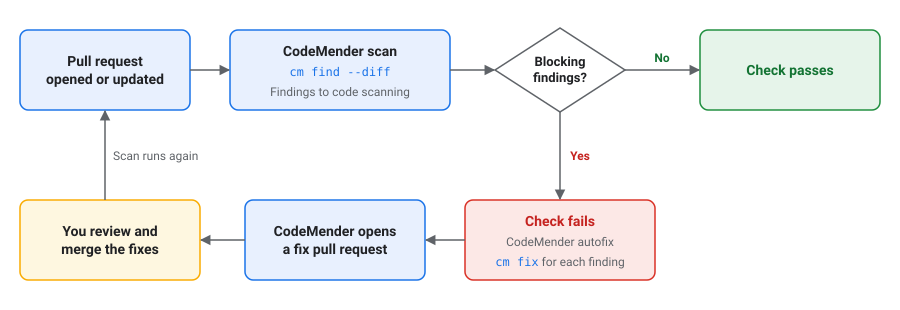
The *CodeMender scan* job does the following:
1. Checks out the pull request with its full history. For pull requests, GitHub checks out a merge commit of the pull request branch into the base branch.
2. Authenticates to Google Cloud and downloads the latest stable release of the CodeMender CLI.
3. Runs `cm find --diff` against the base branch. The job fails if CodeMender finds a vulnerability with a severity that's listed in `FAIL_ON` in the pull request's changes.
4. Uploads the report to GitHub code scanning, even when the scan fails the job. The report includes findings labeled `[LEGACY / UNTOUCHED]`. Code scanning also shows a finding in the pull request's checks when all of the finding's lines are in the pull request's diff.
5. Saves the findings that failed the job for the autofix job.
The scan job doesn't run for pull requests from forks or from Dependabot,
because workflows for those pull requests can't read the repository's secrets.
GitHub reports a skipped job as successful, so the check doesn't block these
pull requests, even if you make it a required check. Review these pull requests
yourself, or scan them locally with `cm find --diff`.
The *CodeMender autofix* job runs when the scan job saves findings. It does
the following:
1. Checks out the pull request branch.
2. Runs `cm fix` for each finding, and commits each fix separately. If CodeMender doesn't fix a finding, the job logs a warning. The job commits only changes to files that are already in the repository, and discards any files that the fix agent creates, such as test output.
3. Opens a pull request from the `codemender/fix-pr-NUMBER` branch into the pull request branch, where `NUMBER` is the pull request number. If the fix pull request already exists, the job updates it. If CodeMender doesn't fix any findings, or if the job reaches its 60-minute timeout, the job doesn't open a pull request.
### Review and merge fixes
> [!IMPORTANT]
> **Important:** CodeMender fixes are AI-generated. Always review each commit and verify that your tests pass before you merge the fix pull request.
GitHub doesn't automatically run workflows for pull requests that a workflow
creates with the `GITHUB_TOKEN`. To scan the fix pull request, a user with write
access to the repository clicks **Approve workflows to run** in the fix pull
request.
When you merge the fix pull request, the pull request branch changes, and the
workflow scans the original pull request again.
### Customize the workflow
You can customize the workflow in the following ways:
- To change the severities that fail the check, in the **Scan the pull
request** step, set `FAIL_ON` to a comma-separated list of severities without spaces, such as `CRITICAL,HIGH,MEDIUM`. Valid values are `CRITICAL`, `HIGH`, `MEDIUM`, and `LOW`.
- To report findings without failing the check, set `FAIL_ON: ""`. The workflow still uploads findings to code scanning, but it doesn't run the autofix job.
- To scan pull requests into some branches only, add a `branches` filter to
the `pull_request` trigger. The workflow then doesn't scan fix pull
requests, because their base is a pull request branch:
```yaml
on:
pull_request:
branches: [main]
```
- To turn off autofix, delete the `autofix` job and the **Save findings for
autofix** step.
- To verify credentials, configuration, network reachability, and
IAM permissions before running a scan (or in a scheduled
monitoring workflow), run `cm health --strict` (add `--json` for
machine-readable output). For exit codes and flag details, see [Check
service connectivity and
permissions](https://docs.cloud.google.com/gemini-enterprise-agent-platform/agents/codemender/set-up-environment#check-health).
- To output ASCII-only logs without emoji, Unicode symbols, or terminal
colors, add `CM_PLAIN: "true"` to the workflow `env` block, or pass
`--plain` to each `cm` command. For precedence rules and report format
details, see [Configure plain text
output](https://docs.cloud.google.com/gemini-enterprise-agent-platform/agents/codemender/set-up-environment#plain-text-output).
## Scan pull requests with Cloud Build
The build in this section scans each pull request in a GitHub repository that's
connected to Cloud Build. The build and its GitHub check fail when
CodeMender finds a vulnerability with `CRITICAL` or `HIGH` severity in the pull
request's changes. The build doesn't fix findings.
Before you start, do the following:
1. Connect your repository to Cloud Build as a second-generation repository. For more information, see [Connect to a GitHub
repository](https://docs.cloud.google.com/build/docs/automating-builds/github/connect-repo-github).
2. Enable the Cloud Build API and the IAM API in the
project that has access to CodeMender. The build uses CodeMender in the
project that runs the build.
```bash
PROJECT_ID="PROJECT_ID"
gcloud services enable cloudbuild.googleapis.com iam.googleapis.com \
--project="${PROJECT_ID}"
```
Replace `PROJECT_ID` with your Google Cloud
project ID.
### Create a service account
Create a service account for the build. Grant it the Agent Platform User
IAM role (`roles/aiplatform.user`) to use CodeMender, and the
Logs Writer role (`roles/logging.logWriter`) to write build logs:
```bash
SA="codemender-build@${PROJECT_ID}.iam.gserviceaccount.com"
gcloud iam service-accounts create codemender-build \
--project="${PROJECT_ID}" \
--display-name="CodeMender Cloud Build"
gcloud projects add-iam-policy-binding "${PROJECT_ID}" \
--member="serviceAccount:${SA}" \
--role="roles/aiplatform.user"
gcloud projects add-iam-policy-binding "${PROJECT_ID}" \
--member="serviceAccount:${SA}" \
--role="roles/logging.logWriter"
```
To save SARIF reports in a Cloud Storage bucket, also grant the service account
access to the bucket:
```bash
BUCKET="BUCKET"
gcloud storage buckets add-iam-policy-binding "gs://${BUCKET}" \
--member="serviceAccount:${SA}" \
--role="roles/storage.objectUser"
```
Replace `BUCKET` with the name of your Cloud Storage
bucket.
### Add the build config
Commit the following build config to the root of your repository as
`cloudbuild.yaml`:
```yaml
# Scans a pull request with CodeMender. The build fails when CodeMender finds
# a CRITICAL or HIGH vulnerability in the pull request's changes.
steps:
- id: install-codemender
name: gcr.io/google.com/cloudsdktool/google-cloud-cli:slim
script: |
#!/usr/bin/env bash
set -euo pipefail
curl -fsSL -o /tmp/cm.zip "$_CM_DOWNLOAD_URL"
python3 -m zipfile -e /tmp/cm.zip /workspace/.codemender-cli
chmod +x /workspace/.codemender-cli/cm
- id: fetch-history
name: gcr.io/google.com/cloudsdktool/google-cloud-cli:slim
script: |
#!/usr/bin/env bash
set -euo pipefail
: "${_BASE_BRANCH:?Run this build from a pull request trigger.}"
# Triggers check out only the pull request's commit. CodeMender needs the
# history back to where the pull request branched from the base branch.
# Fetch from origin, or from GitHub if origin isn't configured.
refspec="+refs/heads/$_BASE_BRANCH:refs/remotes/origin/$_BASE_BRANCH"
git fetch --quiet --unshallow origin "$refspec" ||
git fetch --quiet --unshallow \
"https://github.com/$REPO_FULL_NAME.git" "$refspec"
merge_base=$(git merge-base HEAD "origin/$_BASE_BRANCH")
echo "Merge base with $_BASE_BRANCH: $merge_base"
- id: scan
name: gcr.io/google.com/cloudsdktool/google-cloud-cli:slim
script: |
#!/usr/bin/env bash
set -uo pipefail
export PATH="/workspace/.codemender-cli:$PATH"
# The project that has access to CodeMender.
export GOOGLE_CLOUD_PROJECT="$PROJECT_ID"
cm init || exit 1
status=0
cm find . \
--diff="origin/$_BASE_BRANCH" \
--diff-workers=16 \
--fail-on=CRITICAL,HIGH \
--format=sarif \
--output=codemender.sarif \
--sandbox=false \
--yes \
--bypass-warning || status=$?
# cm find writes the SARIF report when the scan completes.
if [ -f codemender.sarif ]; then
# cm find doesn't print finding details, so print them here.
cm report --status=OPEN --format=md
if [ -n "${_REPORT_BUCKET:-}" ]; then
gcloud storage cp codemender.sarif \
"gs://$_REPORT_BUCKET/codemender/$BUILD_ID.sarif" || status=1
fi
fi
exit "$status"
substitutions:
_CM_DOWNLOAD_URL: https://artifactregistry.googleapis.com/download/v1/projects/cmoc-prod/locations/us/repositories/codemender-cli-production/files/cm%3Astable%3Acm-linux-amd64.zip:download?alt=media
_REPORT_BUCKET: '' # Optional: a bucket to save the SARIF report in.
timeout: 1200s
options:
automapSubstitutions: true
logging: CLOUD_LOGGING_ONLY
```
### Create the trigger
Create a trigger that runs the build for each pull request into `main`:
```bash
REGION="REGION"
CONNECTION="CONNECTION"
REPOSITORY="REPOSITORY"
gcloud builds triggers create github \
--project="${PROJECT_ID}" \
--region="${REGION}" \
--name="codemender-scan" \
--repository="projects/${PROJECT_ID}/locations/${REGION}/connections/${CONNECTION}/repositories/${REPOSITORY}" \
--pull-request-pattern='^main$' \
--comment-control=COMMENTS_ENABLED_FOR_EXTERNAL_CONTRIBUTORS_ONLY \
--build-config=cloudbuild.yaml \
--service-account="projects/${PROJECT_ID}/serviceAccounts/${SA}"
```
Replace the following:
- `REGION`: the region of your Cloud Build repository connection.
- `CONNECTION`: the name of your Cloud Build repository connection.
- `REPOSITORY`: the name of the connected repository in Cloud Build.
Note the following options:
- `--pull-request-pattern` is a regular expression for the pull request's base branch. Use `^` and `$` to match the whole branch name.
- With `--comment-control=COMMENTS_ENABLED_FOR_EXTERNAL_CONTRIBUTORS_ONLY`, the build runs automatically for pull requests from repository owners and collaborators. For pull requests from other contributors, the build runs after an owner or collaborator comments `/gcbrun` on the pull request.
- To save SARIF reports in a bucket, add `--substitutions=_REPORT_BUCKET="${BUCKET}"`.
You can also create the trigger in the Google Cloud console. For more information,
see [Building repositories from
GitHub](https://docs.cloud.google.com/build/docs/automating-builds/github/build-repos-from-github).
> [!CAUTION]
> **Caution:** The build runs the pull request's version of `cloudbuild.yaml` with the trigger's service account. Before you comment `/gcbrun` on a pull request, review its changes, including any changes to `cloudbuild.yaml`.
To show build logs in GitHub, add `--include-logs-with-status` when you create
the trigger, and grant the service account the Logs Viewer role
(`roles/logging.viewer`). Anyone who can view the check in GitHub can then read
the build logs, including the findings.
### How the build works
The build has three steps:
1. `install-codemender` downloads the latest stable release of the CodeMender CLI.
2. `fetch-history` fetches the base branch and the history that CodeMender needs. Cloud Build checks out only the commit that started the build. The step fetches from the `origin` remote. If `origin` isn't configured, the step fetches from GitHub without credentials, which works only for public repositories. In that case, a private repository needs credentials, such as an SSH key. For more information, see [Accessing GitHub from a build using
SSH keys](https://docs.cloud.google.com/build/docs/access-github-from-build).
3. `scan` runs `cm find --diff` against the base branch. When the scan completes, the step prints all findings in the build log. If you set `_REPORT_BUCKET`, the step also copies the SARIF report to `gs://BUCKET/codemender/BUILD_ID.sarif`.
To change the severities that fail the build, edit `--fail-on` in the `scan`
step. If you run the build without a pull request trigger, it fails with the
message `Run this build from a pull request trigger.`
To output ASCII-only build logs and Markdown reports without emoji or Unicode
symbols, add `export CM_PLAIN=true` to the `scan` step, or pass `--plain` to
`cm` commands. For more information, see [Configure plain text
output](https://docs.cloud.google.com/gemini-enterprise-agent-platform/agents/codemender/set-up-environment#plain-text-output).
## Scan before each commit
A Git pre-commit hook can scan your staged changes and block the commit when
CodeMender finds a vulnerability with `CRITICAL` or `HIGH` severity. Developers
can skip the hook, so use it in addition to scanning in CI, not instead of it.
Each developer who uses the hook needs the following:
- The CodeMender CLI, installed and set up as described in [Install and
configure the
CLI](https://docs.cloud.google.com/gemini-enterprise-agent-platform/agents/codemender/set-up-environment), including `gcloud auth application-default login` and `cm init`. The hook needs `cm` on the `PATH`.
- The Agent Platform User role (`roles/aiplatform.user`) in a project with access to CodeMender. CodeMender uses the project in the `GOOGLE_CLOUD_PROJECT` environment variable. If that variable isn't set, CodeMender uses the project from your Application Default Credentials or your gcloud CLI default project.
To add the hook, save the following script as `.git/hooks/pre-commit` in your
repository:
```bash
#!/bin/sh
# Scans staged changes with CodeMender before each commit.
if ! cm find . --diff --staged --fail-on=CRITICAL,HIGH \
--yes --bypass-warning; then
echo "CodeMender blocked this commit. To see the findings, run:" >&2
echo " cm report --status=OPEN" >&2
echo "To commit anyway, run git commit --no-verify." >&2
exit 1
fi
```
Make the script executable, and then add `.cm_project` to your `.gitignore`
file, so that you don't commit the file that CodeMender creates to track the
repository:
```bash
chmod +x .git/hooks/pre-commit
echo .cm_project >> .gitignore
```
When you run `git commit`, the hook scans the files with staged changes. The
scan can take a few minutes. The hook doesn't turn off the CodeMender sandbox.
To commit without the scan, run `git commit --no-verify`.
## Scan flags
The following `cm find` flags control pull request scans. For all flags, run `cm
find --help`:
| Flag | Default | Description |
|---|---|---|
| `--diff[=REF]` | Off | Scans the changes compared with `REF`, such as `origin/main`. Without `REF`, scans uncommitted changes to tracked files (compared against `HEAD`). Can't be used with `--deep` or `--quick`. |
| `--staged` | Off | With `--diff`, scans only staged changes. |
| `--diff-workers COUNT` | `4` | The number of files to scan at the same time, from 1 to 16. |
| `--diff-max-neighbors COUNT` | `10` | The maximum number of dependent files to scan. |
| `--fail-on SEVERITIES` | `CRITICAL,HIGH` | With `--diff`, the severities that make `cm find` exit with status 1. With an empty value, findings don't affect the exit status. |
| `--fail-on-truncation` | Off | With `--diff`, exits with status 1 if CodeMender finds more dependent files than `--diff-max-neighbors` allows. |
| `--format FORMAT` | `table` | The report format: `table`, `json`, or `sarif`. |
| `--output FILE` | Standard output | The file to write the report to. |
| `--plain` | Off | Outputs ASCII-only logs and `table` reports without emoji, Unicode symbols, or terminal colors. You can also set `CM_PLAIN=true` across all `cm` commands. |
| `--duration DURATION` (or `--timeout DURATION`) | `0s` (unlimited) | Sets a maximum wall-clock execution duration for the scan (for example, `15m` or `1h`), or set the `CM_DURATION` environment variable. If the scan reaches this limit before finishing, `cm find` saves all findings discovered so far and exits with status `1` if any finding matches `--fail-on`, or status `50` otherwise. |
## Export token telemetry to Logging
In ephemeral containers such as Cloud Run jobs and
Cloud Build steps, local files under `~/.codemender/logs/sessions/` don't
persist after the container exits. Cloud Run jobs and
Logging agents automatically parse each single-line JSON object
written to standard output (`stdout`) or standard error (`stderr`) into a
structured `jsonPayload` log entry. In Cloud Build, step output is written
as `textPayload` by default; set `options.enableStructuredLogging: true` in your
`cloudbuild.yaml` file so Cloud Build parses JSON lines into `jsonPayload`.
To attribute token usage across teams that share a central Google Cloud
project, set a team identifier (1 to 63 characters matching `[A-Za-z0-9._-]`)
with `--team-id`, the `CM_TEAM_ID` environment variable, or `team_id` in
`~/.codemender/config.yaml`.
### Emit a pre-aggregated run summary
In a disposable container with a fresh `~/.codemender` directory per run (such
as a Cloud Run job task), run `cm stats --jsonl` in an `EXIT`
trap so the container writes one single-line JSON summary across all turns and
multi-worker `cm find --deep` or `cm find --diff` sessions, even when `cm find`
exits with status 1 because of findings:
```bash
export CM_TEAM_ID="TEAM_ID"
trap 'cm stats --jsonl' EXIT
cm init
cm find . \
--diff="origin/$BASE_REF" \
--format=sarif \
--output=codemender.sarif \
--sandbox=false \
--yes \
--bypass-warning
```
Replace `TEAM_ID` with your team identifier, such as
`payments-security`.
> [!NOTE]
> **Note:** Without `--since`, `cm stats --jsonl` summarizes the default 7-day (`168h`) window. On self-hosted runners or environments that reuse `$HOME` across runs, isolate each run with a temporary `CM_HOME` directory (for example, `export CM_HOME="$(mktemp -d)"`) or pass a run-scoped `--since` duration so previous runs aren't counted again.
The `cm stats --jsonl` line includes `team_id` (or `team_ids`), `model` (or
`models`), token totals (`input_tokens`, `output_tokens`, `cached_tokens`,
`thought_tokens`, `total_tokens`), `cache_hit_percent`, and `duration_seconds`
without piping through `jq -c`. In Logs Explorer, filter structured entries
with fields such as `jsonPayload.team_id`, `jsonPayload.model`, and
`jsonPayload.total_tokens`.
### Emit granular per-turn session events
If you also want individual `session_metadata`, `interaction`, and
`session_summary` events in Logging, filter the local JSONL
session files with `jq -c` before the container exits:
```bash
shopt -s nullglob
session_logs=(~/.codemender/logs/sessions/*/*.jsonl)
if (( ${#session_logs[@]} > 0 )); then
jq -c 'select(.type == "session_metadata" or .type == "interaction" or .type == "session_summary")' "${session_logs[@]}"
fi
```
> [!CAUTION]
> **Caution:** Avoid printing raw session log files with `cat`. Unfiltered session logs also include `finding` records (unpatched vulnerability titles and severities), `command_start` arguments and working directories, and `tool_call` or `session_error` text, which might expose vulnerability details to anyone with log-read access in a shared project. Note that `session_metadata` also includes the scan `target` path; omit `"session_metadata"` from the `jq` filter if you want only token and poll counters.
For more information about `cm stats` flags, see [Track token
usage](https://docs.cloud.google.com/gemini-enterprise-agent-platform/agents/codemender/manage-sessions#track-token-usage).
## Troubleshooting
This section describes how to resolve common issues when running CodeMender in
CI/CD pipelines.
### Permission denied
The log shows a line like the following:
```text
[1/1] ❌ src/app.py: start session failed: StartSession failed with HTTP 403 Forbidden.
```
The message can also include `Permission 'aiplatform.interactions.create'
denied`. Check the following:
- The project has access to CodeMender.
- The service account or user has the Agent Platform User role (`roles/aiplatform.user`) in the project.
- The Agent Platform API is enabled in the project.
- CodeMender uses the right project. In GitHub Actions, check the `GCP_PROJECT_ID` secret. Cloud Build uses the project that runs the build. Locally, check the `GOOGLE_CLOUD_PROJECT` environment variable, or your default project if the variable isn't set.
To isolate whether a failure is caused by credentials (exit code `10`),
configuration (exit code `20`), network reachability (exit code `30`), or
project IAM permissions (exit code `40`), run `cm health
--strict` in your pipeline step. For more information, see [Check service
connectivity and
permissions](https://docs.cloud.google.com/gemini-enterprise-agent-platform/agents/codemender/set-up-environment#check-health).
### Resource setup in progress
If the log shows `Resource setup has just started. Please try again shortly.` or
`Resource setup is in progress. Please try again shortly.`, CodeMender is
setting up resources for your project, which typically takes a few minutes. Run
the job again later.
### Unknown flag: --diff
If `cm find` fails with `Error: unknown flag: --diff`, your CLI release doesn't
support pull request scans. Run `cm update`, or download the latest release.
### Base branch not found
If `cm find` fails with an error like the following, the base branch isn't in
the checkout:
```text
Error: retrieving VCS diff: git diff failed: exit status 128: fatal: ambiguous argument 'origin/main': unknown revision or path not in the working tree.
```
Fetch the base branch and its history before you run `cm find`. In GitHub
Actions, set `fetch-depth: 0` in `actions/checkout`.
### Files not scanned
A line with ❌, such as `[1/1] ❌ src/app.py: start session failed`, means that
CodeMender couldn't scan that file. Check the error in the line, and then run
the job again.
### No fix pull request
If the workflow doesn't open a fix pull request, check the following:
- If the autofix job fails when it creates the pull request, turn on **Allow
GitHub Actions to create and approve pull requests** . For more information, see [Configure repository settings](https://docs.cloud.google.com/gemini-enterprise-agent-platform/agents/codemender/integrate-with-cicd.md.txt#github-repository-settings).
- If the autofix job succeeds without opening a pull request, CodeMender didn't fix any findings. The job log shows a warning for each finding that CodeMender didn't fix.
### Code scanning upload fails
If the upload step fails with `GitHub Code Security or GitHub Advanced Security
must be enabled for this repository to use code scanning`, enable GitHub Code
Security for the repository, or delete the upload step. For more information,
see [Configure repository settings](https://docs.cloud.google.com/gemini-enterprise-agent-platform/agents/codemender/integrate-with-cicd.md.txt#github-repository-settings).
### Warning not acknowledged
If `cm` fails with `warning not acknowledged. Please run interactively once to
acknowledge or pass --bypass-warning`, CodeMender needs confirmation that it
can't ask for in a non-interactive environment. Add `--bypass-warning` to the
command. Before you do, read the Preview terms at the top of this page.
For more help, contact your sales team.