This tutorial demonstrates using Cloud Run functions to implement a
[Slack Slash Command](https://api.slack.com/slash-commands) that searches
the [Google Knowledge Graph API](https://developers.google.com/knowledge-graph/).
## Objectives
- Create a Slash Command in Slack.
- Write and deploy an [HTTP Cloud Run function](https://docs.cloud.google.com/functions/1stgendocs/writing/write-http-functions.md.txt).
- Search the Google Knowledge Graph API using the Slash Command.
## Costs
In this document, you use the following billable components of Google Cloud:
- Cloud Run functions
To generate a cost estimate based on your projected usage,
use the [pricing calculator](https://docs.cloud.google.com/products/calculator).
New Google Cloud users might be eligible for a [free trial](https://docs.cloud.google.com/free).
## Before you begin
1. If you already have the gcloud CLI installed, update it by running the following command:
```sh
gcloud components update
```
2. Prepare your development environment.
### Node.js
[Go to the Node.js setup guide](https://docs.cloud.google.com/nodejs/docs/setup.md.txt)
### Python
[Go to the Python setup guide](https://docs.cloud.google.com/python/docs/setup.md.txt)
### Go
[Go to the Go setup guide](https://docs.cloud.google.com/go/docs/setup.md.txt)
### Java
[Go to the Java setup guide](https://docs.cloud.google.com/java/docs/setup.md.txt)
### Ruby
[Go to the Ruby setup guide](https://docs.cloud.google.com/ruby/docs/setup.md.txt)
## Visualizing the flow of data
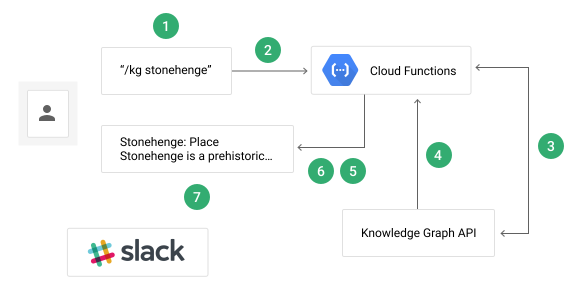
The flow of data in the Slack Slash Command tutorial application involves
several steps:
1. The user executes the `/kg ` Slash Command in a Slack channel.
2. Slack sends the command payload to the function's trigger endpoint.
3. The function sends a request with the user's search query to the Knowledge Graph API.
4. The Knowledge Graph API responds with any matching results.
5. The function formats the response into a [Slack message](https://api.slack.com/docs/message-formatting).
6. The function sends the message back to Slack.
7. The user sees the formatted response in the Slack channel.
It may help to visualize the steps:
## Creating the Knowledge Graph API key
In the [Google Cloud console Credentials page](https://console.cloud.google.com/apis/credentials),
click the **Create credentials** button and select **API key**. Remember this
key, as you will use it to access the Knowledge Graph API in the next section.
## Preparing the function
1. Clone the sample app repository to your local machine:
### Node.js
```sh
git clone https://github.com/GoogleCloudPlatform/nodejs-docs-samples.git
```
Alternatively, you can
[download the sample](https://github.com/GoogleCloudPlatform/nodejs-docs-samples/archive/main.zip)
as a zip file and extract it.
### Python
```sh
git clone https://github.com/GoogleCloudPlatform/python-docs-samples.git
```
Alternatively, you can
[download the sample](https://github.com/GoogleCloudPlatform/python-docs-samples/archive/main.zip)
as a zip file and extract it.
### Go
```sh
git clone https://github.com/GoogleCloudPlatform/golang-samples.git
```
Alternatively, you can
[download the sample](https://github.com/GoogleCloudPlatform/golang-samples/archive/main.zip)
as a zip file and extract it.
### Java
```sh
git clone https://github.com/GoogleCloudPlatform/java-docs-samples.git
```
Alternatively, you can
[download the sample](https://github.com/GoogleCloudPlatform/java-docs-samples/archive/main.zip)
as a zip file and extract it.
### Ruby
```sh
git clone https://github.com/GoogleCloudPlatform/ruby-docs-samples.git
```
Alternatively, you can
[download the sample](https://github.com/GoogleCloudPlatform/ruby-docs-samples/archive/main.zip)
as a zip file and extract it.
2. Change to the directory that contains the Cloud Run functions sample
code:
### Node.js
```sh
cd nodejs-docs-samples/functions/slack/
```
### Python
```sh
cd python-docs-samples/functions/slack/
```
### Go
```sh
cd golang-samples/functions/slack/
```
### Java
```sh
cd java-docs-samples/functions/slack/
```
### Ruby
```sh
cd ruby-docs-samples/functions/slack/
```
## Deploying the function
To deploy the function that is executed when you (or Slack) make an HTTP
POST request to the function's endpoint, run the following command in the
directory that contains the sample code (or the `pom.xml` file for Java):
Replace `YOUR_SLACK_SIGNING_SECRET` with the signing
secret provided by Slack in the **Basic information** page of your app
configuration, and `YOUR_KG_API_KEY` with the Knowledge
Graph API Key you created previously.
### Node.js
```sh
gcloud functions deploy kgSearch \
--runtime nodejs22 \
--trigger-http \
--set-env-vars "SLACK_SECRET=YOUR_SLACK_SIGNING_SECRET,KG_API_KEY=YOUR_KG_API_KEY" \
--allow-unauthenticated
```
Use the [`--runtime`](https://docs.cloud.google.com/sdk/gcloud/reference/functions/deploy.md.txt#--runtime)
flag to specify the runtime ID of a
[supported Node.js version](https://docs.cloud.google.com/static/functions/docs/runtime-support#node.js) to run
your function.
### Python
```sh
gcloud functions deploy kg_search \
--runtime python312 \
--trigger-http \
--set-env-vars "SLACK_SECRET=YOUR_SLACK_SIGNING_SECRET,KG_API_KEY=YOUR_KG_API_KEY" \
--allow-unauthenticated
```
Use the [`--runtime`](https://docs.cloud.google.com/sdk/gcloud/reference/functions/deploy.md.txt#--runtime)
flag to specify the runtime ID of a
[supported Python version](https://docs.cloud.google.com/functions/docs/runtime-support.md.txt#python) to run
your function.
### Go
```sh
gcloud functions deploy KGSearch \
--runtime go121 \
--trigger-http \
--set-env-vars "SLACK_SECRET=YOUR_SLACK_SIGNING_SECRET,KG_API_KEY=YOUR_KG_API_KEY" \
--allow-unauthenticated
```
Use the [`--runtime`](https://docs.cloud.google.com/sdk/gcloud/reference/functions/deploy.md.txt#--runtime)
flag to specify the runtime ID of a
[supported Go version](https://docs.cloud.google.com/functions/docs/runtime-support.md.txt#go) to run
your function.
### Java
```sh
gcloud functions deploy java-slack-function \
--entry-point functions.SlackSlashCommand \
--runtime java17 \
--memory 512MB \
--trigger-http \
--set-env-vars "SLACK_SECRET=YOUR_SLACK_SIGNING_SECRET,KG_API_KEY=YOUR_KG_API_KEY" \
--allow-unauthenticated
```
Use the [`--runtime`](https://docs.cloud.google.com/sdk/gcloud/reference/functions/deploy.md.txt#--runtime)
flag to specify the runtime ID of a
[supported Java version](https://docs.cloud.google.com/functions/docs/runtime-support.md.txt#java) to run
your function.
### Ruby
```bash
gcloud functions deploy kg_search --runtime ruby33 \
--trigger-http \
--set-env-vars "SLACK_SECRET=`YOUR_SLACK_SIGNING_SECRET`,KG_API_KEY=`YOUR_KG_API_KEY`" \
--allow-unauthenticated
```
Use the [`--runtime`](https://docs.cloud.google.com/sdk/gcloud/reference/functions/deploy.md.txt#--runtime)
flag to specify the runtime ID of a
[supported Ruby version](https://docs.cloud.google.com/functions/docs/runtime-support.md.txt#ruby) to run
your function.
> [!NOTE]
> **Note:** In order to configure your application as described in the following section, make sure that you deployed your function with the `--allow-unauthenticated` flag. Alternatively, you can [use the Console](https://docs.cloud.google.com/functions/1stgendocs/securing/managing-access-iam.md.txt#adding_users) to grant the Cloud Run functions Invoker role to `allUsers`.
## Configuring the application
After the function is deployed, you need to create a
[Slack Slash Command](https://api.slack.com/slash-commands)
that sends the query to your function every time the command is triggered:
1. Create a [Slack App](https://api.slack.com/apps) to host your Slack Slash Command.
Associate it with a Slack team where you have permissions to install integrations.
2. Go to **Slash commands** and click the **Create new command** button.
3. Enter `/kg` as the name of the command.
4. Enter the URL for the command:
### Node.js
```bash
https://YOUR_REGION-YOUR_PROJECT_ID.cloudfunctions.net/kgSearch
```
### Python
```bash
https://YOUR_REGION-YOUR_PROJECT_ID.cloudfunctions.net/kg_search
```
### Go
```bash
https://YOUR_REGION-YOUR_PROJECT_ID.cloudfunctions.net/KGSearch
```
### Java
```bash
https://YOUR_REGION-YOUR_PROJECT_ID.cloudfunctions.net/java-slack-function
```
### Ruby
```bash
https://YOUR_REGION-YOUR_PROJECT_ID.cloudfunctions.net/kg_search
```
where `YOUR_REGION` is the region where your
function is deployed and `YOUR_PROJECT_ID` is your Cloud project ID.
Both values are visible in your terminal when your function finishes
deploying.
5. Click **Save**.
6. Go to **Basic Information**.
7. Click **Install your app to your workspace** and follow the instructions
on screen to enable the application for your workspace.
Your Slack Slash Command should come online shortly.
## Understanding the code
### Importing dependencies
The application must import several dependencies in order to communicate with
Google Cloud Platform services:
### Node.js
```javascript
const functions = require('@google-cloud/functions-framework');
const google = require('@googleapis/kgsearch');
const crypto = require('crypto');
// Get a reference to the Knowledge Graph Search component
const kgsearch = google.kgsearch('v1');
```
### Python
```python
import os
from flask import jsonify
import functions_framework
import googleapiclient.discovery
from slack.signature import SignatureVerifier
kgsearch = googleapiclient.discovery.build(
"kgsearch", "v1", developerKey=os.environ["KG_API_KEY"], cache_discovery=False
)
```
### Go
```go
package slack
import (
"context"
"log"
"os"
"google.golang.org/api/kgsearch/v1"
"google.golang.org/api/option"
)
var (
entitiesService *kgsearch.EntitiesService
kgKey string
slackSecret string
)
func setup(ctx context.Context) {
kgKey = os.Getenv("KG_API_KEY")
slackSecret = os.Getenv("SLACK_SECRET")
if entitiesService == nil {
kgService, err := kgsearch.NewService(ctx, option.WithAPIKey(kgKey))
if err != nil {
log.Fatalf("kgsearch.NewService: %v", err)
}
entitiesService = kgsearch.NewEntitiesService(kgService)
}
}
```
### Java
```java
private static final Logger logger = Logger.getLogger(SlackSlashCommand.class.getName());
private static final String API_KEY = getenv("KG_API_KEY");
private static final String SLACK_SECRET = getenv("SLACK_SECRET");
private static final Gson gson = new Gson();
private final String apiKey;
private final Kgsearch kgClient;
private final SlackSignature.Verifier verifier;
public SlackSlashCommand() throws IOException, GeneralSecurityException {
this(new SlackSignature.Verifier(new SlackSignature.Generator(SLACK_SECRET)));
}
SlackSlashCommand(SlackSignature.Verifier verifier) throws IOException, GeneralSecurityException {
this(verifier, API_KEY);
}
SlackSlashCommand(SlackSignature.Verifier verifier, String apiKey)
throws IOException, GeneralSecurityException {
this.verifier = verifier;
this.apiKey = apiKey;
this.kgClient = new Kgsearch.Builder(
GoogleNetHttpTransport.newTrustedTransport(), new GsonFactory(), null).build();
}
// Avoid ungraceful deployment failures due to unset environment variables.
// If you get this warning you should redeploy with the variable set.
private static String getenv(String name) {
String value = System.getenv(name);
if (value == null) {
logger.warning("Environment variable " + name + " was not set");
value = "MISSING";
}
return value;
}
```
### Ruby
```ruby
require "functions_framework"
require "slack-ruby-client"
require "google/apis/kgsearch_v1"
# This block is executed during cold start, before the function begins
# handling requests. This is the recommended way to create shared resources
# and objects.
FunctionsFramework.on_startup do
# Create a global handler object, configured with the environment-provided
# API key and signing secret.
kg_search = KGSearch.new kg_api_key: ENV["KG_API_KEY"],
signing_secret: ENV["SLACK_SECRET"]
set_global :kg_search, kg_search
end
# The KGSearch class implements the logic of validating and responding
# to requests. More methods of this class are shown below.
class KGSearch
def initialize kg_api_key:, signing_secret:
# Create the global client for the Knowledge Graph Search Service,
# configuring it with your API key.
@client = Google::Apis::KgsearchV1::KgsearchService.new
@client.key = kg_api_key
# Save signing secret for use by the signature validation method.
@signing_secret = signing_secret
end
```
### Receiving the webhook
The following function is executed when you (or Slack) make an HTTP
POST request to the function's endpoint:
### Node.js
```javascript
/**
* Receive a Slash Command request from Slack.
*
* Trigger this function by creating a Slack slash command with the HTTP Trigger URL.
* You can find the HTTP URL in the Cloud Console or using `gcloud functions describe`
*
* @param {object} req Cloud Function request object.
* @param {object} req.body The request payload.
* @param {string} req.rawBody Raw request payload used to validate Slack's message signature.
* @param {string} req.body.text The user's search query.
* @param {object} res Cloud Function response object.
*/
functions.http('kgSearch', async (req, res) => {
try {
if (req.method !== 'POST') {
const error = new Error('Only POST requests are accepted');
error.code = 405;
throw error;
}
if (!req.body.text) {
const error = new Error('No text found in body.');
error.code = 400;
throw error;
}
// Verify that this request came from Slack
verifyWebhook(req);
// Make the request to the Knowledge Graph Search API
const response = await makeSearchRequest(req.body.text);
// Send the formatted message back to Slack
res.json(response);
} catch (err) {
console.error(err);
res.status(err.code || 500).send(err.message || 'Internal Server Error');
}
});
```
### Python
```python
@functions_framework.http
def kg_search(request):
if request.method != "POST":
return "Only POST requests are accepted", 405
verify_signature(request)
kg_search_response = make_search_request(request.form["text"])
return jsonify(kg_search_response)
```
### Go
```go
// Package slack is a Cloud Function which recieves a query from
// a Slack command and responds with the KG API result.
package slack
import (
"bytes"
"crypto/hmac"
"crypto/sha256"
"encoding/hex"
"encoding/json"
"fmt"
"io"
"log"
"net/http"
"strconv"
"strings"
"time"
)
type oldTimeStampError struct {
s string
}
func (e *oldTimeStampError) Error() string {
return e.s
}
const (
version = "v0"
slackRequestTimestampHeader = "X-Slack-Request-Timestamp"
slackSignatureHeader = "X-Slack-Signature"
)
type attachment struct {
Color string `json:"color"`
Title string `json:"title"`
TitleLink string `json:"title_link"`
Text string `json:"text"`
ImageURL string `json:"image_url"`
}
// Message is the a Slack message event.
// see https://api.slack.com/docs/message-formatting
type Message struct {
ResponseType string `json:"response_type"`
Text string `json:"text"`
Attachments []attachment `json:"attachments"`
}
// KGSearch uses the Knowledge Graph API to search for a query provided
// by a Slack command.
func KGSearch(w http.ResponseWriter, r *http.Request) {
setup(r.Context())
bodyBytes, err := io.ReadAll(r.Body)
if err != nil {
log.Fatalf("Couldn't read request body: %v", err)
}
r.Body = io.NopCloser(bytes.NewBuffer(bodyBytes))
if r.Method != "POST" {
http.Error(w, "Only POST requests are accepted", http.StatusMethodNotAllowed)
}
if err := r.ParseForm(); err != nil {
http.Error(w, "Couldn't parse form", 400)
log.Fatalf("ParseForm: %v", err)
}
// Reset r.Body as ParseForm depletes it by reading the io.ReadCloser.
r.Body = io.NopCloser(bytes.NewBuffer(bodyBytes))
result, err := verifyWebHook(r, slackSecret)
if err != nil {
log.Fatalf("verifyWebhook: %v", err)
}
if !result {
log.Fatalf("signatures did not match.")
}
if len(r.Form["text"]) == 0 {
log.Fatalf("empty text in form")
}
kgSearchResponse, err := makeSearchRequest(r.Form["text"][0])
if err != nil {
log.Fatalf("makeSearchRequest: %v", err)
}
w.Header().Set("Content-Type", "application/json")
if err = json.NewEncoder(w).Encode(kgSearchResponse); err != nil {
log.Fatalf("json.Marshal: %v", err)
}
}
```
### Java
```java
/**
* Receive a Slash Command request from Slack.
*
* @param request Cloud Function request object.
* @param response Cloud Function response object.
* @throws IOException if Knowledge Graph request fails
*/
@Override
public void service(HttpRequest request, HttpResponse response) throws IOException {
// Validate request
if (!"POST".equals(request.getMethod())) {
response.setStatusCode(HttpURLConnection.HTTP_BAD_METHOD);
return;
}
// reader can only be read once per request, so we preserve its contents
String bodyString = request.getReader().lines().collect(Collectors.joining());
// Slack sends requests as URL-encoded strings
// Java 11 doesn't have a standard library
// function for this, so do it manually
Map body = new HashMap<>();
for (String keyValuePair : bodyString.split("&")) {
String[] keyAndValue = keyValuePair.split("=");
if (keyAndValue.length == 2) {
String key = keyAndValue[0];
String value = keyAndValue[1];
body.put(key, value);
}
}
if (body == null || !body.containsKey("text")) {
response.setStatusCode(HttpURLConnection.HTTP_BAD_REQUEST);
return;
}
if (!isValidSlackWebhook(request, bodyString)) {
response.setStatusCode(HttpURLConnection.HTTP_UNAUTHORIZED);
return;
}
String query = body.get("text");
// Call knowledge graph API
JsonObject kgResponse = searchKnowledgeGraph(query);
// Format response to Slack
// See https://api.slack.com/docs/message-formatting
BufferedWriter writer = response.getWriter();
writer.write(formatSlackMessage(kgResponse, query));
response.setContentType("application/json");
}
```
### Ruby
```ruby
# Handler for the function endpoint.
FunctionsFramework.http "kg_search" do |request|
# Return early if the request is not a POST.
unless request.post?
return [405, {}, ["Only POST requests are accepted."]]
end
# Access the global Knowledge Graph Search client
kg_search = global :kg_search
# Verify the request signature and return early if it failed.
unless kg_search.signature_valid? request
return [401, {}, ["Signature validation failed."]]
end
# Query the Knowledge Graph and format a Slack message with the response.
# This method returns a nested hash, which the Functions Framework will
# convert to JSON automatically.
kg_search.make_search_request request.params["text"]
end
```
The following function authenticates the incoming request by verifying the
`X-Slack-Signature` header provided by Slack:
### Node.js
```javascript
/**
* Verify that the webhook request came from Slack.
*
* @param {object} req Cloud Function request object.
* @param {string} req.headers Headers Slack SDK uses to authenticate request.
* @param {string} req.rawBody Raw body of webhook request to check signature against.
*/
const verifyWebhook = req => {
const signingSecret = process.env.SLACK_SECRET;
const requestSignature = req.headers['x-slack-signature'];
const requestTimestamp = req.headers['x-slack-request-timestamp'];
const requestBody = req.rawBody;
if (!requestSignature || !requestTimestamp) {
const err = new Error('Missing Slack validation headers.');
err.code = 400;
throw err;
}
if (!signingSecret) {
const err = new Error(
'Server configuration error: SLACK_SECRET is missing.'
);
err.code = 500;
throw err;
}
// Prevent replay attacks by verifying the timestamp is recent
const now = Math.floor(Date.now() / 1000);
if (Math.abs(now - Number(requestTimestamp)) > 60 * 5) {
const err = new Error('Slack request timestamp is too old.');
err.code = 401;
throw err;
}
const hmac = crypto.createHmac('sha256', signingSecret);
hmac.update('v0:' + requestTimestamp + ':', 'utf8');
hmac.update(requestBody || '');
const expectedSignature = 'v0=' + hmac.digest('hex');
const sigBuffer = Buffer.from(requestSignature, 'utf8');
const expBuffer = Buffer.from(expectedSignature, 'utf8');
if (
sigBuffer.length !== expBuffer.length ||
!crypto.timingSafeEqual(sigBuffer, expBuffer)
) {
const err = new Error('Invalid Slack signature.');
err.code = 401;
throw err;
}
};
```
### Python
```python
def verify_signature(request):
request.get_data() # Decodes received requests into request.data
verifier = SignatureVerifier(os.environ["SLACK_SECRET"])
if not verifier.is_valid_request(request.data, request.headers):
raise ValueError("Invalid request/credentials.")
```
### Go
```go
// verifyWebHook verifies the request signature.
// See https://api.slack.com/docs/verifying-requests-from-slack.
func verifyWebHook(r *http.Request, slackSigningSecret string) (bool, error) {
timeStamp := r.Header.Get(slackRequestTimestampHeader)
slackSignature := r.Header.Get(slackSignatureHeader)
t, err := strconv.ParseInt(timeStamp, 10, 64)
if err != nil {
return false, fmt.Errorf("strconv.ParseInt(%s): %w", timeStamp, err)
}
if ageOk, age := checkTimestamp(t); !ageOk {
return false, &oldTimeStampError{fmt.Sprintf("checkTimestamp(%v): %v %v", t, ageOk, age)}
// return false, fmt.Errorf("checkTimestamp(%v): %v %v", t, ageOk, age)
}
if timeStamp == "" || slackSignature == "" {
return false, fmt.Errorf("either timeStamp or signature headers were blank")
}
body, err := io.ReadAll(r.Body)
if err != nil {
return false, fmt.Errorf("io.ReadAll(%v): %w", r.Body, err)
}
// Reset the body so other calls won't fail.
r.Body = io.NopCloser(bytes.NewBuffer(body))
baseString := fmt.Sprintf("%s:%s:%s", version, timeStamp, body)
signature := getSignature([]byte(baseString), []byte(slackSigningSecret))
trimmed := strings.TrimPrefix(slackSignature, fmt.Sprintf("%s=", version))
signatureInHeader, err := hex.DecodeString(trimmed)
if err != nil {
return false, fmt.Errorf("hex.DecodeString(%v): %w", trimmed, err)
}
return hmac.Equal(signature, signatureInHeader), nil
}
func getSignature(base []byte, secret []byte) []byte {
h := hmac.New(sha256.New, secret)
h.Write(base)
return h.Sum(nil)
}
// Arbitrarily trusting requests time stamped less than 5 minutes ago.
func checkTimestamp(timeStamp int64) (bool, time.Duration) {
t := time.Since(time.Unix(timeStamp, 0))
return t.Minutes() <= 5, t
}
```
### Java
```java
/**
* Verify that the webhook request came from Slack.
*
* @param request Cloud Function request object in {@link HttpRequest} format.
* @param requestBody Raw body of webhook request to check signature against.
* @return true if the provided request came from Slack, false otherwise
*/
boolean isValidSlackWebhook(HttpRequest request, String requestBody) {
// Check for headers
Optional maybeTimestamp = request.getFirstHeader("X-Slack-Request-Timestamp");
Optional maybeSignature = request.getFirstHeader("X-Slack-Signature");
if (!maybeTimestamp.isPresent() || !maybeSignature.isPresent()) {
return false;
}
Long nowInMs = ZonedDateTime.now().toInstant().toEpochMilli();
return verifier.isValid(maybeTimestamp.get(), requestBody, maybeSignature.get(), nowInMs);
}
```
### Ruby
```ruby
# slack-ruby-client expects a Rails-style request object with a "headers"
# method, but the Functions Framework provides only a Rack request.
# To avoid bringing in Rails as a dependency, we'll create a simple class
# that implements the "headers" method and delegates everything else back to
# the Rack request object.
require "delegate"
class RequestWithHeaders < SimpleDelegator
def headers
env.each_with_object({}) do |(key, val), result|
if /^HTTP_(\w+)$/ =~ key
header = Regexp.last_match(1).split("_").map(&:capitalize).join("-")
result[header] = val
end
end
end
end
# This is a method of the KGSearch class.
# It determines whether the given request's signature is valid.
def signature_valid? request
# Wrap the request with our class that provides the "headers" method.
request = RequestWithHeaders.new request
# Validate the request signature.
slack_request = Slack::Events::Request.new request,
signing_secret: @signing_secret
slack_request.valid?
end
```
### Querying the Knowledge Graph API
The following function sends a request with the user's search query to the
Knowledge Graph API:
### Node.js
```javascript
/**
* Send the user's search query to the Knowledge Graph API.
*
* @param {string} query The user's search query.
*/
const makeSearchRequest = async query => {
const response = await kgsearch.entities.search({
auth: process.env.KG_API_KEY,
query,
limit: 1,
});
return formatSlackMessage(query, response);
};
```
### Python
```python
def make_search_request(query):
req = kgsearch.entities().search(query=query, limit=1)
res = req.execute()
return format_slack_message(query, res)
```
### Go
```go
func makeSearchRequest(query string) (*Message, error) {
res, err := entitiesService.Search().Query(query).Limit(1).Do()
if err != nil {
return nil, fmt.Errorf("do: %w", err)
}
return formatSlackMessage(query, res)
}
```
### Java
```java
/**
* Send the user's search query to the Knowledge Graph API.
*
* @param query The user's search query.
* @return The Knowledge graph API results as a {@link JsonObject}.
* @throws IOException if Knowledge Graph request fails
*/
JsonObject searchKnowledgeGraph(String query) throws IOException {
Kgsearch.Entities.Search kgRequest = kgClient.entities().search();
kgRequest.setQuery(query);
kgRequest.setKey(apiKey);
return gson.fromJson(kgRequest.execute().toString(), JsonObject.class);
}
```
### Ruby
```ruby
# This is a method of the KGSearch class.
# It makes an API call to the Knowledge Graph Search Service, and formats
# a Slack message as a nested Hash object.
def make_search_request query
response = @client.search_entities query: query, limit: 1
format_slack_message query, response
end
```
### Formatting the Slack message
Finally, the following function formats the Knowledge Graph result into a richly
formatted Slack message that will be displayed to the user:
### Node.js
```javascript
/**
* Format the Knowledge Graph API response into a richly formatted Slack message.
*
* @param {string} query The user's search query.
* @param {object} response The response from the Knowledge Graph API.
* @returns {object} The formatted message.
*/
const formatSlackMessage = (query, response) => {
let entity;
// Extract the first entity from the result list, if any
if (
response &&
response.data &&
response.data.itemListElement &&
response.data.itemListElement.length > 0
) {
entity = response.data.itemListElement[0].result;
}
// Prepare a rich Slack message
// See https://api.slack.com/docs/message-formatting
const slackMessage = {
response_type: 'in_channel',
text: `Query: ${query}`,
attachments: [],
};
if (entity) {
const attachment = {
color: '#3367d6',
};
if (entity.name) {
attachment.title = entity.name;
if (entity.description) {
attachment.title = `${attachment.title}: ${entity.description}`;
}
}
if (entity.detailedDescription) {
if (entity.detailedDescription.url) {
attachment.title_link = entity.detailedDescription.url;
}
if (entity.detailedDescription.articleBody) {
attachment.text = entity.detailedDescription.articleBody;
}
}
if (entity.image && entity.image.contentUrl) {
attachment.image_url = entity.image.contentUrl;
}
slackMessage.attachments.push(attachment);
} else {
slackMessage.attachments.push({
text: 'No results match your query...',
});
}
return slackMessage;
};
```
### Python
```python
def format_slack_message(query, response):
entity = None
if (
response
and response.get("itemListElement") is not None
and len(response["itemListElement"]) > 0
):
entity = response["itemListElement"][0]["result"]
message = {
"response_type": "in_channel",
"text": f"Query: {query}",
"attachments": [],
}
attachment = {}
if entity:
name = entity.get("name", "")
description = entity.get("description", "")
detailed_desc = entity.get("detailedDescription", {})
url = detailed_desc.get("url")
article = detailed_desc.get("articleBody")
image_url = entity.get("image", {}).get("contentUrl")
attachment["color"] = "#3367d6"
if name and description:
attachment["title"] = "{}: {}".format(entity["name"], entity["description"])
elif name:
attachment["title"] = name
if url:
attachment["title_link"] = url
if article:
attachment["text"] = article
if image_url:
attachment["image_url"] = image_url
else:
attachment["text"] = "No results match your query."
message["attachments"].append(attachment)
return message
```
### Go
```go
package slack
import (
"fmt"
"google.golang.org/api/kgsearch/v1"
)
func formatSlackMessage(query string, response *kgsearch.SearchResponse) (*Message, error) {
if response == nil {
return nil, fmt.Errorf("empty response")
}
if response.ItemListElement == nil || len(response.ItemListElement) == 0 {
message := &Message{
ResponseType: "in_channel",
Text: fmt.Sprintf("Query: %s", query),
Attachments: []attachment{
{
Color: "#d6334b",
Text: "No results match your query.",
},
},
}
return message, nil
}
entity, ok := response.ItemListElement[0].(map[string]interface{})
if !ok {
return nil, fmt.Errorf("could not parse response entity")
}
result, ok := entity["result"].(map[string]interface{})
if !ok {
return nil, fmt.Errorf("error formatting response result")
}
attach := attachment{Color: "#3367d6"}
if name, ok := result["name"].(string); ok {
if description, ok := result["description"].(string); ok {
attach.Title = fmt.Sprintf("%s: %s", name, description)
} else {
attach.Title = name
}
}
if detailedDesc, ok := result["detailedDescription"].(map[string]interface{}); ok {
if url, ok := detailedDesc["url"].(string); ok {
attach.TitleLink = url
}
if article, ok := detailedDesc["articleBody"].(string); ok {
attach.Text = article
}
}
if image, ok := result["image"].(map[string]interface{}); ok {
if imageURL, ok := image["contentUrl"].(string); ok {
attach.ImageURL = imageURL
}
}
message := &Message{
ResponseType: "in_channel",
Text: fmt.Sprintf("Query: %s", query),
Attachments: []attachment{attach},
}
return message, nil
}
```
### Java
```java
/**
* Helper method to copy properties between {@link JsonObject}s
*/
void addPropertyIfPresent(
JsonObject target, String targetName, JsonObject source, String sourceName) {
if (source.has(sourceName)) {
target.addProperty(targetName, source.get(sourceName).getAsString());
}
}
/**
* Format the Knowledge Graph API response into a richly formatted Slack message.
*
* @param kgResponse The response from the Knowledge Graph API as a {@link JsonObject}.
* @param query The user's search query.
* @return The formatted Slack message as a JSON string.
*/
String formatSlackMessage(JsonObject kgResponse, String query) {
JsonObject attachmentJson = new JsonObject();
JsonObject responseJson = new JsonObject();
responseJson.addProperty("response_type", "in_channel");
responseJson.addProperty("text", String.format("Query: %s", query));
JsonArray entityList = kgResponse.getAsJsonArray("itemListElement");
// Extract the first entity from the result list, if any
if (entityList.size() == 0) {
attachmentJson.addProperty("text", "No results match your query...");
responseJson.add("attachments", attachmentJson);
return gson.toJson(responseJson);
}
JsonObject entity = entityList.get(0).getAsJsonObject().getAsJsonObject("result");
// Construct Knowledge Graph response attachment
String title = entity.get("name").getAsString();
if (entity.has("description")) {
title = String.format("%s: %s", title, entity.get("description").getAsString());
}
attachmentJson.addProperty("title", title);
if (entity.has("detailedDescription")) {
JsonObject detailedDescJson = entity.getAsJsonObject("detailedDescription");
addPropertyIfPresent(attachmentJson, "title_link", detailedDescJson, "url");
addPropertyIfPresent(attachmentJson, "text", detailedDescJson, "articleBody");
}
if (entity.has("image")) {
JsonObject imageJson = entity.getAsJsonObject("image");
addPropertyIfPresent(attachmentJson, "image_url", imageJson, "contentUrl");
}
JsonArray attachmentList = new JsonArray();
attachmentList.add(attachmentJson);
responseJson.add("attachments", attachmentList);
return gson.toJson(responseJson);
}
```
### Ruby
```ruby
# This is a method of the KGSearch class.
# It takes a raw SearchResponse from the Knowledge Graph Search Service,
# and formats a Slack message.
def format_slack_message query, response
result = response.item_list_element&.first&.fetch "result", nil
attachment =
if result
name = result.fetch "name", nil
description = result.fetch "description", nil
details = result.fetch "detailedDescription", {}
{ "title" => name && description ? "#{name}: #{description}" : name,
"title_link" => details.fetch("url", nil),
"text" => details.fetch("articleBody", nil),
"image_url" => result.dig("image", "contentUrl") }
else
{ "text" => "No results match your query." }
end
{ "response_type" => "in_channel",
"text" => "Query: #{query}",
"attachments" => [attachment.compact] }
end
```
### Slack API timeouts
The Slack API expects your function to [respond within 3 seconds](https://api.slack.com/slash-commands#responding_basic_receipt)
of receiving a webhook request.
The commands in this tutorial typically take less than 3 seconds to respond. For
longer-running commands, we recommend configuring a function to [push requests](https://docs.cloud.google.com/pubsub/docs/publisher.md.txt)
(including their [`response_url`](https://api.slack.com/slash-commands#responding_response_url))
to a Pub/Sub topic that acts as a task queue.
Then, you can create a second function [triggered by Pub/Sub](https://docs.cloud.google.com/functions/1stgendocs/calling/pubsub.md.txt)
that processes those tasks and sends results back to Slack's `response_url`.
## Using the Slash command
1. Type the command into your Slack channel:
```
/kg giraffe
```
2. Watch the logs to be sure the executions have completed:
```bash
gcloud functions logs read --limit 100
```
## Clean up
To avoid incurring charges to your Google Cloud account for the resources used in this
tutorial, either delete the project that contains the resources, or keep the project and
delete the individual resources.
### Deleting the project
The easiest way to eliminate billing is to delete the project that you
created for the tutorial.
To delete the project:
> [!CAUTION]
> **Caution** : Deleting a project has the following effects:
>
> - **Everything in the project is deleted.** If you used an existing project for the tasks in this document, when you delete it, you also delete any other work you've done in the project.
> - **Custom project IDs are lost.** When you created this project, you might have created a custom project ID that you want to use in the future. To preserve the URLs that use the project ID, such as an `appspot.com` URL, delete selected resources inside the project instead of deleting the whole project.
>
>
> If you plan to explore multiple architectures, tutorials, or quickstarts, reusing projects
> can help you avoid exceeding project quota limits.
1. In the Google Cloud console, go to the **Manage resources** page.
[Go to Manage resources](https://console.cloud.google.com/iam-admin/projects)
2. In the project list, select the project that you want to delete, and then click **Delete**.
3. In the dialog, type the project ID, and then click **Shut down** to delete the project.
### Deleting the function
To delete the function you deployed in this tutorial,
run the following command:
### Node.js
```sh
gcloud functions delete kgSearch
```
### Python
```sh
gcloud functions delete kg_search
```
### Go
```sh
gcloud functions delete KGSearch
```
### Java
```sh
gcloud functions delete java-slack-function
```
### Ruby
```sh
gcloud functions delete kg_search
```
You can also delete Cloud Run functions from the [Google Cloud console](https://console.cloud.google.com/functions/list).