# Local Development
Cloud Run functions supports several methods of running your functions outside of
the standard deployment environment. This is particularly useful for iterative
development, and for situations where you want to test your function before
deploying.
## Use cases
The ability to run your functions without deploying them can simplify local
testing, compliance with data locality restrictions, and multicloud
deployments.
### Local testing
Testing a function by re-deploying it after each change requires waiting for
deployment each time. By contrast, testing your function directly in your
development environment can shorten the iterative test cycle.
For more information about testing, see
[Test a Cloud Run function before deployment](https://docs.cloud.google.com/functions/1stgendocs/running/predeploy-test.md.txt).
# Data locality restrictions
In some cases, regulations or policies may require data to be kept within a
certain geographical, organizational, or network boundary that may not be
accessible to Cloud Run functions itself.
If a platform that complies with your data locality restrictions is compatible
with one of Cloud Run functions'
[abstraction layers](https://docs.cloud.google.com/functions/1stgendocs/running/overview.md.txt#choosing_an_abstraction_layer), you can run your
functions directly on that platform atop one of these layers.
### Multicloud deployments
Multicloud function deployments are an established pattern to mitigate downtime
risk in reliability-critical environments. Deploying functions to environments
other than Cloud Run functions itself reduces the risk of your application
experiencing unplanned downtime.
## Implementation Choices
Before you can set up your own function hosting environment, there are two key
choices you will need to make:
- Which layer of abstraction you want to use.
- Which type of function you will be running.
### Abstraction layers
Cloud Run functions itself uses a multi-layer architecture, much of which has been
open sourced. These open source components allow you to run code designed for
Cloud Run functions on other platforms.
Two components of this architecture that you can run outside
of the Cloud Run functions infrastructure are the
[Functions Framework](https://docs.cloud.google.com/functions/1stgendocs/running/function-frameworks.md.txt) and the
[Functions Emulator](https://docs.cloud.google.com/functions/1stgendocs/running/functions-emulator.md.txt).
This document explains the purpose of each of these layers and how they fit
together.
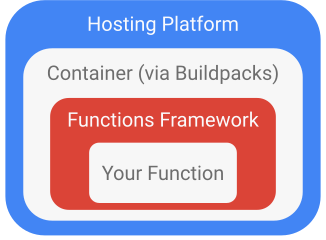
This diagram shows the typical layout of function deployments atop
Cloud Run functions, Cloud Run, and other container-based platforms:
### Event types
Cloud Run functions has two main types of functions:
- [HTTP functions](https://docs.cloud.google.com/functions/1stgendocs/writing/write-http-functions.md.txt)
- [Event-driven functions](https://docs.cloud.google.com/functions/1stgendocs/writing/write-event-driven-functions.md.txt)
HTTP functions can be triggered by arbitrary HTTP requests such as webhooks,
whereas event-driven functions receive events produced by
other Google Cloud products.
## Choosing an abstraction layer
You can run functions locally using either
[Functions Framework](https://docs.cloud.google.com/functions/1stgendocs/running/function-frameworks.md.txt) or
[Functions Emulator](https://docs.cloud.google.com/functions/1stgendocs/running/functions-emulator.md.txt).
[Functions Framework](https://docs.cloud.google.com/functions/1stgendocs/functions-framework.md.txt) is a set of open source
libraries used within Cloud Run functions to unmarshal incoming HTTP requests into
language-specific function invocations. You can use these to convert your
function into a locally-runnable HTTP service.
[Functions Emulator](https://docs.cloud.google.com/functions/1stgendocs/running/functions-emulator.md.txt) uses
[Cloud Native Buildpacks](https://buildpacks.io) and [Docker](https://docker.com)
to wrap HTTP services created by the Functions Framework and build them into runnable
containers, which then run on Cloud Run functions container-based architecture.
Both options have advantages and disadvantages:
- Functions Framework-based environments often have lower resource needs
- Functions Framework does not require underlying containerization software (such as [Docker](https://docker.com))
- Functions Framework-based environments require underlying language infrastructure (such as package managers and language runtimes)
- Functions Emulator mirrors production commands, such as calling and deploying.
- Functions Emulator offers high fidelity to how functions execute when deployed in production.
## Run Functions Locally
Both Functions Framework and Functions Emulator work by forwarding HTTP requests to your
function.
See [Running Functions Framework](https://docs.cloud.google.com/functions/1stgendocs/running/function-frameworks.md.txt) for
more information on how to run functions locally using Functions Framework.
See [Run Functions using the Functions Emulator](https://docs.cloud.google.com/functions/1stgendocs/running/functions-emulator.md.txt) for
more information on how to run functions locally using the Functions Emulator.