


Virtual Private Cloud (VPC) 防火墙规则在应用于流量时会生成日志条目。虽然数据包流可以生成多个日志条目,但 VPC 防火墙规则最多为来自虚拟机 (VM) 实例的每个连接生成一个日志条目。以下示例展示了 VPC 防火墙规则日志记录在不同场景下的工作方式。
出站流量拒绝示例
此示例展示了出站拒绝 VPC 防火墙规则的日志记录,该规则会阻止同一 VPC 网络中两个虚拟机实例之间的流量。
在此示例中,流量在 example-proj 项目的 example-net VPC 网络中的虚拟机实例之间流动。
这两个虚拟机实例分别是:
- 地区
us-west1-a中的 VM1,在west-subnet(us-west1区域)中的 IP 地址为10.10.0.99。 - 地区
us-east1-b中的 VM2,在east-subnet(us-east1区域)中的 IP 地址为10.20.0.99。
- 地区
规则 A:出站拒绝防火墙规则,该规则的目标是网络中的所有实例,目的地为
10.20.0.99(VM2),应用于 TCP 端口80。此规则已启用日志记录。规则 B:入站允许防火墙规则,该规则的目标是网络中的所有实例,来源为
10.10.0.99(VM1),应用于 TCP 端口80。 此规则也启用了日志记录。
如需创建 VPC 防火墙规则,请使用以下 gcloud 命令:
规则 A:针对 TCP 端口
80的出站拒绝规则,适用于所有实例,目的地为10.20.0.99:gcloud compute firewall-rules create rule-a \ --network example-net \ --action deny \ --direction EGRESS \ --rules tcp:80 \ --destination-ranges 10.20.0.99/32 \ --priority 10 \ --enable-logging规则 B:针对 TCP 端口
80的入站允许规则,适用于所有实例,来源为10.10.0.99:gcloud compute firewall-rules create rule-b \ --network example-net \ --action allow \ --direction INGRESS \ --rules tcp:80 \ --source-ranges 10.10.0.99/32 \ --priority 10 \ --enable-logging
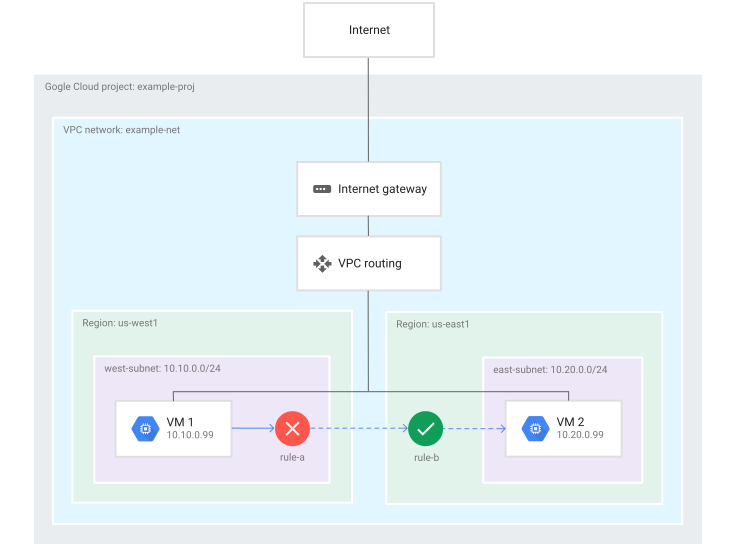
在 VM1 尝试通过 TCP 端口 80 连接到 VM2 的场景中,会发生以下情况:
- 当 VM1 尝试连接到
10.20.0.99(VM2) 时,系统会根据 VM1 生成规则 A 的日志条目。 - 由于规则 A 会阻止流量,而规则 B 不会被考虑,因此系统不会根据 VM2 生成规则 B 的日志条目。
VM1 报告了以下 VPC 防火墙规则日志记录:
| 字段 | 值 |
|---|---|
connection |
src_ip=10.10.0.99 src_port=[EPHEMERAL_PORT] dest_ip=10.20.0.99 dest_port=80 protocol=6 |
disposition |
DENIED |
rule_details |
reference = "network:example-net/firewall:rule-a" priority = 10 action = DENY destination_range = 10.20.0.99/32 ip_port_info = tcp:80 direction = egress |
instance |
project_id="example-proj" instance_name=VM1 区域=us-west1 zone=us-west1-a |
vpc |
project_id="example-proj" vpc_name=example-net subnetwork_name=west-subnet |
remote_instance |
project_id="example-proj" instance_name=VM2 区域=us-east1 zone=us-east1-b |
remote_vpc |
project_id="example-proj" vpc_name=example-net subnetwork_name=east-subnet |
remote_location |
无信息。只有目的地在 VPC 网络外部时才使用此字段。 |
出站允许且入站允许”示例
此示例展示了出站允许 VPC 防火墙规则和入站允许 VPC 防火墙规则的日志记录,这两条规则共同允许同一 VPC 网络中两个虚拟机实例之间的流量。
在此示例中,流量在 example-proj 项目的 example-net VPC 网络中的虚拟机实例之间流动。
这两个虚拟机实例分别是:
- 地区
us-west1-a中的 VM1,在west-subnet(us-west1区域)中的 IP 地址为10.10.0.99。 - 地区
us-east1-b中的 VM2,在east-subnet(us-east1区域)中的 IP 地址为10.20.0.99。
- 地区
规则 A:出站允许防火墙规则,该规则的目标是网络中的所有实例,目的地为
10.20.0.99(VM2),应用于 TCP 端口80。此规则已启用日志记录。规则 B:入站允许防火墙规则,该规则的目标是网络中的所有实例,来源为
10.10.0.99(VM1),应用于 TCP 端口80。 此规则也启用了日志记录。
如需创建 VPC 防火墙规则,请使用以下 gcloud 命令:
规则 A:针对 TCP 端口
80的出站允许规则,适用于所有实例,目的地为10.20.0.99(VM2):gcloud compute firewall-rules create rule-a \ --network example-net \ --action allow \ --direction EGRESS \ --rules tcp:80 \ --destination-ranges 10.20.0.99/32 \ --priority 10 \ --enable-logging规则 B:针对 TCP 端口
80的入站允许规则,适用于所有实例,来源为10.10.0.99(VM1):gcloud compute firewall-rules create rule-b \ --network example-net \ --action allow \ --direction INGRESS \ --rules tcp:80 \ --source-ranges 10.10.0.99/32 \ --priority 10 \ --enable-logging
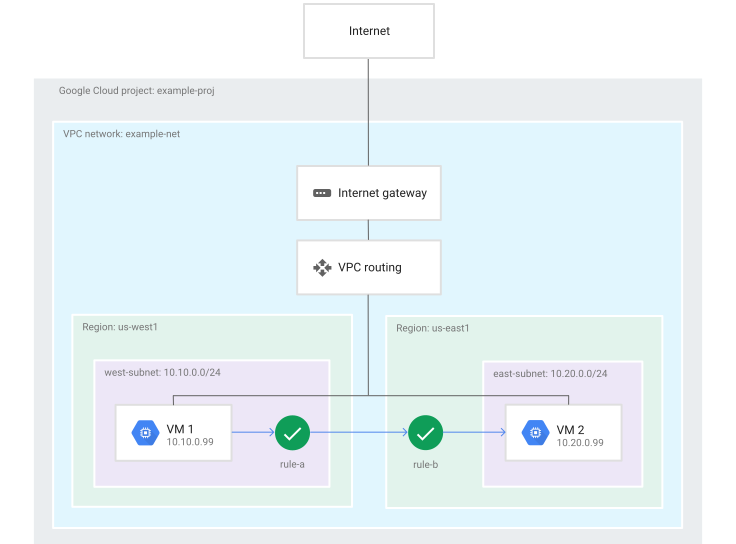
在 VM1 尝试通过 TCP 端口 80 连接到 VM2 的场景中,会发生以下情况:
- 当 VM1 连接到
10.20.0.99(VM2) 时,系统会根据 VM1 生成规则 A 的日志条目。 - 当 VM2 允许来自
10.10.0.99(VM1) 的入站连接时,系统会根据 VM2 生成规则 B 的日志条目。
VM1 报告了以下 VPC 防火墙规则日志记录:
| 字段 | 值 |
|---|---|
connection |
src_ip=10.10.0.99 src_port=[EPHEMERAL_PORT] dest_ip=10.20.0.99 dest_port=80 protocol=6 |
disposition |
ALLOWED |
rule_details |
reference = "network:example-net/firewall:rule-a" priority = 10 action = ALLOW destination_range = 10.20.0.99/32 ip_port_info = tcp:80 direction = egress |
instance |
project_id="example-proj" instance_name=VM1 区域=us-west1 zone=us-west1-a |
vpc |
project_id="example-proj" vpc_name=example-net subnetwork_name=west-subnet |
remote_instance |
project_id="example-proj" instance_name=VM2 区域=us-east1 zone=us-east1-b |
remote_vpc |
project_id="example-proj" vpc_name=example-net subnetwork_name=east-subnet |
remote_location |
无信息。只有目的地在 VPC 网络外部时才使用此字段。 |
VM2 报告了以下 VPC 防火墙规则日志记录:
| 字段 | 值 |
|---|---|
connection |
src_ip=10.10.0.99 src_port=[EPHEMERAL_PORT] dest_ip=10.20.0.99 dest_port=80 protocol=6 |
disposition |
ALLOWED |
rule_details |
reference = "network:example-net/firewall:rule-b" priority = 10 action = ALLOW source_range = 10.10.0.99/32 ip_port_info = tcp:80 direction = ingress |
instance |
project_id="example-proj" instance_name=VM2 区域=us-east1 zone=us-east1-b |
vpc |
project_id="example-proj" vpc_name=example-net subnetwork_name=east-subnet |
remote_instance |
project_id="example-proj" instance_name=VM1 区域=us-west1 zone=us-west1-a |
remote_vpc |
project_id="example-proj" vpc_name=example-net subnetwork_name=west-subnet |
remote_location |
无信息。只有目的地在 VPC 网络外部时才使用此字段。 |
互联网入站示例
此示例展示了入站允许防火墙规则的日志记录,该规则允许从互联网到虚拟机实例的流量。它还展示了有状态防火墙行为如何影响出站拒绝规则。
在此示例中,流量从外部资源流向 example-net VPC 网络中的虚拟机实例。该网络位于 example-proj 项目中。
- 该系统在互联网上的 IP 地址为
203.0.113.114。 - 地区
us-west1-a中的 VM1,在west-subnet(us-west1区域) 中的 IP 地址为10.10.0.99。 - 规则 C:入站允许防火墙规则,该规则的目标是网络中的所有实例,来源为任何 IP 地址 (
0.0.0.0/0),应用于 TCP 端口80。 此规则已启用日志记录。 - 规则 D:出站拒绝防火墙规则,该规则的目标是网络中的所有实例,目的地为任何 IP 地址 (
0.0.0.0/0),应用于所有协议。此规则已启用日志记录。
如需创建 VPC 防火墙规则,请使用以下 gcloud 命令:
规则 C:针对 TCP 端口
80的入站允许规则,适用于所有实例,来源不限:gcloud compute firewall-rules create rule-c \ --network example-net \ --action allow \ --direction INGRESS \ --rules tcp:80 \ --source-ranges 0.0.0.0/0 \ --priority 10 \ --enable-logging规则 D:针对所有协议的出站拒绝规则,适用于所有实例,目的地不限:
gcloud compute firewall-rules create rule-d \
    --network example-net \
    --action deny \
    --direction EGRESS \
    --rules all \
    --destination-ranges 0.0.0.0/0 \
    --priority 10 \
    --enable-logging
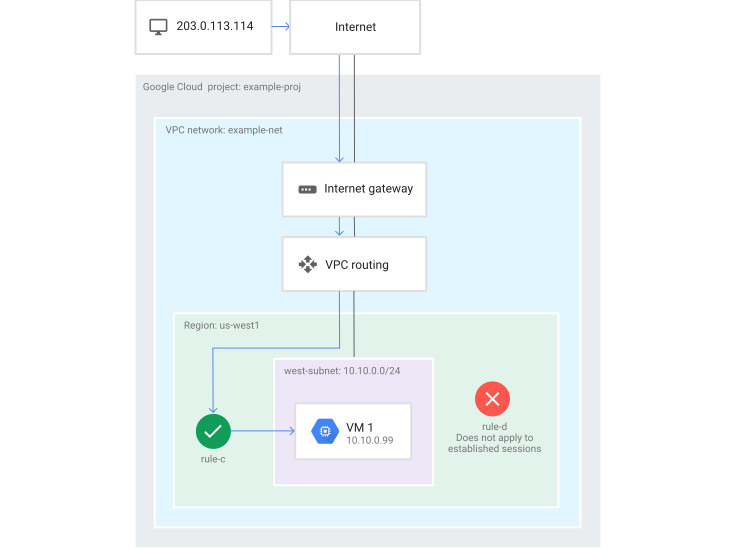
在 IP 地址为 203.0.113.114 的系统尝试通过 TCP 端口 80 连接到 VM1 的场景中,会发生以下情况:
- VM1 在接受来自
203.0.113.114的流量时,会生成规则 C 的日志条目。 - 尽管存在规则 D,但由于 Google Cloud 防火墙规则为有状态规则,因此 VM1 可以回复此传入请求。如果允许传入请求,则任何出站规则都无法阻止已建立的响应。
- 由于规则 D 不适用,因此系统不会考虑该规则,因此规则 D 没有日志条目。
VM1 报告了以下 VPC 防火墙规则日志记录:
| 字段 | 值 |
|---|---|
connection |
src_ip=203.0.113.114 src_port=[EPHEMERAL_PORT] dest_ip=10.10.0.99 dest_port=80 protocol=6 |
disposition |
ALLOWED |
rule_details |
reference = "network:my-vpc/firewall:rule-c" priority = 10 action = ALLOW source_range = 0.0.0.0/0 ip_port_info = tcp:80 direction = ingress |
instance |
project_id="example-proj" instance_name=VM1 区域=us-west1 zone=us-west1-a |
vpc |
project_id="example-proj" vpc_name=example-net subnetwork_name=west-subnet |
remote_location |
continent country region city |