

The URL filtering service lets you control access to specific web domains by blocking or allowing them. To enable the URL filtering service in your network, you must set up multiple Cloud Next Generation Firewall (Cloud NGFW) components, including firewall endpoints, security profiles, and security profile groups. This document provides a high-level workflow that describes how to configure these components and enable the URL filtering service.
To learn more about the URL filtering service, see URL filtering service overview.
Required roles
Identity and Access Management (IAM) roles govern the actions related to configuring and enabling the URL filtering service. The following table describes which roles are necessary for each step:
| Ability | Necessary role |
|---|---|
| Create a firewall endpoint and a firewall endpoint association for a Virtual Private Cloud (VPC) network | Any of the following roles:
|
| Create a URL filtering security profile, a threat prevention security profile, and a security profile group | Any of the following roles:
|
| Create a hierarchical firewall policy and its rules | Compute Organization Firewall Policy Admin role (roles/compute.orgFirewallPolicyAdmin)
You need this role to create a hierarchical firewall policy. You must grant the role on the resource where you want to create the policy. In addition, you need this role to create a rule in a hierarchical firewall policy. You must grant the role on the resource containing the policy or on the policy itself. The role contains the following required permissions:
|
| Associate a hierarchical firewall policy with an organization or folder | Any of the following sets of roles:
|
| Create a global network firewall policy and its rules | Compute Security Admin role (roles/compute.securityAdmin)
You need this role to create a global network firewall policy. You must grant the role on the project where you want to create the policy. In addition, you need this role to create a rule in a global network firewall policy. You must grant the role on the project containing the policy or on the policy itself. The role contains the following required permissions:
|
| Associate a global network firewall policy with a VPC network | Compute Network Admin role (roles/compute.networkAdmin)
This role contains the following required permissions:
|
| Create a CA pool | CA Service Operation Manager role (roles/privateca.caManager)
If you are using Transport Layer Security (TLS) inspection, you need this role to create a CA pool. |
| Create a TLS inspection policy |
If you are using TLS inspection, you need one of the preceding roles to create a TLS inspection policy. These roles contain the following required permissions:
|
For more information about granting roles, see Manage access to projects, folders, and organizations.
You might also be able to get the prescribed permissions with custom roles or other predefined roles.
Configure the URL filtering service without TLS inspection
To configure the URL filtering service in your network, perform the following tasks.
Create a firewall endpoint.
A firewall endpoint is a zonal resource that you must create in the same zone as the workload you want to protect with the URL filtering service.
You can create a firewall endpoint with or without jumbo frame support.
For more information, see Create a firewall endpoint.
Associate the firewall endpoint with your VPC networks.
To enable the URL filtering service, associate the firewall endpoint with your VPC networks. Make sure that you're running your workloads in the same zone as the firewall endpoint.
A firewall endpoint with jumbo frame support can accept packets only up to 8,500 bytes. Alternatively, a firewall endpoint without jumbo frame support can accept packets only up to 1,460 bytes. If you need URL filtering service, we recommend that you configure the associated VPC networks to use the maximum transmission unit (MTU) limits of 8,500 bytes and 1,460 bytes. For more information, see Supported packet size.
For more information about creating firewall endpoint associations, see Create firewall endpoint associations.
Create a security profile for URL filtering.
To allow or deny access to specific domains, create a security profile of type
url-filteringand use URL lists to specify your matcher strings.For more information, see Create a URL filtering security profile.
Optionally, you can create a security profile to scan traffic for threats.
To scan the traffic for security threats, create another security profile of type
threat-prevention. Review the list of threat signatures, evaluate the default responses, and customize actions for the selected signatures according to your requirements.For more information, see Create a threat prevention security profile. To learn more about intrusion detection and prevention service, see Intrusion detection and prevention service overview.
Create a security profile group.
A security profile group acts as a container for security profiles. Create a security profile group to include the security profiles you created in the previous steps.
For more information, see Create a security profile group.
Configure and apply the URL filtering service to your network traffic.
To configure the URL filtering service, create a global network firewall policy or a hierarchical firewall policy with Layer 7 inspection.
If you create a new global firewall policy or use an existing one, add a firewall policy rule with the
apply_security_profile_groupaction and specify the name of the security profile group that you created previously. Make sure that the firewall policy is associated with the same VPC network as the workloads that require inspection.For more information, see Create a global network firewall policy and Add firewall policy rule.
If you create a new hierarchical firewall policy or use an existing one, add a firewall policy rule with the
apply_security_profile_groupaction. Make sure that the firewall policy is associated with the same VPC network as the workloads that require inspection.For more information, see Firewall policy rule tasks.
Configure the URL filtering service with TLS inspection
To configure the URL filtering service with TLS inspection in your network, perform the following tasks.
Create a firewall endpoint.
You can create a firewall endpoint with or without jumbo frame support.
A firewall endpoint is a zonal resource that you must create in the same zone as the workload you want to protect with the URL filtering service.
For more information, see Create a firewall endpoint.
Associate the firewall endpoint with your VPC networks.
To enable the URL filtering service, associate the firewall endpoint with your VPC networks. Make sure that you're running your workloads in the same zone as the firewall endpoint.
A firewall endpoint with jumbo frame support can accept packets only up to 8,500 bytes. Alternatively, a firewall endpoint without jumbo frame support can accept packets only up to 1,460 bytes. If you need URL filtering service, we recommend that you configure the associated VPC networks to use the maximum transmission unit (MTU) limits of 8,500 bytes and 1,460 bytes. For more information, see Supported packet size.
For more information about creating firewall endpoint associations, see Create firewall endpoint associations.
Create a security profile for URL filtering.
To allow or deny access to specific domains, create a security profile of type
url-filteringand use URL lists to specify your matcher strings.For more information, see Create a URL filtering security profile.
Optionally, you can create a security profile to scan traffic for threats.
To scan traffic for security threats, create another security profile of type
threat-prevention. Review the list of threat signatures, evaluate the default responses, and customize actions for the selected signatures according to your requirements.For more information, see Create a threat prevention security profile. To learn more about intrusion detection and prevention service, see Intrusion detection and prevention service overview.
Create a security profile group.
A security profile group acts as a container for security profiles. Create a security profile group to include the security profiles you created in the previous steps.
For more information, see Create a security profile group.
Create and configure resources to inspect encrypted traffic.
Create a certificate authority (CA) pool.
A CA pool is a collection of CAs with a common certificate issuance policy and IAM policy. A regional CA pool must exist before you can configure TLS inspection.
For more information, see Create a CA pool.
Create a root CA.
To use TLS inspection, you must have at least one root CA. The root CA signs an intermediate CA, which then signs all leaf certificates for the clients. For more information, see reference documentation for
gcloud privateca roots createcommand.Grant necessary permissions to the Network Security Service Agent (P4SA).
Cloud NGFW requires a P4SA to generate intermediate CAs for TLS inspection. The service agent needs the required permissions to request certificates for the CA pool.
For more information, see Create a service account.
Create a regional TLS inspection policy.
A TLS inspection policy specifies how to intercept encrypted traffic. A regional TLS inspection policy can hold the configurations for the TLS inspection.
For more information, see Create a TLS inspection policy.
Associate the firewall endpoint with the TLS inspection policy.
Configure and apply the URL filtering service to your network traffic.
To configure the URL filtering service, create a global network firewall policy or a hierarchical firewall policy with Layer 7 inspection.
If you create a new global firewall policy or use an existing one, add a firewall policy rule with the
apply_security_profile_groupaction and specify the name of the security profile group that you created previously. Make sure that the firewall policy is associated with the same VPC network as the workloads that require inspection.For more information, see Create global network firewall policy and Add firewall policy rule.
If you create a new hierarchical firewall policy or use an existing one, add a firewall policy rule with the
apply_security_profile_groupaction configured. Make sure that the firewall policy is associated with the same VPC network as the workloads that require inspection.For more information, see Firewall policy rule tasks.
Example deployment model
The following diagram shows an example of the URL filtering service deployment with multiple firewall endpoints, configured for two VPC networks in the same region but two different zones.
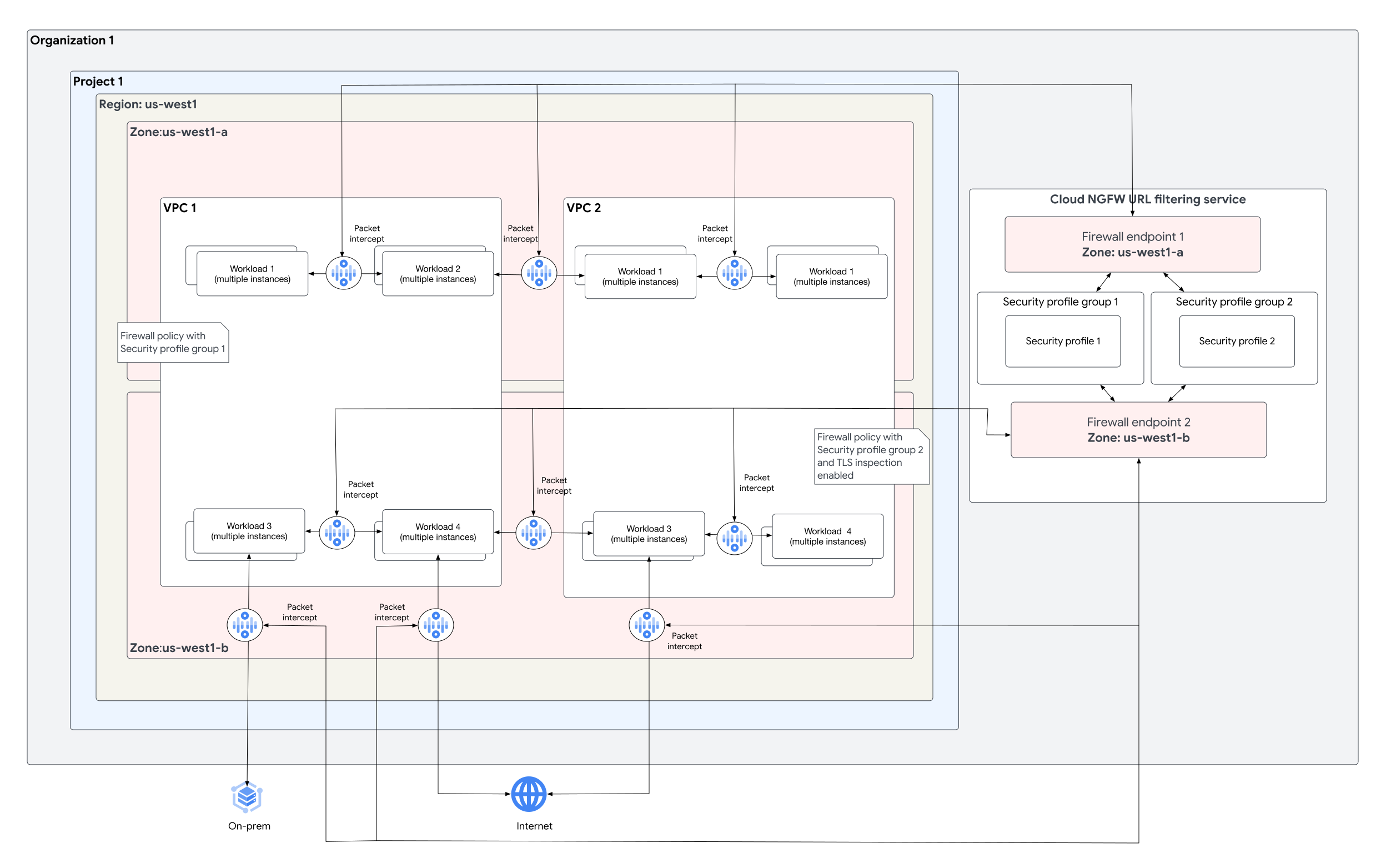
The example deployment has the following configuration:
Two security profile groups:
Security profile group 1with security profileSecurity profile 1.Security profile group 2with security profileSecurity profile 2.
Customer VPC 1 (
VPC 1) has a firewall policy with its security profile group set toSecurity profile group 1.Customer VPC 2 (
VPC 2) has a firewall policy with its security profile group set toSecurity profile group 2.Firewall endpoint
Firewall endpoint 1performs URL filtering for workloads running onVPC 1andVPC 2in zoneus-west1-a.Firewall endpoint
Firewall endpoint 2performs URL filtering with TLS inspection enabled for workloads running onVPC 1andVPC 2in zoneus-west1-b.