To enable intrusion detection and prevention service in your network, you must set up
multiple Cloud Next Generation Firewall (Cloud NGFW) components. This document provides a high-level
workflow that describes how to configure these components and enable threat
detection and prevention.
## Configure intrusion detection and prevention service without TLS inspection
To configure intrusion detection and prevention service in your network, perform the
following tasks.
> [!NOTE]
> **Note:** The following workflow provides a high-level sequence of steps required to configure intrusion detection and prevention service in your network. This workflow assumes that you have already set up your Virtual Private Cloud (VPC) network, subnets, VM instances, and other required Google Cloud resources and components.
1. Create a security profile of type `Threat prevention`. Set up threat or
severity overrides as required by your network. You can create one
or more profiles. To learn how to create threat prevention security profiles,
see [Create a threat prevention security profile](https://docs.cloud.google.com/firewall/docs/configure-security-profiles.md.txt#create-tp-security-profile).
2. Create a security profile group with the security profile created in the
preceding step. To learn how to create a security profile group,
see [Create a security profile group](https://docs.cloud.google.com/firewall/docs/configure-security-profile-groups.md.txt#create-security-profile-group).
3. Create a firewall endpoint in the same zone as your workloads where you want
to enable threat prevention.
You can create a firewall endpoint with or without jumbo frame support.
To learn how to create
a firewall endpoint, see [Create a firewall endpoint](https://docs.cloud.google.com/firewall/docs/configure-firewall-endpoints.md.txt#create-firewall-endpoint).
4. Associate the firewall endpoint with one or more VPC networks
where you want to enable threat detection and prevention. Make sure that you're
running your workloads in the same zone as the firewall endpoint.
A firewall endpoint with jumbo frame support can accept packets only up to
8,500 bytes. Alternatively, a firewall endpoint without jumbo frame support
can accept packets only up to 1,460 bytes. If you need intrusion detection and prevention service, we recommend that you
configure the associated
VPC networks to use the [maximum transmission unit (MTU)](https://docs.cloud.google.com/vpc/docs/mtu.md.txt)
limits of 8,500 bytes and 1,460 bytes. For more information, see
[Supported packet size](https://docs.cloud.google.com/firewall/docs/about-firewall-endpoints.md.txt#supported-packet-size).
> [!CAUTION]
> **Caution:** A firewall endpoint doesn't perform intrusion detection and prevention service for a VPC network if the network is configured with an MTU that's greater than the firewall endpoint's limit.
To learn
how to associate a firewall endpoint with a VPC network,
see [Create firewall endpoint associations](https://docs.cloud.google.com/firewall/docs/configure-firewall-endpoint-associations#create-endpoint-association).
5. You can use [global network firewall policies](https://docs.cloud.google.com/firewall/docs/network-firewall-policies.md.txt)
or [hierarchical firewall policies](https://docs.cloud.google.com/firewall/docs/firewall-policies.md.txt) to
configure intrusion detection and prevention service.
- In a new or existing global firewall policy, add a firewall policy rule with
Layer 7 inspection enabled (`apply_security_profile_group` action) and
specify the name of the security profile group that you created
in the preceding step. Make sure that the firewall policy is associated
with the same VPC network as the workloads that require
inspection. To learn more about global network firewall policy and the
parameters required to create a firewall policy rule with threat
prevention enabled, see [Create global network firewall policy](https://docs.cloud.google.com/firewall/docs/use-network-firewall-policies.md.txt#create-network-firewall-policy) and
[Add firewall policy rule](https://docs.cloud.google.com/firewall/docs/use-network-firewall-policies.md.txt#add_rules).
- You can also use a hierarchical firewall policy to add a firewall policy
rule with a security profile group configured. To learn more about the
parameters required to create hierarchical firewall policy rules with
threat prevention enabled, see [Firewall policy rule tasks](https://docs.cloud.google.com/firewall/docs/using-firewall-policies.md.txt#rule_tasks).
## Configure intrusion detection and prevention service with TLS inspection
To configure intrusion detection and prevention service with
[Transport Layer Security (TLS) inspection](https://docs.cloud.google.com/firewall/docs/about-tls-inspection.md.txt)
in your network, perform the following tasks.
> [!NOTE]
> **Note:** The following workflow provides a high-level sequence of steps required to configure intrusion detection and prevention service with TLS inspection in your network. This workflow assumes that you have already set up your VPC network, subnets, VM instances, and other required Google Cloud resources and components.
1. Create a security profile of type `Threat prevention`. Set up threat or
severity overrides as required by your network. You can create one
or more profiles. To learn how to create threat prevention security profiles,
see [Create a threat prevention security profile](https://docs.cloud.google.com/firewall/docs/configure-security-profiles.md.txt#create-tp-security-profile).
2. Create a security profile group with the security profile created in the
preceding step. To learn how to create a security profile group,
see [Create a security profile group](https://docs.cloud.google.com/firewall/docs/configure-security-profile-groups.md.txt#create-security-profile-group).
3. Create a CA pool and a trust config, and add them to your TLS inspection
policy. To learn how to enable TLS inspection in Cloud NGFW, see
[Set up TLS inspection](https://docs.cloud.google.com/firewall/docs/setup-tls-inspection.md.txt).
4. Create a firewall endpoint in the same zone as your workloads where you want
to enable threat prevention.
You can create a firewall endpoint with or without jumbo frame support.
To learn how to create
a firewall endpoint, see [Create a firewall endpoint](https://docs.cloud.google.com/firewall/docs/configure-firewall-endpoints.md.txt#create-firewall-endpoint).
5. Associate the firewall endpoint with one or more VPC networks
where you want to enable threat detection and prevention. Add the TLS
inspection policy you created in the preceding step to the firewall endpoint
association. Make sure that you're running your workloads in the same zone
as the firewall endpoint.
A firewall endpoint with jumbo frame support can accept packets only up to
8,500 bytes. Alternatively, a firewall endpoint without jumbo frame support
can accept packets only up to 1,460 bytes. If you need intrusion detection and prevention service, we recommend that you
configure the associated
VPC networks to use the [maximum transmission unit (MTU)](https://docs.cloud.google.com/vpc/docs/mtu.md.txt)
limits of 8,500 bytes and 1,460 bytes. For more information, see
[Supported packet size](https://docs.cloud.google.com/firewall/docs/about-firewall-endpoints.md.txt#supported-packet-size).
> [!CAUTION]
> **Caution:** A firewall endpoint doesn't perform intrusion detection and prevention service for a VPC network if the network is configured with an MTU that's greater than the firewall endpoint's limit.
To learn how to associate a firewall endpoint with
a VPC network and enable TLS inspection,
see [Create firewall endpoint associations](https://docs.cloud.google.com/firewall/docs/configure-firewall-endpoint-associations#create-endpoint-association).
6. You can use [global network firewall policies](https://docs.cloud.google.com/firewall/docs/network-firewall-policies.md.txt)
or [hierarchical firewall policies](https://docs.cloud.google.com/firewall/docs/firewall-policies.md.txt) to
configure intrusion detection and prevention service.
- In a new or existing global firewall policy, add a firewall policy rule with
Layer 7 inspection enabled (`apply_security_profile_group` action) and
specify the name of the security profile group that you created
in the preceding step. To enable TLS inspection, specify the
`--tls-inspect` flag. Make sure that the firewall policy is associated
with the same VPC network as the workloads that require
inspection. To learn more about global network firewall policy and the
parameters required to create a firewall policy rule with threat
prevention enabled, see [Create global network firewall policy](https://docs.cloud.google.com/firewall/docs/use-network-firewall-policies.md.txt#create-network-firewall-policy) and
[Add firewall policy rule](https://docs.cloud.google.com/firewall/docs/use-network-firewall-policies.md.txt#add_rules).
- You can also use a hierarchical firewall policy to add a firewall policy
rule with a security profile group configured. To learn more about the
parameters required to create hierarchical firewall policy rules with
threat prevention enabled, see [Firewall policy rule tasks](https://docs.cloud.google.com/firewall/docs/using-firewall-policies.md.txt#rule_tasks).
## Example deployment model
Figure 1 shows an example deployment with intrusion detection and prevention service configured for
two VPC networks in the same region but two different
zones.
[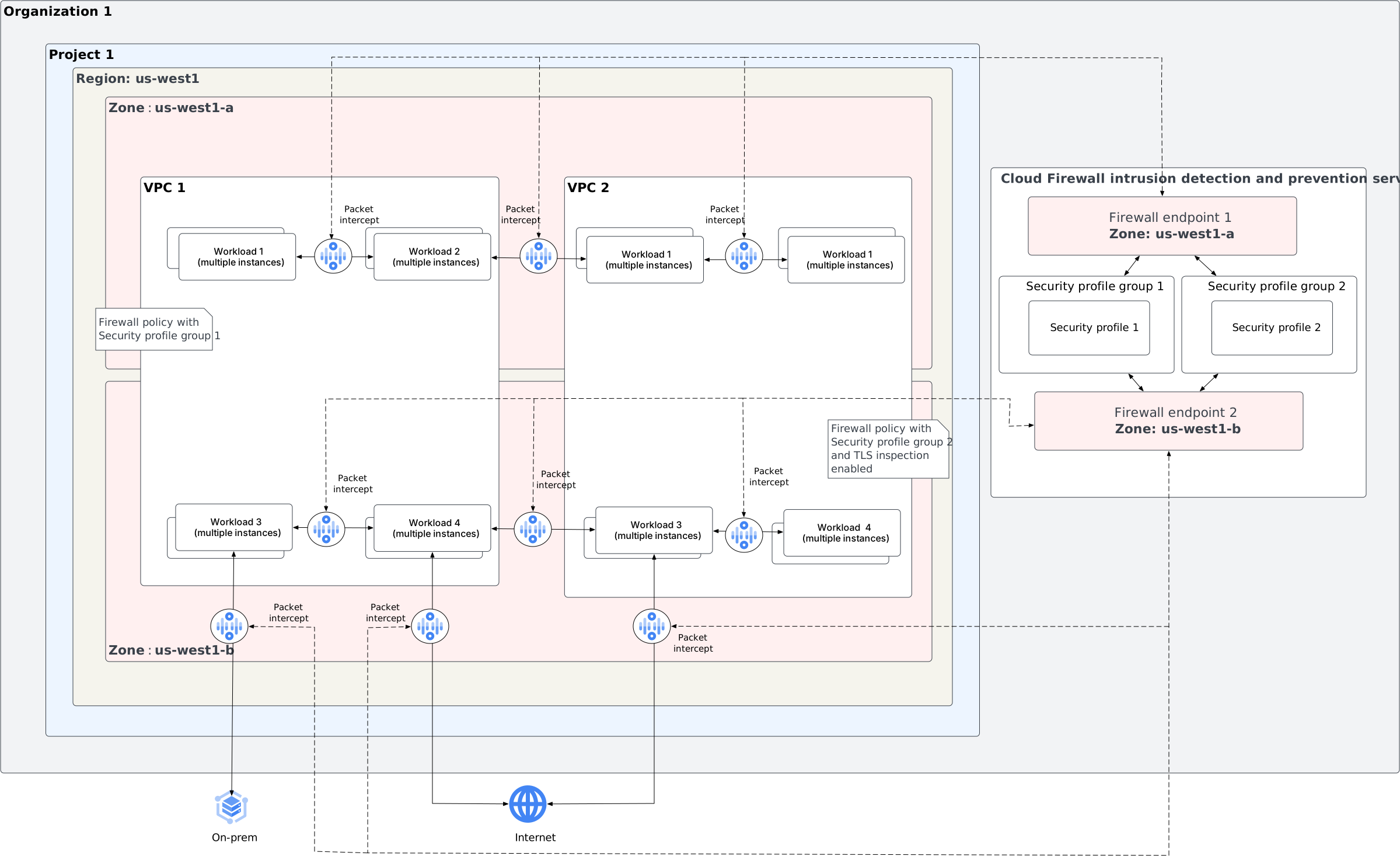](https://docs.cloud.google.com/static/firewall/images/firewall-ips/ips-sample-deployment-in-region.svg) **Figure 1.** Deploy intrusion detection and prevention service in a region (click to enlarge).
The example deployment has the following threat prevention configuration:
1. Two security profile groups:
1. `Security profile group 1` with security profile `Security profile 1`.
2. `Security profile group 2` with security profile `Security profile 2`.
2. Customer VPC 1 (`VPC 1`) has firewall policy with security profile group
set to `Security profile group 1`.
3. Customer VPC 2 (`VPC 2`) has firewall policy with security profile group
set to `Security profile group 2`.
4. Firewall endpoint `Firewall endpoint 1` performs threat detection and
prevention for workloads running on `VPC 1`and`VPC 2` in zone `us-west1-a`.
5. Firewall endpoint `Firewall endpoint 2` performs threat detection and
prevention with TLS inspection enabled for workloads running on `VPC 1` and
`VPC 2` in zone `us-west1-b`.
## What's next
- [Security profile overview](https://docs.cloud.google.com/firewall/docs/about-security-profiles.md.txt)
- [Security profile group overview](https://docs.cloud.google.com/firewall/docs/about-security-profile-groups.md.txt)
- [Firewall endpoint overview](https://docs.cloud.google.com/firewall/docs/about-firewall-endpoints.md.txt)