

The Advanced malware sandbox (WildFire) service for Cloud Next Generation Firewall (Cloud NGFW) provides malware protection using inline machine learning (ML) and cloud-based behavioral sandboxing. Powered by Palo Alto Networks Advanced WildFire, the service extends standard signature-based intrusion detection and prevention service by evaluating suspicious files in real time to prevent zero-day threats from reaching your workloads.
Advanced malware sandbox is included as part of the Cloud Next Generation Firewall Enterprise capabilities. For details, see Pricing and Quotas and limits.
This document provides an overview of Advanced malware sandbox capabilities, architecture, core components, supported file types, and service regions.
Benefits of using Advanced malware sandbox
Integrating Advanced malware sandbox into Cloud Next Generation Firewall Enterprise provides the following capabilities:
Protection against unknown and zero-day threats: detects and blocks novel or highly customized malware that lacks established signatures.
Inline dataplane protection: intercepts and analyzes file transfers in real time directly on zonal firewall endpoints and through cloud lookups to minimize threat exposure.
Adaptive threat intelligence: automatically incorporates newly discovered threat verdicts into local signature databases.
Actionable visibility and forensics: Advanced malware sandbox generates detailed submission logs and threat logs that integrate directly with Cloud Logging. If a threat is detected, you can download detailed analysis reports of the sandbox execution and download the actual malware sample for independent Security Operations Center (SOC) analysis.
How Advanced malware sandbox works
Advanced malware sandbox inspects network-routed file transfers by intercepting packets, performing high-speed local checks, and offloading advanced behavior sandboxing to the cloud when necessary.
The following Advanced malware sandbox architecture diagram shows packet interception from a Virtual Private Cloud (VPC) network virtual machine (VM) to a zonal firewall endpoint, parallel evaluation by the inline ML engine and signature database, real-time cloud lookups, and asynchronous cloud sandboxing.
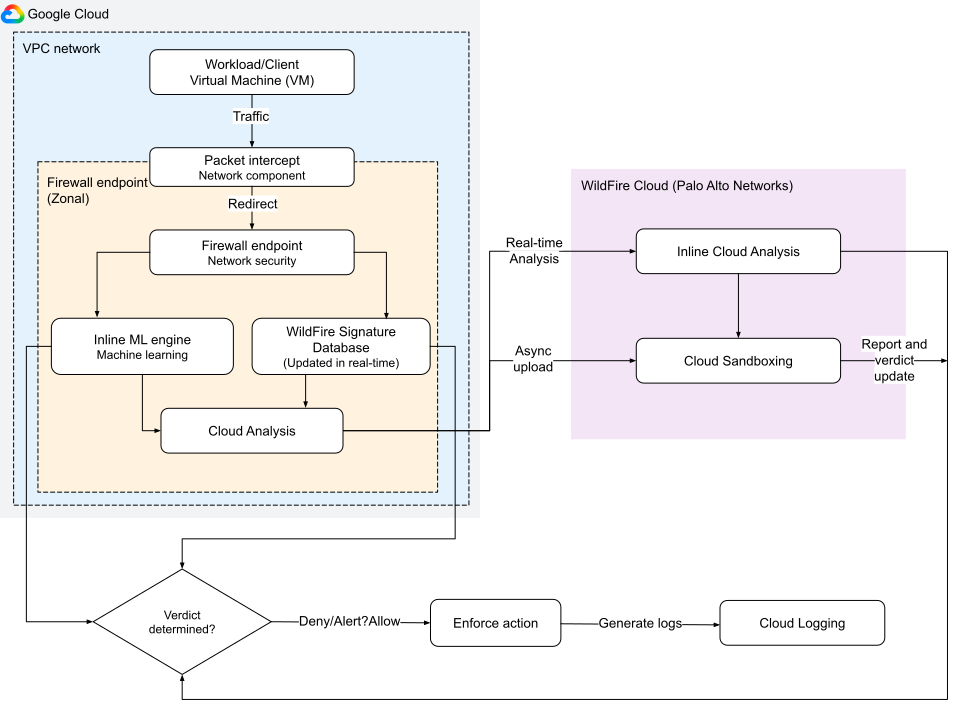
The integration processes and evaluates file transfers through the following stages:
Traffic interception and redirection
When a VM instance inside your VPC network initiates a connection or file transfer, the firewall policy rule redirects the flow as follows:
- Packet interception: The Google Cloud Packet Intercept network component captures packets in the traffic stream.
- Redirection: The intercept component redirects the network packets to the zonal firewall endpoint for Layer 7 inspection.
Inline local evaluation
After traffic is redirected to the firewall endpoint, the file is analyzed in parallel by two inline, high-performance engines:
Signature-based detection: the endpoint compares the file against a local threat signature database. This database is updated in real-time to detect and drop recognized malicious files.
Inline ML: the inline ML engine runs ML models directly in the firewall dataplane. It analyzes the file in real-time to identify zero-day or highly sophisticated threats in supported file types such as
Windows_Executable,ELF,Powershell_Script, andMS_Office.
Cloud-based advanced inspection
For zero-day threats or files with unrecognized local signatures, Advanced malware sandbox uses advanced cloud analysis:
Inline cloud analysis: if enabled in the security profile, the firewall temporarily holds the file transfer while performing a real-time lookup in the Advanced malware sandbox cloud. The cloud evaluates the file and sends a signal back before the file reaches your network.
The Advanced malware sandbox cloud is a partner Software as a Service (SaaS) platform hosted in Google Cloud and operated by Palo Alto Networks (PAN). It provides deep, asynchronous malware analysis and real-time threat evaluation.
Asynchronous cloud sandbox: if the file verdict is unknown, the firewall extracts the file and uploads it asynchronously to the Advanced malware sandbox cloud for deep sandboxing. In this isolated container environment, security engines execute the file and audit its behavior.
Action enforcement and logging
Based on the resulting verdict (Malware, Grayware, or Benign), the firewall rule enforces the policy as follows:
Enforce action: the file is either blocked (
Deny), recorded (Alert), or permitted (Allow) in accordance with your Advanced malware sandbox security profile.Audit logs: event logs are recorded in Cloud Logging, specifically the
firewall_wildfire_submissionlog. These submission logs are displayed on the Advanced malware sandbox submission dashboard and page.Sandbox feedback: after asynchronous sandboxing completes, a full behavioral report and the original malware samples are synchronized out-of-band and made available for you to query or retrieve.
Components of Advanced malware sandbox
To use Advanced malware sandbox, you must configure the following components:
Security profiles and security profile groups
Advanced malware sandbox security profiles: generic policy structures of
WILDFIRE_ANALYSIStype. They define which file types are submitted for analysis and the direction of traffic. For more information, see Advanced malware sandbox security profile.For information on Advanced malware sandbox security profile configuration, see Create and manage Advanced malware sandbox security profiles.
Security profile groups: act as containers for security profiles. Each group contains one or more security profiles of different types. Note that an intrusion detection and prevention service security profile is required when you include a Advanced malware sandbox security profile in a group.
For more information, see Create and manage security profile groups.
Firewall endpoints
A firewall endpoint is an organizational resource, created at the zonal level. It inspects Layer 7 traffic in the zone where it is deployed. The endpoints are associated with one or more VPC in the same zone. To filter traffic for a target VM instance, create the firewall endpoint in the same zone as the VPC where the target VM is located.
A firewall endpoint must have the Enable Advanced malware sandbox (WildFire) option selected. This setting applies to the entire endpoint and determines the region where submissions are sent.
For more information, see Firewall endpoint for Advanced malware sandbox.
Firewall policies
Firewall policies apply directly to all ingress and egress traffic of a VM instance. You can use hierarchical firewall policies and global network firewall policies to configure firewall policy rules with Layer 7 inspection.
Firewall policy rules
Firewall policy rules identify the traffic to be inspected and apply the security profile group that contains the Advanced malware sandbox security profile. To configure Advanced malware sandbox, create a firewall policy rule that does the following:
- Identifies the type of traffic to be inspected by using multiple Layer 3 and Layer 4 firewall policy rule components.
- Specifies the security profile group name for the
apply_security_profile_groupaction on the matched traffic.
For the complete Advanced malware sandbox workflow, see Configure Advanced malware sandbox in your network.
You can also use secure tags in firewall rules to configure Advanced malware sandbox. You can build on existing segmentation that you have set up by using tags in your network to selectively identify VM instance workloads whose file transfers require advanced malware scanning.
If you configure a firewall rule to apply a security profile group and set
the destination to 0.0.0.0/0, traffic originating from VMs in zones without an
attached firewall endpoint doesn't undergo Layer 7 inspection. The firewall
policy rule allows all traffic that matches the other rule parameters, such as
source, port, and protocol. To ensure consistent policy enforcement, deploy
firewall endpoints in all zones in the VPC network where you
have workloads that require Layer 7 inspection.
Supported file types and size limits
The following table lists the file categories, supported extensions, and maximum file size limits analyzed by Advanced malware sandbox:
| Category | Supported file extensions | Maximum size limit |
|---|---|---|
| Executables (PE) | .dll, .exe, .exe64 |
16 MB |
| Executables (Linux) | .a, .dex, .elf, .ko, .o, .so |
50 MB |
| Documents (Microsoft Office) | .doc, .docx, .xls, .xlsx, .ppt, .pptx, .docm, .dotm, .xlm, .xlsm, .xltm, .pptm, .potm, .ppsm |
16 MB |
| Documents (PDF) | .pdf |
3 MB |
| Archives | .rar, .zip, .7z, .zbundle |
50 MB |
| Scripts and web (APK) | .apk |
10 MB |
| Scripts and web (JAR) | .jar |
5 MB |
| Scripts and web (Scripts/Web) | .elink, .hta, .pl, .sh |
20 KB |
Advanced malware sandbox service regions
A Advanced malware sandbox region refers to the specific location where Palo Alto Networks hosts Advanced WildFire. These zones don't map to standard Google Cloud regions. Regardless of where your Google Cloud resources are deployed, your Advanced malware sandbox traffic is routed to Palo Alto's designated service zones for analysis.
If you don't specify a Advanced malware sandbox region when configuring your endpoint, the system automatically maps your traffic to the closest available Advanced malware sandbox region. For more information, see Firewall endpoint for Advanced malware sandbox.
The following table lists the supported Advanced malware sandbox service regions:
Location: the country or geographic area where Palo Alto Networks hosts the regional Advanced malware sandbox analysis infrastructure.
Region: the configuration value to use when creating or updating a firewall endpoint. For example, in the
--wildfire-regionGoogle Cloud CLI flag, API requests, or Terraform resources.Palo Alto Networks Advanced WildFire cloud portal: the Fully Qualified Domain Name (FQDN) for the regional Advanced malware sandbox service portal. You can use this FQDN to verify data residency compliance, audit security boundaries, or configure firewall and proxy allowlists.
| Location | Region | Palo Alto Networks Advanced WildFire cloud portal |
|---|---|---|
| Australia | AUSTRALIA |
au.wildfire.paloaltonetworks.com |
| Canada | CANADA |
ca.wildfire.paloaltonetworks.com |
| France | FRANCE |
fr.wildfire.paloaltonetworks.com |
| Germany | GERMANY |
de.wildfire.paloaltonetworks.com |
| India | INDIA |
in.wildfire.paloaltonetworks.com |
| Indonesia | INDONESIA |
id.wildfire.paloaltonetworks.com |
| Israel | ISRAEL |
il.wildfire.paloaltonetworks.com |
| Japan | JAPAN |
jp.wildfire.paloaltonetworks.com |
| Poland | POLAND |
pl.wildfire.paloaltonetworks.com |
| Qatar | QATAR |
qatar.wildfire.paloaltonetworks.com |
| Saudi Arabia | SAUDI_ARABIA |
sa.wildfire.paloaltonetworks.com |
| Singapore | SINGAPORE |
sg.wildfire.paloaltonetworks.com |
| South Korea | SOUTH_KOREA |
kr.wildfire.paloaltonetworks.com |
| Spain | SPAIN |
es.wildfire.paloaltonetworks.com |
| Switzerland | SWITZERLAND |
ch.wildfire.paloaltonetworks.com |
| Taiwan | TAIWAN |
tw.wildfire.paloaltonetworks.com |
| United Kingdom | UNITED_KINGDOM |
uk.wildfire.paloaltonetworks.com |
| United States | UNITED_STATES |
us-native.wildfire.paloaltonetworks.com |
What's next
- Configure Advanced malware sandbox in your network
- Create firewall endpoints and endpoint associations
- Manage firewall endpoints and endpoint associations
- Create and manage Advanced malware sandbox security profiles