# Manage Standard edition indexes
Indexing behavior depends on the edition of the database. This page
describes how to manage your indexes for Firestore Standard edition. For Firestore Enterprise edition,
see [Firestore Enterprise edition index overview](https://docs.cloud.google.com/firestore/native/docs/enterprise-indexing.md.txt).
Firestore Standard edition ensures query performance by requiring an index for every
query. The indexes required for the most basic queries are [automatically
created](https://docs.cloud.google.com/firestore/native/docs/standard-index-overview#automatic_indexes) for you. As you use and test your app,
Firestore Standard edition generates error messages that help you create additional indexes
that your app requires. This page describes how to manage your
[automatic](https://docs.cloud.google.com/firestore/native/docs/standard-index-overview.md.txt#automatic_indexes), [manual](https://docs.cloud.google.com/firestore/native/docs/standard-index-overview.md.txt#manual_indexes), and [vector](https://docs.cloud.google.com/firestore/native/docs/vector-search.md.txt#create_and_manage_vector_indexes) indexes.
## Create a missing index through an error message
If you attempt a
compound query with a range clause that doesn't map to an existing index,
you receive an error. The error message includes a direct link to create the
missing index in the Firebase console.
> [!NOTE]
> **Note:** You can manage Firestore Standard edition through the Firebase console or the Google Cloud console, but these links will always open in the Firebase console.
Follow the generated link to the Firebase console, review the automatically
populated info, and click **Create**.
> [!NOTE]
> **Note:** For non-array and non-map fields, you must select **ascending** or **descending** ordering, even if you don't need the field for ordering. Your choice doesn't impact the behavior of equalities in the query.
In the case that a vector index is required, the error message will include a
Google Cloud CLI command to create the missing vector index. Run the command to
create the missing index.
## Roles and permissions
Before you can create an index in Firestore Standard edition, make sure that you are assigned either of the following roles:
> [!NOTE]
> **Note:** The following roles are managed through Identity and Access Management (IAM). For more information about roles and associated permissions, see [Predefined roles](https://cloud.google.com/firestore/docs/security/iam#predefined_roles).
- `roles/datastore.owner`
- `roles/datastore.indexAdmin`
- `roles/editor`
- `roles/owner`
If you have defined custom roles, assign all of the following permissions to create indexes:
- `datastore.indexes.create`
- `datastore.indexes.delete`
- `datastore.indexes.get`
- `datastore.indexes.list`
- `datastore.indexes.update`
## Use the Google Cloud console
From the Google Cloud console, you can manage automatic indexing
exemptions and manual indexes.
### Create a manual index
To manually create a new index from the Google Cloud console:
1. In the Google Cloud console, go to the **Databases** page.
[Go to Databases](https://console.cloud.google.com/firestore/databases)
2. Select the required database from the list of databases.
3. In the navigation menu, click **Indexes** , and then click the **Manual** tab.
4. Click **Create Index**.
To index a vector field for vector searches, select **Create vector index** .
Otherwise, select **Create index**.
5. Enter a **Collection ID**. Add the names of the fields you want to index
and an index mode for each field.
For vector indexes, enter a vector field path and the number of vector embedding dimensions.
Click **Save Index**.
Your new index will show up in the list of manual indexes and
Firestore Standard edition will begin creating your index. When your index is done
creating, you will see a green check mark next to the index.
### Delete a manual index
To delete a manual index:
1. In the Google Cloud console, go to the **Databases** page.
[Go to Databases](https://console.cloud.google.com/firestore/databases)
2. Select the required database from the list of databases.
3. In the navigation menu, click **Indexes** , and then click the **Manual** tab.
4. In the list of your manual indexes, click the **More** button for the index you want to delete. Click **Delete**.
5. Confirm that you want to delete this index by clicking **Delete Index** from the alert.
### Add an automatic index exemption
Automatic indexing exemptions allow you to override [automatic index
settings](https://docs.cloud.google.com/firestore/native/docs/standard-index-overview#automatic_indexes) for specific fields in a collection. You can
add an automatic indexing exemption from the console:
1. In the Google Cloud console, go to the **Databases** page.
[Go to Databases](https://console.cloud.google.com/firestore/databases)
2. Select the required database from the list of databases.
3. In the navigation menu, click **Indexes** , and then click the **Automatic** tab.
4. Click **Add Exemption**.
5. Enter a **Collection ID** and **Field path.**
6. Select new indexing settings for this field. Enable or disable automatically
updated ascending, descending, and array-contains single-field indexes for
this field.
7. Click **Save Exemption**.
#### Add a collection-level exemption
To define a single-field index exemption that applies to all fields under a
collection ID:
1. Click **Add Exemption**.
2. Enter a **Collection ID** for the collection group and set **Field path** as `*`.
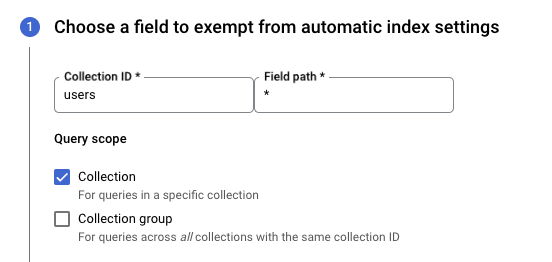
3. Select the indexing exemptions you want to apply for all fields in the collection group.
4. Click **Save Exemption**.
### Delete an automatic indexing exemption
To delete a automatic indexing exemption, do the following:
1. In the Google Cloud console, go to the **Databases** page.
[Go to Databases](https://console.cloud.google.com/firestore/databases)
2. Select the required database from the list of databases.
3. In the navigation menu, click **Indexes** , and then click the **Automatic** tab.
4. In the list of your single-field index exemptions, click the **More** button for the exemption you want to delete. Click **Delete**.
5. Confirm that you want to delete this exemption by clicking **Delete** from the alert.
When you delete an automatic indexing exemption, the specified field or sub-field will
use inherited indexing settings. Document fields revert to your database's
automatic index settings. Sub-fields in a map inherit any exemptions on parent
fields before inheriting automatic index settings.
## Use the Firebase CLI
You can also deploy indexes with the [Firebase CLI](https://firebase.google.com/docs/cli).
To get started, run `firebase init firestore` in your project directory.
During setup, the Firebase CLI generates a JSON file with the default
indexes in the correct format. Edit the file to add more indexes and deploy it
with the `firebase deploy` command.
To deploy Firestore Standard edition indexes and rules only, add the
`--only firestore` flag.
If you make edits to the indexes using the Firebase console, make
sure you also update your local indexes file. Refer to
the [JSON index definition reference](https://firebase.google.com/docs/reference/firestore/indexes/).
## Use Terraform
### Creating indexes in the database
Firestore Standard edition databases can include both single-field (automatic) and composite (manual) indexes. You can edit the Terraform configuration file to create an index for your database. Automatic and manual indexes use distinct Terraform resource types
([`google_firestore_index`](https://registry.terraform.io/providers/hashicorp/google/latest/docs/resources/firestore_index)
and [`google_firestore_field`](https://registry.terraform.io/providers/hashicorp/google/latest/docs/resources/firestore_field)).
Both Native mode and Datastore mode indexes are supported.
#### Single-field (automatic) index
The following example Terraform configuration file creates a single-field index on the `name` field in the `chatrooms` collection:
**firestore.tf**
```
resource "random_id" "variable"{
byte_length = 8
}
resource "google_firestore_field" "single-index" {
project = "project-id"
database = "database-id"
collection = "chatrooms_${random_id.variable.hex}"
field = "name"
index_config {
indexes {
order = "ASCENDING"
query_scope = "COLLECTION_GROUP"
}
indexes {
array_config = "CONTAINS"
}
}
ttl_config {}
}
```
- Replace project-id with your project ID. Project IDs must be unique.
- Replace database-id with your database ID.
#### Composite (manual) index
The following example Terraform configuration file creates a composite index for a combination of the `name` field and the `description` field in the `chatrooms` collection:
**firestore.tf**
```
resource "google_firestore_index" "composite-index" {
project = "project-id"
database = "database-id"
collection = "chatrooms"
fields {
field_path = "name"
order = "ASCENDING"
}
fields {
field_path = "description"
order = "DESCENDING"
}
}
```
- Replace project-id with your project ID. Project IDs must be unique.
- Replace database-id with your database ID.
#### Vector index
The following example Terraform configuration file creates a vector index on the `embedding` field in the `chatrooms` collection:
**firestore.tf**
```
resource "google_firestore_index" "vector-index" {
project = "project-id"
database = "database-id"
collection = "chatrooms"
fields {
field_path = "__name__"
order = "ASCENDING"
}
fields {
field_path = "embedding"
vector_config {
dimension = 128
flat {}
}
}
}
```
- Replace project-id with your project ID. Project IDs must be unique.
- Replace database-id with your database ID.
#### Datastore mode indexes
You can also create Datastore Mode indexes using Terraform.
**datastore.tf**
```
resource "google_firestore_index" "datastore-mode-index" {
project = "project-id"
database = "database-id"
collection = "chatrooms"
fields {
field_path = "name"
order = "ASCENDING"
}
fields {
field_path = "description"
order = "DESCENDING"
}
query_scope = "COLLECTION_GROUP"
api_scope = "DATASTORE_MODE_API"
}
```
##### Migrate from google_datastore_index
The `google_datastore_index` resource is deprecated and will be unavailable in terraform-provider-google version 6.0.0 and later.
If you were previously using the `google_datastore_index` resource, you can migrate to `google_firestore_index`.
You can migrate by doing the following:
1. Write an equivalent `google_firestore_index` resource.
2. Import your existing Datastore mode index into the new resource.
3. Remove references to the old `google_datastore_index` resource.
4. Remove the old `google_datastore_index` resource from Terraform's state.
5. Running `terraform apply` to apply any changes.
More detailed instructions follow:
1. Write a replacement `google_firestore_index` based on your existing `google_datastore_index` resource. See [below](https://docs.cloud.google.com/firestore/native/docs/standard-indexing.md.txt#translate-your-index) for the required changes.
2. Determine the Firestore resource path of your index:
```bash
export INDEX_RESOURCE_PATH=$(echo '"projects/${google_datastore_index.datastore-index-resource-name.project}/databases/(default)/collectionGroups/${google_datastore_index.datastore-index-resource-name.kind}/indexes/${google_datastore_index.datastore-index-resource-name.index_id}"' | terraform console | tr -d '"')
```
Replace datastore-index-resource-name with the Terraform name of your existing resource.
3. Import your existing Datastore mode index to the `google_firestore_index` resource you created above:
```bash
terraform import google_firestore_index.firestore-index-resource-name $INDEX_RESOURCE_PATH
```
Replace firestore-index-resource-name with the Terraform name of your existing resource.
For more information on importing Firestore index resources, see [the google_firestore_index reference documentation](https://registry.terraform.io/providers/hashicorp/google/latest/docs/resources/firestore_index#import).
4. Delete the existing `google_datastore_index` resource from your Terraform configuration file.
5. Remove the existing `google_datastore_index` resource from Terraform state:
```bash
terraform state rm google_datastore_index.datastore-index-resource-name
```
For more information on removing resources,
see the Terraform page on [Removing Resources](https://developer.hashicorp.com/terraform/language/resources/syntax#removing-resources).
6. Run `terraform plan`. Verify the output to confirm that you are neither creating nor destroying any resources.
Inspect the output to ensure the import completed successfully. If the output shows any fields changing, ensure these changes are intended. If the output includes a line similar to:
```
google_firestore_index.firestore-index-resource-name must be replaced
```
then inspect your Terraform configuration file to see if there were any mistakes.
> [!WARNING]
> **Warning:** Do not run terraform apply if you see any index resources requiring replacement or any index resources being deleted. Doing so may cause the loss of your index, possibly resulting in downtime for your application.
7. Once you are satisfied with the Terraform plan output, run:
```bash
terraform apply
```
###### Translate your index
8. To translate a google_datastore_index resource to the equivalent google_firestore_index resource, copy it and make the following changes:
- Replace `google_datastore_index` with `google_firestore_index`.
- Replace the argument name `kind` with `collection`, but keep the argument value the same.
- Replace the argument name `ancestor` with `query_scope`. Replace the argument value `ALL_ANCESTORS` with `COLLECTION_RECURSIVE` and any other value with `COLLECTION_GROUP`. If there was no `ancestor` argument, add a `query_scope` argument with value `COLLECTION_GROUP`.
- Add the argument `api_scope` with value `DATASTORE_MODE_API`.
- For each instance of `properties`, replace it with a corresponding instance of `fields`. Replace each instance of `name` with `field_path` and each instance of `direction` with `order`.
9. For example, consider this `google_datastore_index` resource:
10. **datastore.tf**
```
resource "google_datastore_index" "legacy" {
kind = "foo"
properties {
name = "property_a"
direction = "ASCENDING"
}
properties {
name = "property_b"
direction = "ASCENDING"
}
}
```
11. The equivalent `google_firestore_index` resource would be:
```
resource "google_firestore_index" "new" {
// note: defaults to the provider project
project = project
// note: defaults to the (default) database
database = "(default)"
collection = "foo"
api_scope = "DATASTORE_MODE_API"
// since there was no "ancestor" property set above, use COLLECTION_GROUP here
query_scope = "COLLECTION_GROUP"
fields {
field_path = "property_a"
order = "ASCENDING"
}
fields {
field_path = "property_b"
order = "ASCENDING"
}
}
```
12.
## Index build time
13. To build an index, Firestore Standard edition must set up the index and then backfill the index with existing data. Index build time is the sum of setup time and backfill time:
- Setting up an index takes a few minutes. The minimum build
time for an index is a few minutes, even for an empty database.
- Backfill time depends on how much existing data belongs in the new index. The
more field values that match the index definition, the longer it takes to
backfill the index.
14. Index builds are *long-running operations*.
> [!IMPORTANT]
> **Key Term:** Firestore Standard edition supports several administrative operations that can take a long time to complete. These operations are called ***long-running
> operations***. Firestore Standard edition includes features to execute and manage long- running operations. Supported long-running operations include index builds and export operations.
15. After you start an index build, Firestore Standard edition assigns the operation a unique name. Operation names are prefixed with `projects/[PROJECT_ID]/databases/(default)/operations/`, for example:
```
projects/project-id/databases/(default)/operations/ASA1MTAwNDQxNAgadGx1YWZlZAcSeWx0aGdpbi1zYm9qLW5pbWRhEgopEg
```
16. However, you can leave out the prefix when specifying an operation name for the `describe` command.
### Listing all long-running operations
17. To list long-running operations, use the [gcloud firestore operations list](https://cloud.google.com/sdk/gcloud/reference/firestore/operations/list) command. This command lists ongoing and recently completed operations. Operations are listed for a few days after completion:
```
gcloud firestore operations list
```
### Check operation status
18. Instead of listing all long-running operations, you can list the details of a single operation:
```
gcloud firestore operations describe operation-name
```
### Estimating the completion time
19. As your operation runs, see the value of the [`state` field](https://docs.cloud.google.com/firestore/docs/reference/rpc/google.firestore.admin.v1.md.txt#state) for the overall status of the operation.
20. A request for the status of a long-running operation also returns the metrics `workEstimated` and `workCompleted`. These metrics are returned for the number of documents. `workEstimated` shows the estimated total number of documents an operation will process. `workCompleted` shows the number of documents processed so far. After the operation completes, `workCompleted` reflects the total number of documents that were actually processed, which might be different than the value of `workEstimated`.
21. Divide `workCompleted` by `workEstimated` for a rough progress estimate. The estimate might be inaccurate because it depends on delayed statistics collection.
22. For example, here is the progress status of an index build:
```
{
"operations": [
{
"name": "projects/project-id/operations/AyAyMDBiM2U5NTgwZDAtZGIyYi0zYjc0LTIzYWEtZjg1ZGdWFmZWQHEjF0c2Flc3UtcmV4ZWRuaS1uaW1kYRUKSBI",
"metadata": {
"@type": "type.googleapis.com/google.firestore.admin.v1.IndexOperationMetadata",
"common": {
"operationType": "CREATE_INDEX",
"startTime": "2020-06-23T16:52:25.697539Z",
"state": "PROCESSING"
},
"progressDocuments": {
"workCompleted": "219327",
"workEstimated": "2198182"
}
},
},
...
```
23. When an operation is done, the operation description will contain [`"done":
true`](https://docs.cloud.google.com/firestore/docs/reference/rpc/google.longrunning#operation). See the value of the [`state` field](https://docs.cloud.google.com/firestore/docs/reference/rpc/google.firestore.admin.v1#state) for the result of the operation. If the `done` field is not set in the response, then its value is `false`. Do not depend on the existence of the `done` value for in-progress operations.
24.
## Index building errors
25. You might encounter index building errors when managing manual indexes and automatic index exemptions. An indexing operation can fail if Firestore Standard edition encounters a problem with the data it's indexing. Most commonly, this means you hit an [index limit](https://docs.cloud.google.com/firestore/native/docs/standard-index-overview.md.txt#index_limitations). For example, the operation may have reached the maximum number of index entries per document.
26. If index creation fails, you see the error message in the console. After you verify that you are not hitting any [index limits](https://docs.cloud.google.com/firestore/native/docs/standard-index-overview.md.txt#index_limitations), re-try your index operation.