<?xml version="1.0" encoding="UTF-8"?>
<!-- AUTOGENERATED FILE. DO NOT EDIT. -->
<feed xmlns="http://www.w3.org/2005/Atom">
  <id>tag:google.com,2016:gemini-codeassist-release-notes</id>
  <title>Gemini Code Assist - Release notes</title>
  <link rel="self" href="https://docs.cloud.google.com/feeds/gemini-codeassist-release-notes.xml"/>
  <author>
    <name>Google Cloud Platform</name>
  </author>
  <updated>2025-08-08T00:00:00-07:00</updated>

  <entry>
    <title>August 08, 2025</title>
    <id>tag:google.com,2016:gemini-codeassist-release-notes#August_08_2025</id>
    <updated>2025-08-08T00:00:00-07:00</updated>
    <link rel="alternate" href="https://docs.cloud.google.com/gemini/docs/codeassist/release-notes#August_08_2025"/>
    <content type="html"><![CDATA[<strong class="release-note-product-version-title">VS Code Gemini Code Assist 2.39.0</strong>
<h3>Feature</h3>
<h3 id="quick_preview_of_chat_code_suggestions_across_multiple_files">Quick Preview of chat code suggestions across multiple files</h3>
<h4 id="vs_code_gemini_code_assist_2440">VS Code Gemini Code Assist <code>2.44.0</code></h4>
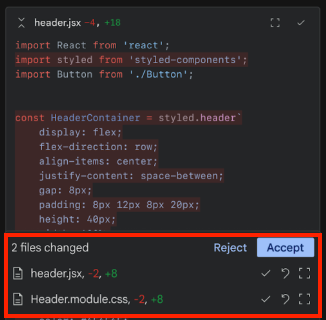
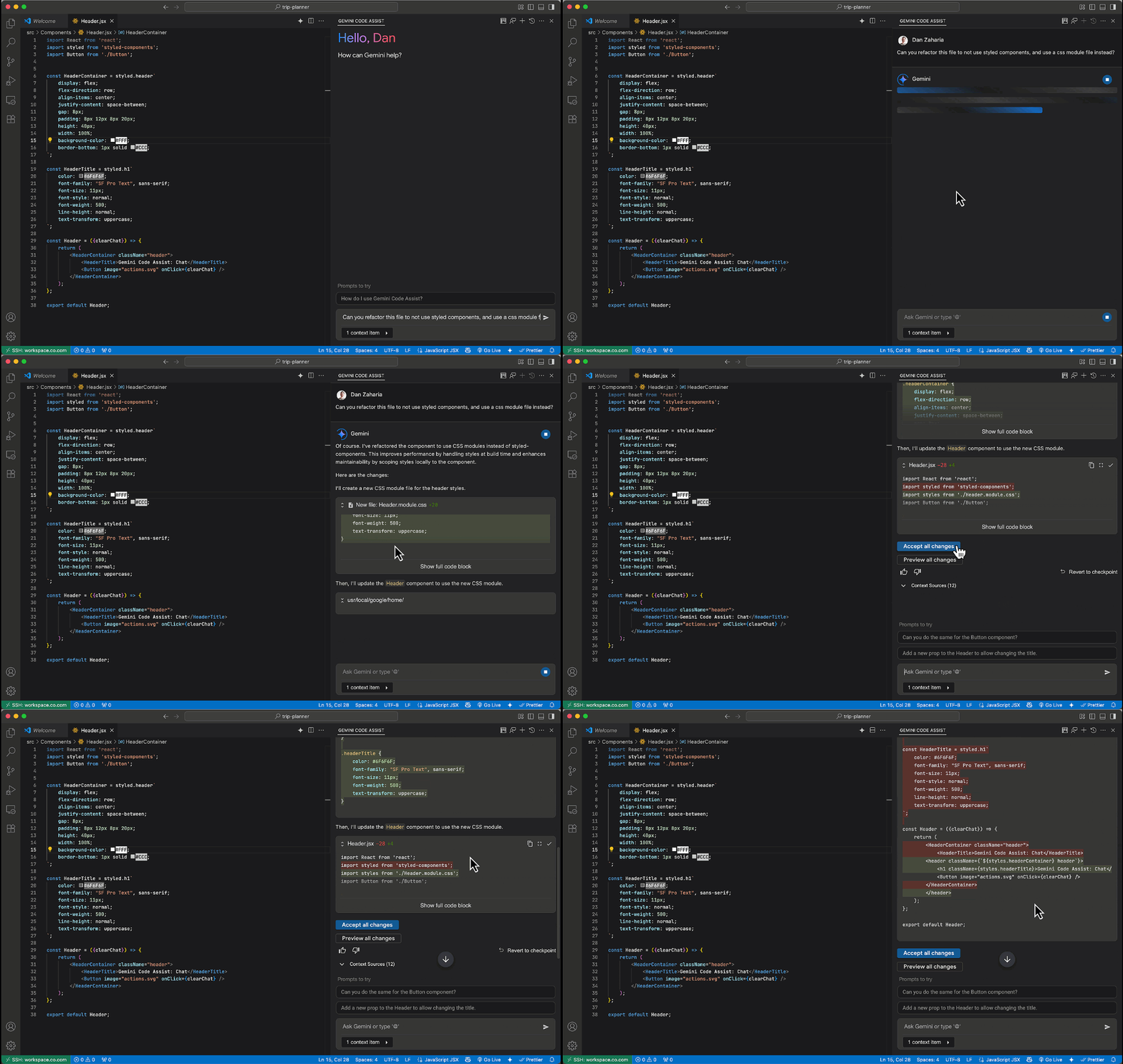
<p>Gemini Code Assist chat provides a <a href="https://cloud.google.com/gemini/docs/codeassist/chat-gemini#view_code_diffs">quick preview</a>
of the collective code suggestions across multiple files in the chat. Selecting
a particular file opens the corresponding file in the editor with the first
suggestion selected by default.</p>
<p><img alt="Quick Preview in VS Code Gemini Code Assist." src="https://cloud.google.com/gemini/images/vscode-quick-preview.png"/></p>
]]>
    </content>
  </entry>

  <entry>
    <title>August 01, 2025</title>
    <id>tag:google.com,2016:gemini-codeassist-release-notes#August_01_2025</id>
    <updated>2025-08-01T00:00:00-07:00</updated>
    <link rel="alternate" href="https://docs.cloud.google.com/gemini/docs/codeassist/release-notes#August_01_2025"/>
    <content type="html"><![CDATA[<strong class="release-note-product-version-title">VS Code Gemini Code Assist 2.39.0</strong>
<h3>Feature</h3>
<h3 id="clickable_filenames_in_chat_output">Clickable filenames in chat output</h3>
<h4 id="intellij_gemini_code_assist_1233_3">IntelliJ Gemini Code Assist <code>1.23.3</code></h4>
<p>IntelliJ Gemini Code Assist provides clickable filenames when it references a
file in your workspace as part of its chat response. Clicking the filename opens
the file in your workspace.</p>
<h3>Feature</h3>
<h3 id="multi-part_chat_code_suggestions">Multi-part chat code suggestions</h3>
<h4 id="intellij_gemini_code_assist_1233_2">IntelliJ Gemini Code Assist <code>1.23.3</code></h4>
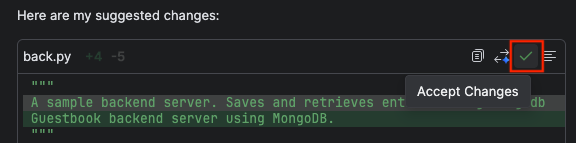
<p>IntelliJ Gemini Code Assist now supports streamlined multi-part chat code
suggestions. You have the option to accept a single code change or all suggested
changes.</p>
<p><img alt="Structured chat edits in IntelliJ Gemini Code Assist" src="https://cloud.google.com/gemini/images/release-notes-images/intellij-structured-chat-edits.png"/></p>
<h3>Changed</h3>
<h3 id="chat_banner_shows_release_channel_information">Chat banner shows release channel information</h3>
<h4 id="intellij_gemini_code_assist_1233_4">IntelliJ Gemini Code Assist <code>1.23.3</code></h4>
<p>The IntelliJ Gemini Code Assist chat banner shows the release channel that
you're currently working in.</p>
<p><img alt="IntelliJ Gemini Code Assist chat banner shows release channel info." src="https://cloud.google.com/gemini/images/release-notes-images/intellij-release-channel-info.png"/></p>
<h3>Feature</h3>
<h3 id="view_code_diff_in_intellij_chat">View code diff in IntelliJ chat</h3>
<h4 id="intellij_gemini_code_assist_1233">IntelliJ Gemini Code Assist <code>1.23.3</code></h4>
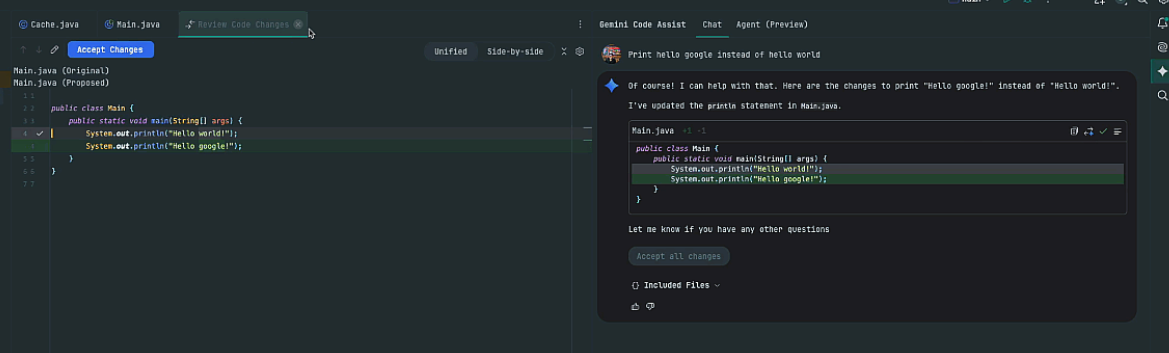
<p>With the <a href="https://cloud.google.com/gemini/docs/codeassist/chat-gemini#view_code_diffs">code diff view</a>
in IntelliJ Gemini Code Assist, you can view suggested code changes directly in
your chat with Gemini Code Assist. This feature boosts productivity by offering
immediate visibility on modifications, streamlining reviews, and enabling
precise control over integrating new code, all within the Gemini Code Assist
chat interface.</p>
<p><img alt="Accept code diff in IntelliJ Gemini Code Assist." src="https://cloud.google.com/gemini/images/intellij-accept-diff.png"/></p>
]]>
    </content>
  </entry>

  <entry>
    <title>July 31, 2025</title>
    <id>tag:google.com,2016:gemini-codeassist-release-notes#July_31_2025</id>
    <updated>2025-07-31T00:00:00-07:00</updated>
    <link rel="alternate" href="https://docs.cloud.google.com/gemini/docs/codeassist/release-notes#July_31_2025"/>
    <content type="html"><![CDATA[<strong class="release-note-product-version-title">VS Code Gemini Code Assist 2.39.0</strong>
<h3>Feature</h3>
<h3 id="auto_approve_mode_lets_the_agent_act_on_your_behalf_preview">Auto Approve mode lets the agent act on your behalf (Preview)</h3>
<p>Enable auto approve mode to let the agent act on your behalf. Once the agent is
done you can review and roll back changes as you see fit.</p>
<p><img alt="auto-approve mode in action" src="https://cloud.google.com/gemini/images/release-notes-images/intellij-auto-approve-in-action.gif"/></p>
<h3>Feature</h3>
<h3 id="use_agent_mode_in_gemini_code_assist_for_vs_code_preview">Use agent mode in Gemini Code Assist for VS Code (Preview)</h3>
<p><img alt="Agent mode in VS Code" src="https://cloud.google.com/gemini/images/release-notes-images/vscode-agent-mode-toggle.png"/></p>
<h4 id="tackle_complex_tasks_with_gemini_code_assist_agent_mode_for_vs_code">Tackle complex tasks with Gemini Code Assist agent mode for VS Code</h4>
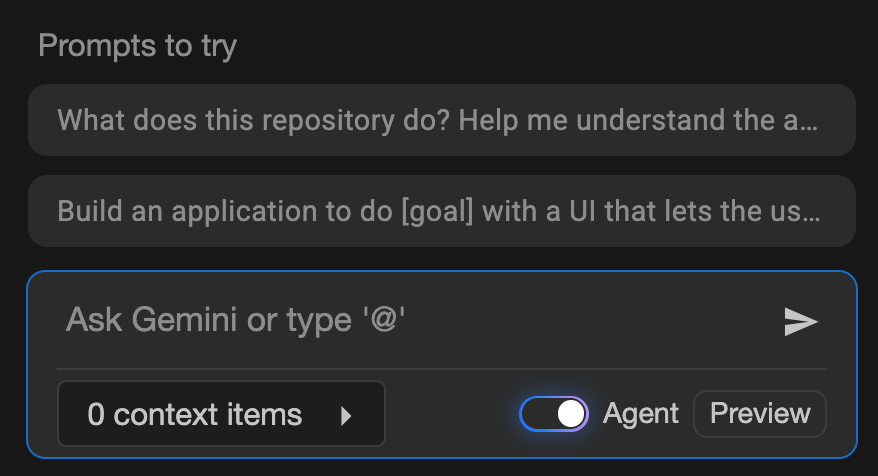
<p>Gemini Code Assist agent mode is available for all users. Describe your goal,
and Gemini will create a plan for you to review and approve before any code is
changed. This update removes the insiders channel requirement, and includes
persistent agent mode or interactive chat state between IDE restarts, real-time
shell command output, and faster UI performance. This collaborative approach
combines AI power with your expertise, enabling you to complete multi-step tasks
with complete control and efficiency.</p>
<p>To get started with agent mode, see
<a href="https://cloud.google.com/gemini/docs/codeassist/use-agentic-chat-pair-programmer">Use agentic chat as a pair programmer</a>.</p>
<h3>Feature</h3>
<h3 id="use_gemini_code_assist_agent_mode_in_intellij_preview">Use Gemini Code Assist agent mode in IntelliJ (Preview)</h3>
<p><img alt="IntelliJ Gemini Code Assist agent mode in action" src="https://cloud.google.com/gemini/images/release-notes-images/intellij-agent-mode-in-action.gif"/></p>
<h4 id="stay_in_control_with_interactive_reviews_and_approvals">Stay in control with interactive reviews and approvals</h4>
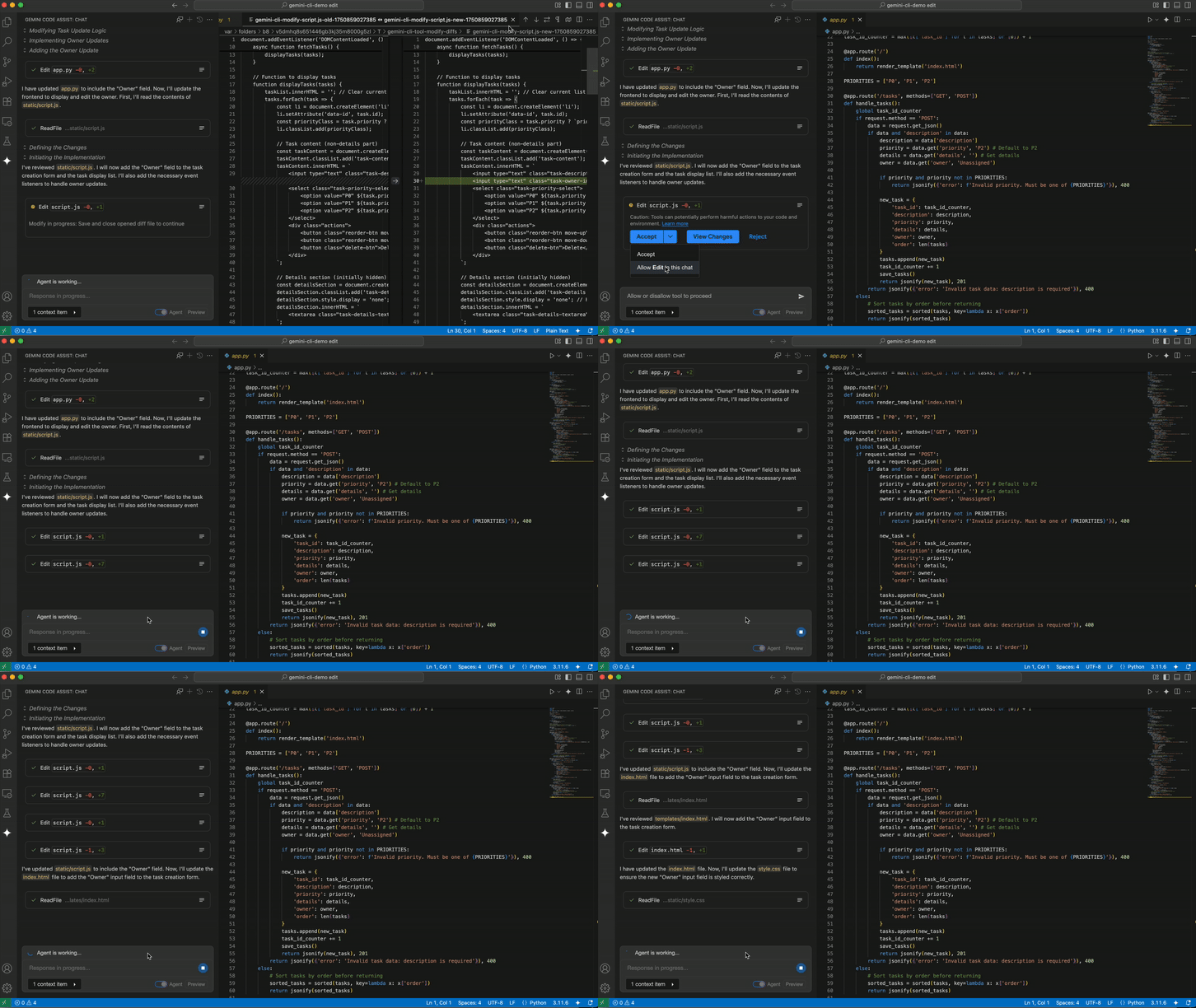
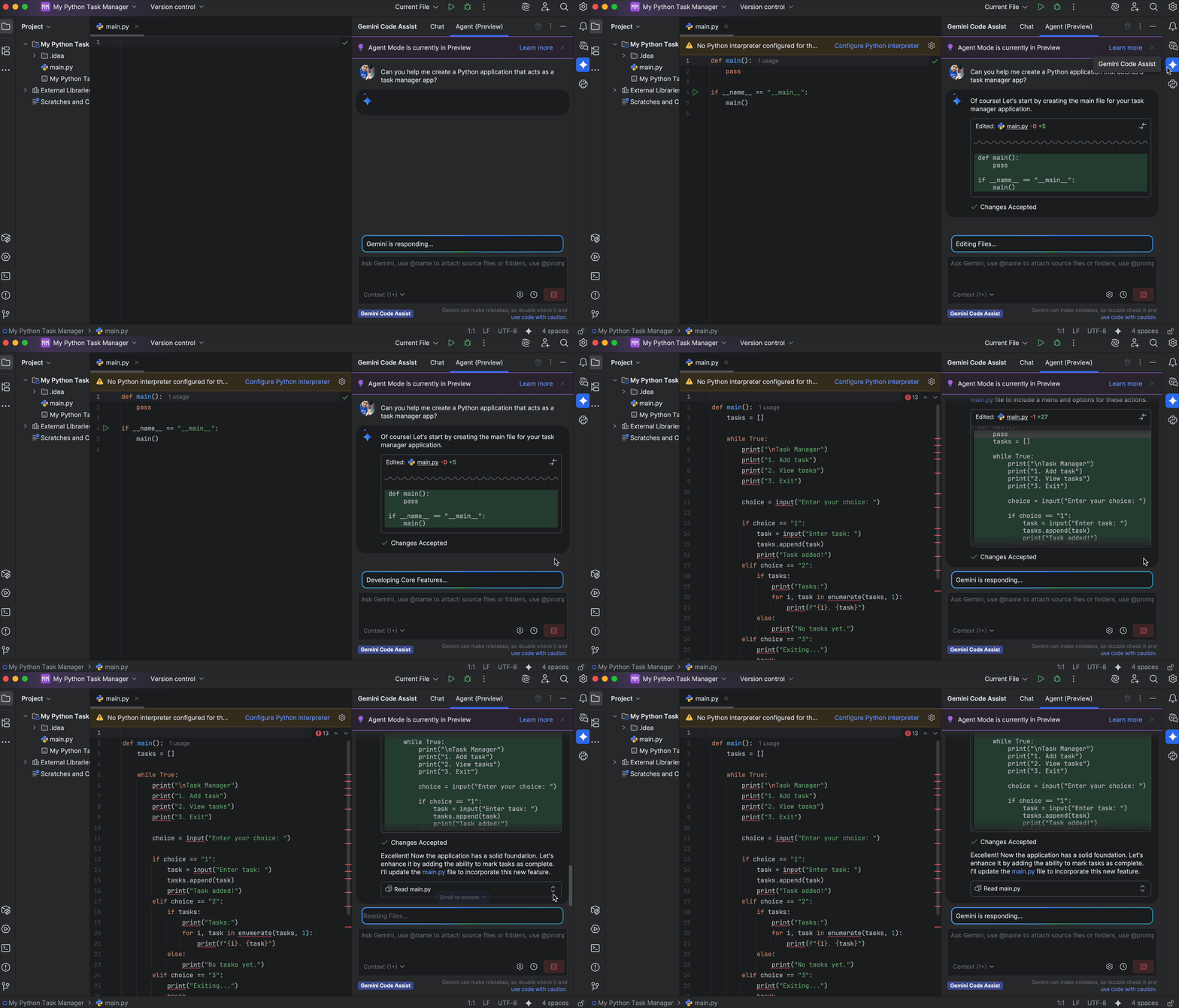
<p>You can use Gemini Code Assist chat in agent mode to complete complex,
multi-step tasks and goals with complete control over every change. Before
making any modifications, the agent will present a plan for your review. You can
edit, ask for changes, approve, or deny any suggested changes. This
collaborative approach combines the power of AI with your expertise, resulting
in better code and a more efficient workflow.</p>
<p>To get started with agent mode, restart your IDE and follow the instructions in
<a href="https://cloud.google.com/gemini/docs/codeassist/use-agentic-chat-pair-programmer">Use agentic chat as a pair programmer</a>.</p>
<h3>Feature</h3>
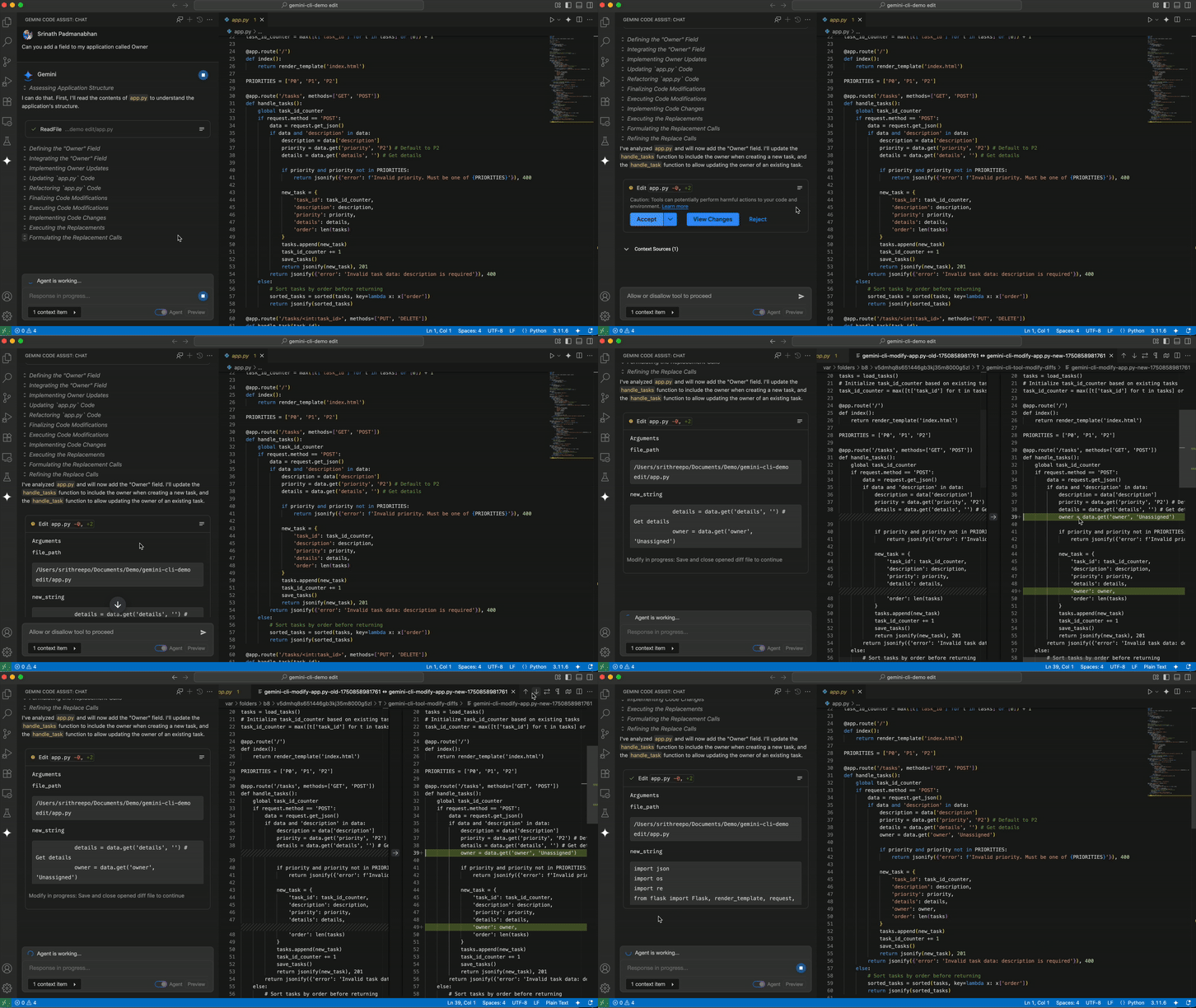
<h3 id="effectively_collaborate_with_your_agent_with_the_improved_diff_view_functionality_preview">Effectively collaborate with your agent with the improved diff view functionality (Preview)</h3>
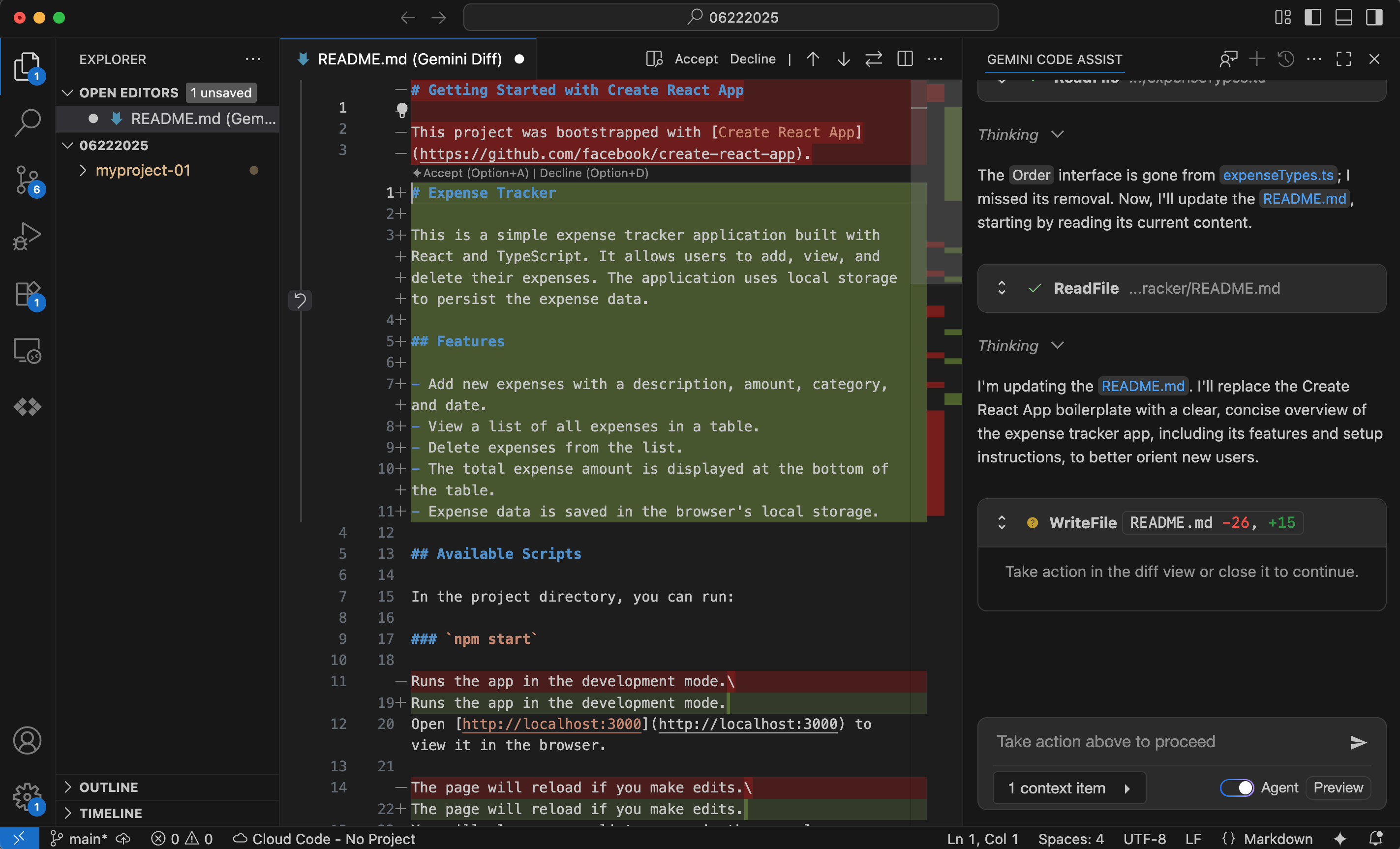
<p>We've enhanced Gemini Code Assist agent mode with powerful new
editing capabilities. You can edit code changes directly in the integrated Diff
view for precise, on-the-fly adjustments. To improve clarity, we've also added
inline diffs directly in the chat, making it easier to see proposed changes at a
glance. These features give you unparalleled control and a more efficient way to
refine AI-suggested code.</p>
<p><img alt="Agent mode diff view in VS Code" src="https://cloud.google.com/gemini/images/release-notes-images/vscode-agent-mode-diff-view.png"/></p>
]]>
    </content>
  </entry>

  <entry>
    <title>July 28, 2025</title>
    <id>tag:google.com,2016:gemini-codeassist-release-notes#July_28_2025</id>
    <updated>2025-07-28T00:00:00-07:00</updated>
    <link rel="alternate" href="https://docs.cloud.google.com/gemini/docs/codeassist/release-notes#July_28_2025"/>
    <content type="html"><![CDATA[<strong class="release-note-product-version-title">VS Code Gemini Code Assist 2.39.0</strong>
<h3>Feature</h3>
<h3 id="inline_diff_preview">Inline diff (Preview)</h3>
<h4 id="vs_code_gemini_code_assist_2420">VS Code Gemini Code Assist <code>2.42.0</code></h4>
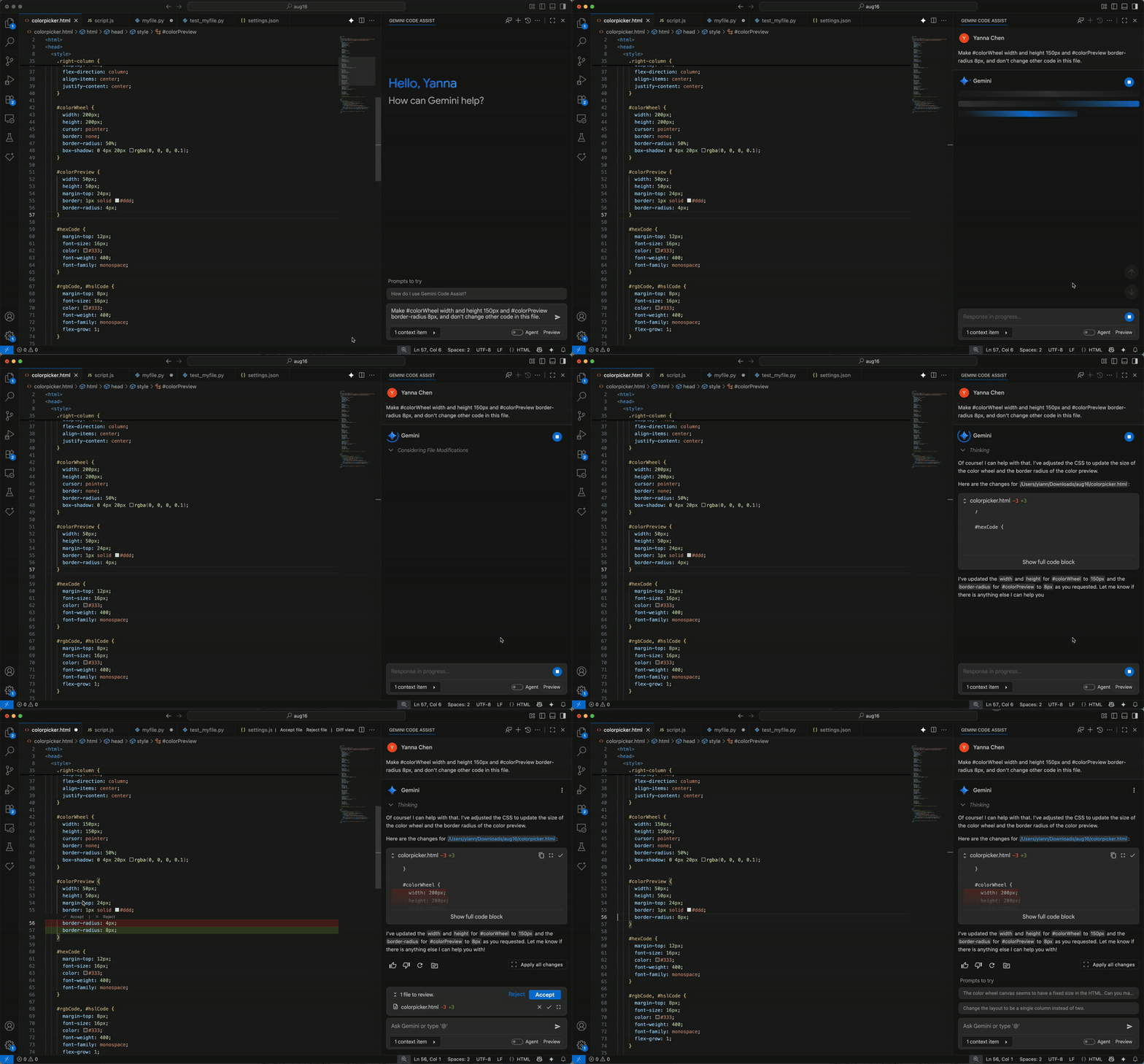
<p><a href="https://cloud.google.com/gemini/docs/codeassist/chat-gemini#view_code_diffs">Inline diff</a>
is available for VS Code Gemini Code Assist <code>2.42.0</code> in
<a href="https://cloud.google.com/terms/service-terms">Preview</a>. With the inline diff
view, you can visually highlight code changes directly in your editor—green for
additions, red for deletions. This feature boosts productivity by offering
immediate visibility on modifications, streamlining reviews, and enabling
precise control over integrating new code, all without leaving your current
view.</p>
<p>If preferred, you can
<a href="https://cloud.google.com/gemini/docs/codeassist/chat-gemini#change_diff_view_settings">change the diff view settings to have a side-by-side diff window</a>
instead of the inline diff.</p>
<p><img alt="Inline diff in VS Code Gemini Code Assist." src="https://cloud.google.com/gemini/images/release-notes-images/vscode-inline-diff.gif"/></p>
]]>
    </content>
  </entry>

  <entry>
    <title>July 24, 2025</title>
    <id>tag:google.com,2016:gemini-codeassist-release-notes#July_24_2025</id>
    <updated>2025-07-24T00:00:00-07:00</updated>
    <link rel="alternate" href="https://docs.cloud.google.com/gemini/docs/codeassist/release-notes#July_24_2025"/>
    <content type="html"><![CDATA[<strong class="release-note-product-version-title">VS Code Gemini Code Assist 2.39.0</strong>
<h3>Feature</h3>
<h3 id="stop_in-progress_chat_responses_with_intellij">Stop in-progress chat responses with IntelliJ</h3>
<h4 id="intellij_gemini_code_assist_1221">IntelliJ Gemini Code Assist <code>1.22.1</code></h4>
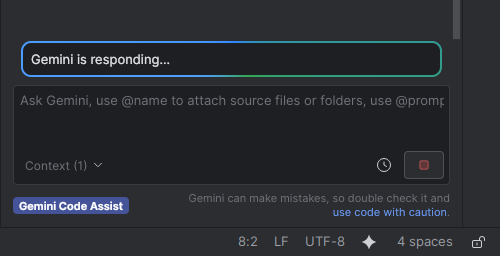
<p>You can
<a href="https://cloud.google.com/gemini/docs/codeassist/chat-gemini#stop_in-progress_chat">stop chat responses</a>
with IntelliJ Gemini Code Assist <code>1.22.1</code>. Undesired long running or errant chat
responses are immediately halted.</p>
<h3>Announcement</h3>
<h3 id="thinking_tokens">Thinking tokens</h3>
<h4 id="intellij_gemini_code_assist_1221_2">IntelliJ Gemini Code Assist <code>1.22.1</code></h4>
<p>You'll see thinking insights into Gemini's thought process before IntelliJ
Gemini Code Assist produces a response, to show you that Gemini is actively
working on your request.</p>
<p><img alt="Thinking tokens in IntelliJ Code Gemini Code Assist." src="https://cloud.google.com/gemini/images/release-notes-images/intellij-thinking-tokens.png"/></p>
]]>
    </content>
  </entry>

  <entry>
    <title>July 18, 2025</title>
    <id>tag:google.com,2016:gemini-codeassist-release-notes#July_18_2025</id>
    <updated>2025-07-18T00:00:00-07:00</updated>
    <link rel="alternate" href="https://docs.cloud.google.com/gemini/docs/codeassist/release-notes#July_18_2025"/>
    <content type="html"><![CDATA[<strong class="release-note-product-version-title">VS Code Gemini Code Assist 2.39.0</strong>
<h3>Changed</h3>
<h3 id="improved_code_completion_speed">Improved code completion speed</h3>
<h4 id="vs_code_gemini_code_assist_2410">VS Code Gemini Code Assist <code>2.41.0</code></h4>
<p>Code completion suggestion speed is improved with VS Code Extension <code>2.41.0</code>.</p>
]]>
    </content>
  </entry>

  <entry>
    <title>July 17, 2025</title>
    <id>tag:google.com,2016:gemini-codeassist-release-notes#July_17_2025</id>
    <updated>2025-07-17T00:00:00-07:00</updated>
    <link rel="alternate" href="https://docs.cloud.google.com/gemini/docs/codeassist/release-notes#July_17_2025"/>
    <content type="html"><![CDATA[<strong class="release-note-product-version-title">VS Code Gemini Code Assist 2.39.0</strong>
<h3>Announcement</h3>
<h3 id="checkpoints_selected_code_snippets_and_terminal_output_and_other_features_are_now_generally_available_ga">Checkpoints, selected code snippets and terminal output, and other features are now Generally Available (GA)</h3>
<p>The following features, which launched in Preview in May and June 2025, are now
<a href="https://cloud.google.com/terms/service-terms">Generally Available</a>:</p>
<ul>
<li><a href="https://cloud.google.com/gemini/docs/codeassist/chat-gemini#revert_to_a_checkpoint_in_chat">Revert to checkpoints</a></li>
<li><a href="https://cloud.google.com/gemini/docs/codeassist/chat-gemini#add_selected_code_snippets_to_context">Add selected code snippets to context</a></li>
<li><a href="https://cloud.google.com/gemini/docs/codeassist/chat-gemini#prompt_with_selected_terminal_output_using_chat">Prompt Gemini Code Assist with selected terminal output</a></li>
<li><a href="https://cloud.google.com/gemini/docs/codeassist/chat-gemini#specify_files_and_folders_in_your_workspace_context">Specify filenames in your workspace</a></li>
<li><a href="https://cloud.google.com/gemini/docs/codeassist/create-aiexclude-file">Exclude files from Gemini Code Assist use</a></li>
</ul>
]]>
    </content>
  </entry>

  <entry>
    <title>July 01, 2025</title>
    <id>tag:google.com,2016:gemini-codeassist-release-notes#July_01_2025</id>
    <updated>2025-07-01T00:00:00-07:00</updated>
    <link rel="alternate" href="https://docs.cloud.google.com/gemini/docs/codeassist/release-notes#July_01_2025"/>
    <content type="html"><![CDATA[<strong class="release-note-product-version-title">VS Code Gemini Code Assist 2.39.0</strong>
<h3>Announcement</h3>
<h3 id="gemini_25_pro_and_gemini_25_flash_models_are_generally_available_ga">Gemini 2.5 Pro and Gemini 2.5 Flash models are Generally Available (GA)</h3>
<p>Gemini 2.5 Pro and Gemini 2.5 Flash are <a href="https://cloud.google.com/terms/service-terms">Generally Available (GA)</a>. These models are used for Gemini Code Assist Standard and Enterprise, and power Gemini Code Assist's chat, code generation, and code transformation capabilities.</p>
<p>With the integration of these stable versions of Gemini 2.5 Pro and Gemini 2.5 Flash, you'll experience a boost in how Gemini Code Assist handles complex tasks. These models excel in areas like coding, mathematics, science, and intricate reasoning, leading to more accurate and helpful suggestions.</p>
<p><img alt="Gemini Code Assist 2.5 Flash and Pro comparison chart." src="https://cloud.google.com/gemini/images/release-notes-images/gca-flash-pro-chart.png"/></p>
]]>
    </content>
  </entry>

  <entry>
    <title>June 25, 2025</title>
    <id>tag:google.com,2016:gemini-codeassist-release-notes#June_25_2025</id>
    <updated>2025-06-25T00:00:00-07:00</updated>
    <link rel="alternate" href="https://docs.cloud.google.com/gemini/docs/codeassist/release-notes#June_25_2025"/>
    <content type="html"><![CDATA[<strong class="release-note-product-version-title">VERSION_UNSPECIFIED</strong>
<h3>Feature</h3>
<h3>Use agent mode in Gemini Code Assist Standard and Enterprise insiders channel for VS Code (Preview)</h3>
<p><img alt="Review and approve" src="https://cloud.google.com/gemini/images/release-notes-images/vscode-agent-mode-approve-changes.gif"/></p>
<p><strong>Stay in control with interactive reviews and approvals</strong>.</p>
<p>You can use Gemini Code Assist chat in agent mode to complete complex, multi-step tasks and goals with  complete control over every change. Before making any modifications, the agent will present a plan for your review. You can edit, ask for changes, approve, or deny any suggested changes. This collaborative approach combines the power of AI with your expertise, resulting in better code and a more efficient workflow.</p>
<p>To get started with agent mode, see <a href="https://cloud.google.com/gemini/docs/codeassist/use-agentic-chat-pair-programmer">Use agentic chat as a pair programmer</a>.</p>
<h3>Feature</h3>
<h3>Use multi file editing in Gemini Code Assist Standard and Enterprise insiders channel in agent mode for VS Code (Preview)</h3>
<p><img alt="Multi-file edits" src="https://cloud.google.com/gemini/images/release-notes-images/vscode-agent-mode-multi-file-edit.gif"/></p>
<p><strong>Say goodbye to single-file edits and hello to project-wide changes</strong>.</p>
<p>With multi-file edits in agent mode, the agent can make concurrent changes across your entire codebase in response to a single prompt. This powerful new capability streamlines large-scale refactoring, feature implementation, and bug fixes. Simply describe the changes you need, and the agent will intelligently identify and modify all relevant files, saving you time and effort.
You will also have the option to undo changes to local files in case you want to revert the changes to an earlier state.</p>
<h3>Feature</h3>
<h3>Use full project context in Gemini Code Assist Standard and Enterprise insiders channel in agent mode for VS Code (Preview)</h3>
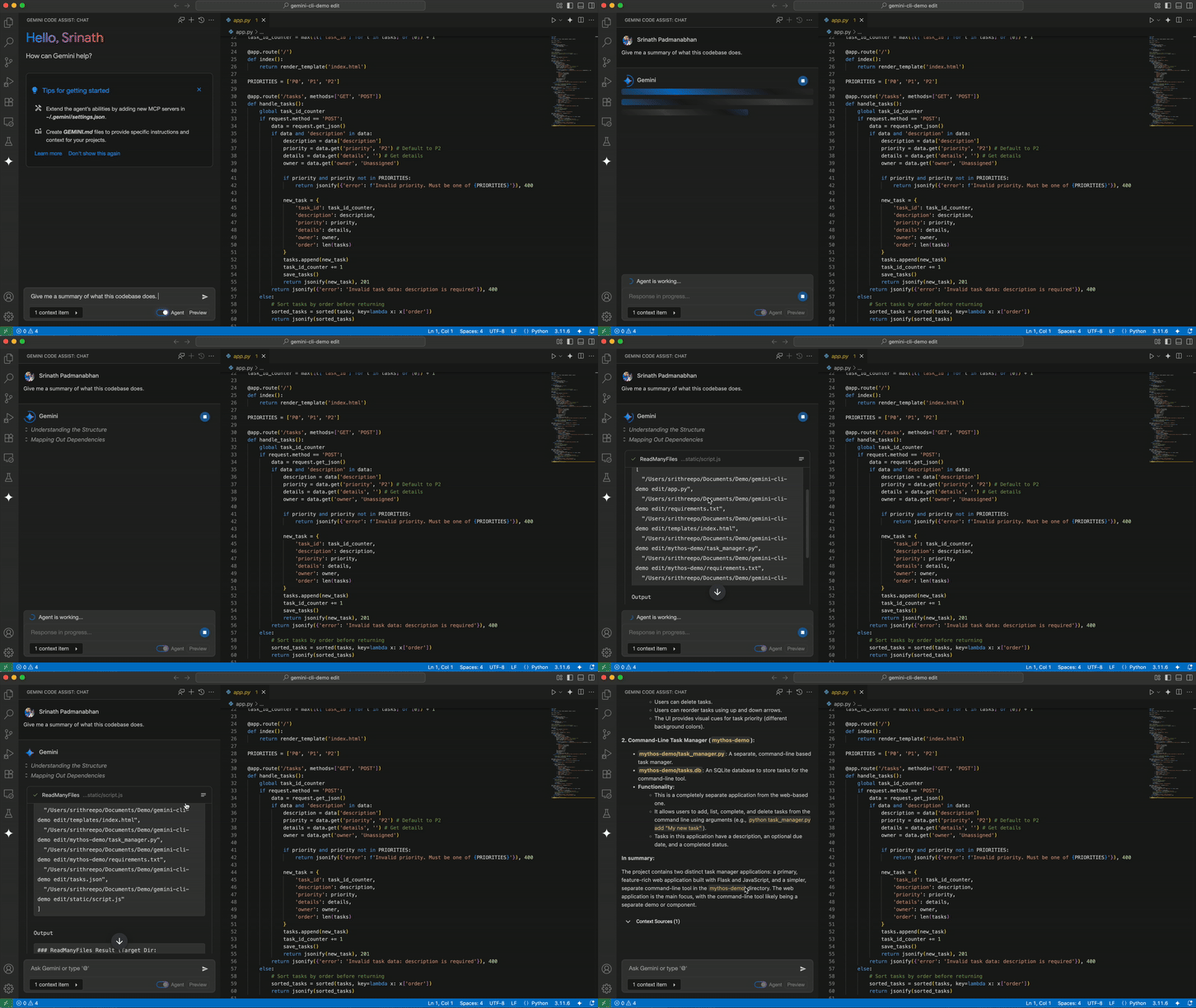
<p><img alt="Explain my codebase" src="https://cloud.google.com/gemini/images/release-notes-images/vscode-agent-mode-explain-codebase.gif"/></p>
<p><strong>Smarter, more accurate code suggestions with full project awareness</strong>.</p>
<p>Agent mode has a comprehensive understanding of your entire project. The agent analyzes your whole codebase and requests files and folders as needed based on your goals. Full project context lets the agent create more accurate and context-aware code completions, suggestions, and refactorings. This deeper understanding of your project's architecture, dependencies, and coding patterns means you get higher-quality, more consistent code with less effort.</p>
]]>
    </content>
  </entry>

  <entry>
    <title>June 18, 2025</title>
    <id>tag:google.com,2016:gemini-codeassist-release-notes#June_18_2025</id>
    <updated>2025-06-18T00:00:00-07:00</updated>
    <link rel="alternate" href="https://docs.cloud.google.com/gemini/docs/codeassist/release-notes#June_18_2025"/>
    <content type="html"><![CDATA[<strong class="release-note-product-version-title">VS Code Gemini Code Assist 2.39.0</strong>
<h3>Feature</h3>
<h3 id="configure_local_codebase_awareness">Configure local codebase awareness</h3>
<p>You can <a href="https://cloud.google.com/gemini/docs/codeassist/configure-local-codebase-awareness">configure local codebase awareness</a> with VS Code Gemini Code Assist <code>2.37.0</code>.</p>
<h3>Feature</h3>
<h3 id="chat_code_suggestion_preview">Chat code suggestion preview</h3>
<p>Chat code suggestions are <a href="https://cloud.google.com/gemini/docs/codeassist/chat-gemini#configure_preview_pane">displayed in a preview block</a> by default with VS Code Gemini Code Assist <code>2.37.0</code>, improving the readability of generated chat responses. You can <a href="https://cloud.google.com/gemini/docs/codeassist/chat-gemini#configure_preview_pane">configure preview pane settings</a> to alternatively display chat code suggestions as fully collapsed or expanded.</p>
<p><img alt="Preview pane in VS Code Gemini Code Assist." src="https://cloud.google.com/gemini/images/release-notes-images/vscode-preview-pane.gif"/></p>
<h3>Feature</h3>
<h3 id="revert_to_a_checkpoint_preview">Revert to a checkpoint (Preview)</h3>
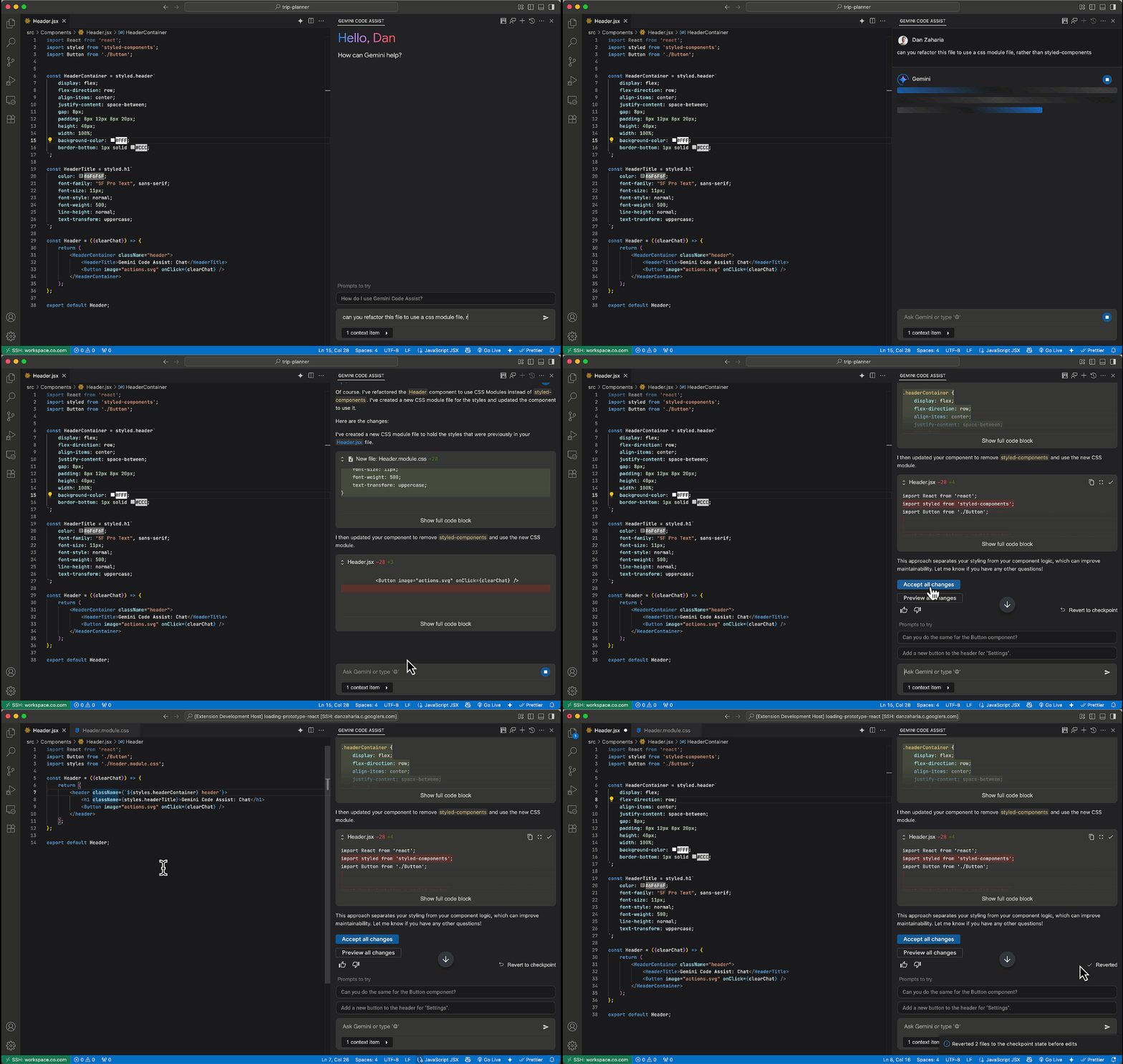
<p>You can <a href="https://cloud.google.com/gemini/docs/codeassist/chat-gemini#revert_to_a_checkpoint_in_chat">revert to a checkpoint for chat code suggestions</a> with VS Code Gemini Code Assist <code>2.37.0</code>, in <a href="https://cloud.google.com/terms/service-terms">Preview</a>. Reverting to a checkpoint enables you to revert affected source files to a point before any code suggestions were applied.</p>
<p><img alt="Preview pane in VS Code Gemini Code Assist." src="https://cloud.google.com/gemini/images/release-notes-images/vscode-revert-to-checkpoint.gif"/></p>
]]>
    </content>
  </entry>

  <entry>
    <title>June 12, 2025</title>
    <id>tag:google.com,2016:gemini-codeassist-release-notes#June_12_2025</id>
    <updated>2025-06-12T00:00:00-07:00</updated>
    <link rel="alternate" href="https://docs.cloud.google.com/gemini/docs/codeassist/release-notes#June_12_2025"/>
    <content type="html"><![CDATA[<strong class="release-note-product-version-title">VS Code Gemini Code Assist 2.39.0</strong>
<h3>Feature</h3>
<h3 id="configure_ai_exclusion_files">Configure AI exclusion files</h3>
<p>You can now <a href="https://cloud.google.com/gemini/docs/codeassist/create-aiexclude-file#configure_context_exclusion_settings">configure the use of <code>.aiexclude</code> and <code>.gitignore</code> files</a> to exclude files from the local context with VS Code Gemini Code Assist (version <code>2.36.0</code>).</p>
<h3>Feature</h3>
<h3 id="add_terminal_output_to_the_chat_context">Add terminal output to the chat context</h3>
<p>Terminal output can now be <a href="https://cloud.google.com/gemini/docs/codeassist/chat-gemini#prompt_with_selected_terminal_output_using_chat">attached to the chat context</a> with VS Code Gemini Code Assist (version <code>2.36.0</code>). You can now ask Gemini Code Assist questions about terminal commands and output, as <a href="https://cloud.google.com/terms/service-terms">Preview</a>.</p>
<p><img alt="Selected terminal output in VS Code Gemini Code Assist" src="https://cloud.google.com/gemini/images/release-notes-images/vscode-terminal-snippets.gif"/></p>
<h3>Feature</h3>
<h3 id="add_code_snippets_to_the_chat_context">Add code snippets to the chat context</h3>
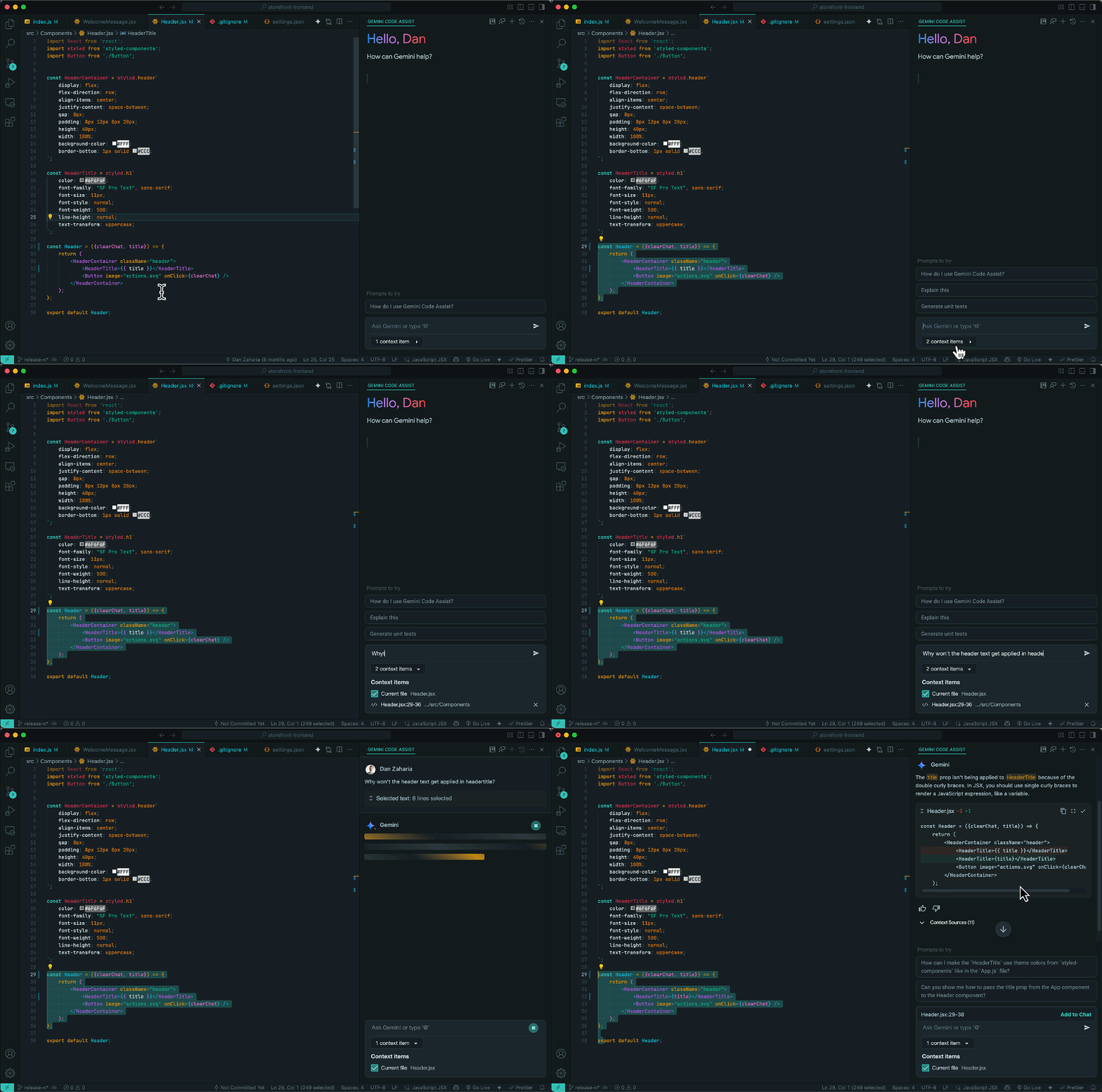
<p>You can now select, attach, and direct Gemini to focus on code snippets with VS Code Gemini Code Assist  (version <code>2.36.0</code>). <a href="https://cloud.google.com/gemini/docs/codeassist/chat-gemini#add_selected_code_snippets_to_context">Code snippet selection</a> enables discrete analysis of smaller code blocks instead of entire files, as <a href="https://cloud.google.com/terms/service-terms">Preview</a>.</p>
<p><img alt="Selected code snippets in VS Code Gemini Code Assist" src="https://cloud.google.com/gemini/images/release-notes-images/vscode-code-snippets.gif"/></p>
]]>
    </content>
  </entry>

  <entry>
    <title>June 05, 2025</title>
    <id>tag:google.com,2016:gemini-codeassist-release-notes#June_05_2025</id>
    <updated>2025-06-05T00:00:00-07:00</updated>
    <link rel="alternate" href="https://docs.cloud.google.com/gemini/docs/codeassist/release-notes#June_05_2025"/>
    <content type="html"><![CDATA[<strong class="release-note-product-version-title">VS Code Gemini Code Assist 2.39.0</strong>
<h3>Feature</h3>
<h3 id="clickable_filenames_in_chat_preview">Clickable filenames in chat (Preview)</h3>
<p>You can now click filenames referenced in a chat response to open the file in the IDE with VS Code Gemini Code Assist (<code>2.35.0</code>), as <a href="https://cloud.google.com/terms/service-terms#1">Preview</a>.</p>
<p><img alt="Clickable filenames in VS Code." src="https://cloud.google.com/gemini/images/release-notes-images/vscode-clickable-filenames.png"/></p>
<h3>Feature</h3>
<h3 id="automatic_scrolling">Automatic scrolling</h3>
<p>VS Code Gemini Code Assist (version <code>2.35.0</code>) now <a href="https://cloud.google.com/gemini/docs/codeassist/chat-gemini#configure_automatic_scrolling">automatically scrolls through chat responses</a>, enabling easier and faster readability. You can disable automatic scrolling in the Gemini Code Assist settings.</p>
<p><img alt="Automatic scrolling in VS Code Gemini Code Assist." src="https://cloud.google.com/gemini/images/release-notes-images/vscode-automatic-scrolling.gif"/></p>
<h3>Feature</h3>
<h3 id="stop_in-progress_chat_responses">Stop in-progress chat responses</h3>
<p>You can now <a href="https://cloud.google.com/gemini/docs/codeassist/chat-gemini#stop_in-progress_chat">stop chat responses</a> with VS Code Gemini Code Assist (version <code>2.35.0</code>). Undesired long running or errant chat responses are immediately halted.</p>
<p><img alt="Stop chat responses in VS Code." src="https://cloud.google.com/gemini/images/release-notes-images/vscode-stop-chat.png"/></p>
<h3>Feature</h3>
<h3 id="exclude_files_from_local_context_preview">Exclude files from local context (Preview)</h3>
<p><a href="https://cloud.google.com/gemini/docs/codeassist/create-aiexclude-file">Context exclusion of files using <code>.gitIgnore</code> is now enforced</a>. Files present in <code>.gitignore</code> are now excluded from the local context with chat, code generation, code completion, and code transformation, as <a href="https://cloud.google.com/terms/service-terms#1">Preview</a>.</p>
]]>
    </content>
  </entry>

  <entry>
    <title>May 28, 2025</title>
    <id>tag:google.com,2016:gemini-codeassist-release-notes#May_28_2025</id>
    <updated>2025-05-28T00:00:00-07:00</updated>
    <link rel="alternate" href="https://docs.cloud.google.com/gemini/docs/codeassist/release-notes#May_28_2025"/>
    <content type="html"><![CDATA[<strong class="release-note-product-version-title">VS Code Gemini Code Assist 2.39.0</strong>
<h3>Feature</h3>
<h3 id="manage_files_and_folders_in_the_context_drawer">Manage files and folders in the Context Drawer</h3>
<p>You can now <a href="https://cloud.google.com/gemini/docs/codeassist/chat-gemini#manage_files_and_folders_in_the_context_drawer">view and manage files and folders requested to be included in Gemini Code Assist's context, using the Context Drawer</a>. After you specify a file or folder to be used as context for your Gemini Code Assist prompts, these files and folders are placed in the Context Drawer, where you can review and remove them from the prompt context.</p>
<p>This gives you more control over which information Gemini Code Assist considers when responding to your prompts.</p>
<p><img alt="Context Drawer for Gemini Code Assist for VS Code" src="https://cloud.google.com/gemini/images/vscode-context-drawer.png"/></p>
]]>
    </content>
  </entry>

  <entry>
    <title>May 22, 2025</title>
    <id>tag:google.com,2016:gemini-codeassist-release-notes#May_22_2025</id>
    <updated>2025-05-22T00:00:00-07:00</updated>
    <link rel="alternate" href="https://docs.cloud.google.com/gemini/docs/codeassist/release-notes#May_22_2025"/>
    <content type="html"><![CDATA[<strong class="release-note-product-version-title">VS Code Gemini Code Assist 2.39.0</strong>
<h3>Announcement</h3>
<p>Gemini Code Assist now uses Gemini 2.5. These models are now used in the following experiences:</p>
<ul>
<li>Chat</li>
<li>Code generation</li>
<li>Code transformation</li>
</ul>
]]>
    </content>
  </entry>

  <entry>
    <title>May 14, 2025</title>
    <id>tag:google.com,2016:gemini-codeassist-release-notes#May_14_2025</id>
    <updated>2025-05-14T00:00:00-07:00</updated>
    <link rel="alternate" href="https://docs.cloud.google.com/gemini/docs/codeassist/release-notes#May_14_2025"/>
    <content type="html"><![CDATA[<strong class="release-note-product-version-title">VS Code Gemini Code Assist 2.39.0</strong>
<h3>Feature</h3>
<h3 id="create_custom_commands">Create custom commands</h3>
<p>You can now <a href="https://cloud.google.com/gemini/docs/codeassist/chat-gemini#create_custom_commands">configure and use custom commands</a> with IntelliJ Gemini Code Assist (version <code>1.15.0</code>). Create, save, and execute your own pre-configured prompts to perform repetitive tasks faster and more easily in the IDE. </p>
<p>To view the custom commands settings, go to <strong>Settings</strong> &gt; <strong>Tools</strong> &gt; <strong>Gemini</strong> &gt; <strong>Prompt Library</strong>.</p>
<p><img alt="IntelliJ Prompt Library" src="https://cloud.google.com/gemini/images/intellij-prompt-library.png"/></p>
<h3>Feature</h3>
<p>Chat responses with error messages now have action buttons for IntelliJ Gemini Code Assist (version <code>1.15.0</code>).</p>
]]>
    </content>
  </entry>

  <entry>
    <title>May 06, 2025</title>
    <id>tag:google.com,2016:gemini-codeassist-release-notes#May_06_2025</id>
    <updated>2025-05-06T00:00:00-07:00</updated>
    <link rel="alternate" href="https://docs.cloud.google.com/gemini/docs/codeassist/release-notes#May_06_2025"/>
    <content type="html"><![CDATA[<strong class="release-note-product-version-title">VS Code Gemini Code Assist 2.39.0</strong>
<h3>Feature</h3>
<h3 id="prompt_with_folders_in_your_local_workspace_preview">Prompt with folders in your local workspace (Preview)</h3>
<p>You can now <a href="https://cloud.google.com/gemini/docs/codeassist/write-code-gemini#prompt_with_specific_files_and_folders_in_your_workspace_with_local_codebase_awareness">include folders from your local IDE project</a> for IntelliJ Gemini Code Assist (version <code>1.14.0</code>) to use as context for your prompts, in <a href="https://cloud.google.com/products#product-launch-stages">Preview</a>. To specify a folder in your chat prompt, type <kbd>@</kbd> and select the folder you want to specify.</p>
<p>Directing Code Assist to add folders to your chat can improve responses by specifying use of the contents within your selected folder(s), with support up to a 1M token context window.</p>
<p><img alt="folders gif" src="https://cloud.google.com/gemini/images/release-notes-images/folders.gif"/></p>
]]>
    </content>
  </entry>

  <entry>
    <title>April 30, 2025</title>
    <id>tag:google.com,2016:gemini-codeassist-release-notes#April_30_2025</id>
    <updated>2025-04-30T00:00:00-07:00</updated>
    <link rel="alternate" href="https://docs.cloud.google.com/gemini/docs/codeassist/release-notes#April_30_2025"/>
    <content type="html"><![CDATA[<strong class="release-note-product-version-title">VS Code Gemini Code Assist 2.39.0</strong>
<h3>Feature</h3>
<p>You can now <a href="https://cloud.google.com/gemini/docs/codeassist/write-code-gemini#prompt_with_specific_files_and_folders_in_your_workspace_with_local_codebase_awareness">include folders from your local IDE project</a> for IntelliJ Gemini Code Assist (version <code>1.14.0</code>) to use as context for your prompts, in <a href="https://cloud.google.com/products#product-launch-stages">Preview</a>.</p>
]]>
    </content>
  </entry>

  <entry>
    <title>April 29, 2025</title>
    <id>tag:google.com,2016:gemini-codeassist-release-notes#April_29_2025</id>
    <updated>2025-04-29T00:00:00-07:00</updated>
    <link rel="alternate" href="https://docs.cloud.google.com/gemini/docs/codeassist/release-notes#April_29_2025"/>
    <content type="html"><![CDATA[<strong class="release-note-product-version-title">VS Code Gemini Code Assist 2.39.0</strong>
<h3>Feature</h3>
<p>VS Code Gemini Code Assist (version <code>2.32.0</code>) now supports <a href="https://cloud.google.com/gemini/docs/codeassist/write-code-gemini#create_multiple_chats">creation and management of multiple chats</a>.</p>
<h3>Feature</h3>
<p>You can now <a href="https://cloud.google.com/gemini/docs/codeassist/chat-gemini#create_rules">specify and apply rules</a> to each chat request with VS Code Gemini Code Assist (version <code>2.32.0</code>).</p>
<h3>Feature</h3>
<p>VS Code Gemini Code Assist (version <code>2.32.0</code>) now supports streamlined multi-part chat code suggestions. You have the option to accept a single code change or all suggested changes.</p>
]]>
    </content>
  </entry>

  <entry>
    <title>April 15, 2025</title>
    <id>tag:google.com,2016:gemini-codeassist-release-notes#April_15_2025</id>
    <updated>2025-04-15T00:00:00-07:00</updated>
    <link rel="alternate" href="https://docs.cloud.google.com/gemini/docs/codeassist/release-notes#April_15_2025"/>
    <content type="html"><![CDATA[<strong class="release-note-product-version-title">VS Code Gemini Code Assist 2.39.0</strong>
<h3>Fixed</h3>
<p>Fixed markdown rendering issues in chat for IntelliJ Gemini Code Assist.</p>
]]>
    </content>
  </entry>

  <entry>
    <title>April 09, 2025</title>
    <id>tag:google.com,2016:gemini-codeassist-release-notes#April_09_2025</id>
    <updated>2025-04-09T00:00:00-07:00</updated>
    <link rel="alternate" href="https://docs.cloud.google.com/gemini/docs/codeassist/release-notes#April_09_2025"/>
    <content type="html"><![CDATA[<strong class="release-note-product-version-title">VS Code Gemini Code Assist 2.39.0</strong>
<h3>Feature</h3>
<p>Streamed chat responses are now generally available for IntelliJ and VS Code Gemini Code Assist. You can disable this feature in settings.</p>
<strong class="release-note-product-version-title">VERSION_UNSPECIFIED</strong>
<h3>Feature</h3>
<p>Gemini Code Assist tools are in <a href="https://cloud.google.com/products#product-launch-stages">Preview</a>. You can use tools to access external services from your IDE. To learn more about tools, see the <a href="https://cloud.google.com/gemini/docs/codeassist/tools-agents/tools-overview">Gemini Code Assist Tools overview</a>.</p>
]]>
    </content>
  </entry>

  <entry>
    <title>April 01, 2025</title>
    <id>tag:google.com,2016:gemini-codeassist-release-notes#April_01_2025</id>
    <updated>2025-04-01T00:00:00-07:00</updated>
    <link rel="alternate" href="https://docs.cloud.google.com/gemini/docs/codeassist/release-notes#April_01_2025"/>
    <content type="html"><![CDATA[<strong class="release-note-product-version-title">VS Code Gemini Code Assist 2.39.0</strong>
<h3>Feature</h3>
<p>Code customization for chat is generally available (<a href="https://cloud.google.com/products#product-launch-stages">GA</a>) for VS Code and IntelliJ Gemini Code Assist. This feature provides contextually relevant code suggestions and insights in your IDE's Gemini Code Assist chat interface. Code customization for chat is available without any additional configuration required. For more information on how to use code customization for chat effectively, see <a href="https://cloud.google.com/gemini/docs/codeassist/use-code-customization">Use code customization</a>.</p>
]]>
    </content>
  </entry>

  <entry>
    <title>March 28, 2025</title>
    <id>tag:google.com,2016:gemini-codeassist-release-notes#March_28_2025</id>
    <updated>2025-03-28T00:00:00-07:00</updated>
    <link rel="alternate" href="https://docs.cloud.google.com/gemini/docs/codeassist/release-notes#March_28_2025"/>
    <content type="html"><![CDATA[<strong class="release-note-product-version-title">VS Code Gemini Code Assist 2.39.0</strong>
<h3>Feature</h3>
<p>Local codebase awareness is now available for IntelliJ Gemini Code Assist. You can now include files from your local IDE project in the prompt context by typing <kbd>@</kbd> in the chat prompt box.</p>
<h3>Feature</h3>
<p>You can now see what files are used by IntelliJ Gemini Code Assist chat and can customize the context as needed.</p>
]]>
    </content>
  </entry>

  <entry>
    <title>March 18, 2025</title>
    <id>tag:google.com,2016:gemini-codeassist-release-notes#March_18_2025</id>
    <updated>2025-03-18T00:00:00-07:00</updated>
    <link rel="alternate" href="https://docs.cloud.google.com/gemini/docs/codeassist/release-notes#March_18_2025"/>
    <content type="html"><![CDATA[<strong class="release-note-product-version-title">VS Code Gemini Code Assist 2.39.0</strong>
<h3>Feature</h3>
<p>You can now configure and use custom commands in the inline chat menu and lightbulb menu for VS Code Gemini Code Assist. To view custom commands settings, go to <strong>Settings</strong> &gt; <strong>Gemini Code Assist</strong> &gt; <strong>Custom Commands</strong>.</p>
<h3>Fixed</h3>
<p>Fixed an issue with an infinite progress bar while trying to log in to IntelliJ Gemini Code Assist.</p>
<h3>Feature</h3>
<p>Streamed chat responses are now available in public preview for IntelliJ and VS Code Gemini Code Assist. You can disable this feature in settings.</p>
]]>
    </content>
  </entry>

  <entry>
    <title>March 12, 2025</title>
    <id>tag:google.com,2016:gemini-codeassist-release-notes#March_12_2025</id>
    <updated>2025-03-12T00:00:00-07:00</updated>
    <link rel="alternate" href="https://docs.cloud.google.com/gemini/docs/codeassist/release-notes#March_12_2025"/>
    <content type="html"><![CDATA[<strong class="release-note-product-version-title">VS Code Gemini Code Assist 2.39.0</strong>
<h3>Changed</h3>
<p>Gemini Code Assist now supports data residency at rest. Data residency meets compliance and regulatory requirements by allowing you to specify the geographic locations (regions) where Gemini Code Assist data is stored.</p>
<h3>Announcement</h3>
<p>You can now use code customization for Gemini Code Assist Enterprise with VPC Service Controls. This allows secure access to on-premises source control systems. For more information, see <a href="https://cloud.google.com/gemini/docs/configure-vpc-service-controls">Configure VPC Service Controls for Gemini</a>.</p>
]]>
    </content>
  </entry>

  <entry>
    <title>March 05, 2025</title>
    <id>tag:google.com,2016:gemini-codeassist-release-notes#March_05_2025</id>
    <updated>2025-03-05T00:00:00-08:00</updated>
    <link rel="alternate" href="https://docs.cloud.google.com/gemini/docs/codeassist/release-notes#March_05_2025"/>
    <content type="html"><![CDATA[<strong class="release-note-product-version-title">VS Code Gemini Code Assist 2.39.0</strong>
<h3>Changed</h3>
<p>Various bug fixes and minor product enhancements for IntelliJ Gemini Code Assist extension.</p>
]]>
    </content>
  </entry>

  <entry>
    <title>February 21, 2025</title>
    <id>tag:google.com,2016:gemini-codeassist-release-notes#February_21_2025</id>
    <updated>2025-02-21T00:00:00-08:00</updated>
    <link rel="alternate" href="https://docs.cloud.google.com/gemini/docs/codeassist/release-notes#February_21_2025"/>
    <content type="html"><![CDATA[<strong class="release-note-product-version-title">VS Code Gemini Code Assist 2.39.0</strong>
<h3>Announcement</h3>
<p>Gemini Code Assist now uses a code-optimized version of Gemini 2.0. This new model is used in the following experiences:</p>
<ul>
<li>Chat</li>
<li>Code generation</li>
<li>Code transformation</li>
</ul>
]]>
    </content>
  </entry>

  <entry>
    <title>February 19, 2025</title>
    <id>tag:google.com,2016:gemini-codeassist-release-notes#February_19_2025</id>
    <updated>2025-02-19T00:00:00-08:00</updated>
    <link rel="alternate" href="https://docs.cloud.google.com/gemini/docs/codeassist/release-notes#February_19_2025"/>
    <content type="html"><![CDATA[<strong class="release-note-product-version-title">VS Code Gemini Code Assist 2.39.0</strong>
<h3>Changed</h3>
<p>IntelliJ Gemini Code Assist now shows disconnected network status in the Gemini status bar instead of an error.</p>
]]>
    </content>
  </entry>

  <entry>
    <title>February 18, 2025</title>
    <id>tag:google.com,2016:gemini-codeassist-release-notes#February_18_2025</id>
    <updated>2025-02-18T00:00:00-08:00</updated>
    <link rel="alternate" href="https://docs.cloud.google.com/gemini/docs/codeassist/release-notes#February_18_2025"/>
    <content type="html"><![CDATA[<strong class="release-note-product-version-title">VS Code Gemini Code Assist 2.39.0</strong>
<h3>Feature</h3>
<p>Code customization for Gemini Code Assist Enterprise now supports repositories hosted on the following: </p>
<ul>
<li><a href="https://cloud.google.com/developer-connect/docs/connect-github-enterprise-cloud">GitHub Enterprise Cloud</a></li>
<li><a href="https://cloud.google.com/developer-connect/docs/connect-github-enterprise">GitHub Enterprise</a></li>
<li><a href="https://cloud.google.com/developer-connect/docs/connect-gitlab">GitLab</a></li>
<li><a href="https://cloud.google.com/developer-connect/docs/connect-gitlab-enterprise">GitLab Enterprise</a></li>
<li><a href="https://cloud.google.com/developer-connect/docs/connect-bitbucket-cloud">Bitbucket Cloud</a></li>
<li><a href="https://cloud.google.com/developer-connect/docs/connect-bitbucket-dc">Bitbucket Data Center</a></li>
</ul>
]]>
    </content>
  </entry>

  <entry>
    <title>February 07, 2025</title>
    <id>tag:google.com,2016:gemini-codeassist-release-notes#February_07_2025</id>
    <updated>2025-02-07T00:00:00-08:00</updated>
    <link rel="alternate" href="https://docs.cloud.google.com/gemini/docs/codeassist/release-notes#February_07_2025"/>
    <content type="html"><![CDATA[<strong class="release-note-product-version-title">VS Code Gemini Code Assist 2.39.0</strong>
<h3>Changed</h3>
<p>Various bug fixes and minor product enhancements for VSCode Gemini Code Assist extension.</p>
]]>
    </content>
  </entry>

  <entry>
    <title>February 06, 2025</title>
    <id>tag:google.com,2016:gemini-codeassist-release-notes#February_06_2025</id>
    <updated>2025-02-06T00:00:00-08:00</updated>
    <link rel="alternate" href="https://docs.cloud.google.com/gemini/docs/codeassist/release-notes#February_06_2025"/>
    <content type="html"><![CDATA[<strong class="release-note-product-version-title">VS Code Gemini Code Assist 2.39.0</strong>
<h3>Feature</h3>
<p>IntelliJ Gemini Code Assist now has a setting to block suggestions that contain citations.</p>
<h3>Fixed</h3>
<p>Fixed issues with Google Cloud project settings for VS Code Gemini Code Assist.</p>
]]>
    </content>
  </entry>

</feed>