Error Reporting aggregates and groups application error events by their root cause, helping you identify, prioritize, and triage issues across your cloud services. An error event represents a single occurrence of an application error and captures its timestamp, execution context, and error message.
Error Reporting is enabled automatically and begins detecting errors without requiring manual setup. It collects error events directly from the Error Reporting API or infers them by scanning log entries for stack traces and common error patterns.
To optimize performance, Error Reporting samples up to 1,000 errors per hour, estimating counts when reaching this threshold. If event volume exceeds capacity, Error Reporting samples up to 100 errors per hour and continues to extrapolate the displayed counts.
When Error Reporting analyzes log entries
Error Reporting is a global service built on Cloud Logging and can analyze log entries when all of the following are true:
- Assured workloads are disabled. For more information, see Overview of Assured Workloads.
- Customer-managed encryption keys (CMEK) are disabled on all log buckets that store the log entry. Error Reporting can't store log entries in log buckets that have CMEK enabled. For information about how to determine the CMEK configuration for a log bucket, see Verify key enablement.
- The log bucket satisfies one of the following:
- The log bucket is stored in the same project where the log entries originated.
- The log entries were routed to a project, and then that project stored those log entries in a log bucket that it owns.
How error events are grouped
When Error Reporting evaluates log entries to identify error events, it ignores the following data:
- Log entries written by the App Engine standard environment that have a
severity level lower than
ERROR. - Stack frames that aren't owned by the user, such as those that belong to public libraries.
When a log entry is scanned, Error Reporting makes the following modifications before inferring error events:
- Replaces any repeating sequence of one or more stack frames with a single occurrence of that sequence.
- Removes compiler-introduced methods and symbols.
Error Reporting applies these rules, in the specified order, to group error events:
| Error event | Grouped by |
|---|---|
| Error events caused by a general problem in the environment.
For example, problems specific to App Engine: com.google.apphosting.runtime.HardDeadlineExceededError com.google.appengine.api.datastore.DatastoreTimeoutException Java problems: java.util.concurrent.CancellationException |
Grouped by exception type. |
| Error events with a stack trace. In the case of nested
exceptions, the innermost exception is considered.
For example: runtime error: index out of range
package1.func1()
file1:20
package2.func2()
file2:33 |
Grouped by exception type and the five topmost frames. |
| Error events without a stack trace but with a message.
For example: runtime error: index out of range
func1()In this example, the following tokens are considered:
|
Grouped by message and (if present) function name. Only the first three literal tokens of the message are considered. |
Data regionality
If you set up Assured Workloads for data residency or Impact Level 4 (IL4) requirements, then Google Cloud automatically disables Error Reporting.
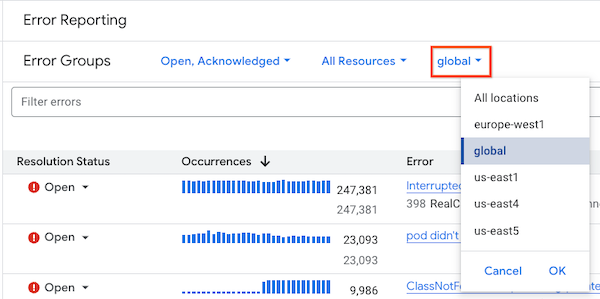
In Cloud Logging, you can regionalize your logs by routing
them to a specific location. On the Error Groups page,
Error Reporting organizes and shows error groups based on the
region of the log bucket that contains the log entries. For example,
an error group listed under us-central1 contains only error logs
that are part of a log bucket in us-central1. Global error groups contain
only error logs that are part of a log bucket in the global region.
To filter the region of the error groups displayed on the Error Groups page,
select a value from the Region menu. This menu has a default value of
global.