

In Error Reporting, you can monitor and diagnose platform failures across Google Cloud services that record error messages without stack traces, helping you quickly resolve infrastructure issues.
For example, if Cloud Run reaches its maximum container instance limit during a request, the failure is recorded in a log entry. Error Reporting detects this event, groups it with similar service errors, and notifies you. You can then use direct links in the console to open service-specific troubleshooting documentation and resolve the bottleneck.
View service error groups
In the Google Cloud console, go to the Error Reporting page:
You can also find this page by using the search bar.
When Error Reporting determines that there is a service failure,
it groups these error events and sets the type of error to Service error.
The Error Reporting overview displays the type of error along
with other information about the error group:
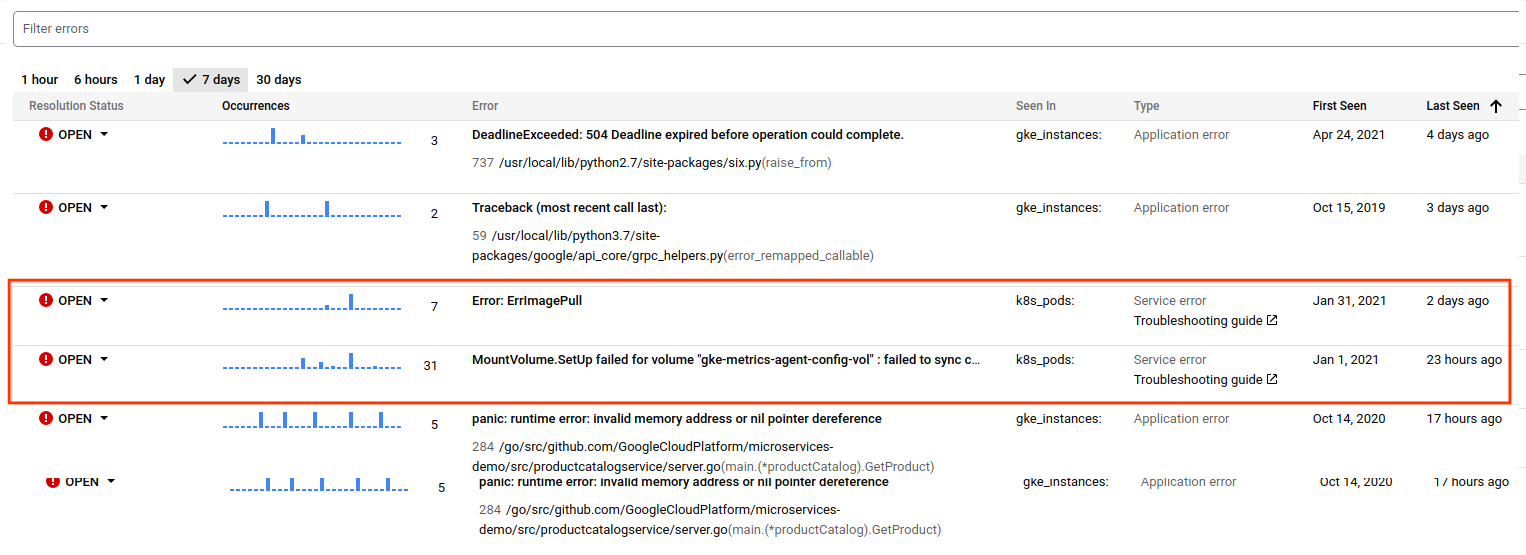
For service error events with documented solutions, Error Reporting provides a link to the troubleshooting guide for the Google Cloud service.
Sample service error events
The following table lists some, but not all, of the error events that the Service Errors feature in Error Reporting captures.
| Google Cloud service name | Error type |
|---|---|
| Dataflow | Worker logs throttling Out of memory (system) Missing custom subnet Lengthy operation in step JRE crash Worker JAR file misconfigured |
| Cloud Run | Memory limit exceeded No instances available |
| Google Kubernetes Engine | Unhealthy pod, failed probe Pods failed scheduling Restarting failed container with backoff Unmounted volume Container image pull failed Failed to update endpoint Secrets/ConfigMaps not found |