You can use
[API keys](https://docs.cloud.google.com/endpoints/docs/openapi/when-why-api-key.md.txt)
to restrict access to specific API methods or all methods in an API. This page
describes how to restrict API access to those clients that have an API key and
also shows how to create an API key.
The
[Extensible Service Proxy (ESP)](https://docs.cloud.google.com/endpoints/docs/openapi/glossary.md.txt#extensible_service_proxy)
uses Service Control API to validate an API key and its association with
a project's enabled API. If you set an API key requirement in your API, requests
to the protected method, class, or API are rejected unless they have a key
generated in your project or within other projects belonging to developers with
whom you have
[granted access to enable your API](https://docs.cloud.google.com/endpoints/docs/openapi/control-api-callers.md.txt).
The project that the API key was created in isn't logged and isn't added to the
request header. You can, however, view the Google Cloud
project that a client is associated with in **Endpoints** \> **Services** , as
described in
[Filter for a specific consumer project](https://docs.cloud.google.com/endpoints/docs/openapi/monitoring-your-api.md.txt#filter_for_a_specific_consumer_project).
For information on which Google Cloud project an API key should be created
in, see
[Sharing APIs protected by API key](https://docs.cloud.google.com/endpoints/docs/openapi/restricting-api-access-with-api-keys.md.txt#sharing_apis_protected_by_api_key).
## Restricting access to all API methods
To require an API key for accessing all methods of an API:
### OpenAPI 2.0
1. Open your project's `openapi.yaml` file in a text editor.
2. Under `securityDefinitions:`, add `api_key:` values `apiKey`, `key`, `query` as shown in the sample code snippet:
```yaml
securityDefinitions:
# This section configures basic authentication with an API key.
api_key:
type: "apiKey"
name: "key"
in: "query"
```
This establishes a "security scheme" called `api_key`, which you can use to protect the API. For other `api_key` definition options, refer to [Api key definition limitations](https://docs.cloud.google.com/endpoints/docs/openapi/openapi-limitations.md.txt#api_key_definition_limitations).
3. At the top level of the file (not indented or nested), add `api_key: []` to the `security` directive. You may need to add the `security` directive or it may already be present:
```yaml
security:
- api_key: []
```
This directive applies the `api_key` security scheme to all methods in the file. Don't place anything inside the brackets. The OpenAPI specification requires an empty list for security schemes that don't use OAuth.
### OpenAPI 3.x
1. Open your project's `openapi.yaml` file in a text editor.
2. Under `components.securitySchemes:`, add the following:
```yaml
components:
securitySchemes:
api_key:
type: "apiKey"
name: "key"
in: "query"
```
This establishes a "security scheme" called `api_key`, which you can use to protect the API.
3. At the top level of the file (not indented or nested), add `api_key: []` to the `security` directive:
```yaml
security:
- api_key: []
```
This directive applies the `api_key` security scheme to all methods in the file.
## Restricting access to specific API methods
To require an API key for a specific method:
### OpenAPI 2.0
1. Open your project's `openapi.yaml` file in a text editor.
2. At the top level of the file (not indented or nested), add an empty security directive to apply it to the entire API:
```yaml
security: []
```
3. Under `securityDefinitions:`, add `api_key:` values `apiKey`, `key`, `query` as shown in the sample code snippet:
```yaml
securityDefinitions:
# This section configures basic authentication with an API key.
api_key:
type: "apiKey"
name: "key"
in: "query"
```
This establishes a "security scheme" called `api_key`, which you can use to protect the API. For other `api_key` definition options, refer to [Api key definition limitations](https://docs.cloud.google.com/endpoints/docs/openapi/openapi-limitations.md.txt#api_key_definition_limitations).
4. Add `api_key: []` to the `security` directive in the method's definition:
```yaml
...
paths:
"/echo":
post:
description: "Echo back a given message."
operationId: "echo"
security:
- api_key: []
produces:
...
```
This directive applies the `api_key` security scheme to the method. Don't place anything inside the brackets. The OpenAPI specification requires an empty list for security schemes which don't use OAuth.
### OpenAPI 3.x
1. Open your project's `openapi.yaml` file in a text editor.
2. At the top level of the file (not indented or nested), add an empty security directive to apply it to the entire API:
```yaml
security: []
```
3. Under `components.securitySchemes:`, add the following:
```yaml
components:
securitySchemes:
api_key:
type: "apiKey"
name: "key"
in: "query"
```
This establishes a "security scheme" called `api_key`, which you can use to protect the API.
4. Add `api_key: []` to the `security` directive in the method's definition:
```yaml
...
paths:
/echo:
post:
description: "Echo back a given message."
operationId: "echo"
security:
- api_key: []
requestBody:
...
```
This directive applies the `api_key` security scheme to the method.
## Removing API key restriction for a method
To turn off API key validation for a particular method even when you've
restricted API access for the API:
### OpenAPI 2.0
1. Open your project's `openapi.yaml` file in a text editor.
2. Add an empty `security` directive in the method's definition:
```yaml
...
paths:
"/echo":
post:
description: "Echo back a given message."
operationId: "echo"
security: []
produces:
...
```
### OpenAPI 3.x
1. Open your project's `openapi.yaml` file in a text editor.
2. Add an empty `security` directive in the method's definition:
```yaml
...
paths:
/echo:
post:
description: "Echo back a given message."
operationId: "echo"
security: []
requestBody:
...
```
## Calling an API using an API key
If an API or API method requires an API key, supply the key using a query
parameter named `key`, as shown in the following curl example:
curl "${ENDPOINTS_HOST}/echo?key=${ENDPOINTS_KEY}"
where `ENDPOINTS_HOST` and `ENDPOINTS_KEY` are environment
variables containing your API hostname and API key, respectively.
## Sharing APIs protected by API key
API keys are associated with the Google Cloud project in which
they have been created. If you have decided to require an API key for
your API, the Google Cloud project that the API key gets created in depends on
the answers to the following questions:
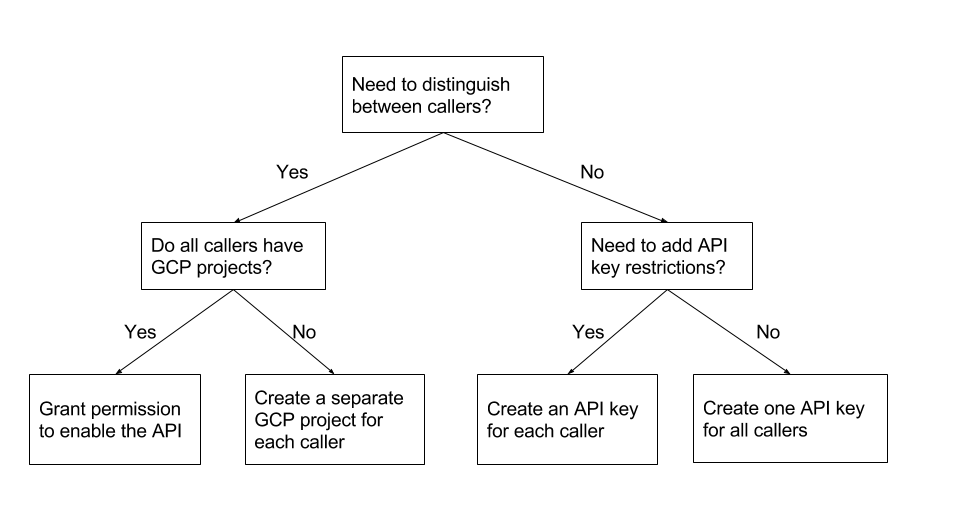
- Do you need to distinguish between the callers of your API so that you can use Endpoints features such as [quotas](https://docs.cloud.google.com/endpoints/docs/openapi/quotas-overview.md.txt)?
- Do all the callers of your API have their own Google Cloud projects?
- Do you need to set up different [API key
restrictions](https://docs.cloud.google.com/docs/authentication/api-keys#api_key_restrictions)?
You can use the following decision tree as a guide for deciding which Google Cloud
project to create the API key in.
### Grant permission to enable the API
When you need to distinguish between callers of your API, and each caller
has their own Google Cloud project, you can grant principals permission to enable the API in
their own Google Cloud project. This way, users of your API can create their own API key for
use with your API.
For example, suppose your team has created an API for internal use by various
client programs in your company, and each client program has their own Google Cloud
project. To distinguish between callers of your API, the API key for each caller
must be created in a different Google Cloud project. You can grant your coworkers
permission to enable the API in the Google Cloud project that the client program is
associated with.
To let users create their own API key:
1. In the Google Cloud project in which your API is configured, grant each user the [permission to enable your
API](https://docs.cloud.google.com/endpoints/docs/openapi/control-api-callers).
2. Contact the users, and let them know that they can [enable your API](https://docs.cloud.google.com/endpoints/docs/openapi/enable-api.md.txt) in their own Google Cloud project and [create an API key](https://docs.cloud.google.com/docs/authentication/api-keys.md.txt#creating_an_api_key).
### Create a separate Google Cloud project for each caller
When you need to distinguish between callers of your API, and not all of the
callers have Google Cloud projects, you can create a separate Google Cloud project and
API key for each caller. Before creating the projects, give some thought to the project
names so that you can easily identify the caller associated with the project.
For example, suppose you have external customers of your API, and you
have no idea how the client programs that call your API were created. Perhaps
some of the clients use Google Cloud services and have a Google Cloud project, and
perhaps some don't. To distinguish between the callers, you must create a separate
Google Cloud project and API key for each caller.
To create a separate Google Cloud project and API key for each caller:
1. Create a separate project for each caller.
2. In each project, [enable your API](https://docs.cloud.google.com/endpoints/docs/openapi/enable-api.md.txt) and [create an API key](https://docs.cloud.google.com/docs/authentication/api-keys.md.txt#creating_an_api_key).
3. Give the API key to each caller.
### Create an API key for each caller
When you don't need to distinguish between callers of your API, but you want
to add API key restrictions, you can create a separate API key for each caller
in the same project.
To create an API key for each caller in the same project:
1. In either the project that your API is configured in, or a project that your [API is enabled in](https://docs.cloud.google.com/endpoints/docs/openapi/enable-api.md.txt), create an API key for each customer that has the [API key
restrictions](https://docs.cloud.google.com/docs/authentication/api-keys#api_key_restrictions) that you need.
2. Give the API key to each caller.
### Create one API key for all callers
When you don't need to distinguish between callers of your API, and you don't need to add API
restrictions, but you still want to require an API key
(to prevent anonymous access, for example), you can create one API key for
all callers to use.
To create one API key for all callers:
1. In either the project that your API is configured in, or a project that your [API is enabled in](https://docs.cloud.google.com/endpoints/docs/openapi/enable-api.md.txt), create an API key for all callers that has the [API key restrictions](https://docs.cloud.google.com/docs/authentication/api-keys.md.txt#api_key_restrictions) that you need.
2. Give the same API key to every caller.
## Application restrictions
Application restrictions specify which websites, IP addresses, or apps can use your API key. For more information, see [Add application restrictions](https://docs.cloud.google.com/authentication/api-keys#adding-application-restrictions).
**Note** : If you use **HTTP referrers (websites)** as an application restriction, you must include a scheme (for example, `https://`) when you add the website restriction. For example, `https://example.com/*` is a valid restriction, but `example.com/*` is not.
## Best practices
If you rely on API keys to protect access to your API and user data, make sure that you set the `--service_control_network_fail_policy` flag to `close` when configuring the [Extensible Service Proxy V2 (ESPv2) startup options](https://docs.cloud.google.com/endpoints/docs/openapi/specify-esp-v2-startup-options.md.txt#timeout). The default value for the flag is `open.`
ESPv2 calls Service Control to verify API keys. If there are network failures when connecting to Service Control and ESPv2 cannot verify the API key, this results in any potential requests made to your API with fraudulent keys being rejected.
## What's next
- [When and why to use API keys](https://docs.cloud.google.com/endpoints/docs/openapi/when-why-api-key.md.txt)
- [Securing an API key](https://docs.cloud.google.com/docs/authentication/api-keys.md.txt#securing_an_api_key)