This page describes migrating an existing Android Cloud Endpoints version 1.0
app to
[Endpoints Frameworks for App Engine](https://docs.cloud.google.com/endpoints/docs/frameworks/java).
Note that this page refers to Endpoints version 1.0 as
Endpoints Frameworks version 1.0 and new
Endpoints Frameworks for App Engine as
Endpoints Frameworks version 2.0.
## Benefits
The new framework brings a number of benefits, including:
- Reduced request latency
- Better integration with App Engine features, such as custom domains.
- Official support for Guice configurations
- Optionally, new API management features
Endpoints Frameworks version 2.0 doesn't affect the interfaces to your
API. Existing clients continue to work after migration without any client-side
code changes.
## Migrating Android multi-module projects to Endpoints Frameworks version 2.0
The following steps guide you through moving Android Studio
Endpoints Frameworks version 1.0 projects to
Endpoints Frameworks version 2.0. The guide migrates
an Android Studio project with a Endpoints module.
## Task list
Use the following high-level task list as you work through the migration guide.
This migration guide assumes you have an existing Android project using a
Google Cloud module.
1. [Before you begin](https://docs.cloud.google.com/endpoints/docs/frameworks/java/migrating-android.md.txt#before_you_begin).
2. [Setup the Google Cloud CLI](https://docs.cloud.google.com/endpoints/docs/frameworks/java/migrating-android.md.txt#cloudsdk).
3. Optional: [Download the sample code](https://docs.cloud.google.com/endpoints/docs/frameworks/java/migrating-android.md.txt#code).
4. [Migrate to Endpoints Frameworks version 2.0](https://docs.cloud.google.com/endpoints/docs/frameworks/java/migrating-android.md.txt#migrate).
5. [Deploy your backend module](https://docs.cloud.google.com/endpoints/docs/frameworks/java/migrating-android.md.txt#deploy).
6. [Generate client libraries](https://docs.cloud.google.com/endpoints/docs/frameworks/java/migrating-android.md.txt#client-libraries).
## Before you begin
1. Install [Android Studio](https://developer.android.com/studio/install.html).
2. Install Android SDK 26+.
3. Install the [gcloud CLI](https://docs.cloud.google.com/sdk/docs.md.txt).
## Set up the gcloud CLI
To setup the gcloud CLI:
1. Initialize the gcloud CLI:
```java
gcloud init
```
2. Use Application Default Credentials:
```java
gcloud auth application-default login
```
3. Install the `app-engine-java` component:
```java
gcloud components install app-engine-java
```
## Optional: Download the sample code
To clone the `legacy` and `v2` sample projects from GitHub:
1. Clone the sample repository to your local machine:
```java
git clone https://github.com/GoogleCloudPlatform/android-docs-samples
```
2. Change to the directory containing the sample code for `legacy` and `v2`:
```java
cd android-docs-samples/endpoints-frameworks/
```
## Migrate to Endpoints Frameworks version 2.0
### Update the `build.gradle` file
Endpoints Frameworks version 2.0 dependencies use Guava 19 and Android
Gradle build plugin `com.android.tools.build:gradle:2.3.3` uses Guava 18. Add
Guava 19 to the build script dependencies closure of the `build.gradle` to
override this transitive dependency.
> [!NOTE]
> **Note:** The legacy changed sections are marked with `LEGACY:` and v2 sections are marked with `V2:`.
### Legacy
```groovy
buildscript {
repositories {
jcenter()
}
dependencies {
classpath 'com.android.tools.build:gradle:2.3.3'
}
}
```
### v2
```groovy
buildscript {
repositories {
jcenter()
}
dependencies {
// V2: Include this dependency when using Endpoints Framework v2
classpath 'com.google.guava:guava:19.0'
classpath 'com.android.tools.build:gradle:2.3.3'
}
}
```
### Update the `app/build.gradle` file
In Endpoints version 1.0, you used the Gradle plugin,
`gradle-appengine-plugin`, to generate an API Discovery Document. In
Endpoints Frameworks version 2.0, you use the
[`endpoints-framework-gradle-plugin`](https://docs.cloud.google.com/endpoints/docs/frameworks/java/gradle-endpoints-frameworks-plugin.md.txt)
to generate a Discovery Document.
This build script uses the client-side plugin,
`com.google.cloud.tools.endpoints-framework-client`.
### Legacy
```groovy
apply plugin: 'com.android.application'
android {
compileSdkVersion 26
buildToolsVersion '26.0.1'
defaultConfig {
applicationId 'com.example.migration.endpoints.app'
minSdkVersion 25
targetSdkVersion 26
versionCode 1
versionName '1.0'
testInstrumentationRunner 'android.support.test.runner.AndroidJUnitRunner'
}
buildTypes {
release {
minifyEnabled false
proguardFiles getDefaultProguardFile('proguard-android.txt'), 'proguard-rules.pro'
}
}
configurations.all {
resolutionStrategy.force 'com.google.code.findbugs:jsr305:2.0.1'
}
}
dependencies {
compile fileTree(dir: 'libs', include: ['*.jar'])
// androidTestCompile compiles instrumentation tests written using Espresso
// used by Firebase Test Lab
androidTestCompile('com.android.support.test.espresso:espresso-core:2.2.2', {
exclude group: 'com.android.support', module: 'support-annotations'
})
compile 'com.android.support:appcompat-v7:26.+'
compile 'com.android.support.constraint:constraint-layout:1.0.1'
compile 'com.google.code.findbugs:jsr305:2.0.1'
compile 'com.google.http-client:google-http-client-android:1.22.0'
compile 'com.google.api-client:google-api-client:+'
testCompile 'junit:junit:4.12'
// LEGACY: Legacy compile :backend project
compile project(path: ':backend', configuration: 'android-endpoints')
}
```
### v2
```groovy
apply plugin: 'com.android.application'
// V2: Apply the new Endpoints Framework client plugin
apply plugin: 'com.google.cloud.tools.endpoints-framework-client'
buildscript {
repositories {
jcenter()
}
dependencies {
// V2: Add the new Endpoints Framework plugin dependencies
classpath 'com.google.cloud.tools:endpoints-framework-gradle-plugin:1.0.2'
}
}
android {
compileSdkVersion 26
buildToolsVersion '26.0.1'
defaultConfig {
applicationId 'com.example.migration.endpoints.app'
minSdkVersion 25
targetSdkVersion 26
versionCode 1
versionName '1.0'
testInstrumentationRunner 'android.support.test.runner.AndroidJUnitRunner'
}
buildTypes {
release {
minifyEnabled false
proguardFiles getDefaultProguardFile('proguard-android.txt'), 'proguard-rules.pro'
}
}
configurations.all {
resolutionStrategy.force 'com.google.code.findbugs:jsr305:2.0.1'
}
}
dependencies {
compile fileTree(dir: 'libs', include: ['*.jar'])
// androidTestCompile compiles instrumentation tests written using Espresso
// used by Firebase Test Lab
androidTestCompile('com.android.support.test.espresso:espresso-core:2.2.2', {
exclude group: 'com.android.support', module: 'support-annotations'
})
compile 'com.android.support:appcompat-v7:26.+'
compile 'com.android.support.constraint:constraint-layout:1.0.1'
compile 'com.google.code.findbugs:jsr305:2.0.1'
testCompile 'junit:junit:4.12'
// V2: Endpoints Framework v2 migration
endpointsServer project(path: ':backend', configuration: 'endpoints')
compile 'com.google.api-client:google-api-client:+'
compile 'com.google.http-client:google-http-client-android:1.22.0'
}
```
### Update the `backend/build.gradle` file
The App Engine standard environment Gradle tooling was updated.
Endpoints Frameworks version 1.0 projects used the
`gradle-appengine-plugin` in `com.google.appengine`, and
Endpoints Frameworks version 2.0 projects
use [`appengine-gradle-plugin`](https://docs.cloud.google.com/appengine/docs/standard/java/using-gradle).
This build script uses the server-side plugin,
`com.google.cloud.tools.endpoints-framework-server`.
### Legacy
```groovy
buildscript {
repositories {
jcenter()
}
dependencies {
// LEGACY: Deprecated App Engine plugin dependency
classpath 'com.google.appengine:gradle-appengine-plugin:1.9.59'
}
}
repositories {
jcenter();
}
apply plugin: 'java'
apply plugin: 'war'
// LEGACY: Deprecated Apply App Engine plugin dependency
apply plugin: 'appengine'
sourceCompatibility = JavaVersion.VERSION_1_7
targetCompatibility = JavaVersion.VERSION_1_7
dependencies {
// LEGACY: Deprecated App Engine plugin dependency
appengineSdk 'com.google.appengine:appengine-java-sdk:1.9.59'
// LEGACY: Legacy Endpoints Framework dependencies
compile 'com.google.appengine:appengine-endpoints:1.9.59'
compile 'com.google.appengine:appengine-endpoints-deps:1.9.59'
compile 'javax.servlet:servlet-api:2.5'
}
appengine { // LEGACY: Deprecated App Engine plugin Tasks configuration
downloadSdk = true
appcfg {
oauth2 = true
// extraOptions is used for acceptance test and
// is not required.
def application = findProperty("appengine.deploy.application")
def version = findProperty("appengine.deploy.version")
def serviceAccount = findProperty("appengine.deploy.serviceAccount")
extraOptions = ["--application=" + application, "--version=" + version,
'--service_account_json_key_file=' + serviceAccount]
}
endpoints {
getClientLibsOnBuild = true
getDiscoveryDocsOnBuild = true
}
}
```
### v2
```groovy
buildscript {
repositories {
jcenter()
}
dependencies {
// V2: Add the new App Engine and Endpoints Frameworks plugin dependencies
classpath 'com.google.cloud.tools:endpoints-framework-gradle-plugin:1.0.2'
classpath 'com.google.cloud.tools:appengine-gradle-plugin:1.3.3'
}
}
repositories {
jcenter();
}
apply plugin: 'java'
apply plugin: 'war'
// V2: Apply new App Engine and Endpoints Framework server plugins
apply plugin: 'com.google.cloud.tools.appengine'
apply plugin: 'com.google.cloud.tools.endpoints-framework-server'
sourceCompatibility = JavaVersion.VERSION_1_7
targetCompatibility = JavaVersion.VERSION_1_7
dependencies {
// V2: Endpoints Framework v2 migration
compile 'com.google.endpoints:endpoints-framework:2.0.9'
compile 'javax.inject:javax.inject:1'
compile 'javax.servlet:servlet-api:2.5'
}
// V2: Define deployment configuration using the new App Engine plugin
// with the appengine closure
appengine { // App Engine tasks configuration
deploy { // deploy configuration
// The following is used for acceptance tests and
// is not required for a migration.
project = findProperty("appengine.deploy.project")
version = findProperty("appengine.deploy.version")
def promoteProp = findProperty("appengine.deploy.promote")
if (promoteProp != null) {
promote = new Boolean(promoteProp)
}
}
}
```
### Update the `web.xml` file
In Endpoints Frameworks version 2.0, the servlet-class changed from
`SystemServiceServlet` to `EndpointsServlet`.
The URL pattern was updated from `/_ah/spi/*` to `/_ah/api/*`.
### Legacy
```xml
SystemServiceServlet
com.google.api.server.spi.SystemServiceServlet
services
com.example.migration.endpoints.backend.MyEndpoint
SystemServiceServlet
/_ah/spi/*
```
### v2
```xml
EndpointsServlet
com.google.api.server.spi.EndpointsServlet
services
com.example.migration.endpoints.backend.MyEndpoint
EndpointsServlet
/_ah/api/*
```
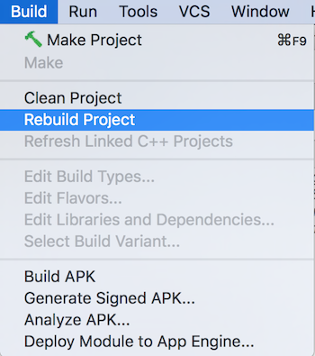
### Rebuild project
Finally, use the Android Studio build list to clean
and rebuild the Android Studio project with the new
dependencies.
## Deploy your backend module
The new Gradle App Engine plugin is now used to deploy the backend
module by using the following Gradle task while in the `backend` module:
```java
gradle appengineDeploy
```
## Generate client libraries
To generate client libraries, use the following Gradle task while in the
`backend` module:
```java
gradle endpointsClientLibs
```
Learn more about the available tasks for the
[Endpoints Frameworks Gradle plugin](https://docs.cloud.google.com/endpoints/docs/frameworks/java/gradle-endpoints-frameworks-plugin.md.txt).
## Adding Endpoints API management
Endpoints Frameworks version 2.0 also lets you turn on API management
features, including:
- API key management
- API sharing
- User authentication
- API metrics
- API logs
To get started using these and other Cloud Endpoints Frameworks 2.0 features,
go to the Java page about [Endpoints Frameworks for App Engine](https://docs.cloud.google.com/endpoints/docs/frameworks/java/about-cloud-endpoints-frameworks.md.txt).