By default, Google Cloud automatically [encrypts data when it is at
rest](https://docs.cloud.google.com/security/encryption-at-rest/default-encryption) using encryption keys
managed by Google.
If you have specific compliance or regulatory requirements related to the keys
that protect your data, you can use customer-managed encryption keys (CMEK) for
Document AI. Instead of Google managing the encryption keys that
protect your data, your Document AI processor is protected using a
key that you control and manage in [Cloud Key Management Service (KMS)](https://docs.cloud.google.com/security/products/security-key-management).
This guide describes CMEK for Document AI. For more information about
CMEK in general, including when and why to enable it, see the
[Cloud Key Management Service documentation](https://docs.cloud.google.com/kms/docs/cmek).
### Prerequisite
The Document AI [Service Agent](https://docs.cloud.google.com/iam/docs/service-agents) must have
the [Cloud KMS CryptoKey Encrypter/Decrypter
role](https://docs.cloud.google.com/kms/docs/reference/permissions-and-roles#predefined) on the key that you use.
The following example grants a role that provides access to a Cloud KMS
key:
### gcloud
```
gcloud kms keys add-iam-policy-binding key \
--keyring key-ring \
--location location \
--project key_project_id \
--member serviceAccount:service-project_number@gcp-sa-prod-dai-core.iam.gserviceaccount.com \
--role roles/cloudkms.cryptoKeyEncrypterDecrypter
```
Replace key with the name of the key. Replace key-ring
with the name of the key ring where the key is located. Replace
location with the Document AI location for the key ring.
Replace key_project_id with the project for the key ring.
Replace project_number with your project's number.
### C#
For more information, see the
[Document AI C# API
reference documentation](https://docs.cloud.google.com/dotnet/docs/reference/Google.Cloud.DocumentAI.V1/latest).
To authenticate to Document AI, set up Application Default Credentials.
For more information, see
[Set up authentication for a local development environment](https://docs.cloud.google.com/docs/authentication/set-up-adc-local-dev-environment).
using https://docs.cloud.google.com/dotnet/docs/reference/Google.Cloud.Iam.V1/latest/Google.Cloud.Iam.V1.html;
using https://docs.cloud.google.com/dotnet/docs/reference/Google.Cloud.Kms.V1/latest/Google.Cloud.Kms.V1.html;
public class IamAddMemberSample
{
public Policy IamAddMember(
string projectId = "my-project", string locationId = "us-east1", string keyRingId = "my-key-ring", string keyId = "my-key",
string member = "user:foo@example.com")
{
// Create the client.
https://docs.cloud.google.com/dotnet/docs/reference/Google.Cloud.Kms.V1/latest/Google.Cloud.Kms.V1.KeyManagementServiceClient.html client = https://docs.cloud.google.com/dotnet/docs/reference/Google.Cloud.Kms.V1/latest/Google.Cloud.Kms.V1.KeyManagementServiceClient.html.https://docs.cloud.google.com/dotnet/docs/reference/Google.Cloud.Kms.V1/latest/Google.Cloud.Kms.V1.KeyManagementServiceClient.html#Google_Cloud_Kms_V1_KeyManagementServiceClient_Create();
// Build the resource name.
https://docs.cloud.google.com/dotnet/docs/reference/Google.Cloud.Kms.V1/latest/Google.Cloud.Kms.V1.CryptoKeyName.html resourceName = new https://docs.cloud.google.com/dotnet/docs/reference/Google.Cloud.Kms.V1/latest/Google.Cloud.Kms.V1.CryptoKeyName.html(projectId, locationId, keyRingId, keyId);
// The resource name could also be a key ring.
// var resourceName = new KeyRingName(projectId, locationId, keyRingId);
// Get the current IAM policy.
https://docs.cloud.google.com/dotnet/docs/reference/Google.Cloud.Iam.V1/latest/Google.Cloud.Iam.V1.Policy.html policy = client.https://docs.cloud.google.com/dotnet/docs/reference/Google.Cloud.Kms.V1/latest/Google.Cloud.Kms.V1.KeyManagementServiceClient.html#Google_Cloud_Kms_V1_KeyManagementServiceClient_IAMPolicyClient.GetIamPolicy(
new https://docs.cloud.google.com/dotnet/docs/reference/Google.Cloud.Iam.V1/latest/Google.Cloud.Iam.V1.GetIamPolicyRequest.html
{
ResourceAsResourceName = resourceName
});
// Add the member to the policy.
policy.https://docs.cloud.google.com/dotnet/docs/reference/Google.Cloud.Iam.V1/latest/Google.Cloud.Iam.V1.Policy.html#Google_Cloud_Iam_V1_Policy_AddRoleMember_System_String_System_String_("roles/cloudkms.cryptoKeyEncrypterDecrypter", member);
// Save the updated IAM policy.
https://docs.cloud.google.com/dotnet/docs/reference/Google.Cloud.Iam.V1/latest/Google.Cloud.Iam.V1.Policy.html result = client.https://docs.cloud.google.com/dotnet/docs/reference/Google.Cloud.Kms.V1/latest/Google.Cloud.Kms.V1.KeyManagementServiceClient.html#Google_Cloud_Kms_V1_KeyManagementServiceClient_IAMPolicyClient.SetIamPolicy(
new https://docs.cloud.google.com/dotnet/docs/reference/Google.Cloud.Iam.V1/latest/Google.Cloud.Iam.V1.SetIamPolicyRequest.html
{
ResourceAsResourceName = resourceName,
Policy = policy
});
// Return the resulting policy.
return result;
}
}
### Go
For more information, see the
[Document AI Go API
reference documentation](https://docs.cloud.google.com/go/docs/reference/cloud.google.com/go/documentai/latest/apiv1).
To authenticate to Document AI, set up Application Default Credentials.
For more information, see
[Set up authentication for a local development environment](https://docs.cloud.google.com/docs/authentication/set-up-adc-local-dev-environment).
import (
"context"
"fmt"
"io"
kms "cloud.google.com/go/kms/apiv1"
)
// iamAddMember adds a new IAM member to the Cloud KMS key
func iamAddMember(w io.Writer, name, member string) error {
// NOTE: The resource name can be either a key or a key ring. If IAM
// permissions are granted on the key ring, the permissions apply to all keys
// in the key ring.
//
// name := "projects/my-project/locations/us-east1/keyRings/my-key-ring/cryptoKeys/my-key"
// member := "user:foo@example.com"
// Create the client.
ctx := context.Background()
client, err := kms.https://docs.cloud.google.com/go/docs/reference/cloud.google.com/go/kms/latest/apiv1.html#cloud_google_com_go_kms_apiv1_KeyManagementClient_NewKeyManagementClient(ctx)
if err != nil {
return fmt.Errorf("failed to create kms client: %w", err)
}
defer client.Close()
// Get the current IAM policy.
handle := client.https://docs.cloud.google.com/go/docs/reference/cloud.google.com/go/kms/latest/apiv1.html#cloud_google_com_go_kms_apiv1_KeyManagementClient_ResourceIAM(name)
policy, err := handle.Policy(ctx)
if err != nil {
return fmt.Errorf("failed to get IAM policy: %w", err)
}
// Grant the member permissions. This example grants permission to use the key
// to encrypt data.
policy.Add(member, "roles/cloudkms.cryptoKeyEncrypterDecrypter")
if err := handle.SetPolicy(ctx, policy); err != nil {
return fmt.Errorf("failed to save policy: %w", err)
}
fmt.Fprintf(w, "Updated IAM policy for %s\n", name)
return nil
}
### Java
For more information, see the
[Document AI Java API
reference documentation](https://docs.cloud.google.com/java/docs/reference/google-cloud-document-ai/latest/overview).
To authenticate to Document AI, set up Application Default Credentials.
For more information, see
[Set up authentication for a local development environment](https://docs.cloud.google.com/docs/authentication/set-up-adc-local-dev-environment).
import com.google.cloud.kms.v1.https://docs.cloud.google.com/java/docs/reference/google-cloud-kms/latest/com.google.cloud.kms.v1.CryptoKeyName.html;
import com.google.cloud.kms.v1.https://docs.cloud.google.com/java/docs/reference/google-cloud-kms/latest/com.google.cloud.kms.v1.KeyManagementServiceClient.html;
import com.google.iam.v1.https://docs.cloud.google.com/java/docs/reference/proto-google-iam-v1/latest/com.google.iam.v1.Binding.html;
import com.google.iam.v1.https://docs.cloud.google.com/java/docs/reference/proto-google-iam-v1/latest/com.google.iam.v1.Policy.html;
import java.io.IOException;
public class IamAddMember {
public void iamAddMember() throws IOException {
// TODO(developer): Replace these variables before running the sample.
String projectId = "your-project-id";
String locationId = "us-east1";
String keyRingId = "my-key-ring";
String keyId = "my-key";
String member = "user:foo@example.com";
iamAddMember(projectId, locationId, keyRingId, keyId, member);
}
// Add the given IAM member to the key.
public void iamAddMember(
String projectId, String locationId, String keyRingId, String keyId, String member)
throws IOException {
// Initialize client that will be used to send requests. This client only
// needs to be created once, and can be reused for multiple requests. After
// completing all of your requests, call the "close" method on the client to
// safely clean up any remaining background resources.
try (https://docs.cloud.google.com/java/docs/reference/google-cloud-kms/latest/com.google.cloud.kms.v1.KeyManagementServiceClient.html client = https://docs.cloud.google.com/java/docs/reference/google-cloud-kms/latest/com.google.cloud.kms.v1.KeyManagementServiceClient.html.create()) {
// Build the key version name from the project, location, key ring, key,
// and key version.
https://docs.cloud.google.com/java/docs/reference/google-cloud-kms/latest/com.google.cloud.kms.v1.CryptoKeyName.html resourceName = https://docs.cloud.google.com/java/docs/reference/google-cloud-kms/latest/com.google.cloud.kms.v1.CryptoKeyName.html.of(projectId, locationId, keyRingId, keyId);
// The resource name could also be a key ring.
// KeyRingName resourceName = KeyRingName.of(projectId, locationId, keyRingId);
// Get the current policy.
https://docs.cloud.google.com/java/docs/reference/proto-google-iam-v1/latest/com.google.iam.v1.Policy.html policy = client.getIamPolicy(resourceName);
// Create a new IAM binding for the member and role.
https://docs.cloud.google.com/java/docs/reference/proto-google-iam-v1/latest/com.google.iam.v1.Binding.html binding =
https://docs.cloud.google.com/java/docs/reference/proto-google-iam-v1/latest/com.google.iam.v1.Binding.html.newBuilder()
.setRole("roles/cloudkms.cryptoKeyEncrypterDecrypter")
.https://docs.cloud.google.com/java/docs/reference/proto-google-iam-v1/latest/com.google.iam.v1.Binding.Builder.html#com_google_iam_v1_Binding_Builder_addMembers_java_lang_String_(member)
.build();
// Add the binding to the policy.
https://docs.cloud.google.com/java/docs/reference/proto-google-iam-v1/latest/com.google.iam.v1.Policy.html newPolicy = policy.https://docs.cloud.google.com/java/docs/reference/proto-google-iam-v1/latest/com.google.iam.v1.Policy.html#com_google_iam_v1_Policy_toBuilder__().https://docs.cloud.google.com/java/docs/reference/proto-google-iam-v1/latest/com.google.iam.v1.Policy.Builder.html#com_google_iam_v1_Policy_Builder_addBindings_com_google_iam_v1_Binding_(binding).build();
client.setIamPolicy(resourceName, newPolicy);
System.out.printf("Updated IAM policy for %s%n", resourceName.https://docs.cloud.google.com/java/docs/reference/google-cloud-kms/latest/com.google.cloud.kms.v1.CryptoKeyName.html#com_google_cloud_kms_v1_CryptoKeyName_toString__());
}
}
}
### Node.js
For more information, see the
[Document AI Node.js API
reference documentation](https://docs.cloud.google.com/nodejs/docs/reference/documentai/latest).
To authenticate to Document AI, set up Application Default Credentials.
For more information, see
[Set up authentication for a local development environment](https://docs.cloud.google.com/docs/authentication/set-up-adc-local-dev-environment).
//
// TODO(developer): Uncomment these variables before running the sample.
//
// const projectId = 'my-project';
// const locationId = 'us-east1';
// const keyRingId = 'my-key-ring';
// const keyId = 'my-key';
// const member = 'user:foo@example.com';
// Imports the Cloud KMS library
const {KeyManagementServiceClient} = require('https://docs.cloud.google.com/nodejs/docs/reference/kms/latest/overview.html');
// Instantiates a client
const client = new https://docs.cloud.google.com/nodejs/docs/reference/kms/latest/overview.html();
// Build the resource name
const resourceName = client.cryptoKeyPath(
projectId,
locationId,
keyRingId,
keyId
);
// The resource name could also be a key ring.
// const resourceName = client.keyRingPath(projectId, locationId, keyRingId);
async function iamAddMember() {
// Get the current IAM policy.
const [policy] = await client.getIamPolicy({
resource: resourceName,
});
// Add the member to the policy.
policy.bindings.push({
role: 'roles/cloudkms.cryptoKeyEncrypterDecrypter',
members: [member],
});
// Save the updated policy.
const [updatedPolicy] = await client.setIamPolicy({
resource: resourceName,
policy: policy,
});
console.log('Updated policy');
return updatedPolicy;
}
return iamAddMember();
### PHP
For more information, see the
[Document AI PHP API
reference documentation](https://docs.cloud.google.com/php/docs/reference/cloud-document-ai/latest).
To authenticate to Document AI, set up Application Default Credentials.
For more information, see
[Set up authentication for a local development environment](https://docs.cloud.google.com/docs/authentication/set-up-adc-local-dev-environment).
use Google\Cloud\Iam\V1\Binding;
use Google\Cloud\Iam\V1\GetIamPolicyRequest;
use Google\Cloud\Iam\V1\SetIamPolicyRequest;
use Google\Cloud\Kms\V1\Client\KeyManagementServiceClient;
function iam_add_member(
string $projectId = 'my-project',
string $locationId = 'us-east1',
string $keyRingId = 'my-key-ring',
string $keyId = 'my-key',
string $member = 'user:foo@example.com'
) {
// Create the Cloud KMS client.
$client = new KeyManagementServiceClient();
// Build the resource name.
$resourceName = $client->cryptoKeyName($projectId, $locationId, $keyRingId, $keyId);
// The resource name could also be a key ring.
// $resourceName = $client->keyRingName($projectId, $locationId, $keyRingId);
// Get the current IAM policy.
$getIamPolicyRequest = (new GetIamPolicyRequest())
->setResource($resourceName);
$policy = $client->getIamPolicy($getIamPolicyRequest);
// Add the member to the policy.
$bindings = $policy->getBindings();
$bindings[] = (new Binding())
->setRole('roles/cloudkms.cryptoKeyEncrypterDecrypter')
->setMembers([$member]);
$policy->setBindings($bindings);
// Save the updated IAM policy.
$setIamPolicyRequest = (new SetIamPolicyRequest())
->setResource($resourceName)
->setPolicy($policy);
$updatedPolicy = $client->setIamPolicy($setIamPolicyRequest);
printf('Added %s' . PHP_EOL, $member);
return $updatedPolicy;
}
### Python
For more information, see the
[Document AI Python API
reference documentation](https://docs.cloud.google.com/python/docs/reference/documentai/latest).
To authenticate to Document AI, set up Application Default Credentials.
For more information, see
[Set up authentication for a local development environment](https://docs.cloud.google.com/docs/authentication/set-up-adc-local-dev-environment).
from google.cloud import kms
from google.iam.v1 import policy_pb2 as iam_policy
def iam_add_member(
project_id: str, location_id: str, key_ring_id: str, key_id: str, member: str
) -> iam_policy.Policy:
"""
Add an IAM member to a resource.
Args:
project_id (string): Google Cloud project ID (e.g. 'my-project').
location_id (string): Cloud KMS location (e.g. 'us-east1').
key_ring_id (string): ID of the Cloud KMS key ring (e.g. 'my-key-ring').
key_id (string): ID of the key to use (e.g. 'my-key').
member (string): Member to add (e.g. 'user:foo@example.com')
Returns:
Policy: Updated Cloud IAM policy.
"""
# Create the client.
client = kms.https://docs.cloud.google.com/python/docs/reference/cloudkms/latest/google.cloud.kms_v1.services.key_management_service.KeyManagementServiceClient.html()
# Build the resource name.
resource_name = client.https://docs.cloud.google.com/python/docs/reference/cloudkms/latest/google.cloud.kms_v1.services.key_management_service.KeyManagementServiceClient.html#google_cloud_kms_v1_services_key_management_service_KeyManagementServiceClient_crypto_key_path(project_id, location_id, key_ring_id, key_id)
# The resource name could also be a key ring.
# resource_name = client.key_ring_path(project_id, location_id, key_ring_id);
# Get the current policy.
policy = client.https://docs.cloud.google.com/python/docs/reference/cloudkms/latest/google.cloud.kms_v1.services.key_management_service.KeyManagementServiceClient.html#google_cloud_kms_v1_services_key_management_service_KeyManagementServiceClient_get_iam_policy(request={"resource": resource_name})
# Add the member to the policy.
policy.bindings.add(
role="roles/cloudkms.cryptoKeyEncrypterDecrypter", members=[member]
)
# Save the updated IAM policy.
request = {"resource": resource_name, "policy": policy}
updated_policy = client.https://docs.cloud.google.com/python/docs/reference/cloudkms/latest/google.cloud.kms_v1.services.key_management_service.KeyManagementServiceClient.html#google_cloud_kms_v1_services_key_management_service_KeyManagementServiceClient_set_iam_policy(request=request)
print(f"Added {member} to {resource_name}")
return updated_policy
### Ruby
For more information, see the
[Document AI Ruby API
reference documentation](https://docs.cloud.google.com/ruby/docs/reference/google-cloud-document_ai-v1/latest).
To authenticate to Document AI, set up Application Default Credentials.
For more information, see
[Set up authentication for a local development environment](https://docs.cloud.google.com/docs/authentication/set-up-adc-local-dev-environment).
# TODO(developer): uncomment these values before running the sample.
# project_id = "my-project"
# location_id = "us-east1"
# key_ring_id = "my-key-ring"
# key_id = "my-key"
# member = "user:foo@example.com"
# Require the library.
require "google/cloud/kms"
# Create the client.
client = Google::Cloud::https://docs.cloud.google.com/ruby/docs/reference/google-cloud-kms-inventory/latest/Google-Cloud-Kms.html.https://docs.cloud.google.com/ruby/docs/reference/google-cloud-kms/latest/Google-Cloud-Kms.html
# Build the resource name.
resource_name = client.crypto_key_path project: project_id,
location: location_id,
key_ring: key_ring_id,
crypto_key: key_id
# The resource name could also be a key ring.
# resource_name = client.key_ring_path project: project_id, location: location_id, key_ring: key_ring_id
# Create the IAM client.
iam_client = Google::Cloud::https://docs.cloud.google.com/ruby/docs/reference/google-cloud-kms-inventory/latest/Google-Cloud-Kms.html::https://docs.cloud.google.com/ruby/docs/reference/google-cloud-kms-v1/latest/Google-Cloud-Kms-V1.html::IAMPolicy::Client.new
# Get the current IAM policy.
policy = iam_client.get_iam_policy resource: resource_name
# Add the member to the policy.
policy.bindings << Google::Iam::https://docs.cloud.google.com/ruby/docs/reference/google-cloud-kms-v1/latest/Google-Cloud-Kms-V1.html::Binding.new(
members: [member],
role: "roles/cloudkms.cryptoKeyEncrypterDecrypter"
)
# Save the updated policy.
updated_policy = iam_client.set_iam_policy resource: resource_name, policy: policy
puts "Added #{member}"
### Using CMEK
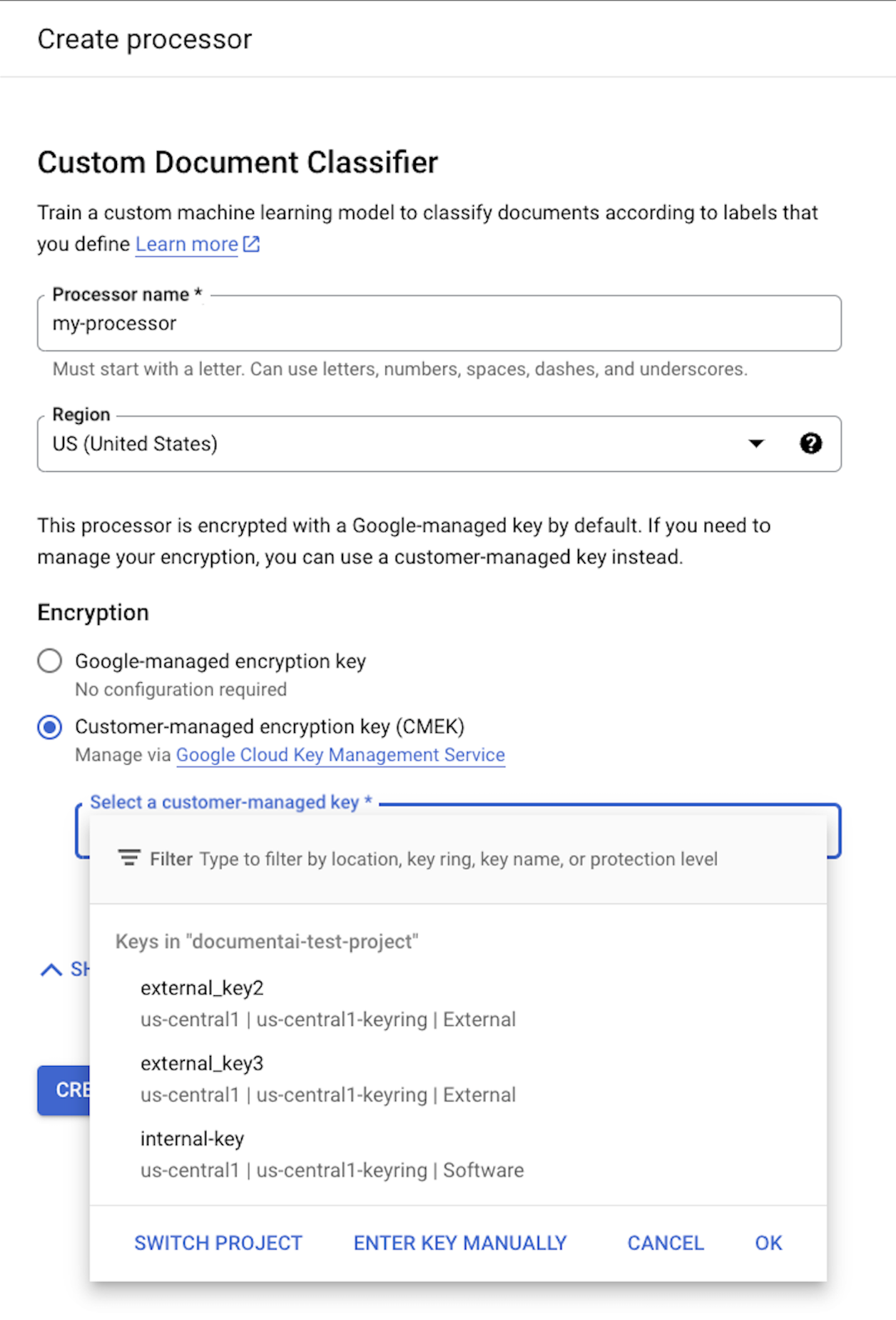
Encryption settings are available when you [create a processor](https://docs.cloud.google.com/document-ai/docs/create-processor).
To use CMEK, select the **CMEK** option and select a key.
> [!NOTE]
> **Note:** The location of your key must match the location of your processor. For example, if your processor is located in `europe-west2`, the corresponding CMEK key must also be located in `europe-west2`. However, for the `us` and `eu` multi-regions, the key must be in `us-central1` and `europe-west4` respectively.
The CMEK key is used for all data associated with the processor and its child
resources. All customer-related data that is sent to the processor is
automatically encrypted with the provided key before writing to disk.
Once a processor has been created, you cannot change its encryption settings. To
use a different key, you must create a new processor.
### External keys
You can use [Cloud External Key Manager](https://docs.cloud.google.com/kms/docs/ekm) (EKM) to create and
manage external keys to encrypt data within Google Cloud.
When you use a Cloud EKM key, Google has no control over the
availability of your externally managed key. If you request access to a
resource encrypted with an externally managed key, and the key is unavailable,
then Document AI will reject the request. There can be a delay of up to
10 minutes before you can access the resource after the key becomes available.
For more considerations when using external keys, see
[EKM considerations](https://docs.cloud.google.com/kms/docs/ekm#considerations).
## CMEK supported resources
When storing any resource to disk, if any customer data is stored as part of the
resource, Document AI first encrypts the contents using the CMEK key.
| Resource | Material Encrypted |
|---|---|
| [`Processor`](https://docs.cloud.google.com/document-ai/docs/reference/rest/v1/projects.locations.processors) | N/A - no user data. However, if you specify a CMEK key during processor creation then it must be valid. |
| [`ProcessorVersion`](https://docs.cloud.google.com/document-ai/docs/reference/rest/v1/projects.locations.processors.processorVersions) | All |
| [`Evaluation`](https://docs.cloud.google.com/document-ai/docs/reference/rest/v1/projects.locations.processors.processorVersions.evaluations) | All |
## CMEK supported APIs
The APIs that use the CMEK key for encryption include the following:
| Method | Encryption |
|---|---|
| [`processDocument`](https://docs.cloud.google.com/document-ai/docs/reference/rest/v1/projects.locations.processors/process) | N/A - no data saved to disk. |
| [`batchProcessDocuments`](https://docs.cloud.google.com/document-ai/docs/reference/rest/v1/projects.locations.processors/batchProcess) | Data is temporarily stored on disk and encrypted using an ephemeral key (see [CMEK compliance](https://docs.cloud.google.com/kms/docs/cmek#cmek_compliance)). |
| [`trainProcessorVersion`](https://docs.cloud.google.com/document-ai/docs/reference/rest/v1/projects.locations.processors.processorVersions/train) | Documents used for training are encrypted using the provided KMS/CMEK key. |
| [`evaluateProcessorVersion`](https://docs.cloud.google.com/document-ai/docs/reference/rest/v1/projects.locations.processors.processorVersions/evaluateProcessorVersion) | Evaluations are encrypted using the provided KMS/CMEK key. |
API requests that access encrypted resources fail if the key is disabled or is unreachable. Examples include the following:
| Method | Decryption |
|---|---|
| [`getProcessorVersion`](https://docs.cloud.google.com/document-ai/docs/reference/rest/v1/projects.locations.processors.processorVersions/get) | Processor versions trained using customer data are encrypted. Access requires decryption. |
| [`processDocument`](https://docs.cloud.google.com/document-ai/docs/reference/rest/v1/projects.locations.processors/process) | Processing documents using an encrypted processor version requires decryption. |
| [`Import Documents`](https://docs.cloud.google.com/document-ai/docs/workbench/create-dataset#import) | Importing documents with [`auto-labeling`](https://docs.cloud.google.com/document-ai/docs/workbench/label-documents#auto-label) enabled using an encrypted processor version requires decryption. |
## CMEK and Cloud Storage
APIs, such as [`batchProcess`](https://docs.cloud.google.com/document-ai/docs/reference/rest/v1/projects.locations.processors/batchProcess),
can read from and write to Cloud Storage buckets.
Any data written to Cloud Storage by Document AI is encrypted using the bucket's configured encryption key, which can be different than your processor's CMEK key.
For more information, see the [CMEK documentation for Cloud Storage](https://docs.cloud.google.com/storage/docs/encryption/customer-managed-keys).