

This document compares core compute options in Google Cloud to help you select the best solution or tool for your application's architecture, scaling, and other requirements.
To deploy workloads on Google Cloud, you can choose from a range of solutions or tools that balance your control over infrastructure with automated management by Google. The compute option you select can significantly impact performance, cost, and daily maintenance effort. To better understand these options before you choose one, see Google compute overview.
Choose a compute option
The best compute solution or tool for your workload might depend on several factors. For example, if you want to migrate your VMware environment to Google Cloud, then use VMware Engine.
To help you navigate trade-offs between infrastructure management, containers, and Compute Engine instances, use the following flowchart. If you want to quickly compare features across compute options, then see the comparison table in this document.
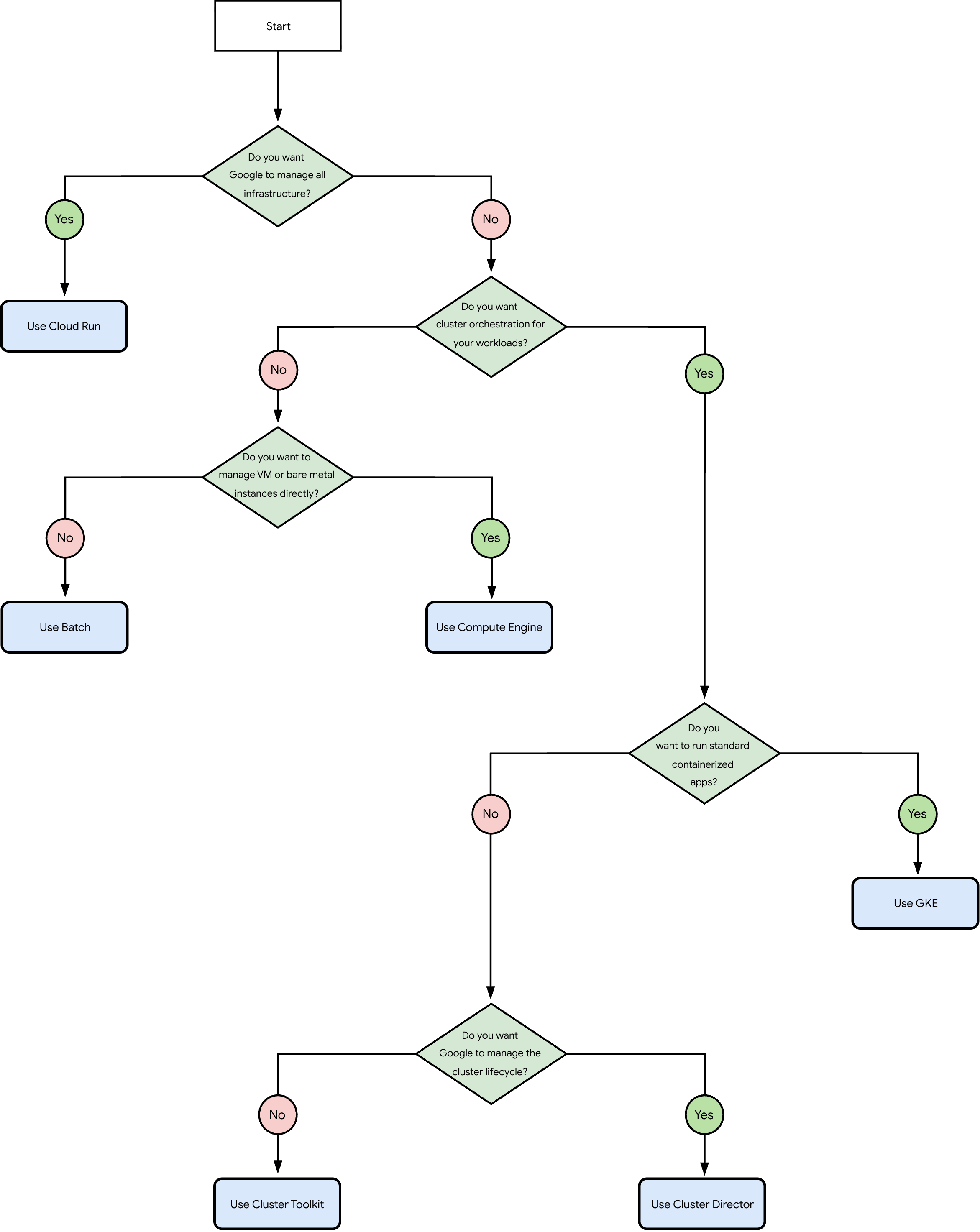
The questions in the preceding flowchart are the following:
Do you want Google to manage all infrastructure?
Yes: use Cloud Run.
No: go to question 2.
Do you want cluster orchestration for your workloads (such as Kubernetes or Slurm)?
Yes: skip to question 4.
No: go to question 3.
Do you want to manage VMs or bare metal instances yourself?
Yes: use Compute Engine.
No: use Batch.
Do you want to run standard containerized applications (such as microservices or APIs)?
Yes: use GKE.
No: go to question 5.
Do you want Google to manage the cluster lifecycle?
Yes: use Cluster Director.
No: use Cluster Toolkit.
Use Batch
Choose Batch for workloads such as asynchronous data analysis, video conversion tasks, or scientific simulations. With Batch, Google manages the infrastructure so that you can schedule, queue, and execute batch compute jobs on Google Cloud. You don't need to deploy or manage servers yourself; instead, you submit executable scripts or containerized workloads to a job queue.
Batch provides the following capabilities:
Accelerator support: Batch supports NVIDIA GPUs up to RTX PRO 6000 for batch and high performance computing (HPC) workloads that require high throughput. Batch doesn't support Google TPUs.
OS and kernel control: Google manages the OS and the execution environment for your jobs.
Orchestration: the job queue schedules tasks and retries them if an error occurs. To scale capacity, the service provisions and starts VMs based on the number of queued jobs, and stops the VMs when those jobs complete.
For more information, see Get started with Batch.
Use Cloud Run
Choose Cloud Run to deploy containerized web applications or jobs without server administration. Cloud Run is a serverless platform that lets you run containerized applications without server or cluster management. Google handles all infrastructure management for you, including the OS, kernel, network setup, and capacity management.
Cloud Run offers the following features:
Accelerator support: Cloud Run supports NVIDIA RTX PRO 6000 Blackwell and L4 GPUs. Cloud Run doesn't support other GPU models or Google TPUs.
OS and kernel control: you package your workloads as containers and run them as web services, asynchronous tasks, or batch jobs.
Orchestration: as a serverless platform, Google starts, runs, and scales your container instances without manual intervention. For web services, Cloud Run adds or removes container instances based on incoming requests or CPU consumption.
For more information, see What is Cloud Run.
Use Cluster Director
Choose Cluster Director if you want to train AI models or execute simulation jobs scheduled by Slurm without network setup or cluster OS configuration tasks. Cluster Director is a managed service that automates deployment and lifecycle management for AI, ML, and HPC clusters.
Cluster Director provides the following capabilities:
Accelerator support: Cluster Director supports NVIDIA GPUs, including GB300 Ultra Superchips, GB200 Superchips, B200, H200, and H100, for AI, ML, and HPC workloads. Cluster Director doesn't support Google TPUs.
OS and kernel control: Google manages the cluster lifecycle and sets up a custom Ubuntu OS designed for ML. The service provides a ready-to-use environment, complete with login nodes, compute nodesets, and deployment templates built for AI workloads.
Orchestration: to scale capacity, Slurm creates nodes when CPU consumption increases, and deletes nodes when they remain idle for a period of time to prevent unnecessary charges.
For more information, see Cluster Director overview.
Use Cluster Toolkit
Choose Cluster Toolkit if you want to use automated deployment templates while maintaining administrative control over your OS and software stack. Cluster Toolkit is an open-source tool used to provision and configure AI, ML, and HPC clusters on Google Cloud.
Cluster Toolkit offers the following features:
Accelerator support: Cluster Toolkit supports NVIDIA GPUs and Google TPUs, which you provision and configure with deployment templates called blueprints. With these automated configuration files, you deploy standardized, repeatable cluster infrastructure based on Infrastructure as Code (IaC) principles.
OS and kernel control: Cluster Toolkit deploys compute instances or GKE resources inside your Google Cloud project. After you deploy these resources, you maintain administrative control over the OS, software settings, and cluster lifecycle.
Orchestration: to scale capacity, you configure managed instance groups (MIGs) or GKE tools to add or remove nodes based on your template settings.
For more information, see Cluster Toolkit overview.
Use Compute Engine
Choose Compute Engine if your applications require custom architectural configurations, specialized kernel settings, or administrative control over virtual servers. Compute Engine is Google Cloud's core Infrastructure as a Service (IaaS) platform, which lets you create and run VM and bare metal instances on Google's physical hardware.
Compute Engine provides the following capabilities:
Accelerator support: Compute Engine supports NVIDIA GPUs and Google TPUs, which you attach to your compute instances.
OS and kernel control: you retain complete control over the OS, kernel settings, and boot files, and you select CPU processors, memory configurations, storage types, and guest OS.
Orchestration: because orchestration is manual, you set up and manage your own compute instances, network rules, traffic routes, and backup systems for reliability. To scale capacity, you add or remove compute instances as needed, use custom tools, or configure MIGs to adjust cluster capacity.
For more information, see Compute Engine overview.
Use GKE
Choose Google Kubernetes Engine (GKE) when you need a robust, container-based orchestration platform for distributed applications or general-purpose microservices. GKE is an industry-standard managed Kubernetes platform to deploy, scale, and orchestrate containerized applications. Google manages the Kubernetes control plane for security and system availability.
GKE offers the following features:
Accelerator support: GKE supports NVIDIA GPUs and Google TPUs for containerized workloads.
OS and kernel control: Google manages the OS in both Autopilot and Standard modes. In Autopilot mode, Google manages cluster nodes and capacity adjustments without manual intervention. In Standard mode, you manage cluster node pools.
Orchestration: to adjust capacity as demand changes, GKE adds or removes containers with Horizontal and Vertical Pod Autoscalers (HPA and VPA), and adds or removes nodes with the cluster autoscaler. GKE also orchestrates batch jobs through Kueue.
For more information, see GKE overview.
Use VMware Engine
Choose VMware Engine to migrate your on-premises VMware workloads to Google Cloud infrastructure with minimal operational changes. VMware Engine is a managed service that lets you run VMware virtual machines on Google hardware without application modifications.
VMware Engine provides the following capabilities:
Accelerator support: VMware Engine doesn't support GPUs or TPUs.
OS and kernel control: you run VMware applications on Google Cloud as they run in your existing setup. Google manages the physical hardware, network infrastructure, and the VMware software platform, such as vSphere, vCenter, vSAN, and NSX-T. You retain administrative control over your VMs, guest OS, and VMware management tools.
Orchestration: to adjust the size of your private cloud, you add or remove dedicated ESXi nodes.
For more information, see Google Cloud VMware Engine overview.
Compare compute options
To identify the compute solution or tool that fits your workload, compare technical capabilities across compute options in the following table:
| Compute option | GPUs | TPUs | OS and kernel control | Orchestration | Scaling |
|---|---|---|---|---|---|
| Batch | Up to NVIDIA RTX PRO 6000 | No | Google managed | Job queue | Automatic based on queued jobs |
| Cloud Run | NVIDIA RTX PRO 6000 Blackwell and L4 | No | Google managed | Serverless | Automatic based on requests or CPU consumption |
| Cluster Director | NVIDIA GB300 Ultra Superchips, GB200 Superchips, B200, H200, and H100 | No | Google managed (custom Ubuntu) | Slurm | Automatic based on CPU consumption |
| Cluster Toolkit | All available NVIDIA GPUs | All available Google TPUs | Self-managed | Automated configuration files (IaC) | Customizable by using MIGs or GKE tools |
| Compute Engine | All available NVIDIA GPUs | All available Google TPUs | Self-managed | Manual | Manual or automatic by using MIGs |
| Google Kubernetes Engine (GKE) | All available NVIDIA GPUs | All available Google TPUs | Google managed (Autopilot) or semi-managed (Standard) | Kubernetes | Automatic pod and node scaling |
| VMware Engine | No | No | Google managed | VMware platform | Manual by using ESXi nodes |
Explore AI Hypercomputer capabilities for AI and ML
AI Hypercomputer is an integrated architecture that combines purpose-built hardware, open software, and flexible consumption models. This architecture is specifically designed to boost your ML productivity and maximize goodput, the rate of useful data transferred, for demanding AI workloads.
AI Hypercomputer provides the following capabilities:
Accelerator support: AI Hypercomputer supports all NVIDIA GPUs and Google TPUs. Accelerators connect over high-bandwidth networking to optimize throughput for AI models across thousands of compute instances.
OS and kernel control: your control over the OS and kernel depends on your chosen deployment tool:
Google-managed environments: if you choose Cluster Director, then Google manages the cluster environment and lifecycle. If you choose GKE in Autopilot mode, then Google manages the container environment.
Self-managed environments: if you choose Cluster Toolkit, Compute Engine, or GKE in Standard mode, then you manage the cluster resources and the OS.
Orchestration: you can use Slurm, GKE, or custom orchestrators to add or remove compute instances, pods, or containers in your cluster when compute demand changes.
For more information, see AI Hypercomputer overview.