


Agen bawaan yang Anda buat di langkah terakhir tidak dapat memberikan data dinamis seperti saldo akun karena semuanya di-hardcode ke dalam agen. Pada langkah tutorial ini, Anda akan membuat webhook yang dapat memberikan data dinamis ke agen. Fungsi Cloud Run digunakan untuk menghosting webhook dalam tutorial ini karena kesederhanaannya, tetapi ada banyak cara lain untuk menghosting layanan webhook. Contoh ini juga menggunakan bahasa pemrograman Go, tetapi Anda dapat menggunakan bahasa apa pun yang didukung oleh fungsi Cloud Run.
Membuat Fungsi
Fungsi Cloud Run dapat dibuat dengan konsol Google Cloud (kunjungi dokumentasi, buka konsol). Untuk membuat fungsi untuk tutorial ini:
Agen Dialogflow dan fungsi Anda harus berada dalam project yang sama. Ini adalah cara termudah bagi Dialogflow untuk memiliki akses aman ke fungsi Anda. Sebelum membuat fungsi, pilih project Anda dari Google Cloud konsol.
Buka halaman ringkasan Cloud Run functions.
Klik Create Function, lalu tetapkan kolom berikut:
- Environment: generasi ke-1
- Nama fungsi: tutorial-banking-webhook
- Region: Jika Anda menentukan region untuk agen, gunakan region yang sama.
- HTTP Trigger type: HTTP
- URL: Klik tombol salin di sini dan simpan nilainya. Anda akan memerlukan URL ini saat mengonfigurasi webhook.
- Autentikasi: Wajibkan autentikasi
- Wajibkan HTTPS: dicentang
Klik Simpan.
Klik Berikutnya (Anda tidak memerlukan runtime, build, koneksi, atau setelan keamanan khusus).
Tetapkan kolom berikut:
- Runtime: Pilih runtime Go terbaru.
- Kode sumber: Editor Inline
- Titik entri: HandleWebhookRequest
Ganti kode dengan kode berikut:
package estwh

import (
	"context"
	"encoding/json"
	"fmt"
	"log"
	"net/http"
	"os"
	"strings"

	"cloud.google.com/go/spanner"
  "google.golang.org/grpc/codes"
)

// client is a Spanner client, created only once to avoid creation
// for every request.
// See: https://cloud.google.com/functions/docs/concepts/go-runtime#one-time_initialization
var client *spanner.Client

func init() {
	// If using a database, these environment variables will be set.
	pid := os.Getenv("PROJECT_ID")
	iid := os.Getenv("SPANNER_INSTANCE_ID")
	did := os.Getenv("SPANNER_DATABASE_ID")
	if pid != "" && iid != "" && did != "" {
		db := fmt.Sprintf("projects/%s/instances/%s/databases/%s",
			pid, iid, did)
		log.Printf("Creating Spanner client for %s", db)
		var err error
		// Use the background context when creating the client,
		// but use the request context for calls to the client.
		// See: https://cloud.google.com/functions/docs/concepts/go-runtime#contextcontext
		client, err = spanner.NewClient(context.Background(), db)
		if err != nil {
			log.Fatalf("spanner.NewClient: %v", err)
		}
	}
}

type queryResult struct {
	Action     string         `json:"action"`
	Parameters map[string]any `json:"parameters"`
}

type text struct {
	Text []string `json:"text"`
}

type message struct {
	Text text `json:"text"`
}

// webhookRequest is used to unmarshal a WebhookRequest JSON object. Note that
// not all members need to be defined--just those that you need to process.
// As an alternative, you could use the types provided by
// the Dialogflow protocol buffers:
// https://godoc.org/google.golang.org/genproto/googleapis/cloud/dialogflow/v2#WebhookRequest
type webhookRequest struct {
	Session     string      `json:"session"`
	ResponseID  string      `json:"responseId"`
	QueryResult queryResult `json:"queryResult"`
}

// webhookResponse is used to marshal a WebhookResponse JSON object. Note that
// not all members need to be defined--just those that you need to process.
// As an alternative, you could use the types provided by
// the Dialogflow protocol buffers:
// https://godoc.org/google.golang.org/genproto/googleapis/cloud/dialogflow/v2#WebhookResponse
type webhookResponse struct {
	FulfillmentMessages []message `json:"fulfillmentMessages"`
}

// accountBalanceCheck handles the similar named action
func accountBalanceCheck(ctx context.Context, request webhookRequest) (
	webhookResponse, error) {
	account := request.QueryResult.Parameters["account"].(string)
	account = strings.ToLower(account)
	var table string
	if account == "savings account" {
		table = "Savings"
	} else {
		table = "Checking"
	}
	s := "Your balance is $0"
	if client != nil {
		// A Spanner client exists, so access the database.
		// See: https://pkg.go.dev/cloud.google.com/go/spanner#ReadOnlyTransaction.ReadRow
		row, err := client.Single().ReadRow(ctx,
			table,
			spanner.Key{1}, // The account ID
			[]string{"Balance"})
		if err != nil {
			if spanner.ErrCode(err) == codes.NotFound {
				log.Printf("Account %d not found", 1)
			} else {
				return webhookResponse{}, err
			}
		} else {
			// A row was returned, so check the value
			var balance int64
			err := row.Column(0, &balance)
			if err != nil {
				return webhookResponse{}, err
			}
			s = fmt.Sprintf("Your balance is $%.2f", float64(balance)/100.0)
		}
	}
	response := webhookResponse{
		FulfillmentMessages: []message{
			{
				Text: text{
					Text: []string{s},
				},
			},
		},
	}
	return response, nil
}

// Define a type for handler functions.
type handlerFn func(ctx context.Context, request webhookRequest) (
	webhookResponse, error)

// Create a map from action to handler function.
var handlers map[string]handlerFn = map[string]handlerFn{
	"account.balance.check": accountBalanceCheck,
}

// handleError handles internal errors.
func handleError(w http.ResponseWriter, err error) {
	log.Printf("ERROR: %v", err)
	http.Error(w,
		fmt.Sprintf("ERROR: %v", err),
		http.StatusInternalServerError)
}

// HandleWebhookRequest handles WebhookRequest and sends the WebhookResponse.
func HandleWebhookRequest(w http.ResponseWriter, r *http.Request) {
	var request webhookRequest
	var response webhookResponse
	var err error

	// Read input JSON
	if err = json.NewDecoder(r.Body).Decode(&request); err != nil {
		handleError(w, err)
		return
	}
	log.Printf("Request: %+v", request)

	// Get the action from the request, and call the corresponding
	// function that handles that action.
	action := request.QueryResult.Action
	if fn, ok := handlers[action]; ok {
		response, err = fn(r.Context(), request)
	} else {
		err = fmt.Errorf("Unknown action: %s", action)
	}
	if err != nil {
		handleError(w, err)
		return
	}
	log.Printf("Response: %+v", response)

	// Send response
	if err = json.NewEncoder(w).Encode(&response); err != nil {
		handleError(w, err)
		return
	}
}
Klik Deploy.
Tunggu hingga indikator status menunjukkan bahwa fungsi telah berhasil di-deploy. Sambil menunggu, periksa kode yang baru saja Anda deploy.
Mengonfigurasi webhook untuk agen
Setelah webhook ada sebagai layanan, Anda perlu mengaitkan webhook ini dengan agen Anda. Hal ini dilakukan melalui fulfillment. Untuk mengaktifkan dan mengelola fulfillment bagi agen Anda:
- Buka konsol Dialogflow ES.
- Pilih agen bawaan yang baru saja Anda buat.
- Pilih Fulfillment di menu sidebar kiri.
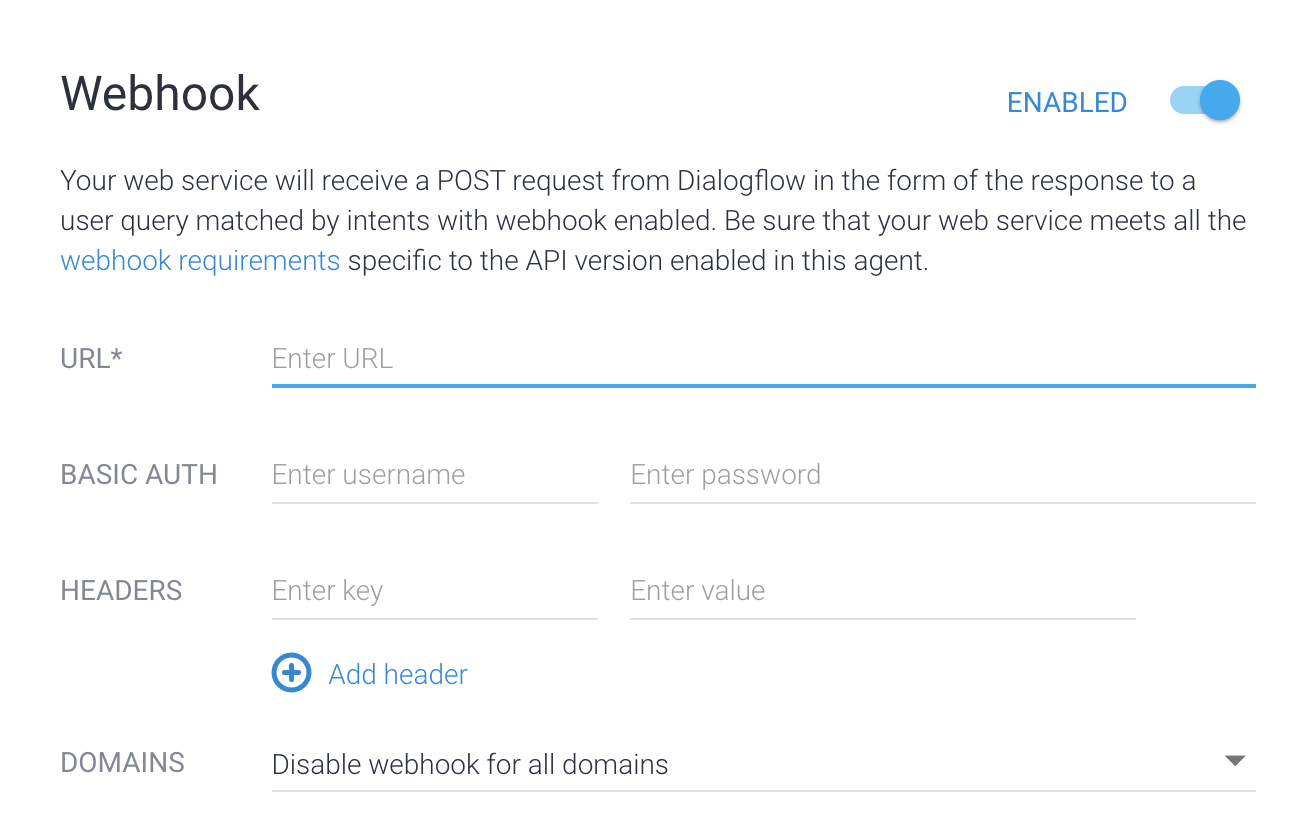
- Alihkan kolom Webhook ke Enabled.
- Berikan URL yang Anda salin dari atas. Biarkan kolom lain kosong.
- Klik Simpan di bagian bawah halaman.
Setelah fulfillment diaktifkan untuk agen, Anda perlu mengaktifkan fulfillment untuk intent:
- Pilih Intent di menu sidebar kiri.
- Pilih intent account.balance.check.
- Scroll ke bawah ke bagian Fulfillment.
- Aktifkan Enable webhook call for this intent.
- Klik Simpan.
Mencoba agen
Agen Anda kini siap untuk dicoba. Klik tombol Test Agent untuk membuka simulator. Coba lakukan percakapan berikut dengan agen:
| Giliran percakapan | Anda | Agen |
|---|---|---|
| 1 | Halo | Halo, terima kasih telah memilih ACME Bank. |
| 2 | Saya ingin mengetahui saldo akun saya | Untuk akun mana Anda ingin mengetahui saldo: tabungan atau giro? |
| 3 | Giro | Berikut saldo terbaru Anda: $0,00 |
Pada giliran percakapan #3, Anda memberikan "giro" sebagai jenis akun. Intent account.balance.check memiliki parameter yang disebut account. Parameter ini ditetapkan ke "checking" (memeriksa) dalam percakapan ini. Intent juga memiliki nilai tindakan "account.balance.check". Layanan webhook dipanggil, dan parameter serta nilai tindakan diteruskan.
Jika memeriksa kode webhook di atas, Anda akan melihat bahwa tindakan ini memicu fungsi bernama serupa untuk dipanggil. Fungsi ini menentukan saldo akun. Fungsi ini memeriksa apakah variabel lingkungan tertentu ditetapkan dengan informasi untuk terhubung ke database. Jika variabel lingkungan ini tidak ditetapkan, fungsi akan menggunakan saldo akun yang di-hardcode. Pada langkah berikutnya, Anda akan mengubah lingkungan untuk fungsi tersebut agar mengambil data dari database.
Pemecahan masalah
Kode webhook menyertakan pernyataan logging. Jika Anda mengalami masalah, coba lihat log untuk fungsi Anda.
Informasi selengkapnya
Untuk informasi selengkapnya tentang langkah-langkah di atas, lihat: