


L'agente predefinito che hai creato nell'ultimo passaggio non può fornire dati dinamici come i saldi degli account, perché tutto è hardcoded nell'agente. In questo passaggio del tutorial, creerai un webhook in grado di fornire dati dinamici all'agente. Le funzioni Cloud Run vengono utilizzate per ospitare l'webhook in questo tutorial per la loro semplicità, ma esistono molti altri modi per ospitare un servizio webhook. L'esempio utilizza anche il linguaggio di programmazione Go, ma puoi utilizzare qualsiasi linguaggio supportato da Cloud Run Functions.
Crea la funzione
Le funzioni Cloud Run possono essere create con la console Google Cloud (visita la documentazione, apri la console). Per creare una funzione per questo tutorial:
È importante che l'agente Dialogflow e la funzione si trovino entrambi nello stesso progetto. Questo è il modo più semplice per Dialogflow di avere accesso sicuro alla tua funzione. Prima di creare la funzione, seleziona il progetto dalla Google Cloud console.
Apri la pagina Panoramica di Cloud Run Functions.
Fai clic su Crea funzione e imposta i seguenti campi:
- Ambiente: 1ª generazione.
- Nome della funzione: tutorial-banking-webhook
- Regione: se hai specificato una regione per l'agente, utilizza la stessa regione.
- Tipo di trigger HTTP: HTTP
- URL: fai clic sul pulsante di copia qui e salva il valore. Ti servirà questo URL durante la configurazione dell'webhook.
- Autenticazione: Richiedi autenticazione
- Richiedi HTTPS: selezionato
Fai clic su Salva.
Fai clic su Avanti (non sono necessarie impostazioni di runtime, build, connessioni o sicurezza speciali).
Imposta i seguenti campi:
- Runtime: seleziona il runtime Go più recente.
- Codice sorgente: editor incorporato
- Punto di contatto: HandleWebhookRequest
Sostituisci il codice con quanto segue:
package estwh

import (
	"context"
	"encoding/json"
	"fmt"
	"log"
	"net/http"
	"os"
	"strings"

	"cloud.google.com/go/spanner"
  "google.golang.org/grpc/codes"
)

// client is a Spanner client, created only once to avoid creation
// for every request.
// See: https://cloud.google.com/functions/docs/concepts/go-runtime#one-time_initialization
var client *spanner.Client

func init() {
	// If using a database, these environment variables will be set.
	pid := os.Getenv("PROJECT_ID")
	iid := os.Getenv("SPANNER_INSTANCE_ID")
	did := os.Getenv("SPANNER_DATABASE_ID")
	if pid != "" && iid != "" && did != "" {
		db := fmt.Sprintf("projects/%s/instances/%s/databases/%s",
			pid, iid, did)
		log.Printf("Creating Spanner client for %s", db)
		var err error
		// Use the background context when creating the client,
		// but use the request context for calls to the client.
		// See: https://cloud.google.com/functions/docs/concepts/go-runtime#contextcontext
		client, err = spanner.NewClient(context.Background(), db)
		if err != nil {
			log.Fatalf("spanner.NewClient: %v", err)
		}
	}
}

type queryResult struct {
	Action     string         `json:"action"`
	Parameters map[string]any `json:"parameters"`
}

type text struct {
	Text []string `json:"text"`
}

type message struct {
	Text text `json:"text"`
}

// webhookRequest is used to unmarshal a WebhookRequest JSON object. Note that
// not all members need to be defined--just those that you need to process.
// As an alternative, you could use the types provided by
// the Dialogflow protocol buffers:
// https://godoc.org/google.golang.org/genproto/googleapis/cloud/dialogflow/v2#WebhookRequest
type webhookRequest struct {
	Session     string      `json:"session"`
	ResponseID  string      `json:"responseId"`
	QueryResult queryResult `json:"queryResult"`
}

// webhookResponse is used to marshal a WebhookResponse JSON object. Note that
// not all members need to be defined--just those that you need to process.
// As an alternative, you could use the types provided by
// the Dialogflow protocol buffers:
// https://godoc.org/google.golang.org/genproto/googleapis/cloud/dialogflow/v2#WebhookResponse
type webhookResponse struct {
	FulfillmentMessages []message `json:"fulfillmentMessages"`
}

// accountBalanceCheck handles the similar named action
func accountBalanceCheck(ctx context.Context, request webhookRequest) (
	webhookResponse, error) {
	account := request.QueryResult.Parameters["account"].(string)
	account = strings.ToLower(account)
	var table string
	if account == "savings account" {
		table = "Savings"
	} else {
		table = "Checking"
	}
	s := "Your balance is $0"
	if client != nil {
		// A Spanner client exists, so access the database.
		// See: https://pkg.go.dev/cloud.google.com/go/spanner#ReadOnlyTransaction.ReadRow
		row, err := client.Single().ReadRow(ctx,
			table,
			spanner.Key{1}, // The account ID
			[]string{"Balance"})
		if err != nil {
			if spanner.ErrCode(err) == codes.NotFound {
				log.Printf("Account %d not found", 1)
			} else {
				return webhookResponse{}, err
			}
		} else {
			// A row was returned, so check the value
			var balance int64
			err := row.Column(0, &balance)
			if err != nil {
				return webhookResponse{}, err
			}
			s = fmt.Sprintf("Your balance is $%.2f", float64(balance)/100.0)
		}
	}
	response := webhookResponse{
		FulfillmentMessages: []message{
			{
				Text: text{
					Text: []string{s},
				},
			},
		},
	}
	return response, nil
}

// Define a type for handler functions.
type handlerFn func(ctx context.Context, request webhookRequest) (
	webhookResponse, error)

// Create a map from action to handler function.
var handlers map[string]handlerFn = map[string]handlerFn{
	"account.balance.check": accountBalanceCheck,
}

// handleError handles internal errors.
func handleError(w http.ResponseWriter, err error) {
	log.Printf("ERROR: %v", err)
	http.Error(w,
		fmt.Sprintf("ERROR: %v", err),
		http.StatusInternalServerError)
}

// HandleWebhookRequest handles WebhookRequest and sends the WebhookResponse.
func HandleWebhookRequest(w http.ResponseWriter, r *http.Request) {
	var request webhookRequest
	var response webhookResponse
	var err error

	// Read input JSON
	if err = json.NewDecoder(r.Body).Decode(&request); err != nil {
		handleError(w, err)
		return
	}
	log.Printf("Request: %+v", request)

	// Get the action from the request, and call the corresponding
	// function that handles that action.
	action := request.QueryResult.Action
	if fn, ok := handlers[action]; ok {
		response, err = fn(r.Context(), request)
	} else {
		err = fmt.Errorf("Unknown action: %s", action)
	}
	if err != nil {
		handleError(w, err)
		return
	}
	log.Printf("Response: %+v", response)

	// Send response
	if err = json.NewEncoder(w).Encode(&response); err != nil {
		handleError(w, err)
		return
	}
}
Fai clic su Esegui il deployment.
Attendi che l'indicatore di stato mostri che la funzione è stata dispiegamento correttamente. Mentre aspetti, esamina il codice che hai appena disegnato.
Configura il webhook per l'agente
Ora che il webhook esiste come servizio, devi associarlo al tuo agente. Questo avviene tramite l'evasione degli ordini. Per attivare e gestire l'evasione degli ordini per il tuo agente:
- Vai alla console Dialogflow ES.
- Seleziona l'agente predefinito appena creato.
- Seleziona Fulfillment nel menu della barra laterale a sinistra.
- Imposta il campo Webhook su Abilitato.
- Fornisci l'URL che hai copiato sopra. Lascia vuoti tutti gli altri campi.
- Fai clic su Salva nella parte inferiore della pagina.
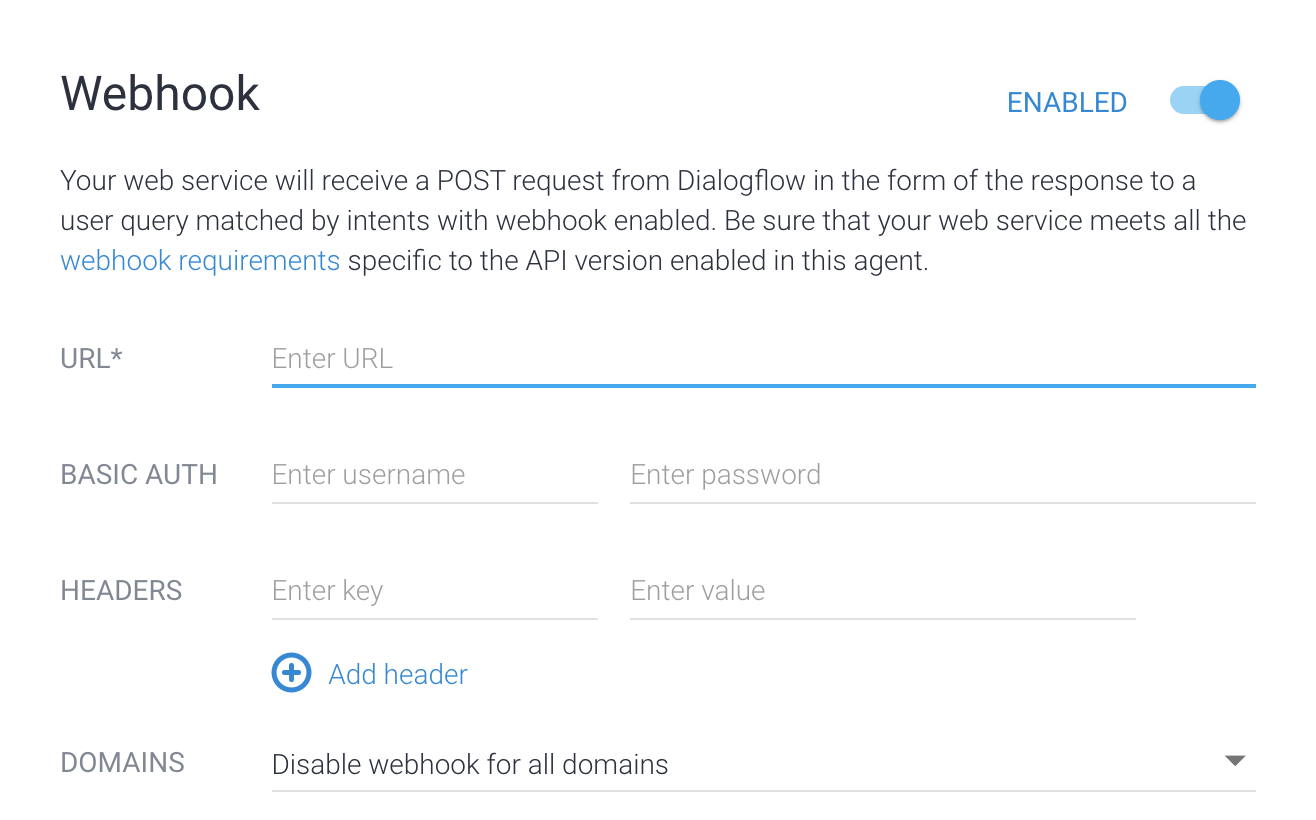
Ora che l'agente è attivo, devi attivare il completamento per un'intenzione:
- Seleziona Intent nel menu della barra laterale a sinistra.
- Seleziona l'intent account.balance.check.
- Scorri verso il basso fino alla sezione Evasione degli ordini.
- Attiva l'opzione Abilita chiamata webhook per questo intent.
- Fai clic su Salva.
Prova l'agente
L'agente è ora pronto per essere provato. Fai clic sul pulsante Test agente per aprire il simulatore. Prova a tenere la seguente conversazione con l'agente:
| Turno di conversazione | Tu | Agente |
|---|---|---|
| 1 | Ciao | Ciao, grazie per aver scelto la Banca ACME. |
| 2 | Voglio conoscere il saldo del mio conto | Per quale conto vuoi il saldo: di risparmio o corrente? |
| 3 | Controllo in corso… | Ecco il tuo saldo più recente: 0,00 $ |
Al terzo turno di conversazione, hai fornito "associato a un conto corrente" come tipo di conto. L'intent account.balance.check ha un parametro chiamato account. Questo parametro è impostato su "checking" in questa conversazione. L'intent ha anche un valore di azione "account.balance.check". Viene chiamato il servizio webhook, a cui vengono passati i valori del parametro e dell'azione.
Se esamini il codice webhook riportato sopra, noti che questa azione attiva una chiamata a una funzione con nome simile. La funzione determina il saldo dell'account. La funzione controlla se sono impostate variabili di ambiente specifiche con informazioni per la connessione al database. Se queste variabili di ambiente non sono impostate, la funzione utilizza un saldo dell'account hardcoded. Nei passaggi successivi, modificherai l'ambiente per la funzione in modo che recuperi i dati da un database.
Risoluzione dei problemi
Il codice webhook include istruzioni di logging. Se riscontri problemi, prova a visualizzare i log della funzione.
Ulteriori informazioni
Per ulteriori informazioni sui passaggi precedenti, consulta: